
IT Glue MCP Server
README.md
# IT Glue MCP Server
A [Model Context Protocol](https://modelcontextprotocol.io/) server that lets AI agents on the
MSPbots Agent Platform read and update IT Glue documentation: organizations, configurations,
locations, passwords, documents, flexible assets, attachments and user activity metrics.
It runs as a stateless HTTP service behind the MSPbots MCP gateway. The gateway sends each
tenant's IT Glue credentials as request headers on every call; the server keeps nothing between
requests.
<div align="center">
## MSPbots Connector
**The MCP Gateway built for MSPs: visible, controlled, and your data stays where it belongs.**
[**Get started at connect.mspbots.ai →**](https://connect.mspbots.ai)
</div>
---
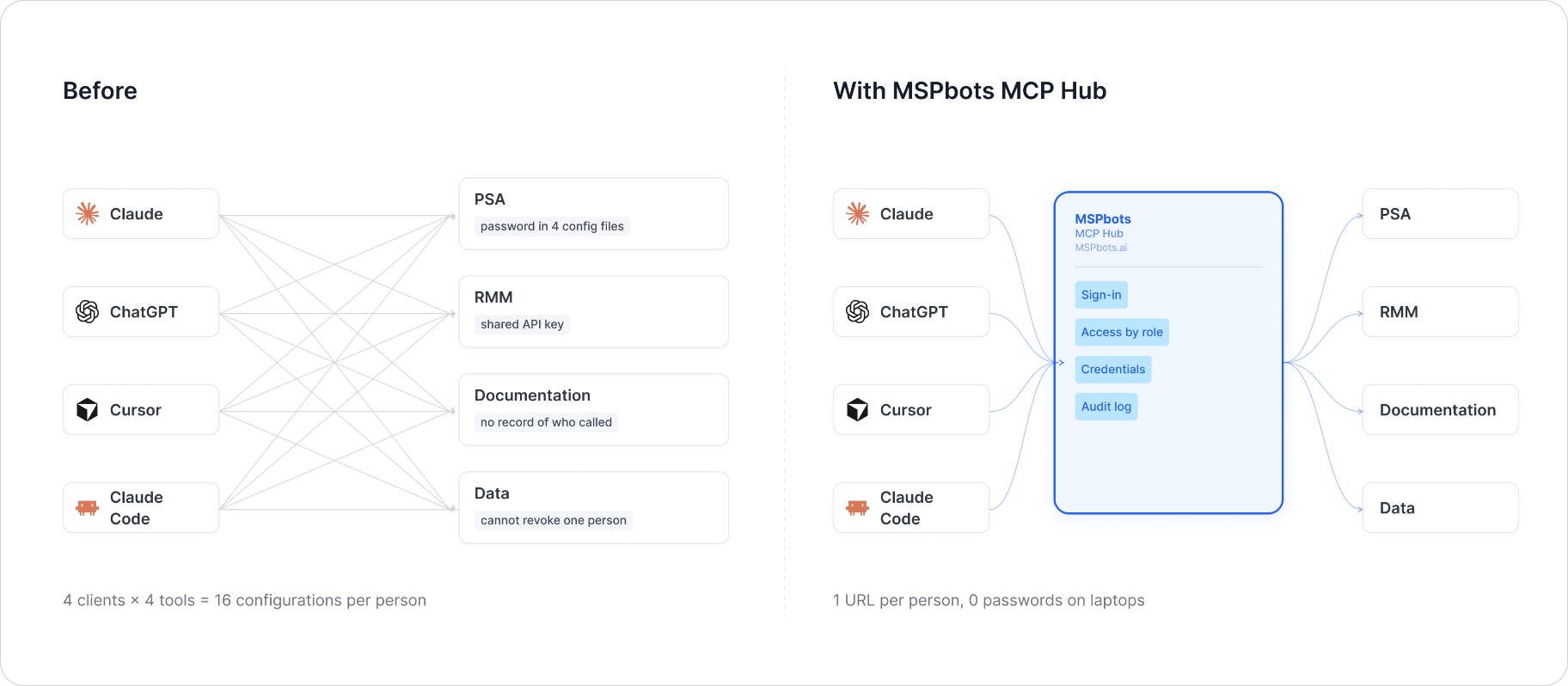
MSPbots Connector gives your AI clients one MCP URL to reach your entire MSP stack (RMM, PSA, documentation, security, finance), and gives you control over who can call which tool and a record of everything that was called.
**Hosted service: [connect.mspbots.ai](https://connect.mspbots.ai)** · Free to use.
### Why Connector
| | |
|---|---|
| **Visible** | Every tool call is logged: who, which vendor, when. Usage dashboard, CSV export, SIEM streaming. |
| **Controlled** | Role-based, per-tool allowlist. Deny by default. |
| **Protected** | Credentials encrypted per record. AI clients never see your vendor passwords or tokens. |
| **MSP-native** | Built for the MSP stack only: RMM, PSA, documentation, security, finance. |
### Quick start
1. **Sign up** at [connect.mspbots.ai](https://connect.mspbots.ai).
2. **Connect your vendors.** Pick from 150+ connectors and authorize each one on the vendor's own page, or bring your own API keys. No extra vendor accounts needed.
3. **Set access.** Create roles and decide which tools each role may call. Nothing is allowed until you allow it.
4. **Add your MCP URL to your AI client.** Copy the URL from your Connector dashboard into Claude, ChatGPT, Cursor, VS Code, Gemini, Codex, or any MCP-capable client.
5. **Ask your AI to do real work**, and watch every call appear in the audit log.
### Features
**Unified gateway**
- One MCP URL for all your AI clients
- 150+ connectors across the MSP stack
- Custom MCP servers supported, free
- Authorization happens on each vendor's own page; the AI never sees passwords or tokens
- Bring your own credentials: use the vendor API keys you already have
- Multiple accounts per app; connect once, reuse across AI clients
- Tool search: finds the right action for the task
- One sign-in; vendor credentials are injected behind the scenes and OAuth tokens refresh automatically
**Visibility**
- Audit log for every tool call (who, which vendor, when)
- Usage dashboard: call volume, top vendors, error rate, per-user activity
- Export audit logs to CSV, or stream to Loki, Graylog, or LogScale (SIEM)
- Optional recording of tool arguments and result summaries (off by default, enabled per organization)
**Control**
- Per-role, per-tool allowlist, deny by default
- owner / admin / member roles
- SCIM provisioning with Entra ID, Okta, JumpCloud, and Google Workspace
**Security**
- Credentials encrypted one record at a time (AES-256-GCM, per-record key)
- AI clients authenticate with OAuth 2.1 + PKCE
- Vendor responses are scanned for prompt-injection patterns and returned as structured data. This is one layer of defense, not a guarantee against every attack.
- Static egress IP for customer firewall and API allowlisting
### Pricing
**Free.**
Links: [connect.mspbots.ai](https://connect.mspbots.ai) · [mspbots.ai](https://mspbots.ai)
---
## Credentials (request headers)
| Header | Required | Meaning |
|---|---|---|
| `X-ITGlue-API-Key` | Yes | IT Glue API key. Create it in IT Glue under **Account > Settings > API Keys** (Administrator role required). Enable password access on the key if agents should read or write passwords. |
| `X-ITGlue-Region` | No | Data center: `us` (default), `eu` or `au`. |
| `X-ITGlue-Base-URL` | No | Custom API endpoint. Must be `https://` on an `*.itglue.com` host. Takes precedence over the region. |
Header names are case-insensitive. A request to `/mcp` without an API key gets `401` with the list
of expected headers; an invalid region or base URL gets `400`.
Note: IT Glue revokes API keys that have not been used for 90 days.
## Tools
| Area | Tools |
|---|---|
| Organizations | `search_organizations`, `get_organization` |
| Configurations | `search_configurations`, `get_configuration`, `archive_configuration`, `unarchive_configuration` |
| Locations | `search_locations`, `get_location`, `create_location`, `update_location` |
| Passwords | `search_passwords`, `get_password`, `create_password`, `update_password` |
| Documents | `search_documents`, `get_document`, `list_document_folders`, `create_document`, `update_document`, `delete_document`, `publish_document`, `archive_document`, `unarchive_document` |
| Document sections | `list_document_sections`, `create_document_section`, `update_document_section`, `delete_document_section` |
| Attachments | `create_attachment`, `list_attachments`, `delete_attachment` |
| Flexible assets | `list_flexible_asset_types`, `search_flexible_assets`, `get_flexible_asset`, `get_flexible_asset_type`, `create_flexible_asset`, `itglue_create_flexible_asset_type`, `update_flexible_asset` |
| Activity | `search_user_metrics` |
| Users | `itglue_list_account_users` |
| Diagnostics | `itglue_health_check` |
Tool names and parameters match the previous IT Glue connector on the MSPbots Agent Platform, so
existing agents keep working. This is why the server has more than 20 tools and why most names
have no `itglue_` prefix.
Behaviour notes:
- Every tool returns a JSON string. Errors use one envelope:
`{"error": {"code": "...", "message": "...", "retryable": false}}` with `code` one of
`not_configured`, `unauthorized`, `not_found`, `invalid_argument`, `rate_limited`, `upstream_error`.
- List tools return `{"items", "count", "page_number", "page_size", "has_more", "total_count",
"offset", "next_offset"}`. `page_size` defaults to 50 and is capped at 200. To read the next page,
pass `next_offset` as `offset`: results larger than 20,000 characters are cut (`truncated`), and
`next_offset` then starts right after the last record returned, so nothing is skipped.
- `get_document` and `list_document_sections` page a document's sections with `offset` / `limit`.
A section whose `content_length` is larger than its content was shortened; read it in parts with
`list_document_sections(section_id, content_offset)` until `has_more` is false.
- `search_passwords` never returns secrets. `create_password` and `update_password` do not echo them.
- Rotating a password: `search_passwords` (organization, name and/or username) to find the entry ID,
then `update_password(id, password, notes?)`. `organization_id` is optional on `update_password`.
Only the fields passed are sent to IT Glue; nothing else is changed or cleared.
- `password` parameters are marked secret in the tool schema (`format: password`, `writeOnly`); the
server never logs them and masks them in error messages.
- `create_flexible_asset` also accepts optional `archived` and `restricted` flags, sent to IT Glue
only when passed (same "only send what was set" behaviour `update_flexible_asset` already has for
`archived`).
- IT Glue has no server-side name filter for documents or folders and no username filter for
passwords; those filters are applied to the returned page.
- `itglue_list_account_users`'s `filter[name]` is an exact match on IT Glue's side, unlike the
fuzzy-feeling name filters on other search tools in this connector.
- Section edits are only visible after `publish_document`.
- Transient failures (429, 5xx, timeouts) are retried with backoff, honouring `Retry-After`.
- `itglue_create_flexible_asset_type`'s `fields[*].kind` is not validated locally; IT Glue rejects
an invalid value with `invalid_argument`. A field's `default_value` is masked from error
messages, same as a trait value.
## Run locally
```bash
uv sync
uv run itglue-mcp # listens on 0.0.0.0:8080
curl -s http://127.0.0.1:8080/health
curl -s http://127.0.0.1:8080/mcp \
-H 'Content-Type: application/json' -H 'Accept: application/json, text/event-stream' \
-H "X-ITGlue-API-Key: $ITGLUE_API_KEY" \
-d '{"jsonrpc":"2.0","id":1,"method":"tools/list"}'
```
Environment variables (all optional): `MCP_HTTP_HOST` (default `0.0.0.0`), `MCP_HTTP_PORT`
(default `8080`), `MCP_TRANSPORT` (`http` or `stdio`). Unknown variables are ignored. Credentials
are never read from the environment.
## Docker
```bash
docker build -t itglue-mcp .
docker run --rm -p 8080:8080 itglue-mcp
```
## Development
```bash
uv sync
uv run pytest -q
uv run ruff check .
```
Code is in `src/itglue_mcp/` (one module per area under `tools/`), tests in `tests/`.
The implementation follows the public IT Glue API documentation at https://api.itglue.com/developer/.
## License
Copyright 2026 MSPbots.ai. Licensed under the Apache License, Version 2.0. See [LICENSE](LICENSE)
and [NOTICE](NOTICE).
IT Glue is a trademark of its owner. This project is not affiliated with or endorsed by IT Glue.
This server cannot be deployed
Maintenance
ActivityMaintained
ResponsivenessSyncing