
duo-mcp
README.md
# duo-mcp
MCP server for the **Cisco Duo Admin API** — Duo's multi-factor authentication
and zero-trust access platform. Built to cover MFA synchronization, user
pre-enrollment, and enrollment validation (the capabilities this task
specifically requested), and — per an explicit follow-up scope decision — the
**full Admin API** beyond that.
<div align="center">
## MSPbots Connector
**The MCP Gateway built for MSPs: visible, controlled, and your data stays where it belongs.**
[**Get started at connect.mspbots.ai →**](https://connect.mspbots.ai)
</div>
---
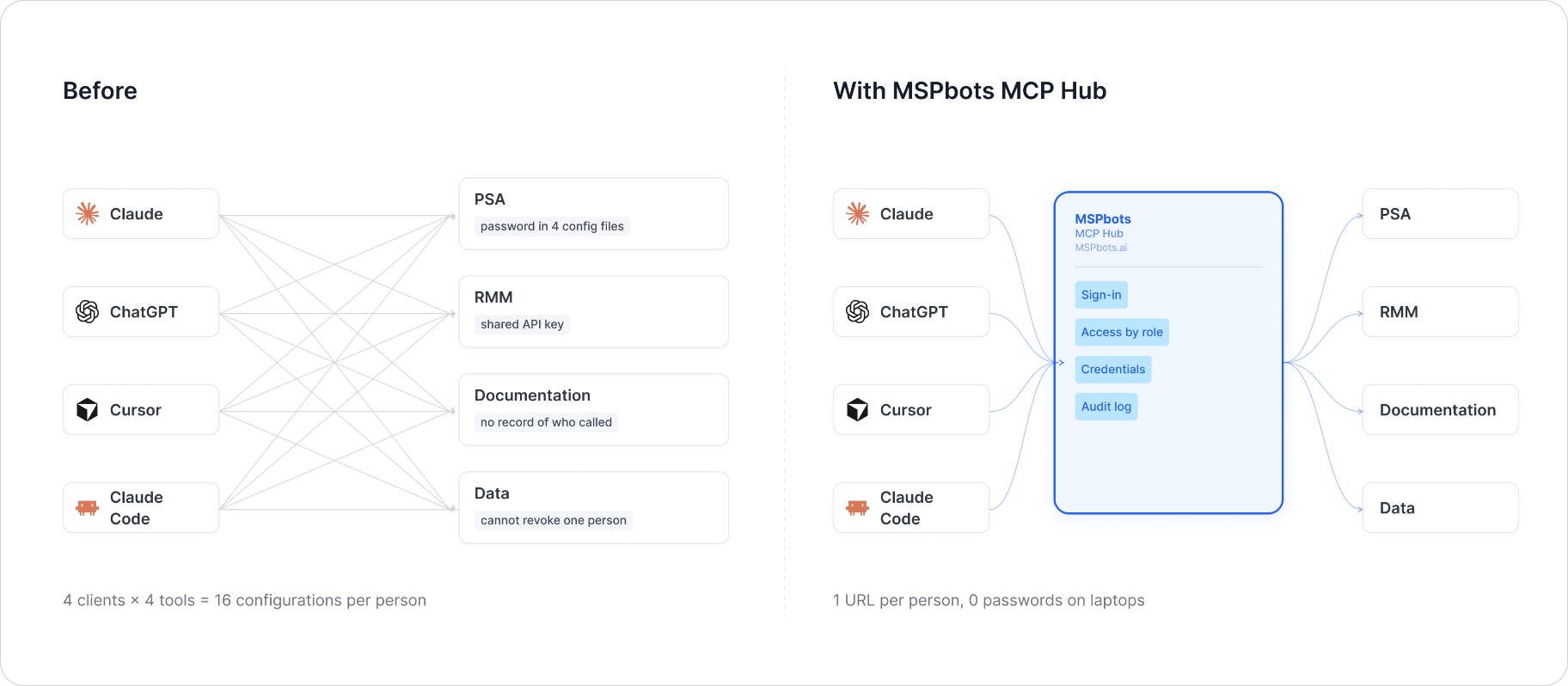
MSPbots Connector gives your AI clients one MCP URL to reach your entire MSP stack (RMM, PSA, documentation, security, finance), and gives you control over who can call which tool and a record of everything that was called.
**Hosted service: [connect.mspbots.ai](https://connect.mspbots.ai)** · Free to use.
### Why Connector
| | |
|---|---|
| **Visible** | Every tool call is logged: who, which vendor, when. Usage dashboard, CSV export, SIEM streaming. |
| **Controlled** | Role-based, per-tool allowlist. Deny by default. |
| **Protected** | Credentials encrypted per record. AI clients never see your vendor passwords or tokens. |
| **MSP-native** | Built for the MSP stack only: RMM, PSA, documentation, security, finance. |
### Quick start
1. **Sign up** at [connect.mspbots.ai](https://connect.mspbots.ai).
2. **Connect your vendors.** Pick from 150+ connectors and authorize each one on the vendor's own page, or bring your own API keys. No extra vendor accounts needed.
3. **Set access.** Create roles and decide which tools each role may call. Nothing is allowed until you allow it.
4. **Add your MCP URL to your AI client.** Copy the URL from your Connector dashboard into Claude, ChatGPT, Cursor, VS Code, Gemini, Codex, or any MCP-capable client.
5. **Ask your AI to do real work**, and watch every call appear in the audit log.
### Features
**Unified gateway**
- One MCP URL for all your AI clients
- 150+ connectors across the MSP stack
- Custom MCP servers supported, free
- Authorization happens on each vendor's own page; the AI never sees passwords or tokens
- Bring your own credentials: use the vendor API keys you already have
- Multiple accounts per app; connect once, reuse across AI clients
- Tool search: finds the right action for the task
- One sign-in; vendor credentials are injected behind the scenes and OAuth tokens refresh automatically
**Visibility**
- Audit log for every tool call (who, which vendor, when)
- Usage dashboard: call volume, top vendors, error rate, per-user activity
- Export audit logs to CSV, or stream to Loki, Graylog, or LogScale (SIEM)
- Optional recording of tool arguments and result summaries (off by default, enabled per organization)
**Control**
- Per-role, per-tool allowlist, deny by default
- owner / admin / member roles
- SCIM provisioning with Entra ID, Okta, JumpCloud, and Google Workspace
**Security**
- Credentials encrypted one record at a time (AES-256-GCM, per-record key)
- AI clients authenticate with OAuth 2.1 + PKCE
- Vendor responses are scanned for prompt-injection patterns and returned as structured data. This is one layer of defense, not a guarantee against every attack.
- Static egress IP for customer firewall and API allowlisting
### Pricing
**Free.**
Links: [connect.mspbots.ai](https://connect.mspbots.ai) · [mspbots.ai](https://mspbots.ai)
---
## Overview
- Stateless HTTP service. No credentials are ever persisted — each request
supplies its own integration key/secret key/API host via headers, used only
for the lifetime of that single request.
- Supports concurrent requests; per-request credential isolation is done via
Python `contextvars`, not a global/shared client instance.
- Entry points: `POST /mcp` (MCP protocol) and `GET /health` (health check).
- Default port: `8080` (configurable via `MCP_HTTP_PORT`).
## Scope
**28 tools**, trimmed down from an original 160-tool full-Admin-API build
(2026-08-04). Duo has **no existing MSPbots integration to anchor scope
against** — it was never previously configured in MSPbots' platform — so
unlike other trimmed vendors in this program, "actual usage" was taken from
the original ClickUp task's own stated requirement instead of a live API
config: **MFA synchronization, user pre-enrollment, and enrollment
validation**. Those 3 capabilities map to the `users` category almost
entirely, plus the resource types a user's MFA methods reference. A fourth
capability, **admin activity**, was added later by PRD-21225 (the 2026-08-04
trim's removal of the `Logs` category had left it uncovered):
- **MFA synchronization**: `duo_users_retrieve_users`,
`duo_users_retrieve_user_by_id`, `duo_users_synchronize_user_from_directory`,
plus per-user MFA-method listing (`retrieve_phones_by_user_id`,
`retrieve_hardware_tokens_by_user_id`,
`retrieve_web_authn_credentials_by_user_id`, `retrieve_groups_by_user_id`)
- **User pre-enrollment**: `duo_users_create_user`, `duo_users_enroll_user`,
`duo_users_associate_phone_with_user` (+ `disassociate`),
`duo_users_associate_hardware_token_with_user`,
`duo_users_associate_group_with_user`, plus phone provisioning
(`duo_phones_create_phone`, `duo_phones_create_activation_code_via_sms`)
- **Enrollment validation**: `duo_users_send_verification_push` +
`duo_users_retrieve_verification_push_response`
- **Admin activity** (PRD-21225): `duo_logs_administrator_logs` — the one log
variant purpose-built for "who did what administrative action, and when";
re-added from the pre-trim `Logs` category, not a new design
Plus core CRUD/list for the referenced resource types themselves —
`duo_users_modify_user`, `duo_users_delete_user`,
`duo_users_create_bypass_codes_for_user`, `duo_phones_retrieve_phones`,
`duo_phones_retrieve_phone_by_id`, `duo_tokens_retrieve_hardware_tokens`,
`duo_tokens_retrieve_hardware_token_by_id`,
`duo_webauthn_credentials_retrieve_web_authn_credentials` (+ `_by_key`),
`duo_groups_retrieve_groups`, `duo_groups_get_group_info`.
Everything else from the original 160-tool build — `Desktop
Authenticators`, `Bypass Codes` (standalone category; the per-user variant
under `users` was kept), `Integrations`, `Policies`, `Endpoints`,
`Registered Devices`, `Passport`, `Administrators`, `Administrative Units`,
`Logs` (partial — see below), `Trust Monitor`, `Settings`, `Custom
Branding`, `Account Info`, `Bulk Operations` (15 categories, ~132 tools) —
was removed as unrelated to the original task's 3 stated capabilities.
`Logs` is the one exception: PRD-21225 re-added a single tool from it
(`duo_logs_administrator_logs`) once "admin activity" was named as this
project's fourth capability; the other 5 log variants (`activity` v2,
`authentication` v1/v2, `offline_enrollment`, `telephony` v1/v2) remain out
of scope — see Known Gaps.
**No official Duo MCP exists** — searched GitHub (`duo-mcp`, `"duosecurity"
mcp`) and both `wyre-technology`/`MSPbotsAI` orgs before building; the only
existing "Duo + MCP" material is [Duo SSO for MCP](https://duo.com/docs/sso-oauth-server-mcp),
which is the reverse relationship (Duo as an identity provider *protecting*
MCP servers), not a Duo Admin API MCP server.
Source data for the kept tools was originally extracted from Duo's own
official Postman collection
(`https://github.com/duosecurity/duo_postman_collection`, `duo-admin-api`
folder), cross-referenced against the live `duo.com/docs/adminapi`
documentation. If a removed category is needed later, that same source can
be re-parsed the same way.
## Authentication
Duo Admin API auth is **not** a simple bearer token — every request is
individually signed with **HMAC-SHA512** (Duo's "sig_version 5") using an
Integration Key (`ikey`) and Secret Key (`skey`). This server implements
that signing logic itself (ported line-for-line from Duo's own
[reference Python client](https://github.com/duosecurity/duo_client_python)
and **verified byte-for-byte identical** against that reference
implementation for both GET-style query-signed requests and POST-style
JSON-body-signed requests, including special-character percent-encoding) —
callers only need to supply the raw ikey/skey/host per request; this server
computes the canonical string, HMAC, and `Authorization: Basic` header on
every call.
Per Duo's own signing convention: `GET`/`DELETE` requests sign and send
params as a url-encoded query string; `POST`/`PUT`/`PATCH` requests sign and
send params as a single JSON object request body. Tools in this server don't
need to know which — the client picks the correct transport based on the
HTTP method automatically, exactly matching the reference implementation's
behavior.
### HEADER authentication parameters
| Header | Type | Required | Default | Allowed values | Description | Example |
|---|---|---|---|---|---|---|
| `X-Duo-Ikey` | string | Yes | None | None | Integration Key of the Duo Admin API integration (used as the Basic Auth username part of the HMAC signature) | `X-Duo-Ikey: DIABCDEFGHIJ1234567K` |
| `X-Duo-Skey` | string | Yes | None | None | Secret Key of the Duo Admin API integration (HMAC-SHA512 signing key, used only to compute the signature for the current request, never stored on disk) | `X-Duo-Skey: 1a2b3c4d5e6f7a8b9c0d1e2f3a4b5c6d7e8f9a0b` |
| `X-Duo-Api-Host` | string | Yes | None | None | The Admin API host of this Duo account (each account has its own subdomain, such as `api-xxxxxxxx.duosecurity.com`); no protocol prefix needed | `X-Duo-Api-Host: api-12345678.duosecurity.com` |
Missing any header returns `401`:
```json
{
"error": "Missing credentials",
"message": "This server requires the X-Duo-Ikey, X-Duo-Skey, and X-Duo-Api-Host headers",
"required_headers": ["X-Duo-Ikey", "X-Duo-Skey", "X-Duo-Api-Host"],
"optional_headers": []
}
```
## Environment Variables
| Variable | Type | Required | Default | Description |
|---|---|---|---|---|
| `MCP_HTTP_PORT` | int | No | `8080` | HTTP listen port |
| `MCP_HTTP_HOST` | string | No | `0.0.0.0` | HTTP listen address |
## MCP Endpoint
- `POST /mcp` — MCP protocol (streamable HTTP transport)
- `GET /health` — health check, returns `{"status": "ok"}` (local-only probe, does not call Duo)
## Tool List
Tool names are `duo_<category>_<operation>`, derived from each operation's
name in Duo's official Postman collection. `body` parameters (for endpoints
whose payload is a nested/complex JSON object rather than flat scalar
fields, e.g. bulk operations, SSO integration config, policy sections) are
accepted as a generic `dict` — the docstring lists the top-level keys from
Duo's own example, and the full schema is in the linked API reference.
The 3 capabilities the original task specifically named map to these tools,
plus a 4th (admin activity) added by PRD-21225:
- **MFA synchronization**: `duo_users_retrieve_users`, `duo_users_synchronize_user_from_directory`
- **User pre-enrollment**: `duo_users_create_user`, `duo_users_enroll_user`
- **Enrollment validation**: `duo_users_send_verification_push` + `duo_users_retrieve_verification_push_response`
- **Admin activity**: `duo_logs_administrator_logs`
| Category | Tool | Description | Method + Path | Params |
|---|---|---|---|---|
| groups | `duo_groups_get_group_info` | Get Group Info. | GET /admin/v2/groups/{group_id} | group_id(required) |
| groups | `duo_groups_retrieve_groups` | Retrieve Groups. | GET /admin/v1/groups | limit(optional), offset(optional) |
| logs | `duo_logs_administrator_logs` | Administrator Logs. | GET /admin/v1/logs/administrator | mintime(optional) |
| phones | `duo_phones_create_activation_code_via_sms` | Create Activation Code via SMS. | POST /admin/v1/phones/{phone_id}/send_sms_activation | phone_id(required), valid_secs(optional), install(optional), installation_msg(optional), activation_msg(optional) |
| phones | `duo_phones_create_phone` | Create Phone. | POST /admin/v1/phones | none |
| phones | `duo_phones_retrieve_phone_by_id` | Retrieve Phone by ID. | GET /admin/v1/phones/{phone_id} | phone_id(required) |
| phones | `duo_phones_retrieve_phones` | Retrieve Phones. | GET /admin/v1/phones | number(optional), extension(optional), limit(optional), offset(optional) |
| tokens | `duo_tokens_retrieve_hardware_token_by_id` | Retrieve Hardware Token by ID. | GET /admin/v1/tokens/{token_id} | token_id(required) |
| tokens | `duo_tokens_retrieve_hardware_tokens` | Retrieve Hardware Tokens. | GET /admin/v1/tokens | type(optional), serial(optional), limit(optional), offset(optional) |
| users | `duo_users_associate_group_with_user` | Associate Group with User. | POST /admin/v1/users/{user_id}/groups | user_id(required), group_id(required) |
| users | `duo_users_associate_hardware_token_with_user` | Associate Hardware Token with User. | POST /admin/v1/users/{user_id}/tokens | user_id(required), token_id(required) |
| users | `duo_users_associate_phone_with_user` | Associate Phone with User. | POST /admin/v1/users/{user_id}/phones | user_id(required), phone_id(required) |
| users | `duo_users_create_bypass_codes_for_user` | Create Bypass Codes for User. | POST /admin/v1/users/{user_id}/bypass_codes | user_id(required), count(optional), codes(optional), reuse_count(optional), valid_secs(optional) |
| users | `duo_users_create_user` | Create User. | POST /admin/v1/users | username(required), aliases(optional), realname(optional), email(optional), status(optional), notes(optional), firstname(optional), lastname(optional) |
| users | `duo_users_delete_user` | Delete User. | DELETE /admin/v1/users/{user_id} | user_id(required) |
| users | `duo_users_disassociate_phone_from_user` | Disassociate Phone from User. | DELETE /admin/v1/users/{user_id}/phones/{phone_id} | user_id(required), phone_id(required) |
| users | `duo_users_enroll_user` | Enroll User. | POST /admin/v1/users/enroll | username(required), email(required), valid_secs(optional) |
| users | `duo_users_modify_user` | Modify User. | POST /admin/v1/users/{user_id} | user_id(required), username(optional), aliases(optional), realname(optional), email(optional), status(optional), notes(optional), firstname(optional), lastname(optional) |
| users | `duo_users_retrieve_groups_by_user_id` | Retrieve Groups by User ID. | GET /admin/v1/users/{user_id}/groups | user_id(required), limit(optional), offset(optional) |
| users | `duo_users_retrieve_hardware_tokens_by_user_id` | Retrieve Hardware Tokens by User ID. | GET /admin/v1/users/{user_id}/tokens | user_id(required), limit(optional), offset(optional) |
| users | `duo_users_retrieve_phones_by_user_id` | Retrieve Phones by User ID. | GET /admin/v1/users/{user_id}/phones | user_id(required), limit(optional), offset(optional) |
| users | `duo_users_retrieve_user_by_id` | Retrieve User by ID. | GET /admin/v1/users/{user_id} | user_id(required) |
| users | `duo_users_retrieve_users` | Retrieve Users. | GET /admin/v1/users | username(optional), limit(optional), offset(optional) |
| users | `duo_users_retrieve_verification_push_response` | Retrieve Verification Push Response. | GET /admin/v1/users/{user_id}/verification_push_response | user_id(required), push_id(required) |
| users | `duo_users_retrieve_web_authn_credentials_by_user_id` | Retrieve WebAuthn Credentials by User ID. | GET /admin/v1/users/{user_id}/webauthncredentials | user_id(required) |
| users | `duo_users_send_verification_push` | Send Verification Push. | POST /admin/v1/users/{user_id}/send_verification_push | user_id(required), phone_id(required) |
| users | `duo_users_synchronize_user_from_directory` | Synchronize User from Directory. | POST /admin/v1/users/directorysync/{directory_key}/syncuser | directory_key(required), username(required) |
| webauthn_credentials | `duo_webauthn_credentials_retrieve_web_authn_credentials` | Retrieve WebAuthn Credentials. | GET /admin/v1/webauthncredentials | limit(optional), offset(optional) |
| webauthn_credentials | `duo_webauthn_credentials_retrieve_web_authn_credentials_by_key` | Retrieve WebAuthn Credentials by Key. | GET /admin/v1/webauthncredentials/[webauthnkey] | webauthnkey(required) |
## Test Example
```bash
# Health check
curl -s http://localhost:8080/health
# Call a tool via the MCP protocol (streamable HTTP) — requires an
# initialize handshake first per the MCP spec; abbreviated example below
# shows the tool-call request body only:
curl -s -X POST http://localhost:8080/mcp \
-H "X-Duo-Ikey: <your-integration-key>" \
-H "X-Duo-Skey: <your-secret-key>" \
-H "X-Duo-Api-Host: api-xxxxxxxx.duosecurity.com" \
-H "Content-Type: application/json" \
-H "Accept: application/json, text/event-stream" \
-H "mcp-session-id: <session-id-from-initialize>" \
-d '{
"jsonrpc": "2.0",
"id": 1,
"method": "tools/call",
"params": {
"name": "duo_users_retrieve_users",
"arguments": {"limit": "5"}
}
}'
```
**Signing correctness verified independently of any live account**: this
server's HMAC-SHA512 request-signing implementation was directly compared,
side-by-side in the same Python process, against Duo's own official
reference client (`duo_client_python`) — the canonical string, the full
`Authorization: Basic` header, and percent-encoding of special characters
were all confirmed byte-for-byte identical for both a GET (query-signed) and
a POST (JSON-body-signed) scenario. Structural checks were also completed:
MCP handshake, `tools/list` returning all 160 registered tools, and 401
credential-gating with placeholder header values.
**Live self-test against a real Duo account: passed.** Using a real Admin API
integration created in a live Duo account, three calls were made through the
running MCP server end-to-end (real HTTP requests to
`api-4d02a5dd.duosecurity.com`, real HMAC-SHA512 signing, real response
parsing):
- `duo_administrators_retrieve_administrators` → returned the real account
owner (`ryan.li@mspbots.ai`, role `Owner`, an enrolled iPhone with push
capability).
- `duo_integrations_retrieve_integrations` → returned the Admin API
integration itself, with `integration_key` matching the ikey used to
authenticate — direct proof the signature was accepted by Duo.
- `duo_users_retrieve_users` → returned `[]`. Cross-checked against the two
calls above (not assumed): since both other calls returned real,
non-empty data through the identical auth/parsing path, the empty array
reflects a genuinely fresh account with zero enrolled end users yet, not
a masked auth failure.
## API Reference
- Admin API docs: https://duo.com/docs/adminapi
- Official Postman collection: https://github.com/duosecurity/duo_postman_collection
- Reference Python client (signing algorithm source): https://github.com/duosecurity/duo_client_python
## Known Gaps
- **Trimmed from 160 to 28 tools on 2026-08-04.** The original build
covered the full public Admin API per an earlier follow-up scope
decision (justified at the time by there being no MSPbots-existing
integration to anchor a narrower scope against). A later scope decision
cut this back to the original ClickUp task's actual 3 stated
capabilities (MFA sync / pre-enrollment / enrollment validation) plus
minimal supporting CRUD — see the Scope section above for the exact
mapping and the full list of the 15 removed categories (~132 tools). If
a removed category is needed later, Duo's own Postman collection (linked
below) still documents its exact operations and they can be re-added the
same way the kept tools were generated.
- **PRD-21225 re-added one tool from the removed `Logs` category**:
`duo_logs_administrator_logs` (`GET /admin/v1/logs/administrator`), the
variant purpose-built for "admin activity" (the one capability named by
that ticket that the 28-tool trim had left uncovered — MFA enrollment and
device review were already served). The other 5 log variants
(`activity` v2, `authentication` v1/v2, `offline_enrollment`, `telephony`
v1/v2) and all 14 other removed categories remain out of scope; if one is
needed later, open a new ticket naming the specific capability rather than
assuming "logs" or "admin" implies the whole category.
- Several kept tools still mutate real Duo account data
(`duo_users_create_user`, `duo_users_delete_user`,
`duo_users_enroll_user`, `duo_phones_create_phone`, etc.) — treat these
as **state-changing** and confirm with a human before invoking.
- **`body` parameters are untyped (`dict`)** where a tool has a nested/
complex JSON payload — each such tool's docstring lists the top-level
keys from Duo's own example payload; the full schema is in the linked
API reference.
- **Live functional self-test passed** (pre-trim) against a real Duo
account — administrators and integrations endpoints returned real data;
the users endpoint correctly returned an empty list for this account's
current (zero end-user) state. Not independently re-verified against the
live API after the trim, though the trim only removed tools/files and
changed no request-building logic for the ones kept.
This server cannot be deployed
Maintenance
ActivityMaintained
ResponsivenessNo recent community issues