
customerthermometer-mcp
README.md
# customerthermometer-mcp
MCP server for **Customer Thermometer** — an email-based CSAT/NPS survey
platform. Exposes its full public REST API (survey reporting + sending) as
MCP tools.
<div align="center">
## MSPbots Connector
**The MCP Gateway built for MSPs: visible, controlled, and your data stays where it belongs.**
[**Get started at connect.mspbots.ai →**](https://connect.mspbots.ai)
</div>
---
MSPbots Connector gives your AI clients one MCP URL to reach your entire MSP stack (RMM, PSA, documentation, security, finance), and gives you control over who can call which tool and a record of everything that was called.
**Hosted service: [connect.mspbots.ai](https://connect.mspbots.ai)** · Free to use.
### Why Connector
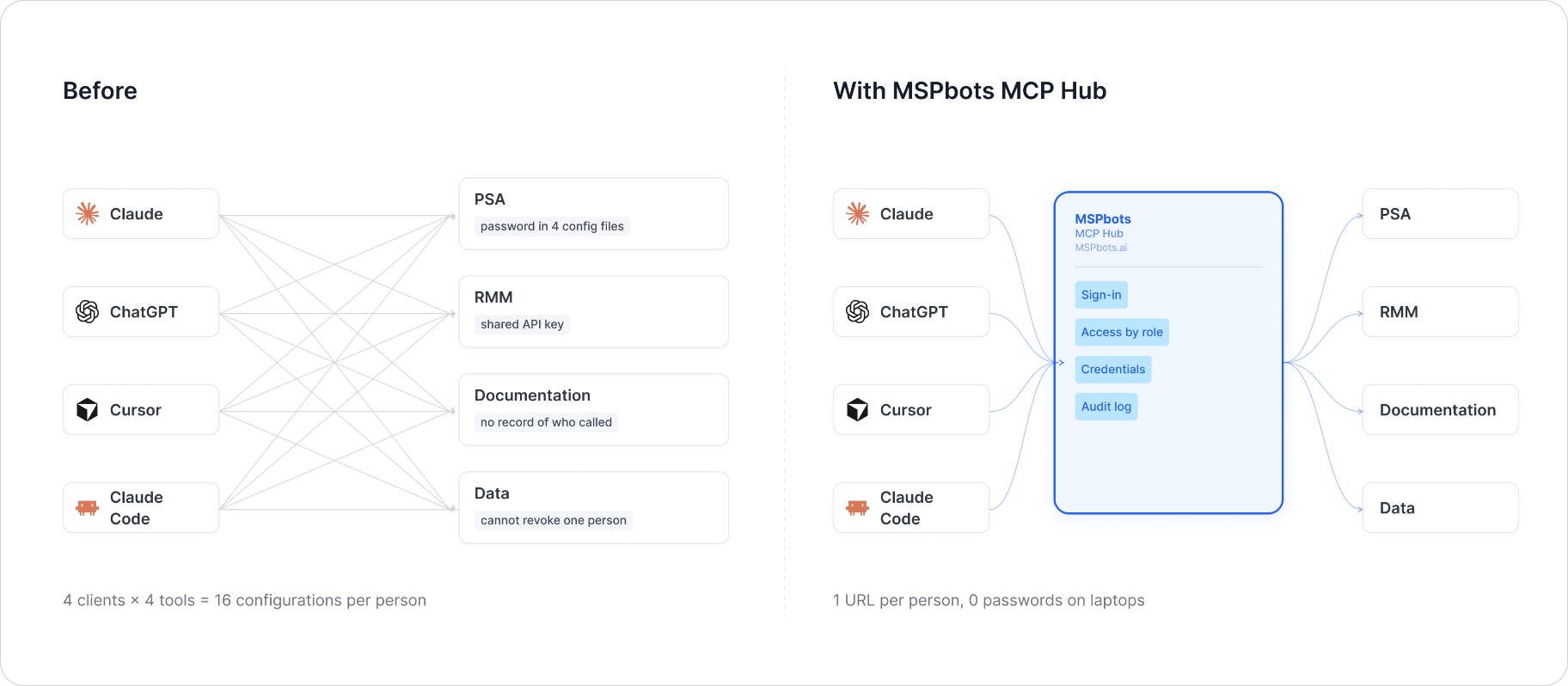
| | |
|---|---|
| **Visible** | Every tool call is logged: who, which vendor, when. Usage dashboard, CSV export, SIEM streaming. |
| **Controlled** | Role-based, per-tool allowlist. Deny by default. |
| **Protected** | Credentials encrypted per record. AI clients never see your vendor passwords or tokens. |
| **MSP-native** | Built for the MSP stack only: RMM, PSA, documentation, security, finance. |
### Quick start
1. **Sign up** at [connect.mspbots.ai](https://connect.mspbots.ai).
2. **Connect your vendors.** Pick from 150+ connectors and authorize each one on the vendor's own page, or bring your own API keys. No extra vendor accounts needed.
3. **Set access.** Create roles and decide which tools each role may call. Nothing is allowed until you allow it.
4. **Add your MCP URL to your AI client.** Copy the URL from your Connector dashboard into Claude, ChatGPT, Cursor, VS Code, Gemini, Codex, or any MCP-capable client.
5. **Ask your AI to do real work**, and watch every call appear in the audit log.
### Features
**Unified gateway**
- One MCP URL for all your AI clients
- 150+ connectors across the MSP stack
- Custom MCP servers supported, free
- Authorization happens on each vendor's own page; the AI never sees passwords or tokens
- Bring your own credentials: use the vendor API keys you already have
- Multiple accounts per app; connect once, reuse across AI clients
- Tool search: finds the right action for the task
- One sign-in; vendor credentials are injected behind the scenes and OAuth tokens refresh automatically
**Visibility**
- Audit log for every tool call (who, which vendor, when)
- Usage dashboard: call volume, top vendors, error rate, per-user activity
- Export audit logs to CSV, or stream to Loki, Graylog, or LogScale (SIEM)
- Optional recording of tool arguments and result summaries (off by default, enabled per organization)
**Control**
- Per-role, per-tool allowlist, deny by default
- owner / admin / member roles
- SCIM provisioning with Entra ID, Okta, JumpCloud, and Google Workspace
**Security**
- Credentials encrypted one record at a time (AES-256-GCM, per-record key)
- AI clients authenticate with OAuth 2.1 + PKCE
- Vendor responses are scanned for prompt-injection patterns and returned as structured data. This is one layer of defense, not a guarantee against every attack.
- Static egress IP for customer firewall and API allowlisting
### Pricing
**Free.**
Links: [connect.mspbots.ai](https://connect.mspbots.ai) · [mspbots.ai](https://mspbots.ai)
---
## Overview
- Stateless HTTP service. No credentials are ever persisted — each request
supplies its own credentials via headers, used only for the lifetime of
that single request.
- Supports concurrent requests; per-request credential isolation is done via
Python `contextvars`, not a global/shared client instance.
- Entry points: `POST /mcp` (MCP protocol) and `GET /health` (health check).
- Default port: `8080` (configurable via `MCP_HTTP_PORT`).
## Scope
**15 tools** — the vendor's entire public API (single `api.php` endpoint,
dispatched via a `getMethod` query parameter): 10 read methods
(`get_thermometers`, `get_recipient_lists`, `get_send_quota`,
`get_happiness_value`, `get_nps_value`, `get_temp_rating_value`,
`get_response_rate_value`, `get_num_responses_value`, `get_blast_results`,
`get_comments`) and 5 write methods (`send_email`, `log_response`,
`add_recipient_to_list`, `delete_response`, `unsubscribe_recipient`).
MSPbots itself only calls 5 of the 10 read methods (BlastResults, Comments,
ResponseRateValue, NumResponsesValue, NPSValue) — this MCP covers the full
API since the vendor's entire public surface is small enough to implement
completely.
## Authentication
Customer Thermometer authenticates with a static **API key**, sent as the
`apiKey` query-string parameter on every call (the vendor's "super API key"
style — no `Authorization: Bearer` header, which the vendor docs reserve for
scoped "sub-API keys"). MSPbots' own integration also stores the API host
(`api_url`) as a per-tenant field, so this server treats it as per-request
too rather than a fixed default.
### HEADER Authorization Parameters
| Header | Type | Required | Default | Allowed values | Description | Example |
|---|---|---|---|---|---|---|
| `X-CustomerThermometer-Api-Key` | string | Yes | None | None | Customer Thermometer API Key, forwarded as the upstream `apiKey` query parameter | `a1b2c3d4e5f6a7b8c9d0e1f2a3b4c5d6` |
| `X-CustomerThermometer-Api-Url` | string | Yes | None | None | API host address (the protocol prefix may be omitted; `https://` is added automatically) | `app.customerthermometer.com/api.php` |
Missing either header returns `401`:
```json
{
"error": "Missing credentials",
"message": "This server requires the X-CustomerThermometer-Api-Key and X-CustomerThermometer-Api-Url headers",
"required_headers": ["X-CustomerThermometer-Api-Key", "X-CustomerThermometer-Api-Url"],
"optional_headers": []
}
```
## Environment Variables
| Variable | Type | Required | Default | Description |
|---|---|---|---|---|
| `MCP_HTTP_PORT` | int | No | `8080` | HTTP listen port |
| `MCP_HTTP_HOST` | string | No | `0.0.0.0` | HTTP listen address |
(No `*_BASE_URL` env var — the API host is per-tenant and always supplied
via the `X-CustomerThermometer-Api-Url` header, never a fixed default.)
## MCP Endpoint
- `POST /mcp` — MCP protocol (streamable HTTP transport)
- `GET /health` — health check, returns exactly `{"status": "ok"}` (a pure
local liveness probe — it never calls out to the Customer Thermometer API,
so it cannot reflect upstream availability; run a real `tools/call` to
verify the MCP path itself)
## Tool List
**15 tools** (10 read-only, 5 write). Every tool result is a JSON-serialized
string per the SOP: the vendor's own payload — an XML document, or a plain
integer/string — is JSON-encoded as-is (so, for example, an XML report comes
back as a quoted JSON string containing that XML) rather than re-parsed into
a different shape. Errors use the SOP's fixed envelope
`{"error": {"code", "message", "retryable"}}` instead of ad-hoc strings.
| Tool | Read/Write | Description | Parameters |
|---|---|---|---|
| `customerthermometer_get_thermometers` | readOnly | List all Thermometer names and IDs | None |
| `customerthermometer_get_recipient_lists` | readOnly | List all recipient List names and IDs | None |
| `customerthermometer_get_send_quota` | readOnly | Get the remaining send quota | None |
| `customerthermometer_get_happiness_value` | readOnly | Get the Happiness Factor (%) | `limit`, `blast_id`, `from_date`, `to_date` (all optional) |
| `customerthermometer_get_nps_value` | readOnly | Get the NPS score | `limit`, `blast_id`, `from_date`, `to_date` (all optional) |
| `customerthermometer_get_temp_rating_value` | readOnly | Get the Temperature Rating (%) | `limit`, `blast_id`, `from_date`, `to_date` (all optional) |
| `customerthermometer_get_response_rate_value` | readOnly | Get the response rate (%) | `limit`, `blast_id`, `from_date`, `to_date` (all optional) |
| `customerthermometer_get_num_responses_value` | readOnly | Get the number of responses | `temperature_id`, `limit`, `blast_id`, `from_date`, `to_date` (all optional) |
| `customerthermometer_get_blast_results` | readOnly | Get detailed response results | `temperature_id`, `limit`, `blast_id`, `from_date`, `to_date` (all optional) |
| `customerthermometer_get_comments` | readOnly | Get response comments | `temperature_id`, `limit`, `blast_id`, `from_date`, `to_date` (all optional) |
| `customerthermometer_send_email` | write | Send a single Email Thermometer survey | `thermometer_id` (required), `list_id` (required), `email_address` (required), `blast_id`/`first_name`/`last_name`/`company_name`/`custom1-3` (optional) |
| `customerthermometer_log_response` | write | Manually log a response | `recipient`/`temperature_id`/`thermometer_id` (required), all others optional |
| `customerthermometer_add_recipient_to_list` | write | Add a recipient to a List | `email_address`/`list_id` (required), `first_name`/`last_name`/`company_name` (optional) |
| `customerthermometer_delete_response` | write, ⚠ destructive | Delete a response (permanently purged after 30 days) | `response_id` (required) |
| `customerthermometer_unsubscribe_recipient` | write | Add an email address to the unsubscribe list | `email_address` (required), `notify` (optional) |
All 7 tools that accept `limit` (`get_happiness_value`, `get_nps_value`,
`get_temp_rating_value`, `get_response_rate_value`,
`get_num_responses_value`, `get_blast_results`, `get_comments`) clamp it to
**200 server-side**. The vendor does **not** document a hard maximum of its
own — a vendor support-doc example shows `&limit=100000` being accepted — so
this 200 cap is this server's own SOP-mandated ceiling (protecting the
agent's context budget), not a vendor-imposed limit.
## Test Example
```bash
# Health check
curl -s http://localhost:8080/health
# Call a tool via the MCP protocol (streamable HTTP) — requires an
# initialize handshake first per the MCP spec; abbreviated example below
# shows the tool-call request body only:
curl -s -X POST http://localhost:8080/mcp \
-H "X-CustomerThermometer-Api-Key: <your-api-key>" \
-H "X-CustomerThermometer-Api-Url: app.customerthermometer.com/api.php" \
-H "Content-Type: application/json" \
-H "Accept: application/json, text/event-stream" \
-H "mcp-session-id: <session-id-from-initialize>" \
-d '{
"jsonrpc": "2.0",
"id": 1,
"method": "tools/call",
"params": {
"name": "customerthermometer_get_send_quota",
"arguments": {}
}
}'
```
**Live-verified** (2026-07-29): `customerthermometer_get_send_quota` and
`customerthermometer_get_nps_value` were both called end-to-end through
this running server with a real API key and returned real account data
(a credit count and an NPS score respectively).
## API Reference
- Full public documentation: https://www.customerthermometer.com/integration/api-documentation/
## Known Gaps
- **`getResponseRateValue`/`getNumResponsesValue` method-name ambiguity in
the vendor's own docs**: each method's parameter table names the
`getMethod` value without the `Value` suffix (`getResponseRate`,
`getNumResponses`), but every worked example on the same page uses the
`...Value` suffixed name — and MSPbots' own configured endpoint names
("ResponseRateValue", "NumResponsesValue") match the suffixed form. This
server uses the suffixed names (`getResponseRateValue`,
`getNumResponsesValue`), consistent with the examples and MSPbots' usage.
- **POST body encoding is not specified in the vendor docs** for
`logResponse`, `addRecipientToList`, and `unsubscribeRecipient` — they
only list field names/types, not a content-type. This server sends them
as `application/x-www-form-urlencoded` (the traditional convention for a
PHP-based endpoint like this); if the vendor actually expects JSON, these
three tools would need `client.post` to switch from `data=` to `json=`.
- Only the 5 tools matching MSPbots' own usage plus `get_send_quota` were
live-verified with real data; the remaining tools are structurally
correct (schema validated, MCP-protocol `tools/list` confirmed) but not
individually smoke-tested — several (`send_email`, `log_response`, etc.)
are write operations that would create/modify real survey data, so they
weren't exercised against the live test account.
- No vendor-documented hard cap exists for `limit` (see the Tool List
section above) — the 200-record ceiling enforced by this server is our
own SOP-driven safeguard, not something the vendor requires.
This server cannot be deployed
Maintenance
ActivityMaintained
ResponsivenessNo recent community issues