
contactscience-mcp
README.md
# contactscience-mcp
MCP server for **Contact Science** — an appointment-setting / sales
engagement CRM platform. Exposes its appointment and call-block reporting
endpoints as MCP tools.
> Naming note: MSPbots' own integration is registered as "Contact Science"
> (`subjectCode=SCIENCE`); the underlying API host is Contact Science's own
> backend, `www.klpzmedia.com`. This MCP covers exactly the 2 GET endpoints
> MSPbots itself has configured — see **Known Gaps** below for why the scope
> stops there.
<div align="center">
## MSPbots Connector
**The MCP Gateway built for MSPs: visible, controlled, and your data stays where it belongs.**
[**Get started at connect.mspbots.ai →**](https://connect.mspbots.ai)
</div>
---
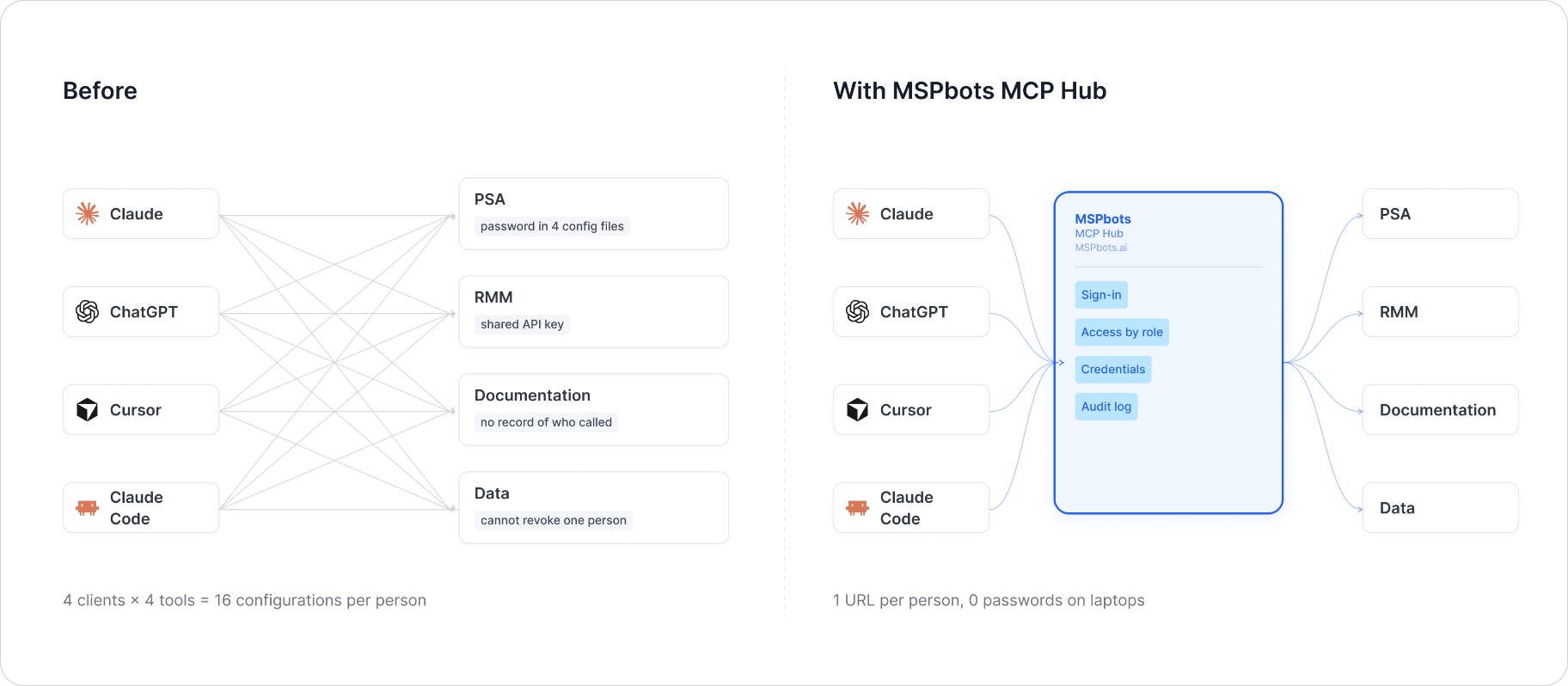
MSPbots Connector gives your AI clients one MCP URL to reach your entire MSP stack (RMM, PSA, documentation, security, finance), and gives you control over who can call which tool and a record of everything that was called.
**Hosted service: [connect.mspbots.ai](https://connect.mspbots.ai)** · Free to use.
### Why Connector
| | |
|---|---|
| **Visible** | Every tool call is logged: who, which vendor, when. Usage dashboard, CSV export, SIEM streaming. |
| **Controlled** | Role-based, per-tool allowlist. Deny by default. |
| **Protected** | Credentials encrypted per record. AI clients never see your vendor passwords or tokens. |
| **MSP-native** | Built for the MSP stack only: RMM, PSA, documentation, security, finance. |
### Quick start
1. **Sign up** at [connect.mspbots.ai](https://connect.mspbots.ai).
2. **Connect your vendors.** Pick from 150+ connectors and authorize each one on the vendor's own page, or bring your own API keys. No extra vendor accounts needed.
3. **Set access.** Create roles and decide which tools each role may call. Nothing is allowed until you allow it.
4. **Add your MCP URL to your AI client.** Copy the URL from your Connector dashboard into Claude, ChatGPT, Cursor, VS Code, Gemini, Codex, or any MCP-capable client.
5. **Ask your AI to do real work**, and watch every call appear in the audit log.
### Features
**Unified gateway**
- One MCP URL for all your AI clients
- 150+ connectors across the MSP stack
- Custom MCP servers supported, free
- Authorization happens on each vendor's own page; the AI never sees passwords or tokens
- Bring your own credentials: use the vendor API keys you already have
- Multiple accounts per app; connect once, reuse across AI clients
- Tool search: finds the right action for the task
- One sign-in; vendor credentials are injected behind the scenes and OAuth tokens refresh automatically
**Visibility**
- Audit log for every tool call (who, which vendor, when)
- Usage dashboard: call volume, top vendors, error rate, per-user activity
- Export audit logs to CSV, or stream to Loki, Graylog, or LogScale (SIEM)
- Optional recording of tool arguments and result summaries (off by default, enabled per organization)
**Control**
- Per-role, per-tool allowlist, deny by default
- owner / admin / member roles
- SCIM provisioning with Entra ID, Okta, JumpCloud, and Google Workspace
**Security**
- Credentials encrypted one record at a time (AES-256-GCM, per-record key)
- AI clients authenticate with OAuth 2.1 + PKCE
- Vendor responses are scanned for prompt-injection patterns and returned as structured data. This is one layer of defense, not a guarantee against every attack.
- Static egress IP for customer firewall and API allowlisting
### Pricing
**Free.**
Links: [connect.mspbots.ai](https://connect.mspbots.ai) · [mspbots.ai](https://mspbots.ai)
---
## Overview
- Stateless HTTP service. No credentials are ever persisted — each request
supplies its own token via a header, used only for the lifetime of that
single request.
- Supports concurrent requests; per-request credential isolation is done via
Python `contextvars`, not a global/shared client instance.
- Entry points: `POST /mcp` (MCP protocol) and `GET /health` (health check).
- Default port: `8080` (configurable via `MCP_HTTP_PORT`).
## Authentication
Contact Science authenticates with a single static **API token**, generated
in the Contact Science admin portal. MSPbots' own integration convention
sends this token as the raw value of the `authorization` header — **no
`Bearer ` prefix** — and this server forwards it exactly that way.
### HEADER authentication parameters
| Header | Type | Required | Default | Allowed values | Description | Example |
|---|---|---|---|---|---|---|
| `X-ContactScience-Authorization` | string | Yes | None | None | Contact Science static API Token, forwarded unchanged as the upstream `authorization` request header (without the `Bearer ` prefix) | `a1b2c3d4e5f6...` |
Missing the header returns `401`:
```json
{
"error": "Missing credentials",
"message": "This server requires the X-ContactScience-Authorization header",
"required_headers": ["X-ContactScience-Authorization"],
"optional_headers": []
}
```
**Important quirk**: unlike most REST APIs, Contact Science's own endpoints
return **HTTP 200 even when the token is invalid** — the error is embedded
in the JSON body instead (`{"error": "Unauthorized", "message": "Invalid API
Key"}`). This server's client (`api_client.py`) detects that body shape and
raises a tool-level error regardless of the HTTP status code, so callers
still see a structured error envelope (see **Error Handling** below) rather
than silently getting an error payload back as if it were real data.
## Error Handling
Tool errors are returned as a structured JSON envelope (never raised as
protocol-level exceptions), so a calling agent can branch on `code` and
`retryable` programmatically:
```json
{"error": {"code": "unauthorized", "message": "Invalid API Key", "retryable": false}}
```
`code` is one of a fixed vocabulary: `not_configured`, `unauthorized`,
`not_found`, `invalid_argument`, `rate_limited`, `upstream_error`.
## Environment Variables
| Variable | Type | Required | Default | Description |
|---|---|---|---|---|
| `MCP_HTTP_PORT` | int | No | `8080` | HTTP listen port |
| `MCP_HTTP_HOST` | string | No | `0.0.0.0` | HTTP listen address |
| `CONTACTSCIENCE_BASE_URL` | string | No | `https://www.klpzmedia.com/apis/1.0` | Contact Science API base URL |
## MCP Endpoint
- `POST /mcp` — MCP protocol (streamable HTTP transport)
- `GET /health` — health check, returns `{"status": "ok"}` (local probe only, does not depend on the upstream Contact Science API)
## Tool List
Both tools are plain `GET` calls against the same 2 endpoints MSPbots itself
calls. **`start_date` is required** — confirmed by live testing, this is not
documented anywhere and contradicts MSPbots' own stored integration config
(which shows empty params); calling either endpoint without it returns
`{"error": "Invalid parameters", "message": "startDate parameter is
missing"}`. `end_date` is an accepted optional filter. Each tool also accepts
an optional `extra_params` pass-through dict for any further query-string
filters, since Contact Science does not publish a public API reference (see
**Known Gaps**).
| Tool | Description | Parameters |
|---|---|---|
| `contactscience_get_appointments` | List appointment report records | `start_date: str` (required, YYYY-MM-DD), `end_date: str \| None` (optional), `extra_params: dict[str,str] \| None` |
| `contactscience_get_call_block` | List call block report records | `start_date: str` (required, YYYY-MM-DD), `end_date: str \| None` (optional), `extra_params: dict[str,str] \| None` |
## Test Example
```bash
# Health check
curl -s http://localhost:8080/health
# Call a tool via the MCP protocol (streamable HTTP) — requires an
# initialize handshake first per the MCP spec; abbreviated example below
# shows the tool-call request body only:
curl -s -X POST http://localhost:8080/mcp \
-H "X-ContactScience-Authorization: <your-contact-science-token>" \
-H "Content-Type: application/json" \
-H "Accept: application/json, text/event-stream" \
-H "mcp-session-id: <session-id-from-initialize>" \
-d '{
"jsonrpc": "2.0",
"id": 1,
"method": "tools/call",
"params": {
"name": "contactscience_get_appointments",
"arguments": {"start_date": "2026-01-01"}
}
}'
```
Expected: `200` with the appointments list on a valid token; `200` with
`{"error": "Unauthorized", "message": "Invalid API Key"}` in the body on an
invalid token — surfaced by this server as a tool-level structured error
envelope (see **Error Handling** above), not treated as real data.
**Live-verified** (2026-07-29) against a real Tech Guardian tenant token:
both `contactscience_get_appointments` and `contactscience_get_call_block`
returned real data end-to-end through this running server.
## API Reference
- No public API documentation exists for Contact Science's reporting API.
The vendor's marketing site (contactscience.com) and backend
(klpzmedia.com) do not publish a developer reference, and no
Swagger/OpenAPI spec or third-party reference was found. The two endpoints
implemented here were confirmed directly from MSPbots' own stored
integration configuration and by probing the live API.
## Known Gaps
- **Scope is exactly MSPbots' 2 configured endpoints, not a larger vendor
API surface** — Contact Science does not publish any public API
reference, so (like `bvoip-mcp` earlier in this program) there was no
broader public spec to weigh a wider scope against.
- Response field shapes are not independently documented — whatever the
live API returns is passed through as-is; no schema/field reference
exists to validate against.
- Beyond `start_date`/`end_date`, further filter parameters are undocumented;
`extra_params` is provided so a caller who discovers additional supported
filters can still pass them through.
- `start_date` being required could not be discovered from any
documentation or from MSPbots' own stored config (which shows it calling
both endpoints with zero params) — it was only found by calling the live
API and reading the resulting error message. MSPbots' own sync may be
relying on a default/fallback behavior not visible from the stored config,
or may be passing it through a mechanism this investigation didn't surface.
This server cannot be deployed
Maintenance
ActivityMaintained
ResponsivenessNo issues