
checkpoint-mcp
README.md
# checkpoint-mcp
MCP server for **Check Point Harmony Endpoint** (endpoint protection/EDR,
part of Check Point's Infinity Portal). Exposes the Harmony Endpoint Web
Management API's policy, asset, vulnerability posture, quarantine, and
remediation methods as MCP tools.
> Naming note: MSPbots' own integration is registered as "Check Point
> Harmony Endpoint" (`subjectCode=CHECKPOINT`). This MCP covers exactly the
> 11 methods MSPbots itself has configured.
<div align="center">
## MSPbots Connector
**The MCP Gateway built for MSPs: visible, controlled, and your data stays where it belongs.**
[**Get started at connect.mspbots.ai →**](https://connect.mspbots.ai)
</div>
---
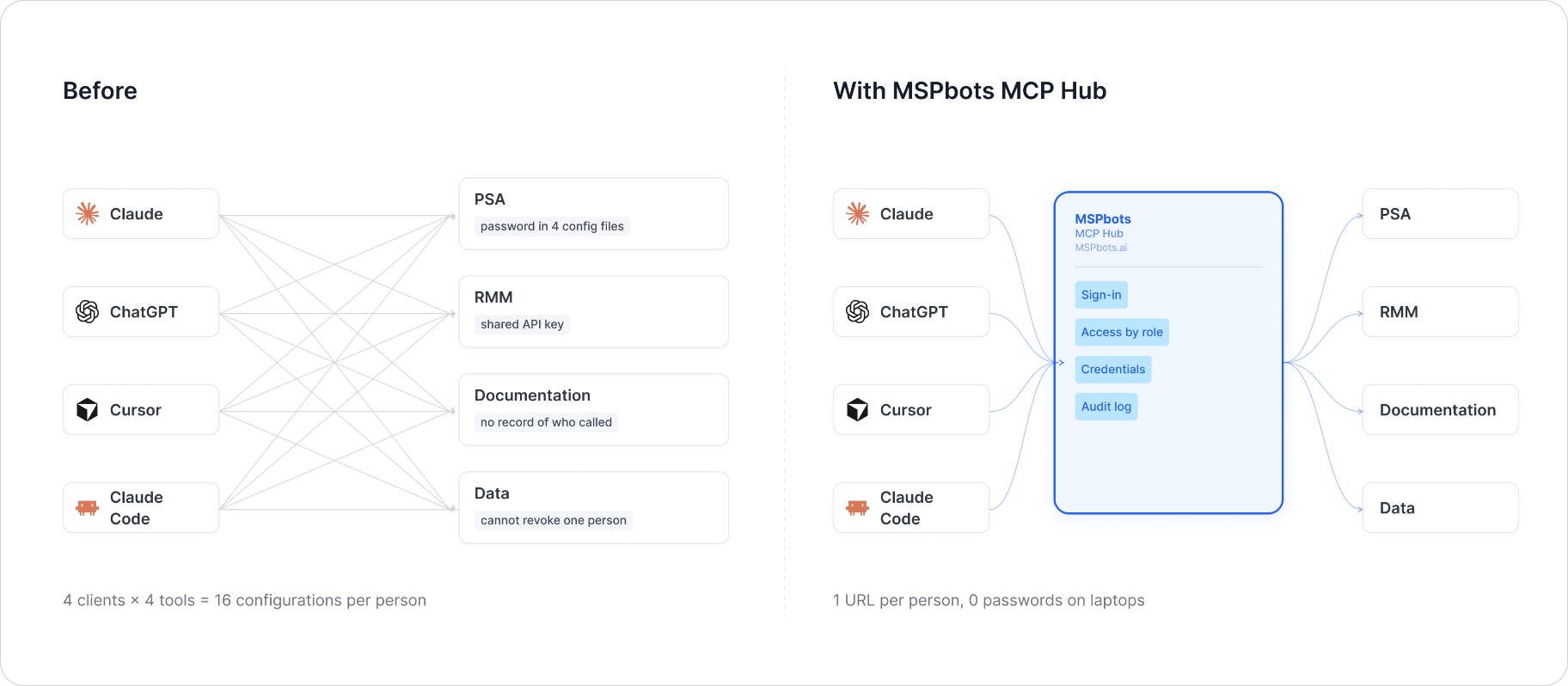
MSPbots Connector gives your AI clients one MCP URL to reach your entire MSP stack (RMM, PSA, documentation, security, finance), and gives you control over who can call which tool and a record of everything that was called.
**Hosted service: [connect.mspbots.ai](https://connect.mspbots.ai)** · Free to use.
### Why Connector
| | |
|---|---|
| **Visible** | Every tool call is logged: who, which vendor, when. Usage dashboard, CSV export, SIEM streaming. |
| **Controlled** | Role-based, per-tool allowlist. Deny by default. |
| **Protected** | Credentials encrypted per record. AI clients never see your vendor passwords or tokens. |
| **MSP-native** | Built for the MSP stack only: RMM, PSA, documentation, security, finance. |
### Quick start
1. **Sign up** at [connect.mspbots.ai](https://connect.mspbots.ai).
2. **Connect your vendors.** Pick from 150+ connectors and authorize each one on the vendor's own page, or bring your own API keys. No extra vendor accounts needed.
3. **Set access.** Create roles and decide which tools each role may call. Nothing is allowed until you allow it.
4. **Add your MCP URL to your AI client.** Copy the URL from your Connector dashboard into Claude, ChatGPT, Cursor, VS Code, Gemini, Codex, or any MCP-capable client.
5. **Ask your AI to do real work**, and watch every call appear in the audit log.
### Features
**Unified gateway**
- One MCP URL for all your AI clients
- 150+ connectors across the MSP stack
- Custom MCP servers supported, free
- Authorization happens on each vendor's own page; the AI never sees passwords or tokens
- Bring your own credentials: use the vendor API keys you already have
- Multiple accounts per app; connect once, reuse across AI clients
- Tool search: finds the right action for the task
- One sign-in; vendor credentials are injected behind the scenes and OAuth tokens refresh automatically
**Visibility**
- Audit log for every tool call (who, which vendor, when)
- Usage dashboard: call volume, top vendors, error rate, per-user activity
- Export audit logs to CSV, or stream to Loki, Graylog, or LogScale (SIEM)
- Optional recording of tool arguments and result summaries (off by default, enabled per organization)
**Control**
- Per-role, per-tool allowlist, deny by default
- owner / admin / member roles
- SCIM provisioning with Entra ID, Okta, JumpCloud, and Google Workspace
**Security**
- Credentials encrypted one record at a time (AES-256-GCM, per-record key)
- AI clients authenticate with OAuth 2.1 + PKCE
- Vendor responses are scanned for prompt-injection patterns and returned as structured data. This is one layer of defense, not a guarantee against every attack.
- Static egress IP for customer firewall and API allowlisting
### Pricing
**Free.**
Links: [connect.mspbots.ai](https://connect.mspbots.ai) · [mspbots.ai](https://mspbots.ai)
---
## Overview
- Stateless HTTP service. No credentials are ever persisted — each request
supplies its own Infinity Portal API key via headers, used only for the
lifetime of that single request.
- Supports concurrent requests; per-request credential isolation is done via
Python `contextvars`, not a global/shared client instance.
- Entry points: `POST /mcp` (MCP protocol) and `GET /health` (health check).
- Default port: `8080` (configurable via `MCP_HTTP_PORT`).
## Authentication
Check Point's Infinity Portal uses a 2-step API-key exchange, and the
Harmony Endpoint Web Management API on top of that requires **both**
resulting tokens together on every real call:
1. `POST {region}/auth/external` with `{clientId, accessKey}` → a portal
bearer token (`data.token`), valid ~30 minutes.
2. `POST {region}/app/endpoint-web-mgmt/harmony/endpoint/api/v1/session/login/cloud`
with `Authorization: Bearer <portal token>` → a management-service
`apiToken`, valid only **~6 minutes**.
3. Every real endpoint call requires **both** `Authorization: Bearer
<portal token>` **and** `x-mgmt-api-token: <apiToken>` headers together,
plus `x-mgmt-run-as-job: on`.
Because the `apiToken` is short-lived anyway, this server performs this
entire 2-step login fresh on **every single tool call** — nothing is
cached or persisted across MCP requests.
**All 11 methods are asynchronous jobs.** The initial call only returns
`{"jobId": ...}`; the real result is fetched by polling `GET
.../jobs/{jobId}` until the job leaves an in-progress state (this server
polls every 1s, up to a 30s timeout, per tool call).
### HEADER Authentication Parameters
| Header | Type | Required | Default | Allowed values | Description | Example |
|---|---|---|---|---|---|---|
| `X-CheckPoint-Client-Id` | string | Yes | None | None | Client ID of the Infinity Portal API Key | `45217fa1-6c33-4389-a169-909fa72e99dd` |
| `X-CheckPoint-Access-Key` | string | Yes | None | None | Secret/Access Key of the Infinity Portal API Key | `911b25e9-149a-45b3-a9a7-a9d43be24635` |
| `X-CheckPoint-Region` | string | Yes | None | `https://cloudinfra-gw-us.portal.checkpoint.com` (US), `https://cloudinfra-gw.portal.checkpoint.com` (EU), `https://cloudinfra-gw.ap.portal.checkpoint.com` (AP) | Gateway address of the tenant's data residency region, matching the Region dropdown options in the MSPbots integration configuration | `https://cloudinfra-gw.ap.portal.checkpoint.com` |
Missing any header returns `401`:
```json
{
"error": "Missing credentials",
"message": "This server requires the X-CheckPoint-Client-Id, X-CheckPoint-Access-Key, and X-CheckPoint-Region headers",
"required_headers": ["X-CheckPoint-Client-Id", "X-CheckPoint-Access-Key", "X-CheckPoint-Region"],
"optional_headers": []
}
```
## Environment Variables
| Variable | Type | Required | Default | Description |
|---|---|---|---|---|
| `MCP_HTTP_PORT` | int | No | `8080` | HTTP listen port |
| `MCP_HTTP_HOST` | string | No | `0.0.0.0` | HTTP listen address |
## MCP Endpoint
- `POST /mcp` — MCP protocol (streamable HTTP transport)
- `GET /health` — health check, returns `{"status": "ok", "service": "checkpoint-mcp", "transport": "http"}`
## Tool List
| Tool | Description | Parameters |
|---|---|---|
| `checkpoint_get_policy_metadata` | List the metadata of all Harmony Endpoint policy rules | None |
| `checkpoint_get_policy_modifications` | Get the modification history of the specified policy rule | `rule_id` (required) |
| `checkpoint_get_policy_assignments` | Get the assignment targets of the specified policy rule | `rule_id` (required) |
| `checkpoint_get_computers_filtered` | List managed computers/endpoints (optional filter) | `filter` (optional, vendor-defined filter object) |
| `checkpoint_search_organization_tree` | Search the organization tree (groups/users/computers) | `search_term`, `search_type`, `entity_types`, `offset`, `page_size` (all optional) |
| `checkpoint_get_vulnerability_data` | List organization-level vulnerability posture data | `offset`, `page_size` (all optional) |
| `checkpoint_get_vulnerability_devices` | Get vulnerability posture details of the specified devices | `device_ids` (required), `offset`, `page_size` (optional) |
| `checkpoint_get_vulnerability_scan_status` | Get vulnerability scan status | None |
| `checkpoint_get_quarantine_files` | List quarantine files | `offset`, `page_size` (all optional) |
| `checkpoint_get_remediation_status` | List the status of remediation/response operations | None |
| `checkpoint_get_remediation_results_slim` | Get the brief result of the specified remediation operation | `remediation_id` (required), `offset`, `page_size` (optional) |
Responses are the vendor's job-result JSON, pretty-printed
(`{"status": "DONE", "statusCode": ..., "data": ...}`), returned as-is.
## Test Example
```bash
# Health check
curl -s http://localhost:8080/health
# Call a tool via the MCP protocol (streamable HTTP) — requires an
# initialize handshake first per the MCP spec; abbreviated example below
# shows the tool-call request body only:
curl -s -X POST http://localhost:8080/mcp \
-H "X-CheckPoint-Client-Id: <your-client-id>" \
-H "X-CheckPoint-Access-Key: <your-access-key>" \
-H "X-CheckPoint-Region: https://cloudinfra-gw.ap.portal.checkpoint.com" \
-H "Content-Type: application/json" \
-H "Accept: application/json, text/event-stream" \
-H "mcp-session-id: <session-id-from-initialize>" \
-d '{
"jsonrpc": "2.0",
"id": 1,
"method": "tools/call",
"params": {
"name": "checkpoint_get_policy_metadata",
"arguments": {}
}
}'
```
**Live-verified** (2026-07-30) against a real Harmony Endpoint tenant, all
11 tools called end-to-end through this running server: `..._policy_metadata`
returned real policy rules (e.g. "Testing App Control", several
organization-default rules across the Access/Threat Prevention/Data
Protection/OneCheck/General Settings/Deployment/Agent Settings/Data Loss
Prevention families); `..._policy_assignments` returned the real
"Entire Organization" assignment for a default rule; `..._computers_filtered`
returned 18 real managed computers with live agent health data;
`..._search_organization_tree` returned real groups (Virtual Directory
Structure, ChromeOsDesktops, etc.); `..._vulnerability_scan_status`
returned real per-device scan statuses; `..._remediation_status` returned
a real completed `DA_COLLECT_LOGS` remediation action;
`..._remediation_results_slim` (using that action's real ID) returned its
real per-machine result; `..._quarantine_files` returned a real quarantined
file record; `..._vulnerability_data` and `..._vulnerability_devices`
returned valid empty result sets (no vulnerability data present for this
tenant at test time — a legitimate empty response, not an error);
`..._policy_modifications` (using a real rule ID) returned `statusCode
204` (no modification history for that rule — also a legitimate response).
## API Reference
- Auth flow discovered and confirmed via the third-party Shuffle SOAR
platform's public integration docs (Check Point does not appear to
publish this specific 2-step token exchange in an easily discoverable
public reference of their own):
https://shuffler.io/apps/Harmony_Endpoint_Management/integrations/Checkpoint
- No further official public API reference for the Harmony Endpoint Web
Management API's individual method schemas was found; behavior for each
of the 11 methods in this README was determined via MSPbots' own stored
`apiConfig` (path/params) cross-checked against live calls with real
credentials (see Live-verified above), following this program's
standing rule to never trust stored config as ground truth without
confirming against the real API.
## Known Gaps
- **Scope is exactly MSPbots' 11 configured endpoints, not the vendor's
full API surface** — Harmony Endpoint Web Management exposes many more
categories (Session, Jobs, Indicators of Compromise, Remediation &
Response - Agent/Threat Prevention, etc. per the Shuffle integration's
own category list) that MSPbots does not use; those are out of scope
here.
- **`checkpoint_get_computers_filtered`'s `filter` parameter shape is
undocumented** — MSPbots' own stored config sends an empty body, so this
server accepts an optional generic `dict` and defaults to `{}` (an
unfiltered listing) rather than guessing at a specific filter schema.
- **Async job polling timeout is fixed at 30s (1s interval)** — all live
test calls completed in well under a second, but a tenant with a very
large dataset could plausibly exceed this; not configurable via env var
in this version.
- **Job responses can validly be non-200/204 without being an error** —
e.g. `checkpoint_get_policy_modifications` returned `statusCode: 204`
or `checkpoint_get_vulnerability_data` returned an empty `data` array;
this server surfaces the job result as-is rather than treating anything
other than 200 as a tool-level error, since the async job framing means
the vendor's own success/failure signaling lives inside the JSON body,
not the outer HTTP status code.
This server cannot be deployed
Maintenance
ActivityMaintained
ResponsivenessNo recent community issues