ShadowGraph
Official# ShadowGraph
[](https://github.com/LiLara-AI/shadowgraph/actions/workflows/ci.yml)
**Local-first decision memory for AI agents.** ShadowGraph remembers what an agent decided, what it
rejected, why it rejected it, and when that decision should be reconsidered.
> Status: **Technical Preview / Early Access.** Install from GitHub — it is not on npm.
> See [Limitations and Technical Preview status](#limitations-and-technical-preview-status).
## Why it matters
Chat memory remembers the conversation. It loses the decision.
Ask an agent three months later why the project uses SQLite and the useful part is already gone:
- The choice may survive in a summary. **The rejected alternative and the reason for rejecting it do not.**
- A fact changes — the deployment goes from single-user to multi-user — and **nothing reopens the decision.**
- The same approach fails again, because **the failed attempt was never recorded as a failed attempt.**
ShadowGraph stores that reasoning as structured, inspectable data instead of prose: what was chosen,
what was rejected, why, the assumptions and evidence behind it, failed attempts, outcomes,
provenance, confidence history, and the conditions that should trigger a rethink.
The promise is deliberately narrow: **important AI decisions should survive sessions and stay
explainable, reviewable, and reconsiderable.**
**Who it is for:** developers building agents on MCP, a CLI, or a local HTTP API who need
consequential decisions to outlive a session. It is a decision store, and it keeps its store on your
machine; data leaves the machine only through opt-ins you turn on (see
[Local-first and privacy](#local-first-and-privacy)).
## Quick Start — 5 minutes
### Requirements
- Node.js 20+ (the optional SQLite backend needs Node 22.5+ for `node:sqlite`)
- No runtime npm dependencies, no build step, no account, no network calls
### 1. Install
ShadowGraph is **not published to npm**. During the Technical Preview, install it from this
repository. A global install puts `shadowgraph` on your `PATH`, which is what MCP clients need:
```bash
npm install --global github:LiLara-AI/shadowgraph
```
This installs the current `main` branch: the development build `0.42.0-dev.0`, newer than the 0.41.0
Technical Preview and not a release. To install the Technical Preview instead, use
`github:LiLara-AI/shadowgraph#v0.41.0`. Before moving a store between the two, read
[Moving between 0.41.0 and `main`](#moving-between-0410-and-main).
<details>
<summary>Or clone and run from source</summary>
```bash
git clone https://github.com/LiLara-AI/shadowgraph.git
cd shadowgraph
npm install
node src/cli.js setup
node src/cli.js doctor
```
Replace `shadowgraph` with `node src/cli.js` in every command below.
</details>
> `npm install shadowgraph-unified-plugin` does **not** work and fails with `E404`. The package is
> `private: true` and unpublished, and the registry name is not reserved. This README will change if
> publication is ever approved.
### 2. JSON arguments and your shell
Every ShadowGraph command takes a single JSON argument, so **quoting depends on your shell.** Pick
the row for the shell you are actually using — this is the most common reason a first command fails:
| Shell | Form | Example |
| --- | --- | --- |
| bash / zsh / Git Bash (macOS, Linux, WSL) | single quotes, plain JSON | `shadowgraph recall '{"project":"demo"}'` |
| Windows PowerShell | single quotes, `\"` inside | `shadowgraph recall '{\"project\":\"demo\"}'` |
| Windows `cmd.exe` | double quotes, `\"` inside | `shadowgraph recall "{\"project\":\"demo\"}"` |
The examples below use the bash form. If a command fails in your shell, please report it.
### 3. Initialize a store
```bash
mkdir shadowgraph-demo
cd shadowgraph-demo
shadowgraph setup
shadowgraph doctor
```
`setup` creates `.shadowgraph/data.json` in the current directory, so run it where you want the
store to live. It never rewrites an existing store. `doctor` then checks Node compatibility, storage
readability and writability, graph validity, and the MCP entry point.
Run `setup` **before** `doctor`: on a fresh directory `doctor` reports `Storage is not initialized`
and exits `1` until a store exists. That is expected, not a failed install.
### 4. Record a decision, restart, and get it back
```bash
shadowgraph decision '{"project":"checkout-service","title":"Choose the datastore","chosen":"SQLite","confidence":0.8,"alternatives":[{"label":"PostgreSQL","reasonRejected":"Single-user local deployment does not justify running a server","reopenWhen":[{"key":"deployment","operator":"equals","value":"multi-user"}]}]}'
shadowgraph fact '{"project":"checkout-service","key":"deployment","value":"single-user","sourceClass":"human_confirmed","confidence":1}'
shadowgraph search '{"query":"datastore","project":"checkout-service"}'
```
Each command runs in a new process and reopens the store from disk, so the `search` result comes
back across a real restart, not from in-memory state. You now have a decision that carries its
rejected alternative, the reason it was rejected, and the condition that should reopen it.
## The demo: a decision that reopens itself
This is the whole point of ShadowGraph, in three commands. Continue in the same directory.
**The decision is settled, so there is nothing to reconsider yet:**
```bash
shadowgraph review '{"project":"checkout-service"}'
```
```json
{
"items": [],
"completeness": {
"returned": 0,
"total": 0,
"omitted": 0,
"complete": true,
"losslessItems": true,
"scope": {
"project": "checkout-service",
"requestState": "project_selected",
"originPresented": false,
"grant": null
}
}
}
```
**Now the world changes. The deployment becomes multi-user:**
```bash
shadowgraph fact '{"project":"checkout-service","key":"deployment","value":"multi-user","sourceClass":"human_confirmed","confidence":1}'
```
**Restart and ask again — passing only the project, never the triggering fact:**
```bash
shadowgraph review '{"project":"checkout-service"}'
```
The result, abridged to the first fields of its one item:
```json
{
"items": [
{
"decisionId": "decision_1788079304730_yjawcg",
"title": "Choose the datastore",
"reason": "deployment",
"alternativesToReconsider": [
"PostgreSQL"
]
}
]
}
```
ShadowGraph read the stored fact, matched it against the rule saved with the decision, and surfaced
the alternative that had been rejected for a reason that no longer holds. The full item also carries
`violatedConditions` (each one names the stored fact it matched as evidence) and the review signal it
recorded, and the result ends with a `completeness` block like the first one. Your IDs and times will
differ.
That is decision memory: not "what did we talk about", but **"what did we decide, what did we rule
out, and does that still hold?"**
For the same story through MCP, the HTTP API, and the JavaScript API — plus recording failed
attempts and outcomes — see the [decision-memory demo](docs/decision-memory-demo.md).
## Key capabilities
**Decision memory.** Decisions carry the chosen approach, rejected alternatives with their reasons,
assumptions, evidence, and structured `reopenWhen` rules. Outcomes (successful, mixed, failed,
unknown) feed back into confidence.
**Reconsideration.** `review()` evaluates reopen rules against *stored* facts, so it works after a
restart without the caller re-supplying what changed. Review signals are persisted and
acknowledgeable.
**Failed-attempt memory.** Attempts record the approach, the result, the environment, and the
lesson, so an agent can discover that something was already tried and why it did not work.
**Provenance you can audit.** Every claim carries a `sourceClass` — `agent_claimed`,
`tool_observed`, `human_confirmed`, or `production_verified` — which records *what was claimed*
about an observation's origin, never proof of it. Ordinary tool input cannot create `verified`; that
requires a separately configured Ed25519 verifier.
**Scoped memory and temporal recall.** `remember()` / `recall()` store preferences, profiles, goals,
instructions, procedures, episodes, and notes under a project plus optional `userId` / `agentId` /
`runId`. Facts, memories, and relations are bi-temporal, so you can ask what was true `asOf` a past
moment. Retrieval fuses lexical, vector, graph-distance, and temporal signals and declares which
signals were unavailable rather than silently degrading.
**Project and scope isolation.** Every write needs a project, a workspace binding (`shadowgraph bind`),
or a capture-origin id: a write with none of them is refused (`write_scope_unresolved`) instead of landing in a shared `default` bucket, and
`default` is an ordinary project name. `search`, `retrieve`, `recall`, `context` and `traverse` read
only the selected project's own records, and the graph expansion they make stays in that project;
with no project selected they return nothing, never every project and never a shared `default`
bucket. An id outside the selected project -- or one that does not exist -- gets the same answer: no
record. A new relationship joins two records of one project (`link` needs that project), and one
across projects is refused like a missing endpoint; relationships stored across projects before are
kept, and no read follows them. The journal, `stats`, `redact`'s output and the public export
(`GET /records`, `list`) read the same way. A by-id change -- an outcome, a status, confidence
evidence, a supersession, a fact verification, a review acknowledgement -- changes only what its own
project or origin owns, and answers another project's id exactly as a missing one. Saving, backup and
restore still cover the whole store; the public export and a redaction are reads of one project and
are refused as a store.
Records written before schema 6 in `default`, or with no project, belong to no project a caller can
name, so no project read returns them; the kernel's `legacyAttributionReview()` lists them for
inspection, each with its legacy state and canonical record, and infers no project for them. A read
with no project reports its empty result as incomplete (`completeness.complete: false`, with a
`scoped_coverage` limitation), never as complete. The MCP tools, HTTP routes and CLI verbs pass the
caller's `project` (or `originId`) to the same boundary: an outcome, a status change or a review
acknowledgement sent with one changes only what it owns, and the same call without one is refused
(`write_scope_unresolved`) alike for every id; `stats` over HTTP (`GET /stats?project=...`) and the
CLI counts only the named project's content, and nothing without one.
Wider access is explicit and revocable: an access grant the owner issues at a terminal
(`issue-access`) opens the projects or origins it names to explicit reads that present it, until it
expires or is revoked. It is not lesson-only sharing, and automatic hook delivery never uses one. A project name, like a presented origin id, is a selector, not access control: any caller of the CLI, MCP or HTTP API that names one explicitly reads it. Legacy records are what only a grant opens. See
the [access transport contract](docs/contracts/access-transports.md).
Omitted scope means all-null scope. Purge is previewable, logical by default, and explicitly
irreversible in hard mode.
**Explainable retrieval.** Results expose raw scores, ranks, and reasons, and every bounded response
declares its total, pages, and omitted scope. Nothing is silently summarized away.
## Local-first and privacy
Everything is a local file. The HTTP server binds to `127.0.0.1` and rejects non-local browser
origins. There is no cloud service, no account, no telemetry, and no analytics — ShadowGraph makes
no outbound network request unless you explicitly configure one.
The opt-ins that can send data off the machine are all off by default:
- **Embeddings.** No endpoint is configured. A localhost OpenAI-compatible server works once
configured; a remote endpoint additionally requires `SHADOWGRAPH_ALLOW_REMOTE_EMBEDDINGS=1`,
because that means memory and query text leave your machine.
- **Extraction.** Separately approved extraction sends eligible redacted captures through the supported first-party Claude subscription route. No API-key, alternate-provider, proxy or paid fallback is supported by this executor; the owner must disable subscription overage. Pattern redaction cannot guarantee every secret is removed. Extraction runs only on Windows, with Claude Code 2.1.288, or with the profiled Claude Code 2.1.292 binary and the receipt of a passing real-host validation of it (ShadowGraph checks the receipt's identity, not the validation itself); on any other platform, version or binary it is refused. See [extraction and its host limits](docs/extraction.md).
- **Markdown export.** `markdown-sync` writes plaintext copies you control. ShadowGraph cannot find
or delete those copies later — see [Storage, backup, and deletion](#storage-backup-and-deletion).
- **Host delivery.** Inert unless you install the hooks and activate delivery for one store. Once
active, the records it delivers (credential-shaped values redacted first) become part of Claude
Code's session transcript and of what the model receives, like any context; ShadowGraph cannot
remove them from the transcript. See [the integrations guide](integrations/README.md).
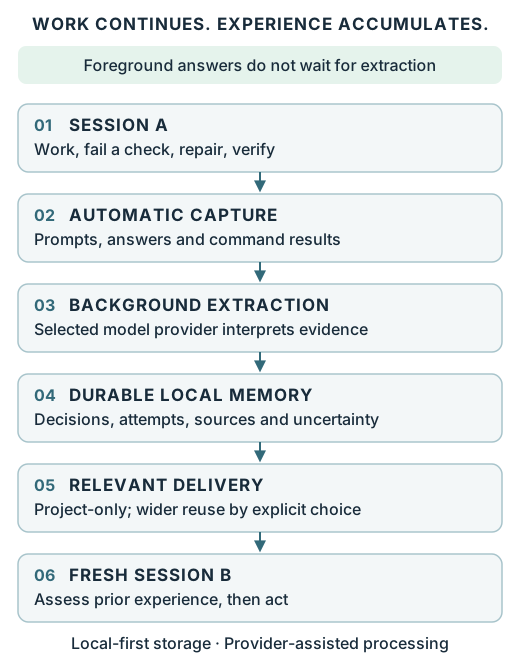
Capture, extraction and delivery require their separate activation procedures. Once active, capture records your prompts, tool calls with their input and output, and the assistant's text from Claude Code sessions, redacted by pattern, into a private local store. Capture uses the enrolled external store; existing manual stores are not automatically migrated, and delivery reads the one store its activation pins. Eligible uncited raw expires under the configured policy even when quarantined, while accepted experience and required cited evidence are protected. Expired raw may no longer be re-extracted.
See the [data lifecycle map](docs/data-lifecycle.md) for deletion reach, retained copies, explicit Markdown pruning and recovery floors, and the [integrated experience lifecycle](docs/contracts/integrated-lifecycle-contract.md) for correction, reprocessing, restart and shutdown boundaries.
For shared local use, set a Bearer token:
```bash
SHADOWGRAPH_API_TOKEN="use-a-random-token-at-least-16-characters" shadowgraph serve
```
Then send `Authorization: Bearer use-a-random-token-at-least-16-characters` with every request. This
is defense in depth for a local deployment, not a public-internet security model. See
[SECURITY.md](SECURITY.md).
## Interfaces
### MCP
```bash
shadowgraph mcp
```
Compact mode is recommended: it advertises 16 workflow tools while the full graph, memories, facts,
alternatives, and outcomes stay stored at full fidelity. Compact mode is a tool-advertisement
choice, not lossy storage.
```bash
SHADOWGRAPH_MCP_COMPACT=1 shadowgraph mcp
```
Tool metadata follows the revision `initialize` negotiates: a session negotiated at `2025-03-26`
also receives behavioural annotations, and one at `2025-06-18` or `2025-11-25` also receives output
schemas and structured results, while a session at `2024-11-05` keeps the tool members and
serialized results it always had. A request for a revision this server does not implement is
answered with `2025-11-25`, the latest it does. See the
[MCP compatibility guide](docs/mcp-compatibility.md) for the full table.
The 16 compact tools are `shadowgraph_context`, `shadowgraph_review_context`, `shadowgraph_expand`, `shadowgraph_remember`, `shadowgraph_recall`,
`shadowgraph_record_decision`, `shadowgraph_record_attempt`, `shadowgraph_record_fact`,
`shadowgraph_record_outcome`, `shadowgraph_retrieve`, `shadowgraph_search`, `shadowgraph_review`,
`shadowgraph_validate`, `shadowgraph_maintain`, `shadowgraph_ack_review` — so a compact client can
clear a review it can already see, instead of accumulating signals with no way to acknowledge
them — and `shadowgraph_reconsider`, which reads the same evaluation as a verdict: review
recommended, unchanged, or a human should look. `shadowgraph_context` is a read that persists
nothing; `shadowgraph_review_context` persists the review signals it finds due, and
`shadowgraph_expand` expands a claim line to its full record. Full mode advertises 35 — see the
[MCP compatibility guide](docs/mcp-compatibility.md) for the complete inventory, every protocol
revision, and verified client behaviour. Full mode includes owner tools: backup to a path the caller
names, restore from one and purge. Its `shadowgraph_bind` and `shadowgraph_attribute` only propose: they
change nothing and return the `shadowgraph bind` or `attribute` input the owner runs and confirms at a
terminal. Give an agent compact mode unless you want it to have the owner tools (see [SECURITY.md](SECURITY.md#local-threat-model)).
### AI tool setup
Install globally first so the client can find `shadowgraph` on its `PATH`:
```bash
npm install --global github:LiLara-AI/shadowgraph
shadowgraph setup
shadowgraph doctor
```
**Claude Code** (user scope):
```bash
claude mcp add --scope user --env SHADOWGRAPH_MCP_COMPACT=1 --transport stdio shadowgraph -- shadowgraph mcp
```
**Cursor** (`.cursor/mcp.json` or `~/.cursor/mcp.json`):
```json
{"mcpServers":{"shadowgraph":{"type":"stdio","command":"shadowgraph","args":["mcp"],"env":{"SHADOWGRAPH_MCP_COMPACT":"1"}}}}
```
**Codex**:
```bash
codex mcp add shadowgraph --env SHADOWGRAPH_MCP_COMPACT=1 -- shadowgraph mcp
```
**Hermes Agent**:
```bash
hermes mcp add shadowgraph --command shadowgraph --connect-timeout 30 --env SHADOWGRAPH_MCP_COMPACT=1 --args mcp
```
File forms for all four live in [`integrations/`](integrations/README.md); `npm run check:integrations`
validates them as files, which is not a live run of each client. Set an absolute
`SHADOWGRAPH_FILE` in the client environment when one store must be shared across working
directories.
### CLI
The commands you will actually use:
```bash
shadowgraph setup
shadowgraph doctor
shadowgraph context '{"project":"my-app"}'
shadowgraph decision '{"project":"my-app","title":"Choose the datastore","chosen":"SQLite"}'
shadowgraph fact '{"project":"my-app","key":"deployment","value":"local","sourceClass":"human_confirmed"}'
shadowgraph attempt '{"project":"my-app","solution":"Rewrite everything","result":"Regression"}'
shadowgraph outcome '{"project":"my-app","decisionId":"DECISION_ID","outcome":{"status":"failed","lessons":["Assumption was wrong"]}}'
shadowgraph review '{"project":"my-app"}'
shadowgraph search '{"query":"database","project":"my-app"}'
shadowgraph remember '{"project":"my-app","memoryType":"preference","key":"editor","text":"Prefers VS Code"}'
shadowgraph recall '{"project":"my-app","query":"development environment"}'
```
<details>
<summary>Full command list</summary>
`setup` · `doctor` · `serve` · `mcp` · `stats` · `list` · `search` · `retrieve` · `recall` ·
`remember` · `markdown-sync` · `context` · `review` · `maintain` · `signals` · `ack` · `validate` ·
`repair-plan` · `backup` · `restore` · `decision` · `attempt` · `fact` · `outcome` · `status` ·
`link` · `traverse` · `redact` · `supersede` · `purge-preview` · `purge` · `journal` · `rebuild` ·
`confidence-evidence` · `review-context` · `deliver` · `capture` · `install-hooks` · `uninstall-hooks` ·
`activate` · `deactivate` · `extract` · `quarantine` · `reconsider` · `migrate` · `downgrade` ·
`bind` · `attribute` · `request-access` · `issue-access` · `delegate-access` · `revoke-access` ·
`discard-access` · `access-status`
Full argument shapes are in the [API reference](docs/api-reference.md).
</details>
### HTTP API
```bash
shadowgraph serve
curl http://127.0.0.1:8787/health
```
A read-only dashboard is served at `http://127.0.0.1:8787/dashboard`. It talks only to the same
local origin, and a token entered there is kept in page memory only — never in cookies, local
storage, or ShadowGraph data.
<details>
<summary>All HTTP endpoints</summary>
```text
GET /health GET /stats GET /records
GET /search?q=&project= GET /review-signals GET /validate
GET /journal
POST /decisions POST /attempts POST /memories
POST /recall POST /facts POST /outcomes
POST /review POST /context POST /status
POST /relationships POST /traverse POST /redact
POST /supersede POST /maintain POST /retrieve
POST /review-signals/ack POST /repair-plan POST /backup
POST /restore POST /rebuild POST /confidence-evidence
POST /projects/purge-preview
DELETE /projects
```
`/redact` returns one project's export with pattern-based redaction applied, which cannot guarantee
every secret is removed, and never mutates. `/repair-plan` is always non-destructive
and returns `{apply:false, actions:[...]}`. `/projects/purge-preview` shows deletion counts without
changing storage. The server returns `401` when token auth is enabled and missing, `403` for
disallowed browser origins, `404` for missing decisions or routes, and `413` for oversized bodies.
</details>
### JavaScript
```js
import { createShadowGraph } from 'shadowgraph-unified-plugin';
const graph = createShadowGraph();
graph.addDecision({
project: 'checkout-service',
title: 'Choose the datastore',
chosen: 'SQLite',
confidence: 0.8,
alternatives: [{
label: 'PostgreSQL',
reasonRejected: 'Single-user local deployment does not justify running a server',
reopenWhen: [{ key: 'deployment', operator: 'equals', value: 'multi-user' }]
}]
});
graph.addFact({
project: 'checkout-service',
key: 'deployment',
value: 'multi-user',
sourceClass: 'human_confirmed',
confidence: 1
});
// review() reads stored facts, so this also works in a fresh process after an
// export/save and load. Do not pass the triggering fact again.
console.log(graph.review({ project: 'checkout-service' }));
```
The bare-specifier import resolves when ShadowGraph is a dependency of your project
(`npm install github:LiLara-AI/shadowgraph`). With a `--global` install, use the CLI, HTTP, or MCP
surfaces instead, or import from the installed path.
## Storage, backup, and deletion
JSON is the zero-dependency default and stores a versioned graph in `.shadowgraph/data.json`. Set
`SHADOWGRAPH_FILE` to relocate it. Set `SHADOWGRAPH_STORAGE=sqlite` on Node 22.5+ for the WAL-backed
relational adapter. Stores are written at schema 7; schemas 1 through 6 remain readable, and `downgrade`
forks a copy at schema 5 (the default, which 0.41.0 reads) or schema 6 (which only unreleased
intermediate builds read), without changing the store.
State and journal are written in one atomic operation, every save and restore for a destination
shares a cross-process lock fence, and a stale write is rejected with a revision conflict rather
than silently lost. `backup` takes a consistent snapshot; `restore` validates domain and journal
consistency before replacing live state, and rolls back on failure. This is process-level rollback
safety, **not** a claim of crash or power-loss durability. The full guarantees — lock timeouts,
stale-lock recovery, revision arithmetic, and restore artifact reporting — are in the
[API reference](docs/api-reference.md#4-storage) and the
[SQLite restore contract](docs/contracts/sqlite-restore-contract.md).
Deletion is explicit and previewable:
```bash
shadowgraph purge-preview '{"project":"release-demo"}'
shadowgraph purge '{"project":"release-demo"}'
shadowgraph purge '{"project":"another-project","mode":"hard"}'
```
Logical purge (the default) removes project content from the live projection and keeps an auditable,
payload-free purge skeleton. Hard purge physically deletes journal entries, creates a declared gap,
and cannot be undone.
**Purge cannot delete external Markdown exports.** ShadowGraph has no way to find plaintext copies
in arbitrary workspaces, Git history, cloud sync, backups, or removable media. Delete those
separately. Backups, the preservation and downgraded copies that `migrate` and `downgrade` write, and
the recovery files an interrupted restore leaves can also still hold material purged or expired
later; a purge does not reach them (see the [data lifecycle map](docs/data-lifecycle.md)).
## Limitations and Technical Preview status
The latest release is the 0.41.0 **Technical Preview / Early Access** (tag `v0.41.0`). It is not Beta
and not stable. `main` carries `0.42.0-dev.0`, a development build: not released, not stable, and its
acceptance criteria have not been assessed.
- **Interfaces and the storage schema may still change.** Do not use it for data you cannot
reproduce.
- **Not on npm.** The package is deliberately `private: true`. The `v0.41.0` Git tag and GitHub
Release are maintainer-authorized for this Technical Preview; **npm publication is not
authorized** and has not occurred.
- **No comparative benchmark has been measured.** Comparative benchmark infrastructure was executed,
but no arm was measured because no common local/free LLM and embedding endpoint was available. No
comparative performance, quality, token, cost, or 'best' claim is supported. ShadowGraph makes no
claim of being faster, cheaper, lower-token, more accurate, or better than any other memory
system. See the [benchmark report](docs/benchmark-report.md).
- **Security review status.** An AI-assisted independent security review of commit `4a5e076` (tree
`62c1918e`) was completed on 2026-08-30 by Antigravity Assistant (Gemini 3.7 Flash), with a PASS
result and no unresolved findings. **No human third-party security audit has been performed.** See
[SECURITY.md](SECURITY.md#security-review-status). That review covered commit `4a5e076`, before
the `v0.41.0` tag. Nothing added since has had an independent security review, including project
scoping, access grants, deletion records and purge-aware restore, schema 6 and 7 migration and
`downgrade`, the Claude Code hooks, automatic capture, transcript reading and extraction.
- **Nothing is captured or extracted unless you turn it on, and there is no hosted sync.** Without the
optional Claude Code integration, ShadowGraph records what you tell it to record. With it, automatic
capture of Claude Code sessions and model-based extraction each stay inert until the owner activates
them separately; capture covers declared events only, with pattern-based redaction (see the
[integrations guide](integrations/README.md) and [extraction](docs/extraction.md)).
- **Capture and delivery cover one enrolled store.** Delivery reads the one store its activation
pins, and capture writes the store it was enrolled with; other stores you use by hand are neither
delivered nor captured into, and are not migrated.
- **Single maintainer.** No paid support, no patch SLA, and no bug bounty.
### Moving between 0.41.0 and `main`
- **Take a backup before upgrading.** `shadowgraph backup [<file>]` copies the store: a JSON store
byte for byte, a SQLite store table by table. A backup taken before this build first saves the
store is still a schema-5 store that 0.41.0 opens. (Opening a SQLite store, this build adds a table
of its own to it; 0.41.0 still reads the store.) Once this build has saved the store, its backups are schema-7 stores; to use one with
0.41.0, restore it into a fresh path with this build and fork a schema-5 copy as below.
- **Upgrading.** This build reads every store 0.41.0 wrote (schemas 1 through 5) and writes schema 7 on
its next save. What changes for you:
- A write that names no project is refused (`write_scope_unresolved`). Pass `project`, or bind the
workspace to a project with `shadowgraph bind`.
- Records 0.41.0 stored in `default` -- written without a project, which 0.41.0 put there, or
naming `default` -- are legacy material whose owner this build treats as uncertain: no read
returns them, not even with `"project":"default"`.
They are not deleted. The JavaScript API's `legacyAttributionReview()` lists them, and
`shadowgraph attribute '{"ids":["<id>"],"targetProject":"<project>","reason":"<why>"}'`, which
you confirm at a terminal, moves named records into a project. To note their ids before
upgrading, run 0.41.0's `shadowgraph list`, which prints every record, and keep the ids of those
with `"project": "default"`. If you rely on such records
and do not want to move them, stay on 0.41.0.
- Some results changed shape; for example, `review` returns `{"items": [...], "completeness": {...}}`
instead of an array. The [changelog](CHANGELOG.md) lists every breaking change.
- **Going back to 0.41.0.** 0.41.0 reads schemas 1 through 5 only and refuses a store this build has
saved. Fork a schema-5 copy with `shadowgraph downgrade '{"output":"<new file>"}'`. It first writes
a verified preservation copy beside the store (`<store>.preservation-<time>`), then the copy, and
never changes the store. `<output>.report.json` names what schema 5 cannot hold, such as record
attribution, erasure tokens, claim evidence and capture state, and the copy's journal history is
replaced by one baseline entry. Point 0.41.0 only at the copy: given a schema-7 SQLite store, 0.41.0 can
set the file's journal mode before it refuses it.
- **What 0.41.0 does not have.** 0.41.0 has none of this build's project isolation or deletion
records: there, a read that names no project returns every project's records, and restoring a
backup taken before a purge brings the purged material back.
- **Hooks, capture, delivery and extraction.** 0.41.0 has no hook, capture, delivery or extraction
commands. Before switching to it, run with this build `shadowgraph deactivate extraction`,
`shadowgraph deactivate capture`, `shadowgraph deactivate delivery`,
`shadowgraph uninstall-hooks --capture` and `shadowgraph uninstall-hooks`, and check that
extraction's cleanup did not report `deferred` (see
[deactivate, uninstall and recover](docs/extraction.md#deactivate-uninstall-and-recover)).
## Feedback and support
Technical Preview feedback is the point of this release. Please tell us when something breaks.
| What | Where |
| --- | --- |
| Bug or incorrect behaviour | [Open a bug report](https://github.com/LiLara-AI/shadowgraph/issues/new?template=bug_report.yml) |
| Feature or capability request | [Open a feature request](https://github.com/LiLara-AI/shadowgraph/issues/new?template=feature_request.yml) |
| Security vulnerability | [Report it privately](https://github.com/LiLara-AI/shadowgraph/security/advisories/new) — never in a public issue |
| Questions, ideas, "is this useful?" | [Discussions](https://github.com/LiLara-AI/shadowgraph/discussions) |
During the preview, these reports are the most valuable:
- **Installation problems** — anything between `npm install --global` and a green `doctor`.
- **MCP client compatibility** — which client, which mode, and what it did or did not discover.
- **Memory usefulness** — did recalled context actually change what your agent did?
- **Confusing workflows** — where the docs or a command shape sent you the wrong way.
- **Missing decision-memory use cases** — decisions you wanted to store and could not.
- **Performance** — where it felt slow, and roughly how large the store was.
ShadowGraph has no telemetry and collects nothing automatically, so a report from you is the only
signal there is. When pasting output, redact anything private: decision and memory content is your
data, and `shadowgraph doctor` output is usually enough.
## Documentation
| Document | What it covers |
| --- | --- |
| [Decision-memory demo](docs/decision-memory-demo.md) | The full worked example through CLI, MCP, HTTP, and JavaScript |
| [API reference](docs/api-reference.md) | JavaScript, CLI, HTTP, and MCP surfaces |
| [Unified memory guide](docs/unified-memory.md) | `remember` / `recall`, scoping, temporal recall, Markdown sync |
| [MCP compatibility](docs/mcp-compatibility.md) | Protocol revisions, tool inventory, verified client behaviour |
| [Contracts](docs/contracts) | Authoritative guarantees: provenance, lifecycle, journal, completeness, search, confidence, SQLite restore |
| [Architecture decisions](docs/adr) | ADR-0006 (memory kernel), ADR-0007 (journal baseline placement) |
| [Vision and principles](docs/vision-and-principles.md) | What ShadowGraph is for, and what it deliberately will not do |
| [Benchmark report](docs/benchmark-report.md) | Honest results — no arm was measured; no comparative claim is supported |
| [Security policy](SECURITY.md) | Threat model, review status, and how to report a vulnerability privately |
| [Contributing](https://github.com/LiLara-AI/shadowgraph/blob/main/CONTRIBUTING.md) | Development setup and pull-request expectations |
| [Changelog](CHANGELOG.md) | Release history |
## Checks
```bash
npm run check
npm run test:performance
npm test
npm run check:integrations
npm run check:mcp
npm audit --omit=dev
npm run check:package
npm run smoke:package
```
GitHub Actions covers Ubuntu and Windows on Node 20, 22, and 24. In every job, the delivery-budget
performance cases run in their own mandatory step before the suite. SQLite gates run only where
`node:sqlite` exists. The strict official MCP Inspector runs full and compact gates, the pinned Glama
`mcp-proxy@6.4.3` gate proves the revision this server negotiates with it and that the tool list
reaches an HTTP scanner unchanged, and the package smoke test runs from a real clean install in
every matrix cell.
## License
MIT. See [LICENSE](LICENSE).
TDQS
Scored across 27 tools
Most tools have clearly distinct purposes and the descriptions cross-reference related tools, so an agent can usually select correctly. However review vs review_signals and search/retrieve/recall are close enough that a model needs to read carefully to avoid selecting the wrong read/evaluate variant.
All tools share the shadowgraph_ prefix and snake_case style, which gives the surface a consistent feel. But the pattern mixes bare verbs (review, rebuild, search), noun phrases (context, journal, confidence_evidence), and verb_noun forms (record_decision, purge_preview), so it is not fully predictable.
27 tools is above the threshold for a heavy surface, and several clusters are over-fragmented: search/retrieve/recall/context/traverse, review/review_signals, and purge/purge_preview could be consolidated. While the domain is broad, the count feels excessive for an agent to navigate.
The core decision/memory lifecycle is well covered: record, recall, update, supersede, review, backup, restore, purge. The main gaps are the explicitly missing unlink operation for relationships and no direct apply tool for repair_plan, though agents can work around these via other tools.