
io.github.KoyoYeager/pystub
<!-- mcp-name: io.github.KoyoYeager/pystub -->
# mcp-pystub
English | [日本語](https://github.com/KoyoYeager/mcp-pystub/blob/master/README.ja.md)
**An MCP server that removes heavy packages from your exe: the ones your dependencies import but your own code never uses.**
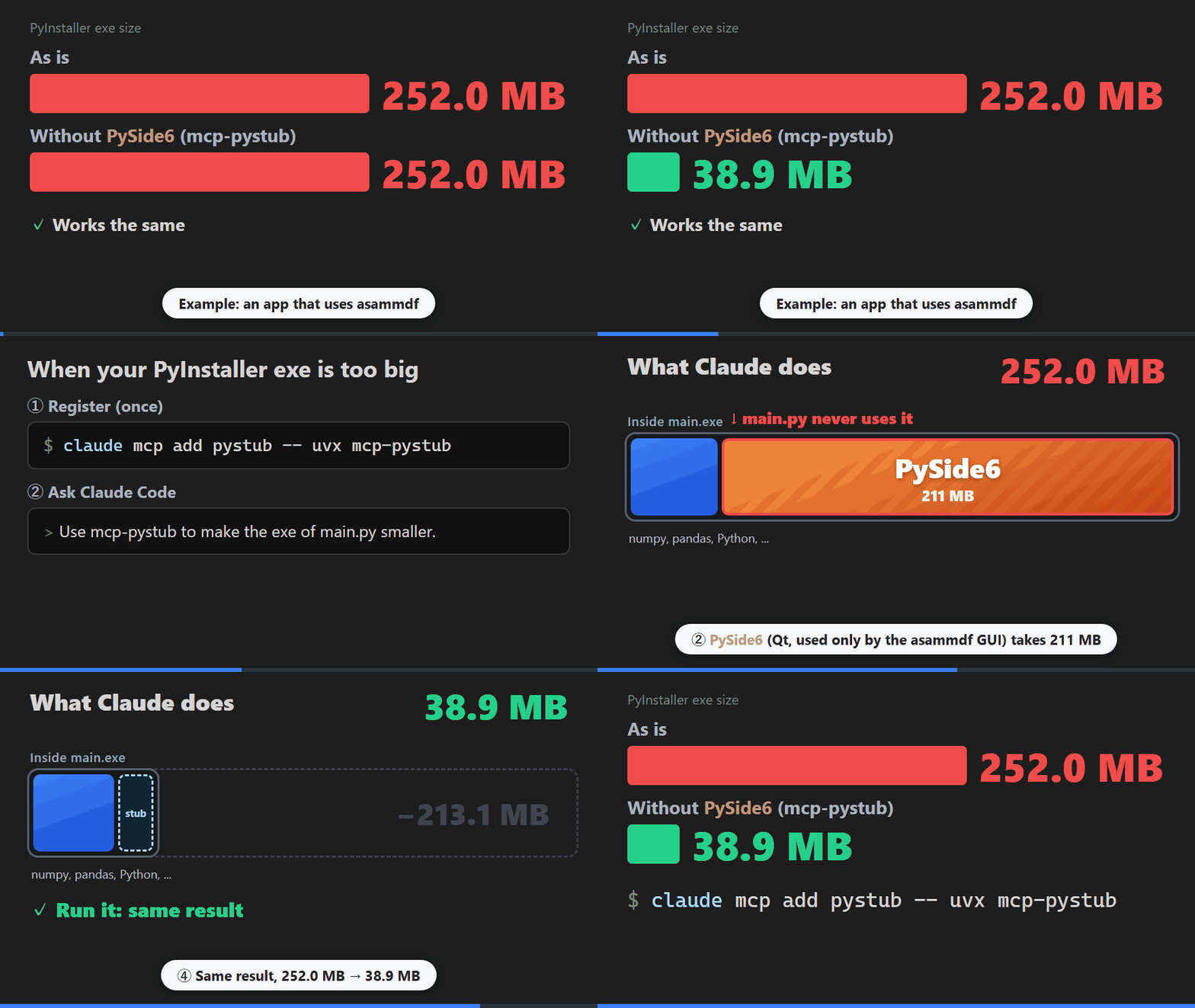
Use it when your PyInstaller exe is too big. For example, an app that only reads and writes MDF files with asammdf still ends up as a 252 MB exe, because asammdf's GUI code pulls in PySide6 (Qt). mcp-pystub finds the parts your app never actually calls, even inside your dependencies, replaces them with stubs (empty stand-in modules), and runs your program to check that the output does not change. The replacement can be undone.
| Library (example use) | exe (as is) | exe (after) | Removed |
|---|---|---|---|
| asammdf (read/write MDF) | 252.0 MB | **38.9 MB** | asammdf.gui -> PySide6 |
| networkx | 76.7 MB | **40.8 MB** | scipy, fontTools, pandas |
| tqdm | 47.7 MB | **33.3 MB** | pandas, fontTools, PIL |
| matplotlib | 44.6 MB | **36.0 MB** | pandas, PIL.ImageQt |
| openpyxl | 26.2 MB | **20.3 MB** | PIL |
| Pillow | 25.7 MB | **14.4 MB** | numpy |
PyInstaller (onefile), Windows 11, Python 3.13. In every case the exe's output was confirmed identical to the original (conditions: [Verified results](https://github.com/KoyoYeager/mcp-pystub/blob/master/docs/results.md)).
## Usage
You need an MCP client such as Claude Code, a venv with your app's dependencies, and PyInstaller to build the exe. Tested on Windows 11 with Python 3.13.
Add it to Claude Code once, then ask Claude.
```bash
claude mcp add pystub -- uvx mcp-pystub
```
Then ask in your project folder:
> Use mcp-pystub to make the exe of main.py smaller. The venv is .venv. You can run it to check.
Saying where the venv is, and that Claude may run your program, lets it check the result by actually running it. Claude goes on from there: finding the unused parts, running with them removed, swapping in the stubs and building the exe. The stubs stay in the venv only for the build; afterwards Claude puts the venv back. No uv, or using another client (Claude Desktop etc.)? See [Tools and setup](https://github.com/KoyoYeager/mcp-pystub/blob/master/docs/tools.md).
## Why not just exclude modules by hand?
You can drop packages with PyInstaller's `--exclude-module`, but only if you know they are never imported at run time. Guess wrong and the exe crashes with an `ImportError`, sometimes only on a rarely used path, long after you shipped it.
- **Finds what is really unused**: an import is not the same as a use. mcp-pystub tells apart code that is imported but never called, even deep inside your dependencies ([how it works](https://github.com/KoyoYeager/mcp-pystub/blob/master/docs/how-it-works.md)).
- **Runs to check**: `verify` plugs in the stubs, runs your program, and checks that the output and exit code are unchanged (your program is run only when you ask for it).
- **Clear error instead of a mystery crash**: if your app later starts using a removed part, the stub stops with a message that names what was removed and why (exceptions to this rule are listed in [Safety and limitations](https://github.com/KoyoYeager/mcp-pystub/blob/master/docs/safety.md)).
- **Reversible**: original files are backed up and the restore commands are printed.
Static analysis alone cannot promise that nothing breaks for every input, so proposals are candidates and the final check is to run the program. For the scope of the guarantee and the limits, see [Safety and limitations](https://github.com/KoyoYeager/mcp-pystub/blob/master/docs/safety.md).
## Documentation
Detailed documents are currently in Japanese.
- [How it works](https://github.com/KoyoYeager/mcp-pystub/blob/master/docs/how-it-works.md) (verdicts, confidence, the three layers, execution trace)
- [Safety and limitations](https://github.com/KoyoYeager/mcp-pystub/blob/master/docs/safety.md) (scope of the guarantee, differences from a normal run, limitations, safety policy)
- [Tools and setup](https://github.com/KoyoYeager/mcp-pystub/blob/master/docs/tools.md) (installation, MCP configuration, tool inputs and outputs)
- [Verified results and performance](https://github.com/KoyoYeager/mcp-pystub/blob/master/docs/results.md) (measurement conditions, analysis time and memory)
- [Verdict specification](https://github.com/KoyoYeager/mcp-pystub/blob/master/docs/STUB_SAFETY_SPEC.md)
- [Changelog](https://github.com/KoyoYeager/mcp-pystub/blob/master/CHANGELOG.md)
- [Development](https://github.com/KoyoYeager/mcp-pystub/blob/master/docs/development.md) (tests, how the README GIF is made)
## License
MIT
TDQS
Scored across 6 tools
The tools have mostly distinct roles: analyze detects candidates, graph returns raw dependency data, check drills into one package, generate/generate_submodule create stubs, and verify tests them. However, analyze, graph, and check all reason over the same import graph, so an agent may occasionally hesitate between analyze and check for package-level inspection.
Most names are clear verbs (analyze, verify, check, generate) and generate_submodule follows a verb_noun pattern. 'graph' is the only outlier, reading more like a noun than a build_graph-style action, but the set remains predictable overall.
Six tools map cleanly onto a coherent workflow: analyze candidates, inspect graph/package usage, generate package or submodule stubs, and verify results. Each tool earns its place without obvious redundancy.
The surface covers the core stub-generation lifecycle from analysis through generation and verification, including C-extension workarounds via generate_submodule. Minor gaps exist around applying/installing generated files or restoring backups, and trace creation is delegated to an external CLI rather than exposed as a tool.