Glama

Ketchup Draw MCP Server

npm version License: MIT

这是一个 MCP (Model Context Protocol) 服务器,集成了 Ketchup AI 的专业绘图能力和 URUSAI! 的图床服务。

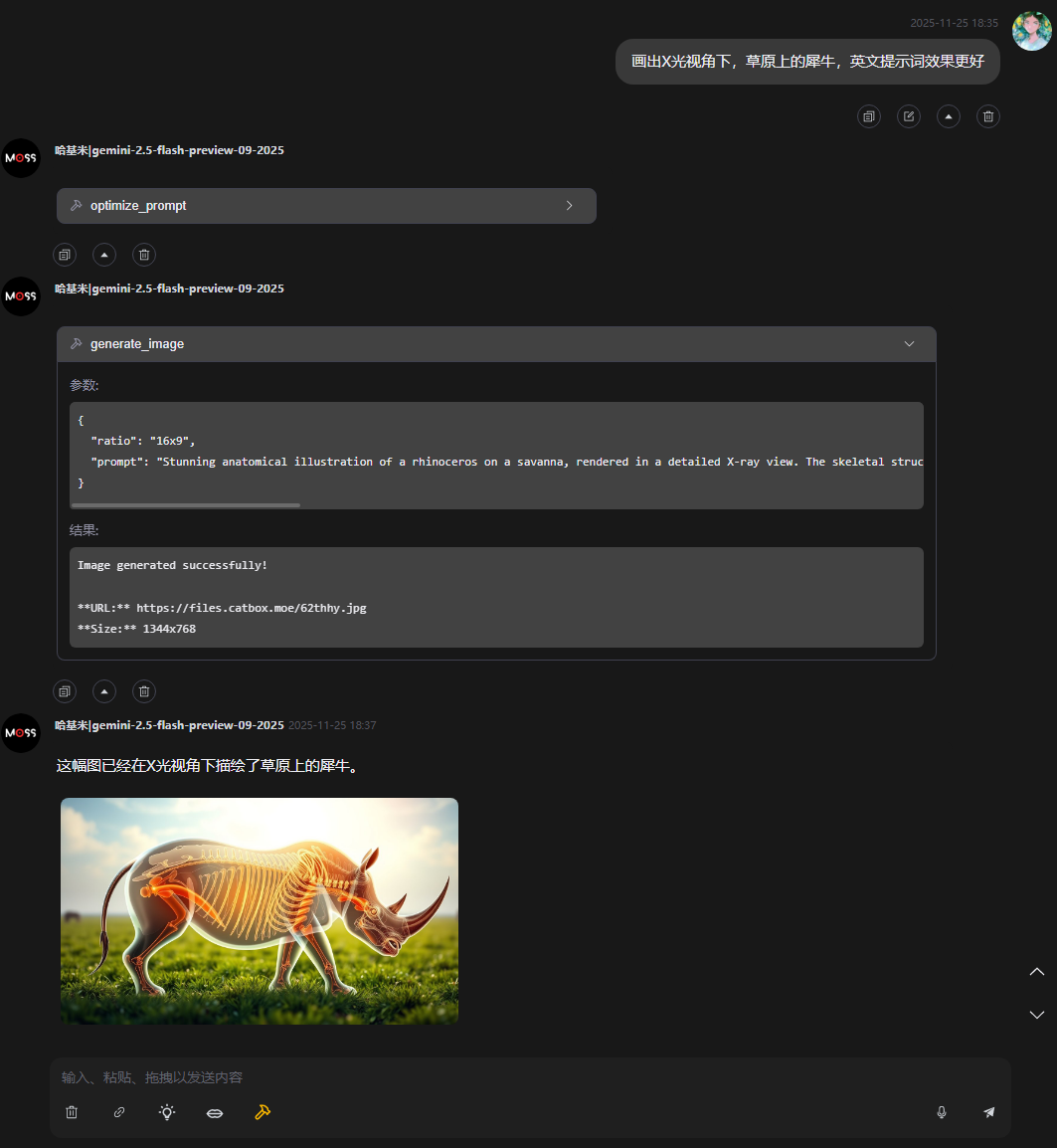
它可以让 Claude Desktop 等 MCP 客户端具备“画图”能力:不仅仅是生成图片,还能自动优化提示词,并将生成的图片自动上传至云端,返回可永久访问的 URL。

Demo

✨ 特性

  • 智能提示词优化 (Prompt Engineering): 将简单的中文/英文短语(如“一只可爱的狗”)自动改写为包含光影、风格、细节描述的专业绘图提示词。

  • 高质量绘图 (AI Generation): 调用 Ketchup AI 引擎生成高分辨率图像。

  • 自动图床上传 (Auto Upload): 生成的图片会自动上传至 URUSAI!,并在对话中直接展示图片预览,同时提供永久链接。

  • 代理支持 (Proxy Support): 内置 undici 代理配置,完美解决国内网络环境下无法访问 URUSAI! 或 API 的问题。

Related MCP server: Replicate Minimax Image-01 MCP Server

🧰 工具详情 (Tools)

本服务器向 MCP 客户端暴露了以下两个工具,大模型可根据上下文自动调用:

1. optimize_prompt

用于将用户的简短描述转化为专业的英文绘图提示词。

  • 描述: Optimize a simple drawing prompt into a detailed professional prompt using Ketchup AI.

  • 输入参数 (Input Schema):

参数名

类型

必填

说明

prompt

string

需要优化的原始提示词(例如:"cyberpunk city at night" 或 "赛博朋克城市")

2. generate_image

用于执行实际的绘图操作并上传。

  • 描述: Generate an image using Ketchup AI and upload it to URUSAI!. Returns the image URL.

  • 输入参数 (Input Schema):

参数名

类型

必填

说明

prompt

string

详细的绘图提示词(建议先调用 optimize_prompt 获取)

ratio

string

图片比例,必须是下方列表中的值之一(如 "16x9"

📐 支持的图片比例 (ratio)

在调用 generate_image 时,ratio 参数支持以下枚举值:

比例代码

尺寸 (WxH)

适用场景

1x1

1024 x 1024

头像、Instagram

16x9

1344 x 768

壁纸、视频封面

9x16

768 x 1344

手机壁纸、Stories

4x3

1152 x 896

传统照片

3x4

896 x 1152

肖像

21x9

1536 x 640

电影宽银幕

9x21

640 x 1536

长条幅

3x2

1280 x 832

风景

2x3

832 x 1280

海报

🚀 使用方法 (Claude Desktop)

无需克隆代码,直接修改 Claude Desktop 的配置文件即可使用 npx 运行。

1. 找到配置文件

  • Windows: %APPDATA%\Claude\claude_desktop_config.json

  • macOS: ~/Library/Application Support/Claude/claude_desktop_config.json

2. 添加配置

将以下内容添加到 mcpServers 对象中:

{
  "mcpServers": {
    "ketchup-draw": {
      "command": "npx",
      "args": [
        "-y",
        "ketchup-draw-mcp-server"
      ],
      "env": {
        "HTTPS_PROXY": "http://127.0.0.1:7890"
      }
    }
  }
}

⚠️ 网络配置重要提示: 由于 URUSAI! 和 Ketchup AI 的服务器在海外,如果你在中国大陆,必须配置 env 中的 HTTPS_PROXY

  • 请将 127.0.0.1:7890 替换为你本地代理软件(如 Clash, v2rayN 等)的实际 HTTP 端口。

  • 如果没有配置代理,图片上传大概率会失败。

🛠️ 本地开发

如果你想贡献代码或进行本地调试:

# 1. 克隆仓库
git clone https://github.com/Komorebi-yaodong/ketchup-draw-mcp-server.git
cd ketchup-draw-mcp-server

# 2. 安装依赖
pnpm install

# 3. 编译
pnpm build

# 4. 运行
node dist/index.js

License

MIT

Available Tools

2 tools
generate_imageA

Generate images based on a list of prompts. Each prompt in the list generates one image.

ParametersJSON Schema
NameRequiredDescriptionDefault
ratioYesThe aspect ratio for all images
promptsYesA list of detailed prompts. 1 to 4 prompts allowed.

TDQS

A3.7/5.0
Behavior2/5

Does the description disclose side effects, auth requirements, rate limits, or destructive behavior?

No annotations are provided, so the description carries the full burden of behavioral disclosure. It does add the useful fact that each prompt generates exactly one image, but it omits critical details such as what the tool returns (e.g., image URLs), potential time delays, rate limits, or failure behavior. For a generation tool, this is insufficient transparency.

Agents need to know what a tool does to the world before calling it. Descriptions should go beyond structured annotations to explain consequences.

Conciseness5/5

Is the description appropriately sized, front-loaded, and free of redundancy?

The description is extremely concise: two short sentences with no redundant information. Every phrase adds meaning, and the most important detail (the one-to-one mapping) is front-loaded. This is an model of efficient writing.

Shorter descriptions cost fewer tokens and are easier for agents to parse. Every sentence should earn its place.

Completeness3/5

Given the tool's complexity, does the description cover enough for an agent to succeed on first attempt?

With no annotations and no output schema, the description is expected to provide more context. It adequately explains the core function and the prompts parameter behavior, but it fails to mention the return value format, any side effects, or when to use this tool relative to 'optimize_prompt'. For a straightforward 2-parameter tool, the description is minimally adequate but not complete.

Complex tools with many parameters or behaviors need more documentation. Simple tools need less. This dimension scales expectations accordingly.

Parameters4/5

Does the description clarify parameter syntax, constraints, interactions, or defaults beyond what the schema provides?

The input schema already provides full descriptions for both parameters (prompts and ratio), so the baseline is 3. The description adds value by clarifying that the prompts array maps one-to-one to generated images, which is not explicitly stated in the schema. This enrichment justifies a score above baseline, though it does not deeply explain ratio semantics.

Input schemas describe structure but not intent. Descriptions should explain non-obvious parameter relationships and valid value ranges.

Purpose5/5

Does the description clearly state what the tool does and how it differs from similar tools?

The description clearly states the tool's function: generating images from a list of prompts. It uses a specific verb ('generate') and resource ('images'), and the second sentence adds the key behavior that each prompt yields one image. This distinguishes it from the sibling tool 'optimize_prompt', which focuses on prompt refinement rather than image generation.

Agents choose between tools based on descriptions. A clear purpose with a specific verb and resource helps agents select the right tool.

Usage Guidelines3/5

Does the description explain when to use this tool, when not to, or what alternatives exist?

The description implies the tool should be used when image generation is needed from text prompts, but it provides no explicit guidance on when to prefer this tool over 'optimize_prompt' or when not to use it. There is no mention of prerequisites, alternative workflows, or exclusions. The context is clear but not elaborated.

Agents often have multiple tools that could apply. Explicit usage guidance like "use X instead of Y when Z" prevents misuse.

optimize_promptA

Optimize a simple drawing prompt into a detailed professional prompt using Ketchup AI.

ParametersJSON Schema
NameRequiredDescriptionDefault
promptYesThe simple prompt to optimize (e.g., 'a cute dog')

TDQS

A4/5.0
Behavior3/5

Does the description disclose side effects, auth requirements, rate limits, or destructive behavior?

No annotations are provided, so the description carries the burden. It states the transformation behavior (simple to detailed) and mentions 'using Ketchup AI', but it does not disclose return format, side effects, permissions, or rate limits. For a simple transformation this is minimal but not rich behavioral context.

Agents need to know what a tool does to the world before calling it. Descriptions should go beyond structured annotations to explain consequences.

Conciseness5/5

Is the description appropriately sized, front-loaded, and free of redundancy?

The description is a single sentence of 13 words, front-loaded with the verb 'Optimize', and contains no redundant or filler text. Every word adds value.

Shorter descriptions cost fewer tokens and are easier for agents to parse. Every sentence should earn its place.

Completeness4/5

Given the tool's complexity, does the description cover enough for an agent to succeed on first attempt?

For a simple one-parameter tool with no output schema, the description adequately explains the purpose and implies the return value (the optimized prompt). It could mention the output format explicitly, but the statement 'into a detailed professional prompt' covers the essential outcome, making it complete enough for the tool's simplicity.

Complex tools with many parameters or behaviors need more documentation. Simple tools need less. This dimension scales expectations accordingly.

Parameters3/5

Does the description clarify parameter syntax, constraints, interactions, or defaults beyond what the schema provides?

The schema description coverage is 100% for the only parameter 'prompt', with an example. The description adds the term 'drawing' but does not materially go beyond the schema's meaning. Baseline of 3 is appropriate due to high schema coverage.

Input schemas describe structure but not intent. Descriptions should explain non-obvious parameter relationships and valid value ranges.

Purpose5/5

Does the description clearly state what the tool does and how it differs from similar tools?

The description uses a specific verb 'Optimize' and a resource 'simple drawing prompt' with a clear goal of producing a 'detailed professional prompt'. This distinguishes it from the sibling tool generate_image, which creates images rather than enhancing prompts.

Agents choose between tools based on descriptions. A clear purpose with a specific verb and resource helps agents select the right tool.

Usage Guidelines4/5

Does the description explain when to use this tool, when not to, or what alternatives exist?

The description clearly implies when to use the tool: when you have a simple prompt and need a more detailed one. It does not explicitly name alternatives or exclusions, but the context of the sibling generate_image suggests a workflow of optimizing first then generating. This meets the 'clear context, no exclusions' level.

Agents often have multiple tools that could apply. Explicit usage guidance like "use X instead of Y when Z" prevents misuse.

Tool Schema Changelog

Recent tool additions, removals, and schema changes observed during successful MCP inspections.

  1. 2 tool updatesv1.0.4
    • First observedgenerate_image
    • First observedoptimize_prompt

TDQS

A3.9/5.0

Scored across 2 tools

Disambiguation5/5

The two tools have clearly distinct roles: optimize_prompt refines a prompt, while generate_image produces images from prompts. There is no overlap in functionality.

Naming Consistency5/5

Both tools follow the same verb_noun pattern: optimize_prompt and generate_image. This is consistent and predictable.

Tool Count3/5

With only two tools, the server feels minimal. While the tools cover a basic prompt-to-image workflow, the count is borderline for a full-featured server.

Completeness4/5

The core workflow of optimizing a prompt and generating an image is covered. Minor gaps exist, such as no options for adjusting generation parameters, but the essential functionality is present.

Maintenance

ActivityInactive
ResponsivenessNo issues

Related MCP Connectors

Related MCP Servers