Glama
Kirandawadi

Volatility3 MCP Server

by Kirandawadi

Volatility3 MCPサーバー

導入

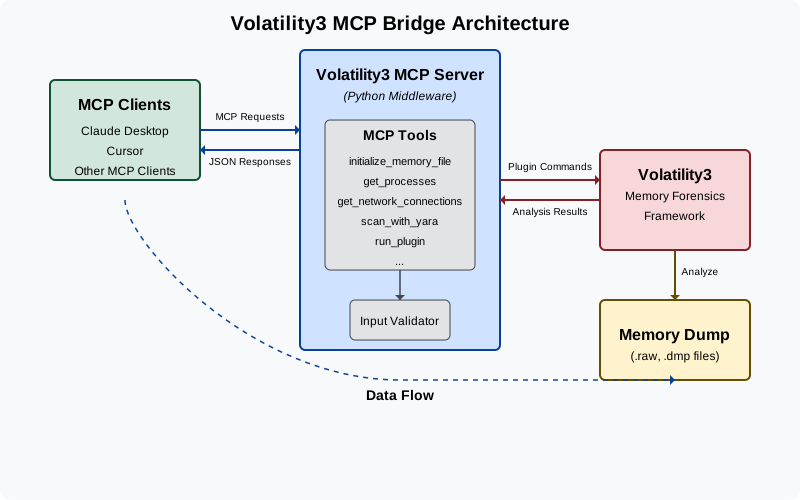
Volatility3 MCP Serverは、Claude DesktopなどのMCPクライアントと、高度なメモリフォレンジックフレームワークであるVolatility3を接続する強力なツールです。この統合により、LLMはシンプルな会話型インターフェースを通じて、メモリダンプの解析、マルウェアの検出、そして高度なメモリフォレンジックタスクを実行できるようになります。アーキテクチャ図
Related MCP server: Volatility MCP

これが解決するもの

メモリフォレンジックは複雑な分野であり、通常は専門知識とコマンドラインの専門知識が求められます。このプロジェクトは、以下の方法でそのギャップを埋めます。

  • 専門家でなくても自然言語で記憶フォレンジックを実行できるようにする

  • LLMがメモリダンプを直接分析して洞察を提供できるようにする

  • 通常は複数の手動ステップを必要とする一般的なフォレンジックワークフローを自動化

  • メモリフォレンジックをよりアクセスしやすく、ユーザーフレンドリーにする

特徴

  • メモリダンプ分析: さまざまなプラグインを使用して Windows および Linux のメモリダンプを分析します

  • プロセス検査: 実行中のプロセスを一覧表示し、その詳細を調べ、疑わしいアクティビティを特定します。

  • ネットワーク分析: ネットワーク接続を調べてコマンド&コントロールサーバーを検出する

  • クロスプラットフォーム サポート: Windows と Linux の両方のメモリ ダンプで動作します (macOS のサポートは近日中に開始されます)

  • マルウェア検出: YARAルールでメモリをスキャンし、既知のマルウェアシグネチャを識別します。

デモ

デモビデオ

このツールの詳細なプレゼンテーションもこちらでご覧いただけます。

構成

  1. このリポジトリをクローンします:

  2. 仮想環境を作成します。

    python -m venv environ
    source environ/bin/activate
  3. 必要な依存関係をインストールします。

    pip install -r requirements.txt

このプロジェクトは次の 2 つの方法で使用できます。

オプション1: Claude Desktopを使用

  1. Claude デスクトップを設定します。

    • Claude -> Settings -> Developer -> Edit Config -> claude_desktop_config.jsonに移動し、次の内容を追加します。

         {
             "mcpServers": {
             "volatility3": {
                 "command": "absolute/path/to/virtual/environment/bin/python3",
                 "args": [
                 "absolute/path/to/bridge_mcp_volatility.py"
                 ]
             }
             }
         }

      Claude Desktopで利用可能なツール

  2. Claude Desktop を再起動し、メモリ ダンプの分析を開始します。

オプション 2: カーソル付き (SSE サーバー)

  1. SSE サーバーを起動します。

    python3 start_sse_server.py
  2. SSE サーバーを使用するように Cursor を構成します。

    • カーソル設定を開く

    • Features -> MCP Serversに移動します

    • URL http://127.0.0.1:8080/sseで新しい MCP サーバーを追加します。 カーソルコンポーザー

  3. エージェント モードで Cursor Composer を使用して、メモリ ダンプの分析を開始します。

利用可能なツール

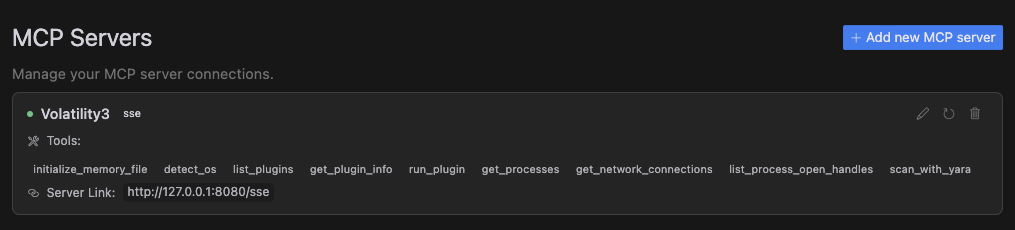
  • initialize_memory_file : 分析用のメモリダンプファイルを設定する

  • detect_os : メモリダンプのオペレーティングシステムを識別する

  • list_plugins : 利用可能なすべての Volatility3 プラグインを表示します

  • get_plugin_info : 特定のプラグインの詳細情報を取得する

  • run_plugin : カスタム引数で任意の Volatility3 プラグインを実行する

  • get_processes : メモリダンプ内の実行中のすべてのプロセスを一覧表示する

  • get_network_connections : システムからのすべてのネットワーク接続を表示する

  • list_process_open_handles : プロセスによってアクセスされたファイルとリソースを調べる

  • scan_with_yara : YARAルールを使用してメモリ内の悪意のあるパターンをスキャンします

貢献

貢献を歓迎します!お気軽にプルリクエストを送信してください。

Tool Schema Changelog

Recent tool additions, removals, and schema changes observed during successful MCP inspections. Dates show when Glama detected each change.

No tool schema history has been recorded yet.

Maintenance

ActivityInactive
ResponsivenessNo issues

Resources

Unclaimed servers have limited discoverability.

Looking for Admin?

If you are the server author, to access and configure the admin panel.

Related MCP Connectors

Related MCP Servers

  • F
    license
    Not graded
    quality
    D
    maintenance
    AI-powered memory dump analysis using Volatility 3 for digital forensics investigations. Enables process analysis, malware detection, network forensics, timeline generation, and anomaly detection with support for Claude, Llama, and other LLMs.
    -
  • A
    license
    Not graded
    quality
    D
    maintenance
    Enables AI assistants to perform memory forensics analysis using Volatility 3 through natural language prompts. Supports process listing, network connection analysis, and other memory artifact inspection from memory images.
    52
    Apache 2.0
  • A
    license
    Not graded
    quality
    F
    maintenance
    Enables automated memory forensics analysis using Volatility 3, supporting Windows, Linux, and macOS memory dumps through a modular plugin interface.
    1
    MIT
  • A
    license
    Not graded
    quality
    A
    maintenance
    Enables natural language threat hunting and incident response by connecting LLMs to enterprise security data sources like Elasticsearch, EVTX logs, PCAP files, and Velociraptor.
    206
    GPL 3.0

Latest Blog Posts

MCP directory API

We provide all the information about MCP servers via our MCP API.

curl -X GET 'https://glama.ai/api/mcp/v1/servers/Kirandawadi/volatility3-mcp'

If you have feedback or need assistance with the MCP directory API, please join our Discord server