
Stitch MCP
README.md
# Stitch MCP
<div align="center">
[](https://www.npmjs.com/package/stitch-mcp)
[](https://opensource.org/licenses/MIT)
[](https://modelcontextprotocol.io)
**Universal MCP Server for Google Stitch**
</div>
Build amazing UI/UX designs instantly with AI. Works seamlessly with Cursor, Claude, Antigravity, and any MCP-compatible editor.
Created by **Aakash Kargathara**.
---
## 🚀 How It Works
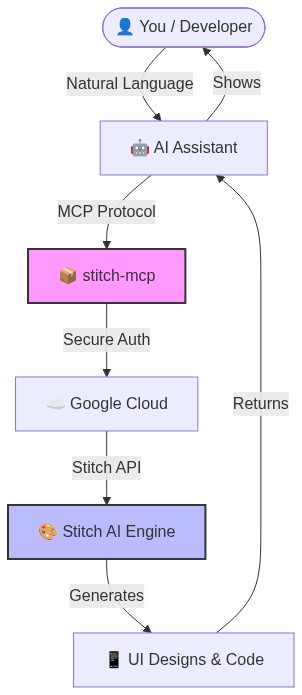
## ✨ Why this is cool
- **Zero Config**: Just login once and it works everywhere.
- **Universal**: Works on Windows, Mac, and Linux.
- **Free**: Google Stitch API is free to use.
## �️ Quick Setup (2 Minutes)
### 1. Prerequisite: Google Cloud
You need a Google Cloud project with the Stitch API enabled.
```bash
# Login to your Google Cloud
gcloud auth login
# Set your project (replace with your actual project ID)
gcloud config set project YOUR_PROJECT_ID
gcloud auth application-default set-quota-project YOUR_PROJECT_ID
# Enable the magic
gcloud beta services mcp enable stitch.googleapis.com
```
### 2. Install the Credentials
This gives `stitch-mcp` permission to talk to Google on your behalf.
```bash
gcloud auth application-default login
```
### 3. Add to Your AI Editor
Copy and paste this into your MCP config file:
**For Claude Desktop**:
`~/Library/Application Support/Claude/claude_desktop_config.json`
**For Cursor**:
Settings > MCP > Add New Server
```json
{
"mcpServers": {
"stitch": {
"command": "npx",
"args": ["-y", "stitch-mcp"],
"env": {
"GOOGLE_CLOUD_PROJECT": "YOUR_PROJECT_ID"
}
}
}
}
```
## 🛠️ Available Tools
| Tool Name | What it does |
|-----------|--------------|
| **`extract_design_context`** | 🧠 Scans a screen to extract "Design DNA" (Fonts, Colors, Layouts). Use this to keep style consistent. |
| **`fetch_screen_code`** | 💾 Downloads the raw HTML/Frontend code of a screen. |
| **`fetch_screen_image`** | 🖼️ Downloads the high-res screenshot of a screen. |
| **`generate_screen_from_text`** | ✨ Generates a NEW screen based on your prompt (and context). |
| **`create_project`** | 📁 Creates a new workspace/project folder. |
| **`list_projects`** | 📋 Lists all your available Stitch projects. |
| **`list_screens`** | 📱 Lists all screens within a specific project. |
| **`get_project`** | 🔍 Retrieves details of a specific project. |
| **`get_screen`** | ℹ️ Gets metadata for a specific screen. |
## 💡 Pro Tip: The "Designer Flow"
To generate consistent UI, use this 2-step flow:
1. **Extract**: "Get design context from the Home Screen..."
2. **Generate**: "Using that context, generate a Chat Screen..."
This ensures your new screen matches your existing design system perfectly.
## 📄 License
**Apache 2.0** - Open source and free to use.
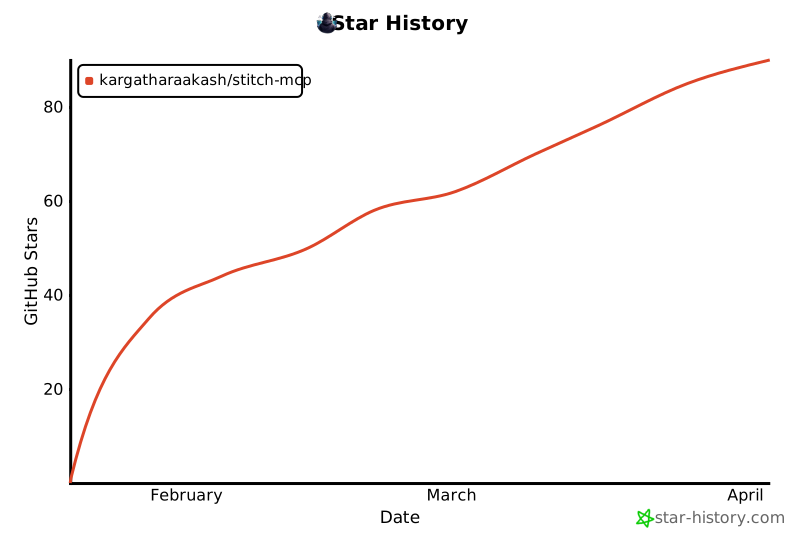
## Star History
[](https://www.star-history.com/#Kargatharaakash/stitch-mcp&type=date&legend=top-left)
---
*Built with ❤️ by Aakash Kargathara*
This server cannot be deployed
Maintenance
ActivityInactive
ResponsivenessNo issues