
PocketMCP
Click on "Install Server".
Wait a few minutes for the server to deploy. Once ready, it will show a "Started" state.
In the chat, type
@followed by the MCP server name and your instructions, e.g., "@PocketMCPsearch for information about SQLite vector storage"
That's it! The server will respond to your query, and you can continue using it as needed.
Here is a step-by-step guide with screenshots.
PocketMCP
PocketMCP is a lightweight, local-first MCP (Model Context Protocol) server that automatically watches folders, chunks and embeds files locally using Transformers.js with MiniLM, stores vectors in SQLite + sqlite-vec, and exposes semantic search capabilities to VS Code and Cursor. Designed for small machines (I'm running on an Intel N100 with 16GB RAM) with zero external dependencies after initial model download.
Features
🔍 Semantic Search: Find content by meaning, not just keywords
📁 Auto-Ingestion: Watches folders and automatically processes new/changed files
📄 Multi-Format Support: PDF, DOCX, Markdown, and plain text files
⚡ Local-First: Runs completely offline after initial model download
🗄️ SQLite Storage: Fast, reliable vector storage with sqlite-vec extension
🔧 MCP Integration: Native support for VS Code and Cursor via MCP protocol
🌐 Web Interface: Built-in web tester for validation and manual testing
💾 Efficient: Designed for resource-constrained environments
🔄 Real-time: Debounced file watching with smart concurrency limits
📊 Smart Segmentation: Page-aware PDF processing and section-aware DOCX handling
🛡️ Robust Error Handling: Graceful handling of encrypted, corrupted, or oversized files
Related MCP server: Task Manager MCP Server
Architecture
flowchart TD
    subgraph "MCP Clients"
        A[VS Code]
        B[Cursor]
    end

    subgraph "Web Interface"
        W1[React Frontend<br/>:5173]
        W2[Express API<br/>:5174]
    end

    subgraph "PocketMCP Server"
        C[MCP Server<br/>stdio transport]
        D[File Watcher<br/>chokidar]
        E[Text Chunker<br/>~1000 chars]
        F[Embeddings<br/>Transformers.js<br/>MiniLM-L6-v2]
        G[SQLite + sqlite-vec<br/>Vector Database]
    end

    subgraph "File System"
        H[Watch Directory<br/>./kb/]
        I[Data Directory<br/>./data/]
    end

    A -.->|MCP Tools| C
    B -.->|MCP Tools| C
    W1 -->|HTTP API| W2
    W2 -->|Database Access| G
    C --> D
    D -->|File Changes| E
    E -->|Text Chunks| F
    F -->|384-dim Vectors| G
    G -.->|Search Results| C
    D -.->|Monitors| H
    G -.->|Stores in| I

    classDef mcpClient fill:#e1f5fe
    classDef webInterface fill:#fff3e0
    classDef server fill:#f3e5f5
    classDef storage fill:#e8f5e8

    class A,B mcpClient
    class W1,W2 webInterface
    class C,D,E,F,G server
    class H,I storage
Performance & Limits
Sweet spot: 10K-100K chunks on modest hardware
Query latency: Sub-100ms for
top_k <= 10on typical corporaMemory usage: ~100MB for model + minimal overhead per document
Concurrency: Limited to 3 simultaneous file operations by default
File size limit: 50MB per file (configurable)
Screenshots
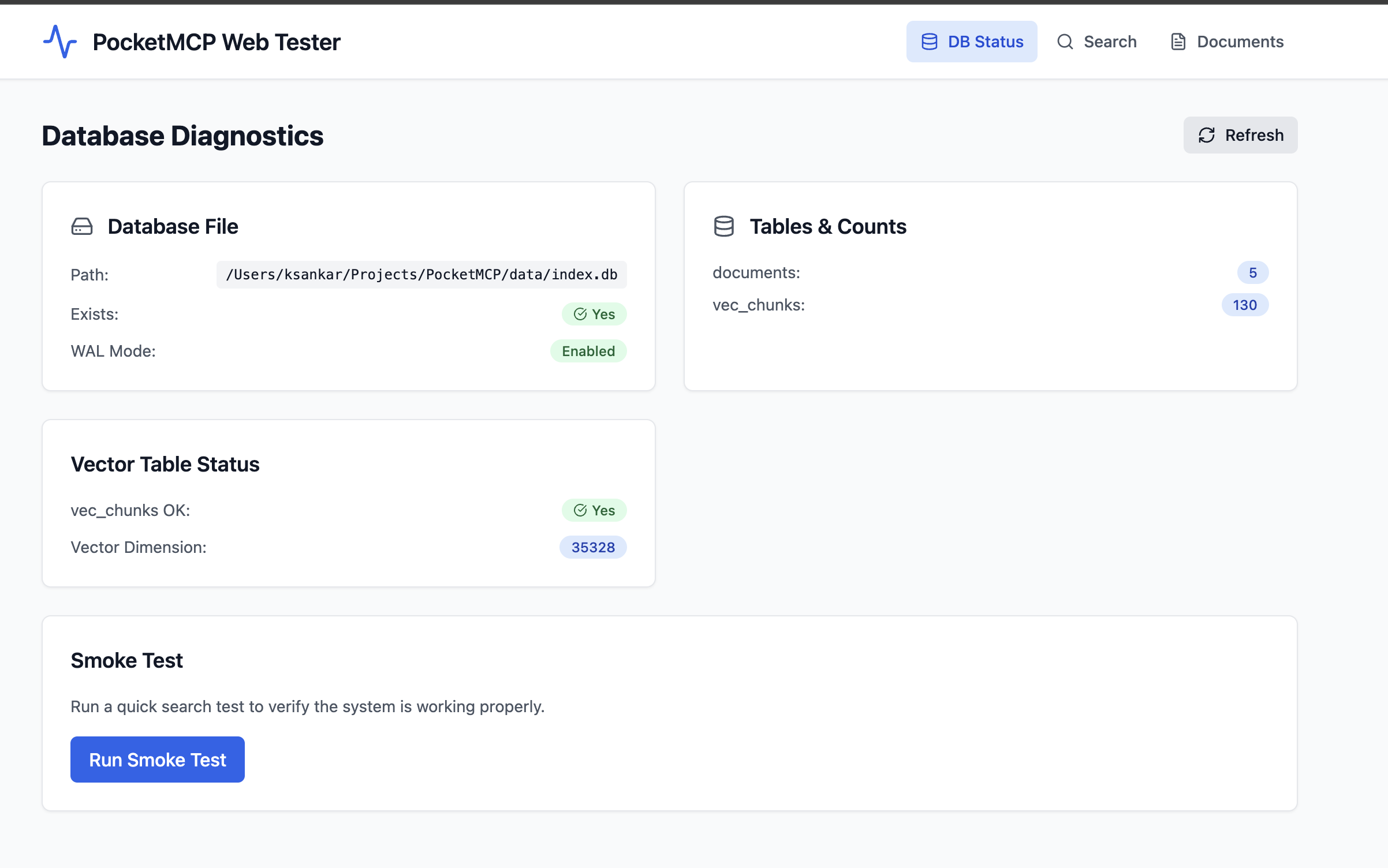
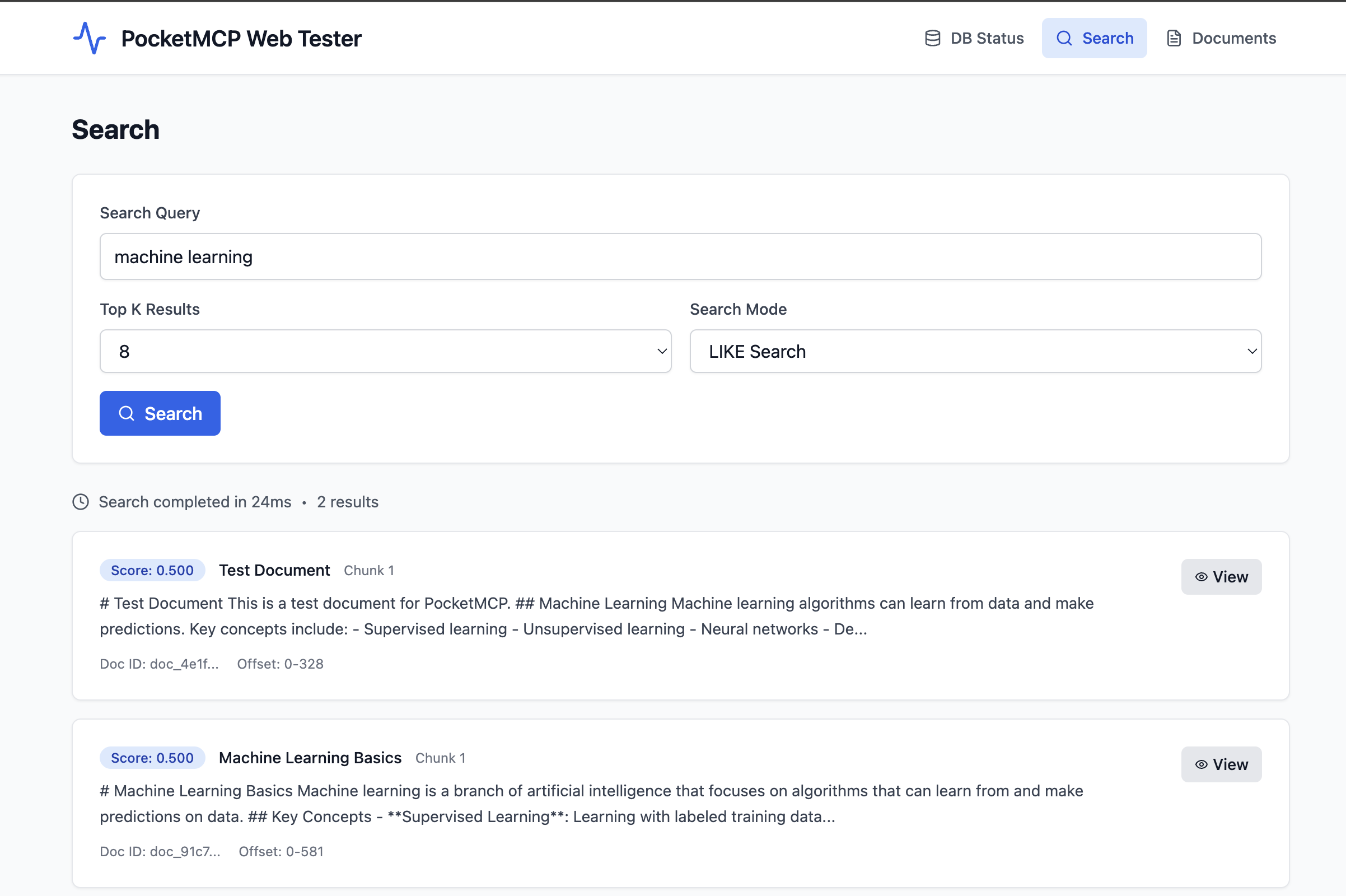
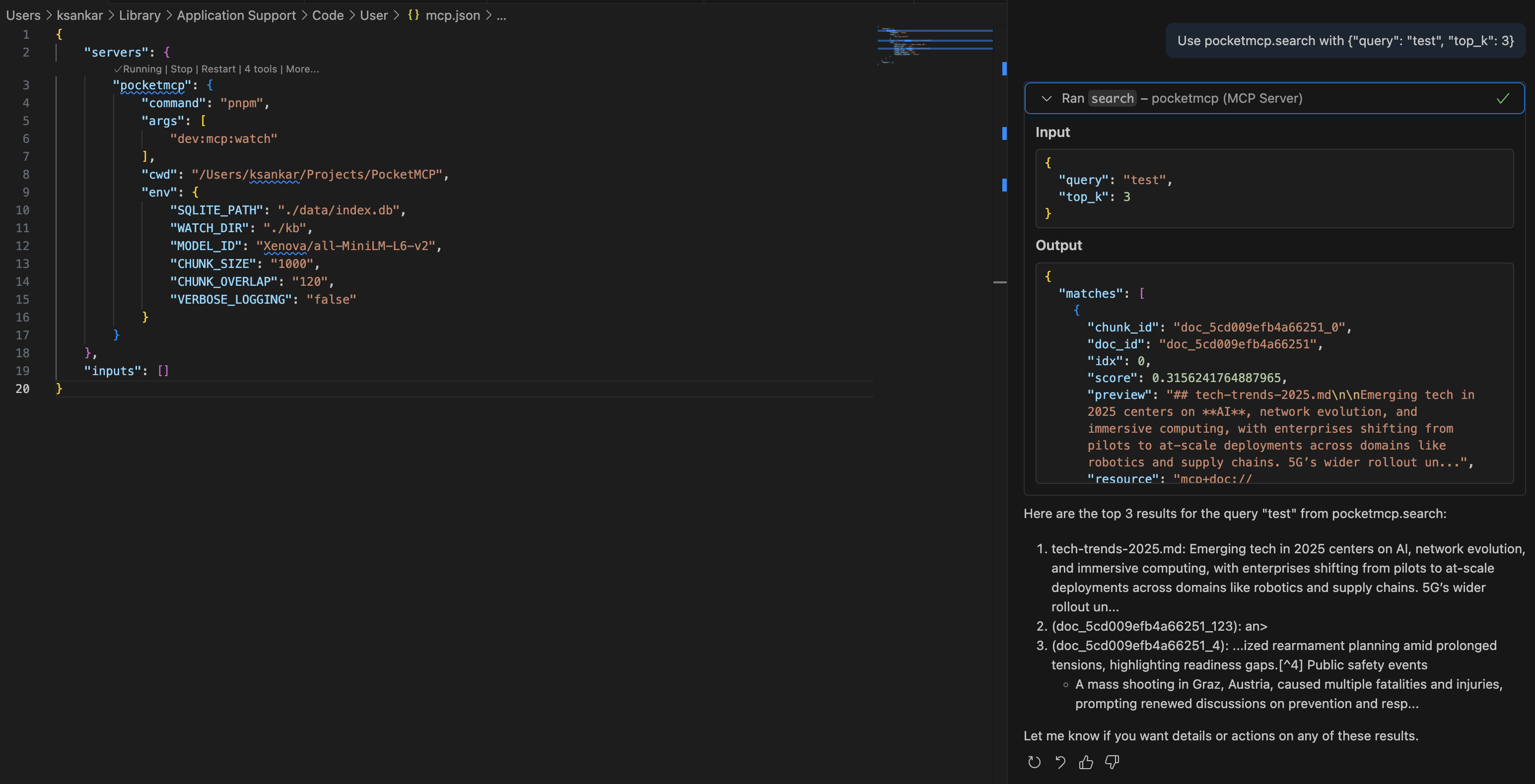
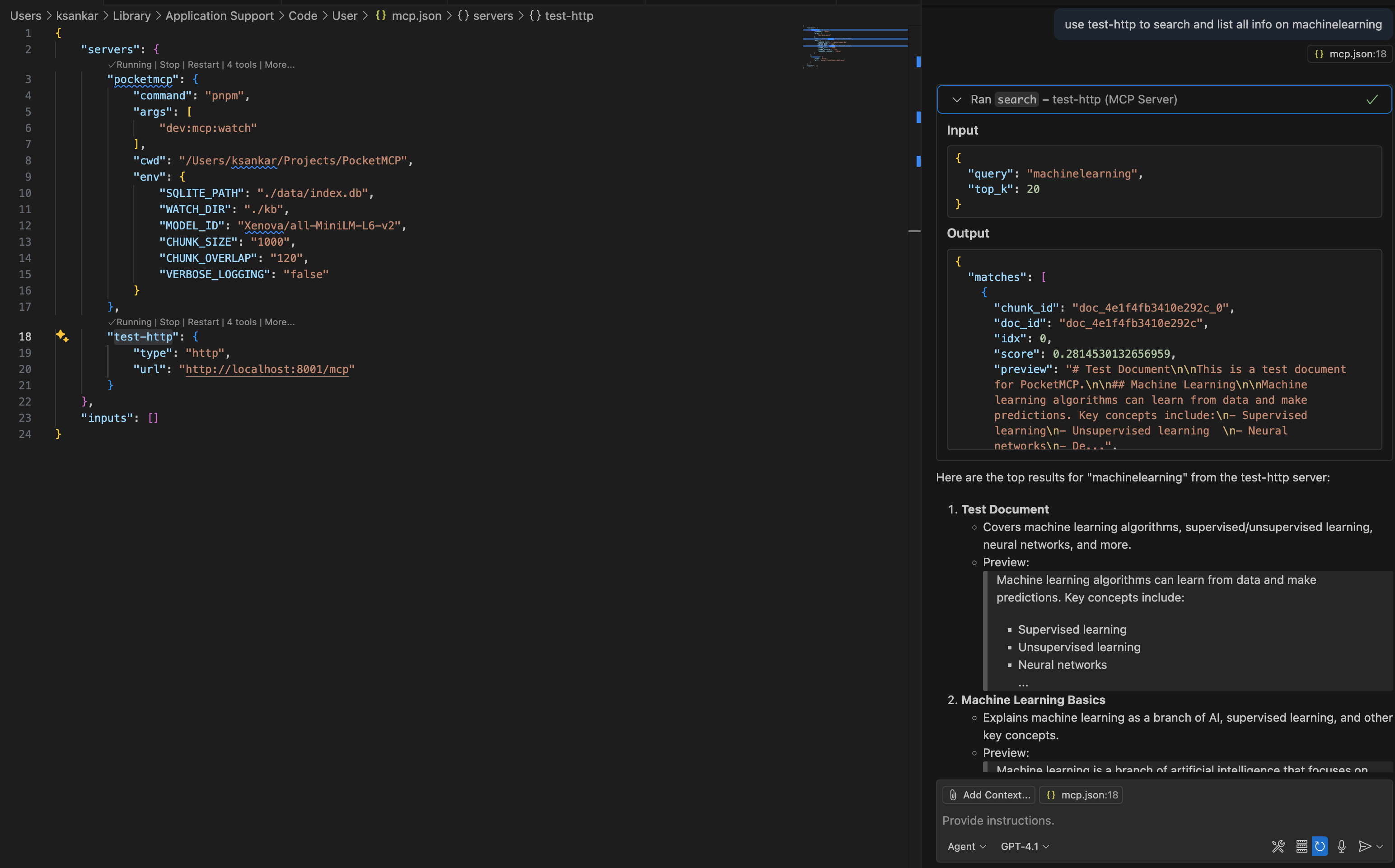
Table of Contents
Quick Start
1. Installation
# Clone or download the project
cd PocketMCP

# Install dependencies
pnpm install

# Setup environment
pnpm setup
# Or manually: cp .env.sample .env
2. Configuration
Edit .env file:
# SQLite database path
SQLITE_PATH=./data/index.db

# Directory to watch for file changes (optional)
WATCH_DIR=./kb

# Embedding model (default is recommended)
MODEL_ID=Xenova/all-MiniLM-L6-v2

# Chunking configuration
CHUNK_SIZE=1000
CHUNK_OVERLAP=120
3. Create Content Directory
# Create directory for your documents
mkdir -p kb

# Add some markdown or text files
echo "# My First Document" > kb/test.md
echo "This is a sample document for testing PocketMCP." >> kb/test.md
4. Start the Server
# Development - MCP server + web interface
pnpm dev

# Production - MCP server only
pnpm build && pnpm start
On first run, the server will download the MiniLM model (~100MB) and then process any files in your watch directory.
Web Tester
PocketMCP includes a comprehensive web interface for testing and validation.
Access Points
Web Interface: http://127.0.0.1:5173
API Server: http://127.0.0.1:5174
Health Check: http://127.0.0.1:5174/health
Features
📊 Database Diagnostics Panel
Real-time database status monitoring
Table counts and vector dimensions
SQLite WAL mode verification
Error detection and reporting
One-click smoke testing
🔍 Search Panel
Interactive semantic search testing
LIKE vs Vector search modes
Configurable result count (top-K)
Detailed result inspection
Performance metrics (response time)
📄 Documents Panel
Browse all indexed documents
Pagination support
Document metadata display
Creation and update timestamps
🔎 Chunk Viewer
Detailed chunk inspection modal
Full text content display
Metadata and offset information
Copy-to-clipboard functionality
API Endpoints
Endpoint | Method | Description |
| GET | Server health check |
| GET | Database diagnostics |
| POST | Semantic search |
| GET | Get specific chunk |
| GET | List documents |
Example API Usage
Search Documents:
curl -X POST http://127.0.0.1:5174/api/search \
  -H "Content-Type: application/json" \
  -d '{"query": "machine learning", "top_k": 5, "mode": "like"}'
Get Diagnostics:
curl http://127.0.0.1:5174/api/db/diag | jq .🔧 MCP Client Integration
Cursor Integration
Open Cursor Settings → MCP
Add a new server:
{
  "command": "pnpm",
  "args": ["dev:mcp"],
  "cwd": "/path/to/PocketMCP",
  "env": {
    "TRANSPORT": "stdio",
    "SQLITE_PATH": "./data/index.db",
    "WATCH_DIR": "./kb"
  }
}
VS Code Integration
Add to your MCP settings:
{
  "mcpServers": {
    "pocketmcp": {
      "command": "pnpm",
      "args": ["dev:mcp"],
      "cwd": "/path/to/PocketMCP",
      "env": {
        "TRANSPORT": "stdio",
        "SQLITE_PATH": "./data/index.db",
        "WATCH_DIR": "./kb"
      }
    }
  }
}
HTTP Transport (Web Clients)
For web clients or remote access:
{
  "mcpServers": {
    "pocketmcp": {
      "transport": "http",
      "url": "http://localhost:8001/mcp"
    }
  }
}
📚 API Reference
MCP Tools
search
Search for similar content using semantic search.
{
  "query": "machine learning algorithms",
  "top_k": 5,
  "filter": {
    "doc_ids": ["doc_123", "doc_456"]
  }
}
upsert_documents
Insert or update documents programmatically.
{
  "docs": [
    {
      "text": "Your document content here...",
      "external_id": "my_doc_1",
      "title": "Important Notes",
      "metadata": {}
    }
  ]
}
delete_documents
Delete documents by ID.
{
  "doc_ids": ["doc_123"],
  "external_ids": ["my_doc_1"]
}
list_documents
List all documents with pagination.
{
  "page": {
    "limit": 20
  }
}
MCP Resources
PocketMCP provides resource URIs for accessing specific chunks:
Format:
mcp+doc://<doc_id>#<chunk_id>Returns: Complete chunk data including text, offsets, and metadata
Configuration
Environment Variables
Variable | Default | Description |
|
| Path to SQLite database file |
| (none) | Directory to watch for file changes |
|
| Hugging Face model for embeddings |
|
| Target chunk size in characters |
|
| Overlap between chunks in characters |
|
| Maximum pages to process in PDF files |
|
| Minimum text characters required in PDFs |
|
| Maximum file size for DOCX files (10MB) |
|
| Split DOCX documents on headings (h1/h2) |
|
| Environment mode |
|
| Enable detailed logs |
|
| Enable dotenv debug output |
|
| Web API server port |
|
| API server bind address |
|
| MCP transport mode (stdio/http/both) |
|
| HTTP server bind address |
|
| MCP server port |
|
| Logging level (debug/info/warn/error) |
Available Scripts
Script | Description |
| Start web interface + API server for testing |
| Start MCP server (both transports + file watching) |
| Build all components |
| Start production MCP server (both transports + file watching) |
| Create .env from template |
| Clean build artifacts and database |
Watch Directory
WATCH_DIRis optional - if not set, only manual document upserts workSupported files:
.md,.txt,.pdf,.docxFile filtering: Automatically ignores temp files,
.DS_Store,node_modules, etc.Nested directories: Recursively watches all subdirectories
Document Processing
Processing Pipeline: Documents → Segments → Chunks
Documents: Top-level files with metadata
Segments: Logical divisions (PDF pages, DOCX sections, etc.)
Chunks: Text pieces optimized for embedding (~1000 chars)
Status Types: ok, skipped, needs_ocr, too_large, error
Supported File Types
Markdown (
.md)Plain text (
.txt)PDF (
.pdf) - Text-based only, no OCRDOCX (
.docx) - Microsoft Word documents
Notes:
Encrypted/password-protected files are skipped
Large files exceeding limits are marked as
too_largeScanned PDFs requiring OCR are marked as
needs_ocr
Development
Project Structure
PocketMCP/                    # Monorepo root
├── package.json             # Workspace configuration
├── pnpm-workspace.yaml      # pnpm workspace setup
├── .env                     # Environment variables
├── .env.sample              # Environment template
├── apps/
│   ├── api/                 # Express API server
│   │   ├── src/
│   │   │   ├── server.ts    # Main API server
│   │   │   └── db.ts        # Database manager
│   │   └── package.json
│   └── web/                 # React + Vite frontend
│       ├── src/
│       │   ├── App.tsx      # Main app component
│       │   ├── store.ts     # Zustand state management
│       │   ├── api.ts       # API client
│       │   └── components/  # UI components
│       └── package.json
├── src/                     # Original MCP server
│   ├── server.ts            # MCP server and main entry point
│   ├── db.ts                # SQLite database with sqlite-vec
│   ├── embeddings.ts        # Transformers.js embedding pipeline
│   ├── chunker.ts           # Text chunking with sentence awareness
│   ├── ingest.ts            # Generic document ingestion
│   ├── file-ingest.ts       # File-specific ingestion logic
│   └── watcher.ts           # File system watcher with debouncing
├── data/                    # SQLite database storage
├── kb/                      # Default watch directory (configurable)
└── README.md
Development Commands
# Install and setup
pnpm install
pnpm setup

# Development
pnpm dev          # Web interface + API
pnpm dev:mcp      # MCP server only

# Production
pnpm build
pnpm start

# Testing
curl http://127.0.0.1:5174/health
Deployment
Docker (Recommended)
Quick Start:
# Pull and run with all services (MCP + API + Web UI)
docker run -d \
  --name pocketmcp \
  --restart unless-stopped \
  -p 8001:8001 \
  -p 5174:5174 \
  -p 5173:5173 \
  -v pocketmcp_data:/app/data \
  -v pocketmcp_kb:/app/kb \
  -v pocketmcp_cache:/app/.cache \
  ghcr.io/kailash-sankar/pocketmcp:latest
Access Points:
MCP Server:
http://localhost:8001API Server:
http://localhost:5174Web UI:
http://localhost:5173
Docker Compose:
git clone https://github.com/kailash-sankar/PocketMCP.git
cd PocketMCP
cp .env.sample .env
docker-compose up -d
Portainer Stacks
Go to Stacks → Add stack
Name:
pocketmcpPaste this configuration:
version: '3.8'
services:
  pocketmcp:
    image: ghcr.io/kailash-sankar/pocketmcp:latest
    container_name: pocketmcp
    restart: unless-stopped
    ports:
      - "8001:8001"  # MCP Server
      - "5174:5174"  # API Server
      - "5173:5173"  # Web UI
    volumes:
      - pocketmcp_data:/app/data
      - pocketmcp_kb:/app/kb
      - pocketmcp_cache:/app/.cache
    environment:
      - NODE_ENV=production
      - TRANSPORT=both
      - SQLITE_PATH=/app/data/index.db
      - WATCH_DIR=/app/kb
    healthcheck:
      test: ["CMD", "curl", "-f", "http://localhost:5173/health"]
      interval: 30s
      timeout: 10s
      retries: 3
      start_period: 60s

volumes:
  pocketmcp_data:
  pocketmcp_kb:
  pocketmcp_cache:
Direct Installation
# Clone and setup
git clone https://github.com/kailash-sankar/PocketMCP.git
cd PocketMCP
pnpm install
pnpm setup

# Configure environment
cp .env.sample .env
# Edit .env with your settings

# Create content directory
mkdir -p kb

# Build and start
pnpm build
pnpm start
Access Points:
MCP Server:
http://localhost:8001API Server:
http://localhost:5174Web UI:
http://localhost:5173
Troubleshooting
Model Download Issues
If the embedding model fails to download:
Check internet connection for initial download
Model cache location:
~/.cache/huggingface/transformers/Clear cache and retry if needed
SQLite Extension Issues
If sqlite-vec fails to load:
Ensure
sqlite-vecnpm package is installedCheck that your system supports the required SQLite version
The system automatically falls back to regular SQLite tables if vec0 virtual tables fail
File Watching Issues
Files not being detected: Check file extensions and ignore patterns
High CPU usage: Increase debounce time with larger
debounceMsvaluesPermission errors: Ensure read/write access to watch and data directories
Web Interface Issues
API not accessible: Ensure API server is running on port 5174
Database not found: Check
SQLITE_PATHenvironment variableCORS errors: API server includes CORS headers for local development
Memory Issues
Reduce
CHUNK_SIZEfor lower memory usageProcess fewer files simultaneously by reducing
maxConcurrencyConsider using a smaller embedding model (though this requires code changes)
Common Error Messages
"Too many parameter values were provided"
This was a known issue with sqlite-vec virtual tables, now fixed with automatic fallback
"Failed to load sqlite-vec extension"
System automatically falls back to regular SQLite tables with JSON embeddings
"Database file does not exist"
Run the MCP server first to create the database, or check the
SQLITE_PATH
License
MIT License - see LICENSE file for details.
Contributing
Fork the repository
Create a feature branch
Make your changes
Add tests if applicable
Submit a pull request
Acknowledgments
sqlite-vec for fast vector similarity search
Transformers.js for local embedding generation
Model Context Protocol for standardized tool integration
Hugging Face for the MiniLM model
React + Vite for the modern web interface
TailwindCSS for beautiful, responsive styling
Resources
Unclaimed servers have limited discoverability.
Looking for Admin?
If you are the server author, to access and configure the admin panel.
Latest Blog Posts
MCP directory API
We provide all the information about MCP servers via our MCP API.
curl -X GET 'https://glama.ai/api/mcp/v1/servers/Kailash-Sankar/PocketMCP'
If you have feedback or need assistance with the MCP directory API, please join our Discord server