

A
licenseA
qualityD
maintenanceA local-first MCP server that exposes personal notes and files as unified semantic context for AI agents via vector search and file monitoring.
6
MIT

Click on "Deploy Server".
Wait a few minutes for the server to deploy. Once ready, it will show a "Started" state.
In the chat, type @ followed by the MCP server name and your instructions, e.g., "@PocketMCP search for information about SQLite vector storage"
That's it! The server will respond to your query, and you can continue using it as needed.
Here is a step-by-step guide with screenshots.
PocketMCP is a lightweight, local-first MCP (Model Context Protocol) server that automatically watches folders, chunks and embeds files locally using Transformers.js with MiniLM, stores vectors in SQLite + sqlite-vec, and exposes semantic search capabilities to VS Code and Cursor. Designed for small machines (I'm running on an Intel N100 with 16GB RAM) with zero external dependencies after initial model download.
🔍 Semantic Search: Find content by meaning, not just keywords
📁 Auto-Ingestion: Watches folders and automatically processes new/changed files
📄 Multi-Format Support: PDF, DOCX, Markdown, and plain text files
⚡ Local-First: Runs completely offline after initial model download
🗄️ SQLite Storage: Fast, reliable vector storage with sqlite-vec extension
🔧 MCP Integration: Native support for VS Code and Cursor via MCP protocol
🌐 Web Interface: Built-in web tester for validation and manual testing
💾 Efficient: Designed for resource-constrained environments
🔄 Real-time: Debounced file watching with smart concurrency limits
📊 Smart Segmentation: Page-aware PDF processing and section-aware DOCX handling
🛡️ Robust Error Handling: Graceful handling of encrypted, corrupted, or oversized files
Related MCP server: knowledgine
flowchart TD
    subgraph "MCP Clients"
        A[VS Code]
        B[Cursor]
    end

    subgraph "Web Interface"
        W1[React Frontend<br/>:5173]
        W2[Express API<br/>:5174]
    end

    subgraph "PocketMCP Server"
        C[MCP Server<br/>stdio transport]
        D[File Watcher<br/>chokidar]
        E[Text Chunker<br/>~1000 chars]
        F[Embeddings<br/>Transformers.js<br/>MiniLM-L6-v2]
        G[SQLite + sqlite-vec<br/>Vector Database]
    end

    subgraph "File System"
        H[Watch Directory<br/>./kb/]
        I[Data Directory<br/>./data/]
    end

    A -.->|MCP Tools| C
    B -.->|MCP Tools| C
    W1 -->|HTTP API| W2
    W2 -->|Database Access| G
    C --> D
    D -->|File Changes| E
    E -->|Text Chunks| F
    F -->|384-dim Vectors| G
    G -.->|Search Results| C
    D -.->|Monitors| H
    G -.->|Stores in| I

    classDef mcpClient fill:#e1f5fe
    classDef webInterface fill:#fff3e0
    classDef server fill:#f3e5f5
    classDef storage fill:#e8f5e8

    class A,B mcpClient
    class W1,W2 webInterface
    class C,D,E,F,G server
class H,I storageSweet spot: 10K-100K chunks on modest hardware
Query latency: Sub-100ms for top_k <= 10 on typical corpora
Memory usage: ~100MB for model + minimal overhead per document
Concurrency: Limited to 3 simultaneous file operations by default
File size limit: 50MB per file (configurable)
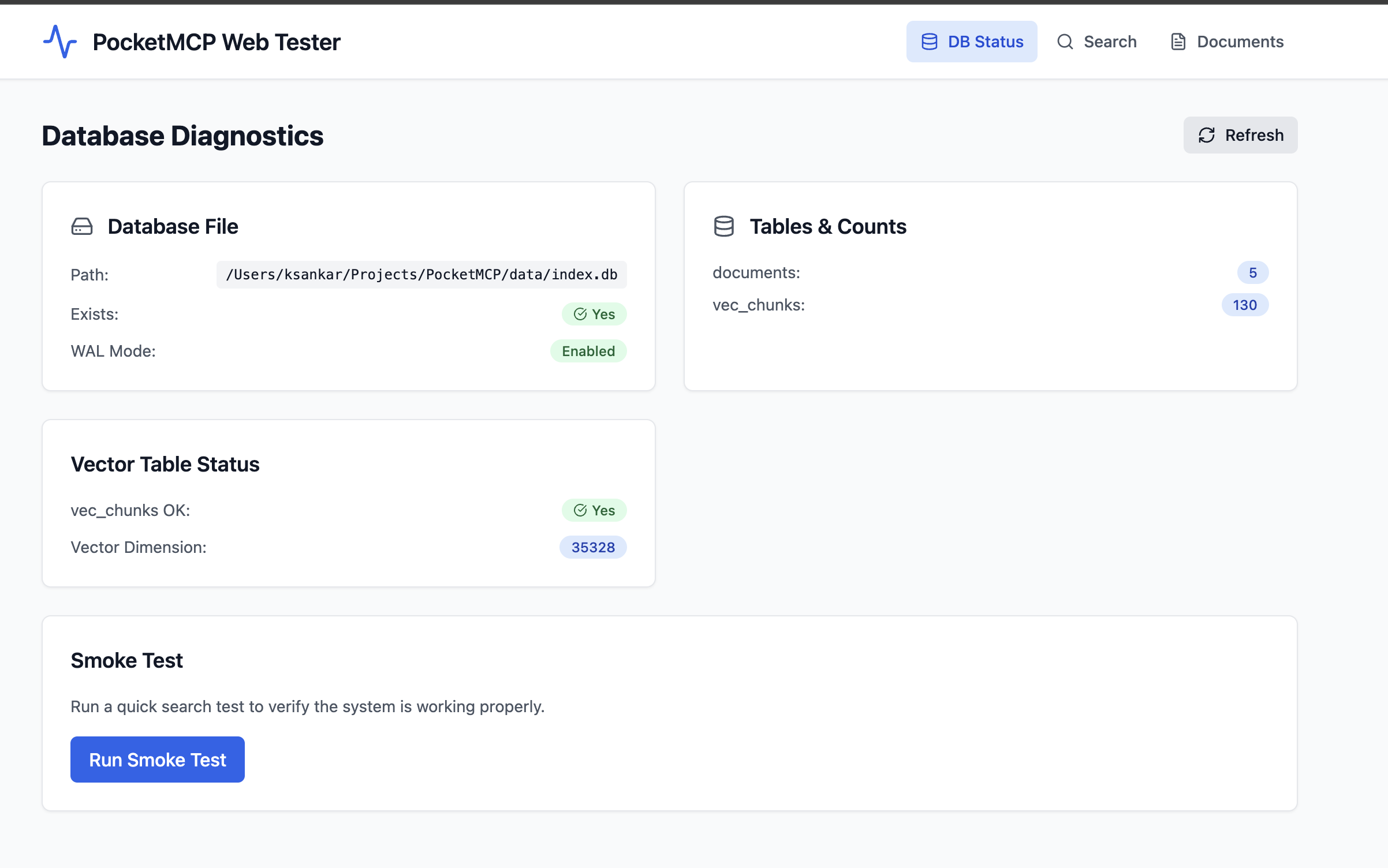
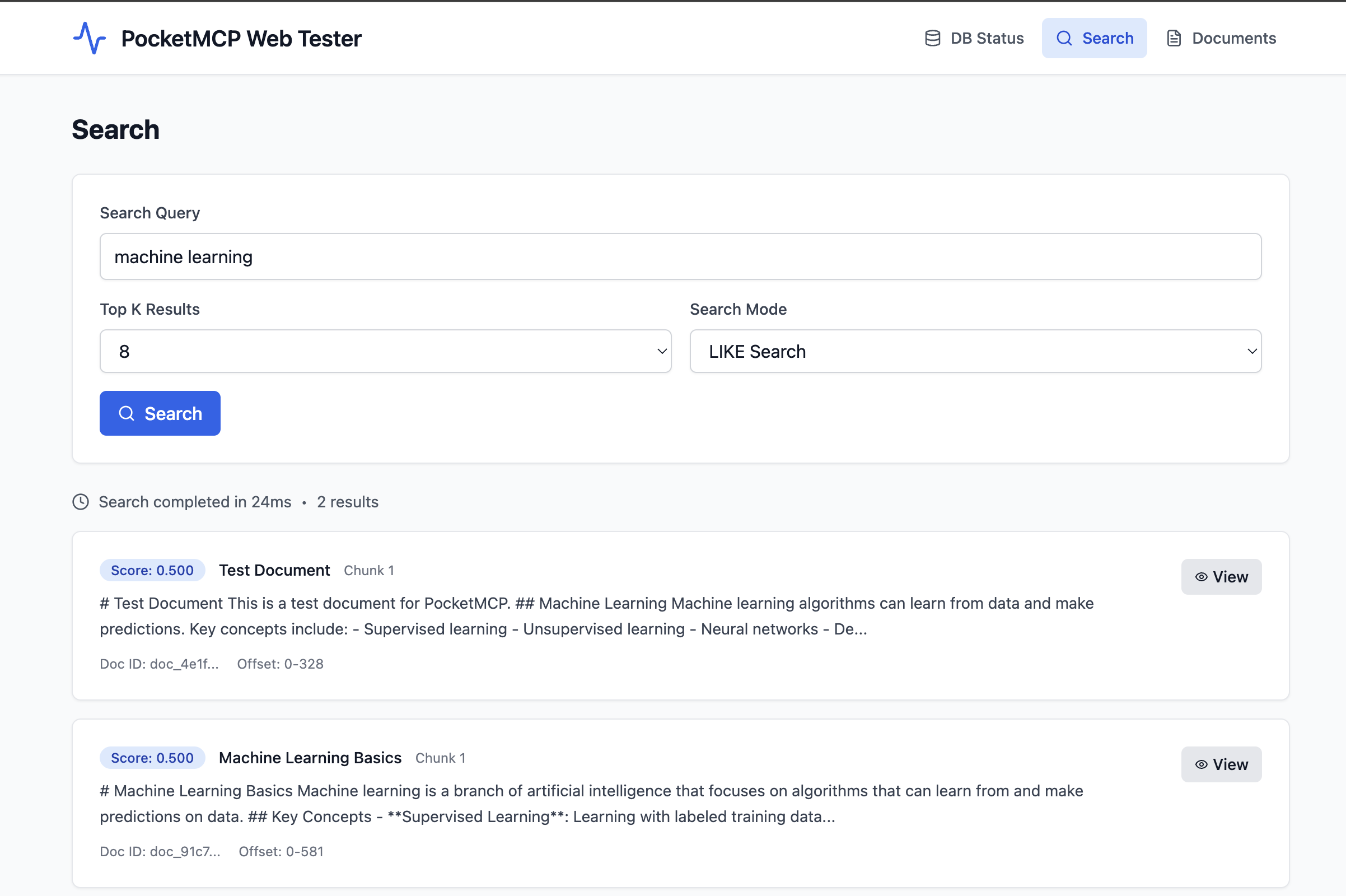
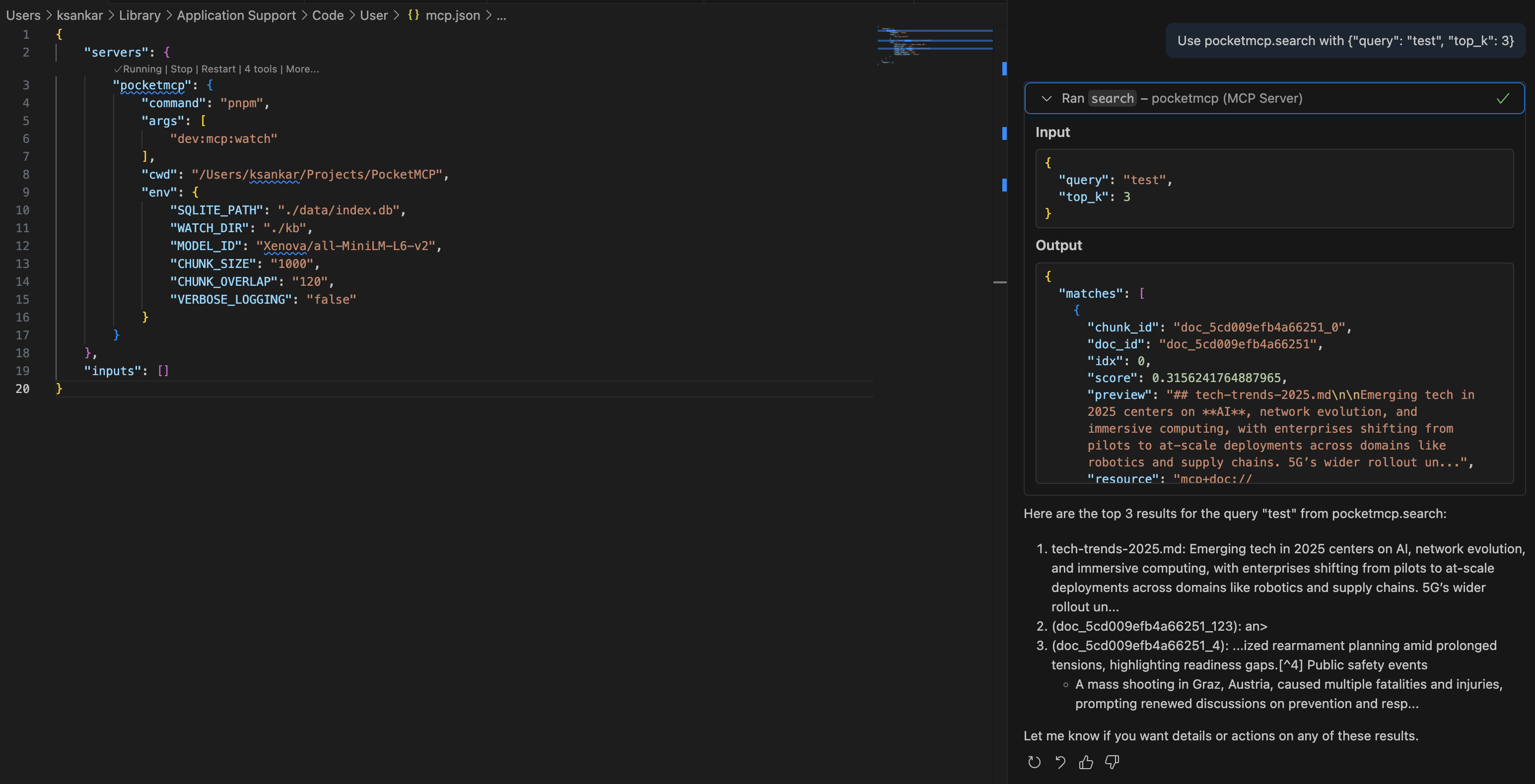
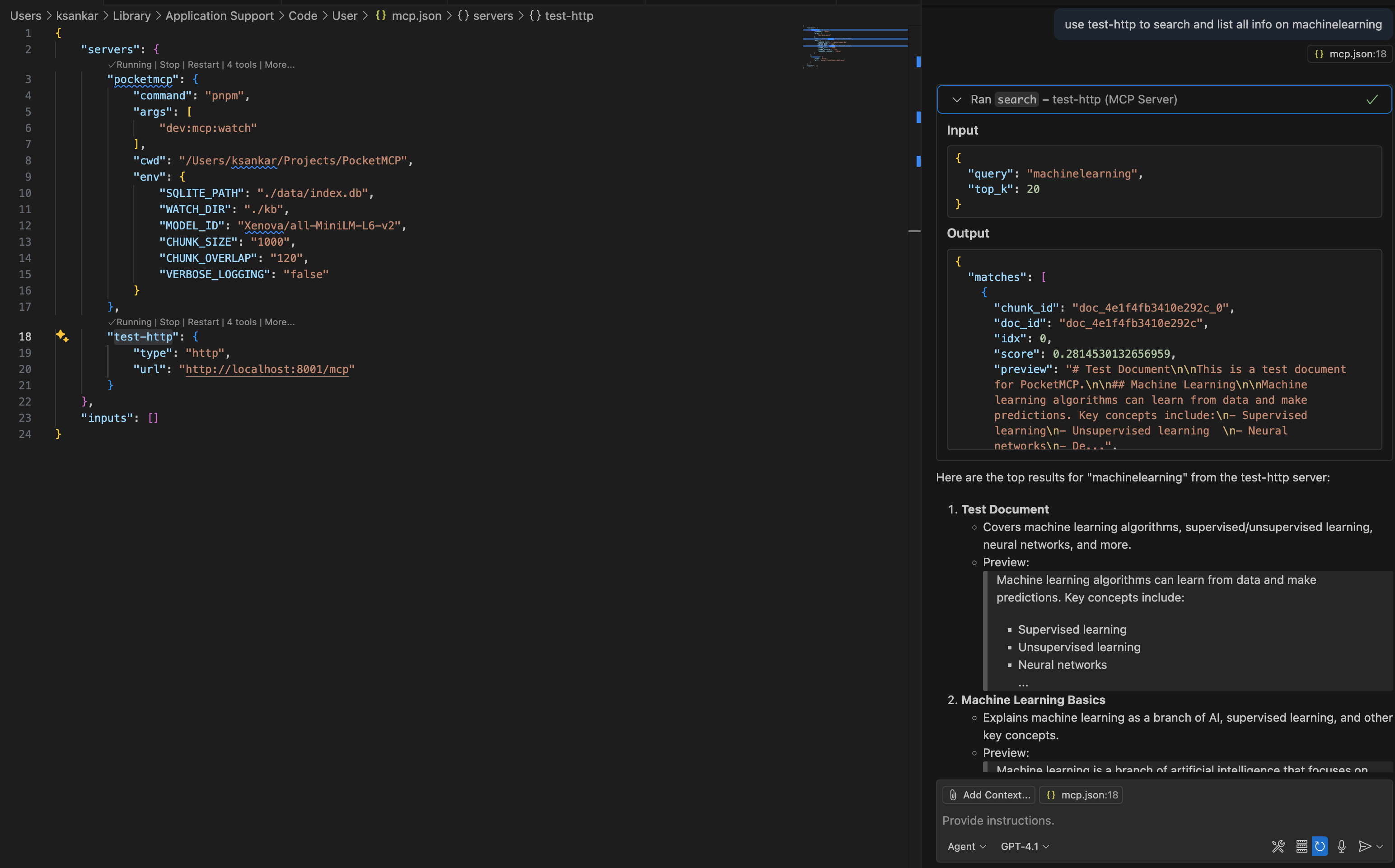
# Clone or download the project
cd PocketMCP

# Install dependencies
pnpm install

# Setup environment
pnpm setup
# Or manually: cp .env.sample .envEdit .env file:
# SQLite database path
SQLITE_PATH=./data/index.db

# Directory to watch for file changes (optional)
WATCH_DIR=./kb

# Embedding model (default is recommended)
MODEL_ID=Xenova/all-MiniLM-L6-v2

# Chunking configuration
CHUNK_SIZE=1000
CHUNK_OVERLAP=120# Create directory for your documents
mkdir -p kb
# Add some markdown or text files
echo "# My First Document" > kb/test.md
echo "This is a sample document for testing PocketMCP." >> kb/test.md# Development - MCP server + web interface
pnpm dev
# Production - MCP server only
pnpm build && pnpm startOn first run, the server will download the MiniLM model (~100MB) and then process any files in your watch directory.
PocketMCP includes a comprehensive web interface for testing and validation.
Web Interface: http://127.0.0.1:5173
API Server: http://127.0.0.1:5174
Health Check: http://127.0.0.1:5174/health
Real-time database status monitoring
Table counts and vector dimensions
SQLite WAL mode verification
Error detection and reporting
One-click smoke testing
Interactive semantic search testing
LIKE vs Vector search modes
Configurable result count (top-K)
Detailed result inspection
Performance metrics (response time)
Browse all indexed documents
Pagination support
Document metadata display
Creation and update timestamps
Detailed chunk inspection modal
Full text content display
Metadata and offset information
Copy-to-clipboard functionality
Endpoint | Method | Description |
| GET | Server health check |
| GET | Database diagnostics |
| POST | Semantic search |
| GET | Get specific chunk |
| GET | List documents |
Search Documents:
curl -X POST http://127.0.0.1:5174/api/search \
  -H "Content-Type: application/json" \
  -d '{"query": "machine learning", "top_k": 5, "mode": "like"}'
Get Diagnostics:
curl http://127.0.0.1:5174/api/db/diag | jq .Open Cursor Settings → MCP
Add a new server:
{
  "command": "pnpm",
  "args": ["dev:mcp"],
  "cwd": "/path/to/PocketMCP",
  "env": {
    "TRANSPORT": "stdio",
    "SQLITE_PATH": "./data/index.db",
    "WATCH_DIR": "./kb"
  }
}Add to your MCP settings:
{
  "mcpServers": {
    "pocketmcp": {
      "command": "pnpm",
      "args": ["dev:mcp"],
      "cwd": "/path/to/PocketMCP",
      "env": {
        "TRANSPORT": "stdio",
        "SQLITE_PATH": "./data/index.db",
        "WATCH_DIR": "./kb"
      }
    }
  }
}For web clients or remote access:
{
  "mcpServers": {
    "pocketmcp": {
      "transport": "http",
      "url": "http://localhost:8001/mcp"
    }
  }
}searchSearch for similar content using semantic search.
{
  "query": "machine learning algorithms",
  "top_k": 5,
  "filter": {
    "doc_ids": ["doc_123", "doc_456"]
  }
}upsert_documentsInsert or update documents programmatically.
{
  "docs": [
    {
      "text": "Your document content here...",
      "external_id": "my_doc_1",
      "title": "Important Notes",
      "metadata": {}
    }
  ]
}delete_documentsDelete documents by ID.
{
  "doc_ids": ["doc_123"],
  "external_ids": ["my_doc_1"]
}list_documentsList all documents with pagination.
{
  "page": {
    "limit": 20
  }
}PocketMCP provides resource URIs for accessing specific chunks:
Format: mcp+doc://<doc_id>#<chunk_id>
Returns: Complete chunk data including text, offsets, and metadata
Variable | Default | Description |
|
| Path to SQLite database file |
| (none) | Directory to watch for file changes |
|
| Hugging Face model for embeddings |
|
| Target chunk size in characters |
|
| Overlap between chunks in characters |
|
| Maximum pages to process in PDF files |
|
| Minimum text characters required in PDFs |
|
| Maximum file size for DOCX files (10MB) |
|
| Split DOCX documents on headings (h1/h2) |
|
| Environment mode |
|
| Enable detailed logs |
|
| Enable dotenv debug output |
|
| Web API server port |
|
| API server bind address |
|
| MCP transport mode (stdio/http/both) |
|
| HTTP server bind address |
|
| MCP server port |
|
| Logging level (debug/info/warn/error) |
Script | Description |
| Start web interface + API server for testing |
| Start MCP server (both transports + file watching) |
| Build all components |
| Start production MCP server (both transports + file watching) |
| Create .env from template |
| Clean build artifacts and database |
WATCH_DIR is optional - if not set, only manual document upserts work
Supported files: .md, .txt, .pdf, .docx
File filtering: Automatically ignores temp files, .DS_Store, node_modules, etc.
Nested directories: Recursively watches all subdirectories
Processing Pipeline: Documents → Segments → Chunks
Documents: Top-level files with metadata
Segments: Logical divisions (PDF pages, DOCX sections, etc.)
Chunks: Text pieces optimized for embedding (~1000 chars)
Status Types: ok, skipped, needs_ocr, too_large, error
Markdown (.md)
Plain text (.txt)
PDF (.pdf) - Text-based only, no OCR
DOCX (.docx) - Microsoft Word documents
Notes:
Encrypted/password-protected files are skipped
Large files exceeding limits are marked as too_large
Scanned PDFs requiring OCR are marked as needs_ocr
PocketMCP/                    # Monorepo root
├── package.json             # Workspace configuration
├── pnpm-workspace.yaml      # pnpm workspace setup
├── .env                     # Environment variables
├── .env.sample              # Environment template
├── apps/
│   ├── api/                 # Express API server
│   │   ├── src/
│   │   │   ├── server.ts    # Main API server
│   │   │   └── db.ts        # Database manager
│   │   └── package.json
│   └── web/                 # React + Vite frontend
│       ├── src/
│       │   ├── App.tsx      # Main app component
│       │   ├── store.ts     # Zustand state management
│       │   ├── api.ts       # API client
│       │   └── components/  # UI components
│       └── package.json
├── src/                     # Original MCP server
│   ├── server.ts            # MCP server and main entry point
│   ├── db.ts                # SQLite database with sqlite-vec
│   ├── embeddings.ts        # Transformers.js embedding pipeline
│   ├── chunker.ts           # Text chunking with sentence awareness
│   ├── ingest.ts            # Generic document ingestion
│   ├── file-ingest.ts       # File-specific ingestion logic
│   └── watcher.ts           # File system watcher with debouncing
├── data/                    # SQLite database storage
├── kb/                      # Default watch directory (configurable)
└── README.md# Install and setup
pnpm install
pnpm setup
# Development
pnpm dev # Web interface + API
pnpm dev:mcp # MCP server only
# Production
pnpm build
pnpm start
# Testing
curl http://127.0.0.1:5174/healthQuick Start:
# Pull and run with all services (MCP + API + Web UI)
docker run -d \
  --name pocketmcp \
  --restart unless-stopped \
  -p 8001:8001 \
  -p 5174:5174 \
  -p 5173:5173 \
  -v pocketmcp_data:/app/data \
  -v pocketmcp_kb:/app/kb \
  -v pocketmcp_cache:/app/.cache \
  ghcr.io/kailash-sankar/pocketmcp:latest
Access Points:
MCP Server: http://localhost:8001
API Server: http://localhost:5174
Web UI: http://localhost:5173
Docker Compose:
git clone https://github.com/kailash-sankar/PocketMCP.git
cd PocketMCP
cp .env.sample .env
docker-compose up -dGo to Stacks → Add stack
Name: pocketmcp
Paste this configuration:
version: '3.8'
services:
  pocketmcp:
    image: ghcr.io/kailash-sankar/pocketmcp:latest
    container_name: pocketmcp
    restart: unless-stopped
    ports:
      - "8001:8001"  # MCP Server
      - "5174:5174"  # API Server
      - "5173:5173"  # Web UI
    volumes:
      - pocketmcp_data:/app/data
      - pocketmcp_kb:/app/kb
      - pocketmcp_cache:/app/.cache
    environment:
      - NODE_ENV=production
      - TRANSPORT=both
      - SQLITE_PATH=/app/data/index.db
      - WATCH_DIR=/app/kb
    healthcheck:
      test: ["CMD", "curl", "-f", "http://localhost:5173/health"]
      interval: 30s
      timeout: 10s
      retries: 3
      start_period: 60s

volumes:
  pocketmcp_data:
  pocketmcp_kb:
pocketmcp_cache:# Clone and setup
git clone https://github.com/kailash-sankar/PocketMCP.git
cd PocketMCP
pnpm install
pnpm setup
# Configure environment
cp .env.sample .env
# Edit .env with your settings
# Create content directory
mkdir -p kb
# Build and start
pnpm build
pnpm startAccess Points:
MCP Server: http://localhost:8001
API Server: http://localhost:5174
Web UI: http://localhost:5173
If the embedding model fails to download:
Check internet connection for initial download
Model cache location: ~/.cache/huggingface/transformers/
Clear cache and retry if needed
If sqlite-vec fails to load:
Ensure sqlite-vec npm package is installed
Check that your system supports the required SQLite version
The system automatically falls back to regular SQLite tables if vec0 virtual tables fail
Files not being detected: Check file extensions and ignore patterns
High CPU usage: Increase debounce time with larger debounceMs values
Permission errors: Ensure read/write access to watch and data directories
API not accessible: Ensure API server is running on port 5174
Database not found: Check SQLITE_PATH environment variable
CORS errors: API server includes CORS headers for local development
Reduce CHUNK_SIZE for lower memory usage
Process fewer files simultaneously by reducing maxConcurrency
Consider using a smaller embedding model (though this requires code changes)
"Too many parameter values were provided"
This was a known issue with sqlite-vec virtual tables, now fixed with automatic fallback
"Failed to load sqlite-vec extension"
System automatically falls back to regular SQLite tables with JSON embeddings
"Database file does not exist"
Run the MCP server first to create the database, or check the SQLITE_PATH
MIT License - see LICENSE file for details.
Fork the repository
Create a feature branch
Make your changes
Add tests if applicable
Submit a pull request
sqlite-vec for fast vector similarity search
Transformers.js for local embedding generation
Model Context Protocol for standardized tool integration
Hugging Face for the MiniLM model
React + Vite for the modern web interface
TailwindCSS for beautiful, responsive styling
Delete documents by ID or external ID
| Name | Required | Description | Default |
|---|---|---|---|
| doc_ids | No | Document IDs to delete | |
| external_ids | No | External IDs to delete |
Does the description disclose side effects, auth requirements, rate limits, or destructive behavior?
With no annotations provided, the description carries the full burden of behavioral disclosure but offers only the word 'Delete'. It fails to specify whether deletions are permanent or soft, what occurs if IDs don't exist, or how the tool handles the case where zero required parameters means both ID arrays are optional (which could imply bulk-deletion behavior).
Agents need to know what a tool does to the world before calling it. Descriptions should go beyond structured annotations to explain consequences.
Is the description appropriately sized, front-loaded, and free of redundancy?
The description is efficiently compressed into six words with the action verb front-loaded. Every word serves a purpose with no redundant filler, making it appropriately sized for the tool's scope.
Shorter descriptions cost fewer tokens and are easier for agents to parse. Every sentence should earn its place.
Given the tool's complexity, does the description cover enough for an agent to succeed on first attempt?
For a destructive operation with no output schema and no annotations, the description is incomplete. It omits critical behavioral context such as return values, error handling for non-existent IDs, the consequence of calling with zero parameters (since none are required), and whether deletions are atomic.
Complex tools with many parameters or behaviors need more documentation. Simple tools need less. This dimension scales expectations accordingly.
Does the description clarify parameter syntax, constraints, interactions, or defaults beyond what the schema provides?
Schema description coverage is 100%, documenting both 'doc_ids' and 'external_ids' as arrays for deletion. The description merely restates these parameter purposes ('by ID or external ID') without adding semantic value regarding format constraints, validation rules, or the implications of providing both versus neither parameter.
Input schemas describe structure but not intent. Descriptions should explain non-obvious parameter relationships and valid value ranges.
Does the description clearly state what the tool does and how it differs from similar tools?
The description provides a clear verb ('Delete') and resource ('documents') with specific identifier types ('ID or external ID'). It distinguishes from siblings like 'list_documents' and 'search' (read operations) and 'upsert_documents' (create/update) through the destructive verb.
Agents choose between tools based on descriptions. A clear purpose with a specific verb and resource helps agents select the right tool.
Does the description explain when to use this tool, when not to, or what alternatives exist?
The description provides no guidance on when to use this tool versus alternatives, nor does it warn about the destructive nature or prerequisites like confirmation requirements. It fails to clarify the relationship with 'upsert_documents' despite both being mutation operations.
Agents often have multiple tools that could apply. Explicit usage guidance like "use X instead of Y when Z" prevents misuse.
List all documents with pagination
| Name | Required | Description | Default |
|---|---|---|---|
| page | No | Pagination options |
Does the description disclose side effects, auth requirements, rate limits, or destructive behavior?
Mentions pagination behavior, but without annotations, the description fails to disclose other critical traits: it doesn't confirm the read-only nature (though implied by 'list'), describe the return structure, or explain error conditions given the lack of output_schema.
Agents need to know what a tool does to the world before calling it. Descriptions should go beyond structured annotations to explain consequences.
Is the description appropriately sized, front-loaded, and free of redundancy?
Extremely concise at only 5 words. While efficient in word count, this brevity contributes to underspecification given the lack of supporting annotations or output schema. No filler or redundancy.
Shorter descriptions cost fewer tokens and are easier for agents to parse. Every sentence should earn its place.
Given the tool's complexity, does the description cover enough for an agent to succeed on first attempt?
Severely incomplete given zero annotations and no output_schema. The description should compensate by describing what the tool returns (document structure, total count, etc.) and confirming read-only safety, but it provides only the minimal action verb.
Complex tools with many parameters or behaviors need more documentation. Simple tools need less. This dimension scales expectations accordingly.
Does the description clarify parameter syntax, constraints, interactions, or defaults beyond what the schema provides?
Schema descriptioncoverage is 100%, establishing a baseline of 3. The description mentions 'pagination' which loosely maps to the 'page' parameter object, but adds no syntax guidance, format details, or constraint explanations beyond what the schemaalready provides.
Input schemas describe structure but not intent. Descriptions should explain non-obvious parameter relationships and valid value ranges.
Does the description clearly state what the tool does and how it differs from similar tools?
States the basic action (list documents) and mentions pagination, but provides minimal scope definition. Does not explicitly distinguish from the 'search' sibling tool, which also retrieves documentsbut likely with filtering capabilities.
Agents choose between tools based on descriptions. A clear purpose with a specific verb and resource helps agents select the right tool.
Does the description explain when to use this tool, when not to, or what alternatives exist?
Contains no guidance on when to use this tool versus alternatives like 'search' (for filtered queries) or 'upsert_documents'. Missing conditions or prerequisites for invocation.
Agents often have multiple tools that could apply. Explicit usage guidance like "use X instead of Y when Z" prevents misuse.
Search for similar content using semantic search
| Name | Required | Description | Default |
|---|---|---|---|
| query | Yes | The search query text | |
| top_k | No | Number of results to return (default: 8) | |
| filter | No | Optional filters for the search |
Does the description disclose side effects, auth requirements, rate limits, or destructive behavior?
With no annotations provided, the description must carry full behavioral burden. It successfully discloses the semantic/vector similarity mechanism but fails to describe return format, result ranking logic, or whether the search is approximate/exact. No mention of latency implications for semantic search.
Agents need to know what a tool does to the world before calling it. Descriptions should go beyond structured annotations to explain consequences.
Is the description appropriately sized, front-loaded, and free of redundancy?
Single sentence with no redundancy. Front-loaded with primary action. However, extreme brevity leaves gaps in contextual information (resource type, return values) that a slightly longer description could address.
Shorter descriptions cost fewer tokens and are easier for agents to parse. Every sentence should earn its place.
Given the tool's complexity, does the description cover enough for an agent to succeed on first attempt?
Lacking output schema, the description should ideally characterize results. Omits explicit mention that this searches 'documents' (the apparent domain from siblings) and gives no hint about result structure or scoring. Adequate minimum but clear gaps remain.
Complex tools with many parameters or behaviors need more documentation. Simple tools need less. This dimension scales expectations accordingly.
Does the description clarify parameter syntax, constraints, interactions, or defaults beyond what the schema provides?
Schema description coverage is 100% (all 3 parameters well-documented), establishing baseline 3. The description adds no additional parameter guidance, but none is needed given comprehensive schema coverage including the nested filter.doc_ids structure.
Input schemas describe structure but not intent. Descriptions should explain non-obvious parameter relationships and valid value ranges.
Does the description clearly state what the tool does and how it differs from similar tools?
States the action (search) and mechanism (semantic) clearly, and distinguishes from 'list_documents' sibling by specifying 'similar content' via semantic search. However, it fails to specify the target resource (documents), which must be inferred from sibling tool names.
Agents choose between tools based on descriptions. A clear purpose with a specific verb and resource helps agents select the right tool.
Does the description explain when to use this tool, when not to, or what alternatives exist?
Provides no guidance on when to use this tool versus siblings. Does not clarify when semantic search is preferred over 'list_documents' filtering, nor mention any prerequisites like existing document embeddings.
Agents often have multiple tools that could apply. Explicit usage guidance like "use X instead of Y when Z" prevents misuse.
Insert or update documents with text content
| Name | Required | Description | Default |
|---|---|---|---|
| docs | Yes | Array of documents to upsert |
Does the description disclose side effects, auth requirements, rate limits, or destructive behavior?
No annotations are provided, so the description must carry full behavioral disclosure. While 'Insert or update' signals mutation, it fails to explain the upsert key logic (what field determines if it updates vs inserts), whether updates are partial or full overwrites, or potential failure modes.
Agents need to know what a tool does to the world before calling it. Descriptions should go beyond structured annotations to explain consequences.
Is the description appropriately sized, front-loaded, and free of redundancy?
Extremely brief at eight words with no redundancy. The phrase 'with text content' front-loads the essential requirement. However, given the lack of annotations, the extreme brevity leaves critical behavioral information unstated.
Shorter descriptions cost fewer tokens and are easier for agents to parse. Every sentence should earn its place.
Given the tool's complexity, does the description cover enough for an agent to succeed on first attempt?
Minimum viable given good schema coverage. However, with no annotations and no output schema, the description should explain the upsert matching behavior and return values. It leaves significant gaps for a mutation tool with sibling search functionality.
Complex tools with many parameters or behaviors need more documentation. Simple tools need less. This dimension scales expectations accordingly.
Does the description clarify parameter syntax, constraints, interactions, or defaults beyond what the schema provides?
With 100% schema coverage, the structured schema already documents all parameters adequately. The description mentions 'text content', which aligns with the required 'text' field, but adds minimal semantic value beyond what the schema provides. Baseline 3 appropriate.
Input schemas describe structure but not intent. Descriptions should explain non-obvious parameter relationships and valid value ranges.
Does the description clearly state what the tool does and how it differs from similar tools?
The description states a specific action ('Insert or update') and resource ('documents'), and the 'upsert' terminology distinguishes it from siblings delete_documents, list_documents, and search. However, it doesn't clarify the scope or matching logic (e.g., when it inserts vs updates).
Agents choose between tools based on descriptions. A clear purpose with a specific verb and resource helps agents select the right tool.
Does the description explain when to use this tool, when not to, or what alternatives exist?
Provides no guidance on when to use this tool versus alternatives. It does not mention prerequisites (like external_id for updates) or when to prefer delete_documents or search over this mutation tool.
Agents often have multiple tools that could apply. Explicit usage guidance like "use X instead of Y when Z" prevents misuse.
Recent tool additions, removals, and schema changes observed during successful MCP inspections.
v1.0.0delete_documentslist_documentssearchupsert_documentsScored across 4 tools
Each tool has a clearly distinct purpose with no overlap: delete_documents removes documents, list_documents retrieves them, search finds similar content, and upsert_documents inserts or updates. An agent can easily tell them apart based on their specific actions.
All tool names follow a consistent verb_noun pattern (e.g., delete_documents, list_documents, upsert_documents), with 'search' as a slight deviation that still fits semantically. The naming is predictable and readable throughout.
With 4 tools, the server is well-scoped for document management, covering core operations like listing, searching, upserting, and deleting. Each tool earns its place without being too sparse or bloated.
The tool set provides strong coverage for basic document CRUD and search operations, but lacks explicit tools for actions like retrieving a single document by ID or updating metadata, which could be minor gaps agents might need to work around.
An MCP server that gives your AI access to the source code and docs of all public github repos
Personal knowledge base MCP server with semantic search, auto-categorization, metadata extraction
Agent-native MCP server over the public saagarpatel.dev corpus. Read-only, stateless.