
hono-telescope
# hono-telescope
[](https://glama.ai/mcp/servers/Jubstaaa/hono-telescope)
[](https://mcpservers.org/servers/jubstaaa/standup-mr)
[](https://badge.fury.io/js/hono-telescope)
[](https://opensource.org/licenses/MIT)
[](https://www.typescriptlang.org/)
[](https://bun.sh/)
[](https://nodejs.org/)
[](https://github.com/jubstaaa/hono-telescope)
[](https://github.com/jubstaaa/hono-telescope)
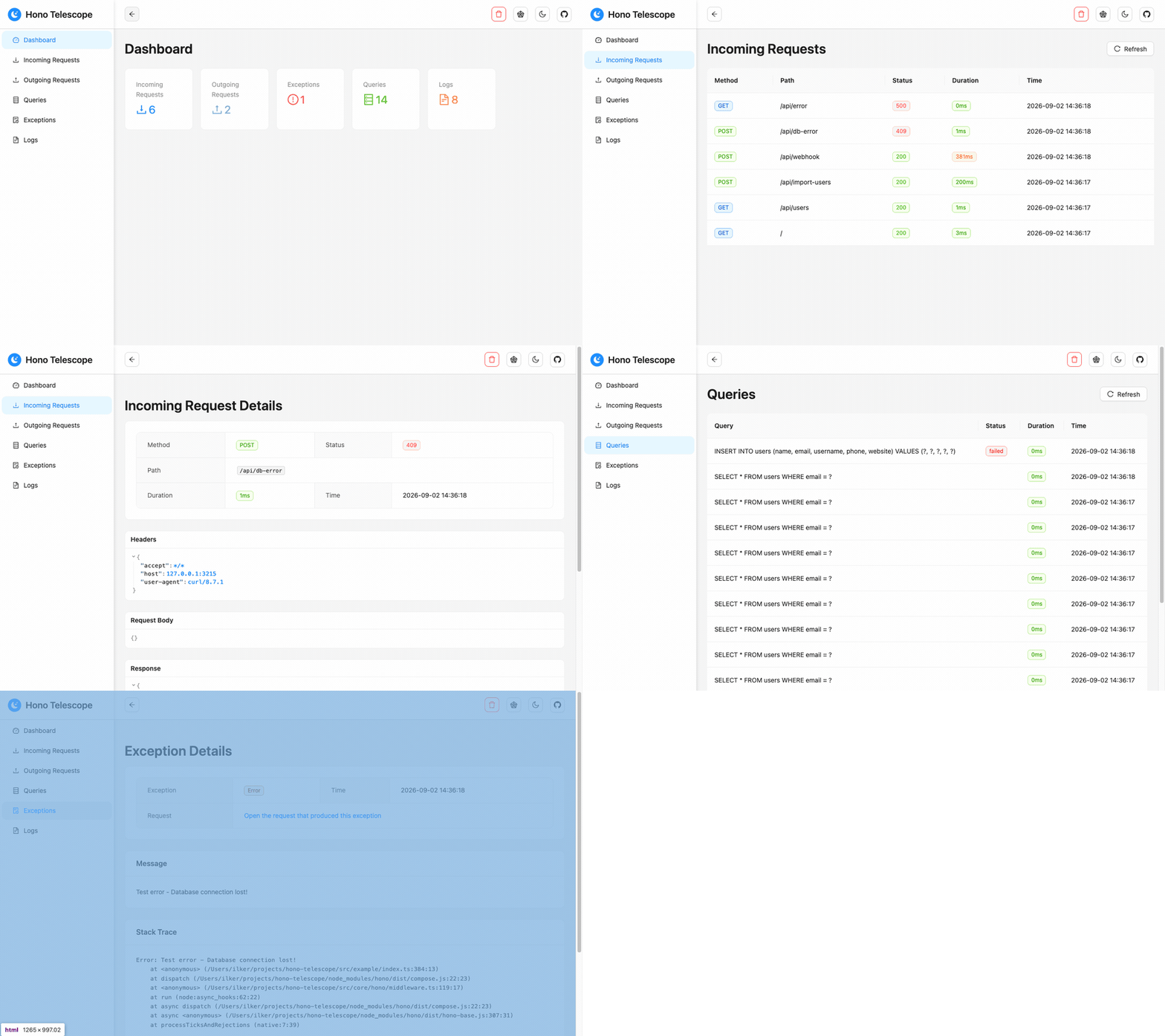
A debugging tool for Hono applications, inspired by Laravel Telescope: a dashboard that shows
you every request with the logs, queries, exceptions and outgoing calls that happened inside it.
**The same endpoint is also an MCP server.** Point Claude Code, Cursor or any MCP client at it
and your coding agent reads the running application's telemetry directly — the actual exception,
the request that produced it, and the queries that ran — instead of being handed a pasted stack
trace. Nothing else in the Hono ecosystem does that.
Zero runtime dependencies. Works on Node.js and Bun.
---
## 🌐 Live Demo
A hosted instance of [the example app](./src/example/index.ts), running 1.0. No installation needed.
**[📊 Open the dashboard](https://hono-telescope.ilkerbalcilar.com/telescope)** — API base: `https://hono-telescope.ilkerbalcilar.com`
Hit a few endpoints and watch the entries appear:
```bash
BASE=https://hono-telescope.ilkerbalcilar.com
curl $BASE/api/users # incoming request + Bun SQLite queries
curl -X POST $BASE/api/import-users # outgoing fetch to JSONPlaceholder, plus inserts
curl -X POST $BASE/api/webhook # outgoing POST whose payload is recorded, `token` redacted
curl -X POST $BASE/api/db-error # UNIQUE violation, recorded as a failed query; 409, no exception
curl $BASE/api/mixed-clients-test # the fetch call is captured, the axios call is not
curl $BASE/api/slow # 2s handler, to see the duration column
curl $BASE/api/error # exception recorded as a child of its request
```
The demo runs with `memoryStorage({ maxEntries: 500 })` and no dashboard auth, so entries are
public, capped at 500 and gone on restart. Don't send anything you wouldn't publish.
---
## ✨ Features
**Currently Available:**
- 📡 **MCP Server** - The dashboard endpoint doubles as a Model Context Protocol server, so an AI agent can read live requests, exceptions and queries with five read-only tools
- 🔍 **HTTP Request Monitoring** - Track incoming requests with headers, payloads and response bodies, and outgoing `fetch` calls with headers, payloads and responses
- 🚨 **Exception Tracking** - Capture and monitor application errors with stack traces
- 📝 **Log Monitoring** - Monitor console logs with different severity levels
- 🗄️ **Database Query Monitoring** - Explicit per-client instrumentation for Prisma, Sequelize, MongoDB, and Bun SQLite with execution time
- 📊 **Beautiful Dashboard** - Modern React-based web interface with real-time updates
- 🎯 **Zero Configuration** - Works out of the box with sensible defaults
- 🏷️ **Tagging System** - Organize entries with custom tags and context
- 🔧 **TypeScript Support** - Full type definitions and type safety
- ⚡ **High Performance** - Minimal overhead with efficient memory management
- 🌐 **Bun & Node.js** - Works with both runtimes seamlessly
- 🗂️ **Multiple Database Support** - Integrates with popular database libraries
- ⚙️ **Zero Runtime Dependencies** - Depends only on Hono (peer dependency)
**Planned Features (Roadmap):**
- 💾 **Data Export** - Export monitored data in multiple formats (JSON, CSV)
- 🔔 **Alerts & Notifications** - Real-time alerts for errors and performance issues
- 📈 **Analytics & Reporting** - Advanced analytics and historical data analysis
- 🔐 **Authentication & Authorization** - Dashboard access control beyond basic auth
- 🌍 **Multi-Tenancy Support** - Support for multiple isolated projects
- 🧩 **Plugin System** - Extensible plugin architecture for custom integrations
- 🔄 **Data Persistence** - Optional database storage for long-term monitoring
## 📦 Installation
```bash
# Using npm
npm install hono-telescope
# Using yarn
yarn add hono-telescope
# Using pnpm
pnpm add hono-telescope
# Using bun
bun add hono-telescope
```
## Quick Start
```typescript
import { Hono } from 'hono';
import { createTelescope, memoryStorage } from 'hono-telescope';
const app = new Hono();
const telescope = createTelescope({ storage: memoryStorage({ maxEntries: 1000 }) });
app.use('*', telescope.middleware());
app.route('/telescope', telescope.dashboard());
export default app;
```
Visit `/telescope`. Telescope is on by default outside production and off inside it.
> 📋 **Complete Example**: See [src/example/index.ts](./src/example/index.ts) for a full working example with all Telescope features including database query monitoring, external request tracking, and error handling.
## MCP Server
Telescope's dashboard doubles as an [MCP](https://modelcontextprotocol.io) server, so an AI
coding agent can read the running application's telemetry instead of being handed pasted stack
traces. There is nothing extra to mount — it is served from the dashboard you already mounted:
```typescript
app.route('/telescope', telescope.dashboard()); // MCP is at /telescope/mcp
```
```bash
claude mcp add --transport http telescope http://localhost:3000/telescope/mcp
```
| Tool | What it answers |
| ------------------- | -------------------------------------------------------------------------------------- |
| `recent_exceptions` | What just failed — each exception with its request and that request's logs and queries |
| `recent_requests` | Which requests ran; filter by `minStatus`, `status`, `minDuration`, `uriContains` |
| `request_detail` | One request in full, untruncated, with every child entry |
| `slow_queries` | The slowest recent queries and which request each ran in |
| `stats` | How many entries of each type exist |
All five are read-only; there is no tool that clears or writes telemetry. `minStatus: 400` is
the one worth remembering — a handler that returns an error status without throwing records no
exception, so that filter is the only way to find those failures.
The transport is the current Streamable HTTP revision (`2026-07-28`), with `2025-11-25` still
accepted for older clients. `GET` and `DELETE` answer `405`: this revision has no SSE stream
and no sessions.
### Clients that only speak stdio
Many editors cannot point an MCP client at a URL. The package ships a bridge for them: it reads
one JSON-RPC message per line on stdin, forwards it to the endpoint your app already serves, and
writes the reply back on stdout.
```bash
claude mcp add telescope -- npx -y hono-telescope mcp-stdio \
--url http://localhost:3000/telescope/mcp
```
```json
{
"mcpServers": {
"telescope": {
"command": "npx",
"args": ["-y", "hono-telescope", "mcp-stdio"],
"env": { "TELESCOPE_URL": "http://localhost:3000/telescope/mcp" }
}
}
}
```
`--url` (or `TELESCOPE_URL`) is the only required option. For a dashboard behind
`dashboard.auth`, pass credentials as a header — `--header` is repeatable, and
`TELESCOPE_HEADER` takes one for clients that can only set environment variables:
```bash
npx -y hono-telescope mcp-stdio --url https://example.com/telescope/mcp \
--header "Authorization: Basic $(printf 'user:pass' | base64)"
```
The bridge forwards; it does not implement the protocol a second time. Your app stays the only
place that answers MCP, so the bridge adds no tools, no session state and no new dependency —
and it needs the app to already be running.
> **The MCP endpoint exposes exactly what the dashboard exposes** — request and response
> bodies, headers and SQL — to whatever agent you connect. It is covered by `dashboard.auth`
> and by the same production refusal: with `enabled: true` under `NODE_ENV=production`,
> mounting without credentials throws.
## Configuration
```typescript
import { createTelescope, memoryStorage, alsContext, consoleCollector } from 'hono-telescope';
const telescope = createTelescope({
enabled: process.env.NODE_ENV !== 'production',
storage: memoryStorage({ maxEntries: 1000 }),
context: alsContext(),
collectors: [consoleCollector()],
dashboardPath: '/telescope',
ignorePaths: ['/health'],
ignoreStaticAssets: true,
capture: {
requestBody: true,
responseBody: true,
maxBodySize: 65536,
},
redact: {
headers: ['authorization', 'cookie', 'set-cookie', 'x-api-key', 'proxy-authorization'],
bodyKeys: ['password', 'token', 'secret', 'apikey', 'authorization'],
},
dashboard: {
auth: { username: 'admin', password: 'telescope' },
},
});
```
All options are optional — `createTelescope()` works with the defaults.
| Key | Type | Default | Notes |
| ---------------------- | ------------------------ | ------------------------------------------------------------------------------- | ------------------------------------------------------------------------------- |
| `enabled` | `boolean` | `NODE_ENV !== 'production'` | Disable in production by default |
| `storage` | `StorageAdapter` | `memoryStorage({ maxEntries: 1000 })` | In-memory storage with 1000 entry limit |
| `context` | `ContextStrategy` | `alsContext()` | AsyncLocalStorage-based request context tracking |
| `collectors` | `Collector[]` | `[consoleCollector(), exceptionCollector(), fetchCollector()]` | Default collectors for console, exceptions, and fetch; pass `[]` to disable all |
| `dashboardPath` | `string` | `'/telescope'` | Dashboard mount path; must match the path in `app.route()` |
| `ignorePaths` | `string[]` | `['.well-known']` | Paths to exclude from monitoring |
| `ignoreStaticAssets` | `boolean` | `true` | Skip monitoring requests for static files (.js, .css, .svg, etc.) |
| `capture.requestBody` | `boolean` | `true` | Capture incoming request bodies |
| `capture.responseBody` | `boolean` | `true` | Capture outgoing response bodies |
| `capture.maxBodySize` | `number` | `65536` | Maximum bytes to capture per body (64 KB) |
| `redact.headers` | `string[]` | `['authorization', 'cookie', 'set-cookie', 'x-api-key', 'proxy-authorization']` | Header names to redact |
| `redact.bodyKeys` | `string[]` | `['password', 'token', 'secret', 'apikey', 'authorization']` | Object keys to redact in request/response bodies |
| `dashboard.auth` | `DashboardAuth \| false` | `undefined` | Optional basic auth for dashboard; required if `enabled: true` in production |
### Mounting at a Custom Path
If you mount the dashboard at a path other than `/telescope`, you **must** set `dashboardPath` to the same value:
```typescript
const telescope = createTelescope({ dashboardPath: '/admin/debug' });
app.route('/admin/debug', telescope.dashboard());
```
The middleware uses `dashboardPath` to avoid recording the dashboard's own traffic, and the dashboard uses it to construct its base URL.
## Database Queries
Pass your database client to Telescope for query instrumentation. Prisma returns a new client—use the returned one:
```typescript
import { createTelescope } from 'hono-telescope';
import { PrismaClient } from '@prisma/client';
const telescope = createTelescope();
const prisma = telescope.instrumentPrisma(new PrismaClient());
// Use the returned `prisma` client, not the original
```
Supported databases:
```typescript
const prisma = telescope.instrumentPrisma(new PrismaClient());
telescope.instrumentSequelize(sequelize);
const mongoClient = new MongoClient(url, { monitorCommands: true });
telescope.instrumentMongo(mongoClient);
telescope.instrumentBunSqlite(db);
```
> **Note**: Automatic database interception was removed in 1.0 because it never worked under Node ESM and captured only raw SQL where it did run. Explicit per-client instrumentation is now required.
A query that fails is recorded too, marked `failed` with the client's own error message, so a
failed command is distinguishable from a slow one in the dashboard and over MCP. This covers
Prisma, MongoDB and Bun SQLite. **Sequelize is the exception**: it is instrumented through the
`afterQuery` hook, which does not appear to run when a query fails, so failed Sequelize queries
are currently not recorded at all. Fixing that needs verification against a real Sequelize.
Call each `instrument*` method **once per client**. Unlike the collectors, they are not
idempotent (only `instrumentBunSqlite` guards against double wrapping), so instrumenting the
same client twice records every query twice.
`instrumentBunSqlite` wraps the `query` and `prepare` statement factories, so statement calls
(`all`, `get`, `run`, `values`) are recorded. Queries issued directly on the database —
`db.exec`, `db.run`, `db.all`, `db.get` — are not captured.
## Security
The dashboard exposes request and response bodies, headers, and SQL. Telescope is therefore disabled when `NODE_ENV === 'production'`. If you enable it there anyway, you must supply `dashboard.auth`; mounting without it throws.
You have two options for production:
1. **Supply credentials** to protect the dashboard with basic auth:
```typescript
createTelescope({
enabled: true,
dashboard: { auth: { username: 'admin', password: 'secret' } },
});
```
2. **Explicitly opt out of auth** to acknowledge full exposure (no auth, dashboard fully open):
```typescript
createTelescope({
enabled: true,
dashboard: { auth: false },
});
```
Sensitive headers (`authorization`, `cookie`, `set-cookie`, `x-api-key`, `proxy-authorization`) and body keys (`password`, `token`, `secret`, `apikey`, `authorization`) are redacted by default, at any nesting depth. Redaction is recursive through nested objects and arrays, case-insensitive, and replaces values with `[REDACTED]` rather than deleting them.
## Limitations
- **Outgoing request bodies are captured only when they are already in memory** — a string,
a `URLSearchParams` or an `ArrayBuffer`. A `ReadableStream`, `FormData` or `Blob` body, and
the body of a `Request` object passed as the first argument to `fetch`, are skipped and the
payload stays empty. Reading those would either consume the body the caller is about to send
or force a `clone()` that can stall on Node.
- **Streamed responses are not captured.** Responses produced by Hono's `streamText` and
`streamSSE` are recorded without a body, so that recording never buffers or delays a stream.
Detection relies on the `Transfer-Encoding: chunked` header those helpers set (the bare
`stream()` helper sets no content-type, so it is skipped too); a hand-rolled
`new Response(readableStream, { headers: { 'content-type': 'text/plain' } })` sets neither
header, so it is read and buffered before being recorded. Set `Transfer-Encoding: chunked`
or a non-text content type on such a response to opt it out of capture.
- **Request and response bodies larger than `capture.maxBodySize` are recorded as metadata
only** (`{ truncated: true, size }`), and a non-JSON `text/*` request body is recorded as
`{ body: text }`. A JSON array body is wrapped so that a recorded body is always an object:
`{ body: [...] }` for requests, `{ response: [...] }` for responses. Redaction still reaches
inside the array.
## Custom Storage Adapters
Implement `StorageAdapter` and verify it against the contract suite that ships with the
package:
```typescript
import { runStorageContract } from 'hono-telescope/testing';
import { myStorage } from './my-storage';
runStorageContract('myStorage', () => myStorage());
```
The suite (a Vitest suite; run it with your own test runner installed) pins the two ordering
guarantees the dashboard relies on: `list` returns newest first, and `findByParent` returns
oldest first.
## Upgrading from 0.x
The 1.0 release introduces a new API centered on `createTelescope()`:
**0.x (Old API)**
```typescript
import { setupTelescope } from 'hono-telescope';
setupTelescope(app, {
enabled: true,
max_entries: 1000,
sanitize_headers: ['authorization'],
});
```
**1.0 (New API)**
```typescript
import { createTelescope, memoryStorage } from 'hono-telescope';
const telescope = createTelescope({
storage: memoryStorage({ maxEntries: 1000 }),
redact: { headers: ['authorization'] },
});
app.use('*', telescope.middleware());
app.route('/telescope', telescope.dashboard());
```
**Key changes:**
- `setupTelescope(app, config)` is replaced by `createTelescope(config)` with explicit middleware and dashboard mounting
- Configuration keys are now camelCase (e.g., `max_entries` → `maxEntries`, `sanitize_headers` → `redact.headers`)
- Database interception is now explicit per-client; automatic interception was removed
- Axios interception was removed (axios on Node does not use `fetch`)
- A request whose handler throws is recorded with the status your own `onError` returned, and the exception is recorded as a child entry of that request
## Development
### Getting Started
First, install dependencies:
```bash
bun install
```
Then build the project for the first time:
```bash
bun run build
```
### Running in Development Mode
Start the TypeScript watcher and example app:
**Terminal 1 - TypeScript Compilation (Watch Mode)**
```bash
bun run dev
```
This watches for TypeScript changes and compiles them to JavaScript.
**Terminal 2 - Example Application**
```bash
bun run dev:example
```
This starts the example Hono application with hot reload at `http://localhost:3000`
- Example API endpoints: `http://localhost:3000/api/...`
- Dashboard: `http://localhost:3000/telescope`
Test all endpoints at once with the test script:
```bash
bash src/example/test-all-endpoints.sh
```
This will automatically test all endpoints and populate the dashboard with data.
## License
[MIT](LICENSE)
TDQS
Scored across 5 tools
Each tool maps to a distinct investigation step: stats for overview, recent_exceptions for thrown failures, recent_requests for status-based failures, slow_queries for DB performance, and request_detail for full inspection. There is no pair an agent would realistically confuse after reading the descriptions.
All names are snake_case noun phrases with a consistent recent_* prefix for list views and a clear singular request_detail for deep dive. The only minor deviation is the abbreviated stats, but the overall pattern is otherwise uniform.
Five tools is well-scoped for a Telescope observability server: an entry point, two list views, one detail drill-down, and one performance view. There are no redundant tools, and the count fits the purpose comfortably.
The tools cover the full inspection workflow: check what is retained, list failures, drill into a single request, and identify slow queries. The workflow has no dead ends because every list tool points toward request_detail for deeper context.