
terminal-mcp
by JoasASantos
README.md
# terminal-mcp
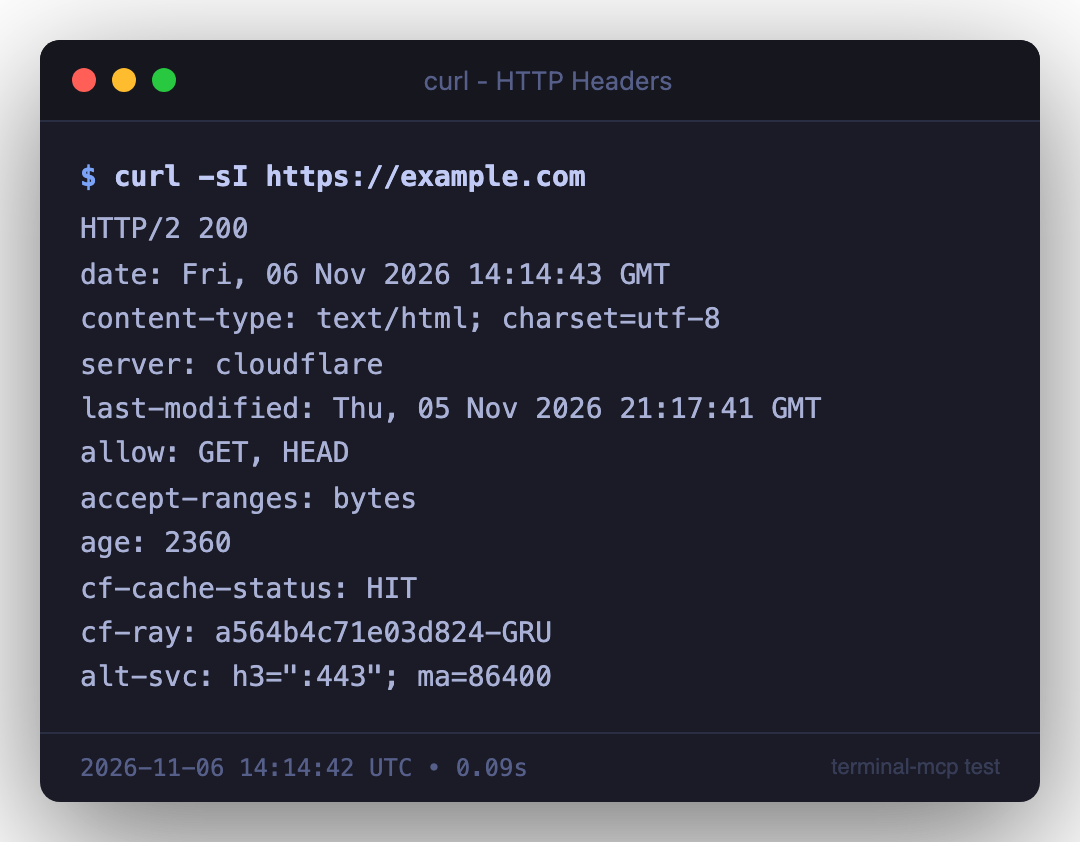
MCP server that executes shell commands and captures terminal output as styled PNG screenshots — perfect for pentest reports, documentation, and any workflow where you need professional-looking terminal captures.
Works with any MCP-compatible client: **Claude Code**, **OpenAI Codex**, **Antigravity**, **Cursor**, **Windsurf**, **Cline**, **Continue**, and more.
## Features
- **Execute & capture**: Run commands with full ANSI color preservation
- **Terminal-styled screenshots**: Renders output as PNG with macOS window chrome, proper colors, and metadata
- **20 built-in themes**: Tokyo Night, Dracula, Nord, Gruvbox, GitHub Dark, Kali, Ubuntu, and more
- **Report-ready**: Watermarks, timestamps, exit codes, custom titles
- **Full ANSI support**: 16 colors, 256-color palette, and 24-bit truecolor
- **Cross-platform**: macOS and Linux support
- **Session capture management**: List, re-render, and manage captures
## Screenshot Examples
## Installation
### Quick Setup (Recommended)
```bash
git clone https://github.com/JoasASantos/terminal-mcp.git
cd terminal-mcp
chmod +x setup.sh
./setup.sh
```
The setup script handles everything: dependency installation, build, and MCP client registration.
### Manual Setup
```bash
git clone https://github.com/JoasASantos/terminal-mcp.git
cd terminal-mcp
npm install
npm run build
```
### Linux Prerequisites
On Linux, Puppeteer requires some system libraries for Chromium:
**Debian/Ubuntu:**
```bash
sudo apt-get install -y \
libnss3 libatk1.0-0 libatk-bridge2.0-0 libcups2 \
libdrm2 libxkbcommon0 libxcomposite1 libxdamage1 \
libxrandr2 libgbm1 libpango-1.0-0 libcairo2 libasound2
```
**Fedora/RHEL:**
```bash
sudo dnf install -y \
nss atk at-spi2-atk cups-libs libdrm libxkbcommon \
libXcomposite libXdamage libXrandr mesa-libgbm pango cairo alsa-lib
```
**Arch Linux:**
```bash
sudo pacman -S nss atk at-spi2-atk cups libdrm libxkbcommon \
libxcomposite libxdamage libxrandr mesa pango cairo alsa-lib
```
## Client Configuration
### Claude Code
**Automatic (via setup.sh):**
```bash
./setup.sh
# Restart Claude Code after setup
```
**Manual (via CLI):**
```bash
claude mcp add terminal-mcp --scope user -e TERMINAL_MCP_DIR="$HOME/terminal-screenshots" -- node /path/to/terminal-mcp/dist/index.js
```
### OpenAI Codex
Add to your Codex MCP configuration:
```json
{
"mcpServers": {
"terminal-mcp": {
"command": "node",
"args": ["/path/to/terminal-mcp/dist/index.js"],
"env": {
"TERMINAL_MCP_DIR": "/path/to/screenshots"
}
}
}
}
```
### Cursor
Add to `.cursor/mcp.json` in your project or `~/.cursor/mcp.json` globally:
```json
{
"mcpServers": {
"terminal-mcp": {
"command": "node",
"args": ["/path/to/terminal-mcp/dist/index.js"],
"env": {
"TERMINAL_MCP_DIR": "/path/to/screenshots"
}
}
}
}
```
### Windsurf
Add to your Windsurf MCP settings (`~/.windsurf/mcp.json`):
```json
{
"mcpServers": {
"terminal-mcp": {
"command": "node",
"args": ["/path/to/terminal-mcp/dist/index.js"],
"env": {
"TERMINAL_MCP_DIR": "/path/to/screenshots"
}
}
}
}
```
### Cline (VS Code)
Add to Cline's MCP server settings in VS Code:
```json
{
"mcpServers": {
"terminal-mcp": {
"command": "node",
"args": ["/path/to/terminal-mcp/dist/index.js"],
"env": {
"TERMINAL_MCP_DIR": "/path/to/screenshots"
}
}
}
}
```
### Continue
Add to `~/.continue/config.json`:
```json
{
"experimental": {
"mcpServers": {
"terminal-mcp": {
"command": "node",
"args": ["/path/to/terminal-mcp/dist/index.js"],
"env": {
"TERMINAL_MCP_DIR": "/path/to/screenshots"
}
}
}
}
}
```
### Antigravity
Add to your Antigravity MCP configuration:
```json
{
"mcpServers": {
"terminal-mcp": {
"command": "node",
"args": ["/path/to/terminal-mcp/dist/index.js"],
"env": {
"TERMINAL_MCP_DIR": "/path/to/screenshots"
}
}
}
}
```
### Generic MCP Client
Any client supporting the [Model Context Protocol](https://modelcontextprotocol.io/) can use terminal-mcp. The server communicates over **stdio** using JSON-RPC. Configure it with:
- **Command:** `node`
- **Args:** `["/path/to/terminal-mcp/dist/index.js"]`
- **Env (optional):** `TERMINAL_MCP_DIR` — directory for saved screenshots
## Tools
| Tool | Description |
|------|-------------|
| `terminal_exec_screenshot` | **Primary tool.** One command = one PNG. Execute any shell command and get a screenshot |
| `terminal_exec` | Execute a command and capture output for later screenshot |
| `terminal_screenshot` | Render a previously captured output as PNG |
| `terminal_screenshot_text` | Render arbitrary text as a terminal PNG |
| `terminal_list_captures` | List all captures in the current session |
| `terminal_list_screenshots` | List saved PNG files |
| `terminal_themes` | List available themes |
Works with any command: `nmap`, `curl`, `gobuster`, `nikto`, `sqlmap`, `ls`, `docker`, `kubectl`, `git`, `python`, `gcc` — anything that runs in a shell.
## Themes (20)
| Theme | Description |
|-------|-------------|
| **tokyonight** | Dark blue, clean and modern (default) |
| **dracula** | Classic purple-accented dark |
| **monokai** | Warm dark with vibrant colors |
| **catppuccin** | Soft pastel dark (Mocha) |
| **nord** | Arctic blue-gray palette |
| **gruvbox** | Retro warm dark with earthy tones |
| **solarized** | Solarized Dark, precision colors |
| **onedark** | Atom One Dark |
| **material** | Material Design dark |
| **ayu** | Ayu Dark, minimal contrast |
| **github** | GitHub Dark |
| **cobalt** | Deep blue with bright accents |
| **hacker** | Green-on-black matrix style |
| **macos** | Native macOS Terminal.app dark |
| **kali** | Kali Linux terminal |
| **parrot** | Parrot OS terminal |
| **ubuntu** | Ubuntu terminal (aubergine) |
| **powershell** | Windows PowerShell blue |
| **retro** | Retro amber phosphor CRT |
| **light** | Light theme for print-friendly reports |
## Screenshot Options
| Option | Type | Default | Description |
|--------|------|---------|-------------|
| `theme` | string | `tokyonight` | Color theme (see list above) |
| `show_chrome` | boolean | `true` | macOS window chrome with traffic lights |
| `font_size` | number | `14` | Font size in pixels |
| `title` | string | command name | Window title bar text |
| `prompt` | string | `$ ` | Shell prompt prefix |
| `show_timestamp` | boolean | `true` | Show timestamp in footer |
| `watermark` | string | — | Watermark text (bottom-right) |
| `save_path` | string | auto | Full path for the output PNG |
| `width` | number | auto | Fixed terminal width in pixels |
| `max_width` | number | `980` | Maximum terminal width |
| `max_lines` | number | all | Truncate output after N lines |
| `line_height` | number | `1.4` | Line spacing multiplier |
| `scale` | number | `2` | Resolution: 1 = 1x, 2 = retina, 3 = 3x |
| `compact` | boolean | `false` | Reduced padding for smaller screenshots |
## Usage Examples
### Basic command screenshot
```
terminal_exec_screenshot({ command: "nmap -sV target.com", theme: "hacker" })
```
### Pentest report with watermark
```
terminal_exec_screenshot({
command: "nikto -h https://target.com",
theme: "tokyonight",
watermark: "CONFIDENTIAL - Pentest Report 2024",
title: "Nikto Web Scanner"
})
```
### Screenshot arbitrary text
```
terminal_screenshot_text({
text: "Finding: SQL Injection in /api/users\nSeverity: Critical\nCVSS: 9.8",
title: "Vulnerability Report",
theme: "dracula"
})
```
## Environment Variables
| Variable | Default | Description |
|----------|---------|-------------|
| `TERMINAL_MCP_DIR` | `~/terminal-screenshots` | Directory for saved screenshots |
## Requirements
- Node.js 18+
- Puppeteer (bundled — downloads Chromium on first run)
- On Linux: system libraries for headless Chromium (see [Linux Prerequisites](#linux-prerequisites))
## License
[MIT](LICENSE)
This server cannot be deployed
Maintenance
ActivityMaintained
ResponsivenessNo recent community issues