
YouTube for AI Agents
<div align="center">
# YouTube for AI Agents
### Claude watches YouTube so you don't have to
Ask *"what's the best video on…?"* and Claude finds it, watches it, and reports back. Drop a long podcast in chat — get the highlights in seconds. Cut clips, build reels, pull transcripts — all without opening a YouTube tab.
[](https://discord.gg/babcVNJBet)
[Quick Start](#quick-start) · [Try it](#try-it) · [Discord](https://discord.gg/babcVNJBet) · [Demo](#demo)
</div>
---
## Demo
[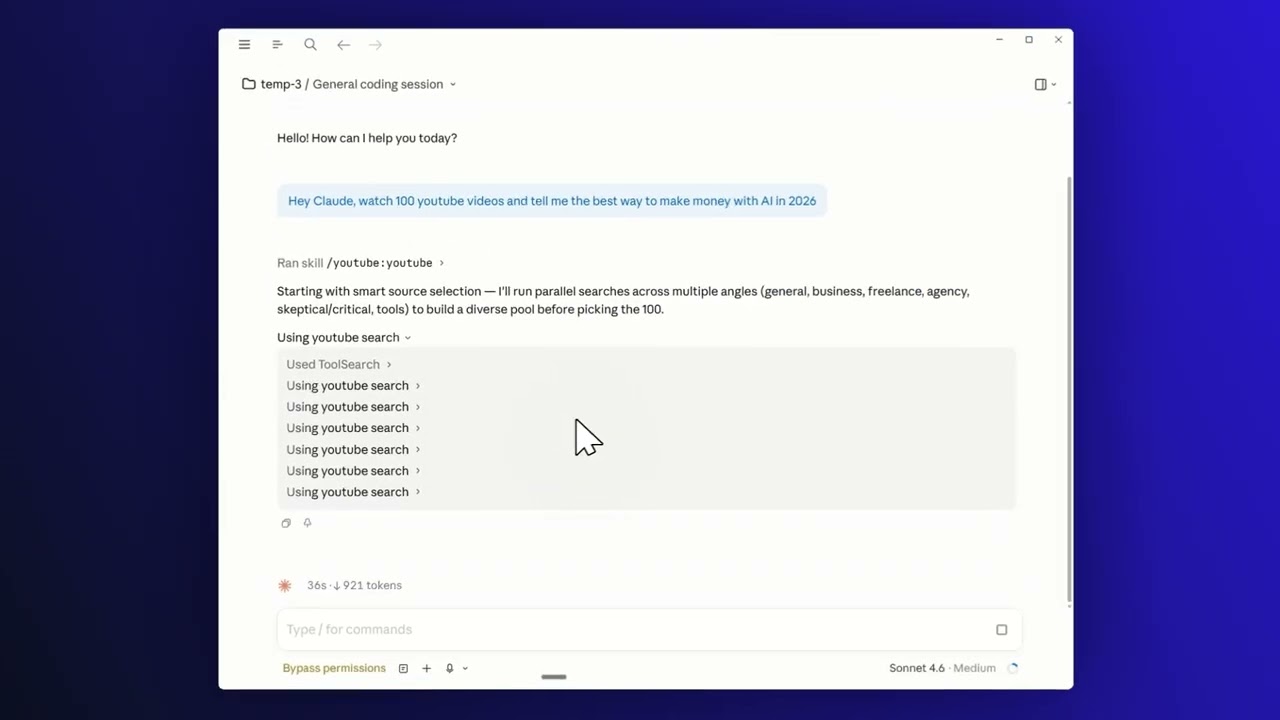](https://youtu.be/KbCC7vaeAHY)
> Click the image to watch the 1-minute walkthrough.
## Quick Start
**1. Install the plugin** — inside Claude Code, run:
```
/plugin marketplace add JCodesMore/jcodesmore-plugins
/plugin install youtube@jcodesmore-plugins
```
Then fully **restart Claude Code** (quit the app and reopen).
**2. That's it.** No API key, no signup. Just start asking.
> *Optional:* run `/youtube:setup` to sign in with your own YouTube cookies for personalized search and recommendations.
## Try it
Talk to Claude like a friend:
- *"Watch this video and give me the recipe — I don't want to scroll the comments."*
- *"Find me five highly-rated videos on Roman history."*
- *"What are this channel's best uploads? Watch the top three and summarize."*
- *"Pull the actionable takeaways from this 90-minute interview."*
- *"Cut a 30-second clip starting at 2:15 from this video."*
- *"Combine these three cooking videos into a single highlight reel."*
The agent searches, watches, and reports back — no scrubbing, no scrolling.
## What's inside
**Nine smart tools** wrapped in **two skills** and **one agent** — search, watch, clip, and reel without leaving the chat.
| Capability | Try saying |
|---|---|
| Search videos, channels, playlists | *"find me the top videos on…"* |
| Watch and summarize | *"watch this and tell me what matters"* |
| Browse a channel or playlist | *"what's worth watching from this YouTuber?"* |
| Pull a transcript | *"grab the transcript around the 5-minute mark"* |
| Download video or audio | *"save the audio of this video"* |
| Cut a clip | *"clip 2:15 to 2:45 from this video"* |
| Build a highlight reel | *"combine these clips into one reel"* |
## Community
[**Discord**](https://discord.gg/babcVNJBet) — chat, help, show-and-tell · [**Issues**](https://github.com/JCodesMore/youtube-for-ai-agents/issues) — bugs & feature requests · [**Contribute**](CONTRIBUTING.md) · [**More plugins**](https://github.com/JCodesMore/jcodesmore-plugins)
<details>
<summary><b>Personalized results (optional)</b></summary>
By default, search runs anonymously — no login required. If you want personalized recommendations and search results, run `/youtube:setup` and follow the cookie-extraction wizard. Cookies stay on your machine in the plugin data directory; nothing is uploaded anywhere.
</details>
<details>
<summary><b>Use it in Cursor, Codex, OpenCode, or Gemini CLI</b></summary>
The MCP server is portable. Per-platform setup guides:
- [Cursor](docs/README.cursor.md)
- [Codex](docs/README.codex.md)
- [OpenCode](docs/README.opencode.md)
- [Gemini CLI](docs/README.gemini-cli.md)
</details>
<details>
<summary><b>Advanced install (without the marketplace)</b></summary>
Clone and build it yourself:
```bash
git clone https://github.com/JCodesMore/youtube-for-ai-agents.git
cd youtube-for-ai-agents
npm install
npm run build
```
Or wire the published npm package directly into any MCP-compatible client:
```json
{
"mcpServers": {
"youtube": {
"command": "npx",
"args": ["-y", "@jcodesmore/youtube-for-ai-agents"]
}
}
}
```
**Requirements:** Node.js ≥ 18.
</details>
<details>
<summary><b>Built on</b></summary>
- [Model Context Protocol SDK](https://modelcontextprotocol.io/) — tool exposure to Claude
- [youtubei.js](https://github.com/LuanRT/YouTube.js) — YouTube InnerTube client (no API key needed)
- [youtube-transcript-plus](https://www.npmjs.com/package/youtube-transcript-plus) — transcript fetching
- [ytdlp-nodejs](https://www.npmjs.com/package/ytdlp-nodejs) — video and audio downloads
- [Zod](https://zod.dev/) — schema validation
</details>
## License
[Apache License 2.0](LICENSE) — © 2026 JCodesMore
> Uses [youtubei.js](https://github.com/LuanRT/YouTube.js), an unofficial YouTube client. Not affiliated with, endorsed by, or associated with YouTube or Google.
---
*Part of [jcodesmore-plugins](https://github.com/JCodesMore/jcodesmore-plugins).*
TDQS
Scored across 9 tools
Each tool targets a distinct resource and action: search, channel/video/playlist metadata retrieval, transcript extraction, video download, clip extraction, and highlight reel assembly. The only potential overlap is between youtube_clip and youtube_download, but clip is explicitly for extracting short segments while download fetches the full source. Descriptions make boundaries clear.
All tools use the youtube_ prefix and follow a predictable verb_noun pattern (get_channel_videos, get_video_info, get_transcript, search, download, clip). The only minor deviation is youtube_highlight_reel, which is a noun phrase, but it clearly implies a create action and fits the overall schema.
Nine tools are well-scoped for an agent consuming YouTube content, with no redundant or trivial entries. Each tool earns its place by covering a distinct step in the research, retrieval, or editing workflow.
The surface covers search, metadata, transcripts, downloads, clipping, highlight reels, playlists, and channels—core workflows for AI agents. Minor gaps exist, such as no direct tool to list all playlists for a channel or to retrieve comments/live stream info, but agents can work around these for most tasks.