
web-scraper-server

# Web Scraper Toolkit






**Expertly crafted by [Roy Dawson IV](https://github.com/imyourboyroy)**
## Use Case Synopsis
Web Scraper Toolkit is a production-grade scraping and browser automation platform for:
- **Engineers and analysts** who need repeatable, scriptable web extraction.
- **Red/blue team workflows** that need transparent anti-bot diagnostics and safe automation controls.
- **Agent builders** who need MCP tools for autonomous URL ingestion, crawling, extraction, and post-processing.
You can run it as:
1. A **CLI tool** (`web-scraper`)
2. An **MCP server** (`web-scraper-server`)
3. A **Python library** (typed config + async APIs)
---
## What it does (without reading code)
### Core scraping and extraction
- Single-page scrape, batch scrape, and domain crawling.
- Sitemap ingestion and tree extraction.
- Markdown, text, HTML, JSON, XML, CSV, screenshot, and PDF outputs.
- Contact extraction (emails, phones, socials).
### Browser intelligence and anti-bot handling
- Playwright-first automation with stealth profile controls.
- Native browser fallback routing (`chrome`, `msedge`, `chromium`) when blocked.
- Interactive browser MCP tools for navigate/click/type/wait/key/scroll/hover/evaluate/screenshot.
- Compact interaction-map MCP output for LLM-friendly clickable-element discovery.
- Optional accessibility-tree MCP output for role/name-first autonomous navigation.
- Script-level diagnostics for detection analysis and route optimization.
### Dynamic host learning (auto-routing)
- Per-domain host profiles in `host_profiles.json`.
- Safe-subset auto-learning of routing strategy.
- Promotion only after clean incognito successes (default threshold: 2).
- Deterministic precedence: explicit override > host profile > global config > defaults.
---
## Out-of-the-box behavior ("just works")
Default behavior is tuned for safety + resilience:
- Playwright **Chromium** is the default primary browser path.
- Incognito-style contexts by default.
- Native fallback policy defaults to `on_blocked`.
- Host profile learning is enabled by default.
- Host profile read-only mode is available (`host_profiles_read_only=true`) to apply-only with no writes.
- Host profile store is auto-created when needed.
- If host profile persistence cannot initialize, toolkit continues with clear diagnostic metadata.
- OS-level anti-bot interaction is blocked in headless mode.
- Before OS mouse takeover, toolkit warns the operator and verifies active foreground window.
- Cloudflare Turnstile challenges are handled autonomously by dynamically disabling detection-vulnerable stealth scripts to allow native auto-validation.
- **Google Search (SERP)** requests are automatically detected and routed through a specialized **Native Chrome Hardware Spoofing** bypass block to prevent `429 Too Many Requests (sorry/index)` bans.
- If Google enforces a persistent soft-ban, the toolkit transparently falls back to the resilient **DuckDuckGo HTML endpoint** to guarantee unblockable organic search extraction.
---
## Quick Start (60 seconds)
```bash
pip install web-scraper-toolkit
playwright install
```
Optional desktop solver support:
```bash
pip install web-scraper-toolkit[desktop]
playwright install
```
Run a first scrape:
```bash
web-scraper --url https://example.com --format markdown --export
```
---
## End-to-End Flow
### Simple flow

### Advanced flow (dynamic routing)
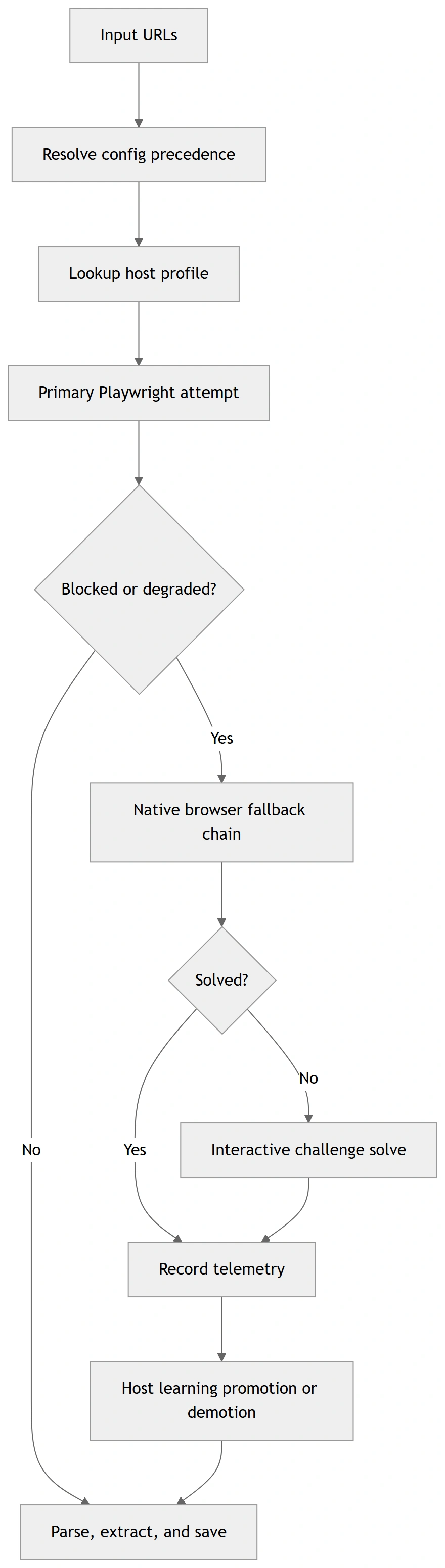
> These diagrams are rendered from Mermaid source files for GitHub/PyPI compatibility.
> Sources: `docs/diagrams/*.mmd`
---
## How to Use It
## 1) CLI (fastest entry)
Minimal:
```bash
web-scraper --url https://example.com --format markdown --export
```
Batch + merge:
```bash
web-scraper --input urls.txt --workers auto --format text --merge --output-name merged.txt
```
Diagnostics wrapper:
```bash
web-scraper --run-diagnostic challenge_matrix --diagnostic-url https://target-site.tld/resource --diagnostic-runs-per-variant 2
```
Optional toolkit auto-commit (off by default):
```bash
web-scraper --run-diagnostic toolkit_route --diagnostic-url https://target-site.tld/resource --diagnostic-auto-commit-host-profile
```
Strict progression gating + artifact capture:
```bash
web-scraper \
--run-diagnostic toolkit_route \
--diagnostic-url https://target-site.tld/resource \
--diagnostic-require-2xx \
--diagnostic-save-artifacts \
--diagnostic-artifacts-dir ./scripts/out/artifacts
```
Deterministic fixture replay / recording for regression analysis:
```bash
python scripts/diag_toolkit_route.py --fixture-replay ./tests/fixtures/challenge/cloudflare_blocked.json
python scripts/diag_toolkit_route.py --url https://target-site.tld/resource --fixture-record ./tests/fixtures/challenge/latest_toolkit_fixture.json
python scripts/diag_challenge_matrix.py --fixture-replay ./tests/fixtures/challenge/zoominfo_px_then_cf_loop.json
```
Cloudflare stealth-strategy matrix testing:
```bash
python scripts/diag_cloudflare_matrix.py --url https://target-site.tld/challenge
```
## 2) MCP (agentic mode)
Local stdio:
```bash
web-scraper-server --stdio
```
Remote transport:
```bash
web-scraper-server --transport streamable-http --host 127.0.0.1 --port 8000 --path /mcp
```
## 3) Python API
```python
import asyncio
from web_scraper_toolkit.browser.config import BrowserConfig
from web_scraper_toolkit.browser.playwright_handler import PlaywrightManager
async def main() -> None:
cfg = BrowserConfig.from_dict({
"headless": True,
"browser_type": "chromium",
"native_fallback_policy": "on_blocked",
"host_profiles_enabled": True,
"host_profiles_path": "./host_profiles.json",
"host_profiles_read_only": False,
})
async with PlaywrightManager(cfg) as manager:
content, final_url, status = await manager.smart_fetch("https://example.com")
print({"status": status, "url": final_url, "has_content": bool(content)})
asyncio.run(main())
```
---
## Safety Model (OS input + anti-bot interactions)
When toolkit enters OS-level mouse challenge solving:
- It warns the operator before input takeover.
- It validates that the browser is foreground/active.
- It verifies click/hold coordinates are inside active window bounds.
- It refuses OS interaction in headless mode.
- `pyautogui` failsafe remains active (move cursor to a screen corner to abort).
Optional env override:
- `WST_OS_INPUT_WARNING_SECONDS` (default: `3`)
---
## Configuration Model
Precedence order:
1. Explicit CLI/MCP arguments
2. Environment variables (`WST_*`)
3. `settings.local.cfg` / `settings.cfg`
4. `config.json`
5. Built-in defaults
Key files:
- `config.example.json`
- `settings.example.cfg`
- `host_profiles.example.json`
- `INSTRUCTIONS.md` (full operations runbook)
---
## Full Usage and Operations
For exhaustive setup, deployment, troubleshooting, CLI/MCP option coverage, and diagnostics workflows, read:
- **`INSTRUCTIONS.md`**
- **`docs/config_schema.md`** (config + host profile schema contract)
- **`docs/api_stability.md`** (API/deprecation policy)
- **`docs/support_matrix.md`** (platform/browser support matrix)
- **`docs/release_checklist.md`** (ship checklist)
Canonical script diagnostics now use `scripts/diag_*.py` names.
Truthfulness note:
- challenge diagnostics now classify pages from **visible text + structure**, not raw HTML noise
- fixture replay is browserless and safe for deterministic regression checks
- live smoke results may still fail when a target changes, but the toolkit now reports those failures more accurately
---
## Verified Outputs
The following output blocks are copied from deterministic command runs in this repository.
### Verified Output A — `diag_toolkit_zoominfo --help`
Command:
```bash
python scripts/diag_toolkit_zoominfo.py --help
```
Expected output:
```text
usage: diag_toolkit_zoominfo.py [-h] [--url URL] [--timeout-ms TIMEOUT_MS]
[--skip-interactive]
[--include-headless-stage]
[--log-level {DEBUG,INFO,WARNING,ERROR}]
[--auto-commit-host-profile]
[--host-profiles-path HOST_PROFILES_PATH]
[--read-only] [--require-2xx]
[--save-artifacts]
[--artifacts-dir ARTIFACTS_DIR]
```
### Verified Output B — CLI includes strict/artifact diagnostic flags
Command:
```bash
python -m web_scraper_toolkit.cli --help
```
Expected excerpt:
```text
--diagnostic-require-2xx
Require final HTTP 2xx status for toolkit diagnostic
stage success.
--diagnostic-save-artifacts
Persist per-stage diagnostic artifacts for toolkit
route diagnostics.
--diagnostic-artifacts-dir DIAGNOSTIC_ARTIFACTS_DIR
Optional artifacts directory override for toolkit
route diagnostics.
```
### Verified Output C — mocked diagnostic report payload (from deterministic test)
File/fixture expectation used in `tests/test_script_diagnostics.py`:
```json
{
"summary": {
"progressed_stages": 1
}
}
```
---
## Production Deployment Checklist
Before release tags, execute and verify:
```bash
ruff format --check .
ruff check src
mypy
pytest -q -m "not integration"
python -m build
python -m twine check dist/*
python scripts/clean_workspace.py --dry-run
```
For full release/security gates, see `docs/release_checklist.md`.
---
## Support Matrix
- Python: 3.10–3.13
- OS: Windows, Linux, macOS
- Native fallback channels: chrome, msedge, chromium
- Interactive OS-level challenge solving: headed desktop sessions only
Details and limitations: `docs/support_matrix.md`.
---
## Author & Links
Created by: **Roy Dawson IV**
GitHub: <https://github.com/imyourboyroy>
PyPi: <https://pypi.org/user/ImYourBoyRoy/>
---
## Host Profile Operator CLI
Host-learning now has an explicit operator CLI so you can inspect, diff, and manage learned routing without digging through JSON manually.
```bash
web-scraper-hosts --path ./host_profiles.json summary
web-scraper-hosts --path ./host_profiles.json inspect zoominfo.com
web-scraper-hosts --path ./host_profiles.json diff zoominfo.com
web-scraper-hosts --path ./host_profiles.json promote zoominfo.com
web-scraper-hosts --path ./host_profiles.json demote zoominfo.com
web-scraper-hosts --path ./host_profiles.json reset zoominfo.com
```
JSON output is available for automation:
```bash
web-scraper-hosts --path ./host_profiles.json --json inspect zoominfo.com
```
This keeps host-learning mutations explicit:
- `inspect` / `diff` / `summary` are read-only
- `promote` / `demote` / `reset` mutate the store intentionally
TDQS
Scored across 62 tools
Multiple overlapping tool pairs exist, such as `screenshot` vs `browser_screenshot`, `click_element` vs `browser_click`, `get_sitemap` vs `crawl_site`, and `save_pdf` vs `download_file`. The split between browser-based and non-browser-based workflows adds confusion, forcing agents to choose between near-equivalent tools based on session state.
Tool names are predominantly snake_case with a verb_noun convention (`scrape_url`, `get_metadata`, `list_jobs`). The `browser_` prefix provides a consistent subgroup, and most deviations are minor (e.g., `health_check` instead of `check_health`). Long diagnostic tool names are slightly awkward but still follow the general pattern.
With 62 tools, the server far exceeds a coherent scope. Many tools are highly specialized diagnostics or configuration variants that could be consolidated. The sheer volume makes the surface overwhelming and dilutes the clarity of the core scraping workflow.
The tool set covers the full web scraping lifecycle: URL validation, fetching, content extraction, crawling, browser automation, job scheduling, configuration, caching, session management, and diagnostics. No major scraping capability appears to be missing, making the server functionally comprehensive.