DrissionPageMCPServer_Modified
Click on "Install Server".
Wait a few minutes for the server to deploy. Once ready, it will show a "Started" state.
In the chat, type
@followed by the MCP server name and your instructions, e.g., "@DrissionPageMCPServer_Modifiednavigate to github.com and take a screenshot of the trending page"
That's it! The server will respond to your query, and you can continue using it as needed.
Here is a step-by-step guide with screenshots.
DrissionPageMCPServer_Modified
基于 DrissionPage-MCP-Server 二次开发的 MCP 服务,为 AI 助手提供强大的浏览器自动化能力。
✨ 核心特性
🌐 浏览器自动化 - 页面导航、元素操作、截图等完整功能
🔧 MCP协议支持 - 与AI助手无缝集成的标准化接口
📸 截图与DOM - 页面分析、元素定位、结构获取
🚀 异步高性能 - 基于FastMCP框架的高效服务
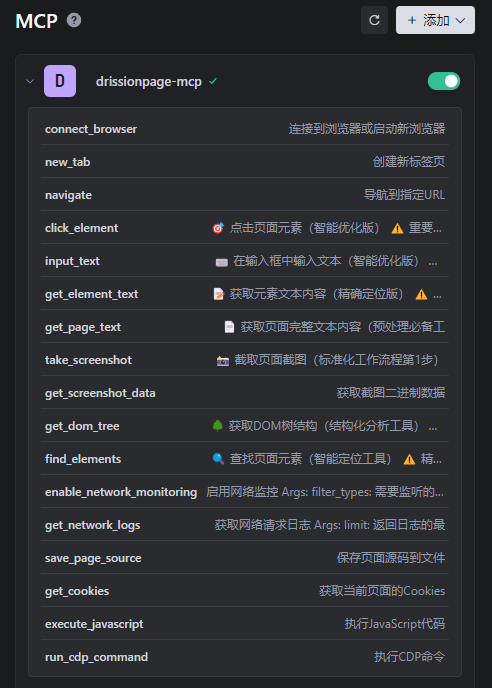
🛠️ 17工具集 - 涵盖浏览器管理到文件处理的全方位功能
🚀 快速开始
安装
# 克隆项目
git clone https://github.com/YourUsername/DrissionPageMCPServer_Modified.git
cd DrissionPageMCPServer_Modified/
# 使用 uv 同步环境
uv sync启动服务
# 启动MCP服务(STDIO模式)
drissionpage-mcp在AI助手中配置
在 Trae AI IDE 中添加 MCP 服务配置:
{
"mcpServers": {
"drissionpage-mcp": {
"command": "<YOUR_PATH>\\DrissionPageMCPServer_Modified\\.venv\\Scripts\\python.exe",
"args": ["-m", "drissionpage_mcp.main"],
"env": {
"PYTHONPATH": "<YOUR_PATH>\\DrissionPageMCPServer_Modified\\src"
}
}
}
}
📱 使用案例
网页自动化操作
复杂页面交互
基本使用示例
# 连接浏览器
result = await connect_browser(port=9222, headless=False)
# 导航并截图
result = await navigate("https://example.com")
result = await take_screenshot("page.png")
# 元素操作
result = await click_element("#submit-button")
result = await input_text("#username", "your_username")🛠️ MCP 工具列表
分类 | 工具 | 功能描述 |
🌐 浏览器管理 | 1. | 连接/启动浏览器 |
2. | 创建新标签页 | |
3. | 页面导航 | |
🎯 元素操作 | 4. | 点击元素 |
5. | 输入文本 | |
6. | 获取元素文本内容 | |
7. | 获取页面完整文本内容 | |
📸 截图功能 | 8. | 页面/元素截图 |
9. | 获取截图数据 | |
🌳 DOM操作 | 10. | 获取DOM树结构 |
11. | 查找页面元素 | |
🔍 网络监控 | 12. | 启用网络监控 |
13. | 获取网络日志 | |
📁 文件操作 | 14. | 保存页面源码 |
15. | 获取Cookies | |
⚡ 高级功能 | 16. | 执行JavaScript |
17. | 执行CDP命令 |
🌐 浏览器支持
支持所有 Chromium 内核浏览器:
Chrome(推荐)- 自动检测系统安装
Edge - 作为备选自动检测
其他 Chromium 浏览器 - 通过环境变量指定路径
项目会自动检测并使用系统中的 Chrome,如果未安装则使用 Edge。
⚙️ 环境配置
# 基本配置
export DRISSIONPAGE_MCP_LOG_LEVEL=INFO
export DRISSIONPAGE_MCP_HEADLESS=false
export DRISSIONPAGE_MCP_TIMEOUT=30
# 指定浏览器路径(可选,支持Chrome/Edge/其他Chromium浏览器)
export DRISSIONPAGE_MCP_BROWSER_PATH=/path/to/chrome
# 其他路径配置(可选)
export DRISSIONPAGE_MCP_DOWNLOAD_PATH=/path/to/downloads
export DRISSIONPAGE_MCP_SCREENSHOT_PATH=/path/to/screenshots🏗️ 项目架构
DrissionPageMCPServer_Modified/
├── .github/ # GitHub 配置
├── docs/ # VitePress 文档站点
├── src/drissionpage_mcp/ # 源代码
│ ├── config/ # 配置模块
│ ├── core/ # 核心功能(浏览器、元素、网络)
│ ├── services/ # 服务层(CDP、DOM、截图)
│ ├── utils/ # 工具模块
│ └── main.py # MCP 服务入口
├── tests/ # 测试
├── pyproject.toml # 项目配置
├── requirements.txt # 依赖
└── uv.lock # 依赖锁定📚 文档
📖 原项目文档 - 完整的项目文档
🔧 故障排除
问题 | 解决方案 |
🌐 浏览器连接失败 | 确保Chrome已安装,检查调试端口配置 |
🎯 元素找不到 | 检查选择器,等待页面加载,使用更具体选择器 |
📸 截图失败 | 检查磁盘空间、文件权限、截图目录 |
🔍 网络监控无数据 | 确保已启用监控,检查过滤条件 |
# 启用调试日志
drissionpage-mcp --log-level DEBUG🤝 贡献
欢迎提交 Issue 和 Pull Request!
Fork 项目 → 2. 创建分支 → 3. 提交更改 → 4. 推送分支 → 5. 创建 PR
📄 许可证
MIT License - 详见 LICENSE 文件
📖 参考项目
DrissionPage-MCP-Server - 原项目
DrissionPage - 底层浏览器自动化库
📧 联系方式
如有问题或建议,请联系:cfx_software@163.com
Resources
Unclaimed servers have limited discoverability.
Looking for Admin?
If you are the server author, to access and configure the admin panel.
Latest Blog Posts
MCP directory API
We provide all the information about MCP servers via our MCP API.
curl -X GET 'https://glama.ai/api/mcp/v1/servers/HyperClockUp/DrissionPageMCPServer_Modified'
If you have feedback or need assistance with the MCP directory API, please join our Discord server