

A
licenseC
qualityC
maintenanceA server that enables AI assistants to execute terminal commands and retrieve outputs via the Model Context Protocol (MCP).
3
26
MIT

Expo 개발을 위해 특별히 설계되었지만 모든 명령줄 애플리케이션에 적용할 수 있는 CLI 명령의 프록시 역할을 하는 MCP(Model Context Protocol) 서버입니다.
Expo 프로젝트 디렉토리로 이동하세요
npx mcp-command-proxy --prefix "ExpoServer" --command "expo start" --port 8383 실행합니다.
커서 설정 -> MCP -> +새로운 MCP 서버 추가로 이동합니다. 다음과 같습니다.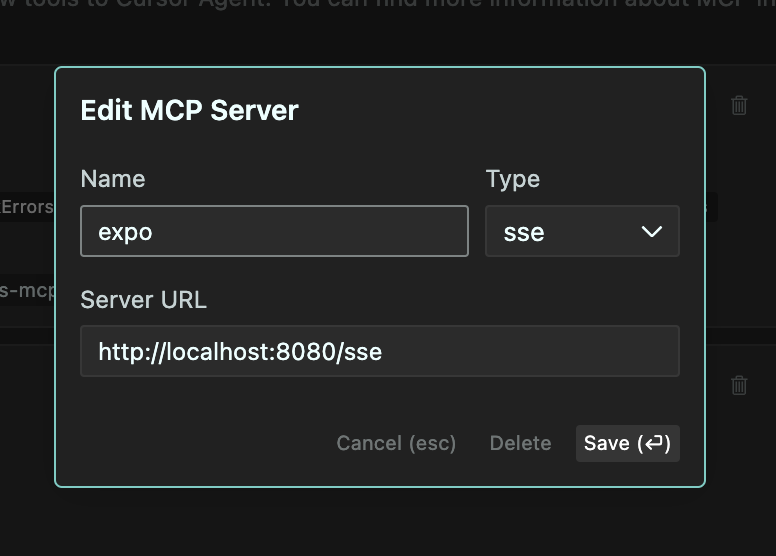
이름을 "ExpoServer"로, 유형을 "SSE"로, URL을 http://localhost:8383/sse 로 설정합니다.
"저장"을 클릭하면 이제 Cursor에서 MCP 서버를 사용할 수 있습니다. 다음과 같습니다.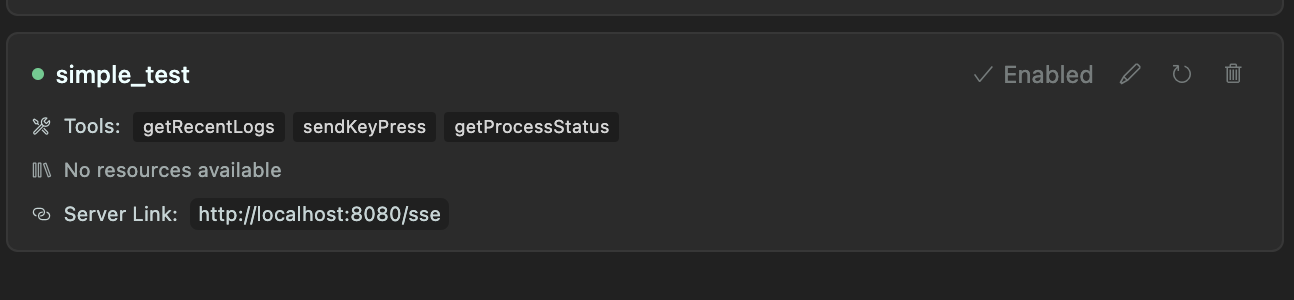
다른 서버와의 충돌을 방지하려면 --port 8383 플래그를 사용하는 것이 좋습니다. 또한, .cursorrules 파일에 다음 지침을 추가할 수 있습니다.
지엑스피1
Related MCP server: iTerm MCP
명령 프록싱 : MCP 서버를 통해 모든 CLI 명령 실행
로그 수집 : 실행 중인 프로세스의 로그를 캡처하고 저장합니다(구성 가능한 버퍼 크기)
키 입력 전달 : 클라이언트에서 실행 중인 프로세스로 키 입력을 전달합니다.
투명한 경험 : 최종 사용자는 마치 직접 실행한 것처럼 명령 출력을 정확하게 볼 수 있습니다.
대화형 명령 : Expo와 같은 대화형 CLI 도구와 함께 작동합니다.
MCP 통합 : Claude 및 기타 MCP 지원 AI 어시스턴트와의 쉬운 통합을 위해 MCP SDK를 사용하여 구축됨
서버는 PTY(Pseudo-Terminal)에서 지정된 명령을 시작합니다.
모든 stdout/stderr 출력은 다음과 같습니다.
실시간으로 클라이언트에게 스트리밍됨
원형 버퍼에 저장됨(구성 가능한 크기, 기본 300줄)
클라이언트의 키 입력은 실행 중인 프로세스로 전달됩니다.
서버는 다음을 위한 도구를 제공합니다.
수집된 로그 보기
키 입력을 프로세스로 전송
프로세스의 현재 상태를 가져옵니다
엑스포 개발 : expo start 실행하고 로그를 수집하는 동안 엑스포와 상호 작용합니다.
빌드 프로세스 : 빌드 프로세스를 모니터링하고 로그를 분석합니다.
장기 실행 서비스 : 서비스 모니터링 및 최근 로그 기록 유지
원격 명령 실행 : 원격 클라이언트에서 명령을 실행하고 모니터링합니다.
노드.js 18+
타입스크립트
pnpm(권장) 또는 npm
# Install dependencies
pnpm install

# Build the project
pnpm build

# Run directly
pnpm start -- --prefix "MyServer" --command "expo start"

# Or install globally
pnpm install -g
mcp-command-proxy --prefix "MyServer" --command "expo start"# Using the CLI
mcp-command-proxy --prefix "ExpoServer" --command "expo start"
# Or programmatically
import { createServer } from 'mcp-command-proxy';
const server = await createServer({
prefix: 'ExpoServer',
command: 'expo start',
bufferSize: 500,
port: 8080
});
// To stop the server later
server.stop();--prefix, -p : 서버의 이름/접두사(기본값: "CommandProxy")
--command, -c : 실행할 명령(필수)
--buffer-size, -b : 메모리에 보관할 로그 줄 수(기본값: 300)
--port : HTTP 서버의 포트(기본값: 8080)
--help, -h : 도움말 표시
이 서버는 다음 MCP 도구를 구현합니다.
getRecentLogs : 버퍼에서 가장 최근 로그를 반환합니다.
매개변수:
limit (선택 사항): 반환할 로그 수(기본값: 100)
types (선택 사항): 포함할 로그 유형(stdout, stderr, system)(기본값: 모두)
sendKeyPress : 실행 중인 프로세스에 키 입력을 전송합니다.
매개변수:
key : 전송 키(예: "enter", "a", "1", "space")
getProcessStatus : 프로세스의 현재 상태를 반환합니다.
매개변수: 없음
mcp-command-proxy -p "ExpoServer" -c "expo start" -b 500Claude가 이 MCP 서버에 연결되도록 구성합니다(SSE 엔드포인트: http://localhost:8080/sse )
Claude에게 Expo 또는 다른 명령을 실행하도록 요청하세요.
Claude는 로그를 분석하고 문제 해결에 도움을 줄 수 있습니다.
# Clone the repository
git clone https://github.com/hormold/mcp-command-proxy.git
cd mcp-command-proxy

# Install dependencies
pnpm install

# Build the project
pnpm build

# Run in development mode
pnpm devMIT
This server cannot be deployed
A comprehensive Model Context Protocol (MCP) server that enables AI assistants to interact with yo…
Talk to your public-facing AI from any MCP client — Claude, ChatGPT, Cursor, Cline, Windsurf.
Enable secure connectivity between Sentry issues and debugging data, and LLM clients, using a Model Context Protocol (MCP) server.
Remote MCP server exposing your Node Command fleet (files, shell, processes, browser) to AI hosts.