

A
licenseB
qualityD
maintenanceIntegrates MATLAB with AI to execute code, generate scripts from natural language, and access MATLAB documentation seamlessly.
2
54
Apache 2.0

The MATLAB MCP Server enables AI agents to interact with MATLAB through the Model Context Protocol. Here's what you can do:
Execute & Validate Code
Run MATLAB code synchronously (fast jobs) or asynchronously (long-running tasks with progress reporting), returning output, variables, and optional Plotly charts
Lint/static-analyze code with checkcode/mlint before execution
Inspect current workspace variables via whos
Async Job Management
Poll job status and progress, retrieve results, cancel jobs, and list all session jobs
Toolbox & Function Discovery
List installed toolboxes, browse functions within a toolbox, and fetch help documentation for any MATLAB function
File Operations
Upload (base64-encoded), delete, and list files in the session directory
Read .m scripts, data files (.mat, .csv, .json, .txt, .xlsx), and images (.png, .jpg, .gif) inline
Interactive Plot Generation
Automatically convert MATLAB figures to interactive Plotly charts, with static PNG fallbacks
Custom Tool Integration
Expose custom .m functions as first-class AI tools via YAML configuration
Server Monitoring & Administration
Check engine pool status, retrieve comprehensive server metrics (CPU, memory, job stats, sessions), get health status (healthy/degraded/unhealthy), and access error logs
Web-based monitoring dashboard with live gauges, time-series charts, and execution logs
Security & Multi-User Support
Configurable function blocklist, filename sanitization, per-user workspace isolation, upload size limits, and elastic engine pool scaling
Automatically converts MATLAB figures and plots into interactive Plotly charts, preserving visual properties like line styles, markers, colors, and legends for web-based rendering.
A Python MCP server that connects any AI agent (Claude, Cursor, Copilot, custom agents) to a shared MATLAB installation. Execute code, discover toolboxes, check code quality, get interactive Plotly plots, and run long simulations — all through MCP.
Your AI agent can now write and run MATLAB code directly
Long-running jobs (hours!) run async — the agent keeps working while MATLAB computes
Multiple users share one MATLAB server via an elastic engine pool
Interactive plots come back as Plotly JSON — renderable in any web UI
Custom MATLAB libraries become first-class AI tools with zero code changes
Related MCP server: MATLAB MCP Server
Feature | Description |
Execute MATLAB code | Sync for fast commands, auto-async for long jobs |
Elastic engine pool | Scales 2-10+ engines based on demand |
Toolbox discovery | Browse installed toolboxes, functions, help text |
Code checker | Run |
Interactive plots | Figures auto-converted to Plotly JSON |
Multi-user (SSE) | Session isolation with per-user workspaces |
Custom tools | Expose your |
Progress reporting | Long jobs report percentage back to the agent |
Cross-platform | Windows + macOS, MATLAB R2022b+ |
One-click Windows install | Offline |
Every MATLAB figure is automatically converted into an interactive Plotly chart — no extra code needed. When your MATLAB code creates a plot, the server:
Extracts figure properties via mcp_extract_props.m — axes, line data, labels, colors, markers, legends, subplots
Maps MATLAB styles to Plotly — line styles (-- → dash), markers (o → circle), legend positions, axis scales, colormaps
Returns interactive JSON — renderable in any web UI with Plotly.newPlot()
Generates a static PNG + thumbnail as fallback for non-interactive clients
Supported plot types: line, scatter, bar, area, subplots (subplot/tiledlayout), multiple axes, log/linear scales
Style fidelity: Line styles, marker shapes, colors (RGB), line widths, font sizes, axis labels, titles, legends, grid lines, axis limits, and background colors are all preserved.
% This MATLAB code...
x = linspace(0, 2*pi, 200);
plot(x, sin(x), 'r-', 'LineWidth', 2); hold on;
plot(x, cos(x), 'b--', 'LineWidth', 2);
plot(x, sin(x) .* cos(x), 'g-.', 'LineWidth', 2);
legend('sin(x)', 'cos(x)', 'sin(x)*cos(x)');
xlabel('x'); ylabel('y');
title('Trigonometric Functions');
...automatically becomes this interactive Plotly chart:

Line styles, colors, markers, legends, and axis labels are all preserved in the conversion.
Python 3.10+
MATLAB R2022b+ with the MATLAB Engine API for Python installed
# Install MATLAB Engine API (from your MATLAB installation)
cd /Applications/MATLAB_R2024a.app/extern/engines/python  # macOS
# cd "C:\Program Files\MATLAB\R2024a\extern\engines\python"  # Windows
pip install .Pixi (recommended, no admin needed):
Pixi installs Python + all dependencies into an isolated, per-project environment — no venv wrangling, no admin rights, works the same on Windows/macOS/Linux.
# Install pixi (Windows PowerShell)
irm -useb https://pixi.sh/install.ps1 | iex
# ...or via winget:
winget install prefix-dev.pixi
git clone https://github.com/HanSur94/matlab-mcp-server-python.git
cd matlab-mcp-server-python
# 1. Engine-free start — verifies the server comes up (no MATLAB required yet)
pixi run start
# 2. Detect your local MATLAB install and pip-install the matching matlabengine
pixi run install-engine
# 3. Start again — MATLAB code now actually executes
pixi run startpixi.lock is committed, so pixi run ... always reproduces the exact resolved
environment (Python 3.10–3.12, fastmcp==3.4.4) on any machine — no separate pip install
step needed. matlabengine is deliberately never a static dependency (its sdist build reads
the local MATLAB installation and fails on machines without a matching release); the
install-engine task installs it on demand, matched to your detected MATLAB release.
Windows (one-click, no admin needed):
git clone https://github.com/HanSur94/matlab-mcp-server-python.git
cd matlab-mcp-server-python
install.bat
The installer auto-detects MATLAB, creates a virtual environment, and installs everything from bundled wheels — fully offline, no internet required. Works on Windows 10/11 with Python 3.10, 3.11, or 3.12.
macOS / Linux:
# Option 1: Install from PyPI
pip install matlab-mcp-python

# Option 2: Install from source
git clone https://github.com/HanSur94/matlab-mcp-server-python.git
cd matlab-mcp-server-python
pip install -e ".[dev]"# Single user (stdio) — simplest setup
matlab-mcp
# Multi-user, HTTP — preferred transport (FastMCP 3.4.4 streamable-http)
matlab-mcp --transport streamablehttp
# Multi-user, SSE — legacy alias, kept for existing SSE clients
matlab-mcp --transport sseWith Pixi, the equivalent tasks are pixi run start (stdio), pixi run http
(streamablehttp, preferred), and pixi run sse (legacy alias). streamablehttp is the
transport to reach for on new setups; sse continues to work unchanged so existing
integrations are never broken.
Add to your Claude Desktop config (~/Library/Application Support/Claude/claude_desktop_config.json on macOS):
{
  "mcpServers": {
    "matlab": {
      "command": "matlab-mcp"
    }
  }
}claude mcp add matlab -- matlab-mcpAdd to .cursor/mcp.json in your project:
{
  "mcpServers": {
    "matlab": {
      "command": "matlab-mcp"
    }
  }
}# Build the image
docker build -t matlab-mcp .
# Run with your MATLAB mounted
docker run -p 8765:8765 -p 8766:8766 \
-v /path/to/MATLAB:/opt/matlab:ro \
-e MATLAB_MCP_POOL_MATLAB_ROOT=/opt/matlab \
matlab-mcp
# Or use docker-compose (edit docker-compose.yml to set your MATLAB path)
docker compose upNote: The Docker image does not include MATLAB. You must mount your own MATLAB installation.
Upgrading? If you previously installed as
matlab-mcp-server, uninstall first:pip uninstall matlab-mcp-server && pip install matlab-mcp-python
Ask your AI agent:
"Calculate the eigenvalues of a 3x3 magic square in MATLAB"
The agent calls execute_code:
A = magic(3);
eigenvalues = eig(A);
disp(eigenvalues)
Result returned inline:
15.0000
 4.8990
-4.8990"Generate a 1kHz sine wave, add noise, then filter it with a low-pass Butterworth filter and plot both"
fs = 8000;
t = 0:1/fs:0.1;
clean = sin(2*pi*1000*t);
noisy = clean + 0.5*randn(size(t));

[b, a] = butter(6, 1500/(fs/2));
filtered = filter(b, a, noisy);

subplot(2,1,1); plot(t, noisy); title('Noisy Signal');
subplot(2,1,2); plot(t, filtered); title('Filtered Signal');
Returns: Interactive Plotly chart + static PNG + thumbnail.
"Run a Monte Carlo simulation with 1 million trials"
n = 1e6;
results = zeros(n, 1);
for i = 1:n
    results(i) = simulate_trial();  % your custom function
    if mod(i, 1e5) == 0
        mcp_progress(__mcp_job_id__, i/n*100, sprintf('Trial %d/%d', i, n));
    end
end
disp(mean(results));
The agent gets a job ID immediately, polls progress ("Trial 500000/1000000 — 50%"), and retrieves results when done.
Expose your proprietary MATLAB functions as first-class AI tools. Create custom_tools.yaml:
tools:
  - name: analyze_signal
    matlab_function: mylib.analyze_signal
    description: "Analyze a signal and return frequency components, SNR, and peak detection"
    parameters:
      - name: signal_path
        type: string
        required: true
      - name: sample_rate
        type: float
        required: true
      - name: window_size
        type: int
        default: 1024
    returns: "Struct with fields: frequencies, magnitudes, snr, peaks"

  - name: train_model
    matlab_function: ml.train_classifier
    description: "Train a classification model on the given dataset"
    parameters:
      - name: dataset_path
        type: string
        required: true
      - name: model_type
        type: string
        default: "svm"
    returns: "Trained model object saved to workspace"
Now the agent can call analyze_signal or train_model directly — with full parameter validation and help text.
Tool | Parameters | Description |
|
| Run MATLAB code. Returns inline if fast (<30s), or a job ID if promoted to async |
|
| Run |
| — | Show variables in the current MATLAB workspace |
Tool | Parameters | Description |
|
| Status + progress percentage for running jobs |
|
| Full result of a completed job |
|
| Cancel a pending or running job |
| — | List all jobs in this session |
Tool | Parameters | Description |
| — | List installed MATLAB toolboxes |
|
| List functions in a toolbox |
|
| Get MATLAB help text for any function |
Tool | Parameters | Description |
|
| Upload data files to the session |
|
| Delete a session file |
| — | List files in the session directory |
Tool | Parameters | Description |
|
| Read a MATLAB |
|
| Read data files ( |
|
| Read image files ( |
Tool | Parameters | Description |
| — | Engine pool stats (available/busy/max) |
Tool | Parameters | Description |
| — | Comprehensive server metrics (pool, jobs, sessions, system) |
| — | Health status with issue detection (healthy/degraded/unhealthy) |
|
| Recent errors and notable events |
All settings live in config.yaml with sensible defaults. Override any setting via environment variables:
# Override pool size
export MATLAB_MCP_POOL_MIN_ENGINES=4
export MATLAB_MCP_POOL_MAX_ENGINES=16

# Override sync timeout (promote to async after 60s instead of 30s)
export MATLAB_MCP_EXECUTION_SYNC_TIMEOUT=60

# Override transport
export MATLAB_MCP_SERVER_TRANSPORT=sseserver:
name: "matlab-mcp-server"
transport: "stdio" # stdio | sse
host: "0.0.0.0" # SSE only
port: 8765 # SSE only
log_level: "info" # debug | info | warning | error
log_file: "./logs/server.log"
result_dir: "./results"
drain_timeout_seconds: 300pool:
min_engines: 2 # always warm
max_engines: 10 # hard ceiling
scale_down_idle_timeout: 900 # 15 min
engine_start_timeout: 120
health_check_interval: 60
proactive_warmup_threshold: 0.8
queue_max_size: 50
matlab_root: null # auto-detectexecution:
sync_timeout: 30 # seconds before async promotion
max_execution_time: 86400 # 24h hard limit
workspace_isolation: true
engine_affinity: false # pin session to engine
temp_dir: "./temp"
temp_cleanup_on_disconnect: truesecurity:
blocked_functions_enabled: true
blocked_functions:
- "system"
- "unix"
- "dos"
- "!"
- "eval"
- "feval"
- "evalc"
- "evalin"
- "assignin"
- "perl"
- "python"
max_upload_size_mb: 100
require_proxy_auth: falsetoolboxes:
mode: "whitelist" # whitelist | blacklist | all
list:
- "Signal Processing Toolbox"
- "Optimization Toolbox"
- "Statistics and Machine Learning Toolbox"
- "Image Processing Toolbox"output:
plotly_conversion: true
static_image_format: "png"
static_image_dpi: 150
thumbnail_enabled: true
thumbnail_max_width: 400
large_result_threshold: 10000
max_inline_text_length: 50000Built-in observability with a web dashboard, JSON health/metrics endpoints, and MCP tools for AI agent self-monitoring.
Access at http://localhost:8766/dashboard (stdio) or http://localhost:8765/dashboard (SSE).
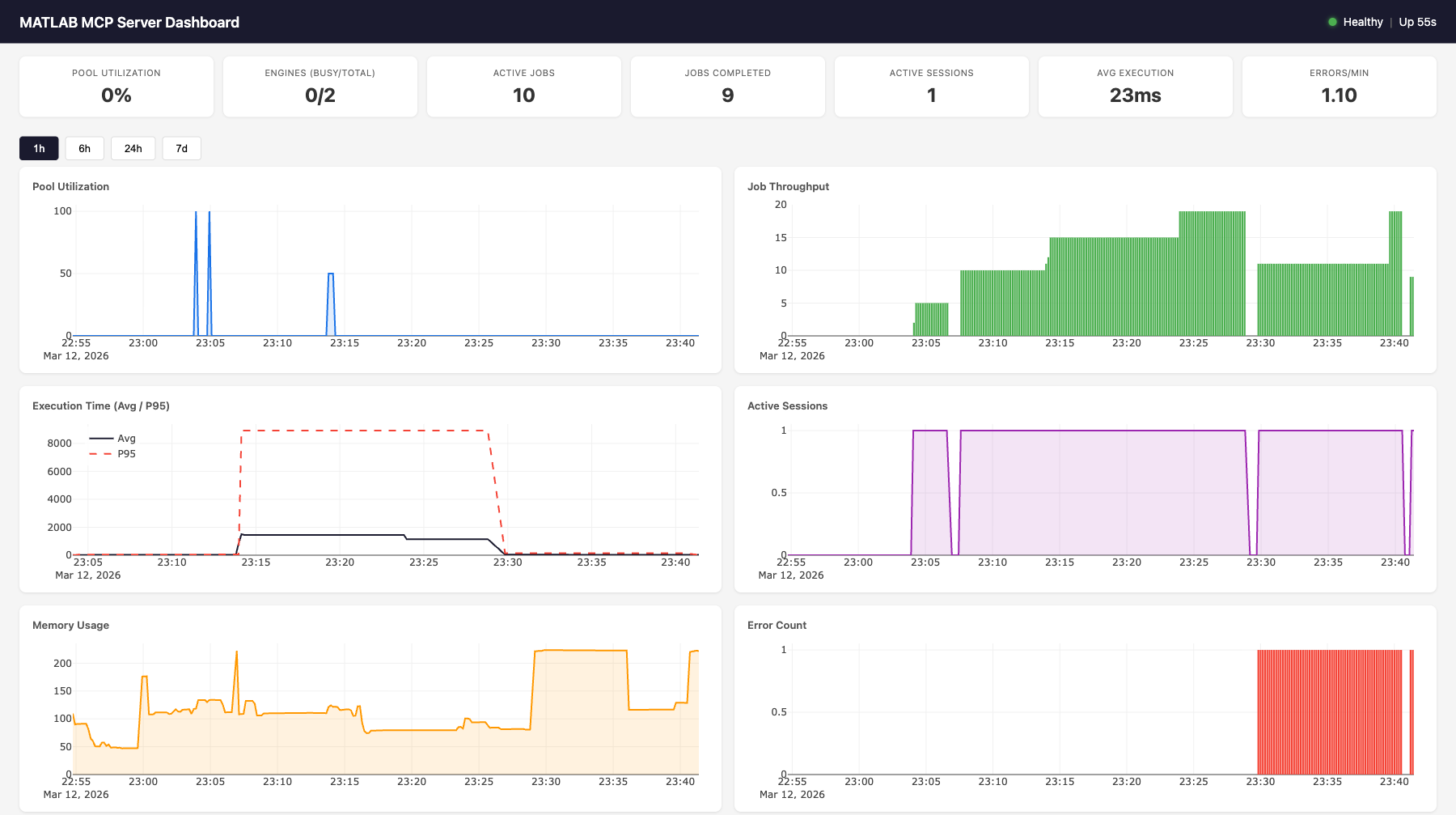
Features:
7 live gauges: pool utilization, engines (busy/total), active jobs, completed jobs, active sessions, avg execution time, errors/min
6 time-series charts (Plotly.js): pool utilization, job throughput, execution time (avg + p95), active sessions, memory usage, error count
MATLAB execution log: filterable table showing time, event type, MATLAB code, output, and duration for every job
Time range selector: 1h, 6h, 24h, 7d views
Auto-refreshes every 10 seconds

curl http://localhost:8766/health{
"status": "healthy",
"uptime_seconds": 3600.1,
"issues": [],
"engines": {"total": 2, "available": 1, "busy": 1},
"active_jobs": 1,
"active_sessions": 3
}Status codes: 200 for healthy/degraded, 503 for unhealthy.
Health evaluation rules:
Status | Condition |
| No engines running ( |
| All engines busy at max capacity ( |
| Pool utilization > 90% |
| Health check failures detected |
| Error rate > 5/min |
| None of the above |
curl http://localhost:8766/metrics{
"timestamp": "2026-03-12T23:01:56.799Z",
"pool": {"total": 2, "available": 1, "busy": 1, "max": 10, "utilization_pct": 50.0},
"jobs": {"active": 1, "completed_total": 47, "failed_total": 2, "cancelled_total": 0, "avg_execution_ms": 28.5},
"sessions": {"total_created": 5, "active": 3},
"errors": {"total": 2, "blocked_attempts": 0, "health_check_failures": 0},
"system": {"uptime_seconds": 3600.1, "memory_mb": 108.8, "cpu_percent": 12.3}
}Endpoint | Parameters | Description |
| — | Health status + issues |
| — | Live metrics snapshot (no DB hit) |
| — | Web dashboard HTML |
| — | Same as |
|
| Time-series data from SQLite |
|
| Event log with MATLAB output |
Available history metrics: pool.utilization_pct, pool.total_engines, pool.busy_engines, jobs.completed_total, jobs.failed_total, jobs.avg_execution_ms, jobs.p95_execution_ms, sessions.active_count, system.memory_mb, system.cpu_percent, errors.total
                    ┌─────────────────────────────────────────────┐
                    │           MetricsCollector                   │
                    │                                             │
                    │  In-memory:                                 │
  record_event() ──│─▶ _counters (7 counters)                    │
  (sync, from any  │   _execution_times (ring buffer, maxlen=100)│
   component)      │                                             │
                    │  Background task (every 10s):               │
                    │   sample_once() ─▶ MetricsStore.insert()   │
                    │                                             │
                    │  Live snapshot (no DB):                     │
                    │   get_current_snapshot() ─▶ /metrics        │
                    └───────────┬─────────────────────────────────┘
                                │
                    ┌───────────▼─────────────────────────────────┐
                    │           MetricsStore (aiosqlite)           │
                    │                                             │
                    │  metrics table:                             │
                    │   id | timestamp | category | metric | value│
                    │   (4 indexes for fast queries)              │
                    │                                             │
                    │  events table:                              │
                    │   id | timestamp | event_type | details     │
                    │   (details = JSON with code, output, etc.)  │
                    │                                             │
                    │  Methods:                                   │
                    │   insert_metrics(), insert_event()          │
                    │   get_latest(), get_history(), get_events() │
                    │   get_aggregates(), prune()                 │
                    │                                             │
                    │  SQLite WAL mode, log-and-swallow errors    │
                    └───────────┬─────────────────────────────────┘
                                │
                    ┌───────────▼─────────────────────────────────┐
                    │     Starlette Dashboard App                  │
                    │                                             │
                    │  /health ─▶ evaluate_health(collector)      │
                    │  /metrics ─▶ collector.get_current_snapshot()│
                    │  /dashboard ─▶ cached index.html            │
                    │  /dashboard/api/* ─▶ store queries          │
                    │  /dashboard/static/* ─▶ JS, CSS, Plotly.js  │
└─────────────────────────────────────────────┘Events are recorded synchronously via collector.record_event() from any server component. Each event includes a JSON details field.
Event Type | Source | Details Fields |
| Executor |
|
| Executor |
|
| SessionManager |
|
| PoolManager |
|
| PoolManager |
|
| PoolManager |
|
| PoolManager |
|
| SecurityValidator |
|
The collector maintains 7 counters updated on every event (no DB hit):
Counter | Incremented By |
|
|
|
|
|
|
|
|
| Any error event ( |
|
|
|
|
Job execution times are stored in a ring buffer (deque(maxlen=100)) for O(1) avg/p95 calculation without DB queries. The p95 is computed as sorted_times[int((len-1) * 0.95)].
Transport | Monitoring Port | How |
SSE | Same as SSE port (8765) | Dashboard mounted as Starlette sub-app via |
stdio | Separate port (8766) | Uvicorn started as background |
The cleanup loop runs every 60 seconds and calls store.prune(retention_days=7) to delete metrics and events older than the configured retention period. SQLite WAL mode ensures reads aren't blocked during writes.
monitoring:
  enabled: true
  sample_interval: 10      # seconds between metric samples
  retention_days: 7         # days to keep historical data
  db_path: "./monitoring/metrics.db"
  dashboard_enabled: true
  http_port: 8766           # dashboard/health port (stdio only)
Environment overrides: MATLAB_MCP_MONITORING_ENABLED, MATLAB_MCP_MONITORING_SAMPLE_INTERVAL, etc.
AI Agent (Claude, Cursor, etc.)
       │
       │ MCP Protocol (stdio or SSE)
       ▼
┌──────────────────────────────────────────────────────────┐
│   MCP Server (FastMCP 2.x)                                │
│   20 tools + custom tools                                 │
│   Session manager  │  Security validator  │  Formatter    │
└──────────┬───────────────────────────────┬───────────────┘
           │                               │
┌──────────▼──────────────────┐  ┌─────────▼──────────────┐
│   Job Executor               │  │  MetricsCollector       │
│   Sync/async execution       │  │  In-memory counters     │
│   Timeout auto-promotion     │  │  Ring buffer (p95)      │
│   stdout/stderr capture      │  │  Background sampling    │
│   Event recording ──────────────▶  Event recording       │
└──────────┬──────────────────┘  └─────────┬──────────────┘
           │                               │
┌──────────▼──────────────────┐  ┌─────────▼──────────────┐
│   MATLAB Pool Manager        │  │  MetricsStore (SQLite)  │
│   Elastic engine pool        │  │  Time-series metrics    │
│   Scale up/down on demand    │  │  Event log with output  │
│   Health checks & replace    │  │  Aggregates & history   │
└──────────┬──────────────────┘  └─────────┬──────────────┘
           │                               │
┌──────────▼──────────────────┐  ┌─────────▼──────────────┐
│   MATLAB Engines (R2022b+)    │  │  Dashboard (Starlette)  │
│   Engine 1 │ Engine 2 │ ... │  │  /health  /metrics      │
│   Workspace isolation        │  │  /dashboard (Plotly.js) │
└──────────────────────────────┘ └─────────────────────────┘AI agent sends execute_code via MCP protocol
SecurityValidator checks code against function blocklist
JobExecutor creates a job, acquires an engine from the pool
Code runs in MATLAB with stdout/stderr captured via StringIO
If completes within sync_timeout (30s): result returned inline
If exceeds timeout: promoted to async, agent gets job_id to poll
MetricsCollector.record_event() logs code + output + duration
Engine released back to pool, workspace reset
All components receive a collector reference at construction time. The collector is wired to live pool/tracker/sessions in the lifespan handler after startup. This allows synchronous record_event() calls from any component without async overhead.
# Construction (before event loop)
collector = MetricsCollector(config)
pool = EnginePoolManager(config, collector=collector)
executor = JobExecutor(pool, tracker, config, collector=collector)
sessions = SessionManager(config, collector=collector)
security = SecurityValidator(config.security, collector=collector)

# Lifespan (after event loop starts)
collector.pool = pool
collector.tracker = tracker
collector.sessions = sessions
collector.store = MetricsStore(config.monitoring.db_path)# Install dev dependencies
pip install -e ".[dev]"
# Run tests (no MATLAB needed — uses mock engine)
pytest tests/ -v
# Run with coverage
pytest tests/ --cov=matlab_mcp --cov-report=term-missing
# Lint
ruff check src/ tests/src/matlab_mcp/
├── server.py # MCP server entry point, tool registration
├── config.py # YAML config, pydantic validation, env overrides
├── pool/
│ ├── engine.py # Single MATLAB engine wrapper
│ └── manager.py # Elastic pool manager
├── jobs/
│ ├── models.py # Job data model, lifecycle
│ ├── tracker.py # Job store, pruning
│ └── executor.py # Sync/async execution, timeout promotion
├── tools/
│ ├── core.py # execute_code, check_code, get_workspace
│ ├── discovery.py # list_toolboxes, list_functions, get_help
│ ├── jobs.py # job status, result, cancel, list
│ ├── files.py # upload, delete, list files
│ ├── admin.py # pool status
│ ├── monitoring.py # get_server_metrics, get_server_health, get_error_log
│ └── custom.py # Custom tool loader from YAML
├── monitoring/
│ ├── collector.py # Background metrics sampling, event recording
│ ├── store.py # Async SQLite storage for time-series data
│ ├── health.py # Health evaluation (healthy/degraded/unhealthy)
│ ├── routes.py # HTTP route handlers (/health, /metrics)
│ ├── dashboard.py # Starlette sub-app with dashboard API
│ └── static/ # Dashboard HTML, CSS, JS (Plotly.js)
├── output/
│ ├── formatter.py # Result formatting
│ ├── plotly_convert.py # Load Plotly JSON from MATLAB extraction
│ ├── plotly_style_mapper.py # MATLAB→Plotly style/property conversion
│ └── thumbnail.py
├── session/
│ └── manager.py # Session lifecycle, temp dirs
├── security/
│ └── validator.py # Function blocklist, filename sanitization
└── matlab_helpers/
├── mcp_extract_props.m
├── mcp_checkcode.m
└── mcp_progress.mProtection | Description |
Function blocklist | Blocks |
Filename sanitization | Rejects filenames with path traversal or invalid characters |
Workspace isolation |
|
SSE proxy auth | Requires reverse proxy with auth for production |
Upload size limits | Configurable max upload size (default 100MB) |
Contributions welcome! Please open an issue or PR on GitHub.
Cancel a pending or running MATLAB execution job.
Attempts to cancel the underlying MATLAB future and marks the job as cancelled in the tracker.
| Name | Required | Description | Default |
|---|---|---|---|
| job_id | Yes |
| Name | Required | Description |
|---|---|---|
No output parameters | ||
Does the description disclose side effects, auth requirements, rate limits, or destructive behavior?
Describes attempt to cancel and marking the job, but no annotations exist. Missing details on reversibility, permissions, or failure cases.
Agents need to know what a tool does to the world before calling it. Descriptions should go beyond structured annotations to explain consequences.
Is the description appropriately sized, front-loaded, and free of redundancy?
Two concise sentences, front-loaded with action. Slightly wordy with repeated 'cancelled', but no extraneous content.
Shorter descriptions cost fewer tokens and are easier for agents to parse. Every sentence should earn its place.
Given the tool's complexity, does the description cover enough for an agent to succeed on first attempt?
For a simple cancel tool, covers basic purpose. Missing parameter semantics and usage context. Output schema exists but not utilized in description.
Complex tools with many parameters or behaviors need more documentation. Simple tools need less. This dimension scales expectations accordingly.
Does the description clarify parameter syntax, constraints, interactions, or defaults beyond what the schema provides?
Schema coverage is 0% and description adds no meaning to the job_id parameter beyond its type. With one required param, more guidance expected.
Input schemas describe structure but not intent. Descriptions should explain non-obvious parameter relationships and valid value ranges.
Does the description clearly state what the tool does and how it differs from similar tools?
Clear verb 'Cancel' with specific resource 'MATLAB execution job' and scope 'pending or running'. Distinct from sibling tools like check_code, get_error_log.
Agents choose between tools based on descriptions. A clear purpose with a specific verb and resource helps agents select the right tool.
Does the description explain when to use this tool, when not to, or what alternatives exist?
No guidance on when to use this tool versus alternatives or when not to use it. Lacks context about prerequisites or cancellation conditions.
Agents often have multiple tools that could apply. Explicit usage guidance like "use X instead of Y when Z" prevents misuse.
Lint MATLAB code using checkcode/mlint.
Writes the code to a temporary file and runs mcp_checkcode() on it, returning a list of issues (line, column, message, severity).
Note: see execute_code above for why the return annotation is
CheckResult (not a union with ToolResult).
| Name | Required | Description | Default |
|---|---|---|---|
| code | Yes |
| Name | Required | Description |
|---|---|---|
| raw | No | |
| error | No | |
| issues | No | |
| job_id | No | |
| status | Yes |
Does the description disclose side effects, auth requirements, rate limits, or destructive behavior?
No annotations are provided, so the description carries the full burden. It discloses key behaviors: writes to a temp file, runs mcp_checkcode(), returns issues. However, it omits details like whether the temp file is cleaned up, required permissions, or side effects. The note about the return type adds context but is confusingly referencing an external 'above' context.
Agents need to know what a tool does to the world before calling it. Descriptions should go beyond structured annotations to explain consequences.
Is the description appropriately sized, front-loaded, and free of redundancy?
The description is short and mostly to the point, with three clear sentences. The first sentence states the purpose. However, the note about 'execute_code above' is out of context and may confuse readers who don't have that reference. It is otherwise well-structured.
Shorter descriptions cost fewer tokens and are easier for agents to parse. Every sentence should earn its place.
Given the tool's complexity, does the description cover enough for an agent to succeed on first attempt?
An output schema is present, so return value details are not required. The description explains the process and return type. However, it could include more about the nature of issues (e.g., severity levels) and error handling. The note about the return annotation is helpful for tool designers but less so for agents. Overall, it moderately covers what is needed.
Complex tools with many parameters or behaviors need more documentation. Simple tools need less. This dimension scales expectations accordingly.
Does the description clarify parameter syntax, constraints, interactions, or defaults beyond what the schema provides?
The only parameter, 'code', has no description in the schema (0% coverage). The description implies 'code' should be MATLAB code through context ('Lint MATLAB code') but does not explicitly state the expected format, length constraints, or encoding. This leaves room for ambiguity.
Input schemas describe structure but not intent. Descriptions should explain non-obvious parameter relationships and valid value ranges.
Does the description clearly state what the tool does and how it differs from similar tools?
The description clearly states the tool lints MATLAB code using checkcode/mlint. It specifies the process (writing to a temp file, running mcp_checkcode) and distinguishes from siblings, as none of the sibling tools (e.g., cancel_job, get_error_log) perform linting.
Agents choose between tools based on descriptions. A clear purpose with a specific verb and resource helps agents select the right tool.
Does the description explain when to use this tool, when not to, or what alternatives exist?
The description does not explicitly state when to use this tool versus alternatives. It implies use for MATLAB code linting but provides no guidance on when not to use or prerequisites. A 3 is adequate but lacks explicit usage boundaries.
Agents often have multiple tools that could apply. Explicit usage guidance like "use X instead of Y when Z" prevents misuse.
Get recent server errors and notable events for diagnosing issues.
| Name | Required | Description | Default |
|---|---|---|---|
| limit | No |
| Name | Required | Description |
|---|---|---|
No output parameters | ||
Does the description disclose side effects, auth requirements, rate limits, or destructive behavior?
With no annotations, the description must fully disclose behavioral traits. It does not state whether the tool is read-only (likely) or destructive, how 'recent' is defined, or any rate limits. The implied read behavior is positive, but lacks depth.
Agents need to know what a tool does to the world before calling it. Descriptions should go beyond structured annotations to explain consequences.
Is the description appropriately sized, front-loaded, and free of redundancy?
The description is a single sentence, which is brief but not overly concise given the lack of critical details. It states the purpose efficiently but omits important usage and parameter information, making it less effective.
Shorter descriptions cost fewer tokens and are easier for agents to parse. Every sentence should earn its place.
Given the tool's complexity, does the description cover enough for an agent to succeed on first attempt?
An output schema exists, so return values are covered. However, the description lacks context on what 'recent' means, how errors are categorized, and whether the result is paginated. For a diagnostic tool, more completeness is expected.
Complex tools with many parameters or behaviors need more documentation. Simple tools need less. This dimension scales expectations accordingly.
Does the description clarify parameter syntax, constraints, interactions, or defaults beyond what the schema provides?
The input schema has a single 'limit' parameter with a default of 20 but no schema description. The tool description does not mention this parameter at all, failing to provide any meaning beyond the raw schema. With 0% schema description coverage, the description should compensate but does not.
Input schemas describe structure but not intent. Descriptions should explain non-obvious parameter relationships and valid value ranges.
Does the description clearly state what the tool does and how it differs from similar tools?
The description clearly states the tool returns 'recent server errors and notable events' for diagnosing issues, which distinguishes it from sibling tools like 'get_server_metrics' (metrics) and 'read_data' (generic data). The verb 'Get' and resource 'error log' are specific.
Agents choose between tools based on descriptions. A clear purpose with a specific verb and resource helps agents select the right tool.
Does the description explain when to use this tool, when not to, or what alternatives exist?
No guidance is provided on when to use this tool versus alternatives like 'get_server_metrics' or 'check_code'. There is no mention of prerequisites, frequency limits, or situations where another tool would be more appropriate.
Agents often have multiple tools that could apply. Explicit usage guidance like "use X instead of Y when Z" prevents misuse.
Get the current status of the MATLAB engine pool.
Returns the total, available, busy, and max engine counts.
| Name | Required | Description | Default |
|---|---|---|---|
No parameters | |||
| Name | Required | Description |
|---|---|---|
No output parameters | ||
Does the description disclose side effects, auth requirements, rate limits, or destructive behavior?
No annotations are provided, so the description carries full burden. It discloses the returned data fields and implies a safe read operation. It does not mention authentication or rate limits, but for a simple status query, the transparency is adequate.
Agents need to know what a tool does to the world before calling it. Descriptions should go beyond structured annotations to explain consequences.
Is the description appropriately sized, front-loaded, and free of redundancy?
Two sentences, front-loaded with the verb 'Get', and concise. Every sentence adds value, no wasted words.
Shorter descriptions cost fewer tokens and are easier for agents to parse. Every sentence should earn its place.
Given the tool's complexity, does the description cover enough for an agent to succeed on first attempt?
Given no parameters and an output schema (context signals indicate it exists), the description fully covers the tool's inputs and outputs. The listed return values complete the picture.
Complex tools with many parameters or behaviors need more documentation. Simple tools need less. This dimension scales expectations accordingly.
Does the description clarify parameter syntax, constraints, interactions, or defaults beyond what the schema provides?
The tool has no parameters, so baseline is 4. The description adds no parameter details, which is appropriate since none exist.
Input schemas describe structure but not intent. Descriptions should explain non-obvious parameter relationships and valid value ranges.
Does the description clearly state what the tool does and how it differs from similar tools?
The description clearly states the tool retrieves the status of the MATLAB engine pool, listing specific counts (total, available, busy, max). This distinguishes it from sibling tools like cancel_job or check_code, which perform different actions.
Agents choose between tools based on descriptions. A clear purpose with a specific verb and resource helps agents select the right tool.
Does the description explain when to use this tool, when not to, or what alternatives exist?
The description does not explicitly state when to use this tool or when to avoid it. However, its purpose is straightforward (read-only status check), and the sibling tools are clearly distinct operations, implied usage is clear.
Agents often have multiple tools that could apply. Explicit usage guidance like "use X instead of Y when Z" prevents misuse.
Get comprehensive server metrics including pool, jobs, sessions, and system stats.
| Name | Required | Description | Default |
|---|---|---|---|
No parameters | |||
| Name | Required | Description |
|---|---|---|
No output parameters | ||
Does the description disclose side effects, auth requirements, rate limits, or destructive behavior?
No annotations are provided, so the description must convey behavioral traits. It implies a read operation via 'Get' but does not explicitly state idempotency, rate limits, or that the operation is non-destructive. The response format is not disclosed, though output schema exists.
Agents need to know what a tool does to the world before calling it. Descriptions should go beyond structured annotations to explain consequences.
Is the description appropriately sized, front-loaded, and free of redundancy?
Single sentence that efficiently conveys the tool's purpose with no unnecessary words. Information is front-loaded.
Shorter descriptions cost fewer tokens and are easier for agents to parse. Every sentence should earn its place.
Given the tool's complexity, does the description cover enough for an agent to succeed on first attempt?
With no parameters and an output schema (which likely details return structure), the description sufficiently covers the tool's purpose. Minor gap: does not clarify if metrics are real-time or historical.
Complex tools with many parameters or behaviors need more documentation. Simple tools need less. This dimension scales expectations accordingly.
Does the description clarify parameter syntax, constraints, interactions, or defaults beyond what the schema provides?
The tool has zero parameters, so the description needs to add no param details. According to rubric, baseline 4 for 0 parameters is appropriate.
Input schemas describe structure but not intent. Descriptions should explain non-obvious parameter relationships and valid value ranges.
Does the description clearly state what the tool does and how it differs from similar tools?
The description clearly states the tool retrieves comprehensive server metrics, specifying categories like pool, jobs, sessions, and system stats. It differentiates from siblings such as get_pool_status or get_error_log by indicating a broader scope.
Agents choose between tools based on descriptions. A clear purpose with a specific verb and resource helps agents select the right tool.
Does the description explain when to use this tool, when not to, or what alternatives exist?
No guidance on when to use this tool versus alternatives (e.g., get_pool_status for pool-specific metrics) or when not to use it. The description lacks context for selection.
Agents often have multiple tools that could apply. Explicit usage guidance like "use X instead of Y when Z" prevents misuse.
List files in the session's temporary directory.
Returns names, sizes, and paths for all files in the session temp dir.
| Name | Required | Description | Default |
|---|---|---|---|
No parameters | |||
| Name | Required | Description |
|---|---|---|
No output parameters | ||
Does the description disclose side effects, auth requirements, rate limits, or destructive behavior?
No annotations are provided, so the description carries full burden. It does not disclose whether the operation is read-only, has performance implications, or any hidden behavior like recursion or filtering.
Agents need to know what a tool does to the world before calling it. Descriptions should go beyond structured annotations to explain consequences.
Is the description appropriately sized, front-loaded, and free of redundancy?
The description is two short sentences, front-loading the purpose and efficiently listing the return data. Every word earns its place.
Shorter descriptions cost fewer tokens and are easier for agents to parse. Every sentence should earn its place.
Given the tool's complexity, does the description cover enough for an agent to succeed on first attempt?
Given no annotations and an output schema, the description adequately explains what is returned but omits behavioral details like whether listing is recursive or includes hidden files. For a simple listing, it is minimally complete.
Complex tools with many parameters or behaviors need more documentation. Simple tools need less. This dimension scales expectations accordingly.
Does the description clarify parameter syntax, constraints, interactions, or defaults beyond what the schema provides?
The input schema has no parameters, so the description adds value by specifying the output fields (names, sizes, paths), which is beyond what the schema provides.
Input schemas describe structure but not intent. Descriptions should explain non-obvious parameter relationships and valid value ranges.
Does the description clearly state what the tool does and how it differs from similar tools?
The description clearly states the tool lists files in the session's temporary directory and specifies the return information (names, sizes, paths). It uses a specific verb ('List') and resource ('session's temporary directory'), and the function is distinct from sibling tools.
Agents choose between tools based on descriptions. A clear purpose with a specific verb and resource helps agents select the right tool.
Does the description explain when to use this tool, when not to, or what alternatives exist?
No guidance is given on when to use this tool vs alternatives. There is no mention of prerequisites, limits, or exclusions.
Agents often have multiple tools that could apply. Explicit usage guidance like "use X instead of Y when Z" prevents misuse.
List available MATLAB toolboxes.
Runs 'ver' in MATLAB and returns the output along with toolbox configuration info.
| Name | Required | Description | Default |
|---|---|---|---|
No parameters | |||
| Name | Required | Description |
|---|---|---|
No output parameters | ||
Does the description disclose side effects, auth requirements, rate limits, or destructive behavior?
No annotations are present, so the description bears full burden. It discloses that it runs the 'ver' command and returns output with config info, but does not specify side effects or read-only nature.
Agents need to know what a tool does to the world before calling it. Descriptions should go beyond structured annotations to explain consequences.
Is the description appropriately sized, front-loaded, and free of redundancy?
Two concise sentences with no wasted words. The purpose is front-loaded and the explanation of mechanism follows efficiently.
Shorter descriptions cost fewer tokens and are easier for agents to parse. Every sentence should earn its place.
Given the tool's complexity, does the description cover enough for an agent to succeed on first attempt?
For a zero-parameter tool with an output schema, the description adequately covers purpose, method, and return content. It could mention potential latency or read-only nature, but overall complete.
Complex tools with many parameters or behaviors need more documentation. Simple tools need less. This dimension scales expectations accordingly.
Does the description clarify parameter syntax, constraints, interactions, or defaults beyond what the schema provides?
There are zero parameters, so no parameter documentation is needed. The description does not add parameter info, but schema coverage is 100%, meeting the high baseline threshold.
Input schemas describe structure but not intent. Descriptions should explain non-obvious parameter relationships and valid value ranges.
Does the description clearly state what the tool does and how it differs from similar tools?
The description clearly states the tool lists available MATLAB toolboxes, uses the verb 'List', and specifies the resource. It distinguishes itself from siblings by focusing on toolbox enumeration.
Agents choose between tools based on descriptions. A clear purpose with a specific verb and resource helps agents select the right tool.
Does the description explain when to use this tool, when not to, or what alternatives exist?
No explicit when-to-use guidance or alternatives are provided. However, the description implies usage for listing toolboxes, and siblings are sufficiently different, making confusion unlikely.
Agents often have multiple tools that could apply. Explicit usage guidance like "use X instead of Y when Z" prevents misuse.
Read a data file (.mat, .csv, .json, .txt, .xlsx) from the session temp directory.
For .mat files, 'summary' mode shows variable names/sizes/types via MATLAB, 'raw' mode returns base64-encoded content. Text files return inline content.
| Name | Required | Description | Default |
|---|---|---|---|
| format | No | summary | |
| filename | Yes |
| Name | Required | Description |
|---|---|---|
No output parameters | ||
Does the description disclose side effects, auth requirements, rate limits, or destructive behavior?
Discloses different modes for .mat files (summary vs raw) and behavior for text files, but does not detail behavior for other file types like .csv or .xlsx. With no annotations, description carries the burden and does well.
Agents need to know what a tool does to the world before calling it. Descriptions should go beyond structured annotations to explain consequences.
Is the description appropriately sized, front-loaded, and free of redundancy?
Two sentences, front-loaded with purpose, no wasted words.
Shorter descriptions cost fewer tokens and are easier for agents to parse. Every sentence should earn its place.
Given the tool's complexity, does the description cover enough for an agent to succeed on first attempt?
Describes key behaviors and file types, but could be more thorough on error conditions or file size limits. Output schema exists, so return details are not needed.
Complex tools with many parameters or behaviors need more documentation. Simple tools need less. This dimension scales expectations accordingly.
Does the description clarify parameter syntax, constraints, interactions, or defaults beyond what the schema provides?
Adds context for the 'format' parameter (summary/raw for .mat) and specifies default and raw mode returns base64, but leaves behavior for 'format' with non-.mat files unclear. Schema coverage is 0%, so description partially compensates.
Input schemas describe structure but not intent. Descriptions should explain non-obvious parameter relationships and valid value ranges.
Does the description clearly state what the tool does and how it differs from similar tools?
Clearly states it reads data files of specific types (.mat, .csv, .json, .txt, .xlsx) from the session temp directory, distinguishing it from siblings like read_image and read_script.
Agents choose between tools based on descriptions. A clear purpose with a specific verb and resource helps agents select the right tool.
Does the description explain when to use this tool, when not to, or what alternatives exist?
Implies usage for reading data files from the session temp directory but does not explicitly state when to use versus alternatives or provide exclusions.
Agents often have multiple tools that could apply. Explicit usage guidance like "use X instead of Y when Z" prevents misuse.
Read an image file (.png, .jpg, .gif) from the session temp directory.
Returns the image as an inline content block that renders in agent UIs.
| Name | Required | Description | Default |
|---|---|---|---|
| filename | Yes |
Does the description disclose side effects, auth requirements, rate limits, or destructive behavior?
No annotations are provided, so the description carries full burden. It discloses the return format (inline content block that renders in UIs) but does not mention error handling, authentication needs, or whether it is read-only. The read nature is implied but not confirmed.
Agents need to know what a tool does to the world before calling it. Descriptions should go beyond structured annotations to explain consequences.
Is the description appropriately sized, front-loaded, and free of redundancy?
Two concise sentences front-load the purpose and quickly add return format. No fluff.
Shorter descriptions cost fewer tokens and are easier for agents to parse. Every sentence should earn its place.
Given the tool's complexity, does the description cover enough for an agent to succeed on first attempt?
For a simple tool with one parameter and no output schema, the description covers basic purpose and output format. However, it lacks details on file existence, unsupported formats, and error responses, which would help completeness.
Complex tools with many parameters or behaviors need more documentation. Simple tools need less. This dimension scales expectations accordingly.
Does the description clarify parameter syntax, constraints, interactions, or defaults beyond what the schema provides?
The sole parameter 'filename' has 0% schema coverage. The description adds that the file is from the session temp directory and lists allowed extensions, but does not clarify if the extension must be included, path format, or behavior if missing.
Input schemas describe structure but not intent. Descriptions should explain non-obvious parameter relationships and valid value ranges.
Does the description clearly state what the tool does and how it differs from similar tools?
The description clearly states the tool reads an image file, specifies supported formats (.png, .jpg, .gif), and notes the location (session temp directory). This distinguishes it from siblings like read_data and read_script.
Agents choose between tools based on descriptions. A clear purpose with a specific verb and resource helps agents select the right tool.
Does the description explain when to use this tool, when not to, or what alternatives exist?
The description implies use for image files but does not explicitly state when to use or not use this tool versus alternatives. No prerequisites or excluded cases are mentioned.
Agents often have multiple tools that could apply. Explicit usage guidance like "use X instead of Y when Z" prevents misuse.
Read a MATLAB .m script file from the session's temporary directory.
Returns the file content as text. Use list_files to see available files.
| Name | Required | Description | Default |
|---|---|---|---|
| filename | Yes |
| Name | Required | Description |
|---|---|---|
No output parameters | ||
Does the description disclose side effects, auth requirements, rate limits, or destructive behavior?
With no annotations provided, the description must disclose behavioral traits. It only states 'Returns the file content as text,' lacking details on error handling (e.g., file not found), permissions, side effects, or whether the file is consumed. Important behavioral context is missing.
Agents need to know what a tool does to the world before calling it. Descriptions should go beyond structured annotations to explain consequences.
Is the description appropriately sized, front-loaded, and free of redundancy?
The description is two sentences: the first states purpose and location, the second provides a helpful tip. It is concise, front-loaded, and contains no unnecessary words.
Shorter descriptions cost fewer tokens and are easier for agents to parse. Every sentence should earn its place.
Given the tool's complexity, does the description cover enough for an agent to succeed on first attempt?
Given an output schema (not shown), the return type is covered. The description provides the key context of the temporary directory and a reference to list_files. However, it lacks information on error cases (e.g., file not found), encoding, or path specification, which are minor gaps for a simple read tool.
Complex tools with many parameters or behaviors need more documentation. Simple tools need less. This dimension scales expectations accordingly.
Does the description clarify parameter syntax, constraints, interactions, or defaults beyond what the schema provides?
The input schema has one required filename parameter with no description (0% coverage). The description adds that the file is read from the session's temporary directory, implying filename is relative to that directory. However, it does not specify whether the .m extension is required or if paths are allowed, leaving some ambiguity.
Input schemas describe structure but not intent. Descriptions should explain non-obvious parameter relationships and valid value ranges.
Does the description clearly state what the tool does and how it differs from similar tools?
The description clearly states 'Read a MATLAB .m script file from the session's temporary directory.' It specifies the verb (read), resource (MATLAB .m script file), and location (temporary directory). The mention of returning file content as text further clarifies the action. It distinguishes from sibling tools like read_data and read_image by specifying .m scripts.
Agents choose between tools based on descriptions. A clear purpose with a specific verb and resource helps agents select the right tool.
Does the description explain when to use this tool, when not to, or what alternatives exist?
The description advises 'Use list_files to see available files,' providing clear guidance on a prerequisite step. However, it does not explicitly state when not to use this tool or compare it to alternatives like read_data for other file types.
Agents often have multiple tools that could apply. Explicit usage guidance like "use X instead of Y when Z" prevents misuse.
Recent tool additions, removals, and schema changes observed during successful MCP inspections.
v2.1.0cancel_job1 field changedInput schema / additionalPropertiesAdded value: +falsecheck_code5 fields changedInput schema / additionalPropertiesAdded value: +falseOutput schema / additionalPropertiesRemoved value: -trueOutput schema / descriptionAdded value: +"Typed, schema-additive view of a ``check_code`` result dict.\n\nParameters\n----------\nstatus:\n Check status: ``\"completed\"``, ``\"pending\"``, or ``\"failed\"``\n (checkcode is executed via the same executor as ``execute_code``, so\n the non-completed statuses can pass through unchanged).\nissues:\n Parsed ``mcp_checkcode`` JSON issues list. Present when the raw\n output parsed as JSON.\nraw:\n Raw checkcode text output. Present as a fallback when JSON parsing\n of the checkcode output failed.\njob_id:\n Job identifier, present on the pass-through ``\"pending\"``/``\"failed\"``\n paths.\nerror:\n Structured error dict, present on the pass-through ``\"failed\"`` path."Output schema / propertiesAdded value: +{
+ "error": {
+ "anyOf": [
+ {
+ "additionalProperties": true,
+ "type": "object"
+ },
+ {
+ "type": "null"
+ }
+ ],
+ "default": null
+ },
+ "issues": {
+ "anyOf": [
+ {},
+ {
+ "type": "null"
+ }
+ ],
+ "default": null
+ },
+ "job_id": {
+ "anyOf": [
+ {
+ "type": "string"
+ },
+ {
+ "type": "null"
+ }
+ ],
+ "default": null
+ },
+ "raw": {
+ "anyOf": [
+ {
+ "type": "string"
+ },
+ {
+ "type": "null"
+ }
+ ],
+ "default": null
+ },
+ "status": {
+ "type": "string"
+ }
+}Output schema / requiredAdded value: +[
+ "status"
+]delete_fileexecute_codeget_error_log1 field changedInput schema / additionalPropertiesAdded value: +falseget_helpget_job_resultget_job_statusget_pool_status1 field changedInput schema / additionalPropertiesAdded value: +falseget_server_healthget_server_metrics1 field changedInput schema / additionalPropertiesAdded value: +falseget_workspacelist_files1 field changedInput schema / additionalPropertiesAdded value: +falselist_functionslist_jobslist_toolboxes1 field changedInput schema / additionalPropertiesAdded value: +falseread_data1 field changedInput schema / additionalPropertiesAdded value: +falseread_image1 field changedInput schema / additionalPropertiesAdded value: +falseread_script1 field changedInput schema / additionalPropertiesAdded value: +falseupload_datav0.1.0cancel_jobcheck_codeexecute_codeget_job_resultget_job_statusget_workspacedelete_fileget_error_logget_helpget_pool_statusget_server_healthget_server_metricslist_fileslist_functionslist_jobslist_toolboxesread_dataread_imageread_scriptupload_dataScored across 10 tools
Each tool targets a clearly distinct resource or action: code linting, job cancellation, toolbox listing, file enumeration, and differentiated file reads (script/data/image), plus server status monitoring. There is no overlap or ambiguity among the listed tools.
All tool names follow a consistent verb_noun snake_case pattern (check_code, cancel_job, list_files, read_script, get_pool_status, etc.). The verbs are uniform and predictable, with no mixing of styles or arbitrary abbreviations.
At 10 tools, the server's scope is well balanced: file I/O, code analysis, job cancellation, and system monitoring are each represented without redundancy or bloat. This count falls comfortably within the optimal range for a focused MCP server.
The set is severely incomplete for its apparent purpose as a MATLAB execution server: there is no execute_code tool, even though check_code explicitly references it, and no way to write or upload scripts to the temp directory. These are critical dead ends that would prevent normal code execution workflows.
MCP server for your apps' tools and custom tools, plus hosted AI agents and approval-gated workflows
MCP server connecting AI agents to 100+ apps (Gmail, Slack, Notion, GitHub) via one-click OAuth.
Nifty's MCP server — exposes tasks, projects, messages, and files as tools for AI agents.
MCP server exposing the Backtest360 engine API as tools for AI agents.