
token-save-mcp
by Habartru
README.md
# token-save-mcp
**Your coding agent burns its context reading files. This stops it — and shows you the receipt.**
[](https://github.com/Habartru/token_save_mcp/actions/workflows/ci.yml)
[](https://pypi.org/project/token-save-mcp/)
[](https://github.com/Habartru/token_save_mcp/blob/main/LICENSE)
[](https://www.python.org/downloads/)
Read one 4,000-line file and ~35,000 tokens sit in your agent's context for the
rest of the session. Read a few more and it compacts, forgets your
instructions, and every later turn costs more — because each one pays for the
whole accumulated context again.
This MCP server sends those files to a cheap worker model instead and returns
only the answer. The bytes are paid for once, in the worker's context, not
permanently in yours.
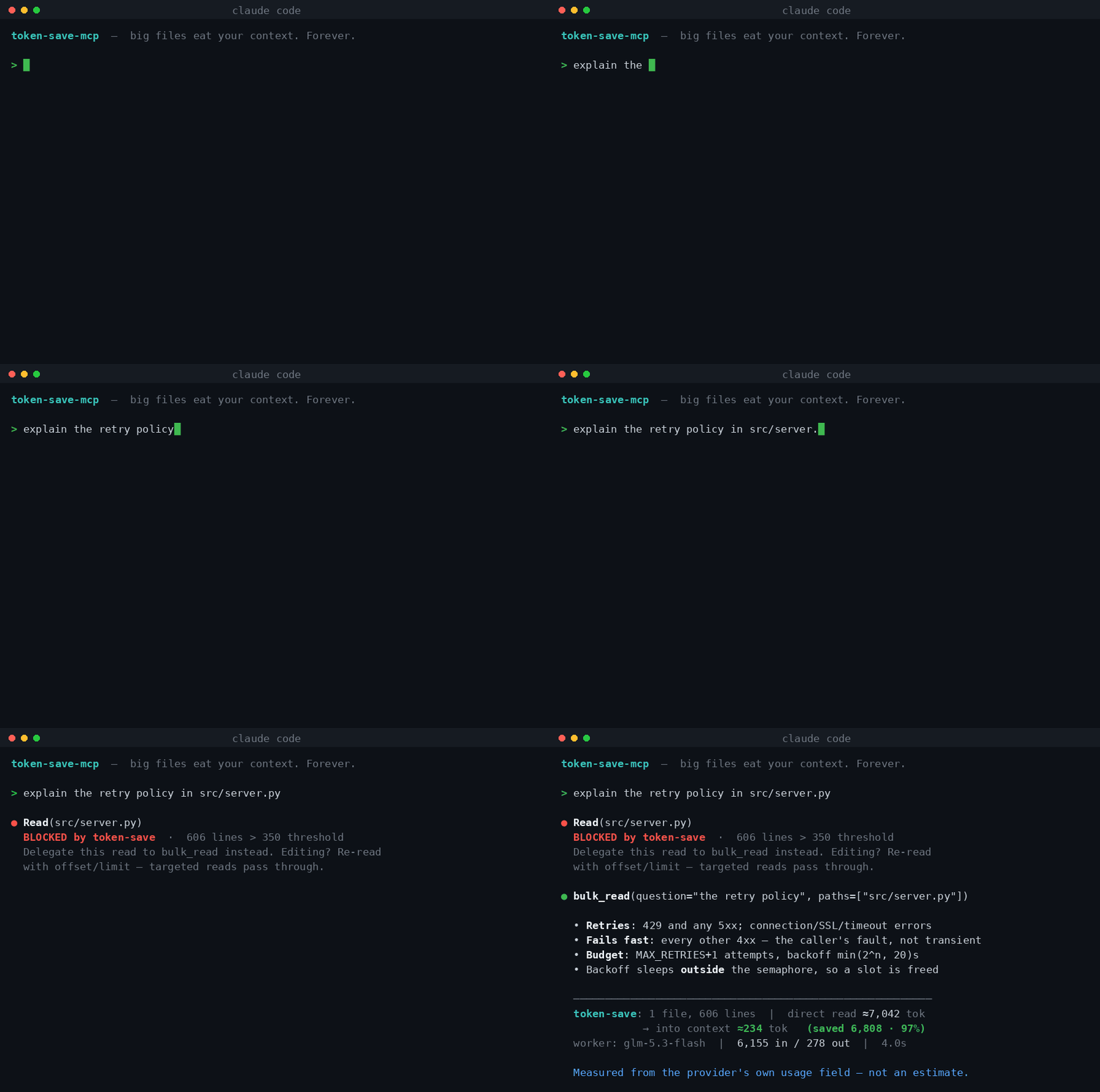
The hook **blocks** the expensive read and redirects it. The answer comes back
with the worker's **real token usage from the API response** — not an estimate,
a receipt:
```
─────────────────────────────────────────────────────────────
token-save: 1 file, 606 lines | direct read ≈7,042 tok →
into context ≈234 tok (saved 6,808 · 97%)
worker: glm-5.3-flash | 6,155 in / 278 out | 4.0s
```
*(`glm-5.3-flash` is just the worker configured in that run — you pick your own.)*
---
## Install
Two commands, plus an API key of your own.
```bash
pip install token-save-mcp
token-save-mcp init --hook
```
`init` finds a provider key you already have, registers the MCP server with
your agent, and installs the hook. If you have no key yet it prints the
options and where to get one.
One package, one command. There is no second MCP server to add and no external
command-line tool to install — the hook is plain Python and ships in the wheel.
You do need **one thing of your own: an API key** from a provider of your
choice (or a local model, which needs Ollama installed). The worker is yours —
your key, your provider, your bill.
<details>
<summary><b>What if I have no API key?</b></summary>
`init` will show you this:
```
This tool sends files to a worker model of YOUR choosing.
Nothing is connected automatically and no key ships with it.
openrouter one key, hundreds of models export OPENROUTER_API_KEY=...
deepseek cheap and strong on code export DEEPSEEK_API_KEY=...
groq fastest responses export GROQ_API_KEY=...
ollama Ollama Cloud subscription export OLLAMA_API_KEY=...
local your own machine — no key nothing to set
```
Pick one, export the key, run `init` again. The key is read from your
environment and stored in your agent's MCP config — you never paste it into a
file yourself.
**No key at all?** `--provider local` runs against a model on your own machine
(Ollama on `localhost:11434`). Nothing leaves the computer.
**Browser login instead of a key?** Not supported. Tools like Kimi Code and
GitHub Copilot authenticate through a browser and expose no OpenAI-compatible
endpoint, so they cannot be used as the worker. Every provider listed above
uses a plain API key.
</details>
Using a provider that is not in the list, or want a specific model? See
[Choosing the worker model](#choosing-the-worker-model) below — there is no
fixed roster.
Verify anytime with `token-save-mcp doctor` — it checks the configuration and
makes one live call to prove the worker answers:
```
✓ provider: openrouter -> https://openrouter.ai/api/v1
✓ worker model: deepseek/deepseek-chat
✓ hook script present (no external tools required)
✓ MCP server registered and connected
✓ worker replied in 1.8s (21 in / 13 out)
```
### Requirements
- Python 3.10+
- An agent that speaks MCP — **Claude Code** for the full experience, since the
enforcement hook is a Claude Code mechanism. Cursor, Cline, Windsurf and
Codex get the tools, and you call them yourself.
- An API key from any OpenAI-compatible provider — or a local model, which needs none
Everything else comes with the package.
---
## Choosing the worker model
**There is no fixed list.** Any model id your provider serves works — nothing is
hardcoded, because a baked-in roster goes stale the day a provider ships
something new.
```bash
# switch provider (and get its default model)
token-save-mcp init --provider deepseek
# pick a specific model
token-save-mcp init --provider openrouter --model anthropic/claude-3.5-haiku
# per call, when one question deserves a stronger model
bulk_read(question="...", paths=[...], model="openai/gpt-4o")
```
Any OpenAI-compatible endpoint at all — including ones with no preset:
```bash
export TOKENSAVE_BASE_URL=https://api.openai.com/v1
export TOKENSAVE_API_KEY=sk-...
export TOKENSAVE_MODEL=gpt-4o-mini
token-save-mcp init --provider openrouter # provider ignored once BASE_URL is set
```
`--model` and `TOKENSAVE_MODEL` do the same thing and work with any provider or
endpoint; the flag wins if both are set. `--provider` only picks a preset's URL
and key variable, so once `TOKENSAVE_BASE_URL` is set it no longer matters
which one you name.
### Which model to pick
The worker reads code and answers questions about it. That is a mechanical job,
so the cheap tier is usually right — a frontier model here costs more and buys
little.
| If you want | Reach for |
|---|---|
| Cheapest that works | A small/flash model from any provider |
| Speed above all | Groq, whose whole point is latency |
| Large corpora in one call | A model with a big context window |
| Nothing leaves the machine | `--provider local` |
`token-save-mcp doctor` proves whichever you chose actually answers before you
rely on it.
---
## Where your code goes
This matters more than the token maths, so it goes before it.
**`bulk_read` sends the contents of the files you name to the provider you
configured.** That is how it works — the worker has to see the code to answer
about it. Nothing is sent anywhere else: no telemetry, no analytics, no
phoning home. The savings ledger is a local file.
What that means in practice:
| Your situation | What to do |
|---|---|
| Open-source or personal code | Any provider is fine |
| Employer's code, no policy against it | Check the provider's data-retention terms first |
| Proprietary or regulated code | Use `--provider local` — the worker runs on your machine and nothing leaves it |
For the local option you install [Ollama](https://ollama.com) and pull a small
coding model; then `token-save-mcp init --provider local` needs no key at all.
It is slower than a hosted model, and on a laptop noticeably so, but the code
never crosses the network.
If you are unsure, start local. You can switch providers with one command later.
---
## What it costs
The worker is far cheaper than your main agent — that is the entire point —
but it is not free, and the numbers depend on your provider.
A rough shape, for a 600-line file:
- The worker reads ~6,000 tokens and writes ~300. At typical cheap-model rates
(under $1 per million input tokens) that is a **fraction of a cent per call**.
- The same read into a frontier agent's context costs perhaps 10-50× more, and
keeps costing, because every later turn pays for it again.
The second point is the one that matters. A file read on turn 20 of a
200-turn session is not paid for once — it sits in the context that every
remaining turn re-reads. That compounding is what this removes.
`token-save-mcp stats` shows what you have actually saved, from real usage
numbers rather than estimates.
---
## The part nobody else does: enforcement
Every token-saving tool has the same failure mode — **the agent forgets to use
it**. A tool the model may ignore gets ignored, and your savings are whatever
the model felt like that day.
> **Claude Code only.** The hook uses Claude Code's `PreToolUse` mechanism.
> In Cursor, Cline, Windsurf or Codex the `bulk_read` and `code_write` tools
> work normally — you just call them yourself instead of being redirected.
> `install-hook` says so if it cannot find Claude Code.
`init --hook` installs it during setup; `token-save-mcp install-hook` adds it
later. Either way it registers a `PreToolUse` hook that **blocks**
`Read` on files over the threshold and redirects the agent to `bulk_read`:
```
Read("src/server.py")
→ BLOCKED: This file is 606 lines (threshold: 350).
Use bulk_read to delegate this read instead.
Need exact content to EDIT? Re-read with offset/limit — that passes through.
```
What still passes through, by design:
- **Targeted reads** (`offset`/`limit`) — editing needs exact text
- **Small files** — under the threshold, delegating costs more than it saves
- **Binaries** and missing files — nothing to summarise
**Not ready to be told no?** Install it in warn mode instead — the read goes
through, but you see what it cost:
```bash
token-save-mcp install-hook --hook-mode warn
```
Enforcement is **opt-in** and reversible: `token-save-mcp uninstall-hook`.
---
## Tools
### `bulk_read(question, paths, model?, effort?)`
Read files without pulling them into context.
```
bulk_read(
question="Which methods touch the database, and where is auth enforced?",
paths=["src/service.py", "src/handlers.py"]
)
```
**Use for:** surveying unfamiliar code, "what does this do", tracing a flow
across files, finding where something is handled.
**Don't use for:** editing (you need exact text — use a targeted read),
debugging that needs your own reasoning over raw code, or files under ~350
lines where delegation overhead exceeds the saving. The tool tells you when
you've crossed that line rather than silently burning a call.
### `code_write(spec, reference, target?, model?, effort?)`
Generate boilerplate matching an existing file's style. With `target`, the code
is written **straight to disk** and only a confirmation returns — the generated
code never enters your context at all.
```
code_write(
spec="pytest suite for clamp(value, lo, hi), covering both bounds and lo>hi",
reference=["tests/test_total.py"],
target="tests/test_clamp.py"
)
→ Wrote tests/test_clamp.py (32 lines). Not read into your context.
```
Never overwrites: the target is created with `O_EXCL`, which also refuses to
follow a dangling symlink.
**How do you review code you never saw?** You run it. This is for generated
work with a cheap check — a test suite you execute, a config you validate, a
stub you compile. If the correctness of the output depends on reading it
carefully, skip `target` and have it returned to you instead.
### `run_command(command, question?, cwd?, timeout?, model?, effort?)`
Run a command and get the verdict, not the output.
```
run_command(command="pytest -q")
→ The run failed (exit 1): 3 tests failed, 197 passed in 42.11s.
FAILED tests/test_payment.py::test_refund_partial
E AssertionError: assert Decimal('12.50') == Decimal('12.55')
tests/test_payment.py:142
Full output (168 lines): ~/.token-save/logs/run-1789759198.log
─────────────────────────────────────────────────────────────
token-save: 168 lines | direct ≈2,922 tok → into context ≈202 tok (93%)
```
A failing suite prints hundreds of lines of setup noise around the four that
matter. Those hundreds go to the worker; the verdict comes back. **The full
output is written to a file**, so if the summary missed something you can read
the part you need — nothing is thrown away.
**Use for:** test suites, builds, linters, type checkers, migrations.
**Don't use for:** output you need verbatim (`git diff` before an edit),
interactive commands, or anything short — under ~400 tokens it is returned in
full rather than sent to a worker at all.
The command runs in a shell with your permissions. It is your command: nothing
is filtered or sandboxed.
### `status()`
The MCP tool version of `doctor`: your agent can call it mid-session to see
the configuration and confirm the worker answers. Use `doctor` from the
terminal when setting up; use `status()` when a call fails and the agent
should work out why.
### `token-save-mcp stats`
Every call appends one line to a local ledger, so you can see what the tool has
actually saved you. Example output after a few weeks of use:
```
$ token-save-mcp stats --badge
token-save-mcp — all time
148 calls · 71,204 lines of code read by a worker
context saved: 812,455 tokens (94%)
worker time: 612s total
Markdown badge:

```
It also flags files you keep delegating, and tells the two cases apart:
```
Files delegated repeatedly
4× src/server.py
26.8K worker tokens spent 3 with an identical question
3× src/cli.py
13.5K worker tokens spent all different questions
The same question asked twice returns the same answer. Keep the
first answer in your notes, or ask the follow-up in the same call.
```
The same question twice is waste — the answer was already paid for. Different
questions about one file are legitimate, but if you keep going back, asking
everything in one call costs less than five.
The ledger is a plain JSONL file in `~/.token-save/` and never leaves your
machine. It records file paths and a **hash** of each question — enough to spot
a repeat, without putting your prompts on disk. `--since 7` limits the window;
`TOKENSAVE_NO_LEDGER=1` turns recording off entirely.
---
## Measured savings
Real runs, not projections. Each number is the footer from an actual call:
| What | Size | Direct read | Via token-save | Saved |
|---|---|---|---|---|
| This project's own server.py | 606 lines | ≈7,042 tok | ≈234 tok | **97%** |
| A large TypeScript handler | 602 lines | ≈13,340 tok | ≈689 tok | **95%** |
| Production Python service | 443 lines | ≈5,788 tok | ≈684 tok | **88%** |
| 4 files across a codebase | 1,910 lines | ≈28,379 tok | ≈304 tok | **99%** |
| Code generation to disk | 58 lines written | — | 0 tok | **100%** |
**Method:** "direct read" is the file's own size at ~3.6 chars/token (source
code is denser than prose); "via token-save" is the returned answer measured the
same way. The worker's in/out numbers come from the provider's `usage` field.
Reproduce any row by running the same call — the footer prints on every one.
**Where it's weaker, honestly:** on a 281-line diff the saving was 67%, because
a short input with a long answer is the worst case. The tool says so in its own
output. Savings are best where the file is big and the question is narrow.
---
## How it compares
Different tools solve "too many tokens" in genuinely different ways:
| | Approach | Enforced? | Savings figure |
|---|---|---|---|
| **token-save-mcp** | LLM worker reads, returns an answer | **Yes** — hook blocks Read | Measured per call |
| Static AST tools | Parse the tree, return exact symbols | No | Deterministic |
| Other delegation MCPs | LLM worker, single provider | No | Usually estimated |
**Static AST tools are better than this one** at "give me the exact body of
`handleRequest`" — they're free, instant, and can't hallucinate. Reach for them
for symbol lookup.
This tool is for **semantic questions over large files** — "what does this
service do", "where does auth happen", "which of these files handle retries" —
where you want an answer, not an extract. That costs a worker call and a few
seconds, and a worker can be wrong. Use both.
---
## Configuration
| Variable | Default | Purpose |
|---|---|---|
| `TOKENSAVE_PROVIDER` | `ollama`\* | Preset: ollama, openrouter, deepseek, groq, local |
| `TOKENSAVE_API_KEY` | — | Overrides the preset's key variable |
| `TOKENSAVE_BASE_URL` | preset | Any OpenAI-compatible endpoint |
| `TOKENSAVE_MODEL` | preset | Worker model id |
| `TOKENSAVE_MIN_LINES` | `350` | Hook threshold, and the "too small" warning |
| `TOKENSAVE_HOOK_MODE` | `block` | `warn` allows the read but flags the cost |
| `TOKENSAVE_HOOK_MAX_BYTES` | `100000` | Also block on size — catches minified files |
| `TOKENSAVE_MAX_CORPUS_BYTES` | `2000000` | Ceiling on one request |
| `TOKENSAVE_TIMEOUT` | `600` | Seconds per call |
| `TOKENSAVE_MAX_RETRIES` | `4` | Retries on transient failures |
| `TOKENSAVE_MAX_CONCURRENCY` | `3` | Match your provider's limit |
| `TOKENSAVE_LEDGER` | `~/.token-save/ledger.jsonl` | Where `stats` reads from |
| `TOKENSAVE_NO_LEDGER` | unset | Set to disable local recording |
\* The default only matters if you set the variables yourself. `init` writes
whichever provider you chose into the MCP config, so it never applies to a
normal setup. Delete the ledger any time with `rm ~/.token-save/ledger.jsonl`.
---
## When not to use this
Being clear about this is the point, not a disclaimer:
- **You need exact text to edit.** Use a targeted read. The hook lets those through.
- **You would re-read the file anyway.** If you cannot act on the answer without
checking it against the source, you have paid for both. The saving is real
only when the answer is enough — which is most survey questions and almost no
debugging.
- **You're debugging subtle behaviour.** Summaries lose the detail that matters.
- **The file is small.** Under ~350 lines, reading directly is cheaper and faster.
- **The worker can be wrong.** It's an LLM. For anything you'll act on blindly,
verify against the source. Static tools don't have this failure mode.
---
## Development
```bash
git clone https://github.com/Habartru/token_save_mcp
cd token_save_mcp
pip install -e ".[dev]"
python tests/test_server.py # 118 server tests — no API calls
python tests/test_cli.py # 34 CLI tests
bash tests/test_hook.sh # 21 hook routing tests
```
The test suite stubs the transport, so it costs nothing to run and is safe in
CI. It covers the retry loop, corpus assembly, fence stripping, the disk-write
guards, and every hook routing decision.
---
## Credits
The delegation-plus-hook pattern is adapted from the `shunt` plugin in
[spotify/portal-ai-plugins](https://github.com/spotify/portal-ai-plugins)
(Apache-2.0), which routes the same kind of work through Spotify's internal
Portal CLI. This project keeps the idea and swaps the transport for any
OpenAI-compatible provider, so no corporate Portal instance is required. Files
also travel in-process rather than through `argv`, which removes the 128 KiB
per-argument limit on Linux.
MIT licensed.
This server cannot be deployed
Maintenance
ActivitySlowing
ResponsivenessNo issues