
YAPI Interface MCP Server
# yapi-get-interface-mcp
一个用于获取YAPI接口详情的MCP(Model Context Protocol)服务器,支持与Cursor、Claude Desktop等AI开发工具集成。
<a href="https://glama.ai/mcp/servers/@Gorvey/yapi-get-interface-mcp">
<img width="380" height="200" src="https://glama.ai/mcp/servers/@Gorvey/yapi-get-interface-mcp/badge" alt="YAPI Interface Server MCP server" />
</a>
## 使用方法
### 可用工具
#### yapi-get-interface
根据接口ID获取YAPI接口详情
**参数:**
- `id`:接口ID(数字格式)
**使用示例:**
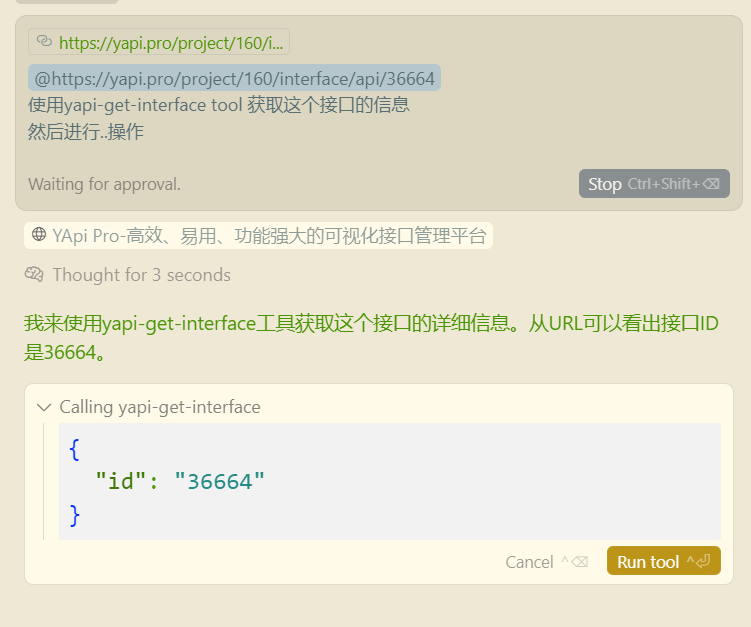
AI工具会自动调用该工具并返回接口的完整信息,包括:
- 接口基本信息(名称、路径、方法等)
- 请求参数(路径参数、查询参数、请求头、请求体)
- 响应信息(响应体、响应类型等)
- 其他元数据(创建时间、状态、标签等)
### 命令行参数
| 参数 | 说明 | 必需 | 示例 |
|------|------|------|------|
| `--email` | YAPI登录邮箱 | 是 | `--email admin@company.com` |
| `--password` | YAPI登录密码 | 是 | `--password mypassword` |
| `--url` | YAPI服务器地址 | 是 | `--url https://yapi.company.com` |
## 快速开始
#### 在Cursor中配置
创建或编辑 `.cursor/mcp.json` 文件(项目级配置)或 `~/.cursor/mcp.json` 文件(全局配置):
```json
{
"mcpServers": {
"yapi-get-interface-mcp": {
"command": "npx",
"args": [
"yapi-get-interface-mcp",
"--email", "your@email.com",
"--password", "yourpassword",
"--url", "https://yapi.yourcompany.com"
]
}
}
}
```
## 环境要求
- Node.js >= 18.0.0
- pnpm >= 8.0.0
## 安装
使用npx可以直接运行,无需本地安装:
```bash
# 克隆项目
git clone https://github.com/Gorvey/yapi-get-interface-mcp.git
cd yapi-get-interface-mcp
# 安装依赖
pnpm install
# 构建项目
pnpm run build
```
## 开发指南
### 项目结构
```
src/
├── config/ # 配置管理
│ └── yapi-config.ts
├── server/ # MCP服务器
│ ├── server.ts
│ ├── tools.ts
│ └── resources.ts
├── yapi/ # YAPI客户端
│ └── client.ts
└── index.ts # 入口文件
```
### 开发脚本
```bash
# 开发模式(带示例配置)
pnpm run dev
# 监听文件变化自动构建
pnpm run watch
# 清理构建文件
pnpm run clean
# 构建项目
pnpm run build
# 使用MCP Inspector调试
pnpm run inspector
```
### 调试
使用MCP Inspector进行调试:
```bash
pnpm run inspector
```
这将启动一个交互式界面,帮助你测试和调试MCP工具。
## 常见问题
### 1. YAPI连接失败
- 检查YAPI服务器地址是否正确
- 确认邮箱和密码是否正确
- 检查网络连接和YAPI服务器可访问性
### 2. 接口ID无效
- 确保接口ID是数字格式
- 检查接口在YAPI中是否存在
- 确认有访问该接口的权限
### 3. MCP服务器未被识别
- 确保已正确构建项目(`pnpm run build`)
- 检查配置文件中的路径是否正确
- 重启AI开发工具
## 许可证
MIT License
## 贡献
欢迎提交Issue和Pull Request来改进这个项目。
## 更多信息
- [MCP协议文档](https://modelcontextprotocol.io/)
- [Cursor MCP集成文档](https://docs.cursor.com/integrations/mcp)TDQS
Scored across 1 tool
With only one tool, there is no possibility of ambiguity or overlap between tools. The tool's purpose is clearly defined as fetching YAPI interface details by ID.
Since there is only one tool, naming consistency is inherently perfect. The tool name 'yapi-get-interface' follows a clear verb_noun pattern and is descriptive.
A single tool is too few for a server named 'YAPI Interface MCP Server', which implies a broader scope for managing YAPI interfaces. This minimal set severely limits functionality and suggests an incomplete implementation.
The tool set is severely incomplete for the domain of YAPI interface management. It only provides a 'get' operation, lacking essential CRUD operations like create, update, delete, or list interfaces, which are necessary for basic agent workflows.