
A
licenseA
qualityD
maintenanceAn MCP server that enables LLMs to interact with Agent-to-Agent (A2A) protocol compatible agents, allowing for sending messages, tracking tasks, and receiving streaming responses.
5
28
MIT

Integrates with Google's Agent-to-Agent (A2A) protocol, allowing communication and interoperability between AI agents through a standardized JSON-RPC interface.
Click on "Deploy Server".
Wait a few minutes for the server to deploy. Once ready, it will show a "Started" state.
In the chat, type @ followed by the MCP server name and your instructions, e.g., "@A2A MCP Server register the currency agent and ask it to convert 100 USD to EUR"
That's it! The server will respond to your query, and you can continue using it as needed.
Here is a step-by-step guide with screenshots.

A mcp server that bridges the Model Context Protocol (MCP) with the Agent-to-Agent (A2A) protocol, enabling MCP-compatible AI assistants (like Claude) to seamlessly interact with A2A agents.
This project serves as an integration layer between two cutting-edge AI agent protocols:
Model Context Protocol (MCP): Developed by Anthropic, MCP allows AI assistants to connect to external tools and data sources. It standardizes how AI applications and large language models connect to external resources in a secure, composable way.
Agent-to-Agent Protocol (A2A): Developed by Google, A2A enables communication and interoperability between different AI agents through a standardized JSON-RPC interface.
By bridging these protocols, this server allows MCP clients (like Claude) to discover, register, communicate with, and manage tasks on A2A agents through a unified interface.
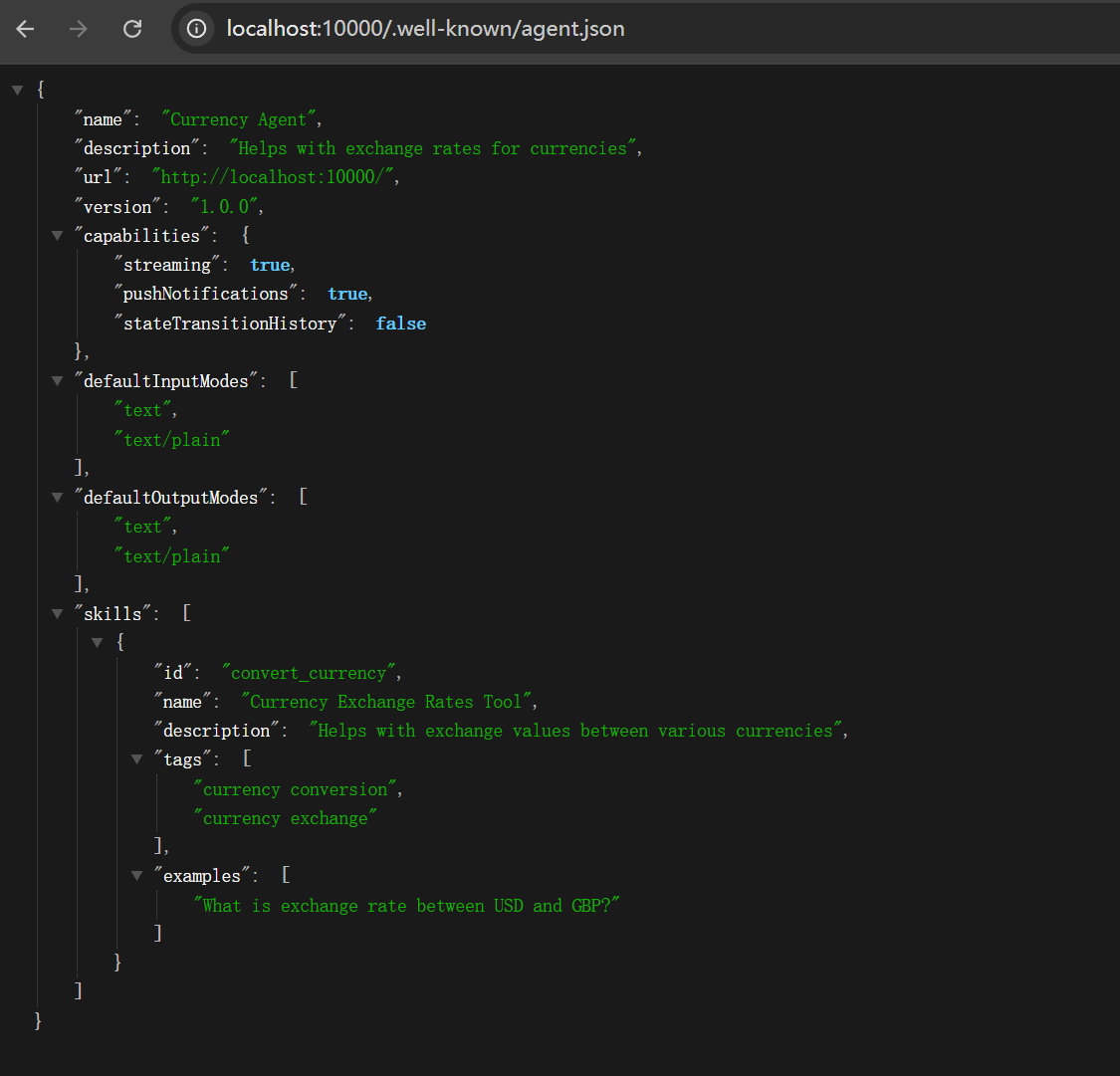
also support cloud deployed Agent
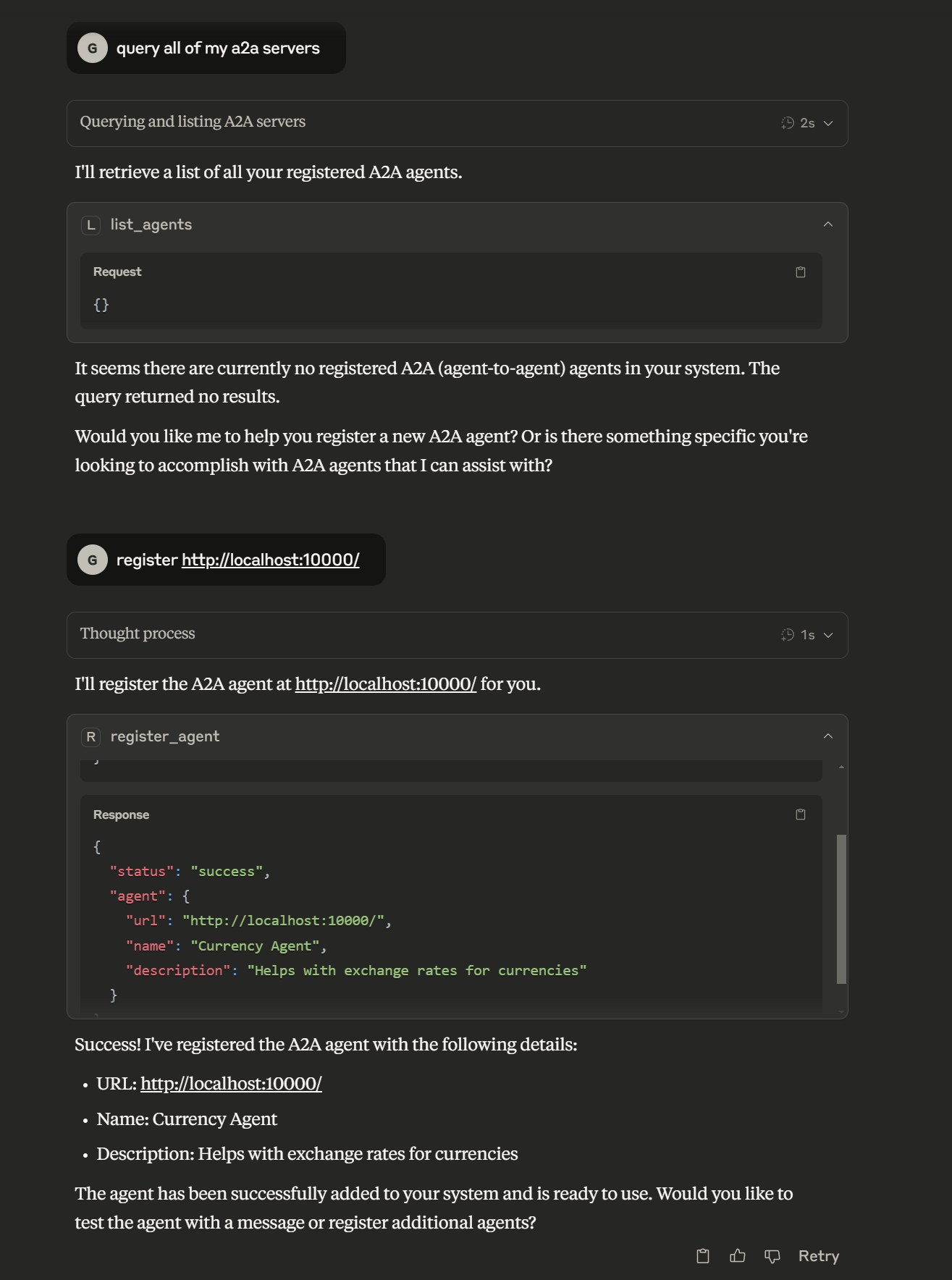
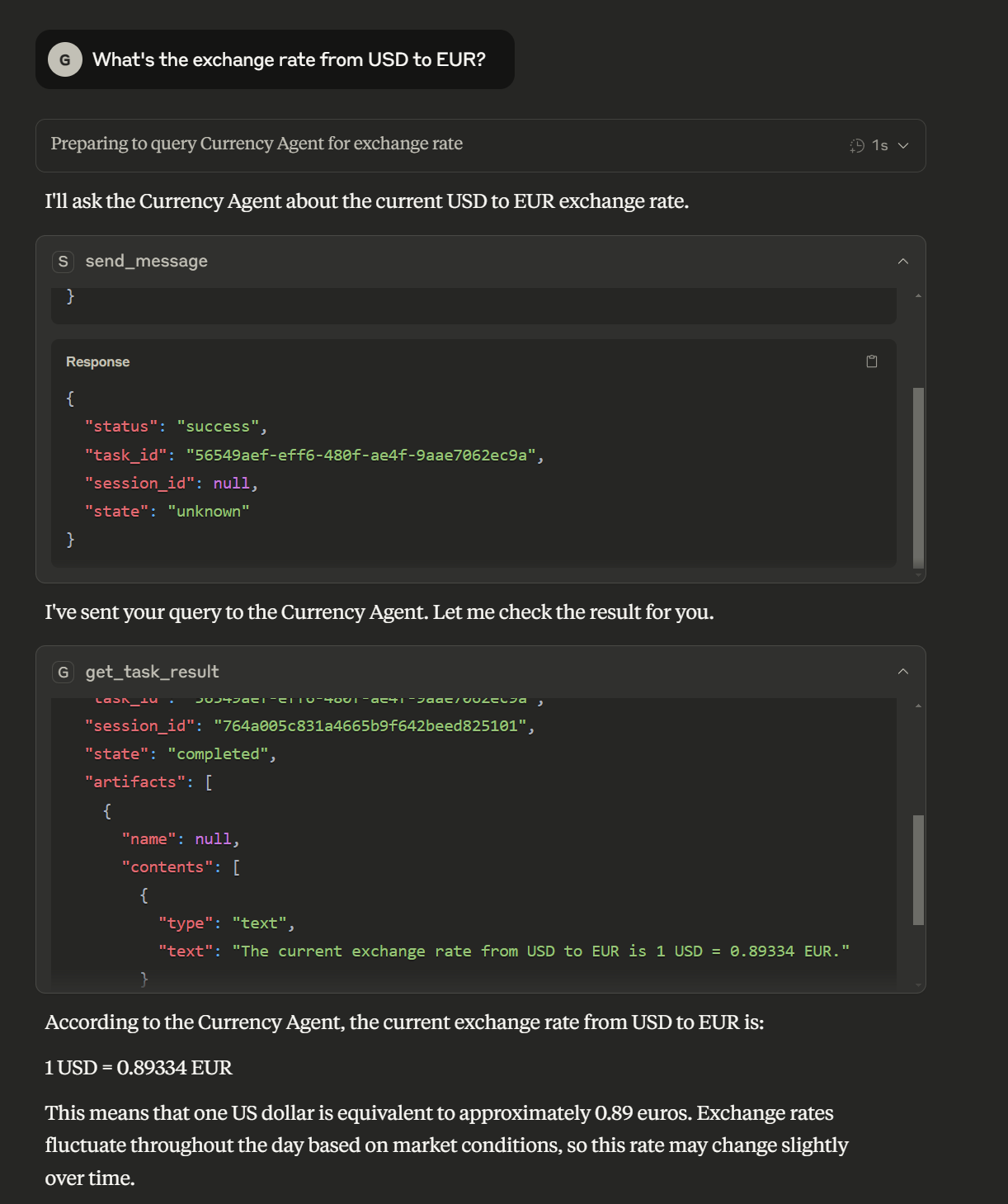
Related MCP server: A2A MCP Server
Agent Management
Register A2A agents with the bridge server
List all registered agents
Unregister agents when no longer needed
Communication
Send messages to A2A agents and receive responses
Stream responses from A2A agents in real-time
Task Management
Track which A2A agent handles which task
Retrieve task results using task IDs
Cancel running tasks
Transport Support
Multiple transport types: stdio, streamable-http, SSE
Configure transport type using MCP_TRANSPORT environment variable
To install A2A Bridge Server for Claude Desktop automatically via Smithery:
npx -y @smithery/cli install @GongRzhe/A2A-MCP-Server --client claudepip install a2a-mcp-serverClone the repository:
git clone https://github.com/GongRzhe/A2A-MCP-Server.git
cd A2A-MCP-Server
Set up a virtual environment:
python -m venv .venv
source .venv/bin/activate  # On Windows: .venv\Scripts\activate
Install dependencies:
pip install -r requirements.txtConfigure how the MCP server runs using these environment variables:
# Transport type: stdio, streamable-http, or sse
export MCP_TRANSPORT="streamable-http"

# Host for the MCP server
export MCP_HOST="0.0.0.0"

# Port for the MCP server (when using HTTP transports)
export MCP_PORT="8000"

# Path for the MCP server endpoint (when using HTTP transports)
export MCP_PATH="/mcp"

# Path for SSE endpoint (when using SSE transport)
export MCP_SSE_PATH="/sse"

# Enable debug logging
export MCP_DEBUG="true"The A2A MCP Server supports multiple transport types:
stdio (default): Uses standard input/output for communication
Ideal for command-line usage and testing
No HTTP server is started
Required for Claude Desktop
streamable-http (recommended for web clients): HTTP transport with streaming support
Recommended for production deployments
Starts an HTTP server to handle MCP requests
Enables streaming of large responses
sse: Server-Sent Events transport
Provides real-time event streaming
Useful for real-time updates
To specify the transport type:
# Using environment variable
export MCP_TRANSPORT="streamable-http"
uvx a2a-mcp-server

# Or directly in the command
MCP_TRANSPORT=streamable-http uvx a2a-mcp-server# Using default settings (stdio transport)
uvx a2a-mcp-server
# Using HTTP transport on specific host and port
MCP_TRANSPORT=streamable-http MCP_HOST=127.0.0.1 MCP_PORT=8080 uvx a2a-mcp-serverClaude Desktop allows you to configure MCP servers in the claude_desktop_config.json file. This file is typically located at:
Windows: %APPDATA%\Claude\claude_desktop_config.json
macOS: ~/Library/Application Support/Claude/claude_desktop_config.json
Linux: ~/.config/Claude/claude_desktop_config.json
Add the following to the mcpServers section of your claude_desktop_config.json:
"a2a": {
  "command": "uvx",
  "args": [
    "a2a-mcp-server"
  ]
}
Note that for Claude Desktop, you must use "MCP_TRANSPORT": "stdio" since Claude requires stdio communication with MCP servers.
If you've cloned the repository and want to run the server from your local installation:
"a2a": {
  "command": "C:\\path\\to\\python.exe",
  "args": [
    "C:\\path\\to\\A2A-MCP-Server\\a2a_mcp_server.py"
  ],
  "env": {
    "MCP_TRANSPORT": "stdio",
    "PYTHONPATH": "C:\\path\\to\\A2A-MCP-Server"
  }
}
Replace C:\\path\\to\\ with the actual paths on your system.
This repository includes a config_creator.py script to help you generate the configuration:
# If using local installation
python config_creator.py
The script will:
Automatically detect Python, script, and repository paths when possible
Configure stdio transport which is required for Claude Desktop
Let you add any additional environment variables if needed
Create or update your Claude Desktop configuration file
Here's an example of a complete claude_desktop_config.json file with the A2A-MCP-Server configured:
{
  "mcpServers": {
    "a2a": {
      "command": "uvx",
      "args": [
        "a2a-mcp-server"
      ]
    }
  }
}Claude can use A2A agents through the MCP tools provided by this server. Here's how to set it up:
For Claude Web: Start the MCP server with the streamable-http transport:
MCP_TRANSPORT=streamable-http MCP_HOST=127.0.0.1 MCP_PORT=8000 uvx a2a-mcp-serverFor Claude Web: In Claude web interface, enable the MCP URL connection in your Tools menu.
Use the URL: http://127.0.0.1:8000/mcp
For Claude Desktop: Add the configuration to your claude_desktop_config.json file as described above. The easiest way is to use the provided config_creator.py script which will automatically detect paths and create the proper configuration.
In Claude, you can now use the following functions:
Register an A2A agent:
I need to register a new agent. Can you help me with that?
(Agent URL: http://localhost:41242)
Send message to an agent:
Ask the agent at http://localhost:41242 what it can do.Retrieve task results:
Can you get the results for task ID: 550e8400-e29b-41d4-a716-446655440000?Cursor IDE can connect to MCP servers to add tools to its AI assistant:
Run your A2A MCP server with the streamable-http transport:
MCP_TRANSPORT=streamable-http MCP_HOST=127.0.0.1 MCP_PORT=8000 uvx a2a-mcp-serverIn Cursor IDE, go to Settings > AI > MCP Servers
Add a new MCP Server with URL: http://127.0.0.1:8000/mcp
Enable the server
Now you can use the A2A tools from within Cursor's AI assistant.
Windsurf is a browser with built-in MCP support:
Run your A2A MCP server with the streamable-http transport:
MCP_TRANSPORT=streamable-http MCP_HOST=127.0.0.1 MCP_PORT=8000 uvx a2a-mcp-serverIn Windsurf browser, go to Settings > MCP Connections
Add a new MCP connection with URL: http://127.0.0.1:8000/mcp
Enable the connection
You can now use A2A tools from within Windsurf's AI assistant.
The server exposes the following MCP tools for integration with LLMs like Claude:
register_agent: Register an A2A agent with the bridge server
{
  "name": "register_agent",
  "arguments": {
    "url": "http://localhost:41242"
  }
}list_agents: Get a list of all registered agents
{
  "name": "list_agents",
  "arguments": {}
}unregister_agent: Remove an A2A agent from the bridge server
{
  "name": "unregister_agent",
  "arguments": {
    "url": "http://localhost:41242"
  }
}send_message: Send a message to an agent and get a task_id for the response
{
  "name": "send_message",
  "arguments": {
    "agent_url": "http://localhost:41242",
    "message": "What's the exchange rate from USD to EUR?",
    "session_id": "optional-session-id"
  }
}send_message_stream: Send a message and stream the response
{
  "name": "send_message_stream",
  "arguments": {
    "agent_url": "http://localhost:41242",
    "message": "Tell me a story about AI agents.",
    "session_id": "optional-session-id"
  }
}get_task_result: Retrieve a task's result using its ID
{
  "name": "get_task_result",
  "arguments": {
    "task_id": "b30f3297-e7ab-4dd9-8ff1-877bd7cfb6b1",
    "history_length": null
  }
}cancel_task: Cancel a running task
{
  "name": "cancel_task",
  "arguments": {
    "task_id": "b30f3297-e7ab-4dd9-8ff1-877bd7cfb6b1"
  }
}1. Client registers an A2A agent
↓
2. Client sends a message to the agent (gets task_id)
↓
3. Client retrieves the task result using task_idUser: Register an agent at http://localhost:41242
Claude uses: register_agent(url="http://localhost:41242")
Claude: Successfully registered agent: ReimbursementAgent
User: Ask the agent what it can do
Claude uses: send_message(agent_url="http://localhost:41242", message="What can you do?")
Claude: I've sent your message. Here's the task_id: b30f3297-e7ab-4dd9-8ff1-877bd7cfb6b1
User: Get the answer to my question
Claude uses: get_task_result(task_id="b30f3297-e7ab-4dd9-8ff1-877bd7cfb6b1")
Claude: The agent replied: "I can help you process reimbursement requests. Just tell me what you need to be reimbursed for, including the date, amount, and purpose."The A2A MCP server consists of several key components:
FastMCP Server: Exposes tools to MCP clients
A2A Client: Communicates with registered A2A agents
Task Manager: Handles task forwarding and management
Agent Card Fetcher: Retrieves information about A2A agents
MCP Client → FastMCP Server → A2A Client → A2A Agent
                   ↑                ↓
└──── Response ──┘When sending a message to an A2A agent, the server:
Generates a unique task_id
Maps this ID to the agent's URL in the task_agent_mapping dictionary
Returns the task_id to the MCP client
Uses this mapping to route task retrieval and cancellation requests
The server provides detailed error messages for common issues:
Agent not registered
Task ID not found
Connection errors to agents
Parsing errors in responses
If an agent can't be registered:
Verify the agent URL is correct and accessible
Check if the agent has a proper agent card at /.well-known/agent.json
If messages aren't being delivered:
Ensure the agent is registered (use list_agents)
Verify the agent is running and accessible
If you can't retrieve a task result:
Make sure you're using the correct task_id
Check if too much time has passed (some agents might discard old tasks)
If you have issues with a specific transport type:
stdio issues: Ensure input/output streams are not redirected or modified
streamable-http issues: Check if the port is available and not blocked by a firewall
sse issues: Verify the client supports Server-Sent Events
If Claude Desktop isn't starting your A2A-MCP-Server:
Check that the paths in your claude_desktop_config.json are correct
Verify that Python is in your PATH if using "command": "python"
For local installation, ensure the PYTHONPATH is correct
Make sure MCP_TRANSPORT is set to "stdio" in the env section
Try running the command manually to see if it works outside of Claude
Use the config_creator.py script for automatic path detection and configuration
To add new capabilities to the server, add methods decorated with @mcp.tool() in the a2a_mcp_server.py file.
The server uses a custom A2AServerTaskManager class that extends InMemoryTaskManager. You can customize its behavior by modifying this class.
a2a-mcp-server/
├── a2a_mcp_server.py      # Main server implementation
├── common/                # A2A protocol code (from google/A2A)
│   ├── client/            # A2A client implementation
│   ├── server/            # A2A server implementation
│   ├── types.py           # Common type definitions
│   └── utils/             # Utility functions
├── config_creator.py      # Script to help create Claude Desktop configuration
├── .gitignore             # Git ignore file
├── pyproject.toml         # Project metadata and dependencies
├── README.md              # This file
└── requirements.txt # Project dependenciesThis project is licensed under the Apache License, Version 2.0 - see the LICENSE file for details.
The code in the common/ directory is from the Google A2A project and is also licensed under the Apache License, Version 2.0.
Anthropic for the Model Context Protocol
Google for the Agent-to-Agent Protocol
Contributors to the FastMCP library
Cancel a running task on an A2A agent.
Args: task_id: ID of the task to cancel
Returns: Cancellation result
| Name | Required | Description | Default |
|---|---|---|---|
| task_id | Yes |
| Name | Required | Description |
|---|---|---|
No output parameters | ||
Does the description disclose side effects, auth requirements, rate limits, or destructive behavior?
With no annotations provided, the description carries full burden but offers limited behavioral insight. It states the tool cancels a 'running task' and returns a 'cancellation result', but doesn't disclose critical details like required permissions, whether cancellation is reversible, potential side effects on the agent, or error conditions (e.g., invalid task_id). This is inadequate for a mutation tool with zero annotation coverage.
Agents need to know what a tool does to the world before calling it. Descriptions should go beyond structured annotations to explain consequences.
Is the description appropriately sized, front-loaded, and free of redundancy?
The description is front-loaded with the core purpose, followed by structured Args and Returns sections. It's efficient with minimal waste, though the 'Returns' line is vague ('Cancellation result') and could be more informative without sacrificing brevity.
Shorter descriptions cost fewer tokens and are easier for agents to parse. Every sentence should earn its place.
Given the tool's complexity, does the description cover enough for an agent to succeed on first attempt?
Given the tool's complexity (a mutation with no annotations) and schema richness (0% coverage, but has output schema), the description is partially complete. It covers the basic action and parameter, and the output schema may handle return values, but it lacks behavioral context, usage guidelines, and detailed parameter semantics, making it only minimally viable.
Complex tools with many parameters or behaviors need more documentation. Simple tools need less. This dimension scales expectations accordingly.
Does the description clarify parameter syntax, constraints, interactions, or defaults beyond what the schema provides?
Schema description coverage is 0%, but the description adds basic meaning by specifying 'task_id: ID of the task to cancel'. This clarifies the parameter's purpose beyond the schema's type definition. However, it doesn't provide format details (e.g., UUID), validation rules, or examples, leaving gaps given the low coverage.
Input schemas describe structure but not intent. Descriptions should explain non-obvious parameter relationships and valid value ranges.
Does the description clearly state what the tool does and how it differs from similar tools?
The description clearly states the action ('Cancel') and target ('a running task on an A2A agent'), providing specific verb+resource. However, it doesn't explicitly differentiate from sibling tools like 'get_task_result' or 'unregister_agent' that might also interact with tasks or agents, which prevents a perfect score.
Agents choose between tools based on descriptions. A clear purpose with a specific verb and resource helps agents select the right tool.
Does the description explain when to use this tool, when not to, or what alternatives exist?
The description provides no guidance on when to use this tool versus alternatives. It doesn't mention prerequisites (e.g., the task must be running), exclusions (e.g., cannot cancel completed tasks), or comparisons to siblings like 'get_task_result' for checking task status, leaving the agent with minimal context for decision-making.
Agents often have multiple tools that could apply. Explicit usage guidance like "use X instead of Y when Z" prevents misuse.
Retrieve the result of a task from an A2A agent.
Args: task_id: ID of the task to retrieve history_length: Optional number of history items to include (null for all)
Returns: Task result including status, message, and artifacts if available
| Name | Required | Description | Default |
|---|---|---|---|
| task_id | Yes | ||
| history_length | No |
| Name | Required | Description |
|---|---|---|
No output parameters | ||
Does the description disclose side effects, auth requirements, rate limits, or destructive behavior?
With no annotations provided, the description carries full burden for behavioral disclosure. It mentions what the tool returns (status, message, artifacts) but doesn't cover important aspects like error handling (what happens with invalid task_id), authentication requirements, rate limits, or whether this is a read-only operation. For a tool that retrieves potentially sensitive task results, this leaves significant behavioral gaps.
Agents need to know what a tool does to the world before calling it. Descriptions should go beyond structured annotations to explain consequences.
Is the description appropriately sized, front-loaded, and free of redundancy?
The description is perfectly structured and concise. It opens with a clear purpose statement, then provides organized sections for Args and Returns with bullet-like formatting. Every sentence earns its place by adding essential information without redundancy or fluff. The information is front-loaded with the core purpose first.
Shorter descriptions cost fewer tokens and are easier for agents to parse. Every sentence should earn its place.
Given the tool's complexity, does the description cover enough for an agent to succeed on first attempt?
Given the tool's moderate complexity (2 parameters, no annotations, but has output schema), the description does well. The output schema existence means it doesn't need to detail return values, and the description covers parameter meanings adequately. However, for a task result retrieval tool in an A2A agent context, it could benefit from mentioning typical use cases or integration patterns with sibling tools.
Complex tools with many parameters or behaviors need more documentation. Simple tools need less. This dimension scales expectations accordingly.
Does the description clarify parameter syntax, constraints, interactions, or defaults beyond what the schema provides?
The description provides meaningful context for both parameters beyond the schema's 0% coverage. It explains that 'task_id' identifies which task to retrieve and that 'history_length' controls how many history items to include (with null meaning all). This adds crucial semantic understanding, though it doesn't specify format constraints for task_id or valid ranges for history_length.
Input schemas describe structure but not intent. Descriptions should explain non-obvious parameter relationships and valid value ranges.
Does the description clearly state what the tool does and how it differs from similar tools?
The description clearly states the action ('Retrieve the result of a task') and resource ('from an A2A agent'), making the purpose immediately understandable. It distinguishes this tool from siblings like 'cancel_task' or 'send_message' by focusing on result retrieval rather than task management or communication. However, it doesn't explicitly contrast with potential alternatives for getting task information, keeping it from a perfect score.
Agents choose between tools based on descriptions. A clear purpose with a specific verb and resource helps agents select the right tool.
Does the description explain when to use this tool, when not to, or what alternatives exist?
The description implies usage when you need to check the outcome of a previously submitted task, but provides no explicit guidance on when to use this versus alternatives. There's no mention of prerequisites (e.g., needing a valid task_id from a prior operation) or when not to use it. The context is clear but lacks specific usage rules or comparisons with sibling tools.
Agents often have multiple tools that could apply. Explicit usage guidance like "use X instead of Y when Z" prevents misuse.
List all registered A2A agents.
Returns: List of registered agents
| Name | Required | Description | Default |
|---|---|---|---|
No parameters | |||
| Name | Required | Description |
|---|---|---|
| result | Yes |
Does the description disclose side effects, auth requirements, rate limits, or destructive behavior?
No annotations are provided, so the description carries full burden. It mentions the return type ('List of registered agents'), which is helpful, but lacks details on permissions, rate limits, pagination, or error handling. For a read operation with zero annotation coverage, this is insufficient.
Agents need to know what a tool does to the world before calling it. Descriptions should go beyond structured annotations to explain consequences.
Is the description appropriately sized, front-loaded, and free of redundancy?
The description is front-loaded with the core purpose in the first sentence, followed by a brief return statement. Both sentences earn their place, and there's no wasted text.
Shorter descriptions cost fewer tokens and are easier for agents to parse. Every sentence should earn its place.
Given the tool's complexity, does the description cover enough for an agent to succeed on first attempt?
Given the tool's simplicity (0 parameters, has output schema), the description is adequate but incomplete. It covers the basic purpose and return value, but lacks behavioral context like permissions or usage scenarios, which would be needed for a higher score.
Complex tools with many parameters or behaviors need more documentation. Simple tools need less. This dimension scales expectations accordingly.
Does the description clarify parameter syntax, constraints, interactions, or defaults beyond what the schema provides?
With 0 parameters and 100% schema description coverage, the baseline is 4. The description doesn't need to add parameter details, and it doesn't introduce unnecessary complexity.
Input schemas describe structure but not intent. Descriptions should explain non-obvious parameter relationships and valid value ranges.
Does the description clearly state what the tool does and how it differs from similar tools?
The description clearly states the verb ('List') and resource ('all registered A2A agents'), making the purpose specific and understandable. However, it doesn't explicitly differentiate from sibling tools like 'get_task_result' or 'register_agent', which would require a 5.
Agents choose between tools based on descriptions. A clear purpose with a specific verb and resource helps agents select the right tool.
Does the description explain when to use this tool, when not to, or what alternatives exist?
No guidance is provided on when to use this tool versus alternatives. The description doesn't mention prerequisites, context for listing agents, or relationships to sibling tools like 'register_agent' or 'unregister_agent'.
Agents often have multiple tools that could apply. Explicit usage guidance like "use X instead of Y when Z" prevents misuse.
Register an A2A agent with the bridge server.
Args: url: URL of the A2A agent
Returns: Dictionary with registration status
| Name | Required | Description | Default |
|---|---|---|---|
| url | Yes |
| Name | Required | Description |
|---|---|---|
No output parameters | ||
Does the description disclose side effects, auth requirements, rate limits, or destructive behavior?
With no annotations provided, the description carries full burden but only states the basic action and return type. It doesn't disclose behavioral traits such as authentication requirements, potential side effects (e.g., agent becoming active), error conditions, or rate limits, which are critical for a registration tool.
Agents need to know what a tool does to the world before calling it. Descriptions should go beyond structured annotations to explain consequences.
Is the description appropriately sized, front-loaded, and free of redundancy?
The description is appropriately sized with two sentences and uses a structured 'Args' and 'Returns' format, making it easy to parse. However, the second sentence about returns is somewhat redundant given the output schema, slightly reducing efficiency.
Shorter descriptions cost fewer tokens and are easier for agents to parse. Every sentence should earn its place.
Given the tool's complexity, does the description cover enough for an agent to succeed on first attempt?
Given the tool's moderate complexity (registration action with one parameter) and the presence of an output schema, the description covers basic purpose and parameters but lacks context on usage, behavior, and integration with siblings. It's minimally adequate but has clear gaps in completeness.
Complex tools with many parameters or behaviors need more documentation. Simple tools need less. This dimension scales expectations accordingly.
Does the description clarify parameter syntax, constraints, interactions, or defaults beyond what the schema provides?
The schema description coverage is 0%, but the description adds minimal semantics by naming the 'url' parameter and indicating it's for the A2A agent. However, it doesn't explain format constraints (e.g., HTTP/HTTPS), validation rules, or examples, leaving gaps despite the single parameter.
Input schemas describe structure but not intent. Descriptions should explain non-obvious parameter relationships and valid value ranges.
Does the description clearly state what the tool does and how it differs from similar tools?
The description clearly states the action ('Register') and resource ('an A2A agent with the bridge server'), making the purpose understandable. However, it doesn't explicitly differentiate from sibling tools like 'unregister_agent' or 'list_agents', which would be needed for a perfect score.
Agents choose between tools based on descriptions. A clear purpose with a specific verb and resource helps agents select the right tool.
Does the description explain when to use this tool, when not to, or what alternatives exist?
No guidance is provided on when to use this tool versus alternatives like 'unregister_agent' or 'list_agents'. The description lacks context about prerequisites, timing, or exclusions, leaving the agent with minimal usage direction.
Agents often have multiple tools that could apply. Explicit usage guidance like "use X instead of Y when Z" prevents misuse.
Send a message to an A2A agent.
Args: agent_url: URL of the A2A agent message: Message to send session_id: Optional session ID for multi-turn conversations
Returns: Agent's response with task_id for future reference
| Name | Required | Description | Default |
|---|---|---|---|
| agent_url | Yes | ||
| message | Yes | ||
| session_id | No |
| Name | Required | Description |
|---|---|---|
No output parameters | ||
Does the description disclose side effects, auth requirements, rate limits, or destructive behavior?
No annotations are provided, so the description carries the full burden. It mentions that the tool returns a 'task_id for future reference', which hints at asynchronous behavior, but fails to disclose critical details like authentication requirements, rate limits, error handling, or whether this is a blocking call. For a communication tool with zero annotation coverage, this is a significant gap in behavioral context.
Agents need to know what a tool does to the world before calling it. Descriptions should go beyond structured annotations to explain consequences.
Is the description appropriately sized, front-loaded, and free of redundancy?
The description is efficiently structured with a clear opening sentence followed by labeled 'Args' and 'Returns' sections. Every sentence earns its place by providing essential information without redundancy, making it easy to scan and understand quickly.
Shorter descriptions cost fewer tokens and are easier for agents to parse. Every sentence should earn its place.
Given the tool's complexity, does the description cover enough for an agent to succeed on first attempt?
Given the tool's moderate complexity (3 parameters, no annotations, but with an output schema), the description is reasonably complete. It covers the purpose, parameters, and return value, and the output schema likely details the response structure, reducing the need for further explanation. However, it could better address behavioral aspects and sibling tool differentiation.
Complex tools with many parameters or behaviors need more documentation. Simple tools need less. This dimension scales expectations accordingly.
Does the description clarify parameter syntax, constraints, interactions, or defaults beyond what the schema provides?
With 0% schema description coverage, the description compensates well by explaining all three parameters: 'agent_url' as the URL of the A2A agent, 'message' as the content to send, and 'session_id' as optional for multi-turn conversations. This adds meaningful context beyond the bare schema, though it doesn't specify formats or constraints for these parameters.
Input schemas describe structure but not intent. Descriptions should explain non-obvious parameter relationships and valid value ranges.
Does the description clearly state what the tool does and how it differs from similar tools?
The description clearly states the verb 'send' and the resource 'message to an A2A agent', making the purpose explicit. However, it doesn't distinguish this tool from its sibling 'send_message_stream', which likely handles streaming responses, leaving some ambiguity about when to choose one over the other.
Agents choose between tools based on descriptions. A clear purpose with a specific verb and resource helps agents select the right tool.
Does the description explain when to use this tool, when not to, or what alternatives exist?
The description implies usage for sending messages to A2A agents, with the optional 'session_id' hinting at multi-turn conversations. However, it lacks explicit guidance on when to use this tool versus 'send_message_stream' or other siblings like 'list_agents', and doesn't mention prerequisites or exclusions, leaving usage context somewhat vague.
Agents often have multiple tools that could apply. Explicit usage guidance like "use X instead of Y when Z" prevents misuse.
Send a message to an A2A agent and stream the response.
Args: agent_url: URL of the A2A agent message: Message to send session_id: Optional session ID for multi-turn conversations
Returns: Stream of agent's responses
| Name | Required | Description | Default |
|---|---|---|---|
| agent_url | Yes | ||
| message | Yes | ||
| session_id | No |
| Name | Required | Description |
|---|---|---|
No output parameters | ||
Does the description disclose side effects, auth requirements, rate limits, or destructive behavior?
With no annotations provided, the description carries full burden. It discloses the streaming behavior and optional session management for conversations, which are valuable behavioral traits. However, it doesn't mention authentication requirements, rate limits, error conditions, or what happens when streaming fails—significant gaps for a network operation tool.
Agents need to know what a tool does to the world before calling it. Descriptions should go beyond structured annotations to explain consequences.
Is the description appropriately sized, front-loaded, and free of redundancy?
The description is perfectly structured with a clear purpose statement followed by organized Args and Returns sections. Every sentence earns its place by providing essential information without redundancy. The front-loaded purpose statement immediately communicates the tool's core function.
Shorter descriptions cost fewer tokens and are easier for agents to parse. Every sentence should earn its place.
Given the tool's complexity, does the description cover enough for an agent to succeed on first attempt?
Given the tool's moderate complexity (network communication with streaming), no annotations, but with an output schema (implied by 'Returns: Stream'), the description does reasonably well. It covers the basic operation, parameters, and return type. However, it lacks details about error handling, streaming mechanics, or performance characteristics that would be helpful for complete understanding.
Complex tools with many parameters or behaviors need more documentation. Simple tools need less. This dimension scales expectations accordingly.
Does the description clarify parameter syntax, constraints, interactions, or defaults beyond what the schema provides?
Schema description coverage is 0%, so the description must compensate. It provides clear semantic meaning for all three parameters: 'agent_url' as the target URL, 'message' as the content to send, and 'session_id' for conversation continuity. This adds substantial value beyond the bare schema types, though it doesn't specify URL format or message constraints.
Input schemas describe structure but not intent. Descriptions should explain non-obvious parameter relationships and valid value ranges.
Does the description clearly state what the tool does and how it differs from similar tools?
The description clearly states the specific action ('Send a message to an A2A agent and stream the response'), identifies the resource (A2A agent), and distinguishes it from sibling 'send_message' by specifying the streaming behavior. This provides immediate differentiation from non-streaming alternatives.
Agents choose between tools based on descriptions. A clear purpose with a specific verb and resource helps agents select the right tool.
Does the description explain when to use this tool, when not to, or what alternatives exist?
The description implies usage context through the mention of 'multi-turn conversations' and streaming, suggesting this is for interactive scenarios where real-time responses are needed. However, it doesn't explicitly state when to choose this over the non-streaming 'send_message' or other alternatives like 'get_task_result'.
Agents often have multiple tools that could apply. Explicit usage guidance like "use X instead of Y when Z" prevents misuse.
Unregister an A2A agent from the bridge server.
Args: url: URL of the A2A agent to unregister
Returns: Dictionary with unregistration status
| Name | Required | Description | Default |
|---|---|---|---|
| url | Yes |
| Name | Required | Description |
|---|---|---|
No output parameters | ||
Does the description disclose side effects, auth requirements, rate limits, or destructive behavior?
No annotations are provided, so the description carries the full burden. It states the action ('unregister') but doesn't disclose behavioral traits such as whether this is destructive (likely yes, but not confirmed), permission requirements, error conditions, or side effects. The return value is mentioned but not elaborated, leaving gaps in understanding the tool's behavior.
Agents need to know what a tool does to the world before calling it. Descriptions should go beyond structured annotations to explain consequences.
Is the description appropriately sized, front-loaded, and free of redundancy?
The description is appropriately sized and front-loaded: the first sentence states the purpose clearly, followed by brief sections for Args and Returns. There's no wasted text, though the structure could be more integrated (e.g., combining purpose with parameter context).
Shorter descriptions cost fewer tokens and are easier for agents to parse. Every sentence should earn its place.
Given the tool's complexity, does the description cover enough for an agent to succeed on first attempt?
Given the tool's complexity (a mutation with no annotations), the description is moderately complete. It covers the purpose and parameter role, and an output schema exists, so return values don't need explanation. However, it lacks critical context like when to use, behavioral risks, or error handling, making it adequate but with clear gaps for safe invocation.
Complex tools with many parameters or behaviors need more documentation. Simple tools need less. This dimension scales expectations accordingly.
Does the description clarify parameter syntax, constraints, interactions, or defaults beyond what the schema provides?
Schema description coverage is 0%, but the description adds minimal semantics: it notes that 'url' is the 'URL of the A2A agent to unregister'. This clarifies the parameter's role beyond the schema's type definition. However, with only one parameter and no format details (e.g., expected URL structure), it partially compensates but doesn't fully address the coverage gap.
Input schemas describe structure but not intent. Descriptions should explain non-obvious parameter relationships and valid value ranges.
Does the description clearly state what the tool does and how it differs from similar tools?
The description clearly states the tool's purpose: 'Unregister an A2A agent from the bridge server.' It specifies the verb ('unregister') and resource ('A2A agent'), distinguishing it from siblings like 'register_agent' and 'list_agents'. However, it doesn't explicitly differentiate from 'cancel_task' or 'send_message' in terms of domain scope.
Agents choose between tools based on descriptions. A clear purpose with a specific verb and resource helps agents select the right tool.
Does the description explain when to use this tool, when not to, or what alternatives exist?
The description provides no guidance on when to use this tool versus alternatives. It doesn't mention prerequisites (e.g., agent must be registered first), exclusions, or compare it to siblings like 'cancel_task' or 'list_agents'. The agent must infer usage from the name alone.
Agents often have multiple tools that could apply. Explicit usage guidance like "use X instead of Y when Z" prevents misuse.
Recent tool additions, removals, and schema changes observed during successful MCP inspections.
v1.0.0cancel_task1 field changedInput schema / properties / task_id / titleRemoved value: -"Task Id"get_task_result2 fields changedInput schema / properties / history_length / titleRemoved value: -"History Length"Input schema / properties / task_id / titleRemoved value: -"Task Id"list_agents2 fields changedOutput schema / properties / result / titleRemoved value: -"Result"Output schema / titleRemoved value: -"_WrappedResult"register_agent1 field changedInput schema / properties / url / titleRemoved value: -"Url"send_message3 fields changedInput schema / properties / agent_url / titleRemoved value: -"Agent Url"Input schema / properties / message / titleRemoved value: -"Message"Input schema / properties / session_id / titleRemoved value: -"Session Id"send_message_stream3 fields changedInput schema / properties / agent_url / titleRemoved value: -"Agent Url"Input schema / properties / message / titleRemoved value: -"Message"Input schema / properties / session_id / titleRemoved value: -"Session Id"unregister_agent1 field changedInput schema / properties / url / titleRemoved value: -"Url"cancel_taskget_task_resultlist_agentsregister_agentsend_messagesend_message_streamunregister_agentScored across 7 tools
Each tool has a clearly distinct purpose with no overlap: cancel_task, get_task_result, list_agents, register_agent, send_message, send_message_stream, and unregister_agent all target specific operations in the A2A agent management workflow. The two message-sending tools are differentiated by streaming vs. non-streaming behavior, avoiding confusion.
All tools follow a consistent verb_noun naming pattern (e.g., cancel_task, get_task_result, list_agents, register_agent). The naming is uniform across all seven tools, using snake_case throughout without any deviations or mixed conventions.
With 7 tools, the server is well-scoped for managing A2A agents and tasks. Each tool earns its place by covering essential operations like agent registration, message sending, task management, and result retrieval, without being overly sparse or bloated.
The tool set provides strong coverage for core A2A agent workflows, including agent lifecycle (register/unregister/list), task management (cancel/get result), and communication (send message with and without streaming). A minor gap exists in lacking a tool to directly list or manage tasks without prior knowledge of task IDs, but agents can work around this using existing tools.
Hosted MCP server connecting AI assistants to 9,000+ apps and 40,000+ actions via Zapier.
MCP server for AI agents to plan, verify, and deploy Cloudflare-native apps.
Talk to your public-facing AI from any MCP client — Claude, ChatGPT, Cursor, Cline, Windsurf.
MCP server unifying ERPs, CRMs, APIs and knowledge base for Claude, ChatGPT and Gemini.