
Amazon MCP
by Frostn1
README.md
<p align="center">
<picture>
<source media="(prefers-color-scheme: dark)" srcset="https://raw.githubusercontent.com/Frostn1/tote/main/docs/logo-dark.svg">
<img src="https://raw.githubusercontent.com/Frostn1/tote/main/docs/logo.svg" width="120" alt="Tote logo">
</picture>
</p>
<h1 align="center">Tote</h1>
<p align="center">
<b>Tote is an MCP server for Amazon shopping.</b><br>
Search with photos, fill your real cart, track orders, watch prices,<br>
and place an order once <b>you</b> confirm it.
</p>
<p align="center">
<a href="https://github.com/Frostn1/tote/raw/main/docs/demo.mp4"><img src="https://raw.githubusercontent.com/Frostn1/tote/main/docs/demo-poster.jpg" width="240" alt="Demo video: a photo of a pen, the matching Amazon product card, add to cart, and the order card that waits for you"></a><br>
<sub><a href="https://github.com/Frostn1/tote/raw/main/docs/demo.mp4">Watch the 20-second demo</a> (guest cart, placeholder address and card, no order placed)</sub>
</p>
<p align="center"><sub>Formerly <code>@frostn/amazon-mcp</code>.</sub></p>
<p align="center">
<a href="https://www.npmjs.com/package/@frostn/tote"><img src="https://img.shields.io/npm/v/@frostn/tote?color=f07c14&label=npm" alt="npm"></a>
<a href="https://github.com/Frostn1/tote/actions/workflows/test.yml"><img src="https://img.shields.io/github/actions/workflow/status/Frostn1/tote/test.yml?label=tests" alt="tests"></a>
<a href="LICENSE"><img src="https://img.shields.io/badge/license-MIT-blue" alt="MIT"></a>
<a href="https://modelcontextprotocol.io"><img src="https://img.shields.io/badge/MCP-server-2b2f3a" alt="MCP server"></a>
<a href="https://bun.sh"><img src="https://img.shields.io/badge/runs%20on-Bun-fbf0df?logo=bun&logoColor=000" alt="Bun"></a>
</p>
<p align="center">
<a href="#install">Install</a> ·
<a href="#use-it-from-your-phone">Phone</a> ·
<a href="#how-buying-works">How buying works</a> ·
<a href="#tools">Tools</a>
</p>
<p align="center">
<img src="https://raw.githubusercontent.com/Frostn1/tote/main/docs/search.png" width="860" alt="Search results as product cards in Claude">
</p>
<p align="center"><sub>Runs on your computer with your own Amazon sign-in. Nothing goes through a third-party server.</sub></p>
> **Read this first**
> - **Not affiliated with Amazon.** "Amazon" is a trademark of Amazon.com, Inc., named only to describe what this works with.
> - **Amazon's [Conditions of Use](https://www.amazon.com/gp/help/customer/display.html?nodeId=508088) apply to you, and they restrict automated access.** Amazon may challenge, sign out or block agents like this one. Use it for your own shopping, at human pace, at your own risk.
> - **It runs as your own signed-in session at human pace, and says it's an AI agent.** If Amazon asks you to stop, stop using it.
> - **Nothing is bought without your confirmation.** See [How buying works](#how-buying-works).
> - **No warranty.** MIT licensed; see [LICENSE](LICENSE) and [TERMS.md](TERMS.md).
## What you can ask
- "Find me good gel pens under $15 and add the best one to my cart"
- "What's in my cart?" / "Remove the stapler"
- "Find this shirt" (with a photo) → "medium, navy" → "add it"
- "Buy the ticked items" → you approve the order in a confirmation
- "Where's my package?" / "Reorder the coffee filters"
- "Tell me when the Lamy Safari drops under $25"
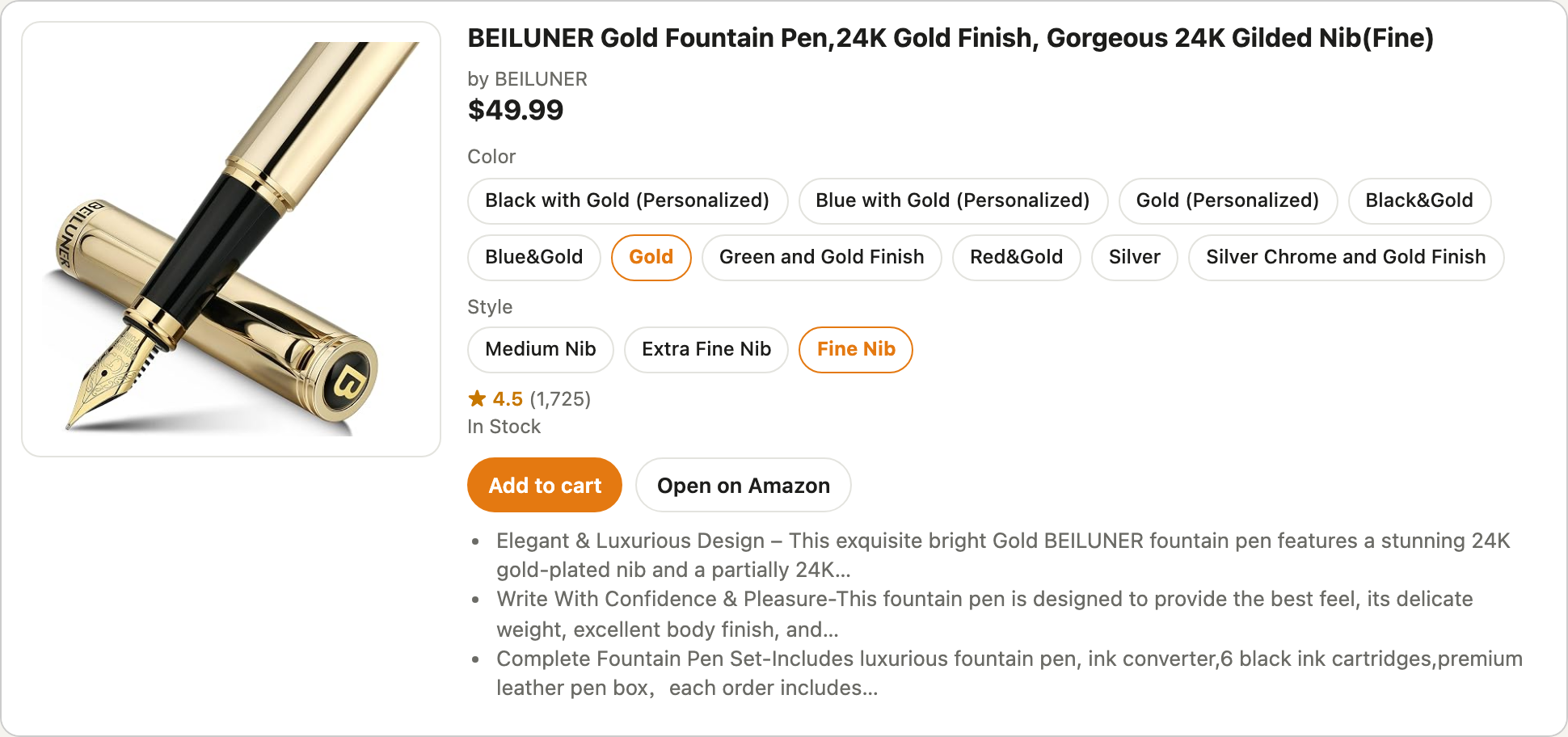
In apps that support [MCP Apps](https://github.com/modelcontextprotocol/ext-apps) (Claude on the web, desktop and phone, ChatGPT, VS Code), results show as cards with photos and **+ Cart**, **Details**, size and colour pickers, and a checkout card. Elsewhere you get text and images.
## Install
You need [Bun](https://bun.sh) (`curl -fsSL https://bun.sh/install | bash`).
**Claude Code**
```bash
claude mcp add -s user tote -- bunx @frostn/tote
```
**Claude Desktop** (Settings → Developer → Edit Config), **Cursor** (`~/.cursor/mcp.json`) and most other apps:
```json
{
"mcpServers": {
"tote": {
"command": "bunx",
"args": ["@frostn/tote"]
}
}
}
```
If the app can't find `bunx`, use its full path: `~/.bun/bin/bunx`, written out as `/Users/you/.bun/bin/bunx`.
**Sign in once.** Ask your agent to "sign me in to Amazon", or run:
```bash
bunx @frostn/tote signin
```
A browser window opens on Amazon's real sign-in page and you sign in there. The agent never sees your password. Before the first sign-in, install the browser it uses:
```bash
bunx playwright install chromium
```
Without a sign-in, everything works on an anonymous guest cart. That cart moves into your account cart when you sign in.
## Use it from your phone
Claude on the phone can't start programs on your computer, so the computer runs the server and the phone connects to it.
1. On your computer, install [cloudflared](https://developers.cloudflare.com/cloudflare-one/connections/connect-networks/downloads/) (`brew install cloudflared`), then run:
```bash
bunx @frostn/tote serve
```
2. It prints a URL like `https://something.trycloudflare.com/mcp/3f9c…`.
3. On [claude.ai](https://claude.ai), open **Settings → Connectors → Add custom connector** and paste the URL.
4. It now works in the Claude iPhone and Android apps too. To sign in from the phone, ask Claude to "sign me in to Amazon". You get a one-time link to Amazon's real sign-in page.
Good to know:
- **The URL is the key.** It contains a random secret, and every other path returns 404. Don't share it. `serve --new-url` makes a new one, after which you update the connector.
- **The computer must stay on and awake** while you use it, with the window open.
- **The address changes on restart** with the free quick tunnel. For a fixed one, point your own URL at the port and pass it in. For example, with [Tailscale Funnel](https://tailscale.com/kb/1223/funnel):
```bash
tailscale funnel 8765
```
```bash
bunx @frostn/tote serve --public-url https://your-mac.your-tailnet.ts.net
```
A named Cloudflare tunnel or your own server works the same way. `--port` picks the local port (default 8765), and `--local` skips the tunnel.
## How buying works
The agent can ask to buy, but only you can say yes.
1. The agent ticks the cart items and calls `amazon_order_buy`. It reads Amazon's real order page: items, address, card (brand and last 4 digits), delivery and total.
2. **Your app shows you a confirmation** with those details. The order is placed only if you accept it there. The first time, you also accept [TERMS.md](TERMS.md).
3. Some apps can't show a confirmation (for example, the Claude Code tab). Then the order card shows a **6-digit code that only you can see**, because the code never goes to the model. You type "confirm 123456" in the chat. The code works once, lasts 10 minutes and allows 3 tries.
4. Before placing anything it re-reads the order page. If the total or the items changed, it stops. It sends exactly one place-order request.
You can always cancel in Amazon → Your Orders. Everything else (search, cart, orders, tracking, price watch) never buys.
## Tools
| tool | does |
|---|---|
| `amazon_search` | results with photos, prices and ratings; `maxPrice`, `minPrice`, `sort`, `page`, `limit` |
| `amazon_suggest` | autocomplete |
| `amazon_product` | details for an ASIN or any Amazon product link, including size and colour options |
| `amazon_variant` | pick options ("medium", "navy") and get that exact version's price and stock |
| `amazon_cart_add` / `amazon_cart_view` / `amazon_cart_remove` / `amazon_cart_select` | your Amazon cart (or a guest cart when signed out); tick which items to buy |
| `amazon_order_preview` | order card: address, card, delivery, total (read-only) |
| `amazon_order_buy` / `amazon_order_confirm` | buy with your confirmation (see above) |
| `amazon_orders` / `amazon_track` | recent orders, Buy again, where's my package |
| `amazon_watch` / `amazon_unwatch` / `amazon_watchlist` | price-drop alerts (`tote watch check` re-checks; run it on a schedule if you like) |
| `amazon_signin` / `amazon_session_status` / `amazon_signout` / `amazon_session_reset` | sign-in and session |
## Command line
Every tool has a command too:
```bash
bunx @frostn/tote search fountain pen --max 30
```
```bash
bunx @frostn/tote cart view
```
```bash
bunx @frostn/tote help
```
Add `--json` for raw data.
## Privacy and identification
- Your session lives in `~/.amazon-agent/session.json` (mode 600) on your computer. Nothing is sent anywhere except Amazon, plus the tunnel when you use `serve` or the sign-in link.
- Every request says it comes from an AI shopping agent: `tote/1.1 (AI shopping agent; +https://github.com/Frostn1/tote)` is added to the user agent. It never pretends to be a person. The tag can't be turned off. `AMAZON_AGENT_TAG` adds contact text to it.
- It never tries to get past a CAPTCHA or bot check, and it doesn't switch to a new session when blocked. If Amazon challenges a request, it says so and stops.
- The sign-in browser is ordinary Playwright Chromium with its automation flags left on; nothing hides that it is automated.
- Requests are throttled to human pace.
## Sign-in options
- **Window** (default when you're at the computer): a visible Chromium window on Amazon's sign-in page.
- **Link** (default in `serve` mode; set `AMAZON_SIGNIN_LINK=on` for stdio): a one-time link to a live view of Amazon's sign-in page running on your computer, so you can sign in from your phone.
- It's a 256-bit token. It expires in 10 minutes and locks to the first device that opens it.
- The remote browser can only open Amazon pages.
- Everything closes once you're signed in.
- It needs `cloudflared`, or set `AMAZON_SIGNIN_PUBLIC_URL` / `AMAZON_SIGNIN_PORT` to your own URL.
- **Keep-alive:** Amazon rotates session tokens, and each rotation is saved. An idle session is refreshed after 12 hours. When a sign-in really expires, the agent tells you and offers a new link.
## Settings
| env | default | |
|---|---|---|
| `AMAZON_MARKETPLACE` | `us` | `us` or `uk` |
| `AMAZON_AGENT_HOME` | `~/.amazon-agent` | session, browser profile, serve secret |
| `AMAZON_SIGNIN_LINK` | off (stdio), on (serve) | allow the sign-in link |
| `AMAZON_MCP_PORT` / `AMAZON_MCP_PUBLIC_URL` | `8765` / none | `serve` port and fixed public URL |
| `AMAZON_AGENT_TAG` | none | extra contact text added to the agent tag |
## Development
```bash
git clone https://github.com/Frostn1/tote && cd tote && bun install
```
```bash
bun test
```
```bash
bun run smoke
```
```bash
bun run view
```
- `bun test` runs offline tests on hand-made page fixtures.
- `bun run smoke` is a live check of the MCP tools on a guest session.
- `bun run view` previews the cards at http://127.0.0.1:4877/.
- [API_MAP.md](API_MAP.md) documents the Amazon web endpoints it uses.
Amazon changes its pages often. If something breaks, open an issue with the command you ran and the error.
## License
MIT. Not affiliated with, endorsed by or sponsored by Amazon.
This server cannot be deployed
Maintenance
ActivityMaintained
ResponsivenessNo recent community issues