
NASA MCP Server
# NASA MCP Server
A Model Context Protocol (MCP) server that provides access to NASA's Astronomy Picture of the Day (APOD) API. This server exposes tools that can be used by AI assistants like Cursor to fetch NASA's daily space images.
## Features
- **NASA Picture of the Day**: Fetch today's or any historical NASA Astronomy Picture of the Day
- **Current Date**: Get the current date in ISO format
- **Easy Integration**: Simple setup for Cursor and other MCP-compatible clients
## Prerequisites
- Node.js (v18 or higher)
- npm or yarn
- A NASA API key (free at [api.nasa.gov](https://api.nasa.gov))
## Installation
1. Clone or navigate to this repository:
```bash
cd ts_mcp
```
2. Install dependencies:
```bash
npm install
```
3. Create a `.env` file in the root directory:
```bash
NASA_API_KEY=your_nasa_api_key_here
```
You can get a free NASA API key by visiting [api.nasa.gov](https://api.nasa.gov) and generating one.
## Building
Build the TypeScript project:
```bash
npm run build
```
Or use the MCP-specific build command:
```bash
npm run build:mcp
```
For development with watch mode:
```bash
npm run dev
```
## Running the Server
Start the MCP server:
```bash
npm start
```
The server runs using stdio (standard input/output) communication, which is required for MCP protocol.
## Integrating with Cursor
To use this MCP server with Cursor, you need to add it to your Cursor settings:
1. Open Cursor Settings:
- Press `Ctrl+,` (Windows/Linux) or `Cmd+,` (Mac)
- Or go to `File > Preferences > Settings`
2. Search for "MCP" or navigate to the MCP settings section
3. Add a new MCP server configuration. The configuration should look like this:
```json
{
"mcpServers": {
"nasa-mcp-server": {
"command": "node",
"args": [
"C:\\code\\MCP\\ts_mcp\\dist\\index.js"
],
"env": {
"NASA_API_KEY": "your_nasa_api_key_here"
}
}
}
}
```
**Important Notes:**
- Replace `C:\\code\\MCP\\ts_mcp\\dist\\index.js` with the absolute path to your built `index.js` file
- Make sure you've built the project first (`npm run build`)
- Replace `your_nasa_api_key_here` with your actual NASA API key
- On Windows, use double backslashes (`\\`) or forward slashes (`/`) in the path
- On Mac/Linux, use forward slashes in the path
### Alternative: Using npm script
You can also configure Cursor to run the server via npm:
```json
{
"mcpServers": {
"nasa-mcp-server": {
"command": "npm",
"args": [
"start"
],
"cwd": "C:\\code\\MCP\\ts_mcp",
"env": {
"NASA_API_KEY": "your_nasa_api_key_here"
}
}
}
}
```
## Usage
Once integrated with Cursor, you can use the MCP tools in your conversations:
### Get Today's NASA Picture
```
Get today's NASA picture of the day
```
### Get a Specific Date's Picture
```
Get the NASA picture from 2026-01-31
```
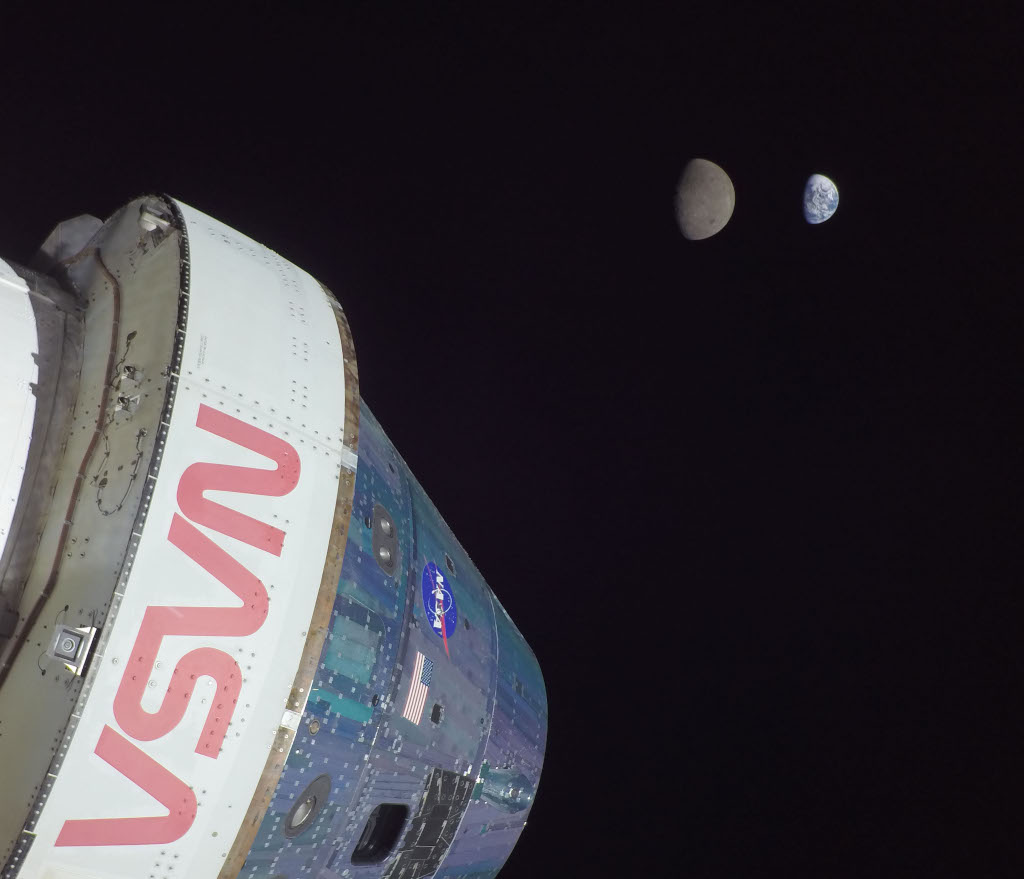
**Example Result:**
- **Title:** Artemis I: Flight Day 13
- **URL:** https://apod.nasa.gov/apod/image/2601/art001e000672-orig1024c.jpg
### Get Current Date
```
What's today's date?
```
## Available Tools
### `nasaPicOfDayTool`
Fetches the NASA Astronomy Picture of the Day for a specific date or today.
**Parameters:**
- `date` (optional): Date in YYYY-MM-DD format. If not provided, defaults to today.
**Returns:**
- `title`: The title of the image
- `date`: The date of the image
- `url`: URL to the image
- `explanation`: Explanation of the image
### `getCurrentDate`
Gets the current date in ISO format.
**Returns:**
- Current date as an ISO string
## Project Structure
```
ts_mcp/
├── src/
│ ├── index.ts # Main MCP server entry point
│ └── tools/
│ ├── nasaPicOfTheDay.ts # NASA APOD tool implementation
│ └── getCurrentDate.ts # Current date tool implementation
├── dist/ # Compiled JavaScript output
├── package.json
├── tsconfig.json
└── .env # Environment variables (not in git)
```
## Development
### Scripts
- `npm run build` - Compile TypeScript to JavaScript
- `npm run build:mcp` - Build with tsup for MCP distribution
- `npm run dev` - Watch mode for development
- `npm start` - Run the compiled server
### Dependencies
- `@mastra/mcp` - MCP server framework
- `@mastra/core` - Core tooling utilities
- `axios` - HTTP client for API requests
- `zod` - Schema validation
- `dotenv` - Environment variable management
## Troubleshooting
### Server won't start
- Make sure you've built the project: `npm run build`
- Verify your `.env` file exists and contains `NASA_API_KEY`
- Check that Node.js is installed and in your PATH
### Cursor can't find the server
- Verify the path in Cursor settings is correct and absolute
- Ensure the `dist/index.js` file exists after building
- Restart Cursor after changing MCP settings
- Check Cursor's developer console for error messages
### API errors
- Verify your NASA API key is valid
- Check your internet connection
- Ensure the date format is YYYY-MM-DD if providing a date
## License
ISC
## Resources
- [NASA APOD API Documentation](https://api.nasa.gov/)
- [Model Context Protocol](https://modelcontextprotocol.io/)
- [Cursor Documentation](https://cursor.sh/docs)
TDQS
Scored across 2 tools
The two tools have completely distinct purposes: one retrieves a NASA picture of the day, the other retrieves the current date. There is no overlap or ambiguity between them.
Both names are in camelCase, but their stylistic patterns differ: 'nasaPicOfDayTool' is a noun phrase with a 'Tool' suffix, while 'getCurrentDate' follows a verb_noun imperative. This inconsistency in naming convention across the small set makes it less coherent.
With only two tools, the server feels thin for a domain as broad as NASA data. The count is borderline, hinting at an incomplete or minimal implementation rather than a well-scoped set.
The tool surface is severely incomplete for a NASA MCP server. Many obvious capabilities such as Mars rover photos, near-earth object tracking, or astronomy data are missing, leaving the server with only a trivial utility and a date function.