
Amadeus Agent
by EEGRCENEM
README.md
# Travel agent
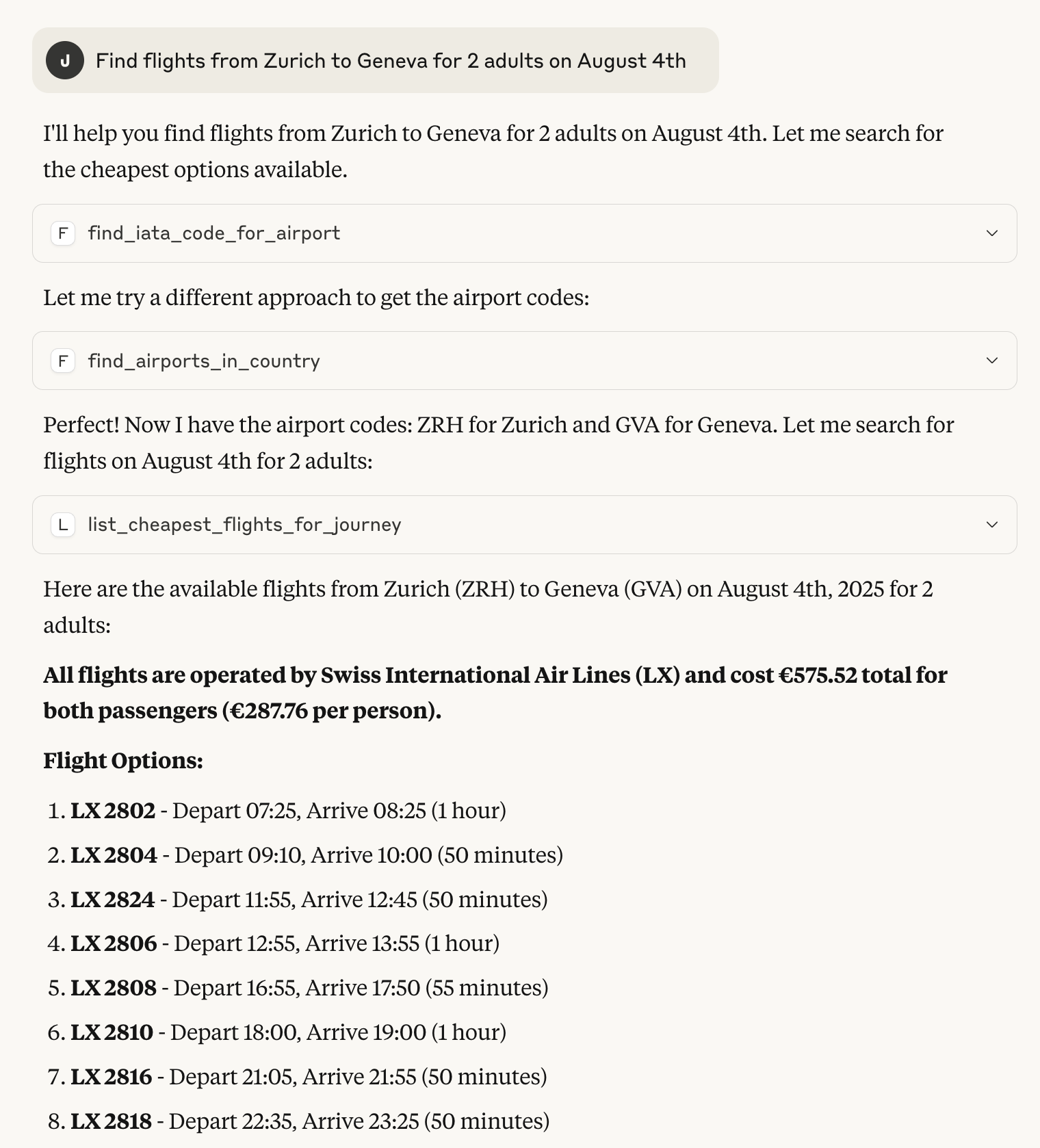
A simple proof-of-concept MCP server for Amadeus enabling LLM-based agents to use Amadeus as a tool.
The server provides tools for LLMs to directly query live flight booking information around the world,
including:
- Cheapest tickets for a particular journey.
- All destinations from a particular airport.
- All routes for an airline.
## What is MCP?
Model Context Protocol (MCP) is a client-server protocol for LLM agents interacting with tools, resources
and prompts. You can think of it as a HTTP for agents. A MCP server hosts a bunch of tools that the agent
can use to carry out tasks for the user.
## What is Amadeus?
Amadeus is a Global distribution system (GDS), essentially a booking and reservation system used by a large
amount of travel agents around the world. It allows querying flight and booking information that would only
be available directly to travel agencies and other resellers.
# Structure
```
- agent
--- resources <- static data
--- services <- service layer for tool logic
--- tools <- actual tools provided to llm
server.py <- main server endpoint
```
# Installation
This project relies on the Python `uv` project manager [uv](https://docs.astral.sh/uv/) which enables
easy dependency manage and distribution. Once you have `uv` installed you can create a virtual environment
with all of the dependencies included to run the project.
```bash
uv install
source .venv/bin/activate
```
Once installed you will need to provide Amadeus-for-develops credentials in a `.env` file in the project root.
The [Amadeus developer pages shows you how to acquire such a key](https://developers.amadeus.com/get-started/get-started-with-self-service-apis-335). Once you have the key and secret, but them in a `.env` file like so:
```bash
AMADEUS_ENV="test"
AMADEUS_KEY=<YOUR-KEY>
AMADEUS_SECRET=<YOUR-SECRET>
```
# Running
When the setup is completed you can start the [FastMCP](https://gofastmcp.com/getting-started/welcome) server
```bash
python server.py
```
It is then ready to accept requests from an LLM agent.
## Connecting to Claude Desktop
Claude Desktop comes with built-in support for interacting with MCP servers. To enable it you need to open Claude
Desktop developer panel and edit your claude_desktop_config.json to start the server.
```json
{
"mcpServers": {
"AmadeusServer": {
"command": "<PATH-TO-PROJECT>/.venv/bin/python",
"args": [
"<PATH-TO-PROJECT>/server.py"
]
}
}
}
```
Then restart Claude Desktop start a new conversation. Before writing select the AmadeusServer from the configuration panel
below the text input.
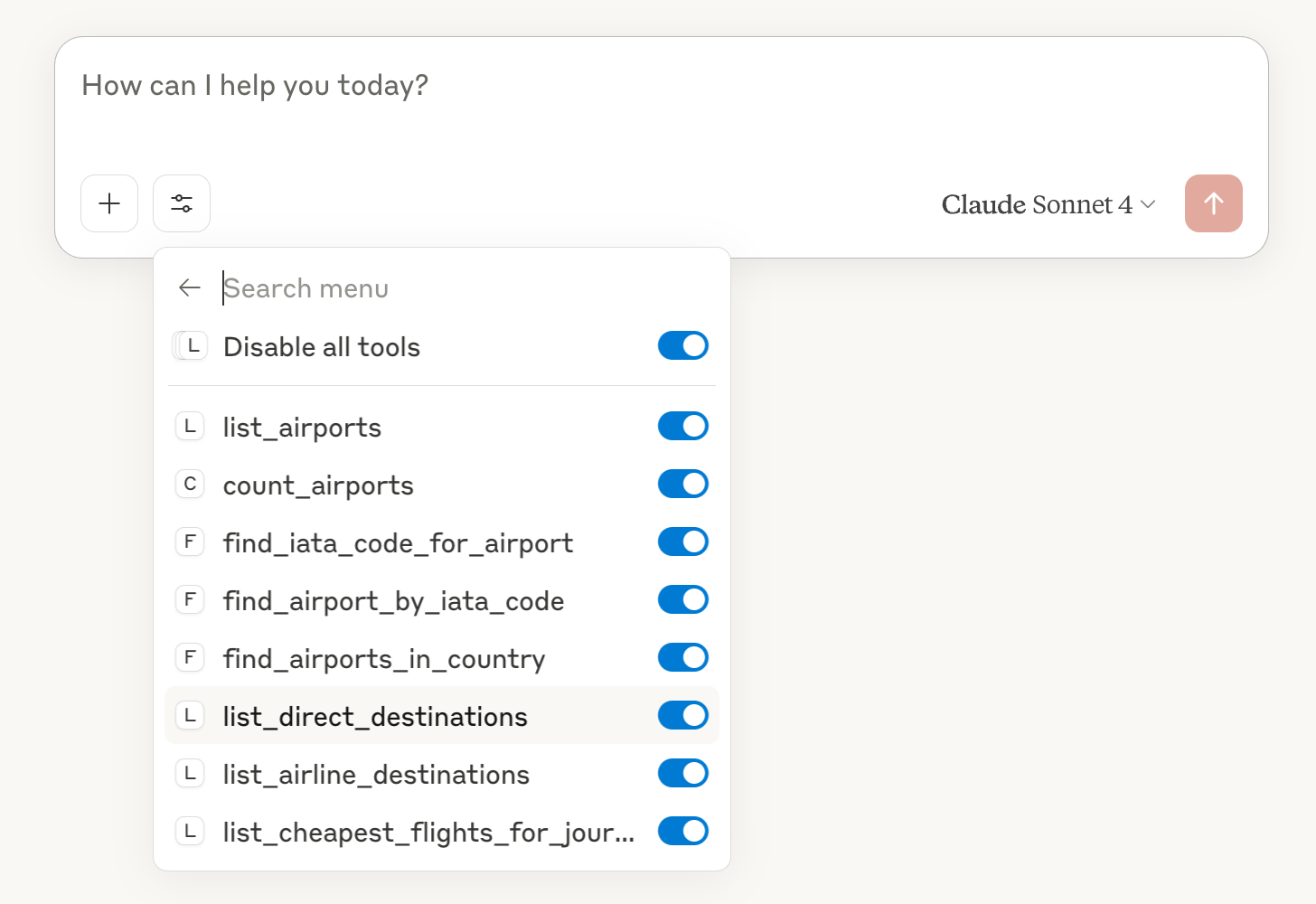
Claude should now discover your tools and use them to solve your tasks.
This server cannot be deployed
Maintenance
ActivityInactive
ResponsivenessNo issues