
SlingHook
# slinghook CLI
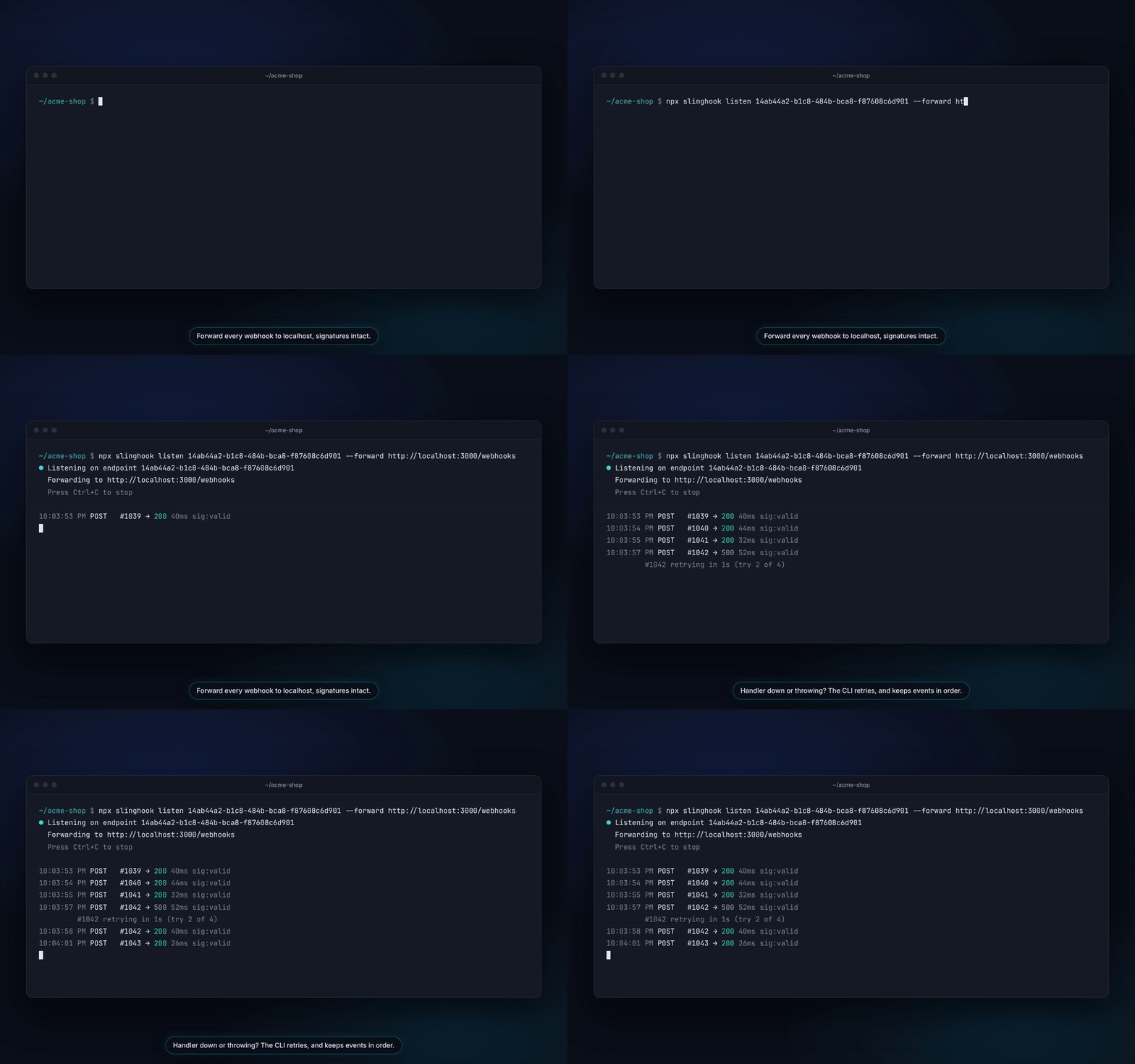
Forwards webhooks captured by a SlingHook server to a server on your machine,
such as `localhost:3000`. A hosted SlingHook instance can't reach your localhost,
so the CLI makes the connection outbound, the same way `stripe listen` does.
Requires Node 20.17+.
```bash
npm install -g slinghook
slinghook auth login --server https://slinghook.co.za
slinghook auth status # who you're logged in as
slinghook endpoints # list your endpoint UUIDs
slinghook mcp # MCP server for AI agents (see below)
slinghook listen <uuid> --forward http://localhost:3000/webhooks
# <uuid> can also be the catch URL you copied, e.g. https://slinghook.co.za/c/<uuid>
```
Every command also works with the short name `shk`, e.g. `shk auth login` or
`shk listen <uuid> --forward …`. `login`, `status` and `logout` also work
without `auth`, as in earlier versions.
```
● Listening on endpoint 3f1c…
Forwarding to http://localhost:3000/webhooks
14:02:11 POST #1234 → 200 37ms sig:valid
14:02:15 POST #1235 → ✗ Connection refused (is your local server running?) 2ms
```
## How it works
1. **Auth.** `slinghook login` works like `gh auth login`. It asks how you want
to log in:
- **Web browser.** The CLI shows a one-time code (like `BCDF-GHJK`) and opens
the dashboard. Sign in there however you normally do (password, Google,
GitHub, SAML, two-factor) and approve the code. The CLI then receives a new
API token named after your computer. The token works in the workspace you
approved it from. `--web` skips the question. Codes expire after 15 minutes.
- **Personal access token.** Create one under **User Settings → API Tokens**
(`/app/?settings=tokens`) and paste it. In scripts and CI use
`slinghook login --with-token < token.txt`, `--token shk_…`, or set
`SLINGHOOK_TOKEN`.
Only the token is saved, in `~/.config/slinghook/config.json` (mode 0600).
The server stores only a SHA-256 hash of it. You can see and revoke tokens
under **User Settings → API Tokens**.
2. **Stream.** `listen` opens `GET /v1/events/<uuid>` with
`Authorization: Bearer <token>`. This is the same SSE stream the dashboard uses.
On first connect the server sends recent `history`, which the CLI skips. It
forwards only new `log` events.
3. **Reconnect.** The server closes the stream every ~55s by design. The CLI
reconnects with `Last-Event-ID`, so webhooks that arrive during the gap are
delivered once and in order. Network errors back off from 1s up to 30s.
4. **Forward.** Each webhook is re-sent with its original method, body, query
string, and headers. Hop-by-hop headers such as `Host` and `Content-Length`
are dropped. Signature headers are kept, so your app's verification runs
for real. The CLI adds `X-Webhook-Replay: true` and `X-SlingHook-Log-Id`.
Deliveries run one at a time with a 15s timeout. Payloads that were
truncated at capture are skipped.
If your server is down, times out, or answers 408, 425, 429 or 5xx, the CLI
retries 3 more times (after 1s, 2s and 4s) before moving on. Later webhooks
wait, so they still arrive in order. `--retries N` changes the count (0 to 10).
5. **Report.** Each result is posted to `POST /api/logs/<id>/replays`, so it
appears in the dashboard's replay history. Use `--no-report` to turn this off.
## Team routing: one provider URL, many developers
On the Team plan, a whole team can share one endpoint (Stripe and Shopify only
allow a few webhook URLs) and still each get their own events on their own
machine. Claim the events that are yours, then listen with `--mine`:
```bash
# Events whose body has metadata.dev = "alice" go to Alice's localhost
slinghook listen <uuid> --forward http://localhost:3000/webhooks \
--claim data.object.metadata.dev=alice
# Or claim by a header or query parameter
slinghook listen <uuid> --forward http://localhost:3000/webhooks --claim header:X-Dev=alice
```
`--claim` saves your claim on the endpoint (replacing your earlier one) and
implies `--mine`. Repeat it to require several conditions. You can also edit
claims under **Endpoint Settings → Team routing** in the dashboard, then run
`listen --mine` without `--claim`.
With `--mine`, the CLI forwards only the events routed to you, and the open
stream counts you as online. Events nobody claims stay in the shared feed for
everyone to see, unless the endpoint is set to give them to whoever is online,
in which case they go round-robin to the people running `listen --mine`.
Viewers can watch but can't claim events.
Don't run the CLI and the dashboard's Auto-Relay toggle for the same endpoint at
the same time, or each webhook will be delivered twice.
## Chaos mode: is your handler idempotent?
On Pro and Team, `slinghook chaos` takes a saved scenario (or one captured
request) and sends it to your handler the way providers really behave:
```bash
slinghook chaos <uuid> --forward http://localhost:3000/webhooks --scenario 12 \
--check http://localhost:3000/debug/orders/count
```
Each event is first sent once (the baseline). Then, in order:
| Test | What is sent | Pass |
| --- | --- | --- |
| duplicates | every event again | 2xx |
| concurrent | the same event 3 times at the same moment | 2xx for all |
| out_of_order | the events again, newest first | 2xx, or 409/425/429/503 to ask for a retry |
| malformed | the first body cut in half, empty, and garbage | 4xx |
| late_retry | the first event again after `--late-delay` seconds | 2xx |
Deliveries are sent exactly as captured, signature included, without the
`X-Webhook-Replay` header, so your handler treats them like the provider's own
redeliveries. Status codes can't show double side effects, so pass `--check`
with a GET on your app that reflects its state (an order count, a balance). It
is read after the baseline and after each test; any change fails that test.
Pick tests with `--only duplicates,concurrent`. Run without `--scenario` to
list the endpoint's scenarios. The report is saved to the dashboard (⌘K →
"Chaos mode"), and the command exits with code 1 when a test fails, so it can
run in CI.
## MCP server: let your AI agent debug webhooks
`slinghook mcp` is a [Model Context Protocol](https://modelcontextprotocol.io)
server. AI coding agents such as Claude Code, Cursor and VS Code start it in the
background and call SlingHook as a set of tools, logged in as you. Ask your agent
"my Stripe webhook is failing, find out why and fix it", and it can run the whole
Catch. Debug. Replay loop:
| Tool | What it does | Changes anything? |
| --- | --- | --- |
| `list_endpoints` | Your catch URLs and where each one relays | No |
| `list_events` | Captured webhooks as short summaries (no bodies). The 50 newest on every plan; `query` and `before_id` search full history (Pro) | No |
| `get_event` | One webhook in full: headers, query, body (long bodies cut) | No |
| `debug_signature` | Why the signature failed, optionally against a candidate secret | No |
| `replay_event` | Re-sends the webhook from your machine to your handler, records it, and returns the verdict: fixed, regressed, still failing or still passing | Yes: a real delivery |
| `get_replay_result` | Replay history and fix verification verdict (both response bodies on Pro) | No |
| `list_scenarios` | Saved scenarios (ordered sets of events) on an endpoint | No |
| `run_scenario` | Replays every step of a scenario from your machine to your handler and reports each step (back to back, or recorded gaps capped at 5s with `keep_timing`; 3 runs a minute) | Yes: real deliveries |
| `generate_handler` | Types, a fixture and a test (TypeScript, Python, PHP or Go) from a real event, to build a handler around. Writes no files itself | No |
| `compare_events` | What differs between two webhooks, field by field (defaults to the previous event of the same type) | No |
| `create_endpoint` | A new catch URL (same name returns the existing one; at most 5 per session; no secrets through the chat) | Yes: adds an endpoint |
Every event has a number within your account (`#12`), shown in the dashboard's
feed. Name events to your agent however is natural: "event 12", "the latest
event", "the latest invoice.paid", or the provider's own id such as Stripe's
`evt_1Qx...`. The inspector's `#12` menu also copies a ready-made prompt.
Add it once, after `slinghook login`:
```bash
# Claude Code (macOS, Linux)
claude mcp add slinghook -- slinghook mcp
# Claude Code on Windows: npm installs slinghook as a .cmd file, which needs cmd /c
claude mcp add slinghook -- cmd /c slinghook mcp
```
Other clients take the same command in their JSON config:
```json
{ "mcpServers": { "slinghook": { "command": "slinghook", "args": ["mcp"] } } }
```
In Claude Code, `/mcp` shows whether it connected. The agent asks before running
`replay_event`, because the tool is marked as one that changes things.
Safety rails:
- **Replays stay local.** `replay_event` only sends to localhost and private
networks (10.x, 172.16-31.x, 192.168.x, `host.docker.internal`). Webhook bodies
are written by third parties, and a crafted one could try to talk your agent
into sending stored payloads elsewhere. Start the server with
`slinghook mcp --allow-remote-targets` to lift this.
- **Rate limits.** One MCP session makes at most 60 tool calls and 10 replays a
minute, so a looping agent stops quickly.
- **Your permissions.** Every call uses your token, so the server's rules apply:
your workspace, your role (viewers can't replay) and your plan.
The server talks JSON-RPC over stdin and stdout, so it prints nothing to stdout
itself; its startup note goes to stderr. To see the protocol, pipe a request in:
```bash
echo '{"jsonrpc":"2.0","id":1,"method":"tools/list"}' | slinghook mcp
```
## Known gaps
- Bodies travel through the JSON event stream as text, so binary payloads aren't
forwarded byte-for-byte.
- There are no retries yet. A failed delivery is reported, and you can replay it
from the dashboard.
## Developing
From a checkout of the SlingHook repo, `cd cli && npm link` puts your working copy on
your PATH, and `npm test` runs the tests.
## Publishing
Bump `version` in `package.json`, then run `npm publish` from this folder. The tests run
first (`prepublishOnly`), and only `bin/`, `src/`, this README and `package.json` are
included in the package.
TDQS
Scored across 11 tools
Each tool pairs a distinct action with a distinct object: listing endpoints/scenarios/events, reading a single event, comparing events, debugging a signature, replaying one event, running a scenario, and fetching a replay result. The only cluster with any risk is replay_event vs run_scenario vs get_replay_result, and the descriptions sharply separate perform-one, perform-sequence, and read-history. An agent can select correctly without guessing.
Every name follows the same snake_case verb_noun convention (list_endpoints, get_event, replay_event, debug_signature, generate_handler, compare_events, create_endpoint). The verbs map predictably to the action performed and resource names are reused consistently across list/get/create.
Eleven tools map cleanly onto the workflow stages of capturing, inspecting, replaying, and debugging webhooks, with no filler tools. Each entry earns its place without inflating the surface.
Coverage is strong for the agent's core loop: discover endpoints, list/get/compare events, debug signatures, replay, verify fixes, and generate handler scaffolding. Gaps (no delete or rename endpoint, no event deletion, secrets intentionally dashboard-only) are deliberate and manageable from the dashboard rather than agent dead ends.