
web-fetch-mcp
# web-fetch-mcp
[](https://pypi.org/project/web-fetch-mcp/)
[](https://pypi.org/project/web-fetch-mcp/)
[](https://github.com/Dutta-SD/web-fetch-mcp/actions/workflows/ci.yml)
[](https://github.com/Dutta-SD/web-fetch-mcp/blob/main/LICENSE)
*A Python MCP server using browser fingerprint impersonation, headless Chrome,
and multi-tier anti-detection to reliably fetch web pages for AI agents —
published on PyPI with CI/CD pipeline and test coverage.*
---
## What is this?
`web-fetch-mcp` is an [MCP](https://modelcontextprotocol.io) server that lets AI
assistants (like Claude, Cursor, or any MCP-compatible client) fetch web pages
**reliably**.
### The problem it solves
When an AI agent fetches a web page, many sites return a CAPTCHA, a JavaScript
challenge, or a login wall — but still send HTTP status `200 OK`. A naive
fetcher hands this garbage to the AI, which then reasons from nonsense.
### How this tool fixes it
`web-fetch-mcp` **detects** when a site returns a block page instead of real
content, and either:
1. **Escalates** to a stronger fetching strategy (there are 3 tiers), or
2. **Fails loudly** with a clear error (`FetchBlocked`) — never silently
returning junk.
> **Status:** Alpha. Core logic is tested, but real-world bypass benchmarks are
> in progress.
---
## Installation
**Requirements:** Python 3.11+
```bash
pip install web-fetch-mcp
```
That's it. This installs the `web-fetch-mcp` command on your system.
---
## Quick Start
### 1. Run the server
```bash
web-fetch-mcp
```
This starts the MCP server in the background. It doesn't show anything on its
own — your AI client talks to it automatically.
### 2. Register with your MCP client
Add this to your MCP client's configuration (e.g. `claude_desktop_config.json`,
`.cursor/mcp.json`, or equivalent):
```json
{
"mcpServers": {
"web-fetch": {
"command": "web-fetch-mcp"
}
}
}
```
### 3. Use it
Once connected, your AI assistant gains two tools:
| Tool | What it does |
|------|--------------|
| `fetch` | Retrieve a web page as markdown, plain text, HTML, or article (main content only) |
| `screenshot` | Render a page in a real browser and return a PNG image |
**Examples your AI can call:**
```python
# Get a clean article (strips navigation, ads, etc.)
fetch("https://example.com/blog-post", output="article")
# Get raw JSON from an API
fetch("https://api.github.com/repos/owner/repo")
# Force JavaScript rendering (for single-page apps like React/Vue)
fetch("https://spa-app.example.com", mode="dynamic")
# Take a screenshot of a dashboard
screenshot("https://example.com/dashboard")
```
---
## How It Works
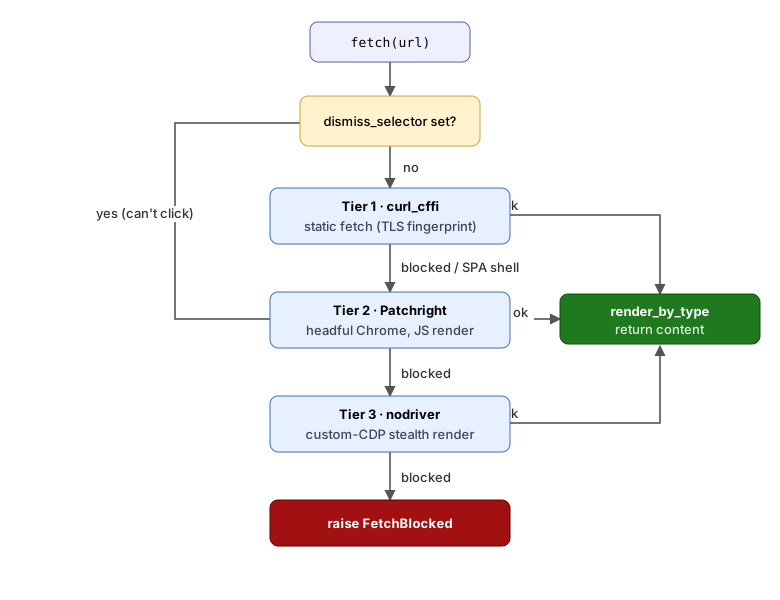
The server uses a **3-tier escalation ladder** — it starts cheap and fast, only
using expensive browser-based methods when simpler ones get blocked:
```
Tier 1: curl_cffi — Fast static fetch (~500ms)
↓ (blocked?)
Tier 2: Patchright — Real Chrome browser, renders JavaScript (~1-3s)
↓ (blocked?)
Tier 3: nodriver — Stealth Chrome, evades automation detection (~2-4s)
↓ (still blocked?)
Raise FetchBlocked error — never return garbage to the AI
```
### What each tier handles
| Tier | Engine | What it defeats |
|------|--------|-----------------|
| 1 | `curl_cffi` | Sites that verify you're a "real browser" by inspecting connection details |
| 2 | Patchright | Sites that need JavaScript to load (React/Vue apps, "please wait" screens) |
| 3 | nodriver | Sites that detect you're using a script-controlled browser instead of a human |
### Modes
You can control which tiers are used:
| Mode | Behavior |
|------|----------|
| `auto` (default) | Try all tiers cheapest-first, escalate on failure |
| `static` | Tier 1 only — fastest, but won't work for JavaScript-heavy sites |
| `dynamic` | Tier 2 only — opens a real browser to run JavaScript |
| `stealth` | Tier 3 only — maximum effort to look like a real human browsing |
### Output formats
| Format | Use case |
|--------|----------|
| `markdown` (default) | Clean, readable text with links preserved |
| `article` | Main content only (strips nav, sidebars, ads) |
| `text` | Plain text, no formatting |
| `html` | Raw rendered HTML |
Non-HTML content is auto-detected: JSON gets pretty-printed, PDFs get
text-extracted.
---
## Development Setup
If you want to contribute or modify the code:
```bash
git clone https://github.com/Dutta-SD/web-fetch-mcp.git
cd web-fetch-mcp
uv sync # install dependencies
uv pip install -e . # install in editable mode
web-fetch-mcp # run the server
```
Run tests:
```bash
uv run pytest
```
### Project structure
```
src/web_fetch_mcp/
├── controller/ → Tool definitions (what the AI client can call)
├── service/ → Retry logic and escalation chain
├── accessor/ → Browser engines (the actual fetching code)
└── core/ → Shared utilities (config, block detection, rendering)
```
---
## Responsible Use
This tool is for fetching content you are **authorized** to access. You are
responsible for complying with each site's Terms of Service, `robots.txt`, and
applicable law. The tool honors `Retry-After` headers and backs off by default.
It does **not** solve CAPTCHAs or bypass authentication you don't hold.
---
## Links
- **PyPI:** https://pypi.org/project/web-fetch-mcp/
- **Source:** https://github.com/Dutta-SD/web-fetch-mcp
- **Issues:** https://github.com/Dutta-SD/web-fetch-mcp/issues
---
## Glossary
| Term | What it means |
|------|---------------|
| **MCP** | Model Context Protocol — a standard way for AI assistants to use external tools. Think of it like a USB port: any AI that speaks MCP can plug into this server. |
| **CAPTCHA** | Those "click the traffic lights" puzzles websites use to check you're human. |
| **SPA** | Single-Page App — a website (like Gmail or Twitter) that loads once and updates dynamically with JavaScript, instead of loading a new page for every click. |
| **TLS fingerprint** | When your browser connects to a website securely, it leaves a "fingerprint" in how it sets up the connection. Sites use this to tell real browsers from scripts. |
| **JavaScript rendering** | Many modern websites are blank HTML shells that only fill in content after JavaScript runs. A simple download gets an empty page; you need a real browser to see the content. |
| **Bot detection** | Techniques websites use to block automated access (scripts, scrapers) while allowing real humans through. |
| **stdio** | Standard input/output — the basic way programs talk to each other through text streams. Your AI client uses this to communicate with the server behind the scenes. |
| **Escalation** | Trying progressively stronger methods. Like knocking on a door, then ringing the bell, then calling the person inside. |
| **`FetchBlocked`** | The error this tool raises when a website blocks all attempts. It tells the AI "I couldn't get the page" instead of handing it a CAPTCHA page and pretending it's the article. |
## License
[Apache-2.0](LICENSE)
TDQS
Scored across 2 tools
The two tools, fetch and screenshot, have clearly distinct purposes: one retrieves content (markdown, text, HTML) and the other captures a visual rendering. There is no overlap in functionality or ambiguity.
Both tool names are single, lowercase verbs describing the action performed. This is a simple and consistent naming pattern that is easy to understand and predict.
With only two tools, the server is minimal but focused. The fetch tool is highly parameterized and covers many use cases, while screenshot adds visual capture. The count is appropriate for a specialized tool set, though slightly thin.
The server covers the core operations of fetching web content and capturing screenshots. However, it lacks utilities for tasks like URL validation, link extraction, or metadata retrieval, which would round out a typical web fetching toolset.