
coras-mcp
# coras-mcp
[](https://github.com/Drewnja/coras-mcp/actions/workflows/test.yml)
[](https://www.npmjs.com/package/coras-mcp)
[](LICENSE)
Describe a risk picture in words; get a real **CORAS** diagram, in a file the
SINTEF *Threat Modelling Tool* opens natively — laid out the way a CORAS
diagram is meant to read, and rendered back so the assistant can check its own
work before handing it to you.
The 2007 editor is bundled, so there is nothing else to download.
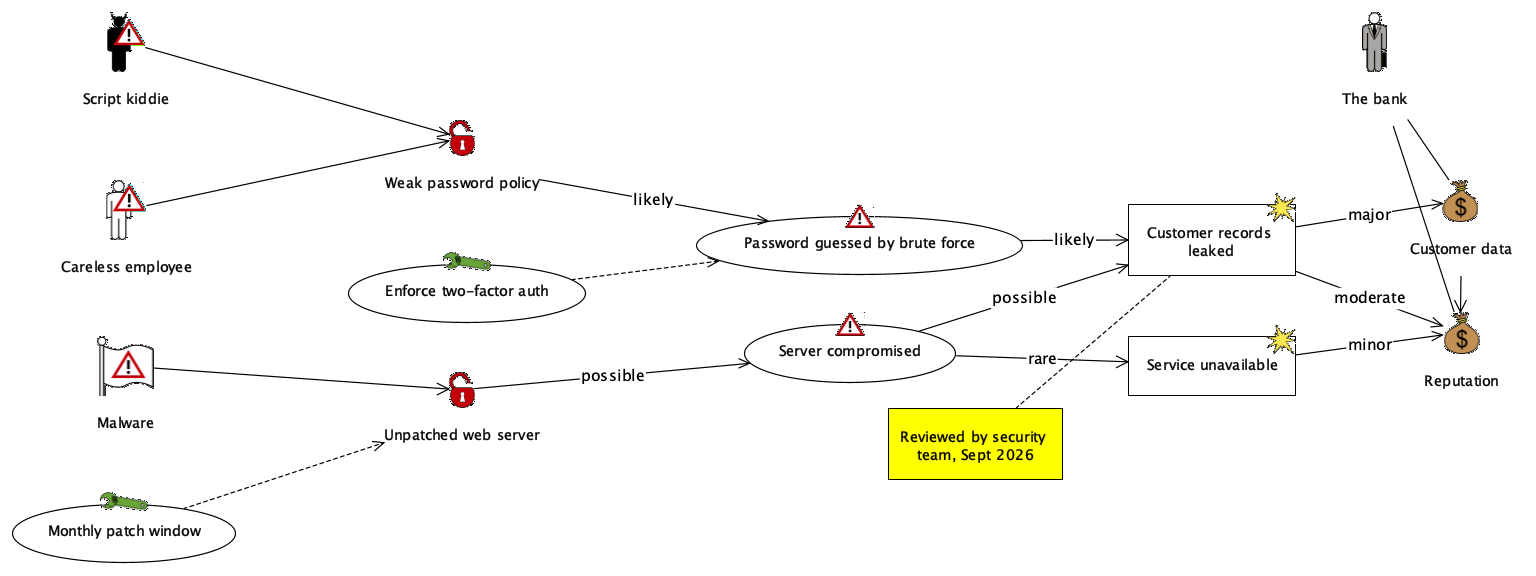
<sub>Produced by `coras_create_diagram` from
[`examples/online-banking.coras`](examples/online-banking.coras), then rendered
through the editor's own renderer — this is exactly what the tool draws.</sub>
---
## Install
**One line, if your assistant speaks MCP:**
```bash
npx -y coras-mcp
```
That is the command to give it. Per client:
<table>
<tr><th>Client</th><th>How</th></tr>
<tr><td><b>Claude Code</b></td><td>
```bash
claude mcp add coras -s user -- npx -y coras-mcp
```
</td></tr>
<tr><td><b>Codex CLI</b></td><td>
```bash
codex mcp add coras -- npx -y coras-mcp
```
or in `~/.codex/config.toml`:
```toml
[mcp_servers.coras]
command = "npx"
args = ["-y", "coras-mcp"]
```
</td></tr>
<tr><td><b>Claude Desktop</b></td><td>
`claude_desktop_config.json` → Settings ▸ Developer ▸ Edit Config:
```json
{ "mcpServers": { "coras": { "command": "npx", "args": ["-y", "coras-mcp"] } } }
```
</td></tr>
<tr><td><b>Cursor</b></td><td>
`~/.cursor/mcp.json` (or `.cursor/mcp.json` in a project):
```json
{ "mcpServers": { "coras": { "command": "npx", "args": ["-y", "coras-mcp"] } } }
```
</td></tr>
<tr><td><b>VS Code / Copilot</b></td><td>
`.vscode/mcp.json`:
```json
{ "servers": { "coras": { "command": "npx", "args": ["-y", "coras-mcp"] } } }
```
</td></tr>
<tr><td><b>Windsurf</b></td><td>
`~/.codeium/windsurf/mcp_config.json`, same `mcpServers` shape as Cursor.
</td></tr>
<tr><td><b>Zed</b></td><td>
`settings.json` → `"context_servers": { "coras": { "command": { "path": "npx", "args": ["-y", "coras-mcp"] } } }`
</td></tr>
<tr><td><b>Anything else</b></td><td>
It is an ordinary stdio MCP server. Command `npx`, arguments `-y coras-mcp`.
</td></tr>
</table>
### What it needs
| | |
| --- | --- |
| **Node 16+** | only to run `npx`. Skip it by cloning and using `bin/coras-mcp`. |
| **Python 3.8+** | runs the server. Already on macOS and Linux; on Windows install it, or install [uv](https://docs.astral.sh/uv/) and the launcher will use that instead. |
| **Java 8+** | *optional.* Needed only to render a diagram, validate it against the real editor, or open the editor. Writing and reading `.dgx` works without it. |
The editor builds an AWT drag-and-drop target while loading a diagram, so those
three tools need a display even when they draw off-screen. On a headless Linux
box, run under Xvfb (`xvfb-run -a …`); everything else works without one.
No Python packages, no `pip install`, no virtualenv — the server has zero
dependencies and talks MCP over stdio directly.
### From a clone instead
```bash
git clone https://github.com/Drewnja/coras-mcp.git
cd coras-mcp
python3 tests/test_coras_mcp.py # 54 tests, ~5 s
claude mcp add coras -s user -- "$PWD/bin/coras-mcp"
```
---
## What you can ask for
> *"Draw the risk picture for our payment API: an outside attacker exploits a
> missing rate limit, brute-forces card numbers, cards get stolen — that hurts
> customer money and our reputation. Add 2FA as a treatment."*
The assistant calls `coras_create_diagram`, gets back both the `.dgx` file and
a picture of it, and can fix anything that looks wrong before you ever open the
tool. Then `coras_open_editor` puts it in front of you, editable by hand.
### Tools
| Tool | What it does |
| --- | --- |
| `coras_reference` | Every element and relationship the editor understands, and which arrows are legal. |
| `coras_create_diagram` | Writes a `.dgx` from a structured spec or from the text notation, lays it out, returns a picture. |
| `coras_read_diagram` | Reads an existing `.dgx` back into a spec and into the text notation. |
| `coras_edit_diagram` | Add, remove, rename, recolour, move, re-lay-out. Keeps a `.bak`. |
| `coras_render_diagram` | PNG or SVG through the editor's own renderer. |
| `coras_validate_file` | Loads the file with the editor's own loader and reports what it found. |
| `coras_open_editor` | Starts the Threat Modelling Tool, optionally with a file open. |
---
## The text notation
```
diagram "Online banking"
stakeholder "The bank" as bank
asset "Customer data" as data
threat "Script kiddie" as kiddie kind=deliberate
vulnerability "Weak password policy" as weakpw
scenario "Password guessed" as guess
incident "Customer records leaked" as leak
treatment "Enforce two-factor auth" as mfa
region "Internet facing" as dmz contains=weakpw,guess
comment "Reviewed Sept 2026" as note
bank -> data
kiddie -> weakpw
weakpw -> guess "likely"
guess -> leak "likely"
leak -> data "major"
mfa -> guess strategy=ReduceLikelihood
note -> leak
```
* `<type> <name> [as <id>] [key=value ...]` declares an element. Types:
`stakeholder`, `threat`, `vulnerability`, `scenario`, `incident`, `risk`,
`asset`, `treatment`, `region`, `comment` (aliases such as `vuln`,
`unwanted-incident`, `note`, `control` work too).
* `a -> b "label"` draws an arrow. **The relationship type is worked out from
the two elements**, by the same rules the editor uses when you draw the arrow
by hand. The label is the text on the arrow: the likelihood on an initiate
arrow, the consequence on a harm arrow.
* `diagram "Name"` starts another diagram in the same file. The same id used in
two diagrams is one model element shown twice — which is exactly what the
editor's model/diagram split is for.
* `#` starts a comment.
Or as a structured spec:
```json
{
"diagrams": [{
"name": "Online banking",
"nodes": [
{"id": "kiddie", "type": "threat", "name": "Script kiddie", "kind": "deliberate"},
{"id": "data", "type": "asset", "name": "Customer data"}
],
"edges": [{"from": "kiddie", "to": "data", "label": "…"}]
}]
}
```
Nodes also take `x`, `y`, `width`, `height` (giving x/y pins an element and
turns off automatic placement for it), `color`, `font`, and — on a region —
`contains`, which sizes the region around the elements it names.
More in [`examples/`](examples): an asset diagram, a threat diagram, a
treatment diagram and a risk diagram.
---
## What is legal
CORAS is a typed language and the editor **refuses to open a file with an
illegal relationship**, so every arrow is checked before anything is written,
with an error that says what would have been allowed instead.
| From | may point at |
| --- | --- |
| stakeholder | asset (ownership) |
| asset | asset (dependency) |
| threat | vulnerability (exploit); threat scenario, risk (initiate) |
| vulnerability | vulnerability (exploit); vulnerability, threat scenario, unwanted incident (initiate) |
| threat scenario | vulnerability (exploit); vulnerability, threat scenario, unwanted incident (initiate) |
| unwanted incident | unwanted incident, threat scenario, risk (initiate); asset (harm) |
| risk | asset (harm) |
| treatment | threat, vulnerability, threat scenario, unwanted incident (treat) |
| comment | anything except another comment |
Two quirks of the 2007 tool, worth knowing:
* **A treatment cannot point at a risk.** The editor lets you draw that arrow
and then drops it when it saves — the file format has no way to express it.
Point the treatment at the incident behind the risk instead.
* **Treatment strategies are written but not read back.** `strategy=Avoid` is
stored in the file; the editor shows every treat arrow as `ReduceLikelihood`.
---
## Layout
Layered, left to right, and aware of the canonical CORAS reading order:
```
stakeholder → threat → vulnerability → threat scenario → unwanted incident → risk → asset
```
* Columns nothing lands in are dropped, so an asset diagram of stakeholders and
assets comes out as two tidy columns rather than seven.
* A treatment is pulled one column left of what it treats; a stakeholder sits
beside the asset it owns — above it, once threats are in the picture, so the
arrows harming that asset have a clear run.
* An arrow that skips a column gets invisible waypoints in the columns it
crosses, so it routes around the shapes in between instead of through them.
* Shapes are sized from the real font metrics of the editor's default font
(`SansSerif 12`, measured on the JVM), so a label never spills out of its
oval; a name too long for any sensible oval is broken over lines.
* Regions are drawn behind everything and sized around their contents.
`direction: "down"` lays the same diagram out top to bottom. `layout:
"preserve"` keeps positions already in the file and only places what is new —
the default when editing.
---
## How it works
`.dgx` is the editor's own format: JAXB-marshalled XML in the
`http://coras.sourceforge.net/profile/1.0` namespace, with a *model* part
(elements and relationships) and a *diagram* part (where each element sits, in
which diagram). The writer reproduces that output element for element and
attribute for attribute, in the order the editor writes it, so a generated file
is indistinguishable from a hand-drawn one.
Validation and rendering re-implement nothing: [`java/src/coras/mcp/Bridge.java`](java/src/coras/mcp/Bridge.java)
is compiled against the editor's own jars and calls its real loader
(`Model.unmarshal` → `ProfileToDgmMapper`) and its real JGraph renderer. If the
bridge can draw it, the tool can open it.
```
coras_mcp/
server.py MCP over stdio, JSON-RPC 2.0, no dependencies
tools.py the seven tools
spec.py the CORAS language and its legality rules, read off the editor's classes
model.py elements, relationships, diagrams, shape sizing
layout.py layered automatic layout
dgx.py .dgx reader and writer
dsl.py the text notation
metrics.py font metrics measured on the JVM
bridge.py finds Java and the tool, runs the helper
bin/cli.js npx entry point
bin/coras-mcp starts the server from anywhere
bin/coras-tool launches the editor with the flags a modern JRE needs
java/ the Java helper, its source and its build script
tool/ the CORAS diagram editor itself (LGPL, unmodified — see NOTICE)
```
### Running the 2007 tool on a modern JRE
The editor ships JAXB 2.0.3, which generates accessor classes at run time. Java
9 and later block that, so on a current JRE it throws
`ExceptionInInitializerError` the moment you open or save a file. One flag
fixes it, and `bin/coras-tool` and this server both pass it:
```
-Dcom.sun.xml.bind.v2.bytecode.ClassTailor.noOptimize=true
```
Double-clicking the jar does **not** pass it. Use `bin/coras-tool` or
`coras_open_editor`.
### Where the tool lives
The bundled copy in `tool/` is used by default. To point at another one:
```bash
npx coras-mcp --set-tool-dir /path/to/folder/with/diagram-editor-2.0-SNAPSHOT.jar
npx coras-mcp --where # what it found: tool, Java, helper jar
```
`CORAS_TOOL_DIR` overrides both; `CORAS_JAVA` picks a JDK/JRE; `CORAS_PYTHON`
picks an interpreter.
---
## Tests
```bash
python3 tests/test_coras_mcp.py
```
54 tests: the language rules, the notation, the layout, the file format, the
seven tools, the MCP protocol over a real stdio pipe, and — when Java is
present — a round trip through the editor itself, including one diagram holding
every legal relationship in the language.
---
## Licence
This project is MIT (see [LICENSE](LICENSE)).
`tool/` contains the **CORAS diagram editor 2.0** by SINTEF, redistributed
unmodified under the **LGPL 2.1**. Upstream:
[sourceforge.net/projects/coras](https://sourceforge.net/projects/coras/).
See [NOTICE](NOTICE) for the details and for where to get its source.
TDQS
Scored across 7 tools
Each tool targets a distinct operation—create, read, edit, render, validate, open in the GUI, or consult the language reference—so there is little risk of selecting the wrong one. The only close pair, read vs. render, is clearly separated by output type: structured spec/text vs. PNG/SVG image.
Most tools follow a consistent coras_<verb>_<noun> pattern: coras_read_diagram, coras_edit_diagram, coras_render_diagram, coras_create_diagram, coras_open_editor. The exceptions are coras_reference, which is a bare noun, and coras_validate_file, which uses 'file' rather than 'diagram', but these are minor deviations.
Seven tools is well-scoped for a CORAS diagram server. Each tool has a clear role covering creation, inspection, editing, rendering, validation, GUI launch, and language reference, with no apparent redundancy.
The core diagram lifecycle is well covered: create, read, edit, render, validate, and even open in the desktop editor. Minor gaps exist—there is no explicit file listing/deletion or a tool to close the launched editor—but these do not block the main workflows.