
Provides real-time monitoring of NVIDIA GPU statistics, including utilization, temperature, and memory usage.
Click on "Install Server".
Wait a few minutes for the server to deploy. Once ready, it will show a "Started" state.
In the chat, type
@followed by the MCP server name and your instructions, e.g., "@MCP System Info ServerShow me my current CPU, memory, and GPU usage."
That's it! The server will respond to your query, and you can continue using it as needed.
Here is a step-by-step guide with screenshots.
MCP System Info Server
A lightweight MCP (Model Context Protocol) server that provides real-time system information including CPU, memory, disk, and GPU statistics.
Features
Category | Information Provided |
System | System name, node name, OS release/version, machine type, processor |
CPU | Processor name, physical/logical cores, frequency, usage percentage |
Memory | Total, available, used memory (GB), utilization percentage |
Disk | Total, used, free space (GB), utilization percentage |
GPU | Name, memory (total/used/free), utilization, temperature (NVIDIA only) |
Prerequisites
Python 3.10+
uv - Fast Python package manager
Installation
# Clone or navigate to the project directory
cd mcp

# Install dependencies (handled automatically by uv)
uv sync
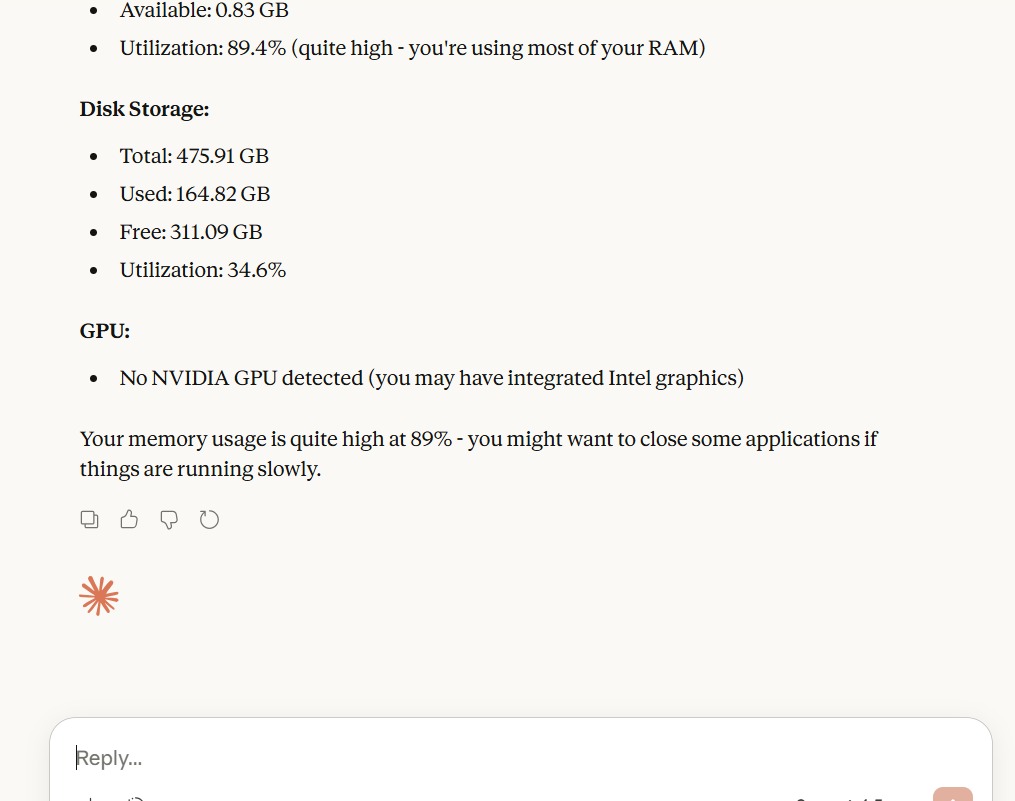
Screenshots

Usage
Running Standalone
uv run sysinfo.pyTesting with MCP Inspector
uv run mcp dev sysinfo.pyClaude Desktop Configuration
Add this to your Claude Desktop configuration file:
Windows: %APPDATA%\Claude\claude_desktop_config.json
{
  "mcpServers": {
    "sysinfo": {
      "command": "uv",
      "args": [
        "--directory",
        "PATH OF THE FOLDER",
        "run",
        "sysinfo.py"
      ]
    }
  }
}
Available Tools
get_sysinfo
Returns comprehensive system information as a JSON object:
{
  "system": {
    "system_name": "Windows",
    "node_name": "DESKTOP-XXX",
    "os_release": "10",
    "os_version": "10.0.19045",
    "machine_type": "AMD64",
    "processor": "Intel64 Family 6..."
  },
  "cpu": {
    "processor_name": "Intel Core i7-10700K",
    "physical_cores": 8,
    "logical_cores": 16,
    "cpu_frequency_mhz": 3800.0,
    "cpu_usage_percent": 12.5
  },
  "memory": {
    "total_gb": 32.0,
    "available_gb": 18.5,
    "used_gb": 13.5,
    "utilization_percent": 42.2
  },
  "disk": {
    "total_gb": 500.0,
    "used_gb": 280.0,
    "free_gb": 220.0,
    "utilization_percent": 56.0
  },
  "gpu": [
    {
      "id": 0,
      "name": "NVIDIA GeForce RTX 3080",
      "memory_total_mb": 10240.0,
      "memory_used_mb": 2048.0,
      "memory_free_mb": 8192.0,
      "gpu_utilization_percent": 15.0,
      "temperature_c": 45
    }
  ]
}
Dependencies
mcp[cli] - MCP SDK with CLI support
psutil - Cross-platform system information
GPUtil - NVIDIA GPU information
py-cpuinfo - Detailed CPU information


Resources
Unclaimed servers have limited discoverability.
Looking for Admin?
If you are the server author, to access and configure the admin panel.