
Keycloak MCP Server
# Keycloak MCP Server
[](https://www.npmjs.com/package/keycloak-model-context-protocol)
[](https://github.com/ChristophEnglisch/keycloak-model-context-protocol/actions/workflows/ci.yml)
[](LICENSE)
A [Model Context Protocol](https://modelcontextprotocol.io) (MCP) server for **Keycloak administration**. It lets an AI assistant such as Claude manage users, groups, roles and sessions, and inspect clients, events and the security posture of your realms, through the Keycloak Admin REST API, with least-privilege authentication and guardrails around every write.
> [!WARNING]
> This server acts with the permissions of the Keycloak account you give it. Use a **dedicated service-account client with only the roles you need**, never the bootstrap admin. Every tool that changes data asks for confirmation by default, and a read-only mode is available. See [Security](#security).
## Highlights
- **24 tools in 7 toolsets**, enabled per toolset. The default set (`core`, `groups`, `roles`) is small; everything else is opt-in.
- **Least-privilege auth.** `client_credentials` with a service account is the recommended grant; the password grant stays available. No credential defaults, so a missing setting fails fast.
- **Guardrails.** Read-only mode, realm allowlist, write protection for the `master` realm, and a preview-then-`confirm: true` flow for every change. Grants of administrative rights are detected through composite roles and parent groups.
- **4 guided prompts** (onboarding, offboarding, security audit, failed-login investigation) and **MCP resources** for realms and users, with realm-name completion.
- **Structured, paginated output** with output schemas; secrets and credentials are never returned or logged.
- Works with Claude Desktop, Claude Code, VS Code, Cursor and any stdio MCP client. Requires Node.js 22 or newer.
## How it works
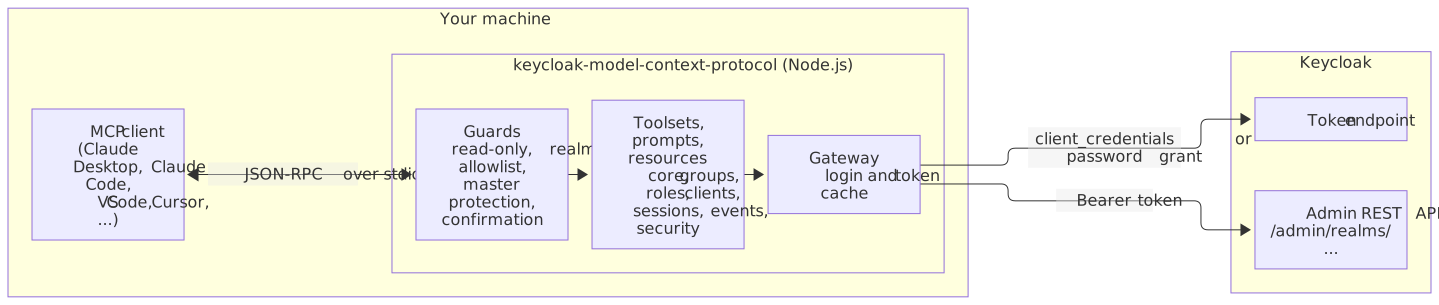
Your MCP client starts the server as a local child process and talks to it over stdio. Every tool call passes the guards, then goes through a single gateway that owns the Keycloak login and caches the access token.
### What a confirmed call looks like
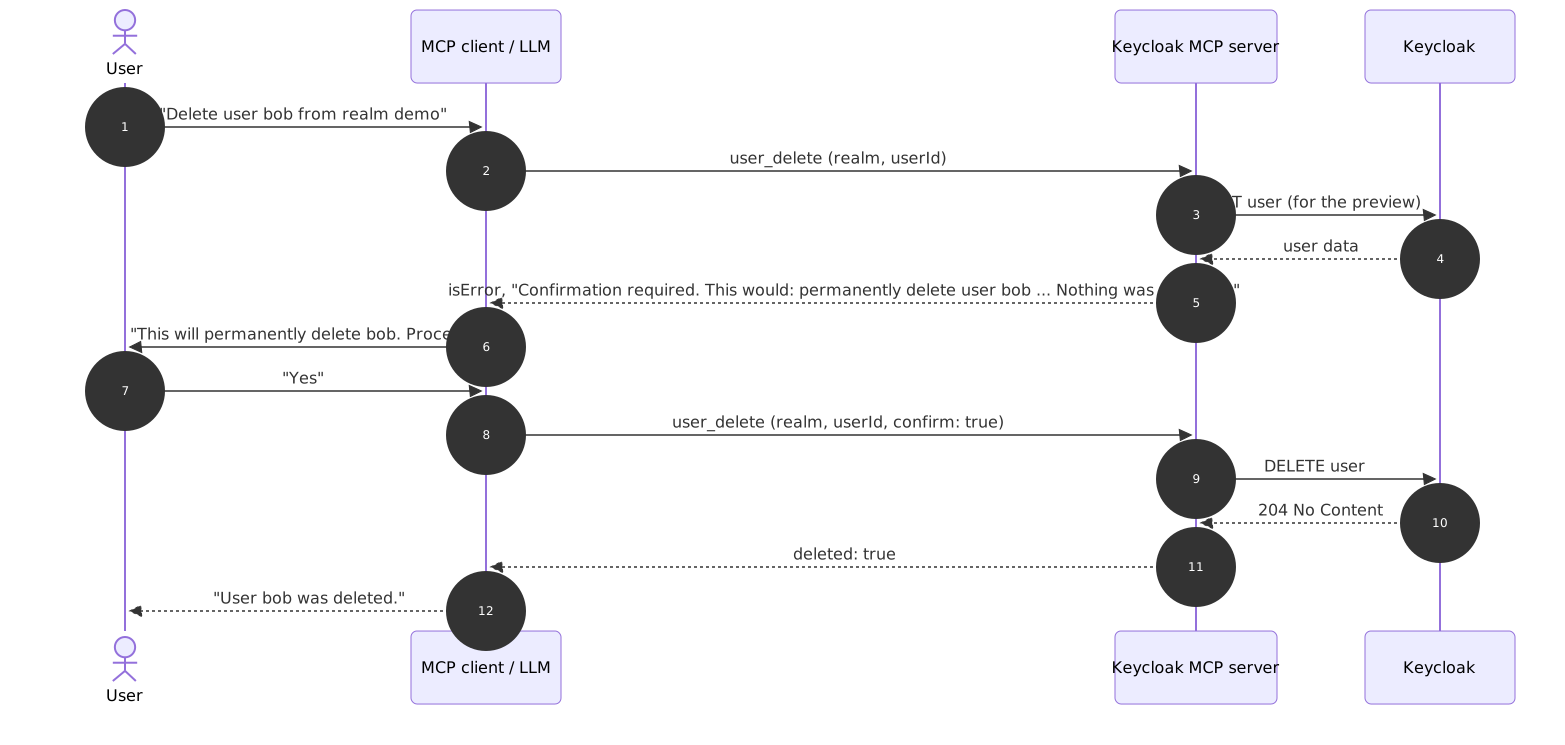
Every tool that changes data is _destructive_ (it deletes or revokes) or _sensitive_ (it changes identity, credentials, rights or protection mechanisms, for example `user_update` or `user_role_assign`). Called without `confirm: true`, such a tool only returns a preview of what would happen and changes nothing. After you approve, the assistant repeats the call with `confirm: true`.
The model can set `confirm: true` itself, even on its first call. The server then still computes the preview and returns it with the result, but only your client's approval prompt proves that a human agreed. All these tools carry `destructiveHint`, so clients that ask before destructive calls ask here too.
## Quick start
**Requirements:** Node.js 22 or newer, a Keycloak server your machine can reach (tested with Keycloak 24.0 to 26.8), and an MCP client.
### 1. Prepare Keycloak (3 steps)
In the realm you want to administer (here `demo`):
1. **Create a client** `mcp-admin` with _Client authentication_ **on** and only _Service accounts roles_ enabled (turn off _Standard flow_ and _Direct access grants_).
2. **Assign roles.** On the client's _Service accounts roles_ tab, assign client roles of `realm-management`. For a first read-only trial: `view-users`, `query-users`, `query-groups`, `view-realm`.
3. **Copy the secret** from the client's _Credentials_ tab.
Step-by-step instructions with Admin Console click paths, `kcadm.sh` commands and a local Docker Keycloak: [docs/getting-started.md](docs/getting-started.md).
### 2. Configure your MCP client
Example for Claude Code (other clients: [docs/clients.md](docs/clients.md)):
```bash
claude mcp add --transport stdio \
--env KEYCLOAK_URL=https://keycloak.example.com \
--env KEYCLOAK_AUTH_REALM=demo \
--env KEYCLOAK_CLIENT_ID=mcp-admin \
--env KEYCLOAK_CLIENT_SECRET="$KEYCLOAK_CLIENT_SECRET" \
keycloak -- npx -y keycloak-model-context-protocol@1
```
Or as JSON (Claude Desktop, `claude_desktop_config.json`):
```json
{
"mcpServers": {
"keycloak": {
"command": "npx",
"args": ["-y", "keycloak-model-context-protocol@1"],
"env": {
"KEYCLOAK_URL": "https://keycloak.example.com",
"KEYCLOAK_AUTH_REALM": "demo",
"KEYCLOAK_CLIENT_ID": "mcp-admin",
"KEYCLOAK_CLIENT_SECRET": "<client-secret>"
}
}
}
}
```
### 3. Ask your first question
> _List the realms you can access, then show me the first 10 users of realm demo._
If you get an answer, you are done. If not, see [docs/troubleshooting.md](docs/troubleshooting.md).
## Configuration
All settings are environment variables. Only `KEYCLOAK_URL` and one set of credentials are required.
| Variable | Default | Purpose |
| ----------------------------------------------- | ------------------- | -------------------------------------------------------------- |
| `KEYCLOAK_URL` | (required) | Base URL of the Keycloak server |
| `KEYCLOAK_AUTH_REALM` | `master` | Realm where the login account or client lives |
| `KEYCLOAK_CLIENT_ID` / `KEYCLOAK_CLIENT_SECRET` | none | `client_credentials` login (recommended) |
| `KEYCLOAK_USERNAME` / `KEYCLOAK_PASSWORD` | none | Password grant login (client defaults to `admin-cli`) |
| `KEYCLOAK_GRANT_TYPE` | auto | `client_credentials` or `password`; detected from what you set |
| `KEYCLOAK_MCP_TOOLSETS` | `core,groups,roles` | Enabled toolsets, or `all` |
| `KEYCLOAK_MCP_READ_ONLY` | `false` | Register read-only tools only |
| `KEYCLOAK_MCP_REALMS` | all | Comma-separated allowlist of target realms |
| `KEYCLOAK_MCP_ALLOW_MASTER_WRITE` | `false` | Allow write tools in the `master` realm |
| `KEYCLOAK_MCP_REQUIRE_CONFIRMATION` | `true` | Destructive and sensitive tools need `confirm: true` |
| `KEYCLOAK_MCP_TIMEOUT_MS` | `30000` | HTTP timeout for Keycloak requests |
| `KEYCLOAK_MCP_LOG_LEVEL` | `info` | `debug`, `info`, `warn` or `error` (stderr) |
Full reference with examples, validation rules and the tool-to-role matrix: [docs/configuration.md](docs/configuration.md).
## Toolsets and tools
Tools are named `<domain>_<verb>`. Only the **default** toolsets are enabled unless you set `KEYCLOAK_MCP_TOOLSETS`. In read-only mode only tools of kind _read_ are registered.
| Toolset | Default | Tools |
| ---------- | :-----: | ------------------------------------------------------------------------------------------------------------------------------------------------------------------------------ |
| `core` | yes | `realm_list`, `realm_get`, `user_search`, `user_get`, `user_create` (sensitive), `user_update` (sensitive), `user_delete` (destructive), `user_send_actions_email` (sensitive) |
| `groups` | yes | `group_list`, `group_members_list`, `user_group_add` (sensitive), `user_group_remove` (destructive) |
| `roles` | yes | `role_list`, `user_roles_list`, `user_role_assign` (sensitive), `user_role_revoke` (destructive) |
| `clients` | no | `client_list`, `client_get` |
| `sessions` | no | `user_sessions_list`, `user_logout` (destructive) |
| `events` | no | `event_list`, `admin_event_list` |
| `security` | no | `user_brute_force_status`, `user_brute_force_unlock` (sensitive) |
Details for every tool (parameters, outputs, required roles): [docs/tools-reference.md](docs/tools-reference.md).
## Prompts and resources
**Prompts** are guided workflows built on the tools. They appear in your client's prompt picker (in Claude Code as slash commands). The `realm` argument autocompletes.
| Prompt | What it does |
| --------------------------- | --------------------------------------------------------------------------------- |
| `onboard_employee` | Create a user, add groups and roles, send the welcome e-mail |
| `offboard_employee` | Review, end sessions and disable a departing employee's account (does not delete) |
| `audit_realm_security` | Read-only security review with prioritized findings |
| `investigate_failed_logins` | Analyze failed logins and lockout status without changing anything |
**Resources** are read-only JSON documents, filtered by the same realm allowlist:
| URI | Content |
| -------------------------------------------- | ---------------------------------------------------------------------------------------- |
| `keycloak://realms` | Names of accessible realms |
| `keycloak://realms/{realm}` | Safe subset of the realm settings |
| `keycloak://realms/{realm}/security-summary` | Brute-force, password policy, SSL, OTP, event flags, client exposure counts (no secrets) |
| `keycloak://realms/{realm}/users/{userId}` | One user's basic fields (no attributes, no credentials) |
## Security
- **Least privilege first.** Use a service-account client scoped to one realm with only the `realm-management` roles you need. A role matrix is in [docs/configuration.md](docs/configuration.md#minimal-roles-per-tool).
- **Every change needs confirmation** (`KEYCLOAK_MCP_REQUIRE_CONFIRMATION=true`): destructive and sensitive tools show a preview first. Grants of administrative rights, also through composite roles and parent groups, profile changes and action e-mails for accounts with administrative rights, and changes to the server's own account need a confirmation that `KEYCLOAK_MCP_REQUIRE_CONFIRMATION=false` does not turn off. Role and group grants, profile changes and action e-mails for the server's own account are refused.
- **Account takeover protection:** a changed e-mail address is marked as unverified unless stated otherwise, action e-mail links are valid for at most 24 hours, and previews name the recipient address and whether the target account has administrative rights.
- **Blast-radius limits:** `KEYCLOAK_MCP_READ_ONLY`, `KEYCLOAK_MCP_REALMS`, and write protection for `master` (off by default).
- **No secrets in output or logs.** Credentials are masked on stderr; tools never return client secrets, user credentials or attributes.
- **Prompt injection:** treat names and descriptions coming from Keycloak as data. The shipped prompts say so explicitly; keep write tools disabled when you do not need them.
Threat model, hardening checklist and how to report a vulnerability: [docs/security.md](docs/security.md) and [SECURITY.md](SECURITY.md).
## Example prompts
- "Which realms can you see? Show me the settings of realm `demo`."
- "Find all users in `demo` whose e-mail ends with `@example.com` and who are disabled."
- "Create user `jdoe` (Jane Doe, jane@example.com) in `demo`, add her to group `engineering` and send her an e-mail to set a password."
- "Who is in the group `ops`, and which roles does `alice` have, including composite roles?"
- "Run the `audit_realm_security` prompt for `demo`." _(needs `clients` and `events` toolsets for the full audit)_
- "There were many failed logins last night. Investigate realm `demo`."
- "Offboard `bob` in `demo`: end his sessions and disable the account."
## Documentation
| Document | Content |
| -------------------------------------------------- | --------------------------------------------------------------- |
| [docs/getting-started.md](docs/getting-started.md) | Local Keycloak, service-account setup, first run, MCP Inspector |
| [docs/configuration.md](docs/configuration.md) | Environment reference, role matrix, role profiles, TLS |
| [docs/clients.md](docs/clients.md) | Claude Desktop, Claude Code, VS Code, Cursor, generic clients |
| [docs/tools-reference.md](docs/tools-reference.md) | Every tool in detail |
| [docs/security.md](docs/security.md) | Threat model and hardening |
| [docs/troubleshooting.md](docs/troubleshooting.md) | Symptoms, causes, fixes |
| [docs/architecture.md](docs/architecture.md) | Components, flows, design decisions |
| [CHANGELOG.md](CHANGELOG.md) | Release notes |
## Upgrade from 0.x
Version 1.0 changes the defaults: credentials are required (no `admin`/`admin` fallback), destructive tools ask for confirmation, and the tools were renamed to `<domain>_<verb>` (for example `create-user` became `user_create`, `delete-user` became `user_delete`). The old `KEYCLOAK_ADMIN` and `KEYCLOAK_ADMIN_PASSWORD` variables still work but are deprecated. See the [migration guide](docs/migration-1.0.md).
## Contributing and license
Contributions are welcome. See [CONTRIBUTING.md](CONTRIBUTING.md) and the [Code of Conduct](CODE_OF_CONDUCT.md). Released under the [MIT License](LICENSE).
TDQS
Scored across 4 tools
Each tool has a clearly distinct purpose with no overlap: create-user and delete-user handle user lifecycle actions, list-realms lists realms, and list-users lists users within a realm. The descriptions make it unambiguous which tool to use for each operation.
All tool names follow a consistent verb_noun pattern with hyphen separation (e.g., create-user, delete-user, list-realms, list-users). This uniformity makes the tool set predictable and easy to understand.
With only 4 tools, the set feels thin for a Keycloak server, which typically manages realms, users, roles, clients, and groups. While the tools cover basic user and realm operations, the scope is limited compared to the domain's complexity.
There are significant gaps in the tool surface for Keycloak management. Missing operations include updating users, managing roles, handling clients, and performing authentication flows. This incomplete coverage will likely cause agent failures when trying to perform common administrative tasks.