


A
licenseA
qualityA
maintenanceA Model Context Protocol (MCP) server that helps large language models index, search, and analyze code repositories with minimal setup
14
470 PyPI
1,004
MIT


Stop wasting 80% of your AI's context window on code searches.
AiDex is an MCP server that gives AI coding assistants instant access to your entire codebase through a persistent, pre-built index. Works with any MCP-compatible AI assistant: Claude Code, Claude Desktop, Cursor, Windsurf, Gemini CLI, VS Code Copilot, and more.
Category | Tools | What it does |
Search & Index |
| Index your project, search identifiers by name (exact/contains/starts_with), time-based filtering |
Signatures |
| Get classes + methods of any file without reading it — single file or glob pattern |
Project Overview |
| Entry points, language breakdown, file tree with stats, file listing by type |
Cross-Project |
| Link dependencies, discover indexed projects |
Global Search |
| Search across ALL your projects at once — "Have I ever written X?" |
Guidelines |
| Persistent AI instructions & coding conventions — shared across all projects |
Sessions |
| Track sessions, detect external changes, leave notes for next session (with searchable history) |
Task Backlog |
| Built-in task management with priorities, tags, auto-logged history, and scheduled/recurring tasks |
Log Hub |
| Universal log receiver — any program sends logs via HTTP, queryable by the AI, live in Viewer |
Screenshots |
| Cross-platform screen capture with LLM optimization — scale + color reduction saves up to 95% tokens |
Viewer |
| Interactive browser UI with file tree, signatures, tasks, logs, and live reload |
11 languages — C#, TypeScript, JavaScript, Rust, Python, C, C++, Java, Go, PHP, Ruby
# Find where "PlayerHealth" is defined — 1 call, ~50 tokens
aidex_query({ term: "PlayerHealth" })
→ Engine.cs:45, Player.cs:23, UI.cs:156

# All methods in a file — without reading the whole file
aidex_signature({ file: "src/Engine.cs" })
→ class GameEngine { Update(), Render(), LoadScene(), ... }

# What changed in the last 2 hours?
aidex_query({ term: "render", modified_since: "2h" })

# Search across ALL your projects at once
aidex_global_query({ term: "TransparentWindow", mode: "contains" })
→ Found in: LibWebAppGpu (3 hits), DebugViewer (1 hit)

# Leave a note for your next session
aidex_note({ path: ".", note: "Test the parser fix after restart" })

# Create a task while working
aidex_task({ path: ".", action: "create", title: "Fix edge case in parser", priority: 1, tags: "bug" })Related MCP server: SRC (Structured Repo Context)
Every time your AI assistant searches for code, it:
Greps through thousands of files → hundreds of results flood the context
Reads file after file to understand the structure → more context consumed
Forgets everything when the session ends → repeat from scratch
A single "Where is X defined?" question can eat 2,000+ tokens. Do that 10 times and you've burned half your context on navigation alone.
Index once, query forever:
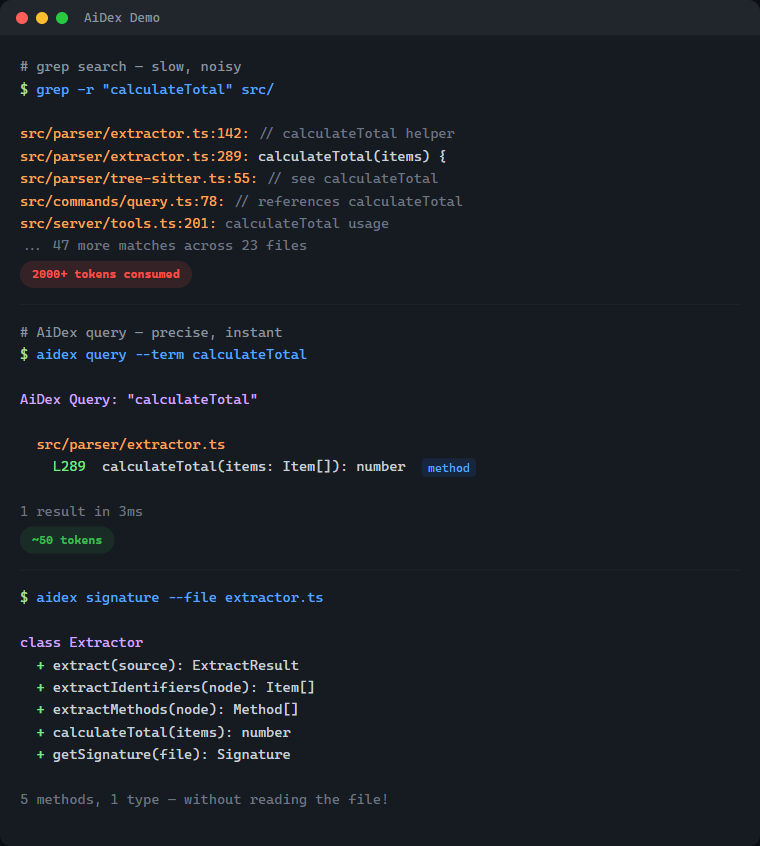
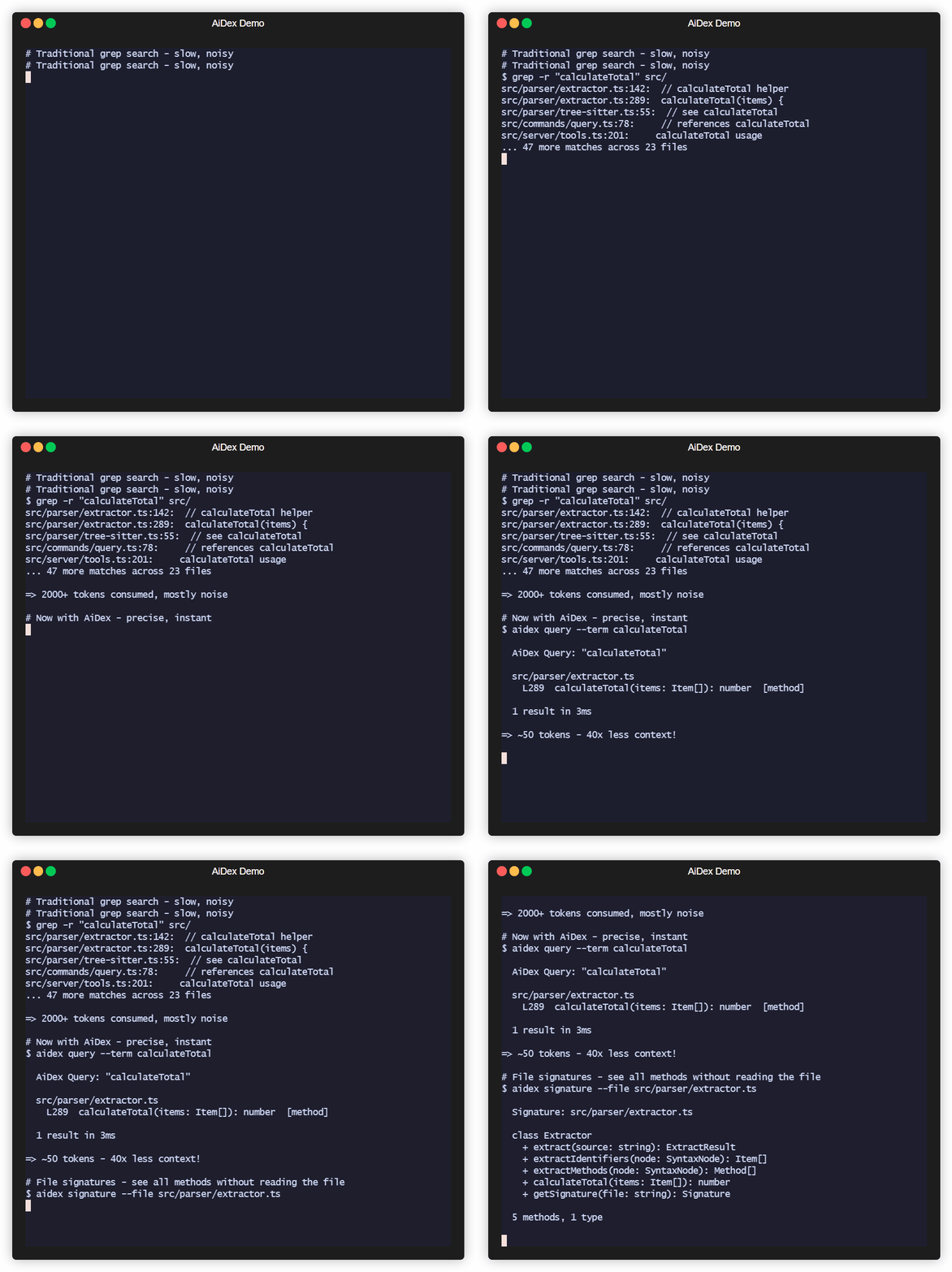
# Before: grep flooding your context
AI: grep "PlayerHealth" → 200 hits in 40 files
AI: read File1.cs, File2.cs, File3.cs...
→ 2000+ tokens consumed, 5+ tool calls

# After: precise results, minimal context
AI: aidex_query({ term: "PlayerHealth" })
→ Engine.cs:45, Player.cs:23, UI.cs:156
→ ~50 tokens, 1 tool call
Result: 50-80% less context used for code navigation.
Grep/Ripgrep | AiDex | |
Context usage | 2000+ tokens per search | ~50 tokens |
Results | All text matches | Only identifiers |
Precision |
|
|
Persistence | Starts fresh every time | Index survives sessions |
Structure | Flat text search | Knows methods, classes, types |
The real cost of grep: Every grep result includes surrounding context. Search for User in a large project and you'll get hundreds of hits - comments, strings, partial matches. Your AI reads through all of them, burning context tokens on noise.
AiDex indexes identifiers: It uses Tree-sitter to actually parse your code. When you search for User, you get the class definition, the method parameters, the variable declarations - not every comment that mentions "user".
Index your project once (~1 second per 1000 files)
aidex_init({ path: "/path/to/project" })AI searches the index instead of grepping
aidex_query({ term: "Calculate", mode: "starts_with" })
→ All functions starting with "Calculate" + exact line numbers

aidex_query({ term: "Player", modified_since: "2h" })
→ Only matches changed in the last 2 hours
Get file overviews without reading entire files
aidex_signature({ file: "src/Engine.cs" })
→ All classes, methods, and their signatures
The index lives in .aidex/index.db (SQLite) - fast, portable, no external dependencies.
Tree-sitter Parsing: Real code parsing, not regex — indexes identifiers, ignores keywords and noise
~50 Tokens per Search: vs 2000+ with grep — your AI keeps its context for actual work
Persistent Index: Survives between sessions — no re-scanning, no re-reading
Incremental Updates: Re-index single files after changes, not the whole project
Time-based Filtering: Find what changed in the last hour, day, or week
Auto-Cleanup: Excluded files (e.g., build outputs) are automatically removed from index
Zero Dependencies: SQLite with WAL mode — single file, fast, portable
Language | Extensions |
C# |
|
TypeScript |
|
JavaScript |
|
Rust |
|
Python |
|
C |
|
C++ |
|
Java |
|
Go |
|
PHP |
|
Ruby |
|
Node.js ≥ 18 (check with node --version)
macOS: brew install node or nvm install 18 && nvm use 18
Linux: use your package manager or nvm
Windows: nodejs.org
If you use nvm, the repo ships a .nvmrc — nvm use picks the right version automatically.
npm install -g aidex-mcpThat's it. Setup runs automatically after install — it detects your installed AI clients (Claude Code, Claude Desktop, Cursor, Windsurf, Gemini CLI, VS Code Copilot) and registers AiDex as an MCP server. It also adds usage instructions to your AI's config (~/.claude/CLAUDE.md, ~/.gemini/GEMINI.md).
To re-run setup manually: aidex setup | To unregister: aidex unsetup | To skip auto-setup: AIDEX_NO_SETUP=1 npm install -g aidex-mcp
For Claude Code (~/.claude/settings.json or ~/.claude.json):
{
  "mcpServers": {
    "aidex": {
      "type": "stdio",
      "command": "aidex",
      "env": {}
    }
  }
}
For Claude Desktop (%APPDATA%/Claude/claude_desktop_config.json on Windows):
{
  "mcpServers": {
    "aidex": {
      "command": "aidex"
    }
  }
}
Note: Both
aidexandaidex-mcpwork as command names.
Important: The server name in your config determines the MCP tool prefix. Use
"aidex"as shown above — this gives you tool names likeaidex_query,aidex_signature, etc. Using a different name (e.g.,"codegraph") would change the prefix accordingly.
For Gemini CLI (~/.gemini/settings.json):
{
  "mcpServers": {
    "aidex": {
      "command": "aidex"
    }
  }
}
For VS Code Copilot (run MCP: Open User Configuration in Command Palette):
{
  "servers": {
    "aidex": {
      "type": "stdio",
      "command": "aidex"
    }
  }
}
For other MCP clients: See your client's documentation for MCP server configuration.
Add to your AI's instructions (e.g., ~/.claude/CLAUDE.md for Claude Code, or the equivalent for your AI client). This tells the AI when and how to use AiDex instead of grepping:
## AiDex - Persistent Code Index (MCP Server)

AiDex provides fast, precise code search through a pre-built index.
**Always prefer AiDex over Grep/Glob for code searches.**

### REQUIRED: Before using Grep/Glob/Read for code searches
Do I want to search code? ├── .aidex/ exists → STOP! Use AiDex instead ├── .aidex/ missing → run aidex_init (don't ask), THEN use AiDex └── Config/Logs/Text → Grep/Read is fine
**NEVER do this when .aidex/ exists:**
- ❌ `Grep pattern="functionName"` → ✅ `aidex_query term="functionName"`
- ❌ `Grep pattern="class.*Name"` → ✅ `aidex_query term="Name" mode="contains"`
- ❌ `Read file.cs` to see methods → ✅ `aidex_signature file="file.cs"`
- ❌ `Glob pattern="**/*.cs"` + Read → ✅ `aidex_signatures pattern="**/*.cs"`

### Session-Start Rule (REQUIRED — every session, no exceptions)

1. Call `aidex_session({ path: "<project>" })` — detects external changes, auto-reindexes
2. If `.aidex/` does NOT exist → run `aidex_init` automatically (don't ask)
3. If a session note exists → **show it to the user** before continuing
4. **Before ending a session:** always leave a note about what to do next

### Question → Right Tool

| Question | Tool |
|----------|------|
| "Where is X defined?" | `aidex_query term="X"` |
| "Find anything containing X" | `aidex_query term="X" mode="contains"` |
| "All functions starting with X" | `aidex_query term="X" mode="starts_with"` |
| "What methods does file Y have?" | `aidex_signature file="Y"` |
| "Explore all files in src/" | `aidex_signatures pattern="src/**"` |
| "Project overview" | `aidex_summary` + `aidex_tree` |
| "What changed recently?" | `aidex_query term="X" modified_since="2h"` |
| "What files changed today?" | `aidex_files path="." modified_since="8h"` |
| "Have I ever written X?" | `aidex_global_query term="X" mode="contains"` |
| "Which project has class Y?" | `aidex_global_signatures term="Y" kind="class"` |
| "All indexed projects?" | `aidex_global_status` |

### Search Modes

- **`exact`** (default): Finds only the exact identifier — `log` won't match `catalog`
- **`contains`**: Finds identifiers containing the term — `render` matches `preRenderSetup`
- **`starts_with`**: Finds identifiers starting with the term — `Update` matches `UpdatePlayer`, `UpdateUI`

### All Tools (30)

| Category | Tools | Purpose |
|----------|-------|---------|
| Search & Index | `aidex_init`, `aidex_query`, `aidex_update`, `aidex_remove`, `aidex_status` | Index project, search identifiers (exact/contains/starts_with), time filter |
| Signatures | `aidex_signature`, `aidex_signatures` | Get classes + methods without reading files |
| Overview | `aidex_summary`, `aidex_tree`, `aidex_describe`, `aidex_files` | Entry points, file tree, file listing by type |
| Cross-Project | `aidex_link`, `aidex_unlink`, `aidex_links`, `aidex_scan` | Link dependencies, discover projects |
| Global Search | `aidex_global_init`, `aidex_global_query`, `aidex_global_signatures`, `aidex_global_status`, `aidex_global_refresh` | Search across ALL projects |
| Guidelines | `aidex_global_guideline` | Persistent AI instructions & conventions (key-value, global) |
| Sessions | `aidex_session`, `aidex_note` | Track sessions, leave notes (with searchable history) |
| Tasks | `aidex_task`, `aidex_tasks` | Built-in backlog with priorities, tags, summaries, auto-logged history, scheduled/recurring tasks |
| Log Hub | `aidex_log` | Universal log receiver — any program sends logs via HTTP, AI queries them, live in Viewer |
| Screenshots | `aidex_screenshot`, `aidex_windows` | Screen capture with LLM optimization (scale + color reduction, no index needed) |
| Viewer | `aidex_viewer` | Interactive browser UI with file tree, signatures, tasks, and live logs |

**11 languages:** C#, TypeScript, JavaScript, Rust, Python, C, C++, Java, Go, PHP, Ruby

### Session Notes

Leave notes for the next session — they persist in the database:
aidex_note({ path: ".", note: "Test the fix after restart" }) # Write aidex_note({ path: ".", note: "Also check edge cases", append: true }) # Append aidex_note({ path: "." }) # Read aidex_note({ path: ".", search: "parser" }) # Search history aidex_note({ path: ".", clear: true }) # Clear
- **Before ending a session:** automatically leave a note about next steps
- **User says "remember for next session: ..."** → write it immediately

### Task Backlog

Track TODOs, bugs, and features right next to your code index:
aidex_task({ path: ".", action: "create", title: "Fix bug", priority: 1, tags: "bug" }) aidex_task({ path: ".", action: "update", id: 1, status: "done" }) aidex_task({ path: ".", action: "log", id: 1, note: "Root cause found" }) aidex_tasks({ path: ".", status: "active" })
aidex_task({ path: ".", action: "create", title: "Check PR status", due: "3d", interval: "3d", task_action: "gh pr list" })
Priority: 1=high, 2=medium, 3=low | Status: `backlog → active → done | cancelled`

### Global Search (across all projects)
aidex_global_init({ path: "/path/to/all/repos" }) # Scan & register aidex_global_init({ path: "...", index_unindexed: true }) # + auto-index small projects aidex_global_query({ term: "TransparentWindow", mode: "contains" }) # Search everywhere aidex_global_signatures({ term: "Render", kind: "method" }) # Find methods everywhere aidex_global_status({ sort: "recent" }) # List all projects
### Screenshots
aidex_screenshot() # Full screen aidex_screenshot({ mode: "active_window" }) # Active window aidex_screenshot({ mode: "window", window_title: "VS Code" }) # Specific window aidex_screenshot({ scale: 0.5, colors: 2 }) # B&W, half size (ideal for LLM) aidex_screenshot({ colors: 16 }) # 16 colors (UI readable) aidex_windows({ filter: "chrome" }) # Find window titles
No index needed. Returns file path → use `Read` to view immediately.

**LLM optimization strategy:** Always start with aggressive settings, then retry if unreadable:
1. First try: `scale: 0.5, colors: 2` (B&W, half size — smallest possible)
2. If unreadable: retry with `colors: 16` (adds shading for UI elements)
3. If still unclear: `scale: 0.75` or omit `colors` for full quality
4. **Remember** what works for each window/app during the session — don't retry every time.Ask your AI: "Index this project with AiDex"
Or manually in the AI chat:
aidex_init({ path: "/path/to/your/project" })Tool | Description |
| Index a project (creates |
| Search by term (exact/contains/starts_with) |
| Get one file's classes + methods |
| Get signatures for multiple files (glob) |
| Re-index a single changed file |
| Remove a deleted file from index |
| Project overview |
| File tree with statistics |
| Add documentation to summary |
| Link another indexed project |
| Remove linked project |
| List linked projects |
| Index statistics |
| Find indexed projects in directory tree |
| List project files by type (code/config/doc/asset) |
| Read/write session notes (persists between sessions) |
| Start session, detect external changes, auto-reindex |
| Open interactive project tree in browser |
| Create, read, update, delete tasks with priority and tags |
| List and filter tasks by status, priority, or tag |
| Take a screenshot (fullscreen, window, region) with optional scale + color reduction |
| List open windows for screenshot targeting |
| Scan directory tree, register all indexed projects in global DB |
| List all registered projects with stats |
| Search terms across ALL registered projects |
| Search methods/types by name across all projects |
| Update stats and remove stale projects from global DB |
| Store/retrieve AI guidelines and coding conventions (key-value, global) |
| Universal log receiver — start HTTP server, query logs, live stream in Viewer |
Track what changed recently with modified_since and modified_before:
aidex_query({ term: "render", modified_since: "2h" })   # Last 2 hours
aidex_query({ term: "User", modified_since: "1d" })     # Last day
aidex_query({ term: "API", modified_since: "1w" })      # Last week
Supported formats:
Relative: 30m (minutes), 2h (hours), 1d (days), 1w (weeks)
ISO date: 2026-01-27 or 2026-01-27T14:30:00
Perfect for questions like "What did I change in the last hour?"
AiDex indexes ALL files in your project (not just code), letting you query the structure:
aidex_files({ path: ".", type: "config" })  # All config files
aidex_files({ path: ".", type: "test" })    # All test files
aidex_files({ path: ".", pattern: "**/*.md" })  # All markdown files
aidex_files({ path: ".", modified_since: "30m" })  # Changed this session
File types: code, config, doc, asset, test, other, dir
Use modified_since to find files changed in this session - perfect for "What did I edit?"
Leave reminders for the next session - no more losing context between chats:
aidex_note({ path: ".", note: "Test the glob fix after restart" })  # Write
aidex_note({ path: ".", note: "Also check edge cases", append: true })  # Append
aidex_note({ path: "." })                                              # Read
aidex_note({ path: ".", clear: true })                                 # Clear
Note History (v1.10): Old notes are automatically archived when overwritten or cleared. Browse and search past notes:
aidex_note({ path: ".", history: true })                    # Browse archived notes (shows summaries)
aidex_note({ path: ".", search: "parser" })                 # Search note history (searches summaries too)
aidex_note({ path: ".", history: true, limit: 5 })          # Last 5 archived notes
Note Summaries (v1.15): Provide a summary when writing/clearing a note — the archived note gets this one-sentence description. History then shows summaries instead of truncated text:
aidex_note({ path: ".", note: "New focus", summary: "Previous session: finished parser refactoring" })Use cases:
Before ending a session: "Remember to test X next time"
AI auto-reminder: Save what to verify after a restart
Handover notes: Context for the next session without editing config files
Search past sessions: "What did we do about the parser?"
Notes are stored in the SQLite database (.aidex/index.db) and persist indefinitely.
Keep your project tasks right next to your code index - no Jira, no Trello, no context switching:
aidex_task({ path: ".", action: "create", title: "Fix parser bug", priority: 1, tags: "bug", summary: "Parser crashes on nested generics in C#" })
aidex_task({ path: ".", action: "update", id: 1, status: "done" })
aidex_task({ path: ".", action: "log", id: 1, note: "Root cause: unbounded buffer" })
aidex_tasks({ path: ".", status: "active" })Tasks can have due dates and repeat intervals. Overdue tasks are reported at every session start across ALL projects:
# One-shot: remind in 3 days
aidex_task({ path: ".", action: "create", title: "Review PR", due: "3d", task_action: "Check if PR was submitted" })

# Recurring: check every week
aidex_task({ path: ".", action: "create", title: "Check dependencies", due: "1w", interval: "1w", task_action: "npm outdated" })

# Auto-execute: runs the action automatically when due
aidex_task({ path: ".", action: "create", title: "Refresh stats", due: "1d", interval: "1d", auto_go: true })
Due formats: Relative ("30m", "2h", "3d", "1w") or ISO date ("2026-04-10")
At every aidex_session call, the Task Scheduler checks ~/.aidex/global.db for due tasks across all projects — even if you're working on a different project. Recurring tasks automatically advance their due date after each trigger.
Features:
Summaries: One-sentence table-of-contents per task — scan the backlog without reading full details
Priorities: 🔴 high, 🟡 medium, ⚪ low
Statuses: backlog → active → done | cancelled
Tags: Categorize tasks (bug, feature, docs, etc.)
History log: Every status change is auto-logged, plus manual notes
Scheduling: Due dates, recurring intervals, actions, auto-execute across all projects
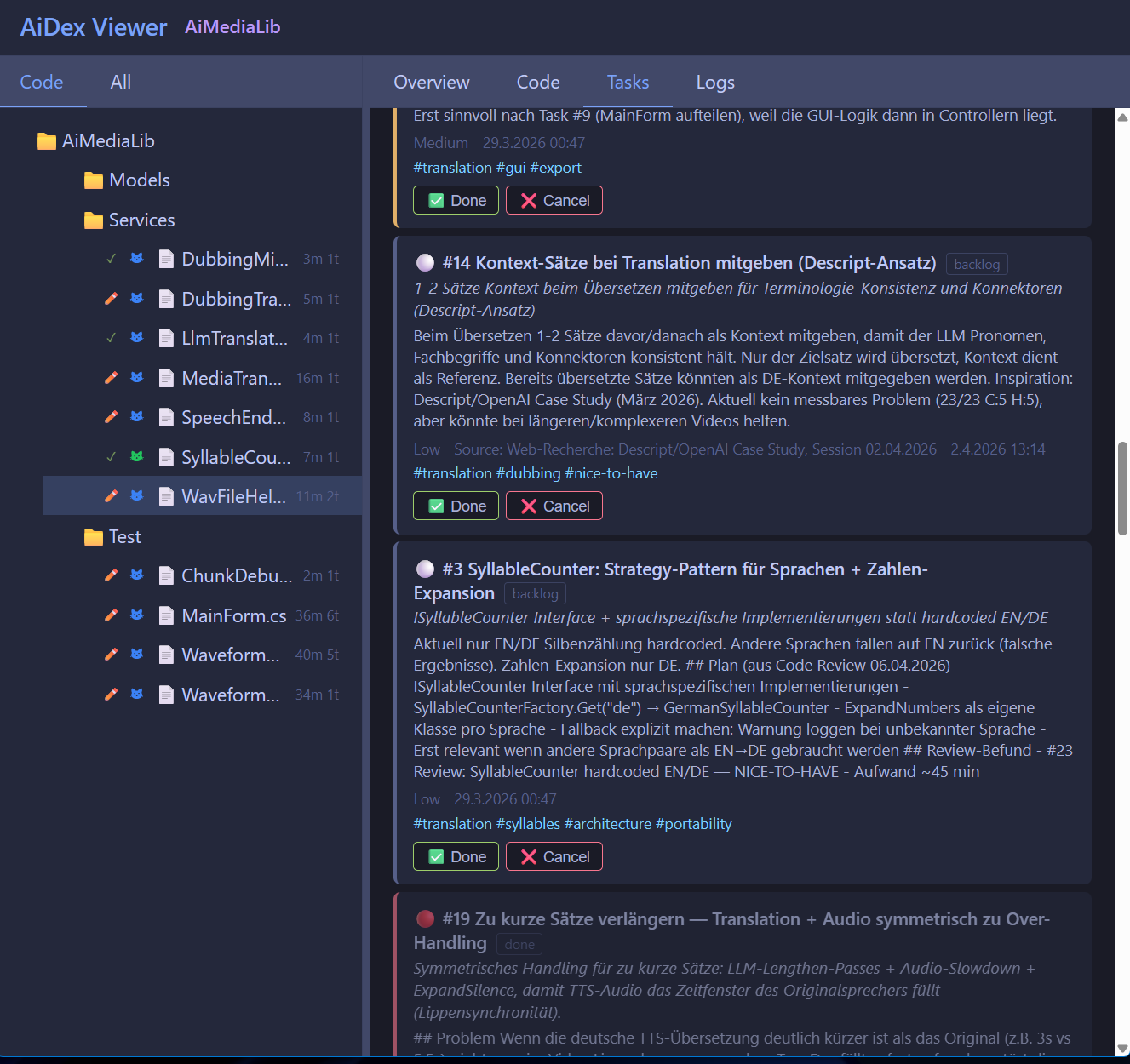
Viewer integration: Tasks tab in the browser viewer with live updates
Persistent: Tasks survive between sessions, stored in .aidex/index.db
Your AI assistant can create tasks while working ("found a bug in the parser, add it to the backlog"), track progress, and pick up where you left off next session.
Search across ALL your indexed projects at once. Perfect for "Have I ever written a transparent window?" or "Where did I use that algorithm?"
aidex_global_init({ path: "Q:/develop" })                              # Scan & register
aidex_global_init({ path: "Q:/develop", exclude: ["llama.cpp"] })      # Skip external repos
aidex_global_init({ path: "Q:/develop", index_unindexed: true })       # Auto-index all found projects
aidex_global_init({ path: "Q:/develop", index_unindexed: true, show_progress: true })  # With browser progress UI
This scans your project directory, registers all AiDex-indexed projects in a global database (~/.aidex/global.db), and reports any unindexed projects it finds by detecting project markers (.csproj, package.json, Cargo.toml, etc.).
With index_unindexed: true, it also auto-indexes all discovered projects with ≤500 code files. Larger projects are listed separately for user decision. Add show_progress: true to open a live progress UI in your browser (http://localhost:3334).
aidex_global_query({ term: "TransparentWindow" })                      # Exact match
aidex_global_query({ term: "transparent", mode: "contains" })          # Fuzzy search
aidex_global_signatures({ term: "Render", kind: "method" })            # Find methods
aidex_global_signatures({ term: "Player", kind: "class" }) # Find classesUses SQLite ATTACH DATABASE to query project databases directly — no data copying
Results are cached in memory (5-minute TTL) for fast repeated queries
Projects are batched (8 at a time) to respect SQLite's attachment limit
Each project keeps its own .aidex/index.db as the single source of truth
Auto-deduplication: Parent projects that contain sub-projects are automatically skipped (e.g., MyApp/ is removed when MyApp/Frontend/ and MyApp/Backend/ exist as separate indexed projects)
aidex_global_status()                                                  # List all projects
aidex_global_status({ sort: "recent" })                                # Most recently indexed first
aidex_global_refresh() # Update stats, remove staleStore persistent coding conventions, review checklists, and AI instructions in a single place — shared across all projects.
aidex_global_guideline({ action: "set", key: "review", value: "Always check: error handling, null safety, no hardcoded strings" })
aidex_global_guideline({ action: "set", key: "style", value: "Use PascalCase for classes, camelCase for methods, 4-space indent" })
aidex_global_guideline({ action: "get", key: "review" })               # Retrieve a guideline
aidex_global_guideline({ action: "list" })                             # Show all guidelines
aidex_global_guideline({ action: "list", filter: "code" })             # Filter by name
aidex_global_guideline({ action: "delete", key: "old-rule" })          # Remove a guideline
Use cases:
Code review checklist: Tell your AI exactly what to look for every time
Coding conventions: Store team style rules once, reference them in any project
Release checklist: Step-by-step process for shipping
Project-agnostic instructions: No more pasting the same context into every session
Guidelines are stored in ~/.aidex/global.db — available across all your projects without aidex_init. Ask your AI: "Load the review guideline and apply it to this file."
Turn any program into a log source for your AI assistant. Your app sends logs via HTTP POST, the AI queries them via MCP, and you see them live in the Viewer — zero dependencies, zero setup in your code.
Your Program ──HTTP POST──→ AiDex Log Hub (port 3335) ──→ Ring Buffer
                                        │                      │
                                        │ WebSocket             │ MCP query
                                        ↓                      ↓
                                   Viewer (Logs tab)      AI Assistant
(you see live) (queries & analyzes)AI starts the Log Hub: aidex_log({ action: "init" })
AI opens the Viewer: aidex_viewer({ path: "." }) — Logs tab shows live stream
Add one line to your program:
// C#
await new HttpClient().PostAsJsonAsync("http://localhost:3335/log",
    new { level = "info", source = "MyApp", message = "Player spawned", data = new { x = 10, y = 20 } });
# Python
requests.post("http://localhost:3335/log", json={"level": "info", "source": "MyApp", "message": "Done"})// JavaScript
fetch("http://localhost:3335/log", {
method: "POST", headers: {"Content-Type": "application/json"},
body: JSON.stringify({level: "info", source: "MyApp", message: "Started"})
});# PowerShell
Invoke-RestMethod -Uri http://localhost:3335/log -Method POST -ContentType "application/json" -Body '{"level":"info","source":"Script","message":"Done"}'Endpoint | Method | Body | Description |
| POST |
| Single log entry |
| POST |
| Batch (multiple at once) |
| GET | — | Status + buffer usage |
Fields: level (debug/info/warn/error), source (app name), message (text, required), data (optional JSON), timestamp (optional, ms)
Ring Buffer: Fixed-size in-memory FIFO (default 10,000 entries) — oldest entries overwritten
Zero-cost: No server, no buffer, no resources until init is called
Persistence: Optional SQLite storage with 7-day auto-cleanup (persist: true)
Consume pattern: query with consume: true removes returned entries — ideal for polling
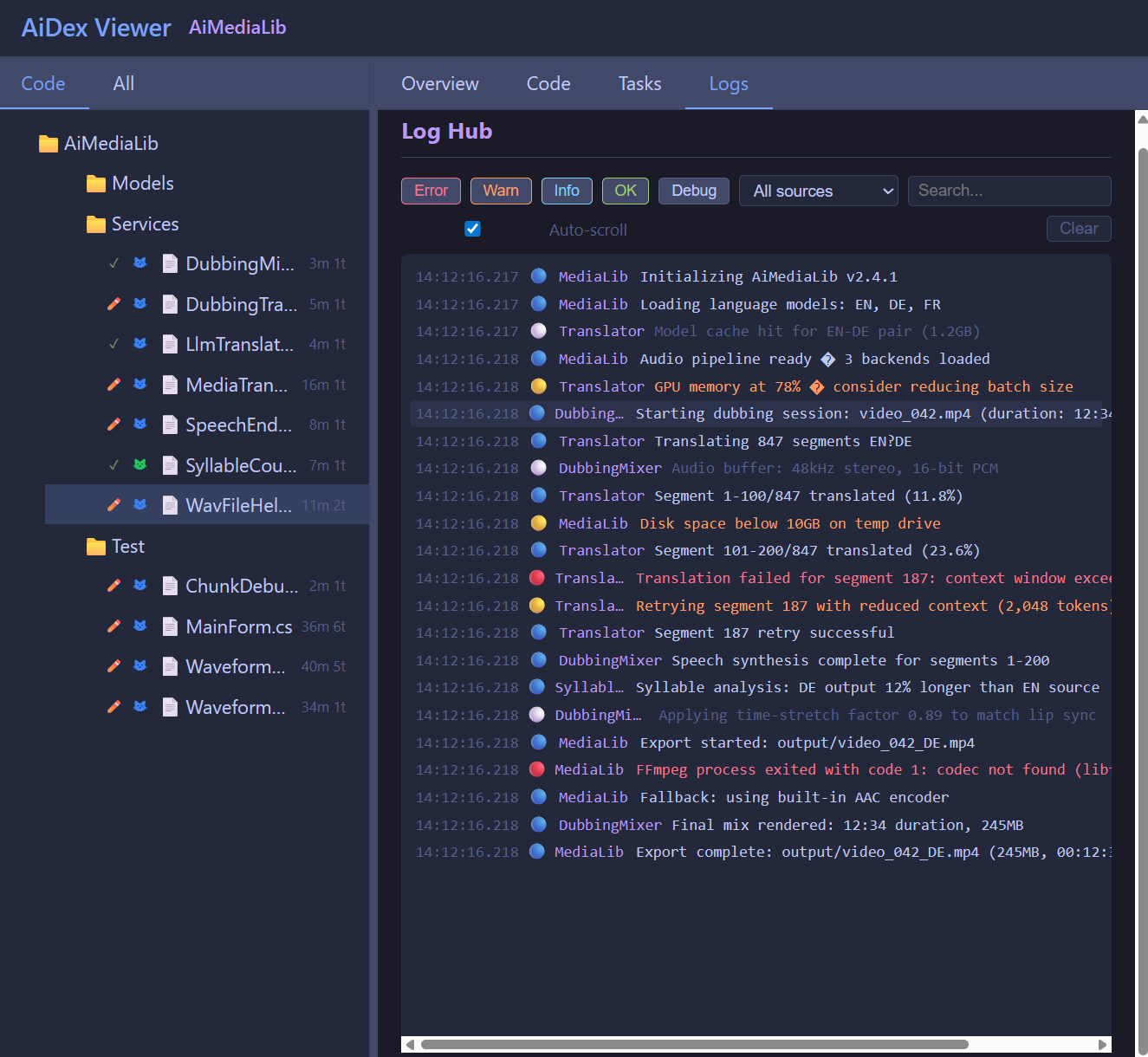
Viewer integration: Logs tab with WebSocket live-stream, level/source/text filters, auto-scroll
Fire & forget: Just POST and go — if the server isn't running, the POST silently fails
Take screenshots and reduce them up to 95% for LLM context. A typical screenshot goes from ~100 KB to ~5 KB — that's thousands of tokens saved per image.
Raw Screenshot | Optimized (scale=0.5, colors=2) | |
File size | ~100-500 KB | ~5-15 KB |
Tokens consumed | ~5,000-25,000 | ~250-750 |
Text readable? | Yes | Yes |
Colors | 16M (24-bit) | 2 (black & white) |
Most screenshots in AI context are for reading text — error messages, logs, UI labels. You don't need 16 million colors for that.
aidex_screenshot()                                             # Full screen (full quality)
aidex_screenshot({ mode: "active_window" })                    # Active window
aidex_screenshot({ mode: "window", window_title: "VS Code" }) # Specific window
aidex_screenshot({ scale: 0.5, colors: 2 })                   # B&W, half size (best for text)
aidex_screenshot({ scale: 0.5, colors: 16 })                  # 16 colors (UI readable)
aidex_screenshot({ colors: 256 })                              # 256 colors (good quality)
aidex_screenshot({ mode: "region" })                           # Interactive selection
aidex_screenshot({ mode: "rect", x: 100, y: 200, width: 800, height: 600 })  # Coordinates
aidex_windows({ filter: "chrome" }) # Find window titlesParameter | Values | Description |
| 0.1 - 1.0 | Scale factor (0.5 = half resolution). Most HiDPI screens are 2-3x anyway. |
| 2, 4, 16, 256 | Color reduction. 2 = black & white, ideal for text screenshots. |
The tool description tells LLMs to optimize automatically:
Start aggressive: scale: 0.5, colors: 2 (smallest possible)
If unreadable: retry with colors: 16 (adds shading for UI elements)
If still unclear: try scale: 0.75 or full color
Remember: cache what works per window/app for the rest of the session
This way the AI learns the right settings per app without wasting tokens on oversized images.
5 capture modes: Fullscreen, active window, specific window (by title), interactive region selection, coordinate-based rectangle
Cross-platform: Windows (PowerShell + System.Drawing), macOS (sips + ImageMagick), Linux (ImageMagick)
Multi-monitor: Select which monitor to capture
Delay: Wait N seconds before capturing (e.g., to open a menu first)
Size reporting: Shows original → optimized size and percentage saved
Auto-path: Default saves to temp directory with fixed filename
No index required: Works standalone, no .aidex/ needed
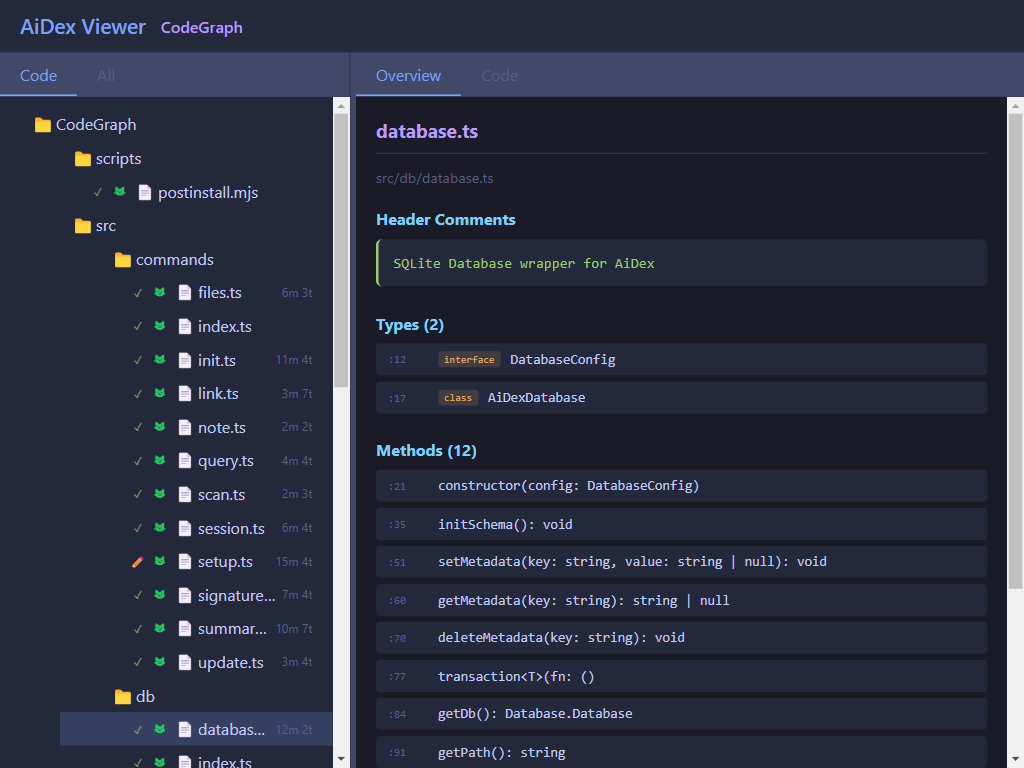
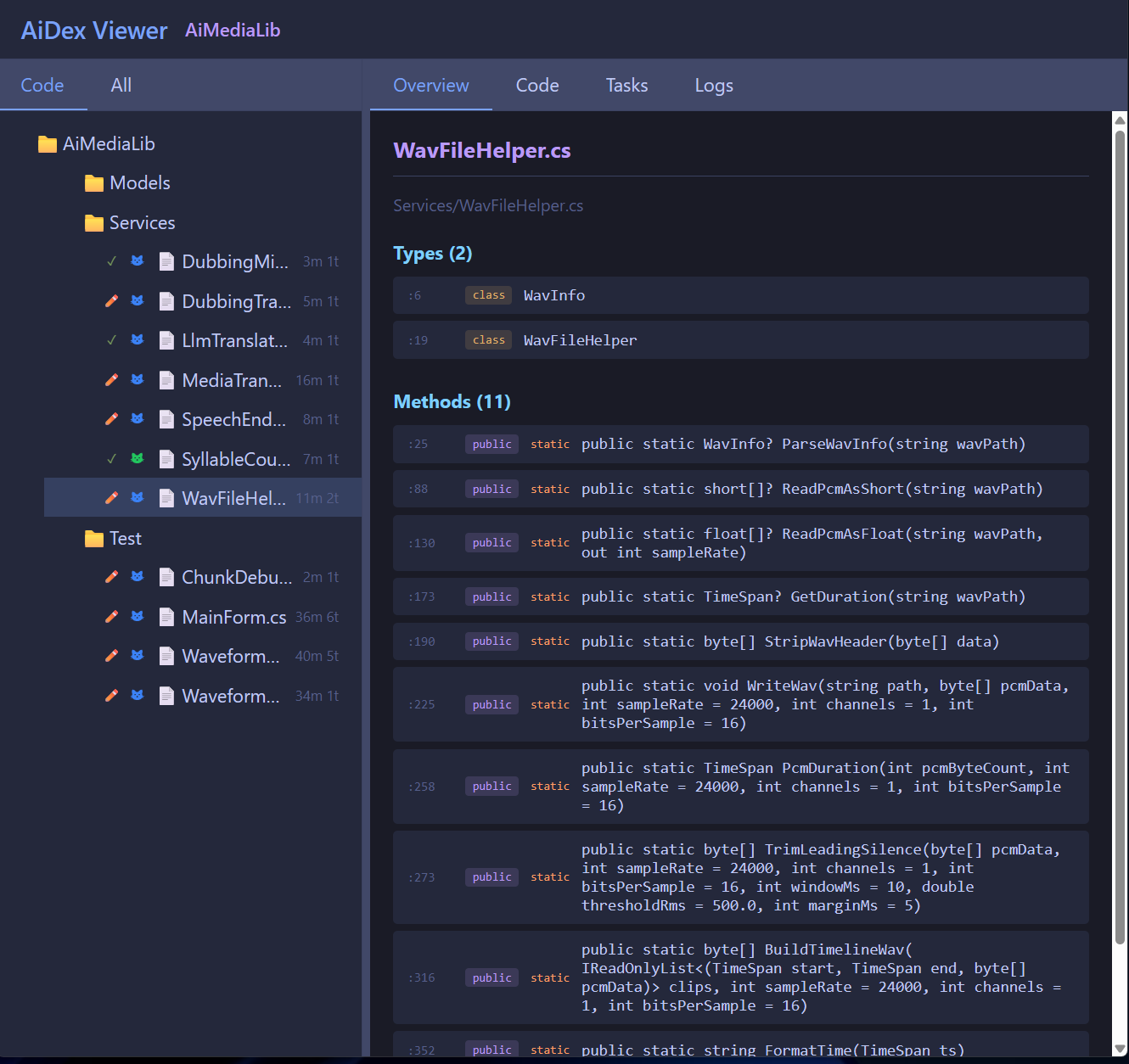
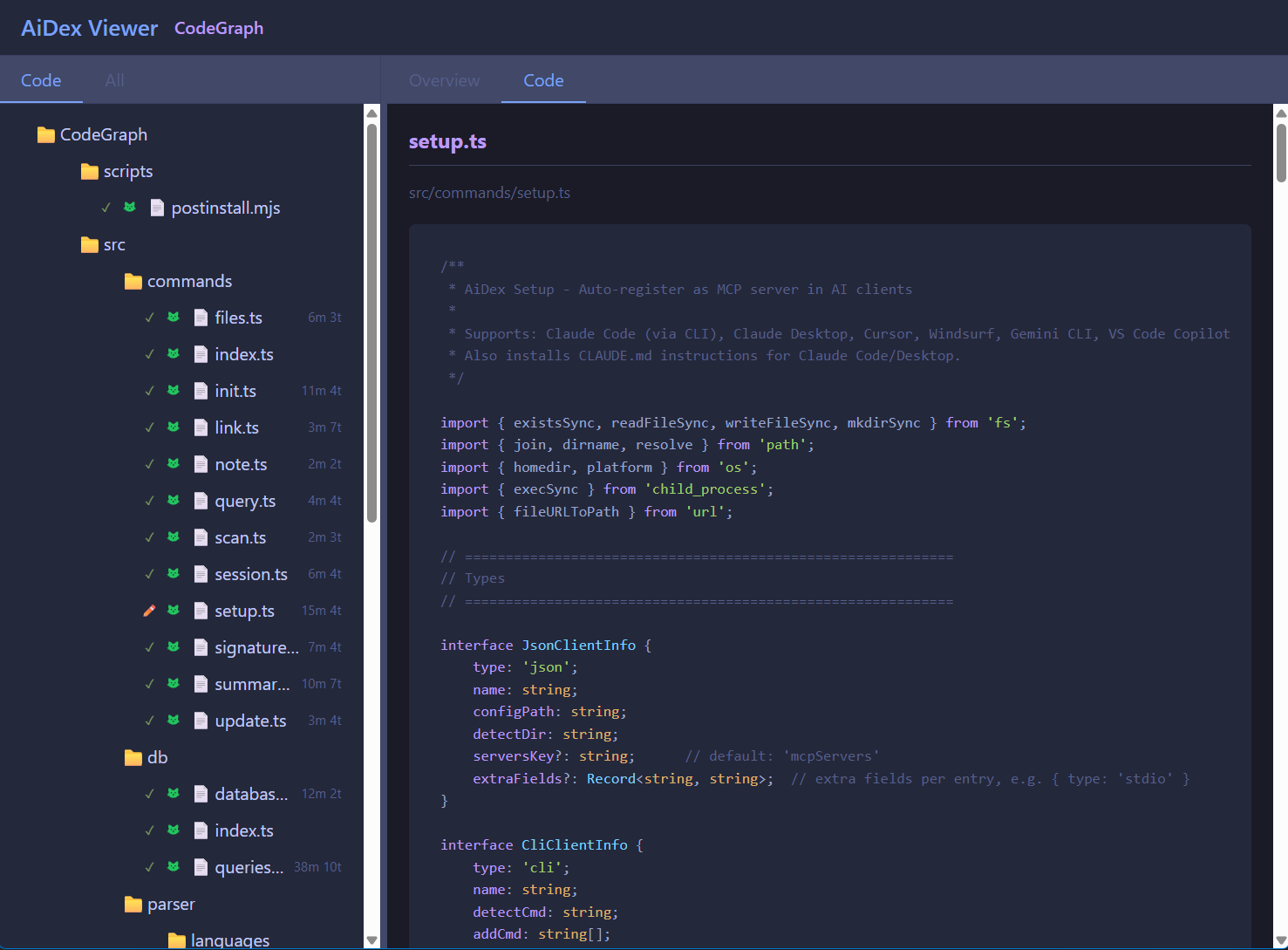
Explore your indexed project visually in the browser:
aidex_viewer({ path: "." })Opens http://localhost:3333 with:
Interactive file tree - Click to expand directories
File signatures - Click any file to see its types and methods
Live reload - Changes detected automatically while you code
Git status icons - See which files are modified, staged, or untracked
Logs tab - Live log stream from Log Hub with filters (level, source, text search)
Tasks tab - View and manage your task backlog
Close with aidex_viewer({ path: ".", action: "close" })
aidex scan Q:/develop       # Find all indexed projects
aidex init ./myproject      # Index a project from command line
aidex-mcpworks as an alias foraidex.
Project | Files | Items | Index Time | Query Time |
Small (AiDex) | 19 | 1,200 | <1s | 1-5ms |
Medium (RemoteDebug) | 10 | 1,900 | <1s | 1-5ms |
Large (LibPyramid3D) | 18 | 3,000 | <1s | 1-5ms |
XL (MeloTTS) | 56 | 4,100 | ~2s | 1-10ms |
Parser: Tree-sitter - Real parsing, not regex
Database: SQLite with WAL mode - Fast, single file, zero config
Protocol: MCP - Works with any compatible AI
.aidex/                  ← Created in YOUR project
├── index.db             ← SQLite database
└── summary.md           ← Optional documentation

AiDex/                   ← This repository
├── src/
│   ├── commands/        ← Tool implementations
│   ├── db/              ← SQLite wrapper
│   ├── parser/          ← Tree-sitter integration
│   └── server/          ← MCP protocol handler
└── build/ ← Compiled outputGitHub Discussions — Ask questions, share your setup, suggest ideas.
Category | For |
Setup help, usage questions | |
Feature suggestions | |
Share your workflow | |
Release news (maintainer only) |
See CONTRIBUTING.md for full details. Quick summary:
Bug? → Open an issue
Idea? → Start a Discussion
New language? → Add a keyword file in src/parser/languages/ and open a PR
MIT License - see LICENSE
Uwe Chalas & Claude
Add or update a section in the project summary (summary.md). Use to document project purpose, architecture, key concepts, or patterns.
| Name | Required | Description | Default |
|---|---|---|---|
| path | Yes | Path to project with .aidex directory | |
| section | Yes | Section to update | |
| content | Yes | Content to add to the section | |
| replace | No | Replace existing section content (default: append) |
Does the description disclose side effects, auth requirements, rate limits, or destructive behavior?
With no annotations provided, the description carries the full burden of behavioral disclosure. It mentions the tool can 'add or update' and specifies the default append behavior via the replace parameter, which is useful. However, it doesn't cover critical aspects like whether this requires specific file permissions, how it handles errors, if changes are reversible, or what the response looks like (no output schema). For a mutation tool with zero annotation coverage, this leaves significant gaps.
Agents need to know what a tool does to the world before calling it. Descriptions should go beyond structured annotations to explain consequences.
Is the description appropriately sized, front-loaded, and free of redundancy?
The description is efficiently structured in two sentences: the first states the core action and target, and the second provides usage context with specific examples. Every word earns its place, with no redundancy or fluff, making it easy to parse quickly.
Shorter descriptions cost fewer tokens and are easier for agents to parse. Every sentence should earn its place.
Given the tool's complexity, does the description cover enough for an agent to succeed on first attempt?
Given the tool's moderate complexity (4 parameters, mutation operation) and lack of annotations or output schema, the description is partially complete. It covers the basic purpose and parameters via the schema, but fails to address behavioral aspects like error handling, permissions, or response format. For a tool that modifies files, more context on safety and outcomes would be beneficial.
Complex tools with many parameters or behaviors need more documentation. Simple tools need less. This dimension scales expectations accordingly.
Does the description clarify parameter syntax, constraints, interactions, or defaults beyond what the schema provides?
Schema description coverage is 100%, so the schema already documents all four parameters thoroughly. The description adds minimal value by listing some section examples ('purpose, architecture, key concepts, or patterns') that align with the enum, but doesn't provide additional syntax, format details, or usage context beyond what the schema specifies. This meets the baseline for high schema coverage.
Input schemas describe structure but not intent. Descriptions should explain non-obvious parameter relationships and valid value ranges.
Does the description clearly state what the tool does and how it differs from similar tools?
The description clearly states the action ('Add or update a section') and the target resource ('project summary (summary.md)'), specifying it's for documentation purposes. It distinguishes from siblings like aidex_note or aidex_task by focusing on structured project documentation rather than general notes or task management. However, it doesn't explicitly contrast with all siblings like aidex_update or aidex_summary.
Agents choose between tools based on descriptions. A clear purpose with a specific verb and resource helps agents select the right tool.
Does the description explain when to use this tool, when not to, or what alternatives exist?
The description provides implied usage context by listing specific section types ('purpose, architecture, key concepts, or patterns'), suggesting when to use this tool for project documentation. However, it lacks explicit guidance on when to choose this over alternatives like aidex_note for general notes or aidex_update for other updates, and doesn't mention prerequisites or exclusions.
Agents often have multiple tools that could apply. Explicit usage guidance like "use X instead of Y when Z" prevents misuse.
List all files and directories in the indexed project. Returns the complete project structure with file types (code, config, doc, asset, test, other) and whether each file is indexed for code search. Use modified_since to find files changed in this session.
| Name | Required | Description | Default |
|---|---|---|---|
| path | Yes | Path to project with .aidex directory | |
| type | No | Filter by file type | |
| pattern | No | Glob pattern to filter files (e.g., "src/**/*.ts") | |
| modified_since | No | Only files indexed after this time. Supports: "2h", "30m", "1d", "1w", or ISO date. Use to find files changed this session. |
Does the description disclose side effects, auth requirements, rate limits, or destructive behavior?
With no annotations provided, the description carries full burden. It discloses key behavioral traits: it returns the complete project structure with file types and indexing status, and supports filtering by modification time. However, it doesn't mention pagination, rate limits, authentication needs, or what happens with invalid paths, leaving gaps for a tool with 4 parameters.
Agents need to know what a tool does to the world before calling it. Descriptions should go beyond structured annotations to explain consequences.
Is the description appropriately sized, front-loaded, and free of redundancy?
The description is efficiently structured in two sentences: the first states the core purpose and return value, the second provides specific usage guidance for a parameter. Every sentence earns its place with no wasted words, making it easy to scan and understand.
Shorter descriptions cost fewer tokens and are easier for agents to parse. Every sentence should earn its place.
Given the tool's complexity, does the description cover enough for an agent to succeed on first attempt?
For a tool with 4 parameters, no annotations, and no output schema, the description is adequate but has clear gaps. It covers the basic purpose and some behavioral context, but doesn't explain the return format structure, error handling, or dependencies on other tools like aidex_init. It's minimally viable but could be more complete given the complexity.
Complex tools with many parameters or behaviors need more documentation. Simple tools need less. This dimension scales expectations accordingly.
Does the description clarify parameter syntax, constraints, interactions, or defaults beyond what the schema provides?
Schema description coverage is 100%, so the schema already documents all parameters thoroughly. The description adds minimal value by reinforcing the purpose of modified_since ('to find files changed this session') but doesn't provide additional syntax or format details beyond what the schema specifies. Baseline 3 is appropriate when the schema does the heavy lifting.
Input schemas describe structure but not intent. Descriptions should explain non-obvious parameter relationships and valid value ranges.
Does the description clearly state what the tool does and how it differs from similar tools?
The description clearly states the specific action ('List all files and directories'), the resource ('in the indexed project'), and the scope ('complete project structure'). It distinguishes from siblings by specifying it returns file types and indexing status, which is unique among the listed tools like aidex_tree or aidex_scan.
Agents choose between tools based on descriptions. A clear purpose with a specific verb and resource helps agents select the right tool.
Does the description explain when to use this tool, when not to, or what alternatives exist?
The description provides clear context for when to use the tool ('to find files changed in this session' using modified_since) and implies usage for retrieving project structure with metadata. However, it doesn't explicitly state when NOT to use it or name alternatives among siblings like aidex_tree for different structural views.
Agents often have multiple tools that could apply. Explicit usage guidance like "use X instead of Y when Z" prevents misuse.
Initialize AiDex indexing for a project. Scans all source files and builds a searchable index of identifiers, methods, types, and signatures.
| Name | Required | Description | Default |
|---|---|---|---|
| path | Yes | Absolute path to the project directory to index | |
| name | No | Optional project name (defaults to directory name) | |
| exclude | No | Additional glob patterns to exclude (e.g., ["**/test/**"]) |
Does the description disclose side effects, auth requirements, rate limits, or destructive behavior?
No annotations are provided, so the description carries the full burden. It mentions scanning and building an index, implying a potentially resource-intensive or time-consuming operation, but doesn't disclose behavioral traits like whether it's idempotent, if it overwrites existing indexes, error conditions, or performance implications. This leaves significant gaps for an initialization tool.
Agents need to know what a tool does to the world before calling it. Descriptions should go beyond structured annotations to explain consequences.
Is the description appropriately sized, front-loaded, and free of redundancy?
The description is concise and front-loaded, stating the core purpose in the first sentence and elaborating with specific actions in the second. Both sentences earn their place by clarifying scope ('all source files') and output ('searchable index'), though it could be slightly more structured (e.g., mentioning it's typically run once).
Shorter descriptions cost fewer tokens and are easier for agents to parse. Every sentence should earn its place.
Given the tool's complexity, does the description cover enough for an agent to succeed on first attempt?
Given the complexity of an indexing initialization tool with no annotations and no output schema, the description is incomplete. It doesn't explain what the index contains (beyond high-level types), how to verify success, error handling, or prerequisites. With many sibling tools, more context on its role in the workflow is needed for adequate completeness.
Complex tools with many parameters or behaviors need more documentation. Simple tools need less. This dimension scales expectations accordingly.
Does the description clarify parameter syntax, constraints, interactions, or defaults beyond what the schema provides?
The input schema has 100% description coverage, so the schema fully documents the parameters (path, name, exclude). The description adds no additional parameter semantics beyond what's in the schema, such as format examples or constraints. With high schema coverage, a baseline score of 3 is appropriate as the description doesn't compensate but doesn't need to.
Input schemas describe structure but not intent. Descriptions should explain non-obvious parameter relationships and valid value ranges.
Does the description clearly state what the tool does and how it differs from similar tools?
The description clearly states the tool's purpose: 'Initialize AiDex indexing for a project' with specific actions ('scans all source files and builds a searchable index'). It distinguishes itself from siblings like 'aidex_query' or 'aidex_status' by focusing on initialization, but doesn't explicitly differentiate from 'aidex_scan' or 'aidex_update' which might have overlapping functionality.
Agents choose between tools based on descriptions. A clear purpose with a specific verb and resource helps agents select the right tool.
Does the description explain when to use this tool, when not to, or what alternatives exist?
No guidance is provided on when to use this tool versus alternatives. With many sibling tools (e.g., 'aidex_scan', 'aidex_update', 'aidex_status'), the description doesn't indicate if this is a one-time setup, required before other operations, or how it relates to similar tools. The user must infer usage from the name and description alone.
Agents often have multiple tools that could apply. Explicit usage guidance like "use X instead of Y when Z" prevents misuse.
Link a dependency project to enable cross-project queries. The dependency must have its own .aidex index.
| Name | Required | Description | Default |
|---|---|---|---|
| path | Yes | Path to current project with .aidex directory | |
| dependency | Yes | Path to dependency project to link | |
| name | No | Optional display name for the dependency |
Does the description disclose side effects, auth requirements, rate limits, or destructive behavior?
No annotations are provided, so the description carries the full burden. It mentions that linking 'enable[s] cross-project queries', which hints at a read-oriented behavior, but doesn't disclose critical traits such as whether this is a mutating operation (likely yes, as it modifies project configuration), any permissions or authentication needs, side effects (e.g., updates to index files), or error conditions. The description is too vague for a tool that likely alters project state.
Agents need to know what a tool does to the world before calling it. Descriptions should go beyond structured annotations to explain consequences.
Is the description appropriately sized, front-loaded, and free of redundancy?
The description is two sentences with zero waste: the first states the purpose and action, the second adds a crucial prerequisite. It's front-loaded with the core functionality and efficiently conveys necessary information without redundancy or fluff. Every sentence earns its place by adding value.
Shorter descriptions cost fewer tokens and are easier for agents to parse. Every sentence should earn its place.
Given the tool's complexity, does the description cover enough for an agent to succeed on first attempt?
Given the complexity (a likely mutating operation with 3 parameters), no annotations, and no output schema, the description is incomplete. It lacks details on behavioral aspects (e.g., what 'link' does operationally, success/failure responses), doesn't explain the output or side effects, and relies solely on the schema for parameters. For a tool that modifies project dependencies, more context is needed to ensure safe and correct usage.
Complex tools with many parameters or behaviors need more documentation. Simple tools need less. This dimension scales expectations accordingly.
Does the description clarify parameter syntax, constraints, interactions, or defaults beyond what the schema provides?
Schema description coverage is 100%, so the schema already documents all three parameters (path, dependency, name) with clear descriptions. The description adds no additional meaning beyond the schema, such as explaining the relationship between 'path' and 'dependency' or the implications of the optional 'name'. Baseline score of 3 is appropriate as the schema handles parameter documentation adequately.
Input schemas describe structure but not intent. Descriptions should explain non-obvious parameter relationships and valid value ranges.
Does the description clearly state what the tool does and how it differs from similar tools?
The description clearly states the action ('Link') and resource ('a dependency project') with the purpose 'to enable cross-project queries'. It distinguishes from siblings like 'aidex_unlink' (opposite action) and 'aidex_links' (likely lists links), but doesn't explicitly differentiate from all siblings. The purpose is specific but could be more precise about what 'link' entails operationally.
Agents choose between tools based on descriptions. A clear purpose with a specific verb and resource helps agents select the right tool.
Does the description explain when to use this tool, when not to, or what alternatives exist?
The description implies usage context by stating 'The dependency must have its own .aidex index', which serves as a prerequisite. However, it doesn't provide explicit guidance on when to use this tool versus alternatives like 'aidex_links' (likely for listing) or 'aidex_unlink' (for removing), nor does it specify scenarios where linking is appropriate versus not. The guidance is limited to a technical requirement.
Agents often have multiple tools that could apply. Explicit usage guidance like "use X instead of Y when Z" prevents misuse.
List all linked dependency projects.
| Name | Required | Description | Default |
|---|---|---|---|
| path | Yes | Path to project with .aidex directory |
Does the description disclose side effects, auth requirements, rate limits, or destructive behavior?
With no annotations provided, the description carries the full burden of behavioral disclosure. It states the action ('List') but doesn't describe what 'linked dependency projects' means, the format of the output, whether it's paginated, or any error conditions. This leaves significant behavioral gaps for a tool with one required parameter.
Agents need to know what a tool does to the world before calling it. Descriptions should go beyond structured annotations to explain consequences.
Is the description appropriately sized, front-loaded, and free of redundancy?
The description is a single, efficient sentence that directly states the tool's purpose without any unnecessary words. It's perfectly front-loaded and wastes no space, making it ideal for quick comprehension.
Shorter descriptions cost fewer tokens and are easier for agents to parse. Every sentence should earn its place.
Given the tool's complexity, does the description cover enough for an agent to succeed on first attempt?
Given the lack of annotations and output schema, the description is insufficiently complete. It doesn't explain what 'linked dependency projects' are, what the output looks like, or how this tool differs from siblings. For a tool with one required parameter and no structured output documentation, more context is needed.
Complex tools with many parameters or behaviors need more documentation. Simple tools need less. This dimension scales expectations accordingly.
Does the description clarify parameter syntax, constraints, interactions, or defaults beyond what the schema provides?
The schema description coverage is 100%, with the 'path' parameter clearly documented as 'Path to project with .aidex directory'. The description adds no additional parameter information beyond what the schema provides, so it meets the baseline for adequate but unenriched parameter semantics.
Input schemas describe structure but not intent. Descriptions should explain non-obvious parameter relationships and valid value ranges.
Does the description clearly state what the tool does and how it differs from similar tools?
The description clearly states the verb ('List') and resource ('all linked dependency projects'), making the purpose immediately understandable. However, it doesn't distinguish this tool from potential siblings like 'aidex_describe' or 'aidex_status' which might also provide dependency information, preventing a perfect score.
Agents choose between tools based on descriptions. A clear purpose with a specific verb and resource helps agents select the right tool.
Does the description explain when to use this tool, when not to, or what alternatives exist?
The description provides no guidance on when to use this tool versus alternatives like 'aidex_describe', 'aidex_status', or 'aidex_query' from the sibling list. It lacks any context about prerequisites, timing, or exclusions, leaving the agent with minimal usage direction.
Agents often have multiple tools that could apply. Explicit usage guidance like "use X instead of Y when Z" prevents misuse.
Read or write a session note for the project. Use this to leave reminders for the next session (e.g., "Test the glob fix", "Refactor X"). Notes persist in the AiDex database and are shown when querying the project.
| Name | Required | Description | Default |
|---|---|---|---|
| path | Yes | Path to project with .aidex directory | |
| note | No | Note to save. If omitted, reads the current note. | |
| append | No | If true, appends to existing note instead of replacing (default: false) | |
| clear | No | If true, clears the note (default: false) |
Does the description disclose side effects, auth requirements, rate limits, or destructive behavior?
No annotations are provided, so the description carries full burden. It discloses key behavioral traits: notes persist in the AiDex database and are shown when querying the project. However, it doesn't cover other important aspects like error handling, permissions needed, or rate limits. The description doesn't contradict annotations (none exist), but it's incomplete for a tool that reads/writes data.
Agents need to know what a tool does to the world before calling it. Descriptions should go beyond structured annotations to explain consequences.
Is the description appropriately sized, front-loaded, and free of redundancy?
The description is appropriately sized (two sentences) and front-loaded with the core purpose. The first sentence states what it does, and the second adds context about persistence and display. There's no wasted text, though it could be slightly more structured (e.g., separating read vs. write behavior).
Shorter descriptions cost fewer tokens and are easier for agents to parse. Every sentence should earn its place.
Given the tool's complexity, does the description cover enough for an agent to succeed on first attempt?
Given 4 parameters with full schema coverage but no annotations or output schema, the description is moderately complete. It covers the tool's purpose and persistence behavior but lacks details on return values (no output schema), error cases, or integration with sibling tools. For a read/write tool with database interaction, more behavioral context would be helpful.
Complex tools with many parameters or behaviors need more documentation. Simple tools need less. This dimension scales expectations accordingly.
Does the description clarify parameter syntax, constraints, interactions, or defaults beyond what the schema provides?
Schema description coverage is 100%, so the schema already documents all 4 parameters thoroughly. The description adds minimal value beyond the schema: it implies the 'note' parameter is optional for reading, but the schema already states 'If omitted, reads the current note.' No additional syntax, format, or constraints are provided. Baseline 3 is appropriate when schema does the heavy lifting.
Input schemas describe structure but not intent. Descriptions should explain non-obvious parameter relationships and valid value ranges.
Does the description clearly state what the tool does and how it differs from similar tools?
The description clearly states the tool's purpose: 'Read or write a session note for the project.' It specifies the verb (read/write) and resource (session note for project), and distinguishes it from siblings by mentioning persistence in the AiDex database. However, it doesn't explicitly differentiate from all siblings (e.g., aidex_task or aidex_summary might also involve project notes).
Agents choose between tools based on descriptions. A clear purpose with a specific verb and resource helps agents select the right tool.
Does the description explain when to use this tool, when not to, or what alternatives exist?
The description provides implied usage guidelines: 'Use this to leave reminders for the next session' and gives examples like 'Test the glob fix'. It suggests when to use (for session reminders) but doesn't explicitly state when not to use or mention alternatives among siblings (e.g., aidex_task for tasks vs. aidex_note for notes). No exclusions or prerequisites are provided.
Agents often have multiple tools that could apply. Explicit usage guidance like "use X instead of Y when Z" prevents misuse.
Search for terms/identifiers in the AiDex index. Returns file locations where the term appears. PREFERRED over Grep/Glob for code searches when .aidex/ exists - faster and more precise. Use this instead of grep for finding functions, classes, variables by name.
| Name | Required | Description | Default |
|---|---|---|---|
| path | Yes | Path to project with .aidex directory | |
| term | Yes | The term to search for | |
| mode | No | Search mode: exact match, contains, or starts_with (default: exact) | |
| file_filter | No | Glob pattern to filter files (e.g., "src/commands/**") | |
| type_filter | No | Filter by line type: code, comment, method, struct, property | |
| modified_since | No | Only include lines modified after this time. Supports: "2h" (hours), "30m" (minutes), "1d" (days), "1w" (weeks), or ISO date string | |
| modified_before | No | Only include lines modified before this time. Same format as modified_since | |
| limit | No | Maximum number of results (default: 100) |
Does the description disclose side effects, auth requirements, rate limits, or destructive behavior?
With no annotations provided, the description carries the full burden. It mentions performance traits ('faster and more precise') and the prerequisite (.aidex/ directory), which is useful. However, it lacks details on error handling, rate limits, authentication needs, or what happens if the index is outdated. For a search tool with 8 parameters, more behavioral context would be beneficial.
Agents need to know what a tool does to the world before calling it. Descriptions should go beyond structured annotations to explain consequences.
Is the description appropriately sized, front-loaded, and free of redundancy?
The description is front-loaded with the core purpose, followed by usage guidelines. Every sentence earns its place: the first defines the tool, the second explains performance benefits and when to use it, and the third reinforces the use case. No wasted words, and it's appropriately sized for a search tool.
Shorter descriptions cost fewer tokens and are easier for agents to parse. Every sentence should earn its place.
Given the tool's complexity, does the description cover enough for an agent to succeed on first attempt?
Given the complexity (8 parameters, no annotations, no output schema), the description is mostly complete. It covers purpose, usage context, and performance, but lacks details on output format (beyond 'file locations') and error scenarios. For a search tool, this is adequate but could be enhanced with more behavioral transparency.
Complex tools with many parameters or behaviors need more documentation. Simple tools need less. This dimension scales expectations accordingly.
Does the description clarify parameter syntax, constraints, interactions, or defaults beyond what the schema provides?
Schema description coverage is 100%, so the schema already documents all 8 parameters thoroughly. The description does not add any parameter-specific details beyond what the schema provides (e.g., it doesn't clarify 'term' semantics or 'type_filter' options). The baseline score of 3 is appropriate since the schema does the heavy lifting.
Input schemas describe structure but not intent. Descriptions should explain non-obvious parameter relationships and valid value ranges.
Does the description clearly state what the tool does and how it differs from similar tools?
The description clearly states the tool's purpose: 'Search for terms/identifiers in the AiDex index. Returns file locations where the term appears.' It specifies the verb ('Search'), resource ('AiDex index'), and output ('file locations'), distinguishing it from siblings like aidex_describe or aidex_status that likely serve different purposes.
Agents choose between tools based on descriptions. A clear purpose with a specific verb and resource helps agents select the right tool.
Does the description explain when to use this tool, when not to, or what alternatives exist?
The description provides explicit guidance on when to use this tool: 'PREFERRED over Grep/Glob for code searches when .aidex/ exists - faster and more precise. Use this instead of grep for finding functions, classes, variables by name.' It names alternatives (Grep/Glob) and specifies the condition (.aidex/ exists), making it highly actionable.
Agents often have multiple tools that could apply. Explicit usage guidance like "use X instead of Y when Z" prevents misuse.
Remove a file from the AiDex index. Use when a file has been deleted from the project.
| Name | Required | Description | Default |
|---|---|---|---|
| path | Yes | Path to project with .aidex directory | |
| file | Yes | Relative path to the file to remove (e.g., "src/OldFile.cs") |
Does the description disclose side effects, auth requirements, rate limits, or destructive behavior?
No annotations are provided, so the description carries the full burden. It discloses the tool's purpose (removing a file from an index) and context (after file deletion), but lacks details on behavioral traits like error handling, permissions required, or what happens if the file isn't in the index. It doesn't contradict annotations, but could be more informative.
Agents need to know what a tool does to the world before calling it. Descriptions should go beyond structured annotations to explain consequences.
Is the description appropriately sized, front-loaded, and free of redundancy?
The description is two sentences, front-loaded with the core purpose and followed by usage guidance. Every word earns its place with no redundancy or fluff, making it highly efficient and easy to parse.
Shorter descriptions cost fewer tokens and are easier for agents to parse. Every sentence should earn its place.
Given the tool's complexity, does the description cover enough for an agent to succeed on first attempt?
Given no annotations and no output schema, the description adequately covers the tool's purpose and usage context. However, for a mutation tool (removing from an index), it lacks details on return values, error conditions, or side effects, which could be important for an agent. It's minimal but functional.
Complex tools with many parameters or behaviors need more documentation. Simple tools need less. This dimension scales expectations accordingly.
Does the description clarify parameter syntax, constraints, interactions, or defaults beyond what the schema provides?
Schema description coverage is 100%, so the schema already documents both parameters (path and file) fully. The description doesn't add any additional meaning or context beyond what the schema provides, such as examples or edge cases. Baseline 3 is appropriate when the schema handles the heavy lifting.
Input schemas describe structure but not intent. Descriptions should explain non-obvious parameter relationships and valid value ranges.
Does the description clearly state what the tool does and how it differs from similar tools?
The description clearly states the specific action ('Remove a file from the AiDex index') and resource ('file'), distinguishing it from siblings like aidex_unlink (likely for removing links) or aidex_update (for updating). It precisely defines the tool's function without ambiguity.
Agents choose between tools based on descriptions. A clear purpose with a specific verb and resource helps agents select the right tool.
Does the description explain when to use this tool, when not to, or what alternatives exist?
It explicitly states when to use this tool ('Use when a file has been deleted from the project'), providing clear context for its application. This helps differentiate it from other tools that might handle file operations differently, such as aidex_scan or aidex_update.
Agents often have multiple tools that could apply. Explicit usage guidance like "use X instead of Y when Z" prevents misuse.
Scan a directory tree to find all projects with AiDex indexes (.aidex directories). Use this to discover which projects are already indexed before using Grep/Glob - indexed projects should use aidex_query instead.
| Name | Required | Description | Default |
|---|---|---|---|
| path | Yes | Root path to scan for .aidex directories | |
| max_depth | No | Maximum directory depth to scan (default: 10) |
Does the description disclose side effects, auth requirements, rate limits, or destructive behavior?
No annotations are provided, so the description carries the full burden of behavioral disclosure. It describes the tool's function (scanning for .aidex directories) and implies a non-destructive, read-only operation, but lacks details on performance (e.g., speed, memory usage), error handling (e.g., invalid paths), or output format (e.g., list of paths, structured data). The description adds some context but falls short of fully compensating for the absence of annotations.
Agents need to know what a tool does to the world before calling it. Descriptions should go beyond structured annotations to explain consequences.
Is the description appropriately sized, front-loaded, and free of redundancy?
The description is front-loaded with the core purpose in the first sentence and follows with usage guidance in the second. Both sentences earn their place by providing essential information without redundancy or fluff, making it efficient and easy to parse for an AI agent.
Shorter descriptions cost fewer tokens and are easier for agents to parse. Every sentence should earn its place.
Given the tool's complexity, does the description cover enough for an agent to succeed on first attempt?
Given the tool's moderate complexity (scanning directories) and lack of annotations or output schema, the description is reasonably complete. It covers the purpose, usage context, and distinguishes from siblings, but could improve by hinting at the output (e.g., 'returns a list of project paths') to compensate for the missing output schema. It's adequate but has a minor gap in output clarity.
Complex tools with many parameters or behaviors need more documentation. Simple tools need less. This dimension scales expectations accordingly.
Does the description clarify parameter syntax, constraints, interactions, or defaults beyond what the schema provides?
Schema description coverage is 100%, so the schema already documents both parameters (path and max_depth) with their types and descriptions. The description does not add any additional meaning beyond what the schema provides, such as examples of valid paths or implications of depth limits. With high schema coverage, the baseline score of 3 is appropriate as the description relies on the schema for parameter details.
Input schemas describe structure but not intent. Descriptions should explain non-obvious parameter relationships and valid value ranges.
Does the description clearly state what the tool does and how it differs from similar tools?
The description clearly states the specific action ('Scan a directory tree') and resource ('.aidex directories' or 'projects with AiDex indexes'), distinguishing it from siblings like aidex_query (for querying indexed projects) or aidex_init (for initializing indexes). It explicitly mentions the goal of discovering indexed projects, which is distinct from other tools that manipulate or query existing indexes.
Agents choose between tools based on descriptions. A clear purpose with a specific verb and resource helps agents select the right tool.
Does the description explain when to use this tool, when not to, or what alternatives exist?
The description provides explicit guidance on when to use this tool ('to discover which projects are already indexed before using Grep/Glob') and when not to use it ('indexed projects should use aidex_query instead'). It clearly names an alternative tool (aidex_query) and specifies the context (pre-query discovery), leaving no ambiguity about its intended use case.
Agents often have multiple tools that could apply. Explicit usage guidance like "use X instead of Y when Z" prevents misuse.
Take a screenshot of the screen, active window, a specific window, an interactive region selection, or a specific rectangle by coordinates. Returns the file path so you can immediately Read the image. No project index required.
| Name | Required | Description | Default |
|---|---|---|---|
| mode | No | Capture mode: fullscreen (default), active_window, window (by title), region (interactive selection), or rect (specific coordinates) | |
| window_title | No | Window title substring to match (required when mode="window"). Use aidex_windows to find titles. | |
| monitor | No | Monitor index (0-based, default: primary). Only applies to fullscreen mode. | |
| delay | No | Seconds to wait before capturing (e.g., 3 to give time to switch windows) | |
| filename | No | Custom filename (default: aidex-screenshot.png). Overwrites if exists. | |
| save_path | No | Custom directory to save in (default: system temp directory) | |
| x | No | X coordinate of the capture rectangle (required when mode="rect") | |
| y | No | Y coordinate of the capture rectangle (required when mode="rect") | |
| width | No | Width of the capture rectangle in pixels (required when mode="rect") | |
| height | No | Height of the capture rectangle in pixels (required when mode="rect") |
Does the description disclose side effects, auth requirements, rate limits, or destructive behavior?
With no annotations provided, the description carries the full burden of behavioral disclosure. It effectively describes the core functionality (capturing screenshots) and key behavioral traits: it returns a file path for immediate reading, overwrites files if they exist (implied by 'Overwrites if exists' in schema), and doesn't require a project index. However, it misses details like potential permissions needed for screen capture, rate limits, or error conditions (e.g., invalid coordinates).
Agents need to know what a tool does to the world before calling it. Descriptions should go beyond structured annotations to explain consequences.
Is the description appropriately sized, front-loaded, and free of redundancy?
The description is front-loaded with the core purpose in the first sentence, followed by essential behavioral details (return file path, no project index). Every sentence earns its place: the first defines the tool's scope, and the second adds critical usage context. It's appropriately sized without redundancy or fluff.
Shorter descriptions cost fewer tokens and are easier for agents to parse. Every sentence should earn its place.
Given the tool's complexity, does the description cover enough for an agent to succeed on first attempt?
Given the tool's moderate complexity (10 parameters, multiple modes) and lack of annotations or output schema, the description is reasonably complete. It covers the main purpose, key behaviors, and integration hint (reading the image). However, it could be more complete by addressing potential side effects (e.g., file system changes) or error handling, which are important for a tool with multiple capture options and no output schema.
Complex tools with many parameters or behaviors need more documentation. Simple tools need less. This dimension scales expectations accordingly.
Does the description clarify parameter syntax, constraints, interactions, or defaults beyond what the schema provides?
The schema description coverage is 100%, so the schema already documents all 10 parameters thoroughly. The description adds minimal value beyond the schema by summarizing the capture modes and mentioning the file path return, but it doesn't provide additional semantic context (e.g., explaining how 'region' mode works interactively or clarifying coordinate systems). Baseline 3 is appropriate given the comprehensive schema.
Input schemas describe structure but not intent. Descriptions should explain non-obvious parameter relationships and valid value ranges.
Does the description clearly state what the tool does and how it differs from similar tools?
The description clearly states the specific action ('Take a screenshot') and enumerates five distinct capture targets (screen, active window, specific window, interactive region, rectangle by coordinates). It explicitly distinguishes this tool from others by mentioning it returns a file path for immediate reading, which differentiates it from sibling tools like aidex_windows (which finds window titles) or aidex_files (which might handle files differently).
Agents choose between tools based on descriptions. A clear purpose with a specific verb and resource helps agents select the right tool.
Does the description explain when to use this tool, when not to, or what alternatives exist?
The description provides clear context for usage by listing the capture modes and specifying that no project index is required. However, it lacks explicit guidance on when to use this tool versus alternatives (e.g., when to use aidex_windows first to find window titles for the 'window' mode). The mention of 'immediately Read the image' implies integration with other tools but doesn't name specific alternatives or exclusions.
Agents often have multiple tools that could apply. Explicit usage guidance like "use X instead of Y when Z" prevents misuse.
Start or check an AiDex session. Call this at the beginning of a new chat session to: (1) detect files changed externally since last session, (2) auto-reindex modified files, (3) get session note and last session times. Returns info for "What did we do last session?" queries.
| Name | Required | Description | Default |
|---|---|---|---|
| path | Yes | Path to project with .aidex directory |
Does the description disclose side effects, auth requirements, rate limits, or destructive behavior?
With no annotations provided, the description carries full burden and discloses key behaviors: it performs file change detection, auto-reindexing, and returns session history info. However, it doesn't mention potential side effects like performance impact during reindexing or error handling for invalid paths.
Agents need to know what a tool does to the world before calling it. Descriptions should go beyond structured annotations to explain consequences.
Is the description appropriately sized, front-loaded, and free of redundancy?
The description is front-loaded with the core purpose, followed by bullet-like functions and a clear use case. Every sentence adds value: the first states what it does, the second lists specific actions, and the third explains when to use it. No wasted words.
Shorter descriptions cost fewer tokens and are easier for agents to parse. Every sentence should earn its place.
Given the tool's complexity, does the description cover enough for an agent to succeed on first attempt?
For a tool with no annotations, no output schema, and one parameter, the description is mostly complete: it explains purpose, usage, and behaviors. However, it lacks details on return format (though hinted at with 'info') and doesn't cover edge cases like missing .aidex directories.
Complex tools with many parameters or behaviors need more documentation. Simple tools need less. This dimension scales expectations accordingly.
Does the description clarify parameter syntax, constraints, interactions, or defaults beyond what the schema provides?
Schema description coverage is 100% with one parameter documented as 'Path to project with .aidex directory'. The description doesn't add parameter details beyond the schema, but with high coverage and only one parameter, the baseline is 3. It earns a 4 by implicitly contextualizing the path parameter through the tool's purpose of session management.
Input schemas describe structure but not intent. Descriptions should explain non-obvious parameter relationships and valid value ranges.
Does the description clearly state what the tool does and how it differs from similar tools?
The description clearly states the verb 'Start or check' with the resource 'AiDex session' and lists three specific functions: detecting externally changed files, auto-reindexing modified files, and retrieving session metadata. It distinguishes from siblings by focusing on session initialization and history queries rather than file operations, indexing, or project management.
Agents choose between tools based on descriptions. A clear purpose with a specific verb and resource helps agents select the right tool.
Does the description explain when to use this tool, when not to, or what alternatives exist?
It explicitly states when to use this tool: 'at the beginning of a new chat session' and for queries about 'What did we do last session?'. This provides clear context for usage versus alternatives like aidex_status for general status or aidex_query for specific searches.
Agents often have multiple tools that could apply. Explicit usage guidance like "use X instead of Y when Z" prevents misuse.
Get the signature of a single file: header comments, types (classes/structs/interfaces), and method prototypes. Use this INSTEAD of reading entire files when you only need to know what methods/classes exist. Much faster than Read tool for understanding file structure.
| Name | Required | Description | Default |
|---|---|---|---|
| path | Yes | Path to project with .aidex directory | |
| file | Yes | Relative path to the file within the project (e.g., "src/Core/Engine.cs") |
Does the description disclose side effects, auth requirements, rate limits, or destructive behavior?
No annotations are provided, so the description carries the full burden of behavioral disclosure. It mentions that the tool is 'Much faster than Read tool,' which adds useful context about performance. However, it lacks details on potential errors (e.g., if the file doesn't exist), output format, or any rate limits or permissions needed, leaving some behavioral aspects unclear.
Agents need to know what a tool does to the world before calling it. Descriptions should go beyond structured annotations to explain consequences.
Is the description appropriately sized, front-loaded, and free of redundancy?
The description is concise and well-structured, consisting of two sentences that efficiently convey purpose and usage guidelines without unnecessary words. Each sentence earns its place by providing essential information, making it front-loaded and easy to understand quickly.
Shorter descriptions cost fewer tokens and are easier for agents to parse. Every sentence should earn its place.
Given the tool's complexity, does the description cover enough for an agent to succeed on first attempt?
Given the tool's moderate complexity (2 parameters, no output schema, no annotations), the description is partially complete. It covers purpose and usage well but lacks details on behavioral aspects like error handling or output format. Without annotations or output schema, more context on what to expect from the tool would improve completeness for effective agent use.
Complex tools with many parameters or behaviors need more documentation. Simple tools need less. This dimension scales expectations accordingly.
Does the description clarify parameter syntax, constraints, interactions, or defaults beyond what the schema provides?
Schema description coverage is 100%, so the schema already documents both parameters ('path' and 'file') with descriptions. The description does not add any additional semantic details about the parameters beyond what the schema provides, such as format examples or constraints. Baseline 3 is appropriate as the schema handles the heavy lifting.
Input schemas describe structure but not intent. Descriptions should explain non-obvious parameter relationships and valid value ranges.
Does the description clearly state what the tool does and how it differs from similar tools?
The description clearly states the tool's purpose with specific verbs ('Get the signature') and resources ('a single file'), detailing what it extracts: header comments, types, and method prototypes. It explicitly distinguishes itself from the 'Read tool' by emphasizing speed and use case for understanding file structure, which helps differentiate it from siblings like aidex_describe or aidex_viewer.
Agents choose between tools based on descriptions. A clear purpose with a specific verb and resource helps agents select the right tool.
Does the description explain when to use this tool, when not to, or what alternatives exist?
The description provides explicit usage guidance: 'Use this INSTEAD of reading entire files when you only need to know what methods/classes exist.' It names an alternative ('Read tool') and specifies when to use this tool (for faster understanding of file structure) versus when not to (when full file content is needed), offering clear context for selection among siblings.
Agents often have multiple tools that could apply. Explicit usage guidance like "use X instead of Y when Z" prevents misuse.
Get signatures for multiple files at once using glob pattern or file list. Returns types and method prototypes. Use INSTEAD of reading multiple files when exploring codebase structure. Much more efficient than multiple Read calls.
| Name | Required | Description | Default |
|---|---|---|---|
| path | Yes | Path to project with .aidex directory | |
| pattern | No | Glob pattern to match files (e.g., "src/Core/**/*.cs", "**/*.ts") | |
| files | No | Explicit list of relative file paths (alternative to pattern) |
Does the description disclose side effects, auth requirements, rate limits, or destructive behavior?
No annotations are provided, so the description carries the full burden. It mentions efficiency benefits ('Much more efficient than multiple Read calls') and the return content ('types and method prototypes'), which adds useful context. However, it lacks details on error handling, performance characteristics (e.g., timeouts), or authentication needs. For a tool with no annotations, this is adequate but leaves gaps in behavioral understanding.
Agents need to know what a tool does to the world before calling it. Descriptions should go beyond structured annotations to explain consequences.
Is the description appropriately sized, front-loaded, and free of redundancy?
The description is front-loaded with the core purpose, followed by usage guidance and efficiency note. Every sentence earns its place: the first states what it does, the second explains when to use it, and the third justifies why. No wasted words, and structure flows logically from function to application.
Shorter descriptions cost fewer tokens and are easier for agents to parse. Every sentence should earn its place.
Given the tool's complexity, does the description cover enough for an agent to succeed on first attempt?
Given the tool's moderate complexity (batch processing with multiple input options), no annotations, and no output schema, the description does well by covering purpose, usage context, and efficiency. However, it lacks details on output format (beyond 'types and method prototypes') and error cases, which could be important for a code analysis tool. It's mostly complete but has minor gaps.
Complex tools with many parameters or behaviors need more documentation. Simple tools need less. This dimension scales expectations accordingly.
Does the description clarify parameter syntax, constraints, interactions, or defaults beyond what the schema provides?
Schema description coverage is 100%, so the schema already documents all three parameters (path, pattern, files) thoroughly. The description adds minimal value beyond the schema—it mentions 'glob pattern or file list' but doesn't clarify parameter interactions (e.g., whether pattern and files are mutually exclusive) or provide examples beyond what's in the schema. Baseline 3 is appropriate when the schema does the heavy lifting.
Input schemas describe structure but not intent. Descriptions should explain non-obvious parameter relationships and valid value ranges.
Does the description clearly state what the tool does and how it differs from similar tools?
The description clearly states the tool's purpose: 'Get signatures for multiple files at once using glob pattern or file list. Returns types and method prototypes.' It specifies the verb ('Get'), resource ('signatures'), and scope ('multiple files'), distinguishing it from sibling tools like aidex_signature (singular) and aidex_files (likely listing files without signature extraction).
Agents choose between tools based on descriptions. A clear purpose with a specific verb and resource helps agents select the right tool.
Does the description explain when to use this tool, when not to, or what alternatives exist?
The description provides explicit guidance on when to use this tool: 'Use INSTEAD of reading multiple files when exploring codebase structure. Much more efficient than multiple Read calls.' It clearly positions this as a batch alternative to individual file reads, helping the agent choose between this and potential sibling tools like aidex_files or generic file-reading operations.
Agents often have multiple tools that could apply. Explicit usage guidance like "use X instead of Y when Z" prevents misuse.
Get AiDex server status and statistics for an indexed project
| Name | Required | Description | Default |
|---|---|---|---|
| path | No | Path to project with .aidex directory (optional, shows server status if not provided) |
Does the description disclose side effects, auth requirements, rate limits, or destructive behavior?
With no annotations provided, the description carries full burden but only states what the tool does, not how it behaves. It doesn't disclose whether this is a read-only operation, what statistics are included, response format, potential rate limits, authentication needs, or error conditions. For a status-checking tool with zero annotation coverage, this leaves significant behavioral gaps.
Agents need to know what a tool does to the world before calling it. Descriptions should go beyond structured annotations to explain consequences.
Is the description appropriately sized, front-loaded, and free of redundancy?
The description is a single, efficient sentence that immediately conveys the core purpose. Every word earns its place: 'Get' (action), 'AiDex server status and statistics' (what), 'for an indexed project' (scope). There's no redundancy or unnecessary elaboration, making it perfectly front-loaded and concise.
Shorter descriptions cost fewer tokens and are easier for agents to parse. Every sentence should earn its place.
Given the tool's complexity, does the description cover enough for an agent to succeed on first attempt?
Given the tool's moderate complexity (status/statistics retrieval), no annotations, no output schema, and 100% schema coverage, the description is minimally adequate. It states what the tool does but lacks details about return values, error handling, or operational constraints. For a status tool that might return structured data, the absence of output schema means the description should ideally provide more context about what 'status and statistics' includes.
Complex tools with many parameters or behaviors need more documentation. Simple tools need less. This dimension scales expectations accordingly.
Does the description clarify parameter syntax, constraints, interactions, or defaults beyond what the schema provides?
Schema description coverage is 100%, so the schema already fully documents the single optional parameter. The description adds marginal value by clarifying the parameter's effect on output ('shows server status if not provided'), which provides useful context beyond the schema's technical specification. With only one parameter and high schema coverage, this earns a 4 rather than 5 since the description doesn't add substantial semantic depth.
Input schemas describe structure but not intent. Descriptions should explain non-obvious parameter relationships and valid value ranges.
Does the description clearly state what the tool does and how it differs from similar tools?
The description clearly states the action ('Get') and resource ('AiDex server status and statistics'), with specific scope ('for an indexed project'). It distinguishes from siblings like aidex_describe or aidex_summary by focusing on server-level operational data rather than project metadata or content summaries. However, it doesn't explicitly contrast with all siblings, so it's not a perfect 5.
Agents choose between tools based on descriptions. A clear purpose with a specific verb and resource helps agents select the right tool.
Does the description explain when to use this tool, when not to, or what alternatives exist?
The description implies usage for checking server status on indexed projects, but doesn't provide explicit guidance on when to use this versus alternatives like aidex_describe (for project metadata) or aidex_summary (for content overview). The parameter description hints at optional behavior ('shows server status if not provided'), which gives some contextual guidance but isn't comprehensive about tool selection.
Agents often have multiple tools that could apply. Explicit usage guidance like "use X instead of Y when Z" prevents misuse.
Get project summary including auto-detected entry points, main types, and languages. Also returns content from summary.md if it exists.
| Name | Required | Description | Default |
|---|---|---|---|
| path | Yes | Path to project with .aidex directory |
Does the description disclose side effects, auth requirements, rate limits, or destructive behavior?
With no annotations provided, the description carries the full burden of behavioral disclosure. It describes what the tool returns (project summary with specific elements and summary.md content), but lacks details on permissions, rate limits, error handling, or whether it's read-only or has side effects. For a tool with zero annotation coverage, this leaves significant gaps in understanding its behavior.
Agents need to know what a tool does to the world before calling it. Descriptions should go beyond structured annotations to explain consequences.
Is the description appropriately sized, front-loaded, and free of redundancy?
The description is concise and front-loaded, with two sentences that directly state the tool's function and an additional feature. There's no wasted text, and it efficiently communicates the core purpose. However, it could be slightly more structured by explicitly separating primary and secondary functions.
Shorter descriptions cost fewer tokens and are easier for agents to parse. Every sentence should earn its place.
Given the tool's complexity, does the description cover enough for an agent to succeed on first attempt?
Given the tool's moderate complexity (single parameter, no output schema, no annotations), the description is minimally adequate. It explains what the tool does but lacks details on output format, error cases, or integration with sibling tools. Without annotations or an output schema, more context on behavioral aspects would improve completeness for effective agent use.
Complex tools with many parameters or behaviors need more documentation. Simple tools need less. This dimension scales expectations accordingly.
Does the description clarify parameter syntax, constraints, interactions, or defaults beyond what the schema provides?
The input schema has 100% description coverage, with the 'path' parameter documented as 'Path to project with .aidex directory.' The description adds no additional parameter semantics beyond this, such as format examples or constraints. Since schema coverage is high, the baseline score of 3 is appropriate, as the schema does the heavy lifting.
Input schemas describe structure but not intent. Descriptions should explain non-obvious parameter relationships and valid value ranges.
Does the description clearly state what the tool does and how it differs from similar tools?
The description clearly states the tool's purpose: 'Get project summary including auto-detected entry points, main types, and languages.' It specifies the verb ('Get') and resource ('project summary') with details about what the summary includes. However, it doesn't explicitly differentiate this from sibling tools like 'aidex_describe' or 'aidex_status', which might also provide project information.
Agents choose between tools based on descriptions. A clear purpose with a specific verb and resource helps agents select the right tool.
Does the description explain when to use this tool, when not to, or what alternatives exist?
The description provides no guidance on when to use this tool versus alternatives. It mentions that it 'returns content from summary.md if it exists,' which hints at a specific use case, but doesn't clarify when to choose this over other tools like 'aidex_describe' or 'aidex_status' for project overviews. No explicit when/when-not or alternative recommendations are provided.
Agents often have multiple tools that could apply. Explicit usage guidance like "use X instead of Y when Z" prevents misuse.
Manage a single task in the project backlog. Actions: create (new task), read (get task + log), update (change fields), delete, log (add history note). Tasks persist in the AiDex database. Completed tasks are preserved as documentation.
| Name | Required | Description | Default |
|---|---|---|---|
| path | Yes | Path to project with .aidex directory | |
| action | Yes | Action to perform on the task | |
| id | No | Task ID (required for read/update/delete/log) | |
| title | No | Task title (required for create) | |
| description | No | Task description (optional details) | |
| priority | No | Priority: 1=high, 2=medium (default), 3=low | |
| status | No | Task status (default: backlog) | |
| tags | No | Comma-separated tags (e.g., "bug, viewer, parser") | |
| source | No | Where the task came from (freetext, e.g., "code review of parser.ts:142") | |
| sort_order | No | Sort order within same priority (lower = first, default: 0) | |
| note | No | Log note text (required for log action) |
Does the description disclose side effects, auth requirements, rate limits, or destructive behavior?
With no annotations provided, the description carries full burden for behavioral disclosure. It adds some useful context: tasks persist in the AiDex database, completed tasks are preserved as documentation, and it mentions the five action types. However, it lacks critical behavioral details like whether deletions are permanent, what authentication is needed, error handling, or what the tool returns. For a multi-action tool with 11 parameters, this is insufficient behavioral transparency.
Agents need to know what a tool does to the world before calling it. Descriptions should go beyond structured annotations to explain consequences.
Is the description appropriately sized, front-loaded, and free of redundancy?
The description is efficiently structured in three sentences: purpose statement, action enumeration, and persistence information. Each sentence adds value, though the second sentence could be more concise. The description is appropriately sized for a multi-action tool and front-loads the essential information about task management.
Shorter descriptions cost fewer tokens and are easier for agents to parse. Every sentence should earn its place.
Given the tool's complexity, does the description cover enough for an agent to succeed on first attempt?
For a complex tool with 11 parameters, 5 distinct actions, no annotations, and no output schema, the description is inadequate. It doesn't explain what the tool returns for different actions, error conditions, or how actions differ in their effects. With no output schema and rich parameter schema, the description should provide more context about expected outputs and action-specific behaviors.
Complex tools with many parameters or behaviors need more documentation. Simple tools need less. This dimension scales expectations accordingly.
Does the description clarify parameter syntax, constraints, interactions, or defaults beyond what the schema provides?
Schema description coverage is 100%, so the schema already documents all 11 parameters thoroughly. The description adds no parameter-specific information beyond what's in the schema. It mentions the five action types but doesn't elaborate on their parameter requirements or interactions. With complete schema coverage, the baseline 3 is appropriate as the description doesn't add meaningful parameter semantics.
Input schemas describe structure but not intent. Descriptions should explain non-obvious parameter relationships and valid value ranges.
Does the description clearly state what the tool does and how it differs from similar tools?
The description clearly states the tool 'manages a single task in the project backlog' and enumerates five specific actions (create, read, update, delete, log). It distinguishes this from sibling tools like 'aidex_tasks' (plural) by focusing on single-task operations. However, it doesn't explicitly contrast with other task-related siblings like 'aidex_update' or 'aidex_query'.
Agents choose between tools based on descriptions. A clear purpose with a specific verb and resource helps agents select the right tool.
Does the description explain when to use this tool, when not to, or what alternatives exist?
The description provides no guidance on when to use this tool versus alternatives. With 21 sibling tools including 'aidex_tasks', 'aidex_update', and 'aidex_query', there's no indication of when this CRUD-style task manager is appropriate versus batch operations or other task-related tools. The description only states what the tool does, not when to choose it.
Agents often have multiple tools that could apply. Explicit usage guidance like "use X instead of Y when Z" prevents misuse.
List and filter tasks in the project backlog. Returns tasks grouped by status (active, backlog, done, cancelled) and sorted by priority. Use to get an overview of all open and completed work.
| Name | Required | Description | Default |
|---|---|---|---|
| path | Yes | Path to project with .aidex directory | |
| status | No | Filter by status (default: show all) | |
| priority | No | Filter by priority | |
| tag | No | Filter by tag (matches any task containing this tag) |
Does the description disclose side effects, auth requirements, rate limits, or destructive behavior?
With no annotations provided, the description carries the full burden. It discloses key behavioral traits: it returns tasks grouped by status and sorted by priority, which adds value beyond the input schema. However, it misses details like pagination, rate limits, authentication needs, or error handling, which are important for a tool with filtering capabilities.
Agents need to know what a tool does to the world before calling it. Descriptions should go beyond structured annotations to explain consequences.
Is the description appropriately sized, front-loaded, and free of redundancy?
The description is front-loaded with the core purpose in the first sentence, followed by additional context. Both sentences earn their place by clarifying output grouping and usage intent. It's efficient but could be slightly more structured, such as separating filtering details from output format.
Shorter descriptions cost fewer tokens and are easier for agents to parse. Every sentence should earn its place.
Given the tool's complexity, does the description cover enough for an agent to succeed on first attempt?
Given no annotations and no output schema, the description partially compensates by explaining the return format (grouped by status, sorted by priority). However, for a tool with 4 parameters and filtering capabilities, it lacks details on response structure, error cases, or example usage, making it adequate but incomplete for optimal agent understanding.
Complex tools with many parameters or behaviors need more documentation. Simple tools need less. This dimension scales expectations accordingly.
Does the description clarify parameter syntax, constraints, interactions, or defaults beyond what the schema provides?
Schema description coverage is 100%, so the schema already documents all parameters thoroughly. The description adds minimal semantic context by mentioning filtering but doesn't elaborate on parameter interactions or default behaviors beyond what's in the schema. This meets the baseline for high schema coverage.
Input schemas describe structure but not intent. Descriptions should explain non-obvious parameter relationships and valid value ranges.
Does the description clearly state what the tool does and how it differs from similar tools?
The description clearly states the verb 'list and filter' with the resource 'tasks in the project backlog', providing a specific purpose. However, it doesn't explicitly differentiate from sibling tools like 'aidex_task' (singular) or 'aidex_query', which might have overlapping functionality, preventing a perfect score.
Agents choose between tools based on descriptions. A clear purpose with a specific verb and resource helps agents select the right tool.
Does the description explain when to use this tool, when not to, or what alternatives exist?
The description implies usage context with 'Use to get an overview of all open and completed work', suggesting it's for broad task visibility. However, it lacks explicit guidance on when to choose this tool over alternatives like 'aidex_query' or 'aidex_task', and doesn't specify exclusions or prerequisites, leaving room for ambiguity.
Agents often have multiple tools that could apply. Explicit usage guidance like "use X instead of Y when Z" prevents misuse.
Get the indexed file tree. Optionally filter by subdirectory, limit depth, or include statistics per file.
| Name | Required | Description | Default |
|---|---|---|---|
| path | Yes | Path to project with .aidex directory | |
| subpath | No | Subdirectory to list (default: project root) | |
| depth | No | Maximum depth to traverse (default: unlimited) | |
| include_stats | No | Include item/method/type counts per file |
Does the description disclose side effects, auth requirements, rate limits, or destructive behavior?
With no annotations provided, the description carries full burden for behavioral disclosure. It mentions the tool retrieves an 'indexed file tree' and optional filtering, but fails to describe critical behaviors: whether this is a read-only operation, what format the tree output takes (e.g., hierarchical list), if there are rate limits, or authentication requirements. For a tool with 4 parameters and no annotation coverage, this is insufficient.
Agents need to know what a tool does to the world before calling it. Descriptions should go beyond structured annotations to explain consequences.
Is the description appropriately sized, front-loaded, and free of redundancy?
The description is extremely concise—two sentences that efficiently convey the core functionality and optional features. Every word earns its place with no redundancy or fluff. It's front-loaded with the primary purpose followed by enhancements.
Shorter descriptions cost fewer tokens and are easier for agents to parse. Every sentence should earn its place.
Given the tool's complexity, does the description cover enough for an agent to succeed on first attempt?
Given the tool's moderate complexity (4 parameters, tree structure output) and lack of both annotations and output schema, the description is incomplete. It doesn't explain what an 'indexed file tree' entails, how results are formatted, or behavioral constraints. For a tool that likely returns structured data, this leaves significant gaps for the agent.
Complex tools with many parameters or behaviors need more documentation. Simple tools need less. This dimension scales expectations accordingly.
Does the description clarify parameter syntax, constraints, interactions, or defaults beyond what the schema provides?
Schema description coverage is 100%, so the schema fully documents all 4 parameters. The description adds marginal value by mentioning the three optional parameters (subdirectory, depth, statistics) but doesn't provide additional semantic context beyond what's in the schema descriptions. This meets the baseline for high schema coverage.
Input schemas describe structure but not intent. Descriptions should explain non-obvious parameter relationships and valid value ranges.
Does the description clearly state what the tool does and how it differs from similar tools?
The description clearly states the tool's purpose: 'Get the indexed file tree' specifies the verb (get) and resource (indexed file tree). It distinguishes from siblings like aidex_files (likely lists files) and aidex_describe (likely describes items) by focusing on the tree structure. However, it doesn't explicitly contrast with all siblings, preventing a perfect score.
Agents choose between tools based on descriptions. A clear purpose with a specific verb and resource helps agents select the right tool.
Does the description explain when to use this tool, when not to, or what alternatives exist?
The description provides no guidance on when to use this tool versus alternatives like aidex_files or aidex_status. It mentions optional filtering capabilities but doesn't explain scenarios where filtering is needed or when other tools might be more appropriate. This lack of comparative context leaves the agent with minimal usage direction.
Agents often have multiple tools that could apply. Explicit usage guidance like "use X instead of Y when Z" prevents misuse.
Remove a linked dependency project.
| Name | Required | Description | Default |
|---|---|---|---|
| path | Yes | Path to current project with .aidex directory | |
| dependency | Yes | Path to dependency project to unlink |
Does the description disclose side effects, auth requirements, rate limits, or destructive behavior?
No annotations are provided, so the description carries the full burden of behavioral disclosure. It states the tool performs a removal action, implying a destructive mutation, but doesn't clarify whether this is reversible, what permissions are needed, if it affects other dependencies, or what the expected outcome is (e.g., error handling). This is inadequate for a mutation tool with zero annotation coverage.
Agents need to know what a tool does to the world before calling it. Descriptions should go beyond structured annotations to explain consequences.
Is the description appropriately sized, front-loaded, and free of redundancy?
The description is a single, efficient sentence that directly states the tool's purpose without unnecessary words. It's front-loaded and wastes no space, making it easy for an agent to parse quickly.
Shorter descriptions cost fewer tokens and are easier for agents to parse. Every sentence should earn its place.
Given the tool's complexity, does the description cover enough for an agent to succeed on first attempt?
Given the tool's complexity (a destructive mutation with 2 parameters), lack of annotations, and no output schema, the description is insufficient. It doesn't address behavioral aspects like safety, error conditions, or return values, leaving significant gaps for an agent to understand how to use it effectively.
Complex tools with many parameters or behaviors need more documentation. Simple tools need less. This dimension scales expectations accordingly.
Does the description clarify parameter syntax, constraints, interactions, or defaults beyond what the schema provides?
Schema description coverage is 100%, with both parameters ('path' and 'dependency') clearly documented in the schema. The description doesn't add any semantic details beyond what the schema provides, such as explaining the relationship between 'path' and 'dependency' or format examples. This meets the baseline for high schema coverage.
Input schemas describe structure but not intent. Descriptions should explain non-obvious parameter relationships and valid value ranges.
Does the description clearly state what the tool does and how it differs from similar tools?
The description clearly states the action ('Remove') and target ('a linked dependency project'), providing a specific verb+resource combination. However, it doesn't explicitly distinguish this tool from sibling tools like 'aidex_remove' or 'aidex_unlink' (if that were a sibling), leaving some ambiguity about its unique role in the toolset.
Agents choose between tools based on descriptions. A clear purpose with a specific verb and resource helps agents select the right tool.
Does the description explain when to use this tool, when not to, or what alternatives exist?
The description offers no guidance on when to use this tool versus alternatives. It doesn't mention prerequisites (e.g., that a dependency must be linked first), exclusions, or compare it to siblings like 'aidex_remove' or 'aidex_link', leaving the agent to infer usage context from the tool name alone.
Agents often have multiple tools that could apply. Explicit usage guidance like "use X instead of Y when Z" prevents misuse.
Re-index a single file. Use after editing a file to update the AiDex index. If the file is new, it will be added to the index. If unchanged (same hash), no update is performed.
| Name | Required | Description | Default |
|---|---|---|---|
| path | Yes | Path to project with .aidex directory | |
| file | Yes | Relative path to the file to update (e.g., "src/Core/Engine.cs") |
Does the description disclose side effects, auth requirements, rate limits, or destructive behavior?
No annotations are provided, so the description carries the full burden. It discloses key behavioral traits: it's a mutation tool (re-indexing/adding), handles new vs. existing files, and skips updates for unchanged files. However, it lacks details on permissions, rate limits, or error handling, which are important for a mutation tool.
Agents need to know what a tool does to the world before calling it. Descriptions should go beyond structured annotations to explain consequences.
Is the description appropriately sized, front-loaded, and free of redundancy?
Three concise sentences with zero waste: first states the purpose, second gives usage guidelines, third clarifies behavior for edge cases. Each sentence earns its place, and the information is front-loaded.
Shorter descriptions cost fewer tokens and are easier for agents to parse. Every sentence should earn its place.
Given the tool's complexity, does the description cover enough for an agent to succeed on first attempt?
Given no annotations and no output schema, the description is moderately complete for a mutation tool. It covers purpose, usage, and some behavior, but lacks details on return values, error conditions, or integration with other tools like aidex_status. It's adequate but has clear gaps.
Complex tools with many parameters or behaviors need more documentation. Simple tools need less. This dimension scales expectations accordingly.
Does the description clarify parameter syntax, constraints, interactions, or defaults beyond what the schema provides?
Schema description coverage is 100%, so the schema already documents both parameters (path and file). The description adds no additional parameter semantics beyond what's in the schema, such as format examples or constraints. Baseline 3 is appropriate when schema does the heavy lifting.
Input schemas describe structure but not intent. Descriptions should explain non-obvious parameter relationships and valid value ranges.
Does the description clearly state what the tool does and how it differs from similar tools?
The description clearly states the specific action ('Re-index a single file') and resource ('AiDex index'), distinguishing it from siblings like aidex_scan (likely bulk indexing) or aidex_query (searching). It specifies the exact operation with conditions for new files and unchanged files.
Agents choose between tools based on descriptions. A clear purpose with a specific verb and resource helps agents select the right tool.
Does the description explain when to use this tool, when not to, or what alternatives exist?
Explicitly states when to use ('Use after editing a file to update the AiDex index') and provides clear alternatives for different scenarios: if the file is new, it's added; if unchanged, no update occurs. This gives precise context for tool selection.
Agents often have multiple tools that could apply. Explicit usage guidance like "use X instead of Y when Z" prevents misuse.
Open an interactive project tree viewer in the browser. Shows the indexed file structure with clickable nodes - click on a file to see its signature (header comments, types, methods). Uses a local HTTP server with WebSocket for live updates.
| Name | Required | Description | Default |
|---|---|---|---|
| path | Yes | Path to project with .aidex directory | |
| action | No | Action to perform: open (default) or close the viewer |
Does the description disclose side effects, auth requirements, rate limits, or destructive behavior?
With no annotations, the description carries the full burden and discloses key behavioral traits: it launches a local HTTP server with WebSocket for live updates, enables interactive clicking to view file signatures, and implies it's a long-running process (with open/close actions). However, it doesn't cover error handling, performance implications, or security considerations.
Agents need to know what a tool does to the world before calling it. Descriptions should go beyond structured annotations to explain consequences.
Is the description appropriately sized, front-loaded, and free of redundancy?
The description is appropriately sized and front-loaded, starting with the core action. Each sentence adds value: first states the purpose, second details functionality, third explains the technical implementation. Minor redundancy exists ('interactive' and 'clickable nodes').
Shorter descriptions cost fewer tokens and are easier for agents to parse. Every sentence should earn its place.
Given the tool's complexity, does the description cover enough for an agent to succeed on first attempt?
Given no annotations and no output schema, the description adequately covers the tool's interactive, browser-based nature but lacks details on return values (e.g., server status), error cases, or integration with sibling tools. It's sufficient for basic understanding but incomplete for robust agent use.
Complex tools with many parameters or behaviors need more documentation. Simple tools need less. This dimension scales expectations accordingly.
Does the description clarify parameter syntax, constraints, interactions, or defaults beyond what the schema provides?
Schema description coverage is 100%, so the baseline is 3. The description adds no additional meaning beyond the schema's documentation of 'path' and 'action' parameters. It implies the tool operates on a project with .aidex directory but doesn't clarify parameter interactions or defaults.
Input schemas describe structure but not intent. Descriptions should explain non-obvious parameter relationships and valid value ranges.
Does the description clearly state what the tool does and how it differs from similar tools?
The description clearly states the tool's purpose with specific verbs ('Open an interactive project tree viewer in the browser') and resources ('indexed file structure'), distinguishing it from siblings like aidex_tree (likely static) or aidex_files (likely list-based). It specifies the interactive nature and browser-based visualization.
Agents choose between tools based on descriptions. A clear purpose with a specific verb and resource helps agents select the right tool.
Does the description explain when to use this tool, when not to, or what alternatives exist?
No explicit guidance on when to use this tool versus alternatives like aidex_tree or aidex_files is provided. The description implies usage for interactive exploration but doesn't mention prerequisites (e.g., requires .aidex directory) or exclusions (e.g., not for batch processing).
Agents often have multiple tools that could apply. Explicit usage guidance like "use X instead of Y when Z" prevents misuse.
List all open windows with their titles, PIDs, and process names. Use this to find the exact window title for aidex_screenshot with mode="window". No project index required.
| Name | Required | Description | Default |
|---|---|---|---|
| filter | No | Optional substring to filter window titles (case-insensitive) |
Does the description disclose side effects, auth requirements, rate limits, or destructive behavior?
No annotations are provided, so the description carries the full burden. It describes the tool's behavior (listing windows with specific attributes) and its relationship to another tool, but doesn't mention potential limitations like performance impact, permissions needed, or what happens if no windows match. The description adds useful context but lacks comprehensive behavioral disclosure.
Agents need to know what a tool does to the world before calling it. Descriptions should go beyond structured annotations to explain consequences.
Is the description appropriately sized, front-loaded, and free of redundancy?
The description is two sentences with zero waste. The first sentence states the core functionality, and the second provides crucial usage guidance. Every word earns its place, making it highly efficient and front-loaded with essential information.
Shorter descriptions cost fewer tokens and are easier for agents to parse. Every sentence should earn its place.
Given the tool's complexity, does the description cover enough for an agent to succeed on first attempt?
For a simple read-only tool with one optional parameter and no output schema, the description is mostly complete. It explains what the tool does, when to use it, and its relationship to another tool. However, without annotations or output schema, it could benefit from mentioning the return format or any constraints, slightly limiting completeness.
Complex tools with many parameters or behaviors need more documentation. Simple tools need less. This dimension scales expectations accordingly.
Does the description clarify parameter syntax, constraints, interactions, or defaults beyond what the schema provides?
Schema description coverage is 100%, so the schema already documents the single optional 'filter' parameter. The description doesn't add any parameter-specific information beyond what's in the schema, maintaining the baseline score of 3 for adequate coverage through structured data alone.
Input schemas describe structure but not intent. Descriptions should explain non-obvious parameter relationships and valid value ranges.
Does the description clearly state what the tool does and how it differs from similar tools?
The description clearly states the verb ('List') and resource ('all open windows') with specific attributes ('titles, PIDs, and process names'). It explicitly distinguishes from sibling 'aidex_screenshot' by explaining its role in finding window titles for that tool.
Agents choose between tools based on descriptions. A clear purpose with a specific verb and resource helps agents select the right tool.
Does the description explain when to use this tool, when not to, or what alternatives exist?
The description provides explicit guidance on when to use this tool ('to find the exact window title for aidex_screenshot with mode="window"') and when not to use it ('No project index required'). It names the alternative tool ('aidex_screenshot') and specifies the context for its use.
Agents often have multiple tools that could apply. Explicit usage guidance like "use X instead of Y when Z" prevents misuse.
Recent tool additions, removals, and schema changes observed during successful MCP inspections.
v1.9.0aidex_describeaidex_filesaidex_initaidex_linkaidex_linksaidex_noteaidex_queryaidex_removeaidex_scanaidex_screenshotaidex_sessionaidex_signatureaidex_signaturesaidex_statusaidex_summaryaidex_taskaidex_tasksaidex_treeaidex_unlinkaidex_updateaidex_vieweraidex_windowsScored across 22 tools
Most tools have distinct purposes, but some overlap exists: aidex_signature and aidex_signatures are similar (single vs. multiple files), and aidex_files and aidex_tree both provide file listings with different focuses. Descriptions help clarify, but an agent might occasionally misselect between these pairs.
All tool names follow a consistent 'aidex_' prefix with snake_case and clear verb_noun patterns (e.g., aidex_query, aidex_update, aidex_screenshot). This uniformity makes the set predictable and easy to navigate.
With 22 tools, the count feels heavy for a code indexing and project management server. While many tools are justified by the domain, it approaches the borderline of being overwhelming, potentially complicating agent decision-making.
The toolset comprehensively covers the domain of code indexing, project management, and session handling. It includes full lifecycle operations (init, query, update, remove), project linking, task management, and utilities like screenshots, leaving no obvious gaps for core workflows.
A comprehensive Model Context Protocol (MCP) server that enables AI assistants to interact with yo…
An MCP server that gives your AI access to the source code and docs of all public github repos
Persistent memory and cross-session learning for AI coding assistants (hosted remote MCP).
Persistent memory for AI assistants. Save once; recall from Claude, ChatGPT, or any MCP client.