

A
licenseNot graded
qualityA
maintenanceAn MCP server that exposes CalDAV calendar operations as tools for AI assistants. It enables users to connect to CalDAV servers to create and list calendar events within specific timeframes.
454 npm
102
MIT

これはセルフホスト可能なカレンダーMCPサービスです。AIモデルにあなたのスケジュールやToDoタスクを自動管理させることができます。
Related MCP server: mcp-labrat
(CalDAVプロトコルのカレンダーのみサポート。その他のプロトコルのカレンダーについては信頼性が未検証です)
指定した日付範囲内のすべてのスケジュール(すべてのカレンダーから)を照会。
指定した日付範囲内のすべてのToDoタスク(すべてのカレンダーから)を照会。
スケジュールとToDoの一括作成。
場所情報の追加をサポート
インテリジェントなタイムゾーン調整をサポート
Dify、N8nなどのツールと組み合わせてクロスプラットフォーム連携が可能
デフォルトで北京時間(UTC+8)でスケジュールを作成
スケジュールの変更および削除をサポート。
以下のコマンドを使用してソースコードをクローンします
git clone https://github.com/Blacol/MCP-PersonalCalendarソースコードのディレクトリにconfig.jsonファイルを作成します。以下は例です:
{
 "calendar_url": "Caldav服务器地址",
 "calendar_username": "日历用户名",
 "calendar_password": "日历密码",
 "default_remind_time": "-15m"
}
以下のコマンドを実行して依存関係をインストールします
# 先创建一个虚拟环境
python3 -m venv .venv
# 进入虚拟环境(Linux)
source .venv/bin/activate
# 安装依赖
uv pip install -e .
# 运行程序
uv run main.py
MCPクライアントを開き、情報を設定します
本ソフトウェアは20002ポートでリッスンします。サーバーにデプロイした後は、対応するポートを解放することを忘れないでください。
設定情報(CherryStudio):
{
   "mcpServers": {
     "PersonalCalendar": {
       "type": "sse",
       "url": "[服务器公网IP]:20002/sse"
     }
   }
}
設定情報(その他のMCPクライアント):
{
  "transport": "sse",
  "url": "[服务器公网IP]:20002/sse"
}
モデルを開いてテストします
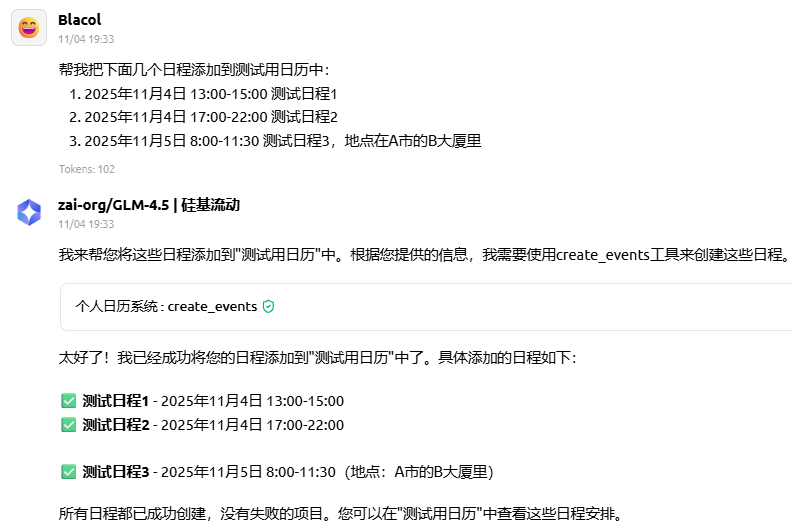
複数のスケジュールを追加
帮我把下面几个日程添加到测试用日历中:
1. 2025年11月4日 13:00-15:00 测试日程1
2. 2025年11月4日 17:00-22:00 测试日程2
3. 2025年11月5日 8:00-11:30 测试日程3,地点在A市的B大厦里
例

異なるタイムゾーンのスケジュールを追加
帮我把下面几个日程添加到测试用日历中:
1. 2025年11月4日 13:00-15:00(东京时间) 测试日程1
2. 2025年11月4日 17:00-22:00(纽约时间) 测试日程2
例
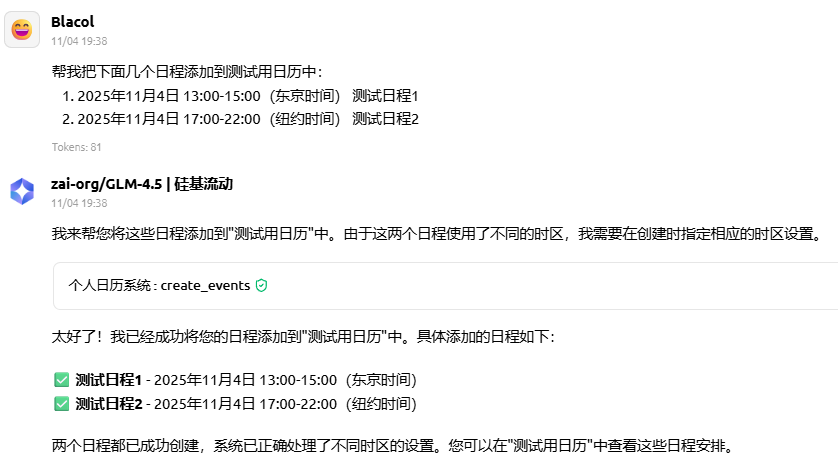
 (ソフトウェア内ではデフォルトでスケジュールが北京時間で表示されます。東京時間の13時は北京時間の12時に、ニューヨーク時間の17時は北京時間の6時に対応します)
This server cannot be deployed
Hosted Google Calendar MCP server for AI agents. No self-hosting or Google Cloud setup.
GDPR-compliant calendar access for AI assistants: read, create, edit, RSVP. Google, MS 365, Apple.
Calendar API for AI agents: events, availability, Google/Microsoft setup, scheduling, and iCal.
MCP server enabling AI agents to manage Bitrix24 features via standardized protocol