
BiteFoundry Teams MCP Server
<div align="center">
# `teams`
**Read Microsoft Teams chats and channel threads, send Markdown messages, and search cached conversations from the terminal.**
[](https://www.npmjs.com/package/@bitefoundry/teams)
[](docs/NPM.md)
[](https://ratatui.rs)
[](LICENSE)
[BiteFoundry](https://bitefoundry.dev/#app-teams) · [Latest release notes](https://github.com/BiteFoundry/teams/releases/latest)
<br />
</div>
---
## Highlights
| Pillar | What You Get |
| --- | --- |
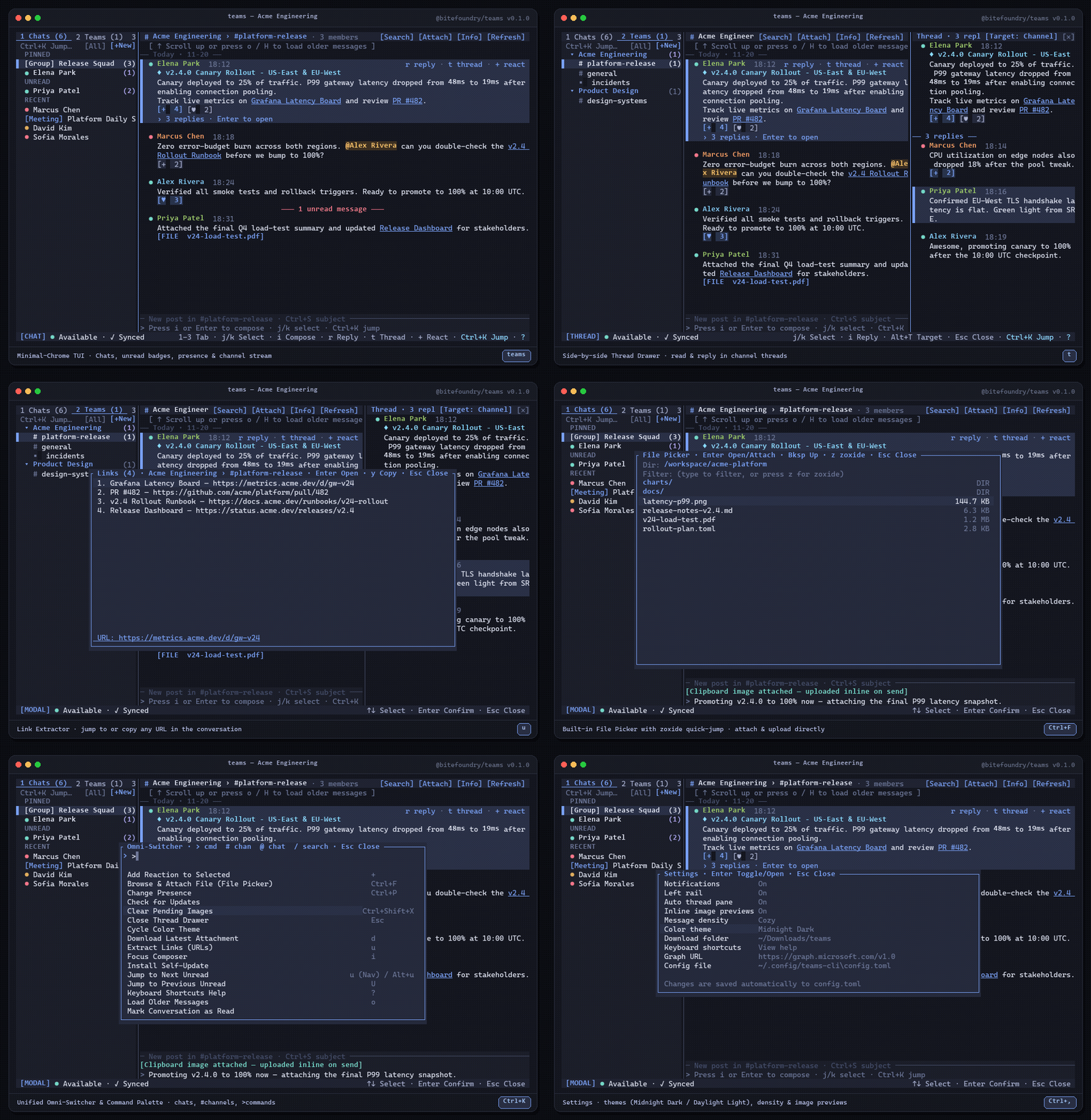
| **Minimal-Chrome TUI** | 3-tier responsive `ratatui` layout (`Wide` / `Medium` / `Narrow`), Composer-First workflow, side-by-side Thread Drawer, Link Extractor (`u`), `zoxide` File Picker (`Ctrl+F`), Unified `Ctrl+K` Omni-Switcher, Cozy/Compact density (`Ctrl+D`), and multi-depth themes (`Midnight Dark`, `Daylight Light`, `ANSI 256/16`, `NO_COLOR`). |
| **High-Res Terminal Images** | Native inline rendering for attachments & pasted `hostedContents` screenshots across **Kitty**, **iTerm2 (`OSC 1337`)**, **Sixel (`DCS q`)**, and **24-bit Half-Blocks (`▀`)** universal fallback with live zoom (`+`/`-`/`0`) and protocol switching (`p`). |
| **Local SQLite FTS5 + IPC Daemon** | Bundled SQLite WAL + FTS5 cache (`cache.db`) with `@odata.nextLink` deep history cursors, offline hybrid search (`teams search`), and cached CLI reads via `teams daemon`. |
| **4-in-1 Agent Interface** | One static binary (Windows, macOS, Linux **GLIBC 2.28 / AlmaLinux 8+**) delivers **TUI**, scriptable **CLI (`--json`)**, **Axum HTTP REST API (`teams serve`)**, and **stdio MCP server (`teams mcp`, 19 tools)**. |
---
## Quick Start
```bash
# 1. Install the native CLI via npm
npm i -g @bitefoundry/teams
# 2. Sign in with the desktop application registered by your organization
teams login --client-id YOUR_CLIENT_ID --tenant-id YOUR_TENANT_ID
# 3. Launch the interactive TUI
teams
```
```sh
teams read "Release Room" --json
```
Read a conversation in compact JSON. The response identifies omitted fields and distinguishes loaded thread replies from the total. For full detail, add `--full` in the CLI or pass `compact: false` to `get_messages` and `get_thread` in MCP.
IT administrators can register the app, select delegated permissions and verify a sign-in in Entra. For the public Microsoft Graph Command Line Tools client, run `teams login`. [Company app registration guide](docs/ENTERPRISE.md)
Update a global npm install with `npm install -g @bitefoundry/teams@latest`. For a standalone binary from [GitHub Releases](https://github.com/BiteFoundry/teams/releases), use `teams update`. To build from source, run `cargo build --release --locked`.
> **External Token Brokers & Custom Entra ID Apps:** Supports `TEAMS_ACCESS_TOKEN`, `TEAMS_TOKEN_FILE`, `TEAMS_TOKEN_REFRESH_CMD` (including `az account get-access-token`), and custom `--client-id` / `--tenant-id`. Run `teams whoami` or `teams doctor --probe` for instant JWT scope diagnostics.
>
> **Corporate TLS-inspecting proxies:** Teams trusts the bundled Mozilla roots and the OS certificate store. If requests still fail with `tls_untrusted_certificate`, export the corporate root CA as PEM and set `TEAMS_EXTRA_CA_PEM=<path>` (`SSL_CERT_FILE` and `NODE_EXTRA_CA_CERTS` are also read). See [docs/ENTERPRISE.md](docs/ENTERPRISE.md#corporate-proxy-and-custom-root-ca).
---
## Keybindings Cheat Sheet
| Key | Context | Action |
| --- | --- | --- |
| `Ctrl+K` | Global | **Omni-Switcher / Command Palette** (`>` commands, `#` channels, `@` chats, `/` search) |
| `1` / `2` / `3` (`Alt+1..3`) | Global | Switch **Chats** / **Teams** / **Activity** (`@mentions`) tabs |
| `j` / `k` / `↑` / `↓` | Nav / Chat | Navigate conversations, messages, or thread replies |
| `i` / `Enter` | Chat / Composer | Focus Composer (`Enter` sends, `Shift+Enter` newline, `Ctrl+V` pastes clipboard image) |
| `t` / `Alt+T` | Chat / Thread | Open right-side **Thread Drawer** / toggle Composer target (`Thread` vs `Channel`) |
| `r` / `+` / `y` / `Del` | Chat / Thread | Quote-reply / add reaction / copy message / delete own message |
| `u` / `h` | Chat / Thread | Open **Link Extractor** overlay (`Enter` open, `y` copy) / toggle inline `href` URLs |
| `v` / `Alt+v` | Chat / Composer | Open high-res **Inline Image Preview** (`+`/`-`/`0` zoom, `p` protocol, `d` save) |
| `Ctrl+F` / `Ctrl+O` | Global | Open built-in **File Picker** (with `z` `zoxide` quick-jump) / send file by path |
| `o` / `H` | Chat | Load older message page (`o`) / deep history backfill (`H`) |
| `/` / `Ctrl+N` / `Ctrl+P` | Global | Search local FTS5 cache / new chat / update Presence status |
| `Ctrl+D` / `Ctrl+B` | Global | Toggle **Cozy / Compact** density / toggle left sidebar |
| `Ctrl+,` / `?` / `Ctrl+Q` | Global | **Settings** / full help overlay / safe quit |
---
## CLI, HTTP API & MCP
### CLI Examples
```bash
# List chats, read history, and send Markdown with @mentions or attachments
teams chats --limit 50 --json
teams read "Acme Engineering/platform-release" --limit 30
teams send "Acme Engineering/platform-release" "**v2.4.0** canary is green!" --subject "Release Update"
teams reply "Acme Engineering/platform-release" 1700000000000 "Confirmed zero 5xx spikes."
teams send-file "Elena Park" ./latency-p99.png --inline --caption "P99 latency benchmark"
# Read a cached thread and edit a post you sent
teams thread "Acme Engineering/platform-release" 1700000000000 --offline --limit 2 --json
teams edit "Acme Engineering/platform-release" 1700000000000 --find "STATE: STAGED" --replace "STATE: READY"
teams edit "Acme Engineering/platform-release" 1700000000000 --subject "Canary rollout"
teams update-chat "Release handoff" --topic "Canary war room"
# Paginate members, channels, and teams (JSON defaults to 50 per page) and search directory users
teams members "Acme Engineering/platform-release" --limit 50 --json
teams users "Alice" --limit 10 --json
teams channels "Acme Engineering" --limit 50 --cursor 50-1795260879123 --json
teams teams --limit 50 --cursor 50-1795260879123 --json
# Offline FTS5 search, deep history sync, presence, and background daemon
teams search "connection pooling" --json
teams sync --chats 100 --depth 100
teams presence --set DoNotDisturb --expiration-mins 60
teams daemon start
```
`teams edit TARGET MSG_ID MARKDOWN` replaces the entire body. `--find` and `--replace` edit one exact occurrence in a single text node of the latest body, preserving links, mentions, images, and attachment references. A missing, repeated, or cross-tag match fails before the write. Channel edits require a signed-in author's delegated token with `ChannelMessage.ReadWrite` (or legacy `Group.ReadWrite.All`). Chat edits use `Chat.ReadWrite`. Graph returns an error when permissions or Teams policy deny the edit. [Microsoft Graph message update](https://learn.microsoft.com/en-us/graph/api/chatmessage-update?view=graph-rest-1.0)
`teams edit --subject` changes the plain-text title of a channel root post you sent. Use the subject option by itself for a PATCH containing only `subject`. `teams update-chat --topic` changes an existing group chat's title using delegated `Chat.ReadWrite`. Topics allow up to 250 characters and exclude colons. [Microsoft Graph chat update](https://learn.microsoft.com/en-us/graph/api/chat-patch?view=graph-rest-1.0)
`read --json`, `read --thread --json`, and `thread --json` return compact objects by default with top-level `omitted` (omitted mention/reaction counts and field names) and a `hint` command; compact messages also include `links` (`[{ "text", "url" }]`) when `<a href>` links in `body_html` do not appear verbatim in `body_plain`. Pass `--json --full` for complete conversation and message objects (`--compact` remains a compatibility alias). In a thread, `--limit` caps the replies while including the root separately, and responses report `thread.returned`, `thread.has_more`, and `thread.root.reply_count` (the total reply count when known, or `null` when truncated). Use `--offline` after an online thread read that covered the requested replies.
`send --json`, `reply --json`, and `send-file --json` also return compact acknowledgements by default (`ok`, `conversation.{conv_key,title,team_name?}`, `message.{msg_id,created_at,mentions?,attachments?}`, plus `reply_to` or `path`/`inline`); pass `--json --full` for complete conversation and message objects.
Markdown sent via `send` / `reply` converts `**bold**`, `*italic*`, `` `code` ``, `~~strike~~`, `[label](url)`, `> quote`, fenced code blocks, single-level `- ` bullet lists, and `@mentions`. Headings (`#`), tables (`|...|`), `_italic_`, nested lists, and numbered lists are sent verbatim.
When any `--json` command fails at runtime (exit `1`), stdout emits a single JSON line `{"ok":false,"error":{"code":"...","message":"..."}}` alongside the existing stderr `Error: ...` message (`error.code` is one of `target_ambiguous` with `candidates`, `target_not_found`, `not_signed_in`, `token_expired` with `details` on `whoami`, `permission_denied` with `http_status: 403`, `unauthorized` with `http_status: 401`, `not_found` with `http_status: 404`, or `error`). Usage/flag errors from argument parsing exit with code `2` and print usage text on stderr without stdout JSON.
For `members`, `channels`, and `teams`, passing `--cursor` reads the next page directly from the local SQLite cache without calling Microsoft Graph. A verified empty member list (`0` members from a completed fetch) returns `members: []` even with `--offline`, whereas an unfetched conversation fails with an error until fetched online. `teams users <QUERY>` searches directory users by display name or email prefix (`startswith`).
### Local HTTP REST API (`teams serve`)
Start an Axum JSON server on `127.0.0.1:8788`. Every route except `/health` needs a Bearer token: pass `--token <secret>`, or use the random one `teams serve` prints to stderr at start-up (`--allow-keyless` turns authentication off on loopback). Browser origins must be allowed one by one with `--cors-origin <ORIGIN>`; requests with a foreign `Host` or `Origin` get `403`.
```bash
teams serve --port 8788 --token "$TEAMS_API_TOKEN"
curl http://127.0.0.1:8788/conversations -H "Authorization: Bearer $TEAMS_API_TOKEN"
curl -X POST http://127.0.0.1:8788/conversations/Elena%20Park/messages \
-H "Authorization: Bearer $TEAMS_API_TOKEN" \
-H "Content-Type: application/json" \
-d '{"markdown":"Build is green — ready to ship!"}'
```
Full endpoint & schema docs: **[docs/API.md](docs/API.md)** · **[docs/openapi.yaml](docs/openapi.yaml)**
### MCP Server (`teams mcp`)
Exposes **19 Microsoft Teams tools** (`list_chats`, `create_chat`, `update_chat`, `list_teams_channels`, `get_messages`, `get_thread`, `send_message`, `reply_message`, `send_file`, `download_attachment`, `react_message`, `edit_message`, `delete_message`, `search_messages`, `list_members`, `search_users`, `mark_read`, `get_presence`, `set_presence`) over newline-delimited stdio JSON-RPC 2.0:
```bash
# Claude Code
claude mcp add teams -- teams mcp
```
```json
// Claude Desktop / Cursor / Windsurf MCP config
{
"mcpServers": {
"teams": {
"command": "teams",
"args": ["mcp"]
}
}
}
```
Full tool schemas & client setups: **[docs/MCP.md](docs/MCP.md)** · **[docs/NPM.md](docs/NPM.md)**
---
## `@bitefoundry` Enterprise Terminal Suite
| Package | Command | Domain | Interfaces |
| --- | --- | --- | --- |
| **`@bitefoundry/teams`** *(this repo)* | `teams` | Microsoft Teams (Chats, Channels, Threads, Presence) | TUI · CLI · HTTP · MCP |
| [`@bitefoundry/outlook`](https://github.com/BiteFoundry/outlook) | `outlook` | Microsoft Outlook (Mail, Calendar, To Do, Contacts) | TUI · CLI · HTTP · MCP |
| [`@bitefoundry/onenote`](https://github.com/BiteFoundry/onenote) | `onenote` | Microsoft OneNote (Notebooks, Sections, Pages) | TUI · CLI · HTTP · MCP |
| [`@bitefoundry/sharepoint`](https://github.com/BiteFoundry/sharepoint) | `sharepoint`, `bitefoundry-onedrive` | SharePoint & OneDrive (Sites, Drives, Lists, Files) | TUI · CLI · HTTP · MCP |
| [`@bitefoundry/atlassian`](https://github.com/BiteFoundry/atlassian) | `atlassian`, `confluence`, `conf` | Jira & Confluence (Issues, Boards, Sprints, Wiki) | TUI · CLI · HTTP · MCP |
| [`@bitefoundry/notion`](https://github.com/BiteFoundry/notion) | `notion` | Notion (Pages, Databases, Blocks, Comments) | TUI · CLI · HTTP · MCP |
---
## License & Disclaimer
Licensed under the [MIT License](https://opensource.org/license/mit).
Unofficial terminal client for Microsoft Teams. Not affiliated with, endorsed by, or sponsored by Microsoft Corporation.
TDQS
Scored across 16 tools
Each tool targets a distinct resource+action pair, and descriptions explicitly point to the sibling tool to use instead (e.g. get_messages vs get_thread vs search_messages, list_chats vs list_teams_channels, send_message vs reply_message vs send_file). The potentially confusing message-posting trio is cleanly separated by 'new post' vs 'thread/quote reply' vs 'file attachment'. No two tools appear interchangeable.
All 16 tools follow a uniform snake_case verb_noun pattern (create_chat, list_chats, update_chat, get_messages, send_message, edit_message, delete_message, search_messages, list_members, search_users, get_presence). Verb choice is meaningful and consistent: list/get for reads, create/update/edit/delete for lifecycle, send/reply for writes.
At 16 tools this sits just above the ideal band, but each entry maps to a genuinely separate capability (chats, channels, messages, threads, files, members, directory users, presence). Nothing looks like a redundant variant or a thin wrapper, though it is on the heavy side for a Teams messaging client.
The surface covers the full message lifecycle (read, thread read, send, reply, edit, delete, search) plus chat creation/rename, attachments up/down, membership, directory lookup, and presence. Gaps are minor: no delete/leave chat, no reactions, and no team/channel creation, but agents can work around these.