
BiteFoundry SharePoint MCP Server
<div align="center">
# `@bitefoundry/sharepoint`
**Browse SharePoint and OneDrive files, inspect version history, and edit SharePoint list rows from the terminal.**
[](https://www.npmjs.com/package/@bitefoundry/sharepoint)
[](docs/NPM.md)
[](https://github.com/BiteFoundry/sharepoint/blob/master/Cargo.toml)
[](LICENSE)
[BiteFoundry](https://bitefoundry.dev/#app-sharepoint) · [Latest release notes](https://github.com/BiteFoundry/sharepoint/releases/latest)
<br />
</div>
---
## Highlights
| Capability | Details |
| --- | --- |
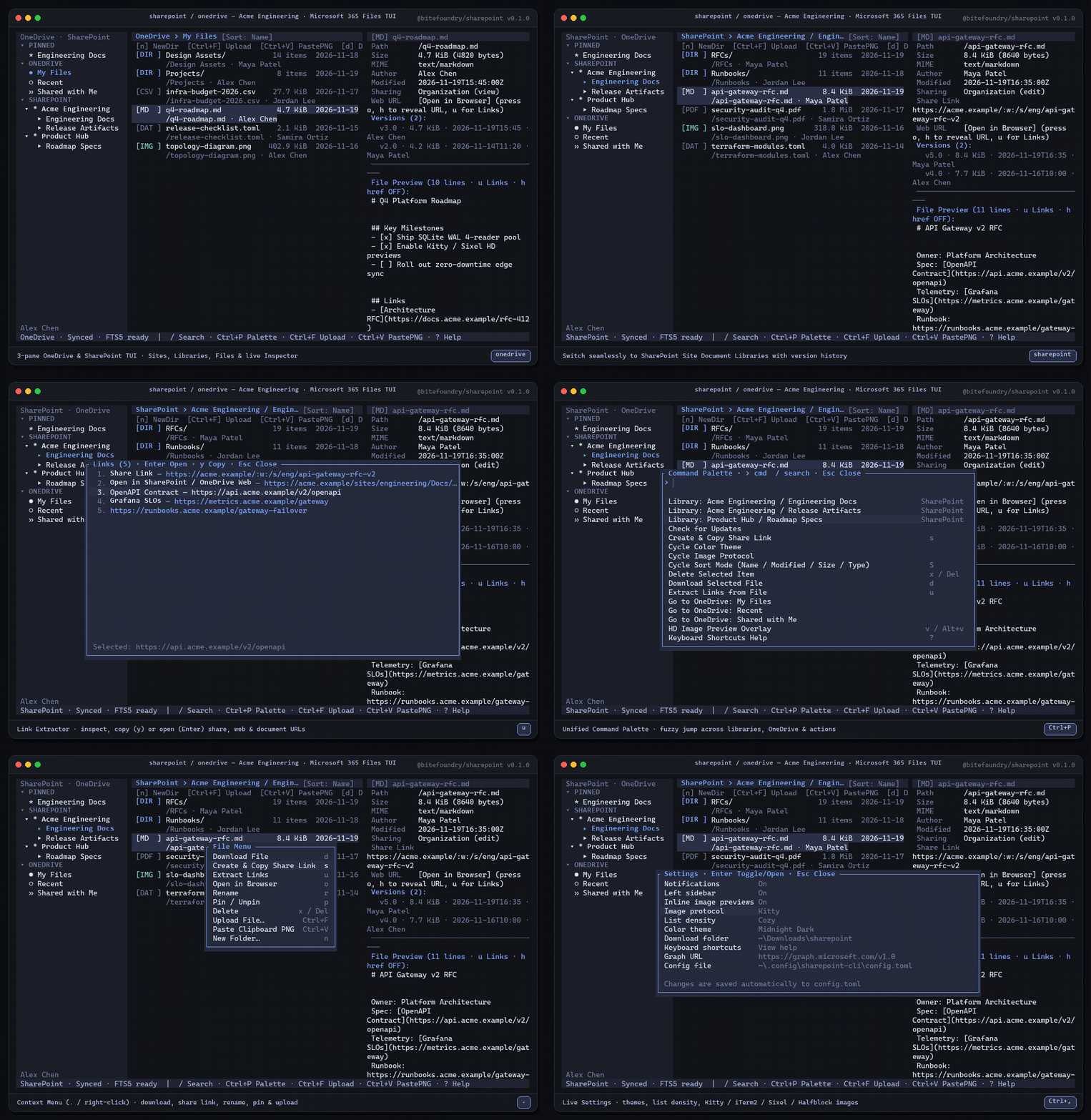
| **Minimal-Chrome 3-Pane TUI** | Dual-persona explorer (`sharepoint` and `bitefoundry-onedrive`) with collapsible Sites, Document Libraries & OneDrive sidebar, sorted file list, live Inspector (metadata, version history, Markdown/YAML/JSON/code preview), Link Extractor (`u`), File Picker with `zoxide` (`Ctrl+F`), Context Menu (`.`), and 6 themes. |
| **High-Res Terminal Images** | Inline Inspector thumbnails & fullscreen HD previews (`v` / `Alt+v`) with 80ms protocol probing for **Kitty**, **iTerm2**, **Sixel** (Floyd-Steinberg dithering), and **24-bit Unicode Half-Blocks** + `Ctrl+V` instant clipboard PNG upload. |
| **Local SQLite FTS5 + IPC Daemon** | WAL-mode SQLite cache with 4-reader pool, hybrid local FTS5 + remote Graph search (`/`), streaming chunked uploads (`> 4 MiB`), and a shared background sync daemon (`sharepoint daemon start`). |
| **4-in-1 Agent Interface** | Interactive **TUI**, scriptable `--json` **CLI**, local **HTTP JSON API** (`sharepoint serve`, port `8790`), and stdio **MCP Server** (`sharepoint mcp`, 20 tools). |
---
## Quick Start
```sh
# 1. Install globally via npm (precompiled native binary for win32 / darwin / linux)
npm i -g @bitefoundry/sharepoint
# 2. Authenticate with Microsoft 365 (PKCE loopback, --device-code, or shared M365 token)
sharepoint login
# 3. Launch the interactive 3-pane TUI in either persona
sharepoint # SharePoint sites and document libraries
bitefoundry-onedrive # Personal OneDrive, including My Files, Recent, and Shared
```
```sh
sharepoint info FILE_ID --drive DRIVE_ID --json
```
Read file metadata from a specific drive. For version history, add `--versions` while online. When paging list rows, reuse the same site, list, and field selection. For full detail, add `--full` in the CLI or pass `compact: false` to `get_file_info` in MCP.
Build both commands with `cargo install --locked --path .` from a checkout. Both executables are also available in the same GitHub release archive. [Install and upgrade](docs/NPM.md)
### Company-managed Microsoft Entra sign-in
`sharepoint login` uses the public Microsoft Graph Command Line Tools client by default. To use a company-owned app, register it as a public client and configure the `http://localhost` redirect URI. Enable public client flows for headless `--device-code` sign-in. [Company app registration guide](https://github.com/BiteFoundry/teams/blob/master/docs/ENTERPRISE.md)
Add the Microsoft Graph delegated permissions your users need and have your Entra administrator grant consent where required.
| Feature | Delegated scopes |
| --- | --- |
| Profile and session refresh | `User.Read`, `offline_access` |
| Read and edit OneDrive files | `Files.Read`, `Files.ReadWrite` |
| Read and edit files the user can access across drives | `Files.Read.All`, `Files.ReadWrite.All` |
| Browse SharePoint sites and libraries, and write to those libraries | `Sites.Read.All`, `Sites.ReadWrite.All` |
The default sign-in requests all scopes in the table. Set `scopes` in `config.toml` to request a narrower set that matches your workflow.
```sh
sharepoint login --client-id YOUR_APP_ID --tenant-id YOUR_TENANT_ID
sharepoint whoami --json
```
For persistent environment configuration, set `SHAREPOINT_CLIENT_ID` and `SHAREPOINT_TENANT_ID`. The OneDrive launcher uses the same credentials.
### Corporate proxy / custom CA
HTTPS connections trust the operating system's certificate store and the bundled Mozilla roots. If a TLS-inspecting proxy re-signs traffic with a root CA that is in neither, requests fail with `TLS certificate was issued by an unknown authority`. Install that root CA in the OS store, or point the tool at a PEM bundle:
| Variable | Read by | If the file cannot be used |
| --- | --- | --- |
| `SHAREPOINT_EXTRA_CA_PEM` (alias `ONEDRIVE_EXTRA_CA_PEM`) | both commands | the command stops with an error naming the variable |
| `SSL_CERT_FILE`, `NODE_EXTRA_CA_CERTS` | both commands, as extra roots | a one-line warning on stderr; the command continues |
Every variable that is set is loaded, in addition to the OS and bundled roots, for Graph, sign-in, downloads, self-update and the realtime connection. The proxy itself is taken from `HTTPS_PROXY` / `NO_PROXY`.
```sh
export HTTPS_PROXY=http://proxy.corp.example:8080
export SHAREPOINT_EXTRA_CA_PEM=/etc/ssl/certs/corp-root-ca.pem
sharepoint whoami --json
```
---
## Keybindings Cheat Sheet
| Key | Action |
| --- | --- |
| `Tab` / `Shift+Tab` | Cycle focus (Sidebar → File List → Inspector) |
| `j` / `k` · `↑` / `↓` | Move selection / scroll Inspector preview |
| `Enter` / `Backspace` | Open folder or site / navigate to parent folder |
| `S` | Cycle sort order (Name / Modified / Size / Type) |
| `Ctrl+F` | Upload file via interactive File Picker (`z` for `zoxide` jump) |
| `Ctrl+V` | Encode clipboard image as PNG & upload to current folder |
| `d` / `n` / `r` / `x` | Download file / new folder / rename / delete (with confirm) |
| `s` / `o` / `p` | Create & copy share link / open in browser / pin target |
| `v` / `u` / `h` | HD image preview / Link Extractor / toggle inline `href` URLs |
| `/` | Hybrid local FTS5 + Microsoft Graph file search |
| `Ctrl+P` / `Ctrl+K` | Unified Command Palette & Library Omni-Switcher |
| `.` / Right-click | Context Menu |
| `Ctrl+,` / `Ctrl+B` / `?` | Settings / Toggle sidebar / Keyboard shortcuts help |
---
## CLI, HTTP API & MCP
### CLI
```sh
sharepoint sites --json
sharepoint drives --site "Acme Engineering" --json
bitefoundry-onedrive ls /Projects/Platform-v4 --json --compact
bitefoundry-onedrive info /Projects/Platform-v4/deploy-pipeline.yaml --versions --versions-limit 5 --json
bitefoundry-onedrive cat /Projects/Platform-v4/deploy-pipeline.yaml
sharepoint upload ./q4-architecture-deck.pdf /RFCs --site "Acme Engineering" --json
sharepoint share /api-gateway-rfc.md --site "Acme Engineering" --type view --scope organization --json
sharepoint search "gateway" --remote --json
```
`sharepoint --help` and `bitefoundry-onedrive --help` list the commands that support `--json`.
`info --json` defaults to compact output with `drive_id`, `id`, `name`, `parent_path`,
`is_folder`, `size`, `last_modified_at`, `e_tag`, `omitted`, and `hint`. Pass `--json --full`
for every item field; `--compact` remains a compatibility alias. For `ls`, `--json --compact`
returns `{ "id": "…" }` for `drive` and core item fields as before, and `ls --json` includes
`returned`, `has_more`, and `source` (`"remote"` or `"cache"`). `info --versions` is online-only
(cannot be combined with `--offline`), reads all available history by default, and adds
`versions` and `versions_has_more`. `--versions-limit` caps history and stops fetching pages
once the cap is reached. An online history lookup reports Graph errors, including permission
denials.
`cat` reads UTF-8 with an optional BOM and UTF-16LE or UTF-16BE with a BOM. Its
byte limit applies to the original file, and plain output preserves line endings.
Use `download` for binary files. To replace a file conditionally, pass its item ID
and eTag to `upload --item-id <ITEM_ID> --if-match <ETAG>`. Conditional
replacement uses an upload session at any file size.
When targeting a site with multiple document libraries, pass `--drive` alongside
`--site`; responses report the selected library in `drive.id` (or `drive_id`).
`drives --json` outputs a JSON array and writes partial site-discovery warnings
to stderr; use MCP `list_drives` if you need `sites_failed` or `has_more` in JSON.
For root paths with spaces, dots, or leading hyphens, prefix with `/` (for
example `/Q4 Report.md` or `mv /-name`).
Exit codes: `1` is a runtime error (with `--json`, stdout prints a single-line
`{"ok":false,"error":{"code":...,"message":...}}` object alongside the stderr
message); `2` is an argument or usage error (plain text on stderr, empty stdout).
### SharePoint List rows
Use `sites --json` to find the site ID, then `lists ls --site-id` to find the
list ID. With the list ID, discover its column names, then select one or more
columns by passing `--field` for each name.
```sh
sharepoint sites --json
sharepoint lists ls --site-id "$SITE_ID" --json
sharepoint lists columns --site-id "$SITE_ID" --list-id "$LIST_ID" --json
sharepoint lists items --site-id "$SITE_ID" --list-id "$LIST_ID" \
--field ReviewStatus --field Quantity --json
sharepoint lists set-field --site-id "$SITE_ID" --list-id "$LIST_ID" \
--item-id 17 --field ReviewStatus --value-json '"Ready"' --if-match '"row-etag"' --json
```
`items` reads one page (default 50 rows; `--limit` accepts `1`–`200`) and returns `items`
(each row's `id`, `e_tag` when available, and `fields` without duplicate `@odata.etag`),
`returned`, `has_more`, and `next_cursor`. Pass `next_cursor` to `--cursor` to read the next
page; the cursor is bound to the same `--site-id`, `--list-id`, and `--field` set (order
independent) and cannot be combined with `--limit`. To read all pages:
```sh
cursor=""
while :; do
if [ -z "$cursor" ]; then
page=$(sharepoint lists items --site-id "$SITE_ID" --list-id "$LIST_ID" --field Title --limit 200 --json)
else
page=$(sharepoint lists items --site-id "$SITE_ID" --list-id "$LIST_ID" --field Title --json --cursor "$cursor")
fi
printf '%s\n' "$page" | jq -c '.items[]'
cursor=$(printf '%s\n' "$page" | jq -r '.next_cursor // empty')
[ -n "$cursor" ] || break
done
```
`set-field` accepts a typed JSON value such as `"Ready"`, `false`, or `0`. Pass the row's
current `e_tag` as `--if-match` to apply the update conditionally. Graph returns `412` for
stale ETags. [List rows](https://learn.microsoft.com/en-us/graph/api/listitem-list?view=graph-rest-1.0) · [Update list fields](https://learn.microsoft.com/en-us/graph/api/listitem-update?view=graph-rest-1.0)
### Local HTTP API (`sharepoint serve`)
```sh
# Start local Axum JSON server (default 127.0.0.1:8790)
sharepoint serve --port 8790 --api-key dev-secret
# Search files across OneDrive & SharePoint from scripts or agents
curl -H "Authorization: Bearer dev-secret" \
"http://127.0.0.1:8790/v1/search?q=gateway&remote=true&limit=10"
```
The API always needs a Bearer key. Without `--api-key`, `serve` generates one and prints it once to stderr; `--allow-keyless` turns the key off on a loopback address. A non-loopback `--bind` requires `--api-key`. The server answers only requests whose `Host` names it (add a proxy name with `--allowed-host`) and allows CORS from loopback origins plus any `--cors-origin`. Uploads from `local_path` and downloads into `dir` need a key or `--allow-local-paths`.
Full route reference & OpenAPI 3.1 spec: [docs/API.md](docs/API.md) · [docs/openapi.yaml](docs/openapi.yaml).
### Model Context Protocol (`sharepoint mcp`)
Add to Claude Desktop, Claude Code, Cursor, or Codex (`20` tools over stdio JSON-RPC 2.0):
```json
{
"mcpServers": {
"sharepoint": {
"command": "sharepoint",
"args": ["mcp"]
}
}
}
```
Full tool catalog & schemas: [docs/MCP.md](docs/MCP.md).
---
## `@bitefoundry` Enterprise Terminal Suite
| Package | Commands | Workspace Coverage |
| --- | --- | --- |
| [`@bitefoundry/teams`](https://www.npmjs.com/package/@bitefoundry/teams) | `teams` | Microsoft Teams chats, channels, threads & meetings |
| [`@bitefoundry/outlook`](https://www.npmjs.com/package/@bitefoundry/outlook) | `outlook` | Microsoft Outlook mail, calendar & contacts |
| [`@bitefoundry/onenote`](https://www.npmjs.com/package/@bitefoundry/onenote) | `onenote` | Microsoft OneNote notebooks, sections, pages & XHTML/Markdown |
| **`@bitefoundry/sharepoint`** | `sharepoint`, `bitefoundry-onedrive` | Microsoft SharePoint sites, document libraries & OneDrive files |
| [`@bitefoundry/atlassian`](https://www.npmjs.com/package/@bitefoundry/atlassian) | `atlassian`, `confluence`, `conf` | Atlassian Jira issues, boards, sprints & Confluence pages |
| [`@bitefoundry/notion`](https://www.npmjs.com/package/@bitefoundry/notion) | `notion` | Notion pages, databases, blocks & Markdown sync |
---
## License & Disclaimer
Licensed under the **MIT License**.
> Unofficial terminal client for Microsoft SharePoint & OneDrive. Not affiliated with, endorsed by, or sponsored by Microsoft Corporation.
TDQS
Scored across 20 tools
Most tools target a distinct resource+action pair: site/drive/file/list operations and the read vs. download vs. metadata trio (read_text_file, download_file, get_file_info) are clearly separable. The listing family (list_files, list_recent, list_shared_with_me, search_files) overlaps in output shape but each has a stated scope, though an agent could still hesitate between search_files (remote cache+Graph) and the plain listers.
Nearly everything follows snake_case verb_noun (list_sites, create_folder, get_file_info, update_list_item_field). The deviations are minor and conventional: whoami has no verb_noun form, and move_or_rename_item compounds two verbs into one name.
20 tools is at the high end but the surface spans four sub-domains (sites/drives, file operations, sharing, SharePoint Lists), so most tools earn their place rather than duplicating. A few could arguably be folded (e.g. list_versions, create_share_link) but nothing feels padded.
File lifecycle is well covered (upload, read, download, move/rename, delete, versions, share links), but the SharePoint Lists side is read+update only: there is no create_list_item, delete_list_item, or create_list, leaving a dead end for common list workflows. Copy-item and share-link removal/permission management are also absent.