
Outlook MCP Server
<div align="center">
# `outlook`
**Manage Outlook mail, calendar events, contacts, and Microsoft To Do from the terminal.**
[](https://www.npmjs.com/package/@bitefoundry/outlook)
[](docs/NPM.md)
[](https://ratatui.rs)
[](LICENSE)
[BiteFoundry](https://bitefoundry.dev/#app-outlook) · [Latest release notes](https://github.com/BiteFoundry/outlook/releases/latest)
<br />
</div>
---
## Highlights
| Pillar | What You Get |
| --- | --- |
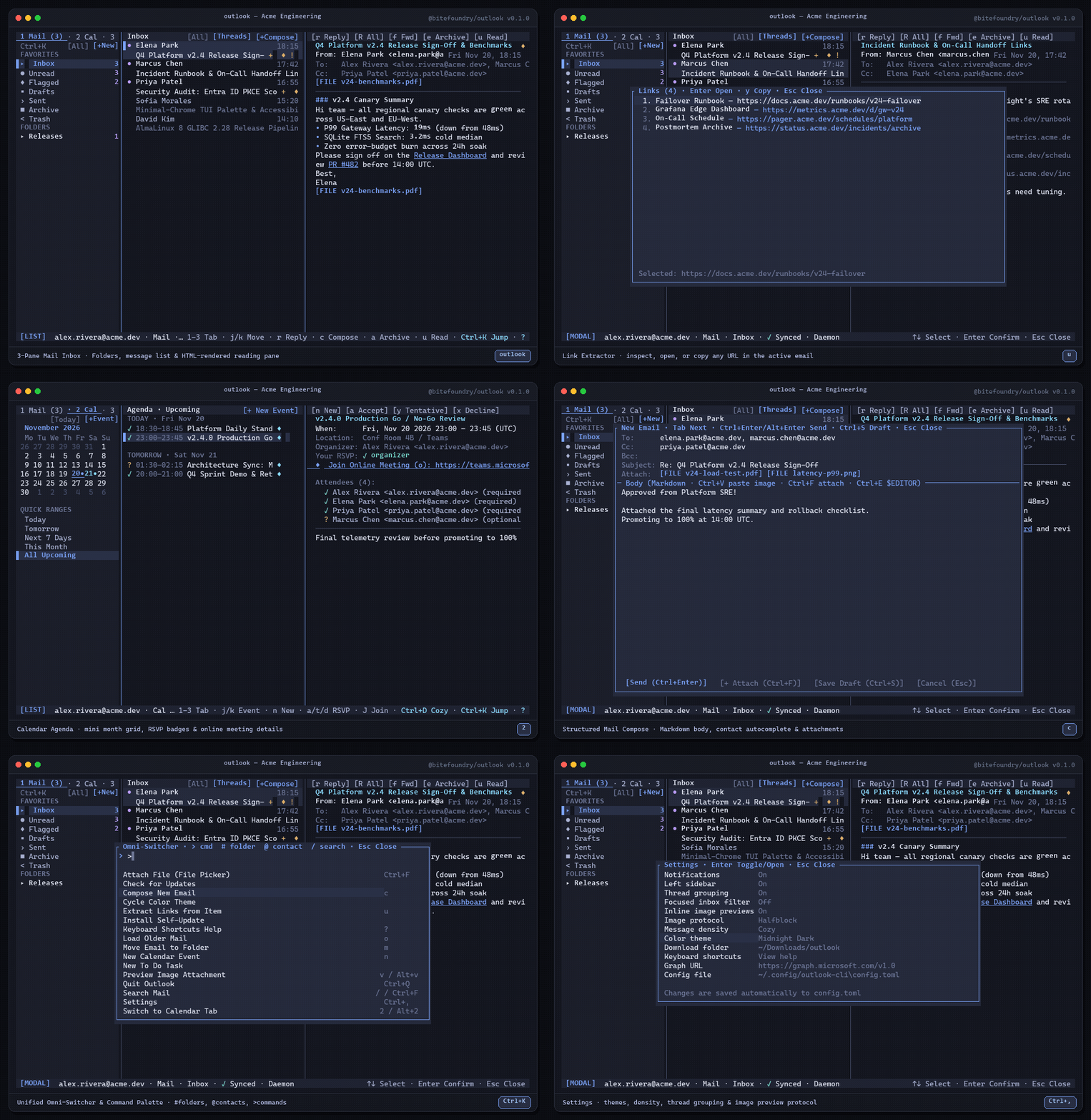
| **Minimal-Chrome TUI** | 3-tier responsive `ratatui` workspace across **Mail** (`1`), **Calendar** (`2`), and **Microsoft To Do** (`3`) with HTML-rendered email preview, inline `href` toggle (`h`), Link Extractor (`u`), quoted-reply folding (`z`), structured Compose modal (`c`), `zoxide` File Picker (`Ctrl+F`), and `Ctrl+K` Omni-Switcher. |
| **High-Res Terminal Images** | Native inline rendering for attached and `cid:`/`https://` email images across **Kitty**, **iTerm2 (`OSC 1337`)**, **Sixel (`DCS q`)**, and **24-bit Half-Blocks (`▀`)** fallback with live zoom (`+`/`-`/`0`) and protocol cycling (`p`). |
| **Local SQLite FTS5 + IPC Daemon** | Bundled SQLite WAL + FTS5 cache (`cache.db`) with incremental delta sync, `$batch` neighbor hydration, optimistic triage (`archive`, `flag`, `mark-read`, `complete`), offline search, and cached CLI reads via `outlook daemon`. |
| **4-in-1 Agent Interface** | One static binary (Windows, macOS, Linux **GLIBC 2.28 / AlmaLinux 8+**) delivers **TUI**, scriptable **CLI (`--json`)**, **Axum HTTP REST API (`outlook serve`, `:3939`)**, and **stdio MCP server (`outlook mcp`, 23 tools)**. |
---
## Quick Start
```bash
# 1. Install the native CLI via npm
npm i -g @bitefoundry/outlook
# 2. Authenticate with Microsoft Entra ID (or automatically reuse your @bitefoundry/teams M365 session!)
outlook login
# 3. Launch the interactive TUI
outlook
```
```sh
outlook read MESSAGE_ID --json
```
Read a message and its attachment metadata. To save a file, use `outlook download MESSAGE_ID --attachment ATTACHMENT_ID --dir .`. For full detail, add `--full` in the CLI or pass `compact: false` to `get_message` in MCP.
For a company registration, use `outlook login --client-id YOUR_CLIENT_ID --tenant-id YOUR_TENANT_ID`. Without an override, Outlook uses the Microsoft Graph Command Line Tools client for its own interactive login. [Register a desktop app](https://github.com/BiteFoundry/teams/blob/master/docs/ENTERPRISE.md) · [Outlook delegated permissions](docs/NPM.md#required-microsoft-graph-delegated-scopes)
> **Shared M365 Session & Token Brokers:** When `share_m365_auth = true` (default), `outlook` seamlessly reuses or upgrades an existing `@bitefoundry/teams` session without a second browser login. Also supports `--device-code`, `OUTLOOK_ACCESS_TOKEN`, `OUTLOOK_TOKEN_FILE`, `OUTLOOK_TOKEN_REFRESH_CMD` (`az account get-access-token`), and custom Entra ID apps. Run `outlook whoami` or `outlook doctor --online` for JWT scope diagnostics.
> **Corporate TLS proxies:** `outlook` trusts the bundled Mozilla roots and the OS trust store. If your network re-signs HTTPS with a private root CA, export it as PEM and set `OUTLOOK_EXTRA_CA_PEM` (`SSL_CERT_FILE` and `NODE_EXTRA_CA_CERTS` also work). `outlook doctor` shows which CA files were loaded. [Details](docs/NPM.md#corporate-tls-proxies-and-private-root-cas)
Update a global npm install with `npm install -g @bitefoundry/outlook@latest`. For a standalone binary from [GitHub Releases](https://github.com/BiteFoundry/outlook/releases), use `outlook update`.
---
## Keybindings Cheat Sheet
| Key | Context | Action |
| --- | --- | --- |
| `1` / `2` / `3` (`Alt+1..3`) | Global | Switch **Mail** / **Calendar** / **To Do Tasks** tabs |
| `Ctrl+K` | Global | **Omni-Switcher / Command Palette** (`>` commands, `#` folders, `@` contacts, `/` search) |
| `j` / `k` / `↑` / `↓` | Global | Navigate folders, message list, calendar agenda, tasks, or reading pane |
| `Tab` / `Enter` / `Esc` | Global | Cycle pane focus (`Folders ↔ List ↔ Reader`) or close modal |
| `c` / `r` / `R` / `f` | Mail | **Compose** / **Reply** / **Reply-All** / **Forward** (Markdown + `Ctrl+F` attach + `Ctrl+V` image) |
| `C` / `Ctrl+S` | Mail / Compose | Start a separate composition / save the current draft to Outlook |
| `e` / `g` / `m` / `Del` | Mail | **Archive** / **Flag** / **Move to folder** / **Delete** (optimistic updates) |
| `h` / `u` / `z` | Mail Reader | Toggle inline `href` URLs / open **Link Extractor** / fold quoted reply history |
| `t` / `F` / `U` | Mail | Toggle **Thread grouping** / **Focused Inbox** / **Unread filter** |
| `v` / `Alt+v` / `d` | Mail Reader | High-res **Inline Image Preview** / download latest attachment (`A` for picker) |
| `n` / `a` / `y` / `x` | Calendar | **New Event** / RSVP **Accept** (`a`), **Tentative** (`y`), **Decline** (`x`) |
| `Space` / `n` | Tasks | Toggle To Do completion (`Space`) / create new task or list (`n`) |
| `/` / `Ctrl+D` / `Ctrl+B` | Global | Search mail (FTS5 + Graph KQL) / toggle **Cozy / Compact** density / toggle sidebar |
| `Ctrl+,` / `?` / `Ctrl+Q` | Global | **Settings** / full help overlay / safe quit |
---
## CLI, HTTP API & MCP
### CLI Examples
```bash
# Mail: inspect inbox, read, reply, and send Markdown with attachments
outlook mail --folder inbox --unread --limit 20 --json
outlook read AAMkAGI2... --json
outlook read AAMkAGI2... --json --full
outlook read AAMkAGI2... --mark-read
outlook send --to elena.park@acme.dev --subject "v2.4 Release" \
--body "**All canary checks passed.** See attached benchmarks." \
--attach ./v24-benchmarks.pdf --importance high
# Calendar & To Do: view agenda, schedule Teams meeting, RSVP, and manage tasks
outlook calendar --days 7
outlook create-event --subject "Go / No-Go Review" \
--start "2026-11-20T14:00:00Z" --end "2026-11-20T14:45:00Z" \
--attendee elena.park@acme.dev --online
outlook add-task "Promote canary to 100%" --due 2026-11-20 --importance high
outlook daemon start
```
JSON output for `mail`, `read`, `move`, `archive`, `search --remote`, `calendar`, and `event` is compact by default. Pass `--full` with `--json` for full cached fields, HTML bodies, and attachment metadata (`content_bytes_b64` is never embedded in CLI/MCP JSON; fetch attachment bytes with `outlook download`, or `outlook download --offline` for cached bytes). `--compact` remains a compatibility alias and conflicts with `--full`. Paginated JSON listings (`mail`, `search --remote`, `folders`, `task-lists`) include `returned`, `has_more`, and `next_cursor`; continue with `--cursor <CURSOR>`. Cursors are bound to the originating command, folder, query, and filter, while `--limit` and `--full` may change between pages. In `mail --json`, `folder` is the canonical folder ID string, and the first online listing of an uncached folder syncs the folder delta: up to 40 delta pages (about 2,000 messages) per call. A larger folder returns the newest messages right away with `"sync_complete": false` and continues the sync on the following listings (or in the TUI / `serve` background sync) until it is complete; the key is absent otherwise. In `search --remote --json`, `hits` holds local cache matches while `remote` holds Graph results, so the same message ID can appear in both arrays.
For `read`, `message_id` is an exact message ID; subject and ID-prefix resolution apply only to CLI `read --offline` (online callers should locate IDs with `search` first). Runtime failures with `--json` emit a structured JSON error object on stdout (`{"ok": false, "error": {"code": ..., "message": ...}}`) with exit code `1`; exit code `2` indicates a CLI usage/parsing error printed as plain text on stderr. For `sync --json` (and `doctor --online --json`), check the `ok` field in the JSON output to determine overall success.
Use `outlook mark` for read and flag changes, and `outlook move` to change folders. MCP `update_message` supports both. In the TUI, `Ctrl+S` saves the current composition. Reopening and saving reuses the draft ID. Reply, reply-all, and forward drafts retain their source message relationship and quoted HTML.
```sh
outlook edit-draft DRAFT_ID --subject "Revised release notes" --json
outlook edit-draft DRAFT_ID --body 'The **final** checklist is attached.' --json
outlook update-event EVENT_ID --start 2026-11-23T09:00 --end 2026-11-23T09:30 --json
outlook update-task TASK_ID --list tasks --due 2026-11-25 --json
```
Each edit sends the specified fields. A draft subject change preserves the original body and its markup. Use `--body-html` to supply replacement HTML directly. Calendar edits leave the body, attendees, and recurrence out of the request. To Do edits leave the body and checklist out of the request. [Message updates](https://learn.microsoft.com/en-us/graph/api/message-update?view=graph-rest-1.0) · [Event updates](https://learn.microsoft.com/en-us/graph/api/event-update?view=graph-rest-1.0) · [To Do updates](https://learn.microsoft.com/en-us/graph/api/todotask-update?view=graph-rest-1.0)
For `create-event`, RFC3339 times are exact instants and wall-clock times such as `"2026-11-23 09:00"` are read in the machine's time zone, or in `--time-zone` when given. `--all-day` needs `YYYY-MM-DD` for both `--start` and `--end`, with an exclusive end date (`--start 2026-11-23 --end 2026-11-24` is one day).
For `update-event`, calendar wall-clock times such as `2026-11-23T09:00` use the event's original Graph time zone. Use date-only values with all-day events and give the exclusive end date. RFC3339 values such as `2026-11-23T09:00:00+09:00` are sent in UTC for timed events. Non-UTC recurring events require wall-clock times. To Do dates use midnight UTC, and RFC3339 To Do timestamps are converted to UTC. [Event time and recurrence](https://learn.microsoft.com/en-us/graph/api/resources/event?view=graph-rest-1.0)
### Local HTTP REST API (`outlook serve`)
Start an Axum JSON server on `127.0.0.1:3939` (with live `/openapi.json`). Requests need a Bearer key: pass your own with `--api-key`, or use the random token the server prints to stderr at startup.
```bash
outlook serve --port 3939 --api-key "$OUTLOOK_API_KEY"
curl -H "Authorization: Bearer $OUTLOOK_API_KEY" \
"http://127.0.0.1:3939/v1/mail/messages?folder=inbox&unread=true"
curl -X POST http://127.0.0.1:3939/v1/mail/send \
-H "Authorization: Bearer $OUTLOOK_API_KEY" \
-H "Content-Type: application/json" \
-d '{"to":["elena.park@acme.dev"],"subject":"Build green","markdown":"All checks passed!"}'
```
`--allow-keyless` serves loopback clients without a key. Browser apps are refused unless their origin is passed with `--cors-origin`; see [Security](docs/API.md#security).
Full endpoint & schema docs: **[docs/API.md](docs/API.md)** · **[docs/openapi.yaml](docs/openapi.yaml)**
### MCP Server (`outlook mcp`)
Exposes **23 Microsoft Outlook tools** over newline-delimited stdio JSON-RPC 2.0, including `update_draft`, `update_event`, and `update_task`.
```bash
# Claude Code
claude mcp add outlook -- outlook mcp
```
```json
// Claude Desktop / Cursor / Windsurf MCP config
{
"mcpServers": {
"outlook": {
"command": "outlook",
"args": ["mcp"]
}
}
}
```
Full tool schemas & client setups: **[docs/MCP.md](docs/MCP.md)** · **[docs/NPM.md](docs/NPM.md)**
---
## `@bitefoundry` Enterprise Terminal Suite
| Package | Command | Domain | Interfaces |
| --- | --- | --- | --- |
| [`@bitefoundry/teams`](https://github.com/BiteFoundry/teams) | `teams` | Microsoft Teams (Chats, Channels, Threads, Presence) | TUI · CLI · HTTP · MCP |
| **`@bitefoundry/outlook`** *(this repo)* | `outlook` | Microsoft Outlook (Mail, Calendar, To Do, Contacts) | TUI · CLI · HTTP · MCP |
| [`@bitefoundry/onenote`](https://github.com/BiteFoundry/onenote) | `onenote` | Microsoft OneNote (Notebooks, Sections, Pages) | TUI · CLI · HTTP · MCP |
| [`@bitefoundry/sharepoint`](https://github.com/BiteFoundry/sharepoint) | `sharepoint`, `bitefoundry-onedrive` | SharePoint & OneDrive (Sites, Drives, Lists, Files) | TUI · CLI · HTTP · MCP |
| [`@bitefoundry/atlassian`](https://github.com/BiteFoundry/atlassian) | `atlassian`, `confluence`, `conf` | Jira & Confluence (Issues, Boards, Sprints, Wiki) | TUI · CLI · HTTP · MCP |
| [`@bitefoundry/notion`](https://github.com/BiteFoundry/notion) | `notion` | Notion (Pages, Databases, Blocks, Comments) | TUI · CLI · HTTP · MCP |
---
## License & Disclaimer
Licensed under the [MIT License](https://opensource.org/license/mit).
Unofficial terminal client for Microsoft Outlook. Not affiliated with, endorsed by, or sponsored by Microsoft Corporation.
TDQS
Scored across 24 tools
Most tools target a clearly distinct resource+action (mail vs. calendar vs. tasks vs. contacts), and the descriptions make the boundaries explicit. Minor overlap exists between update_message (flags/move) and update_draft (subject/body), and complete_task is essentially a specialized update_task, but the descriptions disambiguate these well enough.
The set follows a consistent snake_case verb_noun convention (list_messages, get_message, create_event, delete_message, update_task, etc.) across all domains. The only real outlier is 'whoami', which breaks the pattern but is a common, self-explanatory convention.
At 24 tools the surface is on the heavy side, but it spans four distinct domains (mail, calendar, tasks, contacts) plus auth, averaging ~5-6 tools per domain, which is reasonable. A few tools could potentially be merged (e.g. complete_task into update_task), but nothing feels gratuitous.
Mail and calendar have near-complete lifecycles (list/get/create/update/delete/reply/forward/search), and tasks cover list/create/complete/update. Notable gaps remain: there is no create_draft (only update_draft), no delete_task, and contacts are read-only (search_contacts) with no create/update, but agents can work around most of these.