
BiteFoundry Notion MCP Server
<div align="center">
# `@bitefoundry/notion`
**Read and edit Notion pages, work with database records, and search a synced workspace from the terminal.**
[](https://www.npmjs.com/package/@bitefoundry/notion)
[](docs/NPM.md)
[](https://github.com/BiteFoundry/notion/blob/master/Cargo.toml)
[](LICENSE)
[BiteFoundry](https://bitefoundry.dev/#app-notion) · [Latest release notes](https://github.com/BiteFoundry/notion/releases/latest)
<br />
</div>
---
## Highlights
| Pillar | Capabilities |
| :--- | :--- |
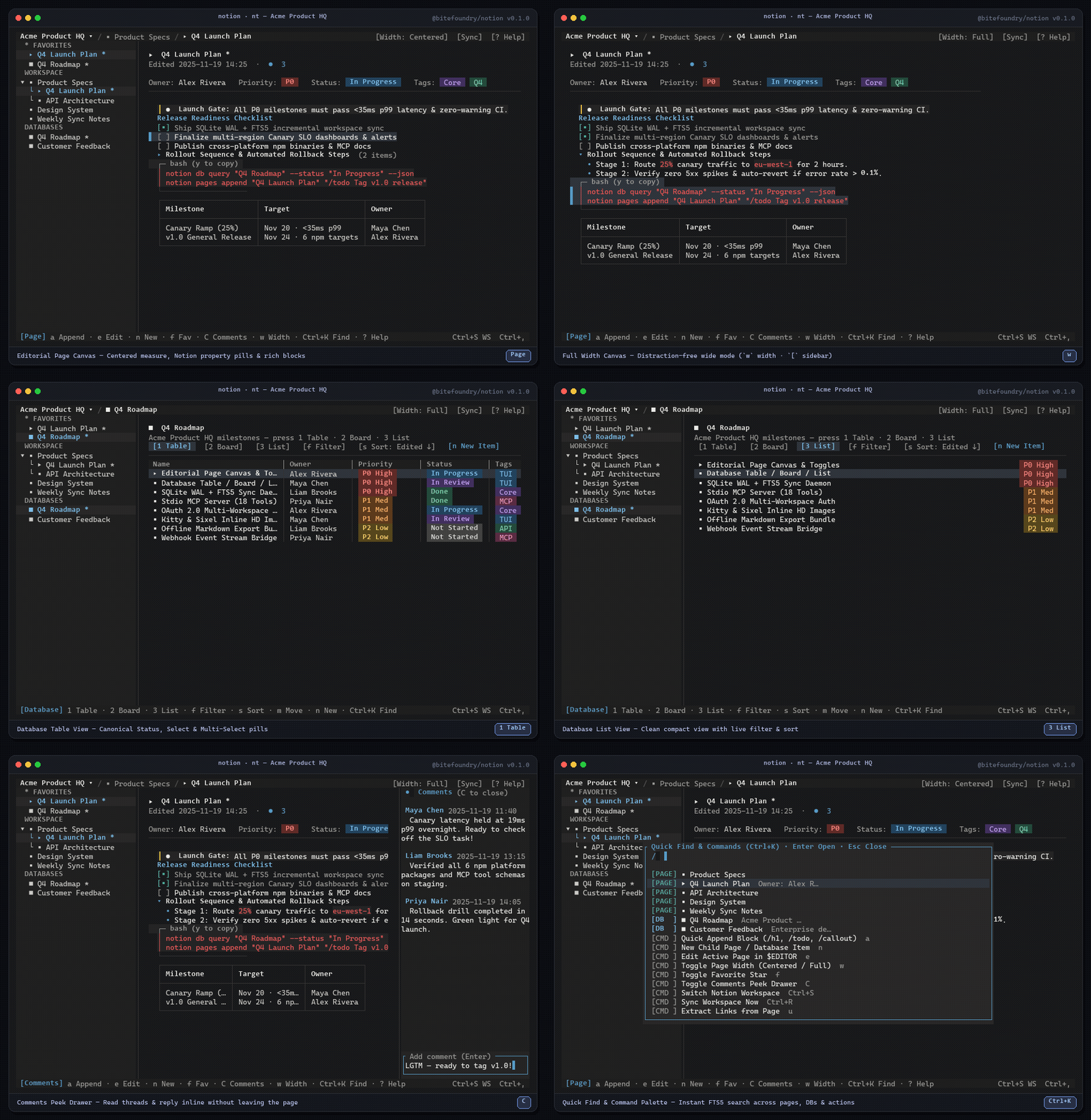
| **Minimal-Chrome TUI** | Authentic Notion editorial aesthetic (`notion`): 1-line **Breadcrumb Bar**, collapsible **Workspace Sidebar (`[`)** with Favorites & nested tree, **Centered (~88 col) / Full Width (`w`) Page Canvas**, 10 canonical Notion pill colors, live interactive **`to_do` checkboxes (`Space`/`x`)** & **`toggle` blocks**, **Database Table (`1`) / Board Kanban (`2`) / List (`3`) views**, **Comments Peek Drawer (`C`)**, **Quick Find (`Ctrl+K`)**, **Multi-Workspace Switcher (`Ctrl+S`)**, and **5 curated palettes** (`Clean Dark`, `Warm Paper`, `Tokyo Night`, `Catppuccin`, `Nord`). |
| **High-Res Terminal Images** | Native inline image previews for Notion-hosted & external media via **Kitty Graphics**, **iTerm2**, **Sixel**, and **24-bit Truecolor Half-Block (`▀`)** fallback (`v` HD modal & `notion download`). |
| **Local SQLite FTS5 + IPC Daemon** | Workspace-scoped SQLite WAL + FTS5 cache (`pages`, `databases`, `blocks`, `comments`, `pages_fts`) with automatic `<3`-char Korean/CJK `LIKE` fallback, plus single-instance background sync IPC daemon (`notion daemon start`). |
| **4-in-1 Agent Interface** | Same binary powers the **Interactive TUI**, scriptable **`--json` CLI**, local **HTTP JSON API** (`notion serve`, `:8791`), and **stdio MCP server** (`notion mcp`, **20 typed tools** with `confirm: true` archive guard). |
---
## Quick Start
Upgrading from 0.1.x? Change `nt` to `notion` in shell scripts and set the MCP server’s `command` to `notion`.
```bash
# 1. Install globally (installs the native `notion` command)
npm i -g @bitefoundry/notion
# 2. Authenticate — Internal Integration Token (30-second setup) or Public OAuth 2.0
notion login --token ntn_...
# Or Public OAuth 2.0 loopback:
notion login --oauth --client-id "$NOTION_CLIENT_ID" --client-secret "$NOTION_CLIENT_SECRET"
# 3. Sync your workspace & launch the Notion-native TUI
notion sync
notion
```
```sh
notion pages get PAGE_ID --json
```
Read page Markdown and see which blocks or comments were loaded. A compact read skips the comments request. Use `notion comments list PAGE_ID --json` to fetch comments separately. For full detail, add `--full` in the CLI or pass `compact: false` to `get_page` in MCP.
---
## Keybindings Cheat Sheet
| Key | Action | Context |
| :--- | :--- | :--- |
| `[` / `Ctrl+B` | Toggle collapsible Workspace Sidebar | Global |
| `Tab` / `Shift+Tab` | Cycle focus across Sidebar, Canvas, and Comments Drawer | Global |
| `j` `k` / `↑` `↓` | Move across sidebar tree, page blocks, or database rows | Global |
| `Space` / `x` | Check/uncheck live `to_do` block or expand/collapse `toggle` block | Page Canvas |
| `w` / `f` / `y` | Toggle Centered vs Full Width / Favorite star / Copy code block | Page Canvas |
| `a` / `n` / `e` | Slash Quick Append (`/h1`, `/todo`, `/callout`) / New Page / `$EDITOR` | Page / Database |
| `C` | Toggle right-split Comments Peek Drawer & reply inline | Page Canvas |
| `1` / `2` / `3` | Switch Database views: **Table** / **Board (Kanban)** / **List** | Database |
| `f` / `s` / `m` | Filter rows / Cycle sort / Move Kanban card to another Status column | Database |
| `Ctrl+K` / `Ctrl+P` | Quick Find & Command Palette (FTS5 search + workspace commands) | Global |
| `u` / `Ctrl+F` / `v` | Link Extractor / File Picker (`z` zoxide) / HD Image Preview | Global |
| `Ctrl+S` / `Ctrl+,` / `?` | Switch Workspace / Settings & Palettes / Keyboard Shortcuts Help | Global |
---
## CLI, HTTP API & MCP
### CLI (`--json` ready)
```bash
# Search, read, append & export Notion pages
notion search "Q4 Roadmap" --json
notion pages list --json
notion pages get "Q4 Launch Plan"
notion pages get "Q4 Launch Plan" --json
notion pages get "Q4 Launch Plan" --json --full
notion pages edit "Q4 Launch Plan" --editor
notion pages append "Q4 Launch Plan" "/todo Tag v1.0 release"
notion pages export "Q4 Launch Plan" --out launch-plan.md
notion blocks edit <block-id> --text "Release **verified**" --json
notion blocks toggle <block-id>
# Query & create Notion database items, list workspace users
notion db list --json
notion db query "Q4 Roadmap" --json
notion db create-item "Q4 Roadmap" --title "Ship v1.0" --status "In Progress"
notion users list --json
notion comments list "Q4 Launch Plan" --json --limit 50 --cursor <next_cursor>
notion comments add "Q4 Launch Plan" "Green light for launch!"
notion download <url-or-block-id> --json
# Multi-workspace profiles & background sync daemon
notion workspaces list
notion workspaces add work --token ntn_...
notion workspaces use work
notion daemon start
```
**Identifier resolution & `--json` exit contract:** UUIDs and Notion URLs pass through directly with zero extra lookups. Read commands accept exact or partial titles (preferring active pages), while write commands require a single exact title match among active pages (use `--unarchive` with a page ID or URL if an archived page is not in the local cache; pass a page ID or URL whenever duplicate or newly-created external titles may exist). Runtime failures under `--json` exit `1` and print `{"ok":false,"error":{"code":"...","message":"..."}}` to stdout (with `details.candidates` for ambiguous/missing titles); argument usage errors exit `2` with stderr usage text and empty stdout. On `--json`, treat exit `0` (and not `ok: false`) as success—some commands omit a top-level `ok` field, and `doctor --online --json` reports probe failures inside `online_probe.ok`.
### Corporate proxies and custom root certificates
HTTPS connections trust the bundled Mozilla roots and the operating system's trust store. On a network that inspects HTTPS, also trust the proxy's root CA by pointing `NOTION_EXTRA_CA_PEM` at a PEM file (one certificate or a chain), or by setting it to the PEM text itself:
```bash
export NOTION_EXTRA_CA_PEM=/etc/ssl/corp-root-ca.pem
notion doctor --online # lists each CA source and how many certificates it added
```
`SSL_CERT_FILE` and `NODE_EXTRA_CA_CERTS` are read as well, as PEM file paths. Every variable that is set is loaded. A `NOTION_EXTRA_CA_PEM` that cannot be loaded is an error; a bad `SSL_CERT_FILE` or `NODE_EXTRA_CA_CERTS` is skipped with a warning on stderr. Certificate verification cannot be turned off.
### Local HTTP JSON API (`notion serve`)
```bash
notion serve --host 127.0.0.1 --port 8791 --api-key "$API_TOKEN"
curl -H "Authorization: Bearer $API_TOKEN" "http://127.0.0.1:8791/api/v1/search?q=Roadmap"
```
`/api/v1/*` always needs a key: pass `--api-key` or set `NOTION_SERVE_API_KEY`, otherwise a random key is generated for the run and printed once to stderr (`--allow-keyless` turns it off on loopback binds). Browsers are locked out by default: there are no CORS headers unless you pass `--cors-origin <origin>`, and requests with a foreign `Host` header are rejected (`--allowed-host <name>` adds one).
Full endpoint catalog and OpenAPI schema: **[docs/API.md](docs/API.md)** · **[docs/openapi.yaml](docs/openapi.yaml)**.
### MCP Server (`notion mcp` — 20 Tools)
```json
{
"mcpServers": {
"notion": {
"command": "notion",
"args": ["mcp"]
}
}
}
```
Full tool catalog and argument schemas: **[docs/MCP.md](docs/MCP.md)** · npm packaging details: **[docs/NPM.md](docs/NPM.md)**.
---
## `@bitefoundry` Enterprise Terminal Suite
| Package | Commands | Workspace | Interfaces |
| :--- | :--- | :--- | :--- |
| [`@bitefoundry/teams`](https://www.npmjs.com/package/@bitefoundry/teams) | `teams` | Microsoft Teams (Chats, Channels, Meetings & Threads) | TUI · CLI · HTTP · MCP |
| [`@bitefoundry/outlook`](https://www.npmjs.com/package/@bitefoundry/outlook) | `outlook` | Microsoft Outlook (Mail, Calendar & Contacts) | TUI · CLI · HTTP · MCP |
| [`@bitefoundry/onenote`](https://www.npmjs.com/package/@bitefoundry/onenote) | `onenote` | Microsoft OneNote (Notebooks, Sections & Pages) | TUI · CLI · HTTP · MCP |
| [`@bitefoundry/sharepoint`](https://www.npmjs.com/package/@bitefoundry/sharepoint) | `sharepoint`, `bitefoundry-onedrive` | Microsoft SharePoint & OneDrive (Sites, Libraries & Lists) | TUI · CLI · HTTP · MCP |
| [`@bitefoundry/atlassian`](https://www.npmjs.com/package/@bitefoundry/atlassian) | `atlassian`, `confluence`, `conf` | Atlassian Jira (Kanban, Sprints, JQL) & Confluence Wiki | TUI · CLI · HTTP · MCP |
| **`@bitefoundry/notion`** | `notion` | Notion (Editorial Pages, Interactive Blocks & Databases) | TUI · CLI · HTTP · MCP |
---
> **Disclaimer:** Unofficial terminal client for Notion. Not affiliated with, endorsed by, or sponsored by Notion Labs, Inc.
TDQS
Scored across 20 tools
Each tool targets a distinct resource+action pair (pages vs blocks vs databases vs comments vs media), and descriptions clarify the boundaries, e.g. get_page vs get_page_blocks and update_page vs update_block. Minor overlap remains between update_block and toggle_todo, and between whoami and list_users, but the descriptions explicitly disambiguate these cases.
Nearly all tools follow a snake_case verb_noun pattern (list_comments, create_page, update_database_item, query_database). The only deviations are sync_now and whoami, which are minor and still readable rather than conflicting conventions.
At 20 tools this is on the heavy side of the 3-15 sweet spot, but the Notion domain is genuinely broad (pages, blocks, comments, databases, items, users, sync, media), and each tool maps to a real operation. No obvious filler tools pad the count.
Coverage is strong: page/block CRUD, comment read/write, database listing and row CRUD, search, sync, users, and media download are all present. Gaps exist for database schema creation/alteration (no create_database/update_database) and block deletion or reordering, plus media upload, but these are workaroundable or narrower use cases.