
atlassian
<div align="center">
# `@bitefoundry/atlassian`
**Read and edit Jira issues and Confluence pages from the terminal. Connect agents through MCP, including a read-only mode.**
[](https://www.npmjs.com/package/@bitefoundry/atlassian)
[](docs/NPM.md)
[](https://github.com/BiteFoundry/atlassian/blob/master/Cargo.toml)
[](LICENSE)
[BiteFoundry](https://bitefoundry.dev/#app-atlassian) · [Watch 35s Launch Film](https://bitefoundry.dev/#app-atlassian) · [Latest release notes](https://github.com/BiteFoundry/atlassian/releases/latest)
<br />
</div>
---
## Highlights
| Pillar | Capabilities |
| :--- | :--- |
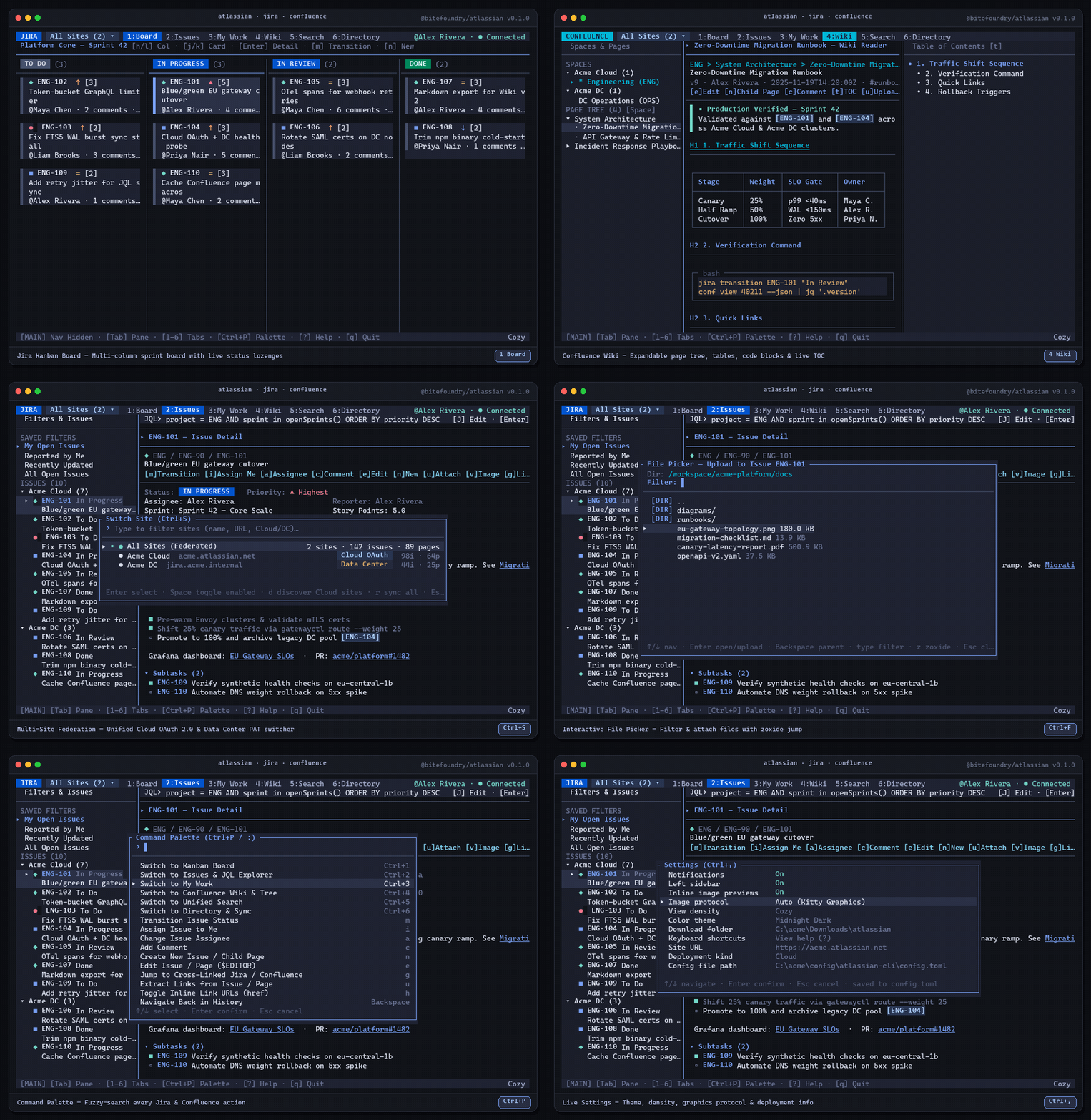
| **Minimal-Chrome TUI** | Dual-persona binary (`atlassian` / `confluence` / `conf`) with multi-column **Kanban Board**, **Issues & JQL Explorer**, **Confluence Space & Page Tree + TOC**, **Multi-Site Federation (`Ctrl+S`)** across Cloud OAuth 2.0 + Data Center PAT, **Link Extractor (`u`)**, **File Picker (`Ctrl+F`)** with `zoxide` jump, **Command Palette (`Ctrl+P`)**, and **Live Settings (`Ctrl+,`)** (5 palettes, Cozy/Compact density). |
| **High-Res Terminal Images** | Inline attachment previews for Jira issues & Confluence pages via **Kitty Graphics**, **iTerm2**, **Sixel**, and **24-bit Truecolor Half-Block (`▀`)** fallback (`v` HD modal & `--preview-images`). |
| **Local SQLite FTS5 + IPC Daemon** | Embedded SQLite WAL + FTS5 cache (`cache.db`) with instant offline unified search across Jira issues & Confluence pages (including `<3`-char CJK/Korean fallback), plus single-instance background sync IPC daemon (`atlassian daemon start`). |
| **4-in-1 Agent Interface** | Same binary powers the **Interactive TUI**, scriptable **`--json` CLI**, local **HTTP JSON API** (`atlassian serve`, `:8789`, Bearer auth), and **stdio MCP server** (`atlassian mcp`, typed tools discovered through `tools/list` with `confirm: true` delete guards). |
---
## Quick Start
```bash
# 1. Install globally (links `atlassian`, `confluence`, `conf` native binaries)
npm i -g @bitefoundry/atlassian
# 2. Authenticate interactively — or pass flags for Cloud API Token, Data Center PAT, or OAuth 2.0
atlassian login
# Non-interactive examples:
# Atlassian Cloud API Token:
atlassian login --url https://acme.atlassian.net --email you@acme.com --token "$ATLASSIAN_API_TOKEN"
# Data Center / Server PAT:
atlassian login --url https://jira.acme.internal --confluence-url https://wiki.acme.internal --deployment datacenter --pat "$ATLASSIAN_PAT"
# Atlassian Cloud OAuth 2.0 (3LO) with multi-site discovery:
atlassian login --oauth --client-id "$ATLASSIAN_OAUTH_CLIENT_ID"
# 3. Launch the TUI (Jira Kanban or Confluence Wiki persona)
atlassian # Jira Kanban Board & Issue Explorer
conf # Confluence Space Tree & Wiki Reader (full alias: confluence)
# Optional: install short shell aliases (`j` -> atlassian, `cf` -> conf)
atlassian alias install
# After reloading your shell: `j` opens Jira TUI, `cf` opens Confluence TUI
```
```sh
atlassian ENG-42 -j # shorthand for: atlassian view ENG-42 --json
conf 40211 -j # shorthand for: conf view 40211 --json
```
Read a Jira issue or Confluence page in compact JSON (passing a Jira key like `ENG-42` to `atlassian` or a numeric page ID like `40211` to `conf` opens `view` automatically). Both report omitted fields and include a hint for retrieving full detail. For full detail, add `-f` / `--full` in the CLI or pass `compact: false` to `get_jira_issue` in MCP.
> **Short Shell Aliases (`j` & `cf`):** Run `atlassian alias install` to add guarded `j` (Jira) and `cf` (Confluence) functions to your PowerShell, Zsh, Bash, or Fish profile without global PATH collisions—typing `j` launches Jira TUI, `cf` launches Confluence TUI, and `j ENG-42 -j` / `cf 40211 -j` work directly. Customize names with `--jira` / `--conf`, preview with `--dry-run`, or print raw shell code via `atlassian init <powershell|zsh|bash|fish>`.
---
## Data Center & Corporate Networks
**Separate Jira and Confluence PATs.** Data Center PATs are per application, so a Jira PAT does not work on Confluence. Pass the Confluence PAT with `--confluence-pat`: it is checked against Confluence before anything is saved, stored under its own credential account (`--confluence-account`, default `<account>-confluence`), and linked from the site as `confluence_account_id` in `config.toml`. Requests under the Confluence URL then use it, while Jira keeps the site's own credential. Cloud sites reject `--confluence-pat`, because one Cloud credential covers both products.
```bash
atlassian login --url https://jira.acme.internal --confluence-url https://wiki.acme.internal --deployment datacenter --pat "$JIRA_PAT" --confluence-pat "$CONFLUENCE_PAT"
# Add a Confluence PAT to a site that is already logged in (its Jira credential is reused):
atlassian login --site <site-id> --confluence-pat "$CONFLUENCE_PAT"
```
`ATLASSIAN_CONFLUENCE_PAT` (alias `CONFLUENCE_PAT`) supplies the Confluence PAT of a Data Center site from the environment and takes precedence over a stored `confluence_account_id`. A Confluence-only server needs no Jira credential: `conf login --url https://wiki.acme.internal --deployment datacenter --pat "$CONFLUENCE_PAT"` verifies the login against Confluence. When a server answers HTTP 200 as an anonymous user (`X-AUSERNAME: anonymous`, a failed `X-Seraph-LoginReason`, or an HTML login page instead of JSON), the request fails as HTTP 401 instead of returning an empty result; on Confluence the message points to `--confluence-pat` and `ATLASSIAN_CONFLUENCE_PAT`.
With two or more sites configured, environment credentials no longer override every site. `ATLASSIAN_PAT` / `JIRA_PAT` (or `ATLASSIAN_API_TOKEN` + `ATLASSIAN_EMAIL`) take precedence only on the site whose URL matches `ATLASSIAN_SITE_URL` / `JIRA_URL` (when neither is set, the top-level `site_url` in `config.toml`); every other site uses its stored credential and falls back to the environment only when it has none. `ATLASSIAN_CONFLUENCE_PAT` applies to that same site, or to the site whose Confluence URL matches `ATLASSIAN_CONFLUENCE_URL`.
**Corporate root CAs.** TLS trusts the OS certificate store plus the bundled Mozilla roots. For a private root CA, set `ATLASSIAN_EXTRA_CA_PEM` to a PEM bundle path (or to the PEM text itself). `SSL_CERT_FILE` and `NODE_EXTRA_CA_CERTS` are read as PEM bundle paths too, and every variable that is set is loaded. A bundle that cannot be read or parsed is skipped with a warning on `stderr`. An untrusted server certificate fails with `TLS certificate for <host> is not trusted (...)`, which names these variables.
**Config location.** `ATLASSIAN_CONFIG_DIR` replaces the default config directory: `config.toml` and the `credentials.json` fallback live there, and the SQLite cache moves to `<dir>/<profile>/cache.db`.
**Diagnostics.** `atlassian doctor --probe` asks Jira and Confluence separately who the credential belongs to, and prints the TLS roots in use (with each extra CA bundle and its certificate count), the config directory and whether `ATLASSIAN_CONFIG_DIR` set it, and any separate Confluence credential account. With `--json` it reports `tls`, `config_dir_source`, `confluence_credential_account`, `env_credentials.applies_to_site` (the site the environment credentials are primary for), and `probe_confluence_me` / `probe_confluence_error` next to the Jira `probe_me` / `probe_error`. `atlassian whoami --json` adds `confluence_user` and `identity` (`ok`, `anonymous`, `unauthorized`, `not_found`, `error`, or `skipped` for each product).
---
## Built for AI Agents (MCP & `--json` CLI)
Most Jira and Confluence integrations break agents in predictable ways: dumping 25 KB of raw ADF JSON per issue, corrupting Confluence layouts on write, overwriting concurrent edits, or exposing destructive tools with no safety rail. `@bitefoundry/atlassian` is engineered around those exact failure modes:
| Agent Capability | What It Does |
| :--- | :--- |
| **Compact by Default (24× smaller reads)** | `get_jira_issue`, `get_confluence_page`, CLI `view --json`, and create/edit writes return compact JSON by default (**1,076 B vs 25,834 B** on a 20-comment issue), with an explicit `omitted` summary and a `hint` to fetch full detail (`--full` / `compact: false`). |
| **Structure-Preserving Edits + `dry_run`** | Update a single Confluence heading with `replace_section` (including inside Cloud layout columns) or surgical `replace_text`, guard against concurrent edits with `prev_version`, and preview native `before`/`after` diffs via `dry_run: true` / `--dry-run` with zero remote writes. |
| **Read-Only MCP & Delete Guards** | Start `atlassian mcp --read-only` to expose only the **15 query tools** and reject write, sync, and download calls before execution. Destructive delete tools require literal boolean `confirm: true`. |
| **Cloud + Data Center Ergonomics** | Works on both Atlassian Cloud and Data Center (PAT), resolves `"me"`, display names, or emails for Jira assignees, lists candidate IDs for ambiguous transitions, auto-escapes plain-text JQL/CQL queries, and emits structured `{ok:false, error:{code, message, http_status?, details?}}` JSON on `--json` runtime failures. |
| **Shared Human + Agent Local Cache** | TUI, CLI, HTTP, and MCP share one SQLite WAL + FTS5 cache—let an agent triage issues or draft Confluence updates, then review them immediately in the terminal UI (`atlassian` / `conf`). |
---
## Keybindings Cheat Sheet
| Key | Action | Context |
| :--- | :--- | :--- |
| `1`–`6` / `Ctrl+1`–`6` | Switch tabs: Board / Issues / My Work / Wiki / Search / Directory | Global |
| `Tab` / `Shift+Tab` | Cycle focus across Nav rail, Main canvas, and Detail/TOC drawer | Global |
| `Ctrl+B` | Toggle left navigation sidebar | Global |
| `h` `j` `k` `l` / Arrows | Navigate Kanban columns, cards, issue lists, and page trees | Board / Lists / Tree |
| `m` / `i` / `a` | Transition issue status / Assign to me / Pick assignee | Jira |
| `c` / `n` / `e` | Add comment / Create issue or child page / Edit (`Ctrl+E` `$EDITOR`) | Jira / Confluence |
| `g` / `Backspace` | Jump across linked `Jira <-> Confluence` refs / navigate back | Global |
| `Space` / `t` | Expand or collapse Confluence tree node / toggle TOC drawer | Confluence |
| `/` | Filter the issue list, or the SPACES pane when it has focus (`~` = personal spaces; `Enter` opens, `Esc` clears, then closes) | Issues / Confluence |
| `u` / `Ctrl+F` / `v` / `d` | Link Extractor / File Picker (`z` zoxide) / Image Preview / Download | Global |
| `Ctrl+S` | Multi-Site Switcher (`All Sites` federated view, Cloud + DC) | Global |
| `Ctrl+P` / `:` | Command Palette (fuzzy search every action) | Global |
| `Ctrl+,` / `?` / `q` | Live Settings / Keyboard Shortcuts Help / Quit | Global |
In the Confluence nav rail, press `/` while the SPACES section has focus to filter spaces by key or name as you type; `Enter` opens the selected space and `Esc` clears the filter, then closes it.
---
## CLI, HTTP API & MCP
### CLI (`--json` ready)
```bash
# Multi-site management & diagnostics
atlassian sites list --json
atlassian doctor
# Jira boards, issue search and edits
atlassian boards --project ENG --json
atlassian issues --jql "project = ENG AND sprint in openSprints()" --json
atlassian search "migration runbook" --json
atlassian view ENG-101 --json
atlassian view ENG-101 --json --full
atlassian edit ENG-101 --append "Confirm monitoring before rollout." --dry-run
atlassian transition ENG-101 "In Review" --comment "Canary 50% green"
atlassian attach ENG-101 ./architecture.png
# Confluence spaces, pages and versioned edits
conf spaces --json
conf pages ENG --json
conf view 40211 --json
conf view 40211 --json --full
# This example uses page.version_number 7.
conf edit 40211 --prev-version 7 --replace "canary" "canary-verified"
# Preview replacing the body under a top-level Confluence Cloud heading.
confluence edit 40211 --prev-version 7 --replace-section "Rollout" "Verify the canary." --dry-run
# Jira issue relationships, sprint and time
atlassian parent ENG-101 ENG-9 --json
atlassian custom-fields ENG-101 --fields-file ./fields.json --json
atlassian link ENG-101 ENG-102 --type Blocks --json
atlassian move-to-sprint 42 ENG-101 ENG-102 --json
atlassian log-work ENG-101 --seconds 1800 --json
# Confluence page metadata and files
conf move 40211 40100 --json
conf labels 40211 --add ops --add rollout --json
conf labels 40211 --remove rollout --json
conf attach 40211 ./checklist.txt --json
# Background sync daemon & self-updater
atlassian daemon start
atlassian update --check
```
Add `--dry-run` to print the pending changes as JSON before saving.
When a `--json` command fails at runtime, `stdout` emits a single JSON error object (`{"ok": false, "error": {"code", "message", "http_status"?, "details"?}}`) alongside the `stderr` message with exit code `1`. Argument parsing errors exit with code `2` and print parser diagnostics to `stderr` only. Write commands (`create`, `edit`, `wiki create`, `wiki edit`) return compact JSON by default; pass `--json --full` (or `compact: false` in MCP) for the full structure.
If you are upgrading from 0.3.x, change shell commands such as `jira view ENG-101 --json` to `atlassian view ENG-101 --json`. In MCP settings, change `"command": "jira"` to `"command": "atlassian"` and keep the `mcp` argument.
If you are upgrading from 0.5.x, `atlassian view --json` and `conf view --json` now return compact JSON by default (with `omitted` counts and a `hint`). Pass `--full` (for example `atlassian view ENG-101 --json --full`) in scripts that expect the full structure. `projects --json`, `boards --json`, and MCP `list_projects` / `list_boards` default to 50 items with `has_more` and `next_cursor`; pass `--limit 1000` / `limit: 1000` and continue with `cursor` when needed. `has_children` on page summaries can now be `null` when unknown.
For Jira, `fields.json` maps explicit field IDs to JSON values, such as `{"customfield_10100":3}`. The Data Center parent command sets a Jira Software epic on an eligible issue. Confluence Data Center page moves take `--prev-version` from the current page read and require a parent in the same space. [Operation details and supported APIs](docs/MCP.md#incremental-jira-and-confluence-operations)
### Local HTTP JSON API (`atlassian serve`)
```bash
atlassian serve --bind 127.0.0.1 --port 8789 --token "$API_TOKEN"
# Search Jira issues and Confluence pages together.
curl -H "Authorization: Bearer $API_TOKEN" "http://127.0.0.1:8789/search?q=gateway&scope=all"
```
Full endpoint catalog and OpenAPI schema: **[docs/API.md](docs/API.md)** · **[docs/openapi.yaml](docs/openapi.yaml)**.
### MCP Server (`atlassian mcp`)
Exposes **37 Jira, Agile, Confluence & unified search tools** over newline-delimited stdio JSON-RPC 2.0 — or **15 read-only query tools** with `--read-only`:
```bash
# Claude Code (full access / read-only mode)
claude mcp add atlassian -- atlassian mcp
claude mcp add atlassian-ro -- atlassian mcp --read-only
```
```json
{
"mcpServers": {
"atlassian": {
"command": "atlassian",
"args": ["mcp"]
}
}
}
```
Pass `["mcp", "--read-only"]` in `args` to restrict the session to the 15 read-only tools and reject write, sync, and download calls before execution.
Both CLI `--json` detail views (`atlassian view`, `atlassian wiki view`, `conf view`) and the two MCP detail tools (`get_jira_issue`, `get_confluence_page`) return compact responses with identifying fields, full Markdown, an `omitted` summary, and a `hint` by default. Pass `--json --full` in the CLI or `compact: false` in MCP for native body data and the full structure. In `omitted`, a `null` count means the collection could not be confirmed in full (failed or truncated subresource).
Full tool catalog and argument schemas: **[docs/MCP.md](docs/MCP.md)** · npm packaging details: **[docs/NPM.md](docs/NPM.md)**.
---
## `@bitefoundry` Enterprise Terminal Suite
| Package | Commands | Workspace | Interfaces |
| :--- | :--- | :--- | :--- |
| [`@bitefoundry/teams`](https://www.npmjs.com/package/@bitefoundry/teams) | `teams` | Microsoft Teams (Chats, Channels, Meetings & Threads) | TUI · CLI · HTTP · MCP |
| [`@bitefoundry/outlook`](https://www.npmjs.com/package/@bitefoundry/outlook) | `outlook` | Microsoft Outlook (Mail, Calendar & Contacts) | TUI · CLI · HTTP · MCP |
| [`@bitefoundry/onenote`](https://www.npmjs.com/package/@bitefoundry/onenote) | `onenote` | Microsoft OneNote (Notebooks, Sections & Pages) | TUI · CLI · HTTP · MCP |
| [`@bitefoundry/sharepoint`](https://www.npmjs.com/package/@bitefoundry/sharepoint) | `sharepoint`, `bitefoundry-onedrive` | Microsoft SharePoint & OneDrive (Sites, Libraries & Lists) | TUI · CLI · HTTP · MCP |
| **`@bitefoundry/atlassian`** | `atlassian`, `confluence`, `conf` | Atlassian Jira (Kanban, Sprints, JQL) & Confluence Wiki | TUI · CLI · HTTP · MCP |
| [`@bitefoundry/notion`](https://www.npmjs.com/package/@bitefoundry/notion) | `notion` | Notion (Editorial Pages, Interactive Blocks & Databases) | TUI · CLI · HTTP · MCP |
| [`@bitefoundry/obsidian`](https://www.npmjs.com/package/@bitefoundry/obsidian) | `bitefoundry-obsidian` | Obsidian (Local Vaults, Backlinks & Interactive Knowledge Graph) | TUI · CLI · HTTP · MCP |
---
> **Disclaimer:** Unofficial terminal client for Atlassian Jira & Confluence. Not affiliated with, endorsed by, or sponsored by Atlassian.
TDQS
Scored across 37 tools
Most tools map cleanly to a distinct resource and action, especially across Jira and Confluence. The main ambiguity is the three search tools (search_all, search_jira_issues, search_confluence_pages), with smaller overlap between update_jira_issue/update_jira_custom_fields and list_space_pages/list_child_pages. Descriptions mostly resolve these, so misselection risk is moderate rather than severe.
All tool names use snake_case with a verb-first pattern such as get_, list_, create_, update_, delete_, add_, remove_, move_, search_, and transition_. Domain prefixes are used where helpful, and minor prefixing differences like list_space_pages versus list_confluence_spaces do not break the predictable convention.
At 37 tools, the surface is well above the typical 3–15 range and creates real selection burden for an agent. The breadth is partly justified by covering both Jira and Confluence, but several tools could be consolidated and the set still feels over-scoped.
Core CRUD for Jira issues and Confluence pages is present, along with transitions, comments, attachments, labels, worklogs, links, and search. Gaps remain around update/delete for comments, attachment deletion, issue-link and worklog lifecycle, and sprint/board management, but these are secondary for core workflows.