
MCP Web Engine
by Arbolencio
README.md
# MCP Web Engine
[](https://www.npmjs.com/package/mcp-web-engine)
[](https://pypi.org/project/mcp-web-engine/)
[](https://opensource.org/license/mit)
**Give your MCP client web search, public-page fetching and Markdown extraction through a self-hostable server.** For developers using Claude Desktop, Cursor, VS Code or their own MCP agents who want an operator-controlled SearXNG backend. Current release: **1.2.2**.
Use it to research a question and inspect its sources, fetch public documentation while coding, or turn a public article into Markdown for further analysis. It is not a browser automation service: authenticated pages and JavaScript rendering are outside its scope.
## Contents
- [Tools](#tools)
- [Recorded demo](#recorded-demo-3060-seconds)
- [Use cases](#use-cases)
- [Architecture](#architecture)
- [Prerequisites](#prerequisites)
- [npm quick start and client setup](#npm-quick-start)
- [PyPI installation](#pypi-installation-without-npm)
- [Local stdio](#local-stdio)
- [HTTP](#http)
- [Configuration](#configuration)
- [Docker and local stack](#docker)
- [Troubleshooting](#troubleshooting)
- [Security controls and limitations](#security-controls-and-limitations)
- [Development and artifact verification](#development-and-artifact-verification)
- [Contributing and security reports](#contributing-and-security-reports)
- [License](#license)
## Tools
| Tool | Arguments | Purpose | Example arguments |
|---|---|---|---|
| `web_search` | `query`, optional `limit` | Search through configured SearXNG | `{"query":"Model Context Protocol","limit":3}` |
| `fetch_url` | `url`, optional `max_bytes` | Fetch a public HTTP(S) page | `{"url":"https://example.com/"}` |
| `extract_markdown` | `url`, optional `max_bytes` | Convert fetched HTML to Markdown | `{"url":"https://example.com/"}` |
Use `tools/list` for authoritative schemas and bounds.
## Recorded demo (30–60 seconds)
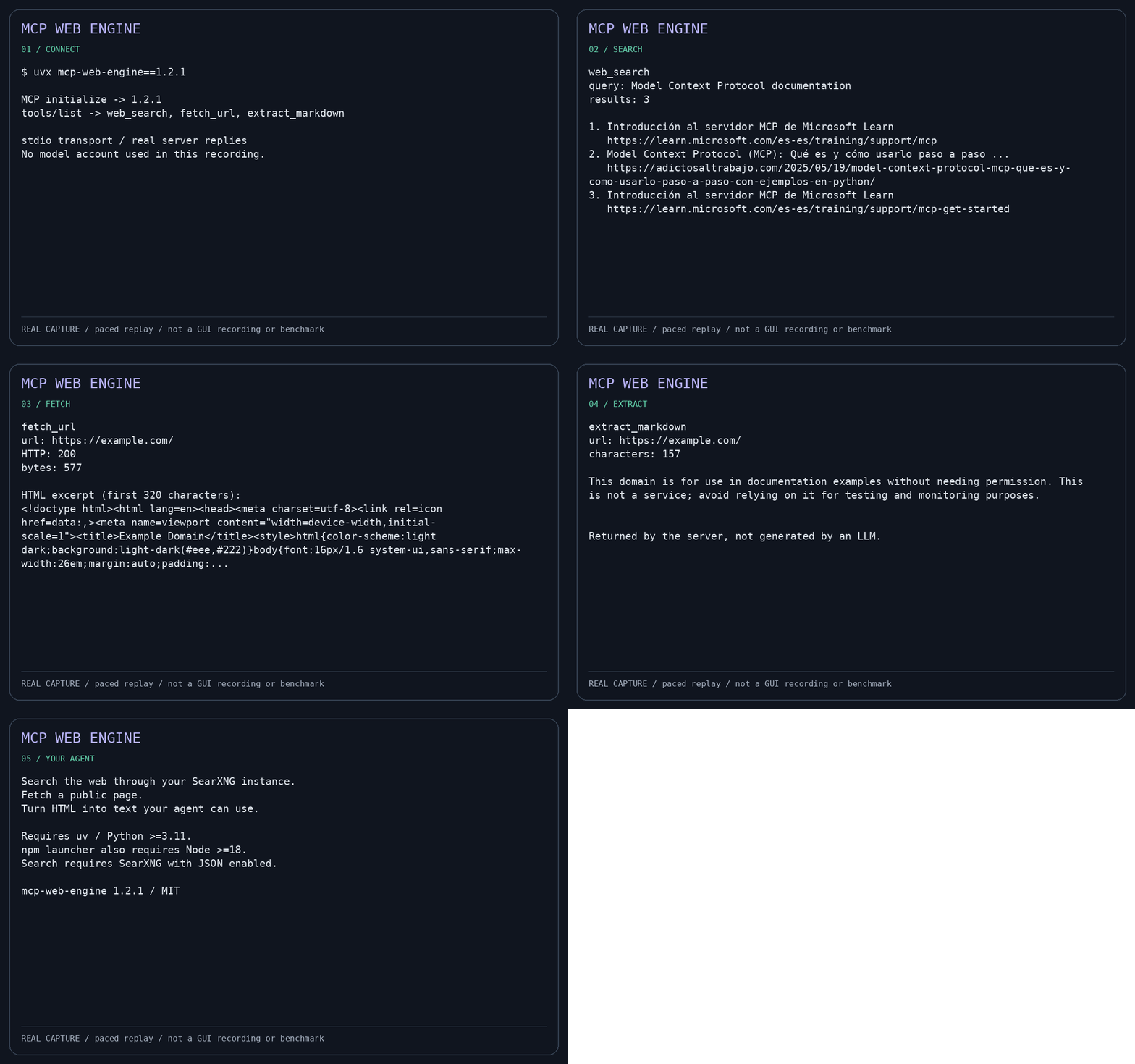
This 35-second replay of **real tool execution** is paced for readability: not a Claude/Cursor UI recording and not a performance benchmark. It shows initialization, tool listing, a live search, public-page fetch and Markdown extraction using public release 1.2.1 over stdio. Replay duration is not execution time. See [the runnable demo](https://github.com/Arbolencio/mcp-web-engine/blob/master/examples/demo.py), [captured JSON exchange](https://github.com/Arbolencio/mcp-web-engine/blob/master/docs/assets/demo-session.json) and [replay renderer](https://github.com/Arbolencio/mcp-web-engine/blob/master/examples/render_demo.py). Recording requires a reachable SearXNG backend for search.
## Use cases
- **Research with sources:** search a topic, inspect result URLs and fetch the pages before summarizing.
- **Coding with public documentation:** give an agent current documentation text without requiring a browser session.
- **Prepare Markdown for analysis:** extract readable content from static public HTML for a downstream workflow; review source material before relying on it.
## Architecture
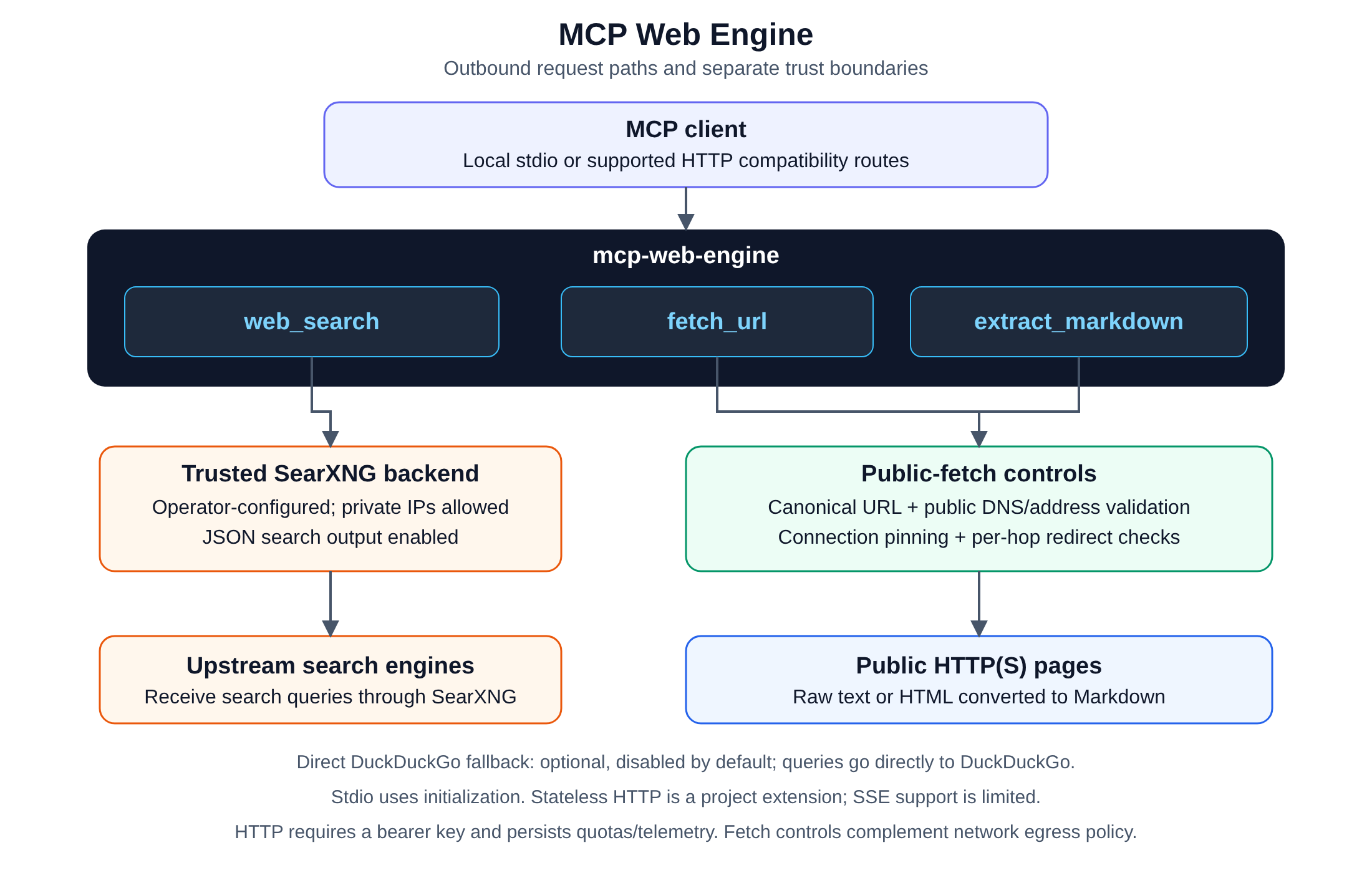
`web_search` sends queries to the operator-configured SearXNG backend, which may
use a private address. SearXNG and its upstream engines receive those queries.
`fetch_url` and `extract_markdown` use the public-fetch path: canonical URL
validation, public-address checks, validated-address connection pinning and
redirect revalidation. These paths have separate trust boundaries.
Local stdio clients initialize before using tools. HTTP includes an
initialize-based compatibility route and a project-specific stateless route;
see [HTTP](#http) for transport limitations. The diagram shows outbound request
paths, not a guarantee of complete MCP transport compliance or network isolation.
## Prerequisites
- Python **>=3.11** for the server.
- For npm: Node **>=18** (prefer a maintained release) and **[uv on PATH](https://docs.astral.sh/uv/getting-started/installation/)**. npm installs a launcher, not Python or SearXNG; uv can provision Python.
- A reachable, operator-controlled **SearXNG instance with JSON search enabled** for `web_search`. The examples use `http://127.0.0.1:8082/search`; change this to your backend. SearXNG is not bundled. Initialization, tool listing and public-page fetch/extraction do not require SearXNG.
- An MCP-capable client with local stdio support. Approve tools according to your client's trust controls.
Installation resolves Python dependencies and may access package indexes. uv isolates dependencies; it is not a security sandbox. Search queries go to SearXNG and its upstream engines; see [security and privacy](#security-controls-and-limitations).
## npm quick start
Use this when you want an MCP server without cloning the repository. Requirements: Node >=18 (prefer a maintained Node release), **uv on PATH**, Python >=3.11 (uv can provision it), and a reachable SearXNG instance with JSON search enabled. npm installs the launcher; it does **not** bundle Python or SearXNG. Install uv from [its official instructions](https://docs.astral.sh/uv/getting-started/installation/).
Launch the pinned npm release (it waits for a stdio client):
```bash
npx --yes mcp-web-engine@1.2.2
```
For actual agent use, paste this into your MCP client's server configuration and replace the SearXNG URL with yours:
```json
{
"mcpServers": {
"mcp-web-engine": {
"command": "npx",
"args": ["--yes", "mcp-web-engine@1.2.2"],
"env": {
"SEARXNG_URL": "http://127.0.0.1:8082/search",
"ALLOW_DDG_FALLBACK": "false"
}
}
}
}
```
Ready-to-copy files: [Linux/macOS](https://github.com/Arbolencio/mcp-web-engine/blob/v1.2.2/examples/npm-stdio.json) and [Windows](https://github.com/Arbolencio/mcp-web-engine/blob/v1.2.2/examples/npm-stdio.windows.json). On Windows the example uses `cmd /c npx` for the npm command shim. The stdio server waits for a client: silence after manually running `npx --yes mcp-web-engine@1.2.2` is normal, not a chat prompt. Initialization lists three tools; a working search backend is needed only when you search. First launch may access package indexes.
**If setup fails:** check `node --version` and `uv --version` in the environment used by the client. Desktop clients may not inherit your interactive shell's PATH; supply the absolute executable path if needed. If tools appear but search fails, verify SearXNG's `/search?q=test&format=json` endpoint returns JSON, not an HTML page or a disabled-JSON error. Local stdio does not need an HTTP API key.
### Connect your client
**Claude Desktop**
1. Open **Settings → Developer → Edit Config** to locate `claude_desktop_config.json`.
2. Merge the `mcpServers` entry above into that file (do not overwrite existing servers). Use [the Windows configuration](https://github.com/Arbolencio/mcp-web-engine/blob/v1.2.2/examples/npm-stdio.windows.json) on Windows or [Linux/macOS configuration](https://github.com/Arbolencio/mcp-web-engine/blob/v1.2.2/examples/npm-stdio.json) elsewhere.
3. Save, fully restart Claude Desktop and check the available tools. Ask it to search a topic with `web_search`, then fetch a public result with `fetch_url` or `extract_markdown`; approve calls when prompted.
See the [official local-server guide](https://modelcontextprotocol.io/quickstart/user).
**Cursor**
1. Create `.cursor/mcp.json` in your project, or use `~/.cursor/mcp.json` for your user-wide setup.
2. Merge the same `mcpServers` configuration above, choosing the Windows example where appropriate.
3. Open Cursor's MCP settings, enable/reload the server, and check its tool list. In Agent, request a search and approve tool execution if prompted.
See [Cursor's official MCP documentation](https://cursor.com/docs/mcp).
**VS Code**
1. Copy [examples/vscode-mcp.json](https://github.com/Arbolencio/mcp-web-engine/blob/v1.2.2/examples/vscode-mcp.json) to your workspace's `.vscode/mcp.json`; on Windows use [examples/vscode-mcp.windows.json](https://github.com/Arbolencio/mcp-web-engine/blob/v1.2.2/examples/vscode-mcp.windows.json).
2. Set your SearXNG URL. VS Code uses a top-level **`servers`**, not `mcpServers`, and each entry explicitly sets `"type": "stdio"`. Do not paste the Claude/Cursor JSON unchanged.
3. Use **MCP: List Servers** in the Command Palette to start the server, review the trust prompt, then enable its tools in agent chat. Request a search and inspect the tool result.
See [VS Code's official MCP documentation](https://code.visualstudio.com/docs/agent-customization/mcp-servers). Client versions and organization policies can change available controls.
**Verification scope:** installed npm stdio command shims were tested on Windows/macOS/Linux with Node 18/22. Configuration examples are schema checked; no full end-to-end GUI sessions in Claude Desktop, Cursor or VS Code were tested. A successful stdio smoke test is not proof of a graphical client's integration.
### PyPI installation (without npm)
Use an isolated virtual environment rather than installing into an externally managed system Python (PEP 668):
```bash
python -m venv .venv
# Linux/macOS:
. .venv/bin/activate
# Windows PowerShell instead: .venv\Scripts\Activate.ps1
python -m pip install "mcp-web-engine==1.2.2"
mcp-web-engine --version
```
In your client configuration, replace `command` with the absolute path to `.venv/bin/mcp-web-engine` (Windows: `.venv\Scripts\mcp-web-engine.exe`) and use `"args": []`; keep the backend environment settings. Escape Windows backslashes as `\\` inside JSON. This route needs Python and pip, not Node or uv. The same SearXNG requirements apply. Alternatively, with uv installed: `uvx --from mcp-web-engine==1.2.2 mcp-web-engine`.
## Local stdio
```bash
git clone https://github.com/Arbolencio/mcp-web-engine.git
cd mcp-web-engine
uv run --locked mcp-web-engine
```
CLI accepts `--stdio` (default), `--serve`, or its `--sse` alias as mutually exclusive transport choices. Use `mcp-web-engine --help` for usage and `mcp-web-engine --version` for the installed version; unknown flags are rejected.
Default transport is newline-delimited JSON-RPC over stdin/stdout. Diagnostics and installer output belong on stderr. Clients should initialize, send `notifications/initialized`, then use `ping`, `tools/list`, and `tools/call`. No search service is required for initialization or listing tools.
Client configuration (replace the absolute checkout path):
```json
{
"mcpServers": {
"mcp-web-engine": {
"command": "uv",
"args": ["tool", "run", "--from", "/absolute/path/mcp-web-engine", "mcp-web-engine"],
"env": {"SEARXNG_URL": "http://127.0.0.1:8082/search", "ALLOW_DDG_FALLBACK": "false"}
}
}
}
```
For a pinned public installation use `uvx --from mcp-web-engine==1.2.2 mcp-web-engine` or `npx --yes mcp-web-engine@1.2.2`. These pin the project version, not its transitive dependencies. The clone above follows the repository default branch, not a release pin; use a reviewed commit and `uv sync --locked` for source deployments.
The npm tarball includes the canonical Python src package and build metadata. `npx --package /absolute/path/mcp-web-engine-1.2.2.tgz mcp-web-engine` delegates to uv; Python/uv remain prerequisites, and first launch may need network access for dependencies.
## HTTP
```bash
export API_KEY="$(python3 -c 'import secrets; print(secrets.token_urlsafe(32))')"
export SEARXNG_URL=http://127.0.0.1:8082/search
uv run mcp-web-engine --serve
```
HTTP defaults to `127.0.0.1:5050`; `API_KEY` must contain at least 32 non-whitespace characters. Send `Authorization: Bearer <YOUR_API_KEY>` to protected endpoints. Keep the key out of source control and URLs. `/health` is a liveness endpoint, not a SearXNG connectivity check.
`POST /v1/mcp/legacy` provides the initialize-based compatibility path. `/v1/mcp` is a project-specific stateless extension requiring `Mcp-Method` (and `Mcp-Name` for tool calls). Its `2026-07-28` label is an internal extension identifier, **not a claim of official MCP conformance**. SSE support is limited; this is not a complete implementation of every MCP transport or optional feature.
## Configuration
Process environment is authoritative. CWD `.env` files are **not** loaded automatically. To explicitly load one, set `MCP_WEB_ENGINE_ENV_FILE` to an existing **absolute** file path; process variables override file values.
| Variable | Default | Meaning |
|---|---|---|
| `SEARXNG_URL` | `http://127.0.0.1:8082/search` | Trusted operator-controlled search backend; search needs it running |
| `ALLOW_DDG_FALLBACK` | `false` | Opt in to sending queries to DuckDuckGo if SearXNG fails |
| `API_KEY` | empty | Operator-generated HTTP bearer key; mandatory for CLI HTTP mode |
| `HOST` / `PORT` | `127.0.0.1` / `5050` | HTTP bind address and port |
| `RATE_LIMIT_PER_MINUTE` | `120` | Per-key HTTP admission limit, persisted in local SQLite |
| `DEFAULT_TIMEOUT_SEC` | `10` | Outbound timeout, up to 120 seconds |
| `MAX_PAYLOAD_BYTES` | `2097152` | Payload ceiling, up to 16 MiB |
| `MAX_CONCURRENT_REQUESTS` | `16` | Process-local ceiling on in-flight HTTP requests; not a multi-worker global limit |
| `REQUEST_BODY_TIMEOUT_SEC` | `10` | Absolute HTTP request-body read deadline in seconds, not a timeout reset by each chunk |
| `MCP_WEB_ENGINE_STATE_DB` | `$XDG_STATE_HOME/mcp-web-engine/usage.sqlite3` (or `~/.local/state/...`) | Local SQLite admission quotas and per-key tool telemetry; share one local file across workers |
| `MCP_WEB_ENGINE_BETA_KEYS_FILE` | Same state directory, `beta_keys.json` | Operator-managed credentials, separate from telemetry; use an absolute path |
| `LOG_LEVEL` / `ENV` | `INFO` / `production` | Logging and environment settings |
## Docker
**Need SearXNG too?** Use the [local stack guide](https://github.com/Arbolencio/mcp-web-engine/blob/v1.2.2/docs/local-stack.md) and
`compose.local.yml` to start both services with JSON search already enabled,
loopback-only host ports and a live verification command. The existing setup
below connects to a search backend you already run.
```bash
# With API_KEY already exported as above:
docker compose up --build -d
```
The image installs the Python package, runs as a non-root user and explicitly starts `mcp-web-engine --serve` on port 5050. Compose publishes **only host loopback**. Container `HOST=0.0.0.0` is necessary for that port mapping; do not confuse it with the host binding. Set `SEARXNG_URL` to a reachable backend: compose defaults to `http://host.docker.internal:8082/search`, using the host gateway. An instance bound only to host loopback may not be reachable from Docker. No SearXNG instance or credentials are bundled. See [operations and limitations](https://github.com/Arbolencio/mcp-web-engine/blob/v1.2.2/docs/operations.md).
## Troubleshooting
| Symptom | What to check |
|---|---|
| The stdio command starts but prints nothing | It is waiting for an MCP client to send JSON-RPC messages. Connect it through your client's server configuration. |
| The client reports `ENOENT` or cannot find `uv`, `uvx` or `npx` | Check the executable in the client's environment. GUI clients may have a different `PATH`; use an absolute executable path when needed. |
| Tools appear, but search returns `SEARXNG_UNAVAILABLE` | Check that your SearXNG `/search?q=test&format=json` returns a JSON object with a `results` array. Verify the backend address, JSON configuration, network access and service logs. |
| A container cannot reach SearXNG | Container loopback refers to that container. Use a reachable host gateway or a shared Docker network; the host service must listen on an address reachable from that network. `host.docker.internal` alone does not expose a loopback-only host service. The [local stack](https://github.com/Arbolencio/mcp-web-engine/blob/v1.2.2/docs/local-stack.md) connects by service name. |
| The local stack cannot bind a host port | Set `LOCAL_SEARXNG_PORT` or `LOCAL_MCP_PORT` to a free port and update host-side clients/probes. This includes conflicts with local model servers. See the [local stack guide](https://github.com/Arbolencio/mcp-web-engine/blob/v1.2.2/docs/local-stack.md). |
| HTTP startup rejects the API key, or a protected request returns 401 | `--serve` requires an operator-generated key of at least 32 non-whitespace characters. Use the same key in the `Authorization: Bearer` header. Local stdio does not need it. |
| Changes to a working-directory `.env` have no effect | Set `MCP_WEB_ENGINE_ENV_FILE` to an existing absolute file path, or export variables in the server process's environment. Process variables take precedence. Compose separately reads `.env` for interpolation. |
| `/health` passes but search fails | Health checks report liveness. Use the [local stack live probe](https://github.com/Arbolencio/mcp-web-engine/blob/v1.2.2/docs/local-stack.md#verify-the-setup) to check actual search, fetching and extraction. |
| A public-fetch tool rejects a local or private URL | This is expected SSRF policy. The trusted SearXNG backend is a separate path; its private address does not permit tools to fetch arbitrary private URLs. |
For client JSON examples, see [client setup](#connect-your-client). For state
permissions, persistence and deployment boundaries, see [operations](https://github.com/Arbolencio/mcp-web-engine/blob/v1.2.2/docs/operations.md).
## Security controls and limitations
Public fetches validate schemes, resolved addresses and redirects, rejecting loopback/private/reserved destinations. Bounded payloads, timeouts and tool argument validation reduce resource exposure. These are defense-in-depth controls, not a guarantee against all SSRF, DNS, routing, proxy or upstream failures; enforce outbound network policy independently.
SearXNG is an intentional trusted-backend exception to public-fetch restrictions and can use a private address. Its operator and upstream engines receive queries; self-hosting does not keep searches entirely on-host. DuckDuckGo fallback is off by default, but ordinary SearXNG searches still involve upstream services. Fetched pages are untrusted input and may contain prompt injection. Dependency isolation does not isolate filesystem/network access. HTTP authentication is not TLS or a multi-host distributed rate limiter; use a restricted network and a TLS reverse proxy when needed. Do not expose the service directly to the Internet.
HTTP mode persists admission counters and tool telemetry keyed by hashed key IDs in local SQLite; operator-managed JSON credentials are stored separately. Self-hosting is not a promise of no logging or no disk writes: review logging, state paths, retention and filesystem permissions before handling sensitive workloads. See [operations and limitations](https://github.com/Arbolencio/mcp-web-engine/blob/v1.2.2/docs/operations.md).
## Development and artifact verification
```bash
uv sync --locked --extra test
uv run --locked python -m pytest -q
uv run --with build python -m build
npm pack
python3 tests/artifact_smoke.py -- uv tool run --from /absolute/path/to/package.whl mcp-web-engine
```
Tests are offline by default. The artifact smoke sends no search query: initialize, silent notification, ping, tool listing, and a rejected loopback fetch. CI tests Python 3.11–3.13 and builds/installs wheel and npm artifacts outside the checkout. Package dependency installation still requires package-index access unless cached.
## Contributing and security reports
Read [CONTRIBUTING.md](https://github.com/Arbolencio/mcp-web-engine/blob/v1.2.2/CONTRIBUTING.md) for the development workflow, test
requirements and distribution checks. Follow [SECURITY.md](https://github.com/Arbolencio/mcp-web-engine/blob/v1.2.2/SECURITY.md) to report
a suspected vulnerability.
For release notes, see the [changelog](https://github.com/Arbolencio/mcp-web-engine/blob/v1.2.2/CHANGELOG.md). Maintainers can follow the [release guide](https://github.com/Arbolencio/mcp-web-engine/blob/v1.2.2/docs/releases.md).
## License
MIT License. See [LICENSE](https://github.com/Arbolencio/mcp-web-engine/blob/v1.2.2/LICENSE).
TDQS
A3.5/5.0
Scored across 3 tools
Disambiguation4/5
web_search is clearly distinct, but fetch_url and extract_markdown both retrieve page content and could be confused when an agent wants Markdown versus raw text. The descriptions help differentiate, but the boundary is not as sharp as ideal.
Naming Consistency4/5
All names use snake_case consistently. However, web_search uses a noun-first pattern while fetch_url and extract_markdown follow verb_noun, creating a minor inconsistency.
Tool Count5/5
Three tools is a tight, well-scoped set for a web engine, covering search, raw fetch, and Markdown extraction without redundancy or bloat.
Completeness4/5
The core lifecycle (search, fetch, extract) is covered. Minor gaps like batch fetching or metadata extraction exist but are not essential for the stated purpose.
Maintenance
ActivityMaintained
ResponsivenessNo recent community issues