
American Cloud MCP Server
OfficialREADME.md
# American Cloud MCP Server
Manage [American Cloud](https://americancloud.com) infrastructure from Claude,
Cursor, and any other [MCP](https://modelcontextprotocol.io) client.
Runs **locally on your machine** over stdio — your API keys never leave your
environment, and no hosted middleman sits between your AI assistant and your
cloud.
## Quick start
Add to your MCP client configuration (Claude Desktop, Claude Code, Cursor, …):
```json
{
"mcpServers": {
"americancloud": {
"command": "npx",
"args": ["-y", "@americancloud/mcp"],
"env": {
"AMERICANCLOUD_API_CLIENT_ID": "your-client-id",
"AMERICANCLOUD_API_CLIENT_SECRET": "your-client-secret"
}
}
}
}
```
Create and manage API keys at
**[console.americancloud.com/api-keys](https://console.americancloud.com/api-keys)**.
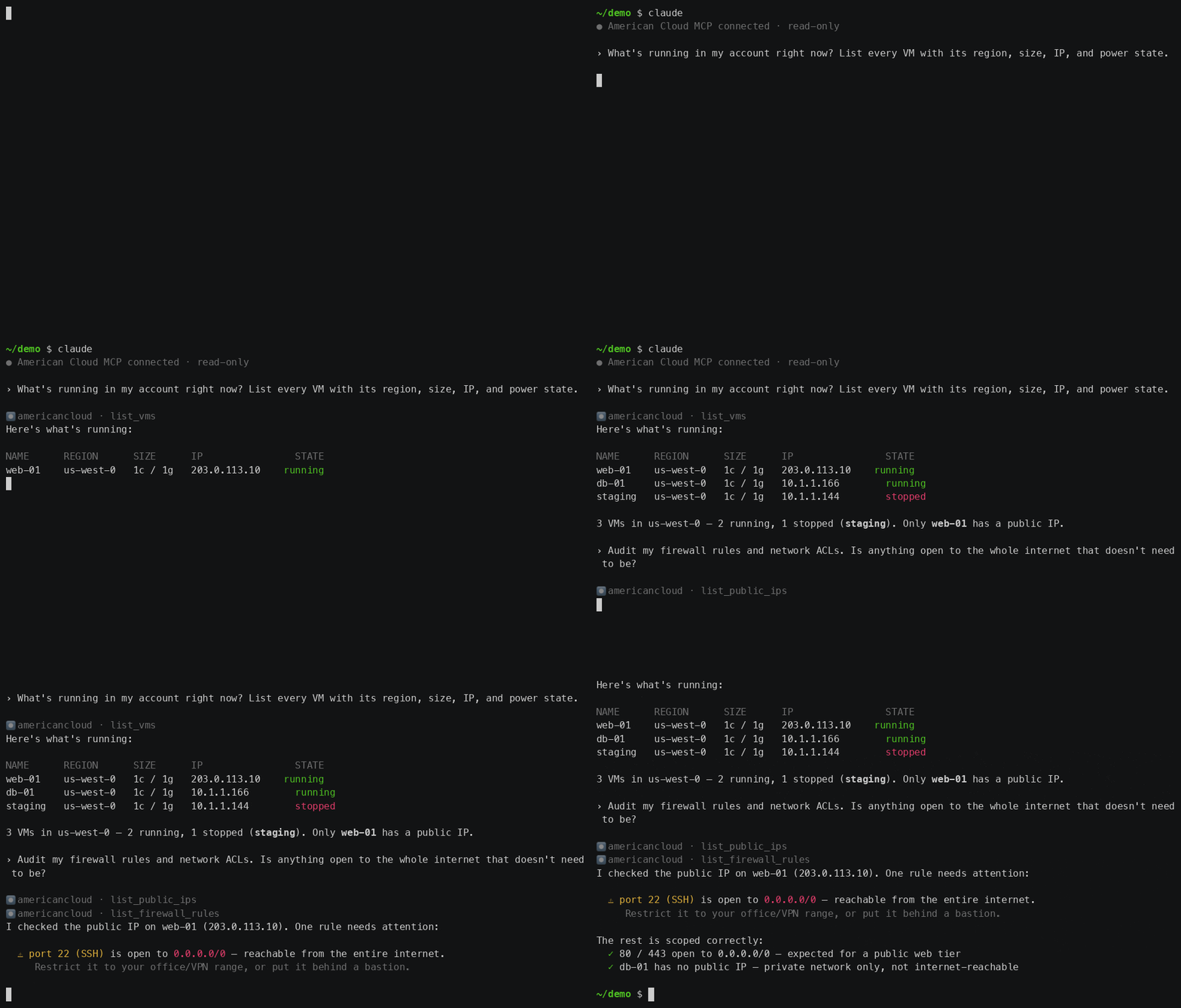
**The server is read-only by default** — see [Safety](#safety) before enabling
resource management.
## Service groups
By default the core infrastructure groups are enabled: **compute, storage,
networking, kubernetes**. Scope or extend with `--services`:
```sh
npx @americancloud/mcp --services all
npx @americancloud/mcp --services compute,dns
```
| Group | Tools | Covers |
|---|---|---|
| `compute` *(default)* | 25 | VMs, packages, images, regions, SSH keys |
| `storage` *(default)* | 27 | block storage, snapshots, object storage and its access keys |
| `networking` *(default)* | 57 | isolated/VPC networks, VPC tiers, public IPs, firewall, port forwarding, load balancers, egress, ACLs |
| `kubernetes` *(default)* | 11 | managed Kubernetes clusters |
| `databases` | 36 | managed MySQL/PostgreSQL/Redis, backups, infrastructure, offerings |
| `wordpress` | 16 | managed WordPress |
| `dns` | 7 | hosted DNS zones and records |
Scoping with `--services` keeps the tool list small for context-sensitive
clients.
## Safety
This server lets an AI assistant manage **real infrastructure with real
billing**. It's designed to be safe by default:
- **Read-only by default.** Out of the box, only read tools (list/get/cost
estimates) are registered — an assistant can explore and inspect but cannot
create, modify, or delete anything. To enable management tools, add
`"--allow-writes"` to `args`.
- **Use the narrowest key.** For inspection, provision a **`read-only` API key**
— then resource mutation is impossible regardless of any flag, because the
key itself can't perform writes. Only use a `read-write` key together with
`--allow-writes` when you actually want the assistant to make changes. One
read tool needs a `read-write` key: `get_kubernetes_cluster_config`, because
the kubeconfig grants full access to the cluster.
- **Destructive tools are flagged.** Delete/release/reinstall/revert/cancel
tools are marked destructive, so MCP clients that support confirmations will
prompt before running them.
```jsonc
// management-enabled (read-write key + opt-in flag):
"args": ["-y", "@americancloud/mcp", "--allow-writes"]
```
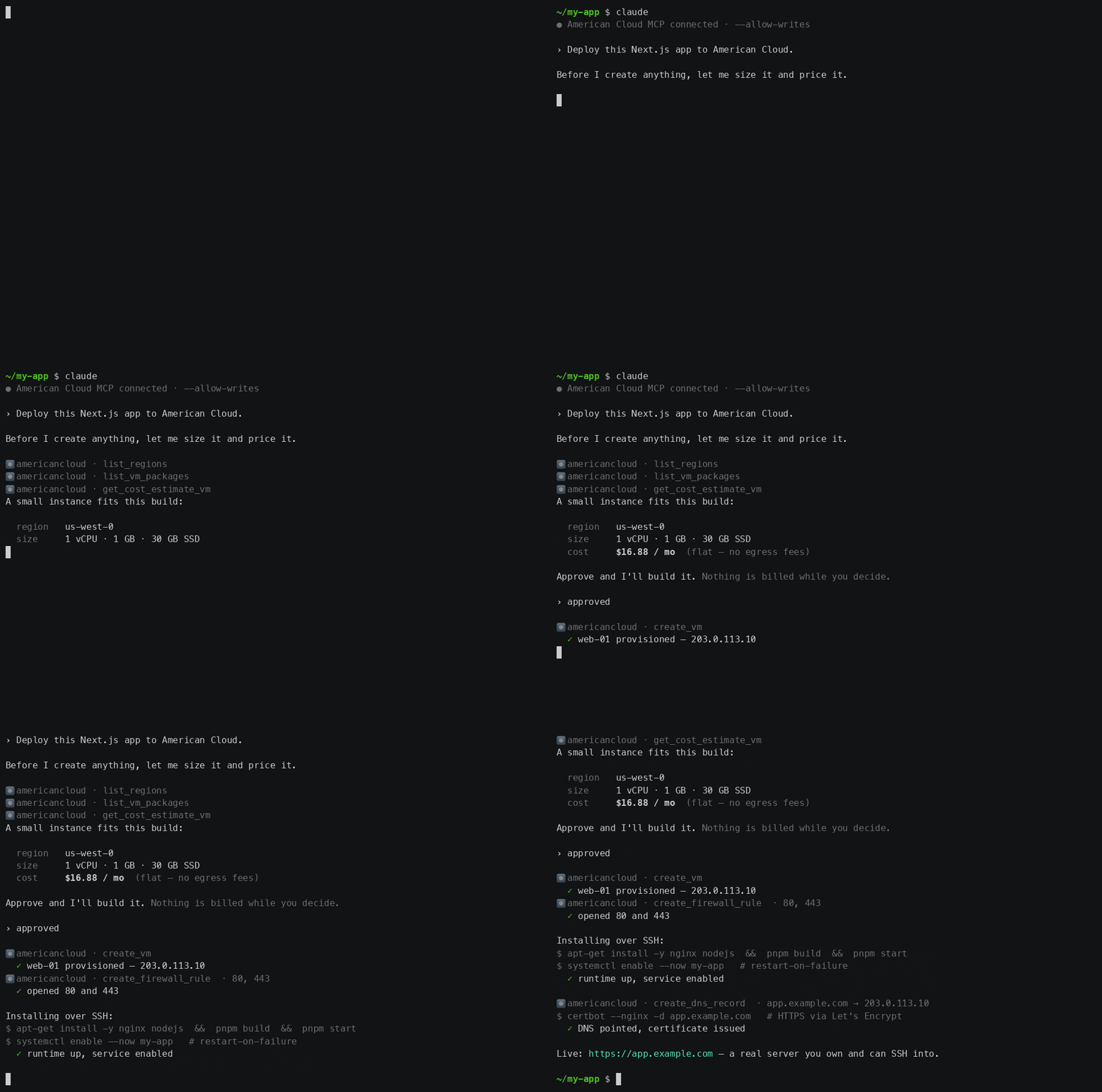
With writes enabled, the assistant can provision and deploy — and it still shows
you the cost and waits for approval before creating anything:
## Environment
| Variable | Required | Purpose |
|---|---|---|
| `AMERICANCLOUD_API_CLIENT_ID` | yes | API client ID (`X-API-Client-ID`) |
| `AMERICANCLOUD_API_CLIENT_SECRET` | yes | API client secret (`X-API-Client-Secret`) |
| `AMERICANCLOUD_API_URL` | no | API base URL override |
## Guides
Full documentation on the American Cloud docs site:
- [MCP server overview](https://americancloud.com/docs/mcp/overview) — setup, safety, and service groups
- Client setup: [Claude Code](https://americancloud.com/docs/mcp/claude-code) · [Claude Desktop](https://americancloud.com/docs/mcp/claude-desktop) · [Cursor](https://americancloud.com/docs/mcp/cursor) · [other clients](https://americancloud.com/docs/mcp/other-clients)
- [Things to try](https://americancloud.com/docs/mcp/use-cases) — prompt ideas across compute, storage, networking, and DNS
- [Deploy with AI](https://americancloud.com/docs/deploy-with-ai/overview) — migration playbooks and deployment recipes built on this server
## Versioning
See [`VERSIONING.md`](./VERSIONING.md) — the server versions independently;
the exact-pinned `@americancloud/sdk` dependency states the API surface it
targets.
## Contributing
This server is generated and maintained in lockstep with the American Cloud
SDK and API — see [`CONTRIBUTING.md`](./CONTRIBUTING.md) for how to report
issues or propose changes.
## License
Apache-2.0 — see [`LICENSE`](./LICENSE) and [`NOTICE`](./NOTICE).
This server cannot be deployed
Maintenance
ActivityMaintained
ResponsivenessNo issues