
health-mcp
by Airbloomer
README.md
# health-mcp
**Ask your AI chatbot about your own health data, from a server you own.**
[](https://github.com/Airbloomer/health-mcp/blob/main/LICENSE)    
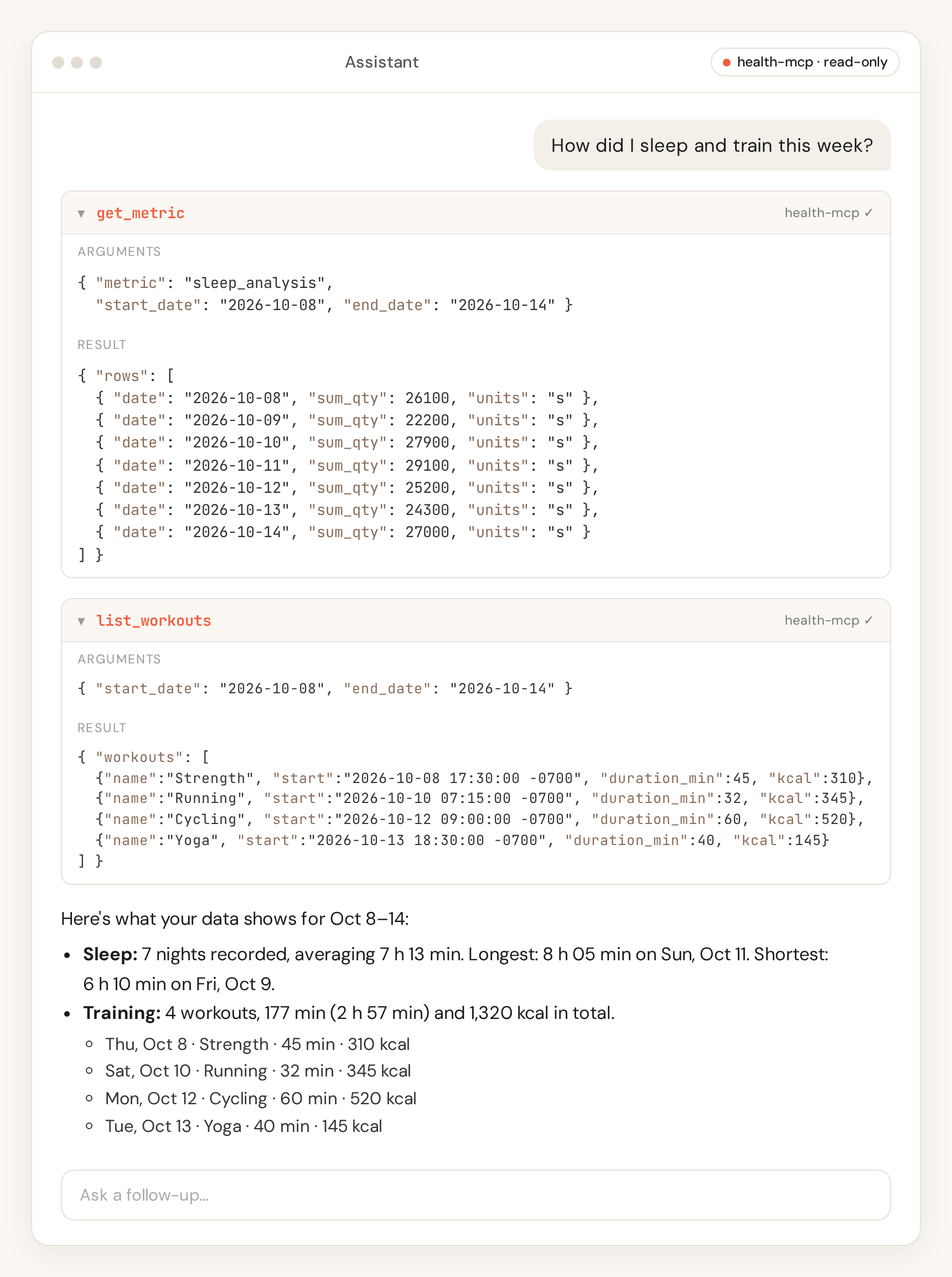
health-mcp takes the steps, calories, weight, body fat, workouts and nutrition your phone already collects (iPhone or Android) and makes them available to any AI chatbot that supports MCP connectors. Sleep can be added as an option with the Android apps. Your data stays on your server.
Not medical advice. See [Disclaimer](#disclaimer).
[Quick start](#quick-start) · [Troubleshooting](#troubleshooting) · [Hosted version](#hosted-version)
## How it works
- **Your phone app sends your data.** An export app on your phone (HC Webhook or Life Dashboard Companion on Android, Apple Shortcuts on iPhone, built in with no extra app) posts your health data to your server.
- **Your server keeps it.** health-mcp stores one row per metric per day in a database that you control.
- **Your chatbot connects.** You add your server to your chatbot as an MCP connector. It can read your data, but never change it.
## Quick start
> **What you need**
>
> - A computer with a terminal
> - [Node.js](https://nodejs.org) 22 or newer
> - A free [Cloudflare](https://www.cloudflare.com) account
> - The phone app: HC Webhook or Life Dashboard Companion (Android), or Apple Shortcuts (iPhone, built in)
> - A chatbot that supports MCP connectors
> - About 15 minutes
The terminal is the app where you type commands: **Terminal** on Mac, **PowerShell** on Windows. Keep it open for every step below.
### 1. Deploy your server
The simplest option is Cloudflare Workers with a D1 database. Copy and paste these commands one at a time:
```bash
git clone https://github.com/Airbloomer/health-mcp.git
cd health-mcp
npm install
cp wrangler.example.toml wrangler.toml
npx wrangler login
npx wrangler d1 create health-mcp
```
The last command prints a `database_id`. Open `wrangler.toml` in a text editor and paste that value in place of `replace-with-d1-database-id`. While you are there, change `HEALTH_TIMEZONE` to your own time zone, for example `Europe/Rome`.
Optional, Android only: sleep is not stored by default. To keep sleep from HC Webhook or Life Dashboard Companion, add `"sleep_analysis"` to `HEALTH_METRIC_ALLOWLIST` in `wrangler.toml` (it's already there, commented out, in `wrangler.example.toml`). Remove the `#` from that line and set it to `HEALTH_METRIC_ALLOWLIST = "sleep_analysis"`, or add `sleep_analysis` to its comma-separated list, rather than adding a second `HEALTH_METRIC_ALLOWLIST` line.
Then create the database tables. Do this **before** you deploy:
```bash
node src/cli/d1-migrate.js --remote
```
✅ **Checkpoint:** the command prints `0001_init.sql` through `0006_ingest_backfill_deadline.sql`, with no error. `--remote` or `--local` is required.
Prefer your own machine, a VPS, or Docker? See [Self-hosting](https://github.com/Airbloomer/health-mcp/blob/main/docs/self-hosting.md) for the Node.js and Docker options (SQLite or Postgres).
### 2. Create your token
The token is the password for your server. Generate a random one:
```bash
openssl rand -hex 32
```
Copy the line it prints. That is your **`<HEALTH_INGEST_TOKEN>`**. Save it somewhere private, such as a password manager. Then store it on your server and deploy:
```bash
npx wrangler secret put HEALTH_INGEST_TOKEN
npx wrangler deploy
```
Paste the token when `secret put` asks for it. `wrangler deploy` prints your server's address, something like `https://health-mcp.<your-subdomain>.workers.dev`. Copy it. That address without `https://` is your **`<your-host>`**.
Anyone with this token can read and write your data. Never share it or post it in a screenshot. More in [Security](https://github.com/Airbloomer/health-mcp/blob/main/docs/security.md).
✅ **Checkpoint:** ask your server for a day's summary (on Windows, type `curl.exe` instead of `curl`):
```bash
curl -H "Authorization: Bearer <HEALTH_INGEST_TOKEN>" "https://<your-host>/summary?date=2026-01-01"
```
You should get back JSON that starts with `{"date":"2026-01-01"`, with empty values for now. `{"error":"unauthorized"}` means the token doesn't match.
### 3. Connect your phone
<details>
<summary><strong>Android: HC Webhook or Life Dashboard Companion</strong></summary>
Both apps read Health Connect, so anything Health Connect already collects (for example from a smart scale or a fitness band app) can be sent. Install one of them, grant it Health Connect read access, and add a webhook:
- **HC Webhook:** URL `https://<your-host>/ingest/hc-webhook`, format JSON.
- **Life Dashboard Companion:** on the **Health** tab, URL `https://<your-host>/ingest/life-dashboard`. Leave **Daily totals in payload** on.
Then add a header with key `Authorization` and value `Bearer <HEALTH_INGEST_TOKEN>` (the word `Bearer`, a space, then the token). Run a sync (in Life Dashboard Companion, tap **Test ping**, then **Sync Now**).
<details>
<summary>Can't add a header?</summary>
Some setups can't send a header, for example a URL added by QR pairing in Life Dashboard Companion. In that case, create a second, separate token and put it in the URL:
```bash
openssl rand -hex 32
npx wrangler secret put HEALTH_INGEST_URL_TOKEN
```
Then use the path form: `https://<your-host>/ingest/hc-webhook/<HEALTH_INGEST_URL_TOKEN>` (or `/ingest/life-dashboard/<HEALTH_INGEST_URL_TOKEN>`).
> **Security note:** this URL token can only send data, never read it. Still, a URL can end up in logs, history, screenshots and QR codes, and Cloudflare's request logs keep the full URL. Prefer the header when you can. Never put your main `HEALTH_INGEST_TOKEN` in a URL. If the URL may have leaked, run `npx wrangler secret put HEALTH_INGEST_URL_TOKEN` again with a new value. See [Security](https://github.com/Airbloomer/health-mcp/blob/main/docs/security.md).
</details>
Full setup for both apps: [Data sources](https://github.com/Airbloomer/health-mcp/blob/main/docs/sources.md#hc-webhook).
</details>
<details>
<summary><strong>iPhone: Apple Shortcuts</strong></summary>
Shortcuts is built into iPhone, so there's no extra app to install. A shortcut reads your Health data in daily mode (**Find Health Samples** with **Group By** set to **Day**, one total per metric per day) and sends it to `https://<your-host>/ingest/shortcuts` with the header key `Authorization` and value `Bearer <HEALTH_INGEST_TOKEN>` (the word `Bearer`, a space, then the token).
Full setup: [Shortcuts guide](https://github.com/Airbloomer/health-mcp/blob/main/docs/shortcuts.md)
Note: these steps are tested against the server but not yet verified on a device.
Prefer a dedicated app? See [Data sources](https://github.com/Airbloomer/health-mcp/blob/main/docs/sources.md).
</details>
✅ **Checkpoint:** after your first sync (on iPhone, run the shortcut once), run the same `curl` command from step 2 with yesterday's date (`YYYY-MM-DD`). You should now see numbers, such as `"steps"`, instead of empty values.
### 4. Connect your chatbot
Every chatbot that supports remote MCP servers needs the same two things:
- **Server URL:** `https://<your-host>/mcp`
- **Authorization header:** `Bearer <HEALTH_INGEST_TOKEN>`
Your server must be reachable on the public internet (the `workers.dev` address is).
<details>
<summary><strong>Claude</strong> (web and desktop)</summary>
Go to **Customize > Connectors**, click **Add**, then add a custom connector. Enter a name and the server URL, choose **No sign in**, and under **Request headers** add `Authorization` with the value `Bearer <HEALTH_INGEST_TOKEN>`. Request headers are a beta feature; see [Claude's help article](https://support.claude.com/en/articles/11176164-use-connectors-to-extend-claude-s-capabilities). On Team and Enterprise plans, an owner adds the connector first.
</details>
<details>
<summary><strong>ChatGPT</strong></summary>
Not supported yet: ChatGPT custom connectors need OAuth; health-mcp uses a bearer token. OpenAI's [custom MCP server documentation](https://developers.openai.com/api/docs/guides/custom-mcp-server) lists OAuth or no authentication as the only options.
</details>
<details>
<summary><strong>Cursor and other clients</strong></summary>
Add a remote MCP server with the URL and header above. A Cursor `mcp.json` example is in the [API reference](https://github.com/Airbloomer/health-mcp/blob/main/docs/api.md#cursor).
</details>
✅ **Checkpoint:** the connector shows four tools: `get_daily_summary`, `get_metric`, `list_metrics`, and `list_workouts`.
### 5. Try it
Start a new chat with the connector turned on and ask:
- "How did I train this week?"
- "How many steps did I take yesterday?"
- "How did I sleep this week?" (Android, with sleep enabled)
- "Show my weight over the last 30 days."
Your data appears only after the phone app's first sync. The sleep question works only with Android, after you enable sleep with the optional `HEALTH_METRIC_ALLOWLIST` setting in step 1.
✅ **Checkpoint:** the chatbot calls a health-mcp tool and answers with your numbers.
## Recommended export settings
Health Auto Export should post recent days, not a full history and not today alone. Create two REST API automations (the app allows one data type each) that both post to `https://<your-host>/ingest` with the header `Authorization: Bearer <HEALTH_INGEST_TOKEN>`.
- **Format:** JSON, export version 2.
- **Metrics:** Dietary Energy, Protein, Carbohydrates, Total Fat, Active Energy, Basal Energy Burned, Step Count, Weight, and Body Fat Percentage. Use one total per metric per day, not hourly buckets.
- **Date range:** today and yesterday. Yesterday is the finished day. Today is the running total, sent again as the day fills in. A range of today only never sends yesterday's finished total. After the initial import window closes, points older than yesterday are dropped (`INGEST_MAX_AGE_DAYS`, default `1`, counted in the configured time zone). A date more than one day ahead is dropped too. Dates before `INGEST_MIN_DATE` (default `2000-01-01`) are dropped as well.
- **Schedule:** a few times a day, not every hour. The two automations share one token, and each run is a post. The default limit is 6 accepted posts per token per hour (`INGEST_RATE_LIMIT_PER_HOUR`).
- **Workouts:** a second automation with the same URL, header, format, version, and date range. Leave route and per-second workout metrics off.
- **Batch requests:** leave them off, so one day is not split across posts.
A one-time full history can be posted here during the initial import window, or at any time on `POST /import/apple-health`. Import that history in chunks of 5 MB or less. An Apple Health import is stored in batches of at most 366 dates, and it is not rejected because of the date count. That import does not open, close, or seal the initial import window, it does not draw down the window byte total, and it does not apply the recent-day filter. It still drops dates before `INGEST_MIN_DATE`. On D1, a request that would run more than 45 statements returns `413` and names `node src/cli/import-apple-health.js --chunk-url`. SQLite and Postgres do not use that statement budget. Setup details are in [Data sources](https://github.com/Airbloomer/health-mcp/blob/main/docs/sources.md#health-auto-export).
## Ingest limits
The first accepted ingest opens an initial import window. There is no separate setup step. Keeping past dates is limited to Health Auto Export JSON on `POST /ingest`. The raised JSON body cap and the higher hourly cap apply to JSON ingest routes while the window is open. Each of those bodies may be up to `INGEST_BACKFILL_MAX_BYTES` (default 5,000,000, and never above 10,000,000), and each token may send `INGEST_BACKFILL_MAX_PER_HOUR` posts (default 60). Import history in chunks of that size or less. The hint text uses the configured cap, and the default wording is 5 MB. The window still rejects a date more than one day ahead, and a date before `INGEST_MIN_DATE` (default `2000-01-01`). A configured minimum before `1970-01-01` is raised to that day, a configured minimum after today is lowered to today in UTC, and a value that is not a real calendar day uses the default. A JSON ingest request may cover at most 366 distinct dates. A total of `INGEST_BACKFILL_MAX_TOTAL_BYTES` (default 500,000,000) applies to non-Apple JSON bodies while the window is open. An Apple Health import does not draw that total down. Unchanged days are still skipped.
A request whose `content-type` does not contain `json` stays on the steady size cap. An Apple Health export on `POST /ingest` uses the 20,000,000 byte cap, not the import-window per-request cap.
The window closes for good at the first of these: the deadline stored when it opened (`INGEST_BACKFILL_HOURS`, default 72), the total stored when it opened, or a request with `"backfill": "done"` or the header `X-Backfill: done`. Changing those settings later does not extend a window that is already open, and it does not reopen a closed one. A database that already holds points, workouts, or raw payloads receives a closed row when its schema is updated, so those rows do not start a window. A database that already has non-Apple data and no window row is treated as closed. An Apple Health import does not open, close, or seal the window, and it does not draw down the window byte total. An Apple import before the first accepted ingest still lets that ingest open the window. On D1, one request may run at most 45 statements. `INGEST_MAX_STATEMENTS` can only lower that ceiling. A Health Auto Export request over the budget returns `413` and names `POST /import/apple-health/chunk`. SQLite and Postgres do not apply this budget. A missing row is not an open window, and a response before that row exists reports it closed. A failed write does not reopen a closed window. Postgres keeps each request's reservation and its writes on one connection, so a failure rolls all of them back. SQLite and D1 keep the bytes for each group that was stored. After the window is closed, `bytes_remaining` is 0 and the steady limits apply again: today and yesterday, `INGEST_MAX_BODY_BYTES` (default 1,000,000), and `INGEST_RATE_LIMIT_PER_HOUR` (default 6). Every ingest response includes `backfill` with `open`, `closes_at`, and `bytes_remaining`. A chunk that is too large during the window returns `413` and asks for a shorter date range. After the window is closed, an old date returns `422` and an oversized or too-frequent post returns `413` or `429`, and the message says the initial import window is closed.
`MemoryStorage` keeps this window in the process only. It is not persistent. A new process has no row and no stored data, so the next stored point can open a window. A restart does not keep a closed window.
## Troubleshooting
- **The chatbot or phone app says unauthorized (`401`).** Check that the header is exactly `Bearer`, one space, then the token. The URL token works only on three `POST` routes: the two Android webhook routes (`/ingest/hc-webhook`, `/ingest/life-dashboard`) and `/ingest/shortcuts`. It never works for `/mcp` or `/summary`.
- **Sending data fails right after deploying.** Run `node src/cli/d1-migrate.js --remote` (or `--local` for a local database), then `npx wrangler deploy` again.
- **A day is missing or shows up on the wrong date.** Set `HEALTH_TIMEZONE` in `wrangler.toml` to your zone, then run `npx wrangler deploy` again.
- **Totals look too low.** Send whole days. On the app routes that compare sample counts, a later sync with fewer samples for a day does not replace a fuller one. A Shortcuts daily total sent with the Bearer token replaces the day. See [Data sources](https://github.com/Airbloomer/health-mcp/blob/main/docs/sources.md).
- **Nothing arrives from the iPhone.** Run the shortcut manually with the phone unlocked, and check the `Authorization` header.
- **`export_hint` is set on a summary.** A recent post looked like too much history, every date in a post was too old, or posts arrived too often. Follow [Recommended export settings](#recommended-export-settings). A later accepted post clears it.
## More documentation
- [API reference](https://github.com/Airbloomer/health-mcp/blob/main/docs/api.md): routes, payload formats, limits, and MCP tools
- [Data sources](https://github.com/Airbloomer/health-mcp/blob/main/docs/sources.md): every supported exporter and full app setup
- [Self-hosting](https://github.com/Airbloomer/health-mcp/blob/main/docs/self-hosting.md): Cloudflare, Docker, Node, configuration, migrations, development
- [Security](https://github.com/Airbloomer/health-mcp/blob/main/docs/security.md): tokens, rotation, URL-token caveats, logs, and browser clients
## Disclaimer
health-mcp is an independent open-source project by Airbloomer, LLC. It is not affiliated with, endorsed by, or sponsored by Apple Inc. or Google LLC. Apple, iPhone, Apple Watch, Apple Health, HealthKit and Shortcuts are trademarks of Apple Inc., registered in the U.S. and other countries. Google, Android and Health Connect are trademarks of Google LLC. They are used here only to describe compatibility.
health-mcp is not a medical device and does not provide medical advice, diagnosis or treatment. Talk to a qualified professional about any health decision.
health-mcp is self-hosted software. You run it and you control your data, and you are responsible for securing your server. Airbloomer, LLC does not host, receive or access your health data.
Any third-party apps mentioned in this project's docs are owned by their respective owners and are not affiliated with or endorsed by Airbloomer, LLC. Use them under their own terms and privacy policies.
Provided under the license in LICENSE, "as is", without warranty of any kind.
## Hosted version
We're exploring a hosted health-mcp for people who don't want to run their own server. It isn't available, and there's no commitment to launch it, or to any pricing or timing. To hear if it happens, email oss@airbloomer.com with the subject 'hosted waitlist'. Please don't include any health information in your email. We'll use your email address only to contact you about a hosted version, keep it no longer than 24 months, and delete it sooner if you ask (reply 'remove' at any time). Details: https://airbloomer.com/privacy. Nothing in this section changes the self-hosted software: Airbloomer, LLC still does not host, receive or access any of your health data.
## License
[MIT](https://github.com/Airbloomer/health-mcp/blob/main/LICENSE)
This server cannot be deployed
Maintenance
ActivityMaintained
ResponsivenessUnresponsive