

A
licenseB
qualityC
maintenanceBridges Obsidian vaults with MCP-compatible AI tools, enabling read/write/search of notes, task management, and vault operations through 34 tools and prompt templates.
34
22 npm
3
MIT

Click on "Deploy Server".
Wait a few minutes for the server to deploy. Once ready, it will show a "Started" state.
In the chat, type @ followed by the MCP server name and your instructions, e.g., "@SilverBullet MCP Server find my notes about retirement planning from last week"
That's it! The server will respond to your query, and you can continue using it as needed.
Here is a step-by-step guide with screenshots.
This project provides a Model Context Protocol (MCP) server that acts as a bridge to your SilverBullet instance. It enables Large Language Models (LLMs) and other MCP-compatible clients to interact with your SilverBullet notes and data by exposing them through standardized MCP tools and resources.
The server is designed to be run via Docker Compose alongside your existing SilverBullet Docker container. It handles authentication and provides a secure way for external applications to access and manipulate your SilverBullet space.
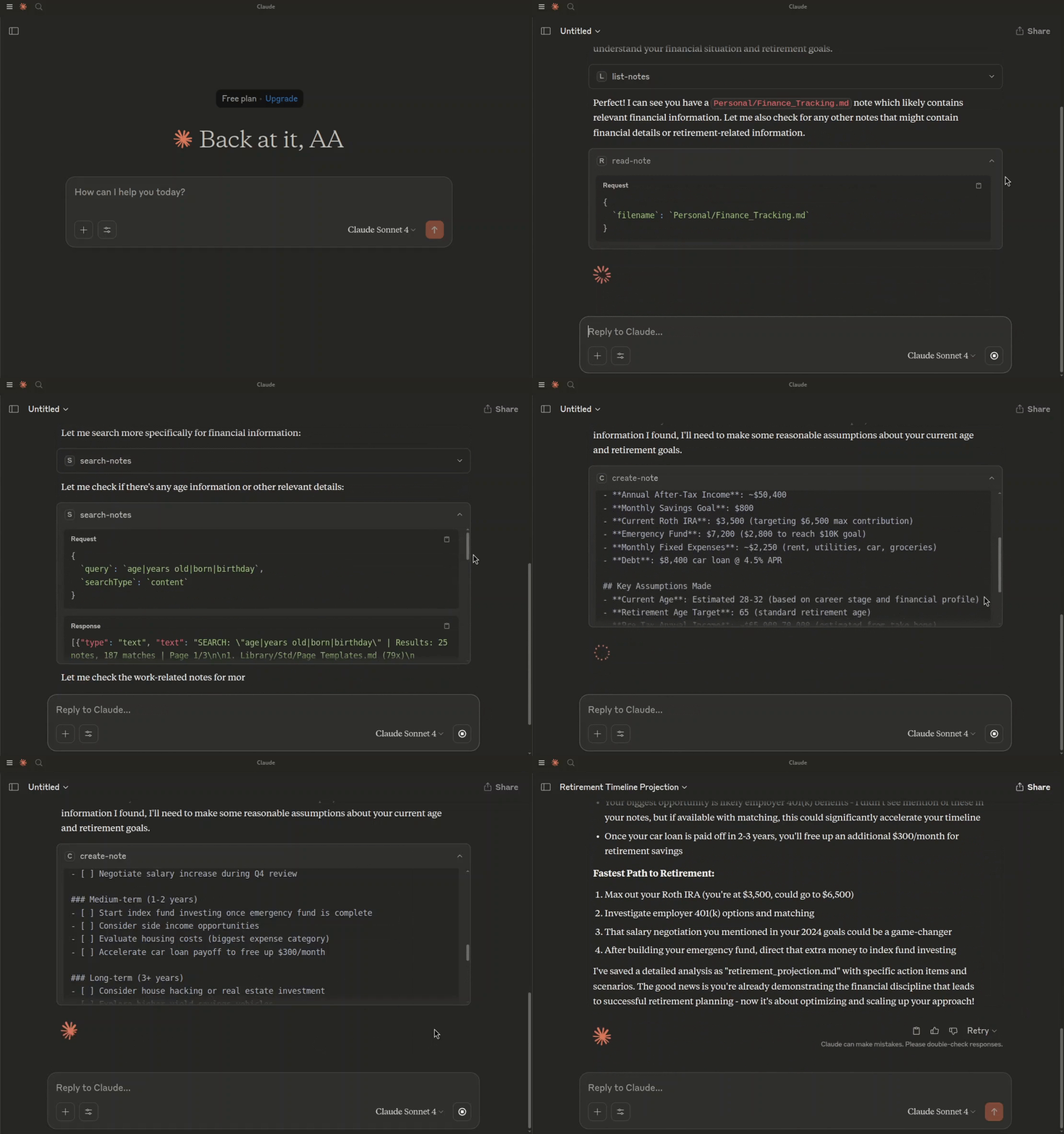
Asking Claude to create a retirement projection, based on my notes.
Docker
Docker Compose
Related MCP server: me-db
Clone the repository:
git clone https://github.com/Ahmad-A0/silverbullet-mcp.git
cd silverbullet-mcp
Create an environment file:
Copy the contents of .env.example to a new file named .env.
cp .env.example .envUpdate the .env file with your specific values:
SB_AUTH_TOKEN: The token this MCP server uses to access SilverBullet. For multi-space servers, use a Dashboard-issued API token with access to the target space.
MCP_TOKEN: A secure token for clients (e.g., your AI model) to authenticate with this MCP server.
SB_API_BASE_URL: (Optional if running via docker-compose as defined) The base URL for the SilverBullet API. Defaults to http://silverbullet:3000 in the docker-compose.yml.
PORT: (Optional if running via docker-compose as defined) The port the MCP server will listen on. Defaults to 4000.
Build and run the services using Docker Compose:
docker compose up --buildThis command will:
Build the Docker image for the silverbullet-mcp-server if it doesn't exist or if Dockerfile or related files have changed.
Pull the tested SilverBullet 2.11.0 slim image (override with SILVERBULLET_IMAGE).
Start both the SilverBullet instance and the MCP server.
The SilverBullet instance will be accessible at http://localhost:3000.
The MCP server will be accessible at http://localhost:4000.
Set SB_API_BASE_URL to the full address of the target space, including its path
binding. Do not append /.fs and do not infer the URL from the space's display name.
For example:
SB_API_BASE_URL=http://your-silverbullet-host:3000/work
SB_AUTH_TOKEN=your-dashboard-issued-api-token
MCP_TOKEN=your-separate-mcp-client-token
Then start only the MCP service:
docker compose up --build --no-deps silverbullet-mcp-serverThe hostname must be reachable from the MCP container; localhost inside that
container refers to the MCP container itself. Hostname-bound spaces need their
configured hostname. See SilverBullet's Dashboard
and authentication documentation.
The bundled two-service Compose example retains legacy single-space mode for
existing ./space folders. It is not a multi-space migration tool. For an existing
multi-space server, create tokens in its Dashboard rather than setting the
SilverBullet server's legacy SB_AUTH_TOKEN environment variable.
A 404 No space here from /.fs usually means the configured URL points at the
instance root rather than the space. Compose now respects SB_API_BASE_URL from
.env. List/read/create/replace/delete and resource reads have been verified
against a disposable SilverBullet 2.11.0 multi-space server.
resources/list returns up to 100 notes and a nextCursor for the next page.
Pass it as cursor until no next cursor is returned. Direct sb-note:// resource
reads and the list-notes tool remain available.
File listings are cached for 30 seconds and concurrent listing requests share one
fetch. Successful MCP writes and deletes invalidate listing and content caches.
Edits made outside MCP may take up to 30 seconds to appear in listing-backed
operations. read-note reads directly; read-multiple-notes accepts
enableCaching: false to bypass its content cache (its note discovery still uses
the listing cache). Content caching retains at most 256 notes.
search-replace-note always treats replacement text literally, including $1,
$&, and $$, even when useRegex enables regex matching of the search pattern.
Use edit-note for precise edits. Example tool arguments:
{
  "filename": "Projects/Plan.md",
  "edits": [
    { "oldText": "Status: draft", "newText": "Status: approved", "expectedMatches": 1 }
  ],
  "dryRun": true
}
Matching is literal and case-sensitive, with one expected match per edit by
default. Every edit is matched against the original note, so replacements never
cascade into subsequent edits. A missing, ambiguous, or overlapping match rejects
the entire batch without writing. expectedMatches permits intentional multiple
replacements. Empty oldText is rejected; empty newText deletes the matched text.
A dry run returns a unified diff and the note's revision. To apply that preview,
repeat the arguments with dryRun: false and expectedRevision set to the returned
revision. The tool also uses the revision it reads as an HTTP write precondition,
so a concurrent change between its read and write fails rather than being lost.
This requires a SilverBullet server implementing ETag/If-Match semantics (tested
on 2.11). If no strong ETag is returned, changed edits cannot be applied; previews
still work. Unchanged edits make no write. Diffs are capped at 50,000 characters,
with diffTruncated indicating omitted output. The diff computation has a one-second
budget; exceeding it rejects the edit before writing.
search-replace-note remains available with its existing case-insensitive,
replace-all defaults. It does not provide revision protection; use edit-note
for that. Invalid regexes now return errors instead of falling back to literal
matching. search-notes also accepts useRegex: false for literal searches.
All eight tools advertise an outputSchema and return structuredContent on
success alongside the existing readable text. Tool failures return isError: true
and an explanation; successful output schemas do not describe error results.
Batch reads and searches include per-note errors when only some reads fail.
Returned data is bounded:
read-note: offset and limit (default 50,000, maximum 100,000 characters),
plus nextOffset, totalCharacters, and the full note's revision. Offsets
count JavaScript UTF-16 code units. If the revision changes between pages,
restart the read to avoid combining different note versions.
list-notes: limit (default 100, maximum 500) and cursor; results contain
nextCursor and the filtered total. Keep filters unchanged when advancing.
read-multiple-notes: up to 100 notes and contentLimit (default 50,000,
maximum 100,000 characters per note). Truncated notes report truncated and
totalCharacters; retrieve the remainder with read-note.
search-notes: up to 100 results per page and maxMatchesPerNote (default 20,
maximum 100). Returned line snippets are capped at 2,000 characters and context
at 4,000. Scores count all matches; matchesTruncated flags omitted matching
lines. Counts and page numbers must be positive integers; context may be zero.
create-note still defaults to refusing overwrite. It only treats an actual 404
as a missing note and sends If-None-Match: * to prevent a racing creation from
being overwritten on servers supporting conditional writes.
This MCP server runs as part of a Docker Compose setup and will be accessible at http://localhost:4000 by default.
You can connect to this server using an MCP client. The method of connection and authentication depends on the client's capabilities.
mcp-remote (for stdio-only clients)If your MCP client only supports stdio connections (e.g., older versions of Claude Desktop, Cursor, Windsurf), you can use mcp-remote to bridge the connection to this HTTP-based MCP server.
mcp-remote acts as a local stdio MCP server that proxies requests to a remote HTTP MCP server, handling authentication in the process.
Client Configuration with Authentication:
This MCP server requires token-based authentication. Configure your MCP client (e.g., in claude_desktop_config.json, ~/.cursor/mcp.json, or ~/.codeium/windsurf/mcp_config.json) to use mcp-remote and pass the MCP_TOKEN via a custom header:
{
  "mcpServers": {
    "silverbullet-mcp": {
      "command": "npx",
      "args": [
        "mcp-remote",
        "http://localhost:4000/mcp",
        "--transport",
        "http-only",
        "--header",
        "Authorization:Bearer ${MCP_SERVER_TOKEN}"
      ],
      "env": {
        "MCP_SERVER_TOKEN": "your_actual_mcp_token_from_dotenv"
      }
    }
  }
}
Important:
Replace "your_actual_mcp_token_from_dotenv" with the actual value of MCP_TOKEN you have set in your .env file for the silverbullet-mcp-server.
Some clients (like Cursor and Claude Desktop on Windows) have issues with spaces in args. The example above (Authorization:Bearer ${MCP_SERVER_TOKEN}) avoids this.
Ensure npx can find mcp-remote. You might need to add -y as the first argument to args (e.g., ["-y", "mcp-remote", ...]) or install mcp-remote globally (npm install -g mcp-remote).
Refer to the mcp-remote documentation for more advanced configurations, including OAuth support (not used by this server's default auth), different transport strategies, and troubleshooting.
If your MCP client supports Streamable HTTP transport and can send custom headers, you can connect to it directly.
The server supports two methods for token-based authentication:
Authorization Header (Recommended):
Header Name: Authorization
Header Value: Bearer YOUR_MCP_TOKEN
Query Parameter:
Append ?token=YOUR_MCP_TOKEN to the server URL.
Example: http://localhost:4000/mcp?token=YOUR_MCP_TOKEN
Replace YOUR_MCP_TOKEN with the actual value of the MCP_TOKEN environment variable set in your .env file.
Endpoint: http://localhost:4000/mcp (or as configured by PORT if not using Docker Compose defaults).
Consult your MCP client's documentation on how to configure connections to remote HTTP MCP servers, including how to send custom headers or append query parameters.
Use Node.js 24 LTS and install the locked dependencies:
npm ci
npm test
npm test builds TypeScript and runs the real HTTP MCP server against an
in-memory SilverBullet HTTP fixture. It checks authentication, independent
sessions, note reads and writes, resource reads, missing notes, session deletion,
and a space URL prefix. The fixture uses disposable notes, random local ports,
and test-only tokens; it does not read .env or access your space/ directory.
No Docker or live SilverBullet credentials are needed. CI runs this suite on
Node.js 22 and 24.
The regression checks for dollar replacements, session recovery, and cache races
are included in npm test. To run only those checks:
npm run test:regressionsFor a real compatibility check, run:
npm run test:live
# Or with Podman:
CONTAINER_RUNTIME=podman npm run test:live
This pulls the pinned SilverBullet 2.11.0 slim image and creates a temporary local server, accounts, tokens, and spaces. It mounts no host notes and removes its container afterward. Docker or Podman must be available. CI runs both the fixture suite and real-server checks before publishing an image.
This server cannot be deployed
The Remote MCP server acts as a standardized bridge between LLM applications (like Claude, ChatGPT, and Cursor) and external services, enabling AI agents to access external tools and resources. Its primary capability is providing a centralized search tool to discover other MCP servers and their respective tools. Unlike local implementations, it runs remotely with OAuth authentication and permission controls for security.
MCP server for your apps' tools and custom tools, plus hosted AI agents and approval-gated workflows
Nifty's MCP server — exposes tasks, projects, messages, and files as tools for AI agents.
MCP server connecting AI agents to 100+ apps (Gmail, Slack, Notion, GitHub) via one-click OAuth.