
Azure DevOps MCP Server
by AgentsGang
README.md
# ⭐ Azure DevOps MCP Server
Easily install the Azure DevOps MCP Server for VS Code or VS Code Insiders:
[](https://insiders.vscode.dev/redirect/mcp/install?name=ado&config=%7B%20%22type%22%3A%20%22stdio%22%2C%20%22command%22%3A%20%22npx%22%2C%20%22args%22%3A%20%5B%22-y%22%2C%20%22%40azure-devops%2Fmcp%22%2C%20%22%24%7Binput%3Aado_org%7D%22%5D%7D&inputs=%5B%7B%22id%22%3A%20%22ado_org%22%2C%20%22type%22%3A%20%22promptString%22%2C%20%22description%22%3A%20%22Azure%20DevOps%20organization%20name%20%20%28e.g.%20%27contoso%27%29%22%7D%5D)
[](https://insiders.vscode.dev/redirect/mcp/install?name=ado&quality=insiders&config=%7B%20%22type%22%3A%20%22stdio%22%2C%20%22command%22%3A%20%22npx%22%2C%20%22args%22%3A%20%5B%22-y%22%2C%20%22%40azure-devops%2Fmcp%22%2C%20%22%24%7Binput%3Aado_org%7D%22%5D%7D&inputs=%5B%7B%22id%22%3A%20%22ado_org%22%2C%20%22type%22%3A%20%22promptString%22%2C%20%22description%22%3A%20%22Azure%20DevOps%20organization%20name%20%20%28e.g.%20%27contoso%27%29%22%7D%5D)
This TypeScript project provides a **local** MCP server for Azure DevOps, enabling you to perform a wide range of Azure DevOps tasks directly from your code editor.
> 🚨 **Public Preview:** This project is in public preview. Tools and features may change before general availability.
## 📄 Table of Contents
1. [📺 Overview](#-overview)
2. [🏆 Expectations](#-expectations)
3. [⚙️ Supported Tools](#️-supported-tools)
4. [🔌 Installation & Getting Started](#-installation--getting-started)
5. [📝 Troubleshooting](#-troubleshooting)
6. [🎩 Examples & Best Practices](#-samples--best-practices)
7. [🙋♀️ Frequently Asked Questions](#️-frequently-asked-questions)
8. [📌 Contributing](#-contributing)
## 📺 Overview
The Azure DevOps MCP Server brings Azure DevOps context to your agents. Try prompts like:
- "List my ADO projects"
- "List ADO Builds for 'Contoso'"
- "List ADO Releases for 'Contoso'"
- "List ADO Repos for 'Contoso'"
- "List test plans for 'Contoso'"
- "List teams for project 'Contoso'"
- "List iterations for project 'Contoso'"
- "List my work items for project 'Contoso'"
- "List work items in current iteration for 'Contoso' project and 'Contoso Team'"
## 🏆 Expectations
The Azure DevOps MCP Server is built from tools that are concise, simple, focused, and easy to use—each designed for a specific scenario. We intentionally avoid complex tools that try to do too much. The goal is to provide a thin abstraction layer over the REST APIs, making data access straightforward and letting the language model handle complex reasoning.
## ⚙️ Supported Tools
Interact with these Azure DevOps services:
### 🧿 Core
- **core_list_project_teams**: Retrieve a list of teams for the specified Azure DevOps project.
- **core_list_projects**: Retrieve a list of projects in your Azure DevOps organization.
- **core_get_identity_ids**: Retrieve Azure DevOps identity IDs for a list of unique names.
### ⚒️ Work
- **work_list_team_iterations**: Retrieve a list of iterations for a specific team in a project.
- **work_create_iterations**: Create new iterations in a specified Azure DevOps project.
- **work_assign_iterations**: Assign existing iterations to a specific team in a project.
### 📅 Work Items
- **wit_my_work_items**: Retrieve a list of work items relevant to the authenticated user.
- **wit_list_backlogs**: Retrieve a list of backlogs for a given project and team.
- **wit_list_backlog_work_items**: Retrieve a list of backlogs for a given project, team, and backlog category.
- **wit_get_work_item**: Get a single work item by ID.
- **wit_get_work_items_batch_by_ids**: Retrieve a list of work items by IDs in batch.
- **wit_update_work_item**: Update a work item by ID with specified fields.
- **wit_create_work_item**: Create a new work item in a specified project and work item type.
- **wit_list_work_item_comments**: Retrieve a list of comments for a work item by ID.
- **wit_get_work_items_for_iteration**: Retrieve a list of work items for a specified iteration.
- **wit_add_work_item_comment**: Add a comment to a work item by ID.
- **wit_add_child_work_items**: Create one or more child work items of a specific work item type for the given parent ID.
- **wit_link_work_item_to_pull_request**: Link a single work item to an existing pull request.
- **wit_get_work_item_type**: Get a specific work item type.
- **wit_get_query**: Get a query by its ID or path.
- **wit_get_query_results_by_id**: Retrieve the results of a work item query given the query ID.
- **wit_update_work_items_batch**: Update work items in batch.
- **wit_work_items_link**: Link work items together in batch.
- **wit_work_item_unlink**: Unlink one or many links from a work item.
#### Deprecated Tools
- **wit_add_child_work_item**: Replaced by `wit_add_child_work_items` to allow creating one or more child items per call.
- **wit_close_and_link_workitem_duplicates**: This tool is no longer needed. Finding and marking duplicates can be done with other tools.
### 📁 Repositories
- **submit_pull_request_vote**: Submit your final reviewer vote on a pull request (approve, reject, wait, etc.).
- **repo_list_repos_by_project**: Retrieve a list of repositories for a given project.
- **repo_list_pull_requests_by_repo**: Retrieve a list of pull requests for a given repository.
- **repo_list_pull_requests_by_project**: Retrieve a list of pull requests for a given project ID or name.
- **repo_list_branches_by_repo**: Retrieve a list of branches for a given repository.
- **repo_list_my_branches_by_repo**: Retrieve a list of your branches for a given repository ID.
- **repo_list_pull_requests_by_commits**: List pull requests associated with commits.
- **repo_list_pull_request_threads**: Retrieve a list of comment threads for a pull request.
- **repo_list_pull_request_thread_comments**: Retrieve a list of comments in a pull request thread.
- **repo_get_repo_by_name_or_id**: Get the repository by project and repository name or ID.
- **repo_get_branch_by_name**: Get a branch by its name.
- **repo_get_pull_request_by_id**: Get a pull request by its ID.
- **repo_create_pull_request**: Create a new pull request.
- **repo_update_pull_request_status**: Update the status of an existing pull request to active or abandoned.
- **repo_update_pull_request**: Update various fields of an existing pull request (title, description, draft status, target branch).
- **repo_update_pull_request_reviewers**: Add or remove reviewers for an existing pull request.
- **repo_reply_to_comment**: Replies to a specific comment on a pull request.
- **repo_resolve_comment**: Resolves a specific comment thread on a pull request.
- **repo_search_commits**: Searches for commits.
- **repo_create_pull_request_thread**: Creates a new comment thread on a pull request.
### 🛰️ Builds
- **build_get_definitions**: Retrieve a list of build definitions for a given project.
- **build_get_definition_revisions**: Retrieve a list of revisions for a specific build definition.
- **build_get_builds**: Retrieve a list of builds for a given project.
- **build_get_log**: Retrieve the logs for a specific build.
- **build_get_log_by_id**: Get a specific build log by log ID.
- **build_get_changes**: Get the changes associated with a specific build.
- **build_run_build**: Trigger a new build for a specified definition.
- **build_get_status**: Fetch the status of a specific build.
- **build_update_build_stage**: Update the stage of a specific build.
### 🚀 Releases
- **release_get_definitions**: Retrieve a list of release definitions for a given project.
- **release_get_releases**: Retrieve a list of releases for a given project.
### 🧪 Test Plans
- **testplan_create_test_plan**: Create a new test plan in the project.
- **testplan_create_test_case**: Create a new test case work item.
- **testplan_add_test_cases_to_suite**: Add existing test cases to a test suite.
- **testplan_list_test_plans**: Retrieve a paginated list of test plans from an Azure DevOps project. Allows filtering for active plans and toggling detailed information.
- **testplan_list_test_cases**: Get a list of test cases in the test plan.
- **testplan_show_test_results_from_build_id**: Get a list of test results for a given project and build ID.
### 🔎 Search
- **search_code**: Get code search results for a given search text.
- **search_wiki**: Get wiki search results for a given search text.
- **search_workitem**: Get work item search results for a given search text.
## 🔌 Installation & Getting Started
For the best experience, use Visual Studio Code and GitHub Copilot. See the [getting started documentation](./docs/GETTINGSTARTED.md) to use our MCP Server with other tools such as Visual Studio 2022, Claude Code, and Cursor.
### Prerequisites
1. Install [VS Code](https://code.visualstudio.com/download) or [VS Code Insiders](https://code.visualstudio.com/insiders)
2. Install [Node.js](https://nodejs.org/en/download) 20+
3. Install [Azure CLI](https://learn.microsoft.com/en-us/cli/azure/install-azure-cli?view=azure-cli-latest)
4. Open VS Code in an empty folder
### 🔑 Personal Access Token (PAT) Authentication
You can use a Personal Access Token (PAT) for authentication instead of Azure CLI. To enable PAT authentication, set the following environment variables before starting the MCP server:
```bash
AZURE_DEVOPS_AUTH_TYPE = "pat"
AZURE_DEVOPS_PERSONAL_ACCESS_TOKEN = "<your-pat-token>"
```
If `AZURE_DEVOPS_AUTH_TYPE` is set to `pat`, the server will use the PAT for authentication. Otherwise, it will use Azure CLI or other Azure Identity credentials.
### Azure Login
If you are not using PAT authentication, ensure you are logged in to Azure DevOps via the Azure CLI:
```sh
az login
```
### Installation
#### ✨ One-Click Install
[](https://insiders.vscode.dev/redirect/mcp/install?name=ado&config=%7B%20%22type%22%3A%20%22stdio%22%2C%20%22command%22%3A%20%22npx%22%2C%20%22args%22%3A%20%5B%22-y%22%2C%20%22%40azure-devops%2Fmcp%22%2C%20%22%24%7Binput%3Aado_org%7D%22%5D%7D&inputs=%5B%7B%22id%22%3A%20%22ado_org%22%2C%20%22type%22%3A%20%22promptString%22%2C%20%22description%22%3A%20%22Azure%20DevOps%20organization%20name%20%20%28e.g.%20%27contoso%27%29%22%7D%5D)
[](https://insiders.vscode.dev/redirect/mcp/install?name=ado&quality=insiders&config=%7B%20%22type%22%3A%20%22stdio%22%2C%20%22command%22%3A%20%22npx%22%2C%20%22args%22%3A%20%5B%22-y%22%2C%20%22%40azure-devops%2Fmcp%22%2C%20%22%24%7Binput%3Aado_org%7D%22%5D%7D&inputs=%5B%7B%22id%22%3A%20%22ado_org%22%2C%20%22type%22%3A%20%22promptString%22%2C%20%22description%22%3A%20%22Azure%20DevOps%20organization%20name%20%20%28e.g.%20%27contoso%27%29%22%7D%5D)
After installation, select GitHub Copilot Agent Mode and refresh the tools list. Learn more about Agent Mode in the [VS Code Documentation](https://code.visualstudio.com/docs/copilot/chat/chat-agent-mode).
#### 🧨 Install from Public Feed (Recommended)
This installation method is the easiest for all users of Visual Studio Code.
🎥 [Watch this quick start video to get up and running in under two minutes!](https://youtu.be/EUmFM6qXoYk)
##### Steps
In your project, add a `.vscode\mcp.json` file with the following content:
```json
{
"inputs": [
{
"id": "ado_org",
"type": "promptString",
"description": "Azure DevOps organization name (e.g. 'contoso')"
}
],
"servers": {
"ado": {
"type": "stdio",
"command": "npx",
"args": ["-y", "@azure-devops/mcp", "${input:ado_org}"]
}
}
}
```
Save the file, then click 'Start'.
<img src="./docs/media/start-mcp-server.gif" alt="start mcp server" width="250"/>
In chat, switch to [Agent Mode](https://code.visualstudio.com/blogs/2025/02/24/introducing-copilot-agent-mode).
Click "Select Tools" and choose the available tools.
<img src="./docs/media/configure-mcp-server-tools.gif" alt="configure mcp server tools" width="300"/>
Open GitHub Copilot Chat and try a prompt like `List ADO projects`.
> 💥 We strongly recommend creating a `.github\copilot-instructions.md` in your project and copying the contents from this [copilot-instructions.md](./.github/copilot-instructions.md) file. This will enhance your experience using the Azure DevOps MCP Server with GitHub Copilot Chat.
See the [getting started documentation](./docs/GETTINGSTARTED.md) to use our MCP Server with other tools such as Visual Studio 2022, Claude Code, and Cursor.
## 📝 Troubleshooting
See the [Troubleshooting guide](./docs/TROUBLESHOOTING.md) for help with common issues and logging.
## 🎩 Examples & Best Practices
Explore example prompts in our [Examples documentation](./docs/EXAMPLES.md).
For best practices and tips to enhance your experience with the MCP Server, refer to the [How-To guide](./docs/HOWTO.md).
## 🙋♀️ Frequently Asked Questions
For answers to common questions about the Azure DevOps MCP Server, see the [Frequently Asked Questions](./docs/FAQ.md).
## 📌 Contributing
We welcome contributions! During preview, please file issues for bugs, enhancements, or documentation improvements.
See our [Contributions Guide](./CONTRIBUTING.md) for:
- 🛠️ Development setup
- ✨ Adding new tools
- 📝 Code style & testing
- 🔄 Pull request process
## 🤝 Code of Conduct
This project follows the [Microsoft Open Source Code of Conduct](https://opensource.microsoft.com/codeofconduct/).
For questions, see the [FAQ](https://opensource.microsoft.com/codeofconduct/faq/) or contact [open@microsoft.com](mailto:open@microsoft.com).
## 📈 Project Stats
[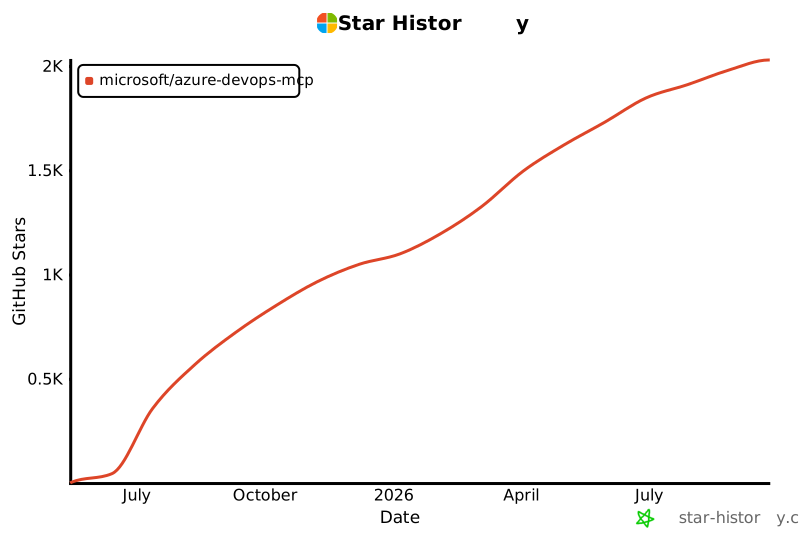](https://star-history.com/#microsoft/azure-devops-mcp)
## 🏆 Hall of Fame
Thanks to all contributors who make this project awesome! ❤️
[](https://github.com/microsoft/azure-devops-mcp/graphs/contributors)
> Generated with [contrib.rocks](https://contrib.rocks)
## License
Licensed under the [MIT License](./LICENSE.md).
---
_Trademarks: This project may include trademarks or logos for Microsoft or third parties. Use of Microsoft trademarks or logos must follow [Microsoft’s Trademark & Brand Guidelines](https://www.microsoft.com/en-us/legal/intellectualproperty/trademarks/usage/general). Third-party trademarks are subject to their respective policies._
<!-- version: 2023-04-07 [Do not delete this line, it is used for analytics that drive template improvements] -->
This server cannot be deployed
Maintenance
ActivityInactive
ResponsivenessNo issues