
mathematica-mcp
# Mathematica MCP
**A front-end / notebook automation layer for Mathematica, built for AI agents.**
Your AI agent can write Mathematica code. This server lets it *run* that code in your live Mathematica session: create and edit notebooks, build interactive `Manipulate` panels, capture screenshots, verify derivations step by step, and read `.nb` files even without a kernel. Works with Claude, Cursor, VS Code, Codex, and Gemini.
It runs **beside** the official [Wolfram Local MCP](https://www.wolfram.com/artificial-intelligence/mcp/local), not instead of it: Wolfram's server is the reference evaluator and documentation surface; this one owns the live notebook. See [How it compares](#how-it-compares).
[](https://opensource.org/licenses/MIT)
[](https://www.python.org/downloads/)
[](https://www.wolfram.com/mathematica/)
[](https://github.com/AbhiRawat4841/mathematica-mcp/actions/workflows/ci.yml)
[](https://github.com/AbhiRawat4841/mathematica-mcp/releases)
[](https://pypi.org/project/mathematica-mcp-full/)
> Upgrading from an earlier version? See the [Migration Guide](docs/MIGRATION.md).
### Watch it in action
[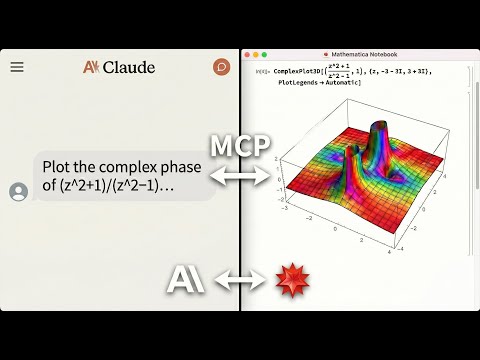](https://www.youtube.com/watch?v=TjGSkvVyc1Y)
*An AI agent solving math, generating plots, and controlling a live Mathematica notebook. Errors are returned directly to the agent, no copy-pasting notebook output back into chat.*
---
## Why this exists
LLMs can write Wolfram Language, but they cannot run it, see the result, or fix their own mistakes. This server closes that loop:
- **Live notebook control**: the agent creates, edits, evaluates, and screenshots real notebooks in your running Mathematica front end. Interactive content (`Manipulate`, `Dynamic`, sliders) renders as live panels.
- **Fast by default**: computation runs on a persistent kernel session that starts warming the moment the server launches; calls return in milliseconds, not the ~13 seconds of a cold `wolframscript` start per request.
- **Self-debugging agents**: Mathematica errors flow back with a `suggested_fix` and, when derivable, a ready-to-run `retry_with` call. No copying red text from the notebook into chat.
- **Derivation checking**: `verify_derivation` validates a chain of mathematical steps and pinpoints the first invalid one.
- **Reads notebooks without a license**: `read_notebook_file` parses `.nb` files in pure Python when no kernel is available (a kernel is used for higher fidelity when present).
- **Local and private**: core execution stays on your machine. Cloud services are contacted only by opt-in tools like `wolfram_alpha`.
---
## What you can ask for
**"Integrate x^2 sin(x) from 0 to pi, then verify the result."**
```text
evaluate("Integrate[x^2 Sin[x], {x, 0, Pi}]") => -4 + Pi^2
verify_derivation(steps=["Integrate[x^2 Sin[x], {x, 0, Pi}]", "-4 + Pi^2"])
=> Step 1 → 2: ✓ VALID
All steps are valid!
```
**"Plot the sombrero function in a new notebook."**
```text
notebooks(action="create", title="Sombrero")
evaluate("Plot3D[Sinc[Sqrt[x^2+y^2]], {x,-4,4}, {y,-4,4}]", target="notebook")
=> [3D surface plot rendered in the live notebook]
```
**"Give me a Chebyshev polynomial explorer with a degree slider."**
```text
evaluate("Manipulate[Plot[ChebyshevT[n, x], {x, -1, 1}], {n, 0, 30, 1}]", target="notebook")
=> [live slider panel in the notebook; interactive code is auto-routed to the front end]
```
---
## Quick start
**Prerequisites:** [Mathematica 14.0+](https://www.wolfram.com/mathematica/) (15+ recommended) with `wolframscript` on your PATH, and the [uv](https://docs.astral.sh/uv/) package manager.
```bash
# One command, pick your client:
uvx mathematica-mcp-full setup claude-desktop # or: cursor | vscode | codex | gemini | claude-code
```
Restart Mathematica (so the addon loads) and restart your editor. Then verify:
```bash
uvx mathematica-mcp-full doctor
```
Done - ask your agent for a plot.
> The PyPI package and CLI are named **`mathematica-mcp-full`**.
Manual installation, per-client configuration details, and troubleshooting live in the **[Installation Guide](docs/installation.md)**.
---
## The lean default
Agents see a consolidated **12-tool** surface (~2.9k tokens of schema) instead of the classic 82 tools (~15k tokens) - a 5x cut in the context an agent pays before doing any work, with the same engine underneath. Prefer everything? `MATHEMATICA_PROFILE=classic` restores the full pre-1.0 surface, and `MATHEMATICA_TOOLSETS` adds opt-in extras to lean.
- Tool reference: **[Technical Reference - Lean Profile Tools](docs/technical-reference.md#complete-tool-reference)**
- Profiles and toolsets: **[Technical Reference - Tool Profiles](docs/technical-reference.md#tool-profiles)**
- How it stays fast: **[Technical Reference - Architecture](docs/technical-reference.md#architecture)**
---
## How it compares
Runs **alongside** the official Wolfram Local MCP (`setup <client> --with-official` configures both side by side). The differentiator is live notebook / front-end automation:
| Capability | Official Wolfram Local MCP | **This MCP** |
|------------|:--------------------------:|:------------:|
| Wolfram-Language evaluation | `WolframLanguageEvaluator` | `evaluate` (warm persistent kernel) |
| Wolfram Alpha | `WolframAlpha` | `wolfram_alpha` (opt-in `cloud`) |
| Symbol docs / definitions | `SymbolDefinition`, `CreateSymbolDoc` | `symbols` extra (`get_symbol_info`) |
| Read a notebook file | `ReadNotebook` (needs kernel) | **`read_notebook_file` - works with no kernel / license (Python fallback)** |
| Write a notebook file | `WriteNotebook` | `notebooks`, `edit_cells` (live front-end) |
| Live notebook control (create/edit/eval/screenshot) | No | **Yes** |
| Interactive UIs (sliders, `Manipulate`) | No | **Yes, in the live front-end** |
| Derivation verification | No | **`verify_derivation`** |
| Doc search / code inspection / test reports | `CodeInspector`, `TestReport` | Deliberately **not duplicated** - use the official server |
---
## Who this is for
| Audience | Use case |
|----------|----------|
| Researchers using LLM coding assistants | Run Mathematica from Claude/Cursor/VS Code without leaving your editor |
| Data scientists | Import, transform, and visualize data through natural language |
| Educators | Create interactive Mathematica notebooks through AI conversation |
| **Not for** | Production web services, untrusted multi-tenant environments |
---
## Documentation
* **[Installation Guide](docs/installation.md)**: manual setup, per-client configs, troubleshooting
* **[Migration Guide](docs/MIGRATION.md)**: upgrading between versions
* **[Technical Reference](docs/technical-reference.md)**: architecture, tools, and configuration
* **[Security Model](SECURITY.md)**: threat model, permissions, and vulnerability reporting
* **[Benchmarks](docs/benchmarks.md)**: performance data and reproduction steps
* **[Examples](docs/examples/)**: worked agent conversations (symbolic calculus, notebook analysis)
* **[Contributing](CONTRIBUTING.md)**: development setup, testing, and PR process
* **[Changelog](CHANGELOG.md)**: version history
---
## License
MIT License
TDQS
Scored across 82 tools
Most tools have clearly distinct purposes guided by detailed descriptions and usage notes (e.g., PRIMARY vs LEGACY vs ADVANCED). Some overlap exists between execute_code, evaluate_cell, and write_cell, but the descriptions clarify when to use each.
Naming is moderately consistent with a mix of snake_case (e.g., batch_commands) and camelCase (e.g., interpret_natural_language). Some tools use verb_noun pattern, others do not, leading to a readable but not fully uniform style.
With 82 tools, the server is heavy but the Mathematica domain is broad, covering computation, notebooks, symbolic math, and external knowledge. The count is borderline; some tools are legacy or narrow, but they serve specific needs.
The tool surface covers core CRUD workflows (notebooks, variables, packages, caching) and extensive mathematical operations, unit conversion, entity lookup, and repository search. Minor gaps exist (e.g., no explicit matrix operations) but are covered by generic code execution.