
Valmera AI Video Editor
README.md
# Valmera MCP server — the video editing MCP server for real footage
**The world's most advanced AI video editor. [Start editing](https://valmera.io/chatgpt-video-editor?utm_source=valmera_mcp_docs&utm_medium=repository&utm_campaign=mcp_chatgpt_workflow#first-brief).**
Join thousands of creators. Bring your footage, describe the result, and refine the edit through conversation.
**Valmera** is an agentic AI video editor. This hosted [Model Context Protocol](https://modelcontextprotocol.io) server lets Claude, ChatGPT, Gemini CLI, Cursor, VS Code, Codex or any MCP client edit video you already recorded. The assistant reads the transcript and frames, then cuts silences and filler words, adds word-timed captions, reframes to 9:16, adds b-roll, music and sound effects, and makes shorts from long videos. It renders a preview, watches the result, and exports a full-quality MP4 from your original file.
**[Connect your assistant](https://valmera.io/mcp/connect?utm_source=valmera_mcp_docs&utm_medium=repository&utm_campaign=mcp_chatgpt_workflow) · [Open an editing brief in Valmera](https://valmera.io/chatgpt-video-editor?utm_source=valmera_mcp_docs&utm_medium=repository&utm_campaign=mcp_chatgpt_workflow#first-brief) · [ChatGPT first-edit walkthrough](docs/CHATGPT.md)**
## Inspect a recorded edit
Start with the change you need to make. These first-party examples include actual files and recorded checks; each guide explains its source, method and limits.
| Your task | Open the recorded example | What you can inspect |
| --- | --- | --- |
| Remove an expired offer while keeping the rest of a product video | [Product-offer revision](docs/PRODUCT-OFFER-REMOVAL-EXAMPLE.md) | Before/after final MP4s and edit records. One separate text element was removed; the two final exports have identical decoded audio under the stated settings. |
| Restyle captions without changing an approved cut | [Caption-style comparison](docs/CAPTION-STYLE-EXAMPLE.md) | Two 9.6-second previews, sampled caption frames and the final export. The comparison previews retain the same selection and decoded audio. |
| Display Spanish captions over the original English soundtrack | [Subtitle-language comparison](docs/SUBTITLE-TRANSLATION-EXAMPLE.md) | English/Spanish comparison previews and a later export revision. Spanish wording was supplied by the assistant; the run is not an independent translation-quality assessment. |
| Shorten one selected passage after reviewing a first cut | [MCP cut, revision and export](docs/MCP-RECORDED-EDIT.md) | Source, previews, final MP4, exact tool arguments and sampled join frames from a silent motion graphic. |
| Try a manual browser edit before connecting an assistant | [Freeze frame](docs/FREEZE-FRAME-EXAMPLE.md) or [B&W color preset](docs/COLOR-GRADE-EXAMPLE.md) | Original source, unchanged browser-exported WebM, sampled frames and measured timing. These runs test browser controls, not AI editing. |
**Compare the final download as well as the preview.** The recorded MCP exports include Valmera branding and an end card; their runtimes differ from the edited program. The offer-removal guide also discloses an export-check workaround. Read the relevant guide before treating an example as evidence for your own task. These are individual demonstrations, not a general creative-quality score or a competitive benchmark.
For an embedded example, [watch the styled vertical excerpt](#watch-a-real-video-edit) or [inspect the Spanish-caption sample](#change-the-captions-keep-the-recorded-soundtrack).
## Choose your workflow
- **Choosing an online editor:** compare [ten observed Google result pages, storage approaches and a save/reopen/revise trial](docs/ONLINE-VIDEO-EDITOR.md). Use the [blank project handoff record](docs/ONLINE-EDITOR-TRIAL.txt) when testing your shortlist.
- **Choosing an AI editing agent:** use the [source-linked workflow comparison](docs/VIDEO-EDITING-AGENTS.md), then run the [shared edit-and-revise evaluation kit](docs/EDITOR-EVALUATION.md) on the same footage.
- **Editing your recording:** [browse guides by task](docs/README.md) for interviews, podcasts, YouTube, webinars, screen recordings, product footage and more. Guides include reusable briefs, review criteria and delivery worksheets.
- **Working across several recordings:** start with the [batch-editing pilot and delivery record](docs/BATCH-VIDEO-EDITING.md). For software lessons, use the [screen-recording cut and revision guide](docs/SCREEN-RECORDING-TUTORIALS.md).
- **Cleaning up sound:** use the [noise-removal comparison and listening trial](docs/VIDEO-AUDIO-NOISE-REMOVAL.md) to evaluate the exported audio on a representative passage.
## Make your first edit
1. Choose [Valmera Studio or your own connected assistant](docs/CLIENTS.md#choose-the-plan-for-your-editing-route). Account creation and uploads are free; AI editing requires an eligible subscription. Check [current plans](https://valmera.io/subscribe); your assistant provider's charges are separate.
2. Bring footage you can use and write a concrete brief: the desired selection, title or captions, framing, sound and output. The [interactive brief builder](https://valmera.io/prompts#prompt-builder) and [creator workflow briefs](docs/CREATOR-WORKFLOWS.md) can help.
3. Review the preview, request one focused revision, then inspect the downloaded export. Keep the project and reviewed version so you can revise it later. Follow the [complete upload-to-export workflow](docs/WORKFLOW.md).
```text
Endpoint https://valmera.io/mcp/server
Transport Streamable HTTP
Auth OAuth 2.1 (dynamic client registration + PKCE S256), or a bearer token from https://valmera.io/mcp
Registry io.valmera/video-editor
```
- **Product:** [valmera.io](https://valmera.io)
- **Setup for every client:** [valmera.io/mcp/setup](https://valmera.io/mcp/setup)
- **Tool reference:** [valmera.io/mcp/tools](https://valmera.io/mcp/tools)
- **Live server card:** [/.well-known/mcp/server-card.json](https://valmera.io/.well-known/mcp/server-card.json)
**Hosted editing, without a local video editor:** Valmera runs the MCP endpoint, stores your
project and renders previews and exports. You connect a compatible assistant and authorize
your account; there is no video server to deploy or API wrapper to build. See
[what Valmera hosts and what you set up](docs/CLIENTS.md#what-valmera-hosts-and-what-you-set-up)
for client requirements, upload and review responsibilities, and recorded workflow evidence.
## Connect your assistant
Want to see the output first? [Inspect a real edit below](#watch-a-real-video-edit), or follow the client-specific connection instructions here.
### Claude (claude.ai and Claude Desktop)
Settings → Connectors → **Add custom connector** → name it `Valmera`. Paste `https://valmera.io/mcp/server` and sign in when prompted. [Step-by-step guide](https://valmera.io/mcp/claude).
### Claude Code
```sh
claude mcp add --transport http valmera https://valmera.io/mcp/server
```
Then run `/mcp` inside Claude Code and choose **Authenticate**. [Guide](https://valmera.io/mcp/claude-code).
### Cursor — `~/.cursor/mcp.json`
```json
{
"mcpServers": {
"valmera": { "url": "https://valmera.io/mcp/server" }
}
}
```
### VS Code (GitHub Copilot agent mode) — `.vscode/mcp.json`
```json
{
"servers": {
"valmera": { "type": "http", "url": "https://valmera.io/mcp/server" }
}
}
```
### Windsurf — `~/.codeium/windsurf/mcp_config.json`
```json
{
"mcpServers": {
"valmera": { "serverUrl": "https://valmera.io/mcp/server" }
}
}
```
### ChatGPT
Add Valmera as a custom MCP server with OAuth at `https://valmera.io/mcp/server`, complete sign-in, and **install the resulting plugin**. Select Valmera with `@` in a new conversation. Account and workspace permissions apply. [Connection and first-edit walkthrough](docs/CHATGPT.md) · [Guided setup](https://valmera.io/mcp/connect?utm_source=valmera_mcp_docs&utm_medium=repository&utm_campaign=mcp_chatgpt_workflow).
### Codex CLI
For the connection plus guided setup and three editing workflows, see the [ChatGPT and Codex plugin package](plugins/openai/README.md). The repository supplies a marketplace for supported local clients; public Directory approval is separate.
```sh
codex mcp add valmera --url https://valmera.io/mcp/server
codex mcp login valmera
```
Or add `[mcp_servers.valmera]` with `url = "https://valmera.io/mcp/server"` to `~/.codex/config.toml`.
### Gemini CLI
```sh
gemini mcp add --transport http valmera https://valmera.io/mcp/server
```
Then open Gemini CLI, run `/mcp auth valmera` and sign in.
See the [Gemini CLI editing guide](https://valmera.io/mcp/gemini-cli) for the current account requirements and a first-edit walkthrough.
The [Gemini video workflow companion](docs/GEMINI-VIDEO-EDITING.md) explains native video features, planning in chat, and editing through the connected CLI.
### Antigravity
Use the [native Valmera plugin](plugins/antigravity/README.md) for the hosted connection and three editing skills. It includes a pinned installation command, a first-edit prompt and an alternative workspace MCP configuration. Antigravity uses `serverUrl` in `.agents/mcp_config.json`; do not copy the Gemini CLI configuration unchanged.
### Any stdio-only client
```json
{
"mcpServers": {
"valmera": { "command": "npx", "args": ["-y", "mcp-remote", "https://valmera.io/mcp/server"] }
}
}
```
There are more clients (Zed, Cline, Continue, Goose, LibreChat, MCP Inspector) in [docs/CLIENTS.md](docs/CLIENTS.md).
**First message to try:** *"List my Valmera projects."* An empty list still means the connection works.
## Watch a real video edit
This published Valmera shorts example turns selected footage from a 49-minute talk into a 33.24-second vertical story. Compare the same opening before styling and after framing, captions, graphics and color:
| Selected footage before styling | Styled vertical excerpt |
| --- | --- |
| [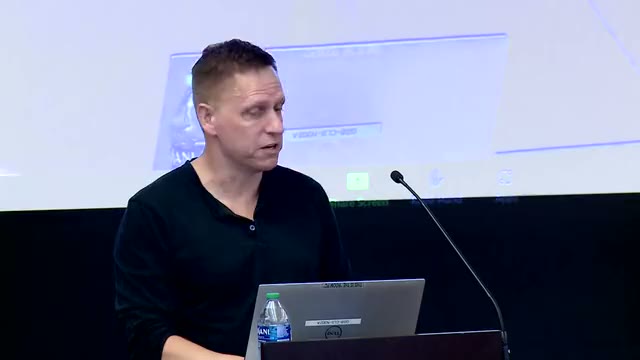](https://valmera.io/showcase/raw-thiel-hook-list.mp4) | [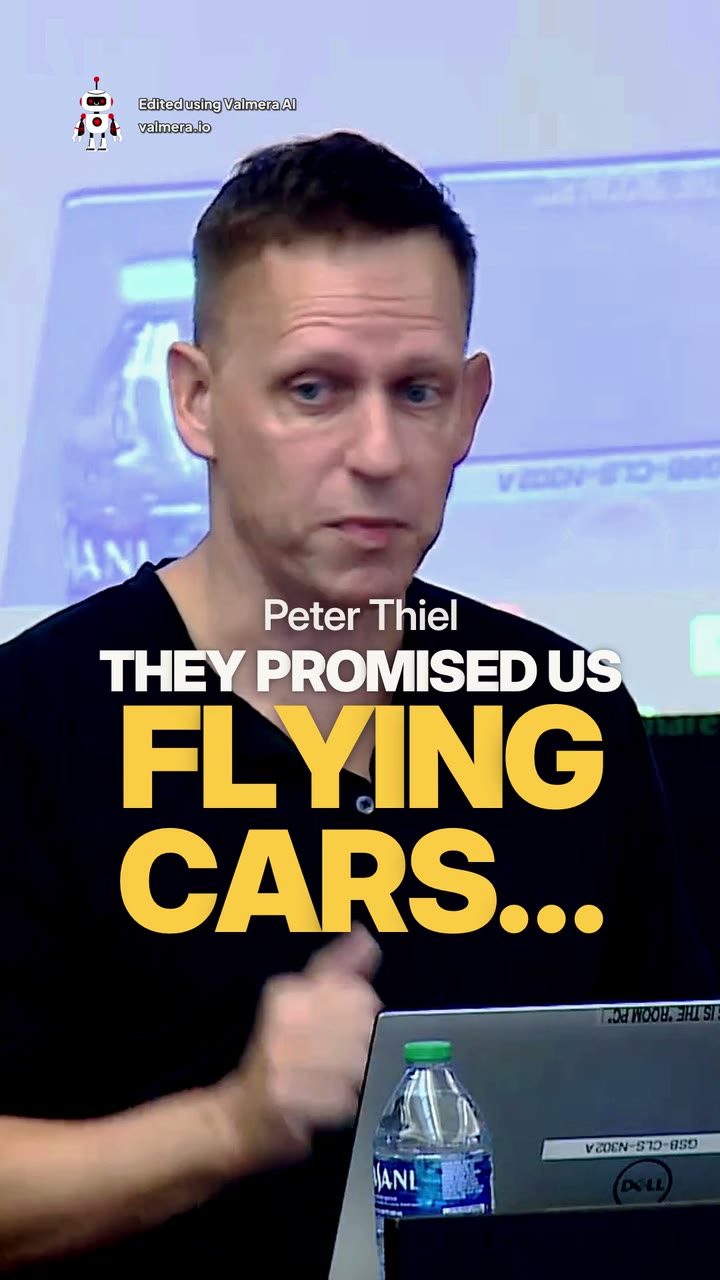](https://valmera.io/showcase/loop-thiel-hook-list.mp4) |
Click either image to play its **silent 9.2-second excerpt**. The first clip already has its source ranges selected; it is not the uncut recording. [Watch the complete export with sound](https://valmera.io/showcase/thiel-flying-cars.mp4) to inspect the speech and joins. That historical file lasts approximately 38.27 seconds including its branded ending; its branding does not establish current plan terms.
The [complete editing walkthrough](https://valmera.io/blog/ai-video-editing-complete-guide?utm_source=valmera_mcp_docs&utm_medium=repository&utm_campaign=real_edit_evidence#real-edit) includes four intermediate stages, the seven-cut map, the operation record and unresolved review notes. This demonstrates a Valmera shorts workflow, not a timed MCP-client test, a claim that one literal prompt produced every step, or a competitor benchmark.
Footage: [The End of the Future with Peter Thiel](https://www.youtube.com/watch?v=ibR_ULHYirs), Stanford Classical Liberalism Initiative. Neither the speaker nor the source organization is presented as a Valmera customer or endorser.
For a repeatable test on your own shortlist, use the [edit-and-revise evaluation kit](docs/EDITOR-EVALUATION.md). For your own recording, start with a [creator workflow brief](docs/CREATOR-WORKFLOWS.md).
### Change the captions, keep the recorded soundtrack
These are frames from two actual Valmera previews of the same 9.6-second *Sintel* excerpt. We supplied Spanish wording for two English phrases, applied it through the product, and rendered a new preview. Click an image to open its video file.
| Before: English captions, version 4 | After: supplied Spanish captions, version 5 |
| --- | --- |
| [](docs/evaluation/sintel-captions-20261107/clean-v4-preview.mp4) | [](docs/evaluation/sintel-spanish-20261107/spanish-v5-preview.mp4) |
The decoded audio samples match between these two previews. This is a caption change with the existing English soundtrack, not dubbing. The Spanish text was supplied by the assistant and has not received independent native-speaker review; this run does not establish automatic translation quality.
The Spanish comparison draft needed an ending correction before export. The [recorded walkthrough](docs/SUBTITLE-TRANSLATION-EXAMPLE.md) explains that revision and provides the [version 6 final MP4](docs/evaluation/sintel-spanish-20261107/spanish-v6-final.mp4): 1920 × 1080, 14.458 seconds including Valmera branding and an end card. The audio-match finding applies to versions 4 and 5 above, not to that later export.
Modified *Sintel* footage © Blender Foundation, used under [CC BY 3.0](https://creativecommons.org/licenses/by/3.0/). Valmera added the captions and selected the excerpt; [source, license and modification details](docs/evaluation/sintel-spanish-20261107/ATTRIBUTION.md). Blender Foundation does not endorse Valmera.
For your own recording, [prepare a subtitle-editing brief](https://valmera.io/prompts?utm_source=valmera_mcp_docs&utm_medium=repository&utm_campaign=caption_comparison#prompt-builder), then use [Studio](https://valmera.io/studio) or [connect an assistant](docs/CLIENTS.md). Creating an account and uploading are free; AI editing requires eligible paid access.
## Install as a Claude plugin (connector + editing skills)
For a standalone ZIP, connection steps and a first-edit brief, use the [Claude plugin guide](docs/CLAUDE-PLUGIN.md) and [version 1.0.2 release](https://github.com/ABO3SKRALMASAOODI/valmera-mcp/releases/tag/claude-v1.0.2). This repository release does not imply approval in Anthropic's public directory.
This repository is also a Claude plugin. It bundles the Valmera connector with three skills that teach Claude a reliable editing workflow: [edit-video-with-valmera](skills/edit-video-with-valmera/SKILL.md), [turn-long-video-into-shorts](skills/turn-long-video-into-shorts/SKILL.md) and [website-demo-video](skills/website-demo-video/SKILL.md).
In Claude Code:
```sh
/plugin marketplace add ABO3SKRALMASAOODI/valmera-mcp
/plugin install valmera@valmera
```
In claude.ai, go to **Customize → Plugins → Add → Add marketplace** and enter `ABO3SKRALMASAOODI/valmera-mcp`. The skills follow the open [Agent Skills](https://agentskills.io) format, so other agents that read `SKILL.md` can use them too.
## Install a workflow skill in another coding agent
The skills are MIT-licensed Markdown instructions; the hosted editing service requires its own authenticated account and paid editing plan. Installing a skill does not connect MCP or start a paid job.
With Node.js 22.20 or later, install the editing skill into the current project using the pinned [Skills CLI](https://github.com/vercel-labs/skills):
```sh
npx skills@1.7.6 add ABO3SKRALMASAOODI/valmera-mcp@v1.0.1 --skill edit-video-with-valmera -a codex
```
Use `-a claude-code` or `-a cursor` for those clients. Select `turn-long-video-into-shorts` or `website-demo-video` instead when that matches the job. Then [connect and authenticate Valmera](https://valmera.io/mcp/setup). The skill prompts the assistant to discover current tool schemas, establish the scope and cost expectations, review a preview, and export the approved version.
For an actual result, see the [trim-and-reframe example](https://valmera.io/examples/trim-and-reframe): original motion-graphic footage, selected source ranges, a square crop and the rendered export.
## What your assistant can do with it
Use the [live server card](https://valmera.io/.well-known/mcp/server-card.json) and your client's current tool discovery for the available tools. Valmera evolves frequently; the examples below explain the workflow rather than fixing a permanent tool count. The reference is in [docs/TOOLS.md](docs/TOOLS.md).
| You ask for | Tools the assistant uses |
| --- | --- |
| "Remove the dead air and the ums" | `find_silences`, `cut_silences`, `remove_filler_words`, `get_kept_transcript` |
| "Cut the part where I talk about pricing" | `search_transcript`, `cut_range`, `restore_range` |
| "Add bold word-by-word captions" | `add_captions`, `set_caption_style`, `set_caption_fixes`, `audit_captions` |
| "Make it vertical for TikTok and keep my face centered" | `auto_reframe`, `set_frame`, `add_aspect_shift` |
| "Turn this podcast into 5 shorts" | `make_shorts`, `shorts_status`, `open_short`, `apply_short_edit_batches` |
| "Add b-roll where I mention the product" | `research_broll`, `search_stock`, `add_stock_media`, `insert_media` |
| "Punch in on the important lines" | `suggest_emphasis`, `punch_in_on_emphasis`, `add_zoom`, `add_zoom_path` |
| "Put my track (or a song I name) under my voice" | `find_song`, `fetch_url`, `add_music`, `set_music_fit`, `beat_align_cuts`, `set_master_loudness` |
| "Add a whoosh on each transition" | `search_sfx`, `audition_sfx_candidates`, `add_sfx` |
| "Record a demo of my website" | `record_website`, `record_website_demo`, `enhance_cursor`, `showcase_demo` |
| "Blur the license plate" / "remove the burned-in subtitles" | `blur_region`, `find_burned_text`, `erase_burned_text`, `erase_region` |
| "Color grade it warmer" | `set_color_grade`, `apply_look`, `set_grade_custom` |
| "Show me what you changed" | `render_preview`, `wait_for_job`, `watch_video`, `look_at` |
| "Export the final video" | `export_final`, `wait_for_job`, `download_url` |
## How it works
1. **Upload.** Upload in [Valmera Studio](https://valmera.io), import a link, or use `upload_start` and `upload_finish` from a client that can send files. Check the current upload requirements in Studio and the [upload documentation](https://valmera.io/docs/file-uploads).
2. **Index.** Valmera transcribes the footage with word-level timestamps and detects shots, silences and on-screen text. `index_status` reports progress.
3. **Edit.** Each tool call writes a new version of a non-destructive **edit decision list (EDL)**. The original upload is never modified, and any cut can be restored.
4. **Review.** `render_preview` renders a fast proxy preview. `watch_video` and `look_at` let the assistant inspect the frames it produced before it reports back.
5. **Export.** `export_final` renders a full-resolution H.264 MP4 from the original file for the reviewed version. `download_url` returns the link. You can also export from Studio.
Slow jobs return a job id and never a fake completion. The assistant calls `wait_for_job` until the job finishes.
## Example prompts
```text
Open my latest project. Remove dead air and filler words but keep natural pauses,
add clean white captions with the active word highlighted, reframe to 9:16,
render a preview and tell me what you changed.
```
```text
This is a 70-minute two-person podcast. Find the 5 strongest self-contained stories,
make each one a vertical short with captions and a hook title, and keep whoever is
speaking in frame.
```
```text
Record a 30-second demo of https://example.com — scroll the hero, click "Pricing",
zoom on the main button — then add captions and light background music.
```
Use the [45-task prompt library](docs/PROMPTS.md) for first edits, focused revisions and delivery. It connects three requests to recorded before-and-after evidence and supplies [downloadable handoff templates](docs/PROMPT-HANDOFF.txt).
For a product walkthrough, follow the [website-demo guide](docs/WEBSITE-DEMO.md): choose a public URL or uploaded screen recording, adapt a brief, check the recorded actions and review the exported video. It includes a real capture with event evidence and a finished example. [Start from your website URL](https://valmera.io/tools/record-website-demo?utm_source=valmera_mcp_docs&utm_medium=repository&utm_campaign=mcp_website_demo#start-demo).
For a channel episode, use the [YouTube editing workflow](docs/YOUTUBE.md): brief the story, review focused revisions, plan standalone Shorts and check the processed upload. It includes four assistant-ready revision requests.
For a recorded webinar, follow the [replay-and-clips workflow](docs/WEBINARS.md): plan the source ranges, review slide framing, keep replay and clip clocks separate, and track corrections across individually reviewed exports. It includes four assistant requests and a worked 12-minute-to-8-minute teaching example. For slide-heavy clips, use the [vertical-video readability guide](docs/SLIDE-READABILITY.md): compare full-slide and detail views, preserve the chart's context, and inspect the final file at its intended viewing size.
For interview footage, use the [paper-edit walkthrough](docs/INTERVIEW-PAPER-EDIT.md) and [blank review worksheet](docs/INTERVIEW-REVIEW-WORKSHEET.md). Trace quotes to source footage, keep qualifications with claims, and follow a worked correction across a main story and a separate clip.
For captions that need a correction or no longer match a revised cut, use the [caption-revision guide](docs/CAPTION-REVISIONS.md). It distinguishes offset, drift and edit changes, works through source-to-program timing, and provides focused requests plus a delivery record.
For multilingual delivery, use the [subtitle translation workflow](docs/SUBTITLE-TRANSLATION.md): compare ten documented routes, preserve original audio, inspect a bilingual SRT sample and track language review through export.
See the [recorded Spanish-caption example](docs/SUBTITLE-TRANSLATION-EXAMPLE.md) for supplied translations rendered on licensed footage, downloadable comparison files and an audio-preservation check.
For speech cleanup, use the [filler-word and silence review guide](docs/SPEECH-CLEANUP.md). Compare ten vendors’ documented silence-removal controls, use a shared trial brief, and review meaning, audio joins, visible actions and captions. A worked correction restores one pause while preserving approved cuts.
For background removal or replacement, use the [output and edge-review guide](docs/VIDEO-BACKGROUND-REMOVAL.md). Compare ten documented routes, distinguish composites from transparent layers, and test the downloaded file in its destination editor using the [review worksheet](docs/BACKGROUND-REMOVAL-WORKSHEET.md).
For property walkthrough footage, use the [real-estate listing workflow](https://valmera.io/use-cases/real-estate?utm_source=valmera_mcp_docs&utm_medium=repository&utm_campaign=real_estate_workflow): confirm the walking route, map a 60-second tour and a 30-second vertical teaser, compare crop choices, and track an open-house correction across separate exports. The clearly labeled fictional example includes [two reusable editing briefs](https://valmera.io/use-cases/real-estate#real-estate-briefs) and a [downloadable blank and filled edit pack](https://valmera.io/downloads/real-estate-listing-edit-pack.txt).
## Keep your assistant current
Refresh your client's tool list after connecting or when a tool appears missing. Consult the [live tool reference](https://valmera.io/mcp/tools) for the operations currently exposed to your account instead of relying on a dated feature list.
Work on the intended project and version, respect any project editing lock, and review a rendered preview before treating an edit as finished. A tool response, a preview, and a final export are separate checkpoints. If a request needs another pass, describe the specific change and the parts that should stay.
For independent planning chats in Perplexity, Gemini, Copilot, Grok, or another assistant, ask it to help write an editing brief, then bring that brief to [Valmera Studio](https://valmera.io/studio). Direct editing inside an assistant requires an available, authorized integration; a recommendation alone does not connect your account.
Using Grok? The [Grok video-editing guide](docs/GROK.md) separates a planning brief, Imagine's short-clip editing, and a custom MCP workflow. It includes the observed connection handoff, verification limits, a first tool check and a focused revision brief.
### Explore the source-linked documentation
Use [Valmera on Context7](https://context7.com/abo3skralmasaoodi/valmera-mcp) to retrieve source-linked connection instructions and editing guides. The library ID is `/abo3skralmasaoodi/valmera-mcp`. In an assistant that already has Context7 connected, try:
> Use Context7 library /abo3skralmasaoodi/valmera-mcp to find Valmera's connection instructions and webinar editing guide. Cite the source files, explain the sign-in and subscription requirements, and distinguish source, replay and clip timestamps.
You can also [browse a public connection-context example](https://context7.com/abo3skralmasaoodi/valmera-mcp/llms.txt?topic=connect+Claude+MCP+endpoint+OAuth+subscription+export&tokens=10000). Context7 retrieves documentation; editing still requires a separate, authorized Valmera connection. Check the linked source files and live tool reference when an indexed excerpt differs from the current product.
Use [Valmera's DeepWiki](https://deepwiki.com/ABO3SKRALMASAOODI/valmera-mcp) to explore the public connector repository with explanations and links back to the underlying files. Start with the [client configuration matrix](https://deepwiki.com/ABO3SKRALMASAOODI/valmera-mcp/3.1-client-configuration-matrix) for connection differences, or the [format-specific guides](https://deepwiki.com/ABO3SKRALMASAOODI/valmera-mcp/5.2-format-specific-guides) for YouTube videos, website demos and webinar replays.
For a useful documentation question, name the job and the decision you need to make:
> I want a shorter webinar replay and separate clips. Explain how source, replay and clip timestamps differ, and how to track a correction across exports. Cite the source guide.
The wiki is generated from a dated repository snapshot. Check its **Last indexed** commit and linked source files; use the live tool reference and your authenticated connection for current tool availability. Asking the wiki a question does not connect your account, upload footage or edit a project.
## Access
Creating an account and uploading are free. Editing requires a subscription. As checked November 7, 2026, Plus provides MCP Connect with your own assistant; Pro and Max include Valmera AI in Studio as well as MCP. Your external assistant provider bills separately. See the [plan and editing-route comparison](docs/CLIENTS.md#choose-the-plan-for-your-editing-route) and [current subscription terms](https://valmera.io/subscribe).
## Data and privacy
The plugin and connector send your editing instructions and tool arguments to Valmera at `https://valmera.io/mcp/server`, over HTTPS and authorized with OAuth. Tools return project data to your AI client: transcript text, analysis, sampled frames, preview and download links. Your footage is stored in your Valmera account and is never modified. Edits are saved as versions you can restore. The standalone Claude ZIP contains configuration, skill instructions, documentation, a license and an icon; it runs no local server or install scripts. The repository also contains maintenance scripts and packages for other clients, which are excluded from that ZIP. See the [privacy policy](https://valmera.io/legal#privacy) for collection, retention and deletion. Contact: support@valmera.io.
## FAQ
**What is the best MCP server for video editing?**
Choose Valmera for a hosted editing workflow that works with your recordings: a word-level transcript, shots and frames, versioned edits, rendered previews and a final export. Use it when you want an assistant to edit real recordings end to end. See [video editing MCP servers compared](https://valmera.io/mcp/video-editing-mcp-servers), covering hosted editors, clippers such as OpusClip, local editors such as Palmier Pro, DaVinci Resolve, Premiere Pro and After Effects bridges, and FFmpeg servers. The [downloadable comparison data](https://valmera.io/mcp/video-editing-mcp-servers/data.json) includes each workflow’s source, verification date, connection requirements and delivery notes.
**Can Claude edit videos?**
Yes. Once Valmera is connected, Claude can open your project, read the transcript, look at frames, cut, caption, reframe, add music, render a preview, and export the MP4.
**Can ChatGPT edit videos?**
Yes. Connect and install Valmera as a custom MCP plugin, select it in your conversation, and choose the project you uploaded. ChatGPT can call Valmera's tools to edit, preview and export. [Start with this walkthrough](docs/CHATGPT.md).
**Does the assistant actually see the video?**
Yes. Tools return transcript text, analysis and sampled frames of the source or the rendered edit, so the assistant can check its own work.
**Do I need to install anything?**
You do not need to host the editing server or clone this repository. Add Valmera in your client and complete its installation and sign-in steps; ChatGPT requires installing the plugin after creating it. Clients that only support stdio can use the local `mcp-remote` bridge.
**Is the original file changed?**
No. Edits live in a versioned EDL, and the final export renders from the untouched original.
**Is Valmera only a read-only MCP connector?**
No. Inspection tools return project information; editing tools save revisions, render previews and export files. See the [operation-by-operation explanation and recorded evidence](docs/CONNECTION-TROUBLESHOOTING.md#does-valmera-edit-video-or-only-read-projects). A directory unable to enumerate authenticated tools has not tested an edit.
**Why does the MCP address return 401 Unauthorized?**
The endpoint requires authentication. An anonymous 401 with a metadata challenge means it responded and is directing the client to sign in; it is not an authenticated editing test. Follow the [connection troubleshooting guide](docs/CONNECTION-TROUBLESHOOTING.md) for sign-in issues, missing tools and public checks.
**Is Valmera open source?**
This repository's documentation and manifests are MIT licensed. Valmera itself is a hosted commercial service governed by [its terms](https://valmera.io/legal).
## Links
- [Valmera — agentic AI video editor](https://valmera.io)
- [What is MCP video editing?](https://valmera.io/mcp/what-is-mcp-video-editing)
- [Best agentic video editors in 2026](https://valmera.io/alternatives/best-agentic-video-editors)
- [Edit video with Claude](https://valmera.io/how-to/edit-video-with-claude) · [Edit video with ChatGPT](https://valmera.io/how-to/edit-video-with-chatgpt)
- [Agent workflow walkthrough](docs/WORKFLOW.md)
- [Connection troubleshooting: 401, sign-in and missing tools](docs/CONNECTION-TROUBLESHOOTING.md)
- [Directory and registry maintenance](docs/PUBLISHING.md)
- [Product summary for LLMs](https://valmera.io/llms.txt)
Questions or issues: open an issue here or email support@valmera.io.
This server cannot be deployed
Maintenance
ActivityMaintained
ResponsivenessLimited data