
@agent-mcp/react
by A-Launch
README.md
# `agent-mcp-react`
[](https://www.npmjs.com/package/agent-mcp-react)
[](https://github.com/A-Launch/agent-mcp-react/actions/workflows/gate.yml)
[](https://github.com/A-Launch/agent-mcp-react/blob/main/LICENSE)
[](https://github.com/A-Launch/agent-mcp-react/blob/main/.nvmrc)
[](https://react.dev)
**Make your React page an MCP server.**
Expose a running React application as an MCP server, so an agent can drive it through typed tools
instead of clicking its UI.
```text
customers.set_filters({ health: ["at_risk"], arrMin: 1000000 })
```
instead of opening filters, finding Health, clicking At risk, then setting a revenue floor by hand.
[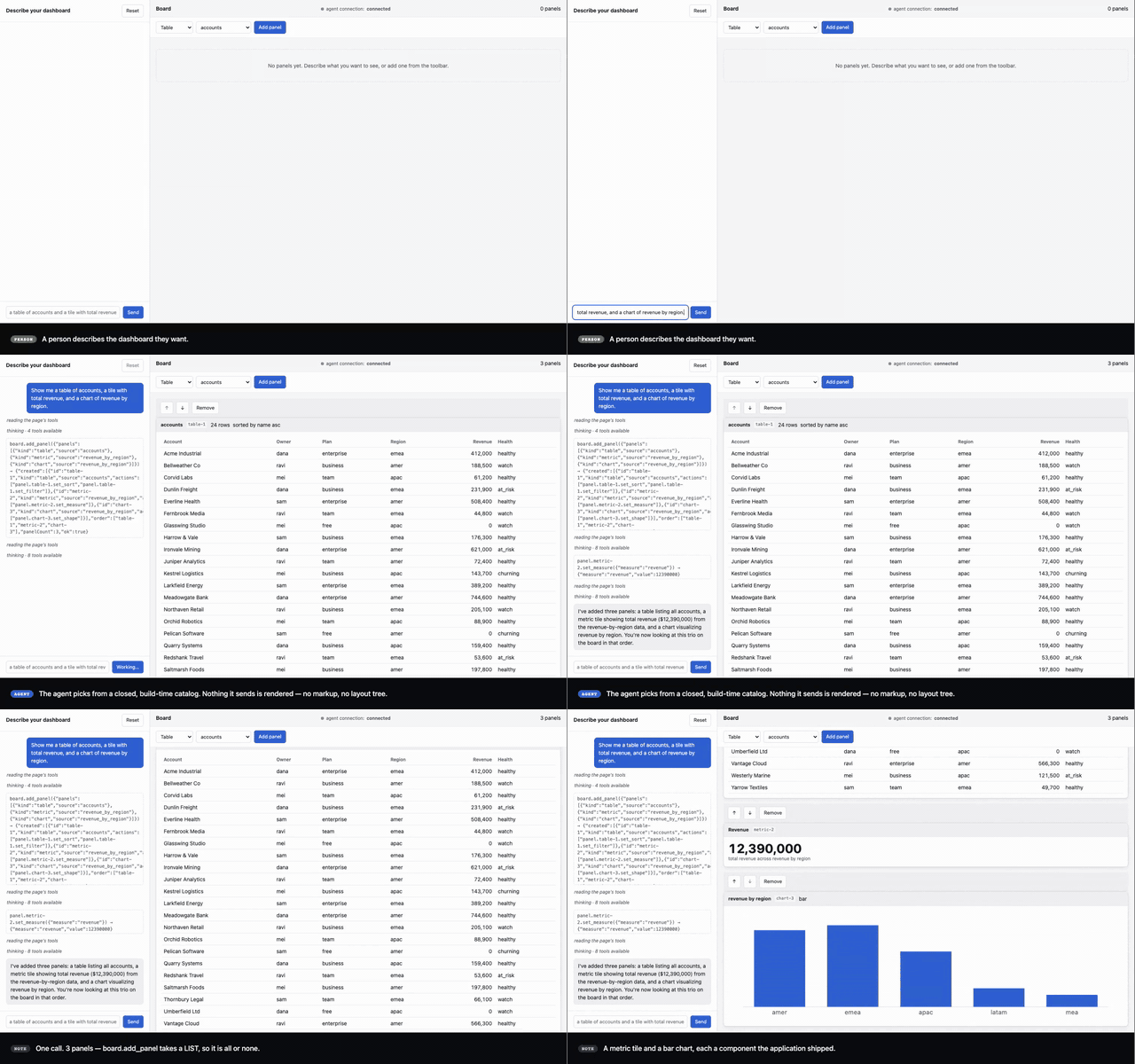](https://github.com/A-Launch/agent-mcp-react/blob/main/docs/media/composable-board.mp4)
*A person describes a dashboard; the agent composes it by calling the tools the page declared, and the
panels it built are then driven by hand. Twenty seconds of the
[full three-minute recording](https://github.com/A-Launch/agent-mcp-react/blob/main/docs/media/composable-board.mp4). The left pane is the agent's real tool
calls — nothing there is a transcript written for the video.*
The application keeps owning its state. MCP is a **second control interface** onto the same
application actions the human UI already calls. It is not browser automation, and not a second store.
This library is the browser half. The MCP server runs in the tab. The page asks your app for a URL,
connects out to your gateway, and answers from there. You still supply the gateway, a ticket minter,
and an agent runtime where the MCP client lives.
## What the agent can do
- **Application tools you declare in React.** They exist while that UI is on screen. Input is
schema-checked before the handler runs. You must configure a validator.
- **Optional DOM tools (experimental):** inspect the page, then click, fill, type, or scroll. Reading
and acting are separate permissions. Off by default. These tools never enter the shared page
registry.
- **Optional JavaScript evaluation** in the page. Off by default. Privileged. Each call needs
approval. This tool never enters the shared page registry.
Capability and confirmation checks apply to this library's connection. Other callers using the
shared page registry skip those gates. Keep real authorization in your handlers.
## Browser requirements
| Requirement | Why |
|---|---|
| **A secure context** | The tool registry is defined only in a secure context. `localhost` counts. |
| **A tool registry** | One browser channel ships `document.modelContext` natively, behind a flag. Everywhere else the library installs a published portability shim. Application source is identical either way. |
| `WebSocket`, `crypto.randomUUID`, `AbortController`, `AbortSignal.any` | Engine floor: Chrome 116, Safari 17.4, Firefox 124. |
The documented browser matrix is a support target, not fully verified. Three Playwright engines are
not nine browser-and-version combinations. What has been run, and what has not:
[docs/browser-support.md](https://github.com/A-Launch/agent-mcp-react/blob/main/docs/browser-support.md).
## Quickstart — using it in your app
```bash
npm install agent-mcp-react
```
ESM only. React `>=18` as a peer, Node `>=22` for the toolchain, and a secure context in the browser
(`localhost` counts).
Wrap your app in the provider and declare one tool in the component that owns the state — both shown
in full under [Use it](#use-it) below. Then open the page and paste this into the browser console:
```js
const mc = document.modelContext;
const tool = (await mc.getTools()).find((t) => t.name === 'counter.increment');
await mc.executeTool(tool, JSON.stringify({ by: 7 }));
```
The number on the page changes. **You needed no agent, no API key and no backend to see that** — the
tool is in the browser's own per-document registry, which is exactly where a browser-native agent
looks. Connecting an external agent over a socket is a later step, and your backend owns it.
The same path, at a slower pace and with the reasons:
**[docs/tutorial-first-tool.md](https://github.com/A-Launch/agent-mcp-react/blob/main/docs/tutorial-first-tool.md)** — about fifteen minutes.
**Working from a checkout instead?** Pack it and depend on the tarball; a `file:` dependency on the
*directory* does not work, because `publishConfig` applies when a package is packed and never when a
directory is linked. Routes and failure modes:
[docs/consuming-without-publishing.md](https://github.com/A-Launch/agent-mcp-react/blob/main/docs/consuming-without-publishing.md).
```bash
pnpm pack # → agent-mcp-react-<version>.tgz
```
## Use it
Four props are required: `connection`, `server`, `capabilities`, and `onUnexpectedState`. This
snippet is compiled against the packed tarball from a project outside this repository.
```tsx
import { AgentMcpProvider, CONFIRMATION } from 'agent-mcp-react';
import { createAjvValidator } from 'agent-mcp-react/validation';
<AgentMcpProvider
connection={{
getUrl: async () => {
// Called once per connection attempt. Opaque to the library: never parsed,
// never amended, never stored. Your backend mints a single-use credential.
const { url } = await fetch('/api/mcp-ticket', { method: 'POST' }).then((r) => r.json());
return url;
},
}}
server={{ name: 'my-app', version: '1.0.0' }}
// Every member is required. An omitted one is denied rather than defaulted.
capabilities={{
application: true,
dom: { inspect: false, interact: false },
evaluate: false,
}}
onUnexpectedState={(failure) => console.error('[mcp]', failure)}
validation={{ validator: createAjvValidator() }}
// Asked before a tool declared `confirmation: 'required'` runs. Without a resolver such a
// tool is refused at every call — absence is not consent.
confirmation={{
resolver: (request) =>
window.confirm(`Allow ${request.tool}?`) ? CONFIRMATION.approved : CONFIRMATION.refused,
}}
>
<App />
</AgentMcpProvider>
```
Declare a tool in the component that owns the feature. It exists while that component is mounted,
and the handler always reads current state:
```tsx
import { useMcpTool } from 'agent-mcp-react';
useMcpTool({
name: 'account.set_health',
title: "Change the open account's health",
description: 'Set the relationship health of the account whose drawer is open.',
inputSchema: {
type: 'object',
properties: {
health: { type: 'string', enum: ['green', 'amber', 'red'] },
reason: { type: 'string', minLength: 1 },
},
required: ['health', 'reason'],
additionalProperties: false,
},
permissions: { confirmation: 'required' },
handler: (input) => {
dashboard.setHealth(account.id, input.health as Health, ACTOR.agent);
return { account: account.name, to: input.health };
},
});
```
The schema is enforced in the runtime before the handler runs.
## What you have to supply
| | |
|---|---|
| A **WebSocket gateway** | Terminates the socket and relays MCP to your agent runtime |
| A **ticket minter** | A backend endpoint issuing a single-use credential per connection attempt |
| An **agent runtime** | Where the MCP client lives, because that is where the socket is held |
`tools/mock-agent/` implements all three for local development and is not a production component.
The provider takes `getUrl()` and never a credential.
## Things that will bite you
| | |
|---|---|
| `capabilities` is **required**, and so is **every member of it** | `{ application: true }` does not compile. Spell `dom` and `evaluate` too. |
| `onUnexpectedState` is **required** | A registry-integrity alarm has no response to travel back on. |
| A schema with **no validator** | The declaration is refused with `MCP_TOOL_VALIDATOR_MISSING` and the tool is never exposed — but your page keeps rendering. It reaches `onRegistration`, and the development console names the import to add. Other tools on the page are unaffected. [Declaring a tool](https://github.com/A-Launch/agent-mcp-react/blob/main/docs/declaring-a-tool.md). |
| `createAjvValidator` needs CSP `unsafe-eval` | Under a strict policy it throws at declaration, so the page exposes **no tools at all** and an agent sees an empty page rather than an error. `localhost` has no policy, so a local demo will not show you this — check it before deploying. [The defect record](https://github.com/A-Launch/agent-mcp-react/blob/main/docs/issues/validator-requires-unsafe-eval.md). |
| A **secure context** is required | `localhost` counts. |
| A mutating handler must **await `context.afterRender()`** | Otherwise it resolves before React commits, and a state read in the same turn returns the previous render. The agent is told the mutation succeeded and then reads a value that does not include it — which looks exactly like a tool that silently did nothing, so the agent retries. [Commit and registration](https://github.com/A-Launch/agent-mcp-react/blob/main/docs/explanation-commit-and-registration.md). |
| `confirmation: 'required'` gates **this library's bridge, not the action** | The agent waits for a person; any script, widget or extension on the page calls the same tool with no dialog. It is not authorization. Anything that must never happen without consent belongs **inside the handler**. [Declaring a tool](https://github.com/A-Launch/agent-mcp-react/blob/main/docs/declaring-a-tool.md). |
| `document.modelContext` is **not there when your component mounts** | The provider adopts the registry asynchronously, in an effect. A sibling or child that reads the registry in its own mount effect finds nothing and, if it only looks once, stays empty forever. [Reading the registry from the page](https://github.com/A-Launch/agent-mcp-react/blob/main/docs/observing-tool-calls.md#reading-the-registry-from-your-own-code). |
| A page-script call refused for bad arguments is **invisible to your observers** | The registry validates against the declared schema and throws before this library sees the call, so nothing reaches `onToolError` or the call log. Silence there does not mean nobody called. [Observing tool calls](https://github.com/A-Launch/agent-mcp-react/blob/main/docs/observing-tool-calls.md). |
## Docs
| If you want | Read |
|-------------|------|
| **To see it work in fifteen minutes** | **[docs/tutorial-first-tool.md](https://github.com/A-Launch/agent-mcp-react/blob/main/docs/tutorial-first-tool.md)** |
| Every public export | [docs/reference-api.md](https://github.com/A-Launch/agent-mcp-react/blob/main/docs/reference-api.md) |
| To use it without publishing it | [docs/consuming-without-publishing.md](https://github.com/A-Launch/agent-mcp-react/blob/main/docs/consuming-without-publishing.md) |
| To declare a tool | [docs/declaring-a-tool.md](https://github.com/A-Launch/agent-mcp-react/blob/main/docs/declaring-a-tool.md) |
| To wire the socket | [docs/connecting-to-an-agent.md](https://github.com/A-Launch/agent-mcp-react/blob/main/docs/connecting-to-an-agent.md) |
| To let an agent read state | [docs/exposing-state.md](https://github.com/A-Launch/agent-mcp-react/blob/main/docs/exposing-state.md) |
| To bind Redux, Zustand, or a router | [docs/store-adapters.md](https://github.com/A-Launch/agent-mcp-react/blob/main/docs/store-adapters.md) |
| The design, condensed | [docs/design.md](https://github.com/A-Launch/agent-mcp-react/blob/main/docs/design.md) |
| What changed, and when | [CHANGELOG.md](https://github.com/A-Launch/agent-mcp-react/blob/main/CHANGELOG.md) |
| Everything else | [docs/README.md](https://github.com/A-Launch/agent-mcp-react/blob/main/docs/README.md) |
## Quickstart — working on the library
```bash
git clone https://github.com/A-Launch/agent-mcp-react.git
cd agent-mcp-react
pnpm install # Node >=22; corepack enable gets the pinned pnpm
scripts/setup-git-hooks.sh # points core.hooksPath at .githooks/
pnpm gate # everything that must be green before a pull request
```
`pnpm gate` is the whole health check in one command and takes a few minutes. If it passes on a fresh
clone, your environment is right and anything that breaks later is yours.
To watch an agent drive a real page, run three servers in three terminals — the pages are demonstrators
in this repository, and the agent is a mock that stands in for a real runtime:
```bash
pnpm dev:agent # mock agent runtime :45000
pnpm dev:example # customer dashboard :45010
pnpm dev:board # composable board :45030
```
Then open <http://localhost:45010>, and drive it from
<http://localhost:45020> (`pnpm dev:chat`) or by calling the mock agent's HTTP endpoints directly.
Ports, environment variables, capability profiles and the test layers:
[docs/local-development.md](https://github.com/A-Launch/agent-mcp-react/blob/main/docs/local-development.md).
**Before your first pull request**, read sections 2 and 3 of
[CONTRIBUTING.md](https://github.com/A-Launch/agent-mcp-react/blob/main/CONTRIBUTING.md) — setup and the gate. The rest can wait until you need it.
## Health gate
```bash
pnpm gate
```
Required after any change under `src/`, `examples/` or `tools/`. What it runs, and in which order, is
in `package.json` — it builds the library and the examples, runs the unit, React, transport and
integration suites, typechecks, lints, and verifies the packed tarball and an external consumer.
Three of those ask a question the suites cannot. `pnpm build` asserts what is **in** `dist/` rather
than what the compiler returned, because a build can exit zero having emitted nothing and exit non-zero
having emitted something unloadable. `verify:package` resolves every export the packed tarball
declares, from inside the tarball. `verify:consumer` installs that tarball into a project **outside
this repository**, typechecks it against the shipped types and bundles it with a real bundler — which
is the only check that asks whether an embedder can actually consume this package, since everything
in-repo resolves through workspace paths and a root tsconfig instead.
Three more run separately, because they need dev servers or browser binaries:
```bash
pnpm test:e2e # three engines, real browser, real socket
pnpm test:e2e:native # opt-in: Chromium with a real native tool registry
pnpm verify:consumer:runs # loads an external project's production bundle in a browser
```
## Contributing
Issues and pull requests are welcome. [CONTRIBUTING.md](https://github.com/A-Launch/agent-mcp-react/blob/main/CONTRIBUTING.md) owns every convention here —
where code goes, the five invariants that fail silently, what the gate requires of a change, and the
patterns that are refused outright. Read sections 2 and 3 before your first pull request; they are the
setup and the gate, and everything else can be read when you need it.
By participating you agree to the [code of conduct](https://github.com/A-Launch/agent-mcp-react/blob/main/CODE_OF_CONDUCT.md).
**Found a security problem?** Do not open an issue. [SECURITY.md](https://github.com/A-Launch/agent-mcp-react/blob/main/SECURITY.md) says how to report it
privately — a reachability hole in this library is reachable on every page that embeds it, from the
moment the issue is readable.
## License
Apache-2.0. See [LICENSE](https://github.com/A-Launch/agent-mcp-react/blob/main/LICENSE) and [NOTICE](https://github.com/A-Launch/agent-mcp-react/blob/main/NOTICE).
This server cannot be deployed
Maintenance
ActivitySlowing
ResponsivenessNo issues