<p align="center">English | <a href="README.zh-cn.md">中文</a><br></p>
# alibabacloud-devops-mcp-server
[](https://smithery.ai/server/@aliyun/alibabacloud-devops-mcp-server)
[AlibabaCloud Devops](https://www.aliyun.com/product/yunxiao) MCP Server provides AI assistants with the ability to interact with the Yunxiao platform, enabling them to read work item contents in projects, automatically write code after understanding requirements, and submit code merge requests. Enterprise development teams can use it to assist with code reviews, optimize task management, reduce repetitive operations, and thus focus on more important innovation and product delivery.
## Features
alibabacloud-devops-mcp-server provides the following capabilities for AI assistants:
* **Code Repository Management**: Query code repositories and their branches, create branches
* **File Operations**: Create, update, delete, and retrieve code file content
* **Code Review**: Create and manage code review processes
* **Project Management**: Search projects, get project details
* **Pipeline Management**: Get pipeline details, get pipeline list, create a pipeline run instance, get the latest pipeline run instance, get pipeline run details, get pipeline run list, Query / Run a pipeline deployment task
* **Package Management**: Get package repository details list, Get artifacts details list, Get single artifact details
* **Application Delivery**: Create and manage deployment orders, applications, orchestrations, variable groups, templates, tags, global variables, and deployment resources
## Tools
alibabacloud-devops-mcp-server integrates various tools, including:
### Organization Management
- `get_current_organization_Info`: Get current user's organization information
- `get_user_organizations`: Get the list of organizations the current user has joined
- `get_organization_role`: Get information about an organization role
- `get_organization_departments`: Get the list of departments in an organization
- `get_organization_department_info`: Get information about a department in an organization
- `get_organization_department_ancestors`: Get the ancestors of a department in an organization
- `get_organization_members`: Get the list of members in an organization
- `get_organization_member_info`: Get information about a member in an organization
- `get_organization_member_info_by_user_id`: Get information about a member in an organization by user ID
- `search_organization_members`: Search for organization members
- `list_organization_roles`: List organization roles
- `get_organization_role`: Get information about an organization role
### Code Management Tools
- `create_branch`: Create a branch
- `delete_branch`: Delete a branch
- `get_branch`: Get branch information
- `list_branches`: Get branch list
- `create_file`: Create a file
- `delete_file`: Delete a file
- `get_file_blobs`: Get file content
- `list_files`: Query file tree
- `update_file`: Update file content
- `create_change_request`: Create a merge request
- `create_change_request_comment`: Create a comment on a merge request
- `get_change_request`: Query merge request
- `list_change_request_patch_sets`: Query merge request version list
- `list_change_request`: Query merge request list
- `list_change_request_comments`: Query merge request comment list
- `get_compare`: Compare code
- `get_repository`: Get repository details
- `list_repositories`: Get repository list
### Project Management Tools
- `get_project`: Get project details
- `search_projects`: Search projects
- `get_sprint`: Get sprint details
- `list_sprints`: List sprints in a project
- `get_work_item`: Get work item details
- `search_workitems`: Search work items
- `get_work_item_types`: get work item types
- `create_work_item`: create work item
- `list_all_work_item_types`: List all work item types in an organization
- `list_work_item_types`: List work item types in a project space
- `get_work_item_type`: Get details of a specific work item type
- `list_work_item_relation_work_item_types`: List work item types that can be related to a specific work item
- `get_work_item_type_field_config`: Get field configuration for a specific work item type
- `get_work_item_workflow`: Get workflow information for a specific work item type
- `list_work_item_comments`: List comments for a specific work item
- `create_work_item_comment`: Create a comment for a specific work item
- `list_current_user_effort_records`: [Project Management] 获取用户的实际工时明细,结束时间和开始时间的间隔不能大于6个月
- `list_effort_records`: [Project Management] 获取实际工时明细
- `create_effort_record`: [Project Management] 登记实际工时
- `list_estimated_efforts`: [Project Management] 获取预计工时明细
- `create_estimated_effort`: [Project Management] 登记预计工时
- `update_effort_record`: [Project Management] 更新登记实际工时
- `update_estimated_effort`: [Project Management] 更新登记预计工时
### Pipeline Management Tools
- `get_pipeline`: Get pipeline details
- `list_pipelines`: Get pipeline list
- `smart_list_pipelines`: Smart pipeline search with natural language time references
- `create_pipeline_run`: Create a pipeline run instance
- `get_latest_pipeline_run`: Get the latest pipeline run instance
- `get_pipeline_run`: Get pipeline run details
- `list_pipeline_runs`: Get pipeline run list
- `list_pipeline_jobs_by_category`: Get pipeline execution tasks by category
- `list_pipeline_job_historys`: Get the execution history of a pipeline task
- `execute_pipeline_job_run`: Manually run a pipeline task
- `get_pipeline_job_run_log`: Get the execution logs of a pipeline job
- `list_service_connections`: List service connections in organization
- `create_pipeline_from_description`: Automatically generates YAML configuration and creates pipeline
- `update_pipeline`: Update an existing pipeline in Yunxiao by pipelineId. Use this to update pipeline YAML, stages, jobs, etc.
#### Resource Member Management Tools
- `create_resource_member`: Create a resource member
- `delete_resource_member`: Delete a resource member
- `list_resource_members`: Get a list of resource members
- `update_resource_member`: Update a resource member
- `update_resource_owner`: Transfer resource owner
#### Tag Management Tools
- `create_tag`: Create a tag
- `create_tag_group`: Create a tag group
- `list_tag_groups`: Get a list of tag groups
- `delete_tag_group`: Delete a tag group
- `update_tag_group`: Update a tag group
- `get_tag_group`: Get a tag group
- `delete_tag`: Delete a tag
- `update_tag`: Update a tag
#### VM Deploy Order Management Tools
- `stop_vm_deploy_order`: Stop VM deploy order
- `skip_vm_deploy_machine`: Skip VM deploy machine
- `retry_vm_deploy_machine`: Retry VM deploy machine
- `resume_vm_deploy_order`: Resume VM deploy order
- `get_vm_deploy_order`: Get VM deploy order details
- `get_vm_deploy_machine_log`: Get VM deploy machine log
### Packages Management Tools
- `list_package_repositories`: Get package repositories details list
- `list_artifacts`: Get artifacts details list
- `get_artifact`: Get single artifact details
### Application Delivery Tools
- `create_change_order`: [application delivery] 创建部署单
- `list_change_order_versions`: [application delivery] 查看部署单版本列表
- `get_change_order`: [application delivery] 读取部署单使用的物料和工单状态
- `list_change_order_job_logs`: [application delivery] 查询环境部署单日志
- `find_task_operation_log`: [application delivery] 查询部署任务执行日志,其中通常包含下游部署引擎的调度细节信息
- `execute_job_action`: [application delivery] 操作环境部署单
- `list_change_orders_by_origin`: [application delivery] 根据创建来源查询部署单
- `list_applications`: [application delivery] List applications in an organization with pagination
- `get_application`: [application delivery] Get application details by name
- `create_application`: [application delivery] Create a new application
- `update_application`: [application delivery] Update an existing application
- `get_latest_orchestration`: [application delivery] Get the latest orchestration for an environment
- `list_app_orchestration`: [application delivery] List application orchestrations
- `create_app_orchestration`: [application delivery] Create an application orchestration
- `delete_app_orchestration`: [application delivery] Delete an application orchestration
- `get_app_orchestration`: [application delivery] Get an application orchestration
- `update_app_orchestration`: [application delivery] Update an application orchestration
- `get_env_variable_groups`: [application delivery] Get variable groups for an environment
- `create_variable_group`: [application delivery] Create a variable group
- `delete_variable_group`: [application delivery] Delete a variable group
- `get_variable_group`: [application delivery] Get a variable group
- `update_variable_group`: [application delivery] Update a variable group
- `get_app_variable_groups`: [application delivery] Get variable groups for an application
- `get_app_variable_groups_revision`: [application delivery] Get the revision of variable groups for an application
- `search_app_templates`: [application delivery] Search application templates
- `create_app_tag`: [application delivery] Create an application tag
- `update_app_tag`: [application delivery] Update an application tag
- `search_app_tags`: [application delivery] Search application tags
- `update_app_tag_bind`: [application delivery] Update application tag bindings
- `create_global_var`: [application delivery] Create a global variable group
- `get_global_var`: [application delivery] Get a global variable group
- `update_global_var`: [application delivery] Update a global variable group
- `list_global_vars`: [application delivery] List global variable groups
- `get_machine_deploy_log`: [application delivery] Get machine deployment log
- `add_host_list_to_host_group`: [application delivery] Add host list to host group
- `add_host_list_to_deploy_group`: [application delivery] Add host list to deploy group
## Usage
### Prerequisites
* node version >= 18.0.0
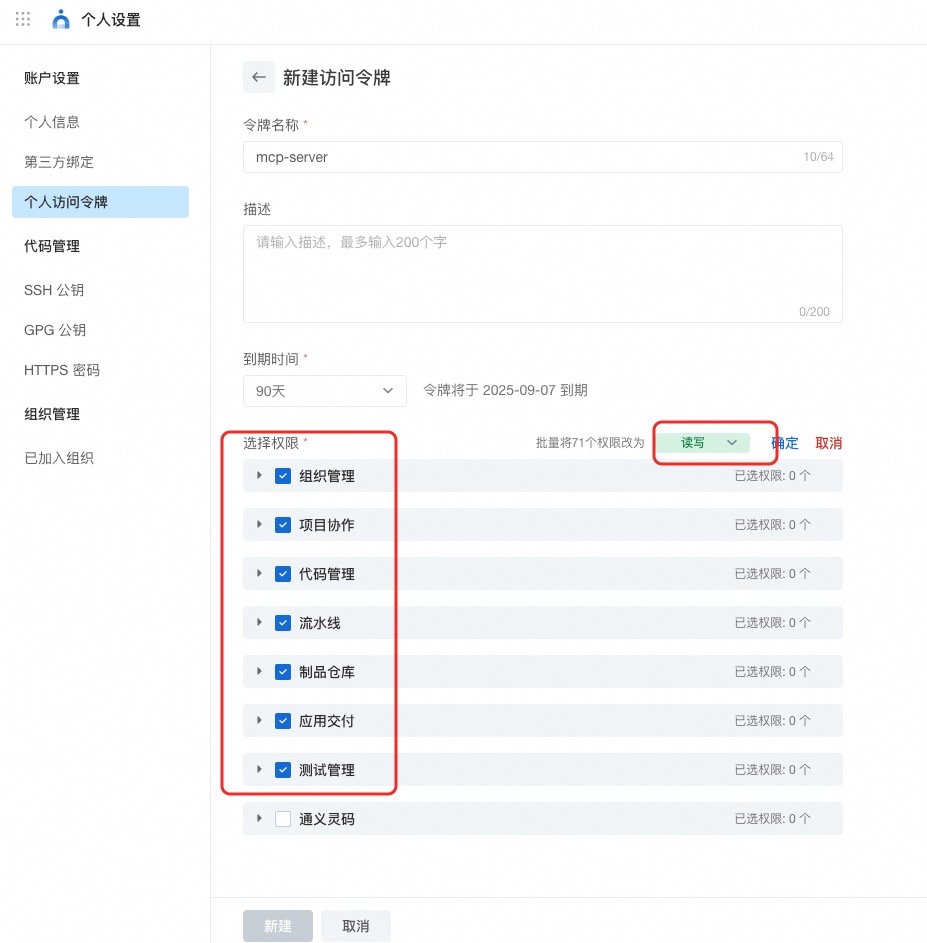
* [AlibabaCloud Devops](https://www.aliyun.com/product/yunxiao) Personal Access Token, [click here to obtain](https://help.aliyun.com/zh/yunxiao/developer-reference/obtain-personal-access-token). Grant read and write permissions to all APIs under organization management, project collaboration, code management, pipeline management, artifact repository management, application delivery and testing management.
### Installing via Smithery
To install [AlibabaCloud DevOps](https://www.aliyun.com/product/yunxiao) Server for Claude Desktop automatically via [Smithery](https://smithery.ai/server/@aliyun/alibabacloud-devops-mcp-server):
```bash
npx -y @smithery/cli install @aliyun/alibabacloud-devops-mcp-server --client claude
```
### Install Yunxiao MCP server via MCP marketplace
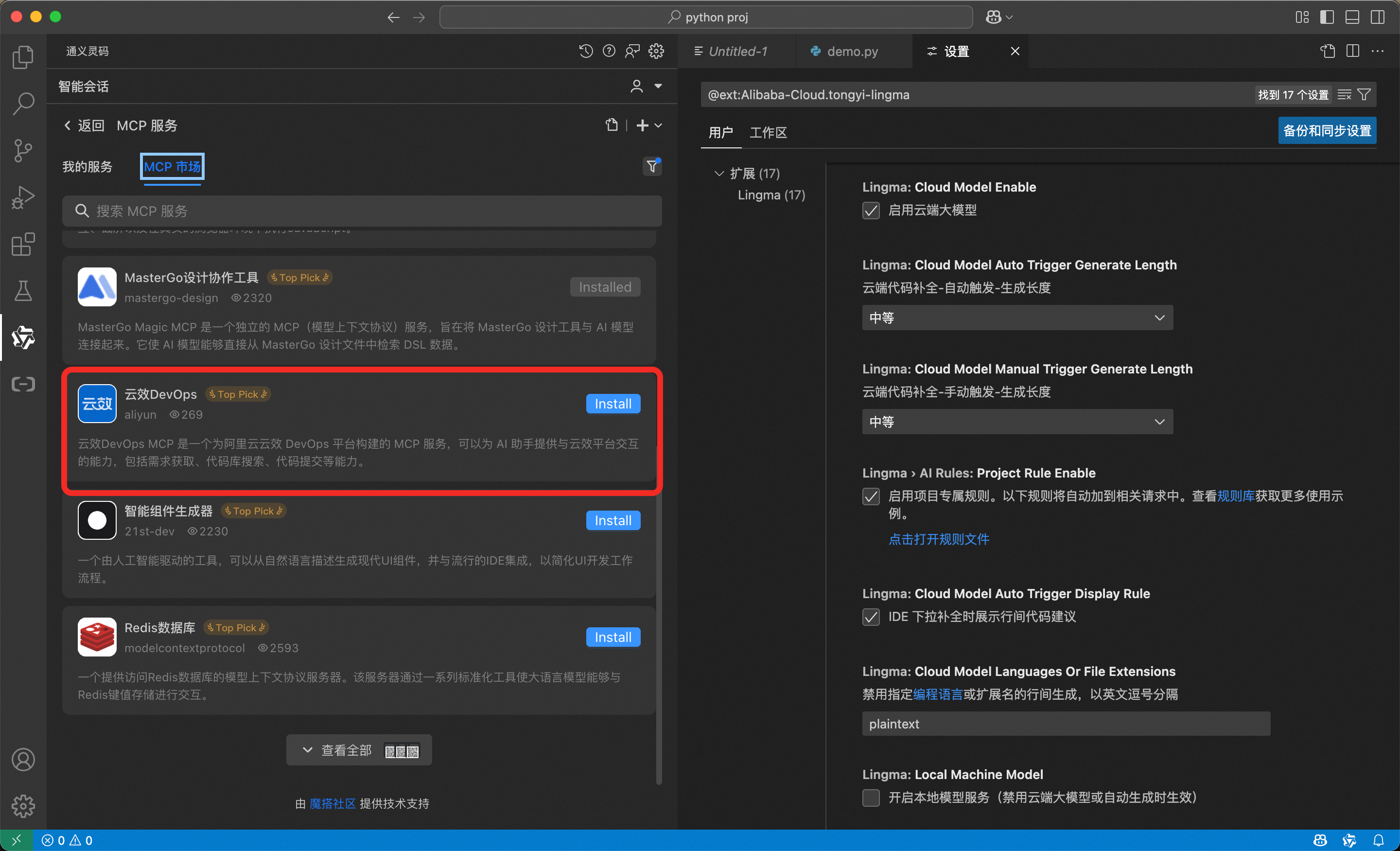
The MCP market built into Lingma (AlibabaCloud Tongyi Lingma) has already provided the AlibabaCloud Devops MCP service. To install it, simply enter the MCP market in Lingma and search for "Yunxiao DevOps", then click install.
### Run MCP Server via NPX/Cursor/Claude code etc.
```json
{
"mcpServers": {
"yunxiao": {
"command": "npx",
"args": [
"-y",
"alibabacloud-devops-mcp-server"
],
"env": {
"YUNXIAO_ACCESS_TOKEN": "<YOUR_TOKEN>"
}
}
}
}
```
### Run MCP Server via Docker Container
#### Option 1: Use Official Image (Recommended)
You can use the official Docker image without building it yourself:
```shell
# Pull the official image
docker pull build-steps-public-registry.cn-beijing.cr.aliyuncs.com/build-steps/alibabacloud-devops-mcp-server:v0.2.0
```
Then use the official image name in your docker run commands instead of `alibabacloud/alibabacloud-devops-mcp-server`.
#### Option 2: Build Your Own Image
If you prefer to build the image yourself:
```shell
docker build -t alibabacloud/alibabacloud-devops-mcp-server .
```
#### 2. Run the Container
The MCP server supports three modes: **stdio mode** (default), **SSE mode**, and **HTTP mode** (Streamable HTTP).
##### Stdio Mode (for MCP clients)
Run the container directly (using official image):
```shell
docker run -i --rm \
-e YUNXIAO_ACCESS_TOKEN="your_token_here" \
build-steps-public-registry.cn-beijing.cr.aliyuncs.com/build-steps/alibabacloud-devops-mcp-server:v0.2.0
```
Or use an environment file:
```shell
# Create .env file with: YUNXIAO_ACCESS_TOKEN=your_token_here
docker run -i --rm \
--env-file .env \
build-steps-public-registry.cn-beijing.cr.aliyuncs.com/build-steps/alibabacloud-devops-mcp-server:v0.2.0
```
> **Note**: If you built your own image, replace the image name with `alibabacloud/alibabacloud-devops-mcp-server`.
##### SSE Mode (for HTTP access)
Run the container in background (using official image):
```shell
docker run -d --name yunxiao-mcp \
-p 3000:3000 \
-e YUNXIAO_ACCESS_TOKEN="your_token_here" \
-e PORT=3000 \
-e MCP_TRANSPORT=sse \
build-steps-public-registry.cn-beijing.cr.aliyuncs.com/build-steps/alibabacloud-devops-mcp-server:v0.2.0 \
node dist/index.js --sse
```
> **Note**: If you built your own image, replace the image name with `alibabacloud/alibabacloud-devops-mcp-server`.
The server will be available at:
- SSE endpoint: `http://localhost:3000/sse`
- Messages endpoint: `http://localhost:3000/messages?sessionId=<session-id>`
##### HTTP Mode (Streamable HTTP for smithery.ai)
Run the container in background (using official image):
```shell
docker run -d --name yunxiao-mcp \
-p 3000:3000 \
-e YUNXIAO_ACCESS_TOKEN="your_token_here" \
-e PORT=3000 \
-e MCP_TRANSPORT=http \
build-steps-public-registry.cn-beijing.cr.aliyuncs.com/build-steps/alibabacloud-devops-mcp-server:v0.2.0 \
node dist/index.js --http
```
Or use npm script:
```shell
npm run start:http
```
> **Note**: If you built your own image, replace the image name with `alibabacloud/alibabacloud-devops-mcp-server`.
The server will be available at:
- MCP endpoint: `http://localhost:3000/mcp`
This mode is compatible with smithery.ai platform deployment requirements.
View logs:
```shell
docker logs -f yunxiao-mcp
```
Stop the container:
```shell
docker stop yunxiao-mcp
```
#### 3. Configure MCP Client (for stdio mode)
If you're using a MCP client (like Claude Desktop, Cursor, etc.), configure it to use Docker:
```json
{
"mcpServers": {
"yunxiao": {
"command": "docker",
"args": [
"run",
"-i",
"--rm",
"-e",
"YUNXIAO_ACCESS_TOKEN",
"build-steps-public-registry.cn-beijing.cr.aliyuncs.com/build-steps/alibabacloud-devops-mcp-server:v0.2.0"
],
"env": {
"YUNXIAO_ACCESS_TOKEN": "<YOUR_TOKEN>"
}
}
}
}
```
> **Note**: If you built your own image, replace the image name with `alibabacloud/alibabacloud-devops-mcp-server`.
### Run MCP Server via Docker Compose
1. Environment Setup
```shell
cd alibabacloud-devops-mcp-server
cp .env.example
```
2. Running the Services:
```shell
docker compose up -d
```
3. Configure MCP Server
```json
{
"mcpServers": {
"yunxiao": {
"url":"http://localhost:3000/sse"
}
}
}
```
### HTTP/SSE Mode with Custom Tokens
When running in HTTP or SSE mode, each user can use their own token by passing it as a query parameter or request header:
1. Via query parameter:
```
# For SSE mode
http://localhost:3000/sse?yunxiao_access_token=USER_SPECIFIC_TOKEN
# For HTTP mode
http://localhost:3000/mcp?yunxiao_access_token=USER_SPECIFIC_TOKEN
```
2. Via request header:
```
x-yunxiao-token: USER_SPECIFIC_TOKEN
```
This allows multiple users to share the same service while using their own individual tokens for authentication.
### Toolsets
The server now supports toolsets, allowing you to enable only the tools you need. This can reduce the number of tools presented to the AI assistant and improve performance.
Available toolsets:
- `base`: Base tools that are always loaded (get_current_user, get_current_organization_info, get_user_organizations)
- `code-management`: Code repository management tools (includes commit management tools)
- `organization-management`: Organization management tools (excluding base tools)
- `project-management`: Project management tools (includes effort management tools)
- `pipeline-management`: Pipeline management tools (includes service connections, resource member, and VM deploy order tools)
- `packages-management`: Package repository management tools
- `application-delivery`: Application delivery tools
To use toolsets, you can specify them via command line arguments or environment variables:
1. Via command line argument:
```bash
npx -y alibabacloud-devops-mcp-server --toolsets=code-management,project-management
```
2. Via environment variable:
```bash
DEVOPS_TOOLSETS=code-management,project-management npx -y alibabacloud-devops-mcp-server
```
If no toolsets are specified, all tools will be enabled by default.
## Contact Us
## Contact Us
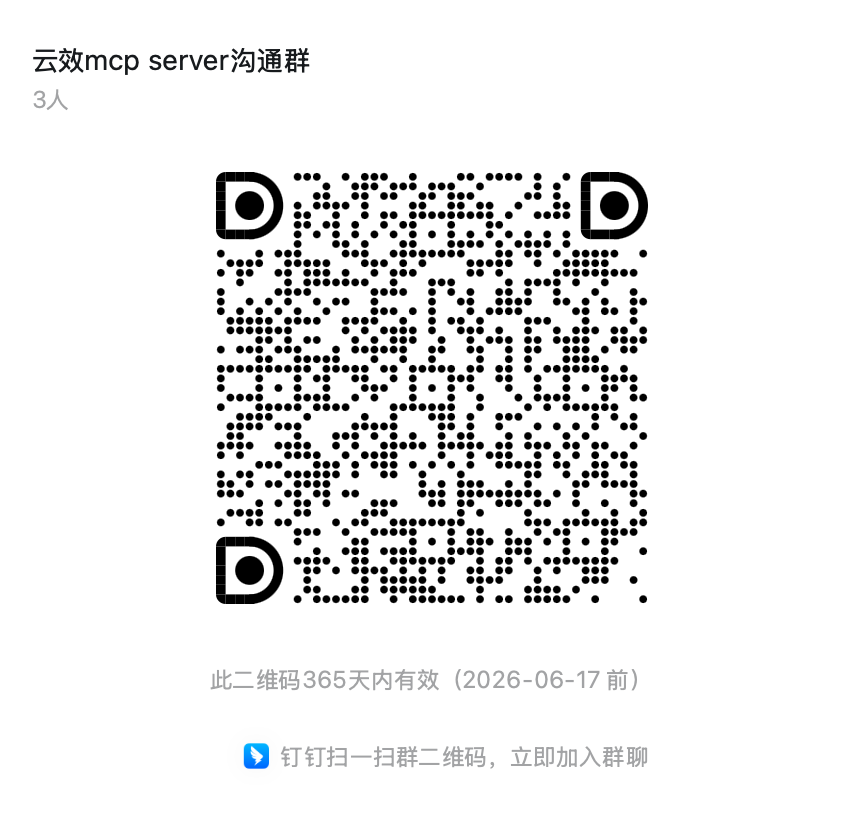
If you have any questions, please join the Alibaba Cloud Devops discussion group (134400004101) for discussion.
## Related Links
- [AlibabaCloud DevOps](https://www.aliyun.com/product/yunxiao)
- [MCP market](https://modelscope.cn/mcp/servers/@aliyun/alibabacloud-devops-mcp-server)
- [Example Use Cases](https://mp.weixin.qq.com/s/KQsN6dQlnNeCNATC-QD7pg)
