<div align="center">
<h1>K8M</h1>
</div>
<div align=center>
[](https://trendshift.io/repositories/14095)
</div>
<div align=center>


</div>
<div align=center>
[](https://github.com/weibaohui/k8m/blob/master/LICENSE)
[](https://goreportcard.com/report/github.com/weibaohui/k8m)



[](https://archestra.ai/mcp-catalog/weibaohui__k8m)
</div>
[English](README_en.md) | [中文](README.md)
**k8m** is an AI-driven Mini Kubernetes AI Dashboard lightweight console tool designed to simplify cluster management. It is built on AMIS and uses [`kom`](https://github.com/weibaohui/kom) as the Kubernetes API client. **k8m** comes with built-in Qwen2.5-Coder-7B, supports deepseek-ai/DeepSeek-R1-Distill-Qwen-7B model interaction capabilities, and supports integration with your own private AI models (including ollama).
### Demo
[DEMO](http://107.150.119.151:3618)
[DEMO-InCluster Mode](http://107.150.119.151:31999)
Username and password demo/demo
### Documentation
- For detailed configuration and usage instructions, please refer to [Documentation](docs/README.md).
- For changelog, please refer to [Changelog](CHANGELOG.md).
- For customizing AI model parameters and configuring private AI models, please refer to [Self-Hosted/Custom AI Model Support](docs/use-self-hosted-ai.md)
and [Ollama Configuration](docs/ollama.md).
- For detailed configuration option descriptions, please refer to [Configuration Options](docs/config.md).
- For database configuration, please refer to [Database Configuration](docs/database.md).
- DeepWiki documentation: [Development Design Documentation](https://deepwiki.com/weibaohui/k8m)
### Key Features
- **Miniaturized Design**: All functionalities are integrated into a single executable file for easy deployment and simple usage.
- **Easy to Use**: Friendly user interface and intuitive operation workflow make Kubernetes management easier. Supports standard k8s, aws eks, k3s, kind, k0s and other cluster types.
- **High Performance**: Backend built with Golang, frontend based on Baidu AMIS, ensuring high resource utilization and fast response speed.
- **AI-Driven Integration**: Implements word explanation, resource guide, YAML attribute automatic translation, Describe information interpretation, log AI diagnosis, and running command recommendation based on ChatGPT, and integrates [k8s-gpt](https://github.com/k8sgpt-ai/k8sgpt) functionality for Chinese display, providing intelligent support for managing k8s.
- **Feature Plugin**: Feature functions are plugin-based, enabled on demand, no resource consumption when not enabled.
- **MCP Integration**: Visual management of MCP, enabling large model calls to Tools, with 49 built-in k8s multi-cluster MCP tools that can be combined to achieve over a hundred cluster operations. Can serve as MCP Server for other large model software. Easily implement large model management of k8s. Can record every MCP call in detail. Supports mcp.so mainstream services.
- **MCP Permission Integration**: Multi-cluster management permissions and MCP large model call permissions are integrated. In a nutshell: whoever uses the large model executes MCP with their permissions. Safe usage without worries, avoiding unauthorized operations.
- **Multi-Cluster Management**: Automatically recognizes clusters using InCluster mode internally, automatically scans configuration files in the same directory after configuring kubeconfig path, and registers multiple clusters for management simultaneously. Supports heartbeat detection and automatic reconnection.
- **Multi-Cluster Permission Management**: Supports authorization for users and user groups, can authorize by cluster, including cluster read-only, Exec command, and cluster administrator three types of permissions. After authorizing user groups, users in the group all get corresponding authorization. Supports setting namespace blacklist/whitelist.
- **Supports k8s Latest Features**: Supports APIGateway, OpenKruise and other functional features.
- **Pod File Management**: In the file tree on the left side of the Console interface, right-click menu supports browsing, editing, uploading, downloading, and deleting files within Pods, simplifying daily operations.
- **Pod Operation Management**: Supports real-time viewing of Pod logs, downloading logs, and directly executing Shell commands within Pods. Supports Ctrl+F search, similar to grep -A -B highlighted search.
- **API Open**: Supports creating API KEY for third-party external access, provides swagger interface management page.
- **Cluster Inspection Support**: Supports multi-cluster scheduled inspection, custom inspection rules, supports lua script rules. Supports sending to DingTalk groups, WeChat groups, Feishu groups and custom webhooks. Supports AI summary.
- **k8s Event Forwarding**: Supports multi-cluster k8s Event forwarding to webhooks, can filter by cluster, keywords, namespace, name, etc., establishing multiple dedicated monitoring forwarding channels. Supports AI summary.
- **CRD Management**: Can automatically discover and manage CRD resources, list all CRDs in tree form, improving work efficiency.
- **Helm Marketplace**: Supports free addition of Helm repositories, one-click installation, uninstallation, and upgrade of Helm applications, supports automatic updates.
- **Cross-Platform Support**: Compatible with Linux, macOS and Windows, and supports x86, ARM and other architectures, ensuring seamless multi-platform operation.
- **Multi-Database Support**: Supports SQLite, MySql, PostgreSql and other databases.
- **Fully Open Source**: Opens all source code without any restrictions, can be freely customized and extended, and can be used commercially.
**k8m**'s design philosophy is "AI-driven, lightweight and efficient, simplifying complexity," helping developers and operators quickly get started and effortlessly manage Kubernetes clusters.

## **Plugin System**
k8m adopts a plugin-based architecture where all functional modules exist as plugins, supporting flexible enable/disable and extension. The plugin system provides complete lifecycle management, dependency resolution, scheduled task scheduling, and other features.
### Plugin Features
- **Modular Design**: Each plugin is independently developed, deployed, and managed without affecting each other
- **Lifecycle Management**: Supports complete plugin lifecycle including installation, enable, disable, uninstall, start, stop, etc.
- **Dependency Management**: Supports dependency declaration between plugins, automatically loads in order
- **Scheduled Tasks**: Supports defining scheduled tasks in plugins using standard cron expressions
- **Route Registration**: Supports multiple route types including cluster routes, management routes, plugin management routes, etc.
- **Database Management**: Plugins can declare database tables they use, system manages automatically
- **Multi-Instance Support**: Implements master-standby switching in multi-instance environments through election plugin
### Built-in Plugin List
| Plugin Name | Plugin Title | Version | Description |
|-------------|--------------|---------|-------------|
| **leader** | Multi-Instance Election Plugin | 1.0.0 | Provides multi-instance automatic election capability: completes leader election through Kubernetes native mechanisms. Please ensure /health/ready readiness probe is enabled before use. After enabling, traffic will be concentrated on the master instance. |
| **k8swatch** | K8s Resource Monitoring Plugin | 1.0.0 | Monitors Kubernetes resource changes, including Pod, Node, PVC, PV, Ingress, etc. After disabling, real-time data on some pages will not be displayed. |
| **webhook** | Webhook Plugin | 1.0.0 | Webhook receiver management, test sending and sending record query |
| **eventhandler** | Event Forwarding Plugin | 1.0.0 | K8s event collection, rule filtering and Webhook forwarding. After enabling election plugin, only master instance executes, otherwise each instance executes. |
| **inspection** | Cluster Inspection Plugin | 1.0.0 | Lua-based cluster inspection plan, rule management and result viewing. After enabling election plugin, only master instance executes, otherwise each instance executes. |
| **helm** | Helm Management Plugin | 1.0.0 | Helm repository, Chart, Release management. Includes repository addition, Chart browsing, Release installation upgrade uninstallation and other functions. Scheduled update of repository index. |
| **gllog** | Global Log | 1.0.0 | Global log query, supports cross-cluster Pod log viewing |
| **swagger** | Swagger Documentation | 1.0.0 | Swagger API documentation viewing. Execute make.sh script in plugin directory to generate documentation. |
| **mcp_runtime** | MCP Runtime Management Plugin | 1.0.0 | Manages MCP servers used for large model conversations. Includes MCP server configuration, tool management, execution log viewing, open MCP service and other functions. When calling MCP in conversation, Authorization header will be automatically added with value JWT token. |
| **openapi** | OpenAPI Plugin | 1.0.0 | API key management for programmatic access to platform |
| **k8m_mcp_server** | K8M MCP Server Plugin | 1.0.0 | Uses K8M as MCP Server. Can be added to MCP runtime management for use. This plugin listens on /mcp/k8m/sse to provide service. |
| **k8sgpt** | K8sGPT Plugin | 1.0.0 | Kubernetes resource AI intelligent analysis, supports intelligent diagnosis of multiple resource types such as Pod, Deployment, Service, etc. Source from https://github.com/k8sgpt-ai/k8sgpt project |
| **ai** | AI Plugin | 1.0.0 | AI function plugin, provides K8s resource intelligent analysis, event consultation, log analysis, Cron expression parsing and other functions. Supports custom AI model configuration. |
| **heartbeat** | Cluster Heartbeat Reconnection Plugin | 1.0.0 | Manages cluster heartbeat detection and automatic reconnection function |
| **gatewayapi** | Gateway API Management Plugin | 1.0.0 | Kubernetes Gateway API management |
| **istio** | Istio Management Plugin | 1.0.0 | Kubernetes Istio service mesh management |
| **openkruise** | OpenKruise Management Plugin | 1.0.0 | Kubernetes OpenKruise advanced workload management |
| **demo** | Demo Plugin | 1.0.12 | Demonstrates fixed list and CRUD functionality |
### Plugin Development
For detailed plugin development documentation, please refer to: [Plugin Architecture Documentation](pkg/plugins/readme.md)
Plugin development includes the following contents:
- Plugin metadata definition
- Lifecycle interface implementation
- Route registration
- Database table management
- Scheduled task configuration
- Menu declaration
- Dependency relationship management
## **Run**
1. **Download**: Download the latest version from [GitHub release](https://github.com/weibaohui/k8m/releases).
2. **Run**: Start with the `./k8m` command and visit [http://127.0.0.1:3618](http://127.0.0.1:3618).
3. **Login Username and Password**:
- Username: `k8m`
- Password: `k8m`
- Please note to change username/password and enable two-factor authentication after going online.
4. **Parameters**:
```shell
Usage of ./k8m:
--enable-temp-admin Whether to enable temporary admin account configuration, disabled by default
--admin-password string Administrator password, takes effect after enabling temporary admin account configuration
--admin-username string Administrator username, takes effect after enabling temporary admin account configuration
--print-config Whether to print configuration information (default false)
--connect-cluster Whether to automatically connect to existing clusters when starting, disabled by default
-d, --debug Debug mode
--in-cluster Whether to automatically register and manage the host cluster, enabled by default
--jwt-token-secret string Secret used for generating JWT token after login (default "your-secret-key")
-c, --kubeconfig string Path to kubeconfig file (default "/root/.kube/config")
--kubectl-shell-image string Kubectl Shell image. Default is bitnami/kubectl:latest, must contain kubectl command (default "bitnami/kubectl:latest")
--log-v int Log level for klog.klog.V(2) (default 2)
--login-type string Login method, password, oauth, token, etc., default is password (default "password")
--image-pull-timeout Node Shell, Kubectl Shell image pull timeout. Default is 30 seconds
--node-shell-image string NodeShell image. Default is alpine:latest, must contain `nsenter` command (default "alpine:latest")
-p, --port int Listening port (default 3618)
-v, --v Level Log level for klog (default 2)
```
You can also directly start it using docker-compose (recommended):
```yaml
services:
k8m:
container_name: k8m
image: registry.cn-hangzhou.aliyuncs.com/minik8m/k8m
restart: always
ports:
- "3618:3618"
environment:
TZ: Asia/Shanghai
volumes:
- ./data:/app/data
```
After startup, access port `3618`, default username: `k8m`, default password: `k8m`.
If you want to quickly set up an experience through an online environment, you can visit: [k8m](https://cnb.cool/znb/qifei/-/tree/main/letsfly/justforfun/k8m)
## **ChatGPT Configuration Guide**
### Built-in GPT
Starting from version v0.0.8, GPT is built-in and does not require configuration.
If you need to use your own GPT, please refer to the following documentation.
- [Self-Hosted/Custom AI Model Support](use-self-hosted-ai.md) - How to use self-hosted models
- [Ollama Configuration](ollama.md) - How to configure and use Ollama large models
### **ChatGPT Status Debugging**
If setting parameters does not work, try using `./k8m -v 6` to get more debugging information.
The following information will be output, check the logs to confirm whether ChatGPT is enabled.
```go
ChatGPT enabled status:true
ChatGPT enabled key:sk-hl**********************************************, url:https://api.siliconflow.cn/v1
ChatGPT uses model set in environment variables:Qwen/Qwen2.5-7B-Instruc
```
### **ChatGPT Account**
This project integrates the [github.com/sashabaranov/go-openai](https://github.com/sashabaranov/go-openai) SDK.
For users in China, it's recommended to use the [Silicon Flow](https://cloud.siliconflow.cn/) service.
After logging in, create an API_KEY at [https://cloud.siliconflow.cn/account/ak](https://cloud.siliconflow.cn/account/ak)
## **k8m Environment Variable Settings**
k8m supports flexible configuration through environment variables and command line parameters. The main parameters are as follows:
| Environment Variable | Default Value | Description |
|----------------------------|----------------------------|-----------------------------------------------------------------------------------------------|
| `PORT` | `3618` | Listening port number |
| `KUBECONFIG` | `~/.kube/config` | Path to `kubeconfig` file, automatically scans and identifies all configuration files in the same directory |
| `ANY_SELECT` | `"true"` | Whether to enable arbitrary selection word explanation, enabled by default (default true) |
| `LOGIN_TYPE` | `"password"` | Login method (e.g., `password`, `oauth`, `token`) |
| `ENABLE_TEMP_ADMIN` | `"false"` | Whether to enable temporary admin account configuration, disabled by default. Used for first login or forgotten password |
| `ADMIN_USERNAME` | | Administrator username, takes effect after enabling temporary admin account configuration |
| `ADMIN_PASSWORD` | | Administrator password, takes effect after enabling temporary admin account configuration |
| `DEBUG` | `"false"` | Whether to enable `debug` mode |
| `LOG_V` | `"2"` | Log output level, same usage as klog |
| `JWT_TOKEN_SECRET` | `"your-secret-key"` | Secret used for JWT Token generation |
| `KUBECTL_SHELL_IMAGE` | `bitnami/kubectl:latest` | kubectl shell image address |
| `NODE_SHELL_IMAGE` | `alpine:latest` | Node shell image address |
| `IMAGE_PULL_TIMEOUT` | `"30"` | Node shell, kubectl shell image pull timeout (seconds) |
| `CONNECT_CLUSTER` | `"false"` | Whether to automatically connect to discovered clusters after starting the program, disabled by default |
| `PRINT_CONFIG` | `"false"` | Whether to print configuration information |
For detailed parameter description and more configuration methods, please refer to [docs/readme.md](docs/README.md).
These environment variables can be set when running the application, for example:
```sh
export PORT=8080
export GIN_MODE="release"
./k8m
```
For other parameters, please refer to [docs/readme.md](docs/README.md).
## Running with Containerized k8s Cluster
Use [KinD](https://kind.sigs.k8s.io/docs/user/quick-start/) or [MiniKube](https://minikube.sigs.k8s.io/docs/start/) to install a small k8s cluster.
## KinD Method
* Create KinD Kubernetes Cluster
```
brew install kind
```
* Create a new Kubernetes cluster:
```
kind create cluster --name k8sgpt-demo
```
## Deploy k8m to the Cluster for Experience
### Installation Script
```docker
kubectl apply -f https://raw.githubusercontent.com/weibaohui/k8m/refs/heads/main/deploy/k8m.yaml
```
* Access:
NodePort is used by default, please access port 31999. Or configure Ingress yourself.
http://NodePortIP:31999
### Modify Configuration
It is recommended to modify through environment variables first. For example, add env parameters in deploy.yaml.
## Built-in MCP Server Guide
### AI Tool Integration
#### General Configuration
Suitable for MCP tool integration like Cursor, Claude Desktop, Windsurf, etc. You can also use these software's UI to add configurations.
```json
{
"mcpServers": {
"kom": {
"type": "sse",
"url": "http://IP:9096/sse"
}
}
}
```
#### Claude Desktop
1. Open Claude Desktop settings panel
2. Add MCP Server address in API configuration section
3. Enable SSE event listening
4. Verify connection status
#### Cursor
1. Enter Cursor settings interface
2. Find extension service configuration
3. Add MCP Server URL (e.g. http://localhost:3618/mcp/k8m/sse)
#### Windsurf
1. Access configuration center
2. Set API server address
### MCP FAQ
1. Ensure MCP Server is running with accessible ports
2. Check network connectivity
3. Verify SSE connection establishment
4. Check tool logs for troubleshooting (failed MCP executions will have error records)
### Service Endpoint, Can be Developed for Use by Other AI Tools
If started in binary mode, the access address is http://ip:3618/mcp/k8m/sse
If started in cluster mode, the access address is http://nodeIP:31919/sse
### Cluster Management Scope
The management scope of the built-in MCP Server is consistent with the cluster scope managed by k8m.
All connected clusters in the interface can be used.
### Built-in MCP Server Configuration Instructions
#### MCP Tool List (49 types)
| Category | Method | Description |
|-----------------------|---------------------------------|-------------------------------------------------|
| **Cluster Management (1)** | `list_clusters` | List all registered Kubernetes clusters |
| **Deployment Management (12)** | `scale_deployment` | Scale Deployment |
| | `restart_deployment` | Restart Deployment |
| | `stop_deployment` | Stop Deployment |
| | `restore_deployment` | Restore Deployment |
| | `update_tag_deployment` | Update Deployment image tag |
| | `rollout_history_deployment` | Query Deployment upgrade history |
| | `rollout_undo_deployment` | Rollback Deployment |
| | `rollout_pause_deployment` | Pause Deployment upgrade |
| | `rollout_resume_deployment` | Resume Deployment upgrade |
| | `rollout_status_deployment` | Query Deployment upgrade status |
| | `hpa_list_deployment` | Query HPA list of Deployment |
| | `list_deployment_pods` | Get Pod list managed by Deployment |
| **Dynamic Resource Management (including CRD, 8)** | `get_k8s_resource` | Get k8s resource |
| | `describe_k8s_resource` | Describe k8s resource |
| | `delete_k8s_resource` | Delete k8s resource |
| | `list_k8s_resource` | List k8s resources in list form |
| | `list_k8s_event` | List k8s events in list form |
| | `patch_k8s_resource` | Update k8s resource using JSON Patch |
| | `label_k8s_resource` | Add or delete labels for k8s resources |
| | `annotate_k8s_resource` | Add or delete annotations for k8s resources |
| **Node Management (8)** | `taint_node` | Add taint to node |
| | `untaint_node` | Remove taint from node |
| | `cordon_node` | Set Cordon for node |
| | `uncordon_node` | Cancel Cordon for node |
| | `drain_node` | Execute Drain for node |
| | `get_node_resource_usage` | Query resource usage of node |
| | `get_node_ip_usage` | Query Pod IP resource usage on node |
| | `get_node_pod_count` | Query Pod count on node |
| | `drain_node` | Execute Drain for node |
| | `get_node_resource_usage` | Query resource usage of node |
| | `get_node_ip_usage` | Query Pod IP resource usage on node |
| | `get_node_pod_count` | Query Pod count on node |
| **Pod Management (14)** | `list_pod_files` | List Pod files |
| | `list_all_pod_files` | List all Pod files |
| | `delete_pod_file` | Delete Pod file |
| | `upload_file_to_pod` | Upload file to Pod, supports passing text content and storing as Pod file |
| | `get_pod_logs` | Get Pod logs |
| | `run_command_in_pod` | Execute command in Pod |
| | `get_pod_linked_service` | Get Service linked to Pod |
| | `get_pod_linked_ingress` | Get Ingress linked to Pod |
| | `get_pod_linked_endpoints` | Get Endpoints linked to Pod |
| | `get_pod_linked_pvc` | Get PVC linked to Pod |
| | `get_pod_linked_pv` | Get PV linked to Pod |
| | `get_pod_linked_env` | Get runtime environment variables of Pod by running env command in Pod |
| | `get_pod_linked_env_from_yaml` | Get runtime environment variables of Pod from Pod yaml definition |
| | `get_pod_resource_usage` | Get resource usage of Pod, including CPU and memory request values, limit values, allocatable values, and usage ratios |
| **YAML Management (2)** | `apply_yaml` | Apply YAML resource |
| | `delete_yaml` | Delete YAML resource |
| **Storage Management (3)** | `set_default_storageclass` | Set default StorageClass |
| | `get_storageclass_pvc_count` | Get PVC count under StorageClass |
| | `get_storageclass_pv_count` | Get PV count under StorageClass |
| **Ingress Management (1)** | `set_default_ingressclass` | Set default IngressClass |
**v0.0.66 Update**
1. Added MCP support
2. Built-in multi-cluster operations:
1. list_k8s_resource
2. get_k8s_resource
3. delete_k8s_resource
4. describe_k8s_resource
5. get_pod_logs
**v0.0.67 Update**
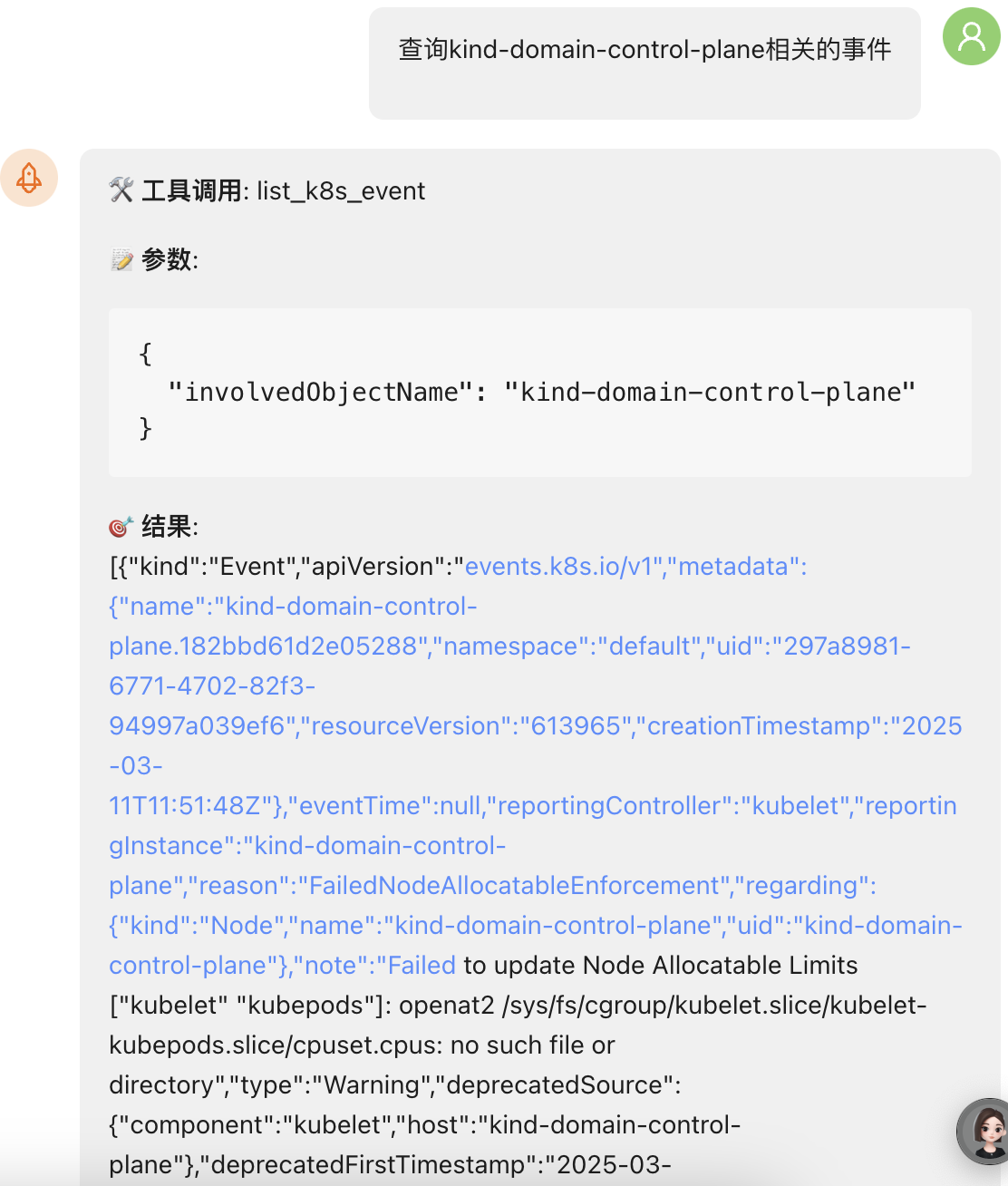
1. New MCP event query tool
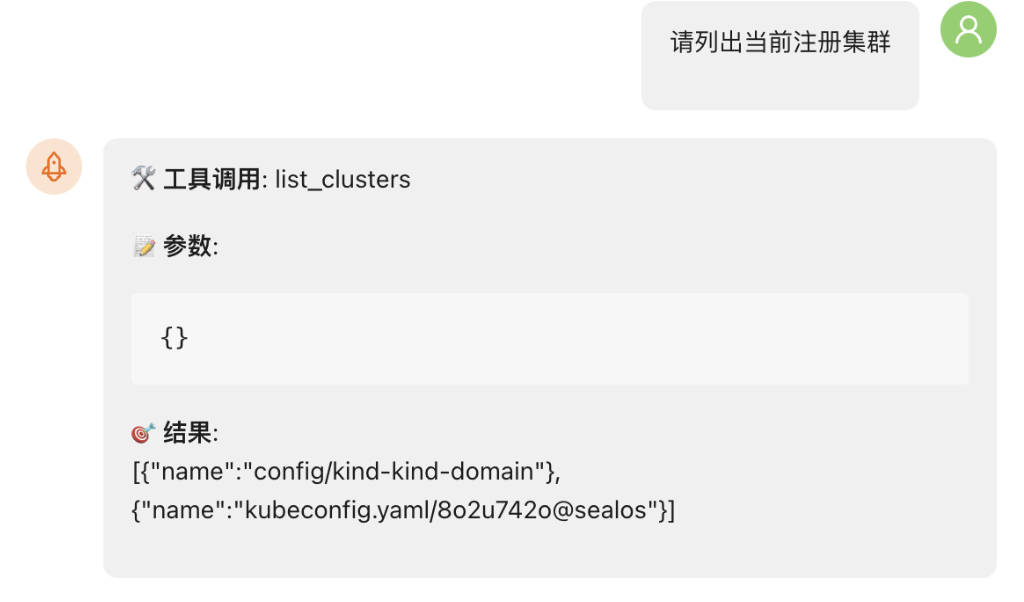
2. New cluster registration query tool
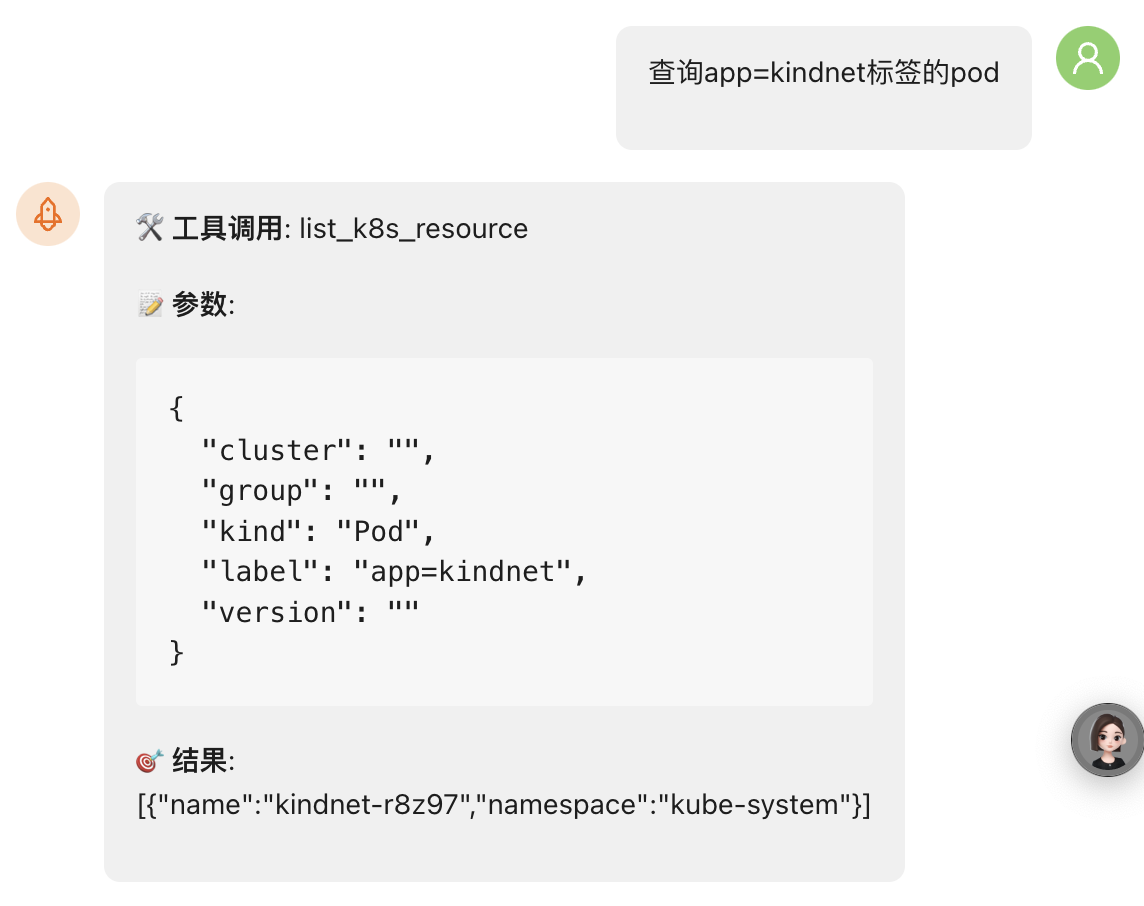
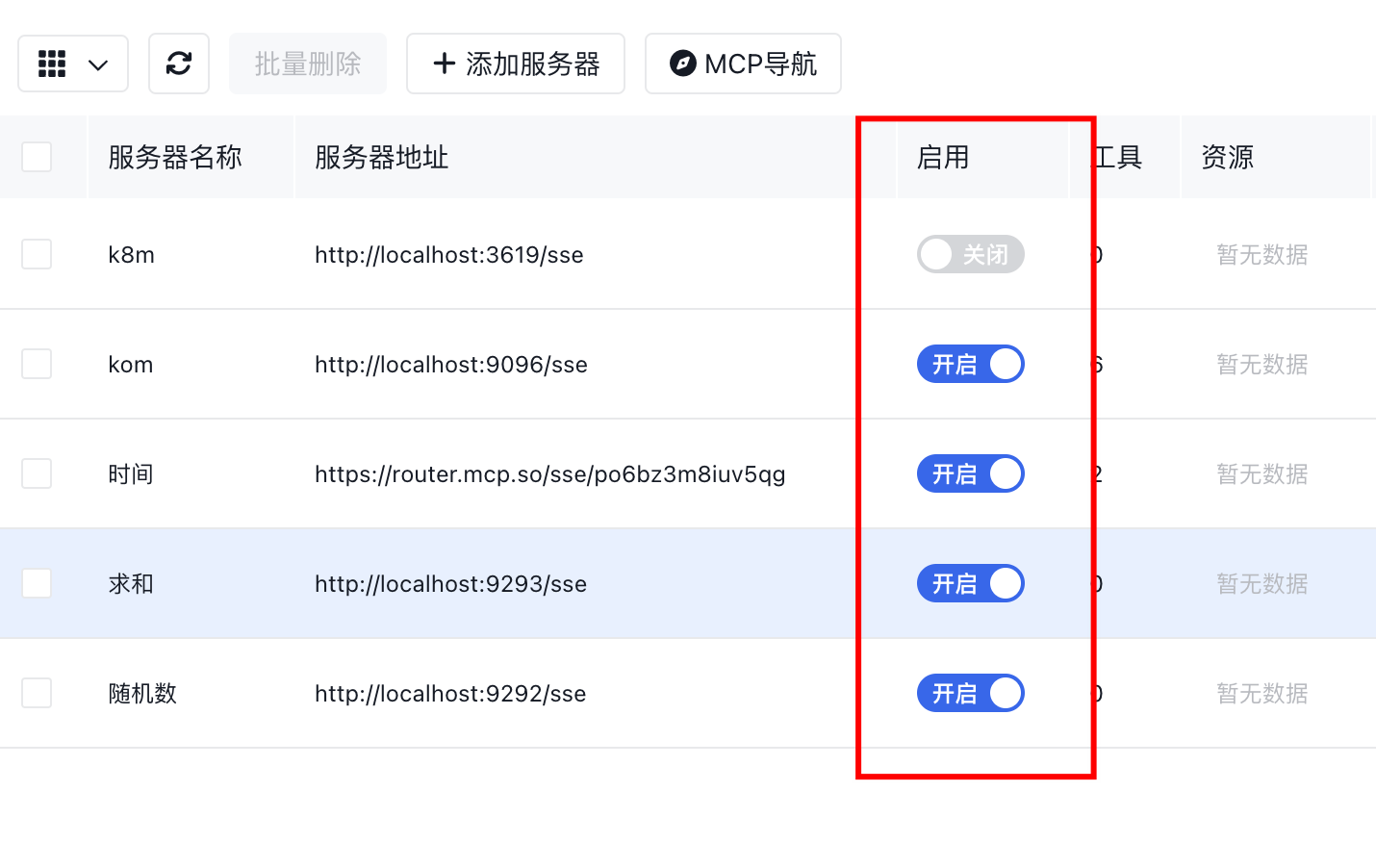
3. Enhanced label-based resource filtering (e.g. app=k8m)
4. Added quick enable/disable toggle for MCP Server
## Development & Debugging
If you want to develop and debug locally, please execute local frontend build once first to automatically generate the dist directory. Because this project uses binary embedding, the frontend will error without dist.
#### Step 1: Build Frontend
```bash
cd ui
pnpm run build
```
#### Compile and Debug Backend
```bash
# Download dependencies
go mod tidy
# Run
air
# Or
go run *.go
# Listens on localhost:3618 port
```
#### Frontend Hot Reload
```bash
cd ui
pnpm run dev
# Vite service will listen on localhost:3000 port
# Vite forwards backend access to 3618 port
```
Visit http://localhost:3000
### HELP & SUPPORT
If you have any further questions or need additional help, please feel free to contact me!
### Special Thanks
[zhaomingcheng01](https://github.com/zhaomingcheng01): Provided many high-quality suggestions, making outstanding contributions to k8m's usability and ease of use~
[La0jin](https://github.com/La0jin): Provided online resources and maintenance, greatly improving k8m's presentation
[eryajf](https://github.com/eryajf): Provided us with very useful github actions, adding automated release, build, publishing and other functions to k8m
## Contact Me
WeChat (大罗马的太阳) Search ID: daluomadetaiyang, note k8m.
<br><img width="214" alt="Image" src="https://github.com/user-attachments/assets/166db141-42c5-42c4-9964-8e25cf12d04c" />
