# Cyntrisec CLI
[](https://pypi.org/project/cyntrisec/)
[](https://cyntrisec.com/)
[](https://x.com/cyntrisec)
[](LICENSE)
[](https://pypi.org/project/cyntrisec/)
[](https://registry.modelcontextprotocol.io)
<!-- mcp-name: io.github.cyntrisec/cyntrisec -->

> [!CAUTION]
> **Beta Software Disclaimer**: This tool is currently in **BETA**. It is provided "as is", without warranty of any kind.
> While Cyntrisec is a read-only analysis tool by default, the user assumes all responsibility for any actions taken based on its findings.
> **Always review** generated remediation plans and Terraform code before application.
AWS capability graph analysis and attack path discovery.
<a href="https://glama.ai/mcp/servers/@tsyrulb/cyntrisec">
<img width="380" height="200" src="https://glama.ai/mcp/servers/@tsyrulb/cyntrisec/badge" />
</a>
A read-only CLI tool that:
- Scans AWS infrastructure via AssumeRole
- Builds a capability graph (IAM, network, dependencies)
- Discovers attack paths from internet to sensitive targets
- Prioritizes fixes by ROI (security impact + cost savings)
- Identifies unused capabilities (blast radius reduction)
- Outputs deterministic JSON with proof chains
## Demo
[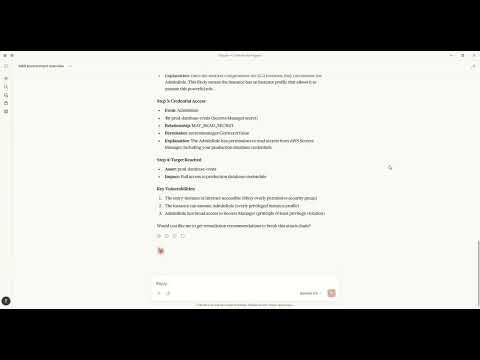](https://www.youtube.com/watch?v=-g3PjWyK3mo)
> *Watch how to discover attack paths and generate fixes using natural language with Claude MCP.*
## Architecture
```text
+----------------------------------------------------------------------------------+
| CYNTRISEC CLI |
+----------------------------------------------------------------------------------+
| CLI Layer (Typer) |
| scan analyze cuts waste report comply can diff serve ... |
+-----------------------------+----------------------------------------------------+
| Core Engine | Storage (local) |
| - AWS collectors | ~/.cyntrisec/scans/<scan_id>/ |
| - Normalization/schema | snapshot.json, assets.json, relationships.json |
| - GraphBuilder -> AwsGraph | findings.json, attack_paths.json |
| - Path search -> paths | ~/.cyntrisec/scans/latest -> <scan_id> |
| - Min-cut + Cost (ROI) | (Windows fallback: latest is a file) |
+-----------------------------+----------------------------------------------------+
| Outputs: JSON/agent, HTML report, remediation plan + Terraform hints |
+----------------------------------------------------------------------------------+
```
<!-- Legacy Unicode diagram (kept for reference; may render oddly in some environments) -->
<!--
```
┌─────────────────────────────────────────────────────────────────────────────┐
│ CYNTRISEC CLI │
├─────────────────────────────────────────────────────────────────────────────┤
│ │
│ ┌─────────────────────────────────────────────────────────────────────┐ │
│ │ CLI Layer (typer) │ │
│ │ ┌─────────┐ ┌─────────┐ ┌─────────┐ ┌─────────┐ ┌─────────┐ │ │
│ │ │ scan │ │ analyze │ │ cuts │ │ waste │ │ report │ ... │ │
│ │ └────┬────┘ └────┬────┘ └────┬────┘ └────┬────┘ └────┬────┘ │ │
│ └───────┼──────────┼──────────┼──────────┼──────────┼─────────────────┘ │
│ │ │ │ │ │ │
│ ┌───────▼──────────▼──────────▼──────────▼──────────▼────────────────┐ │
│ │ Core Engine │ │
│ │ ┌──────────────┐ ┌──────────────┐ ┌──────────────┐ │ │
│ │ │ Graph │ │ Paths │ │ Compliance │ │ │
│ │ │ (AwsGraph) │ │ (BFS/DFS) │ │ (CIS/SOC2) │ │ │
│ │ └──────────────┘ └──────────────┘ └──────────────┘ │ │
│ │ ┌──────────────┐ ┌──────────────┐ ┌──────────────┐ │ │
│ │ │ Cuts │ │ Waste │ │ Simulator │ │ │
│ │ │ (ROI/Min) │ │ (Unused) │ │ (IAM Eval) │ │ │
│ │ └──────────────┘ └──────────────┘ └──────────────┘ │ │
│ │ ┌──────────────┐ │ │
│ │ │ Cost Engine │ │ │
│ │ │ (Estimator) │ │ │
│ │ └──────────────┘ │ │
│ └────────────────────────────────────────────────────────────────────┘ │
│ │ │
│ ┌───────▼────────────────────────────────────────────────────────────┐ │
│ │ AWS Layer │ │
│ │ ┌──────────────┐ ┌──────────────┐ ┌──────────────┐ │ │
│ │ │ Collectors │ │ Normalizers │ │ Relationship │ │ │
│ │ │ (EC2, IAM, │ │ (Asset → │ │ Builder │ │ │
│ │ │ RDS, ...) │ │ Schema) │ │ │ │ │
│ │ └──────────────┘ └──────────────┘ └──────────────┘ │ │
│ └────────────────────────────────────────────────────────────────────┘ │
│ │ │ │
│ ┌───────▼──────────────────────┐ ┌──────────────▼──────────────────┐ │
│ │ Storage Layer │ │ MCP Server │ │
│ │ ┌────────────┐ ┌─────────┐ │ │ ┌──────────────────────────┐ │ │
│ │ │ Filesystem │ │ Memory │ │ │ │ Tools: get_scan_summary │ │ │
│ │ │ (~/.cyntri │ │ (tests) │ │ │ │ get_attack_paths, ... │ │ │
│ │ │ sec/) │ │ │ │ │ └──────────────────────────┘ │ │
│ │ └────────────┘ └─────────┘ │ │ │ │
│ └──────────────────────────────┘ └─────────────────────────────────┘ │
│ │
└─────────────────────────────────────────────────────────────────────────────┘
│
▼
┌─────────────────────────────────────────────────────────────────────────────┐
│ AWS Account │
│ ┌─────────────┐ ┌─────────────┐ ┌─────────────┐ ┌─────────────┐ │
│ │ IAM │ │ EC2 │ │ RDS │ │ S3 │ ... │
│ │ (Roles, │ │ (Instances, │ │ (Databases) │ │ (Buckets) │ │
│ │ Policies) │ │ SGs, VPCs) │ │ │ │ │ │
│ └─────────────┘ └─────────────┘ └─────────────┘ └─────────────┘ │
└─────────────────────────────────────────────────────────────────────────────┘
```
-->
### Data Flow
```text
CLI (scan) --AssumeRole--> AWS Session --Describe/Get/List--> AWS APIs (read-only)
|
v
Collectors -> normalize -> Assets + Relationships -> AwsGraph
|
v
Attack path search (BFS/DFS)
|
v
Min-cut (remediation cuts)
|
v
Cost engine (ROI)
Local artifacts: ~/.cyntrisec/scans/<scan_id>/*.json
```
<!-- Legacy Unicode diagram (kept for reference; may render oddly in some environments) -->
<!--
```
┌──────────┐ AssumeRole ┌──────────┐ Describe/Get/List ┌─────────┐
│ CLI │ ─────────────────▶│ AWS │ ◀─────────────────────▶│ APIs │
│ (scan) │ │ Session │ │(read-only)
└────┬─────┘ └──────────┘ └─────────┘
│
▼
┌──────────┐ normalize ┌──────────┐ build edges ┌──────────────┐
│Collectors│ ─────────────────▶│ Assets │ ─────────────────▶│Relationships│
└──────────┘ └──────────┘ └──────┬───────┘
│
┌───────────────────────────────────────────────────────────────┐
▼
┌──────────┐ BFS/DFS ┌──────────┐ min-cut ┌──────────────┐
│ AwsGraph │ ─────────────────▶│ Attack │ ─────────────────▶│ Remediation │
│ │ │ Paths │ │ Cuts │
└──────────┘ └──────────┘ └──▲───────────┘
│ (ROI)
┌──────┴───────┐
│ Cost Engine │
└──────────────┘
```
-->
## Installation
```bash
pip install cyntrisec
```
### Windows PATH Fix
If you see "cyntrisec is not recognized", the Scripts folder isn't on PATH:
```powershell
# Option 1: Run with python -m
python -m cyntrisec --help
# Option 2: Add to PATH for current session
$env:PATH += ";$env:APPDATA\Python\Python311\Scripts"
```
## Quick Start
> **Prerequisite**: Ensure you have [AWS CLI](https://aws.amazon.com/cli/) installed and configured with credentials (e.g., `aws configure`) or environment variables set. `terraform` is required for the setup step.
```bash
# 1. Create the read-only IAM role in your account
cyntrisec setup iam 123456789012 --output role.tf
# 2. Apply the Terraform
cd your-infra && terraform apply
# 3. Run a scan
cyntrisec scan --role-arn arn:aws:iam::123456789012:role/CyntrisecReadOnly
# 4. View attack paths
cyntrisec analyze paths --min-risk 0.5
# 5. Find minimal fixes (prioritized by ROI)
cyntrisec cuts --format json
# 6. Generate HTML report
cyntrisec report --output report.html
```
## Commands
### Core Analysis
| Command | Description |
|---------|-------------|
| `scan` | Scan AWS infrastructure |
| `analyze paths` | View attack paths |
| `analyze findings` | View security findings |
| `analyze stats` | View scan statistics |
| `analyze business` | Business entrypoint analysis |
| `report` | Generate HTML/JSON report |
### Setup & Validation
| Command | Description |
|---------|-------------|
| `setup iam` | Generate IAM role Terraform |
| `validate-role` | Validate IAM role permissions |
### Remediation
| Command | Description |
|---------|-------------|
| `cuts` | Find minimal fixes (Cost & ROI prioritized) |
| `waste` | Find unused IAM permissions |
| `remediate` | Generate or optionally apply Terraform plans (gated) |
### Policy Testing
| Command | Description |
|---------|-------------|
| `can` | Test "can X access Y?" |
| `diff` | Compare scan snapshots |
| `comply` | Check CIS AWS / SOC2 compliance |
### Agentic Interface
| Command | Description |
|---------|-------------|
| `manifest` | Output machine-readable capabilities |
| `explain` | Natural language explanations |
| `ask` | Query scans in plain English |
| `serve` | Run as MCP server for AI agents |
## MCP Server Mode
Run Cyntrisec as an MCP server for AI agent integration:
```bash
# Install with MCP support (now included by default)
pip install cyntrisec
```
```bash
cyntrisec serve # Start stdio server
cyntrisec serve --list-tools # List available tools
```
### MCP Tools (15)
| Category | Tool | Description |
|----------|------|-------------|
| **Discovery** | `list_tools` | List all available tools |
| | `set_session_snapshot` | Set active snapshot for session |
| | `get_scan_summary` | Get summary of latest AWS scan |
| **Assets** | `get_assets` | Get assets with type/name filtering |
| | `get_relationships` | Get relationships between assets |
| | `get_findings` | Get security findings with severity filtering |
| **Attack Paths** | `get_attack_paths` | Get attack paths with risk scores |
| | `explain_path` | Detailed hop-by-hop path breakdown |
| | `explain_finding` | Detailed finding explanation |
| **Remediation** | `get_remediations` | Find optimal fixes for attack paths |
| | `get_terraform_snippet` | Generate Terraform code for remediation |
| **Access** | `check_access` | Test if principal can access resource |
| | `get_unused_permissions` | Find unused IAM permissions |
| **Compliance** | `check_compliance` | Check CIS AWS or SOC 2 compliance |
| | `compare_scans` | Compare scan snapshots |
### Claude Desktop
**MacOS**: `~/Library/Application Support/Claude/claude_desktop_config.json`
**Windows**: `%APPDATA%\Claude\claude_desktop_config.json`
```json
{
"mcpServers": {
"cyntrisec": {
"command": "python",
"args": ["-m", "cyntrisec", "serve"]
}
}
}
```
### Claude Code (CLI)
Run the following command to configure the server:
```bash
claude mcp add cyntrisec -- python -m cyntrisec serve
```
### Google Gemini / Antigravity
Locate your agent configuration (e.g., `~/.gemini/antigravity/mcp_config.json`) and add:
```json
{
"mcpServers": {
"cyntrisec": {
"command": "python",
"args": ["-m", "cyntrisec", "serve"]
}
}
}
```
## Trust & Safety
### Read-Only Guarantees
This tool makes **read-only API calls** to your AWS account. The IAM role
should have only `Describe*`, `Get*`, `List*` permissions.
### No Data Exfiltration
All data stays on your local machine. Nothing is sent to external servers.
Scan results are stored in `~/.cyntrisec/scans/`.
### No Auto-Remediation (Default Safe Mode)
By default, Cyntrisec is **read-only** and **does not modify** your AWS infrastructure.
- It **analyzes** your account using read-only APIs.
- It can **generate** remediation artifacts (e.g., Terraform modules) for you to review.
- It does **not** apply changes automatically.
### Optional Remediation Execution (Explicit Opt-In)
Cyntrisec includes an **explicitly gated** path that can execute Terraform **only if you intentionally enable it**.
This mode is:
- **Disabled by default**
- Requires `--enable-unsafe-write-mode`
- Requires an additional explicit flag (e.g. `--execute-terraform`) to run Terraform
- Intended for controlled environments (sandbox / CI with approvals), not unattended production
If you do not pass these flags, Cyntrisec will never run `terraform apply`.
### Write Operations
Cyntrisec makes **no AWS write API calls** during scanning and analysis.
The only supported "write" behavior is optional execution of Terraform **locally on your machine**, and only when explicitly enabled via unsafe flags.
Every AWS API call is logged in CloudTrail under session name `cyntrisec-cli`.
## Trust & Permissions
Cyntrisec runs with a read-only IAM role. Generate the recommended policy with
`cyntrisec setup iam <ACCOUNT_ID>` and keep permissions to `Describe*`, `Get*`,
and `List*`. Live modes (`waste --live`, `can --live`) require extra IAM
permissions; the generated policy and docs cover those additions.
## Output Format
Primary output is JSON to stdout. When stdout is not a TTY, the CLI automatically switches to JSON:
```bash
cyntrisec analyze paths --format json | jq '.paths[] | select(.risk_score > 0.7)'
```
Agent-friendly output wraps results in a structured envelope:
```bash
cyntrisec analyze paths --format agent
```
```json
{
"schema_version": "1.0",
"status": "success",
"data": {...},
"artifact_paths": {...},
"suggested_actions": [...]
}
```
## Exit Codes
| Code | Meaning |
|------|---------|
| 0 | Success / compliant |
| 1 | Findings / regressions / denied |
| 2 | Usage error |
| 3 | Transient error (retry) |
| 4 | Internal error |
Use in CI/CD:
```bash
cyntrisec scan --role-arn $ROLE_ARN || exit 1
cyntrisec diff || echo "Regressions detected"
```
## Storage
Scan results are stored locally:
```text
~/.cyntrisec/
|-- scans/
| |-- 2026-01-17_123456_123456789012/
| | |-- snapshot.json
| | |-- assets.json
| | |-- relationships.json
| | |-- findings.json
| | `-- attack_paths.json
| `-- latest -> 2026-01-17_...
`-- config.yaml
```
<!-- Legacy Unicode tree (kept for reference; may render oddly in some environments) -->
<!--
```
~/.cyntrisec/
├── scans/
│ ├── 2026-01-17_123456_123456789012/
│ │ ├── snapshot.json
│ │ ├── assets.json
│ │ ├── relationships.json
│ │ ├── findings.json
│ │ └── attack_paths.json
│ └── latest -> 2026-01-17_...
└── config.yaml
```
-->
## Versioning
This project follows Semantic Versioning. See `CHANGELOG.md` for release notes.
## License
Apache-2.0
## Links
- [PyPI Package](https://pypi.org/project/cyntrisec/)
- [Website](https://cyntrisec.com/)
- [Twitter/X](https://x.com/cyntrisec)
