
Provides tools for generating and rendering Excalidraw diagrams through the Kroki service, with intelligent format selection and instruction generation.
Enables creation and rendering of Mermaid diagrams, including flowcharts, sequence diagrams, and ER diagrams, with intelligent format selection and syntax-specific instruction generation.
Supports SVG output format for all diagram types, enabling scalable vector graphics rendering of diagrams through the Kroki service.
Supports PlantUML diagram creation and rendering for UML diagrams, with format-specific coding instructions and professional image output via Kroki integration.
Enables creation and rendering of Vega-Lite visualizations with format-specific instructions and professional output through integrated Kroki service.
Click on "Install Server".
Wait a few minutes for the server to deploy. Once ready, it will show a "Started" state.
In the chat, type
@followed by the MCP server name and your instructions, e.g., "@Diagram Bridge MCP ServerCreate a system architecture diagram for our new microservices project"
That's it! The server will respond to your query, and you can continue using it as needed.
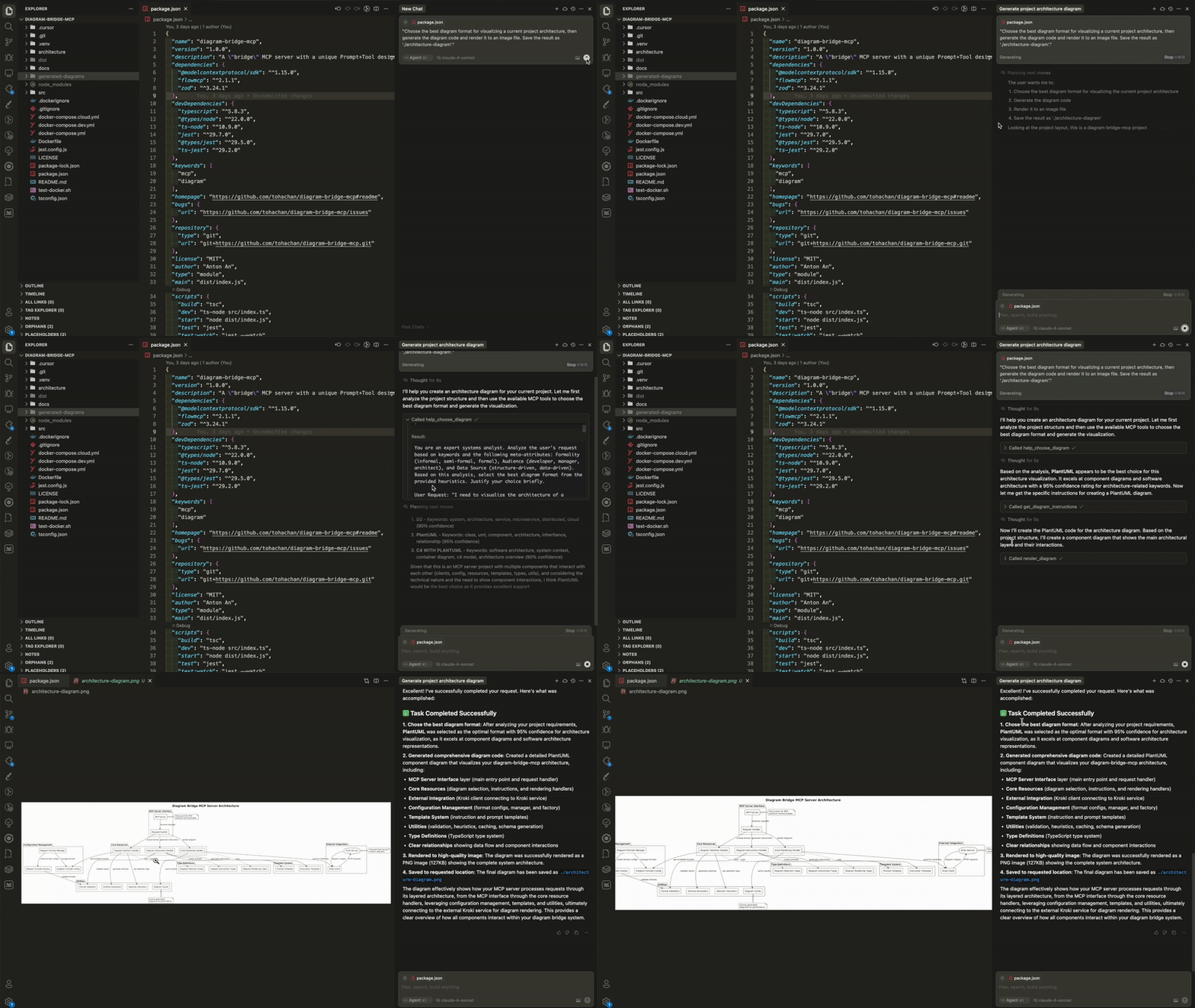
Here is a step-by-step guide with screenshots.
Diagram Bridge MCP Server



A comprehensive MCP server that bridges the gap between LLMs and diagram creation through three powerful, independent tools: intelligent format selection, format-specific instruction generation, and professional diagram rendering (using kroki server). Each tool can be used standalone or combined in sequence for complete diagram workflows - from choosing the right format to generating the final image.
Supported Formats: Mermaid, PlantUML, C4 Model, D2, GraphViz, BPMN, Structurizr, Excalidraw, Vega-Lite
Quick Start
Prerequisites:
Node.js 18.0 or higher
Docker and Docker Compose
Install and build:
git clone git@github.com:tohachan/diagram-bridge-mcp.git
cd diagram-bridge-mcp
npm install && npm run build
Configure ports (optional):
# Copy and edit environment file to customize ports
cp .env.example .env
# Edit .env to set PORT and KROKI_PORT as needed

# Or set environment variables directly:
export PORT=4000        # MCP Server port (default: 3000)
export KROKI_PORT=9000  # Kroki service port (default: 8000)
Start services:
# Option 1: Interactive port configuration
./scripts/start-with-ports.sh

# Option 2: Default ports (3000 for MCP, 8000 for Kroki)
docker-compose up --build

# Option 3: Custom ports via environment variables
PORT=4000 KROKI_PORT=9000 docker-compose up --build
Add to Cursor (or any MCP client):
For direct local use (without Docker):
{
  "mcpServers": {
    "diagram-bridge-mcp": {
      "command": "node",
      "args": ["/path/to/diagram-bridge-mcp/dist/index.js"],
      "enabled": true
    }
  }
}
For Docker-based setup (recommended):
{
  "mcpServers": {
    "diagram-bridge-mcp": {
      "command": "docker",
      "args": [
        "exec",
        "-i",
        "diagram-bridge-mcp",
        "node",
        "dist/index.js"
      ],
      "enabled": true
    }
  }
}Note: The MCP protocol uses STDIO communication. The HTTP endpoints (:3000/health) are only for Docker monitoring, not for MCP client connections.
Start using: The server provides three MCP tools ready for use!
💡 Usage Example
Here's a simple prompt to demonstrate the complete workflow:
"Choose the best diagram format for visualizing a current project architecture, then generate the diagram code and render it to an image file. Save the result as 'architecture-diagram'."This single prompt will:
Analyze your request and recommend the optimal format
Get specific instructions for creating the diagram in that format
Create and render the final diagram to a PNG/SVG file
🎨 Examples Gallery
Want to see what's possible? Check out Examples Gallery
🛠️ Tools Overview
help_choose_diagram
Purpose: Intelligent format selection based on your requirements
Analyzes your request using AI-powered heuristics
Provides confidence-scored recommendations
Works with format constraints when needed
Generates structured prompts for optimal LLM decision-making
Example: "I need to show database relationships" → Recommends Mermaid ER diagram format with detailed reasoning
get_diagram_instructions
Purpose: Generate format-specific coding instructions
Creates tailored prompts for any supported diagram format
Includes syntax guidelines, best practices, and common pitfalls
Provides working examples and output specifications
Ensures LLMs generate syntactically correct diagram code
Example: For Mermaid format → Detailed Mermaid syntax guide with examples
render_diagram
Purpose: Transform diagram code into professional images
Renders diagrams via integrated Kroki service
Supports PNG and SVG output formats
Includes intelligent caching for performance
Provides file storage with absolute paths for easy access
Example: Mermaid code → High-quality PNG/SVG image file
⚙️ Configuration
Basic Setup
Default storage:
{project-root}/generated-diagrams/Default Kroki: Uses local Docker Kroki service
Default ports: MCP Server (3000), Kroki (8000)
Port Configuration
The server automatically configures ports based on environment variables:
External Port (
PORT): The port exposed by Docker container (default: 3000)Kroki Port (
KROKI_PORT): The port for Kroki service (default: 8000)Internal Communication: Services communicate internally using fixed container ports
# Interactive configuration (recommended)
./scripts/start-with-ports.sh

# Quick port change
PORT=4000 KROKI_PORT=9000 docker-compose up --build

# Check running services
curl http://localhost:4000/health # Using your custom PORTNote: When running in Docker, the server provides HTTP endpoints for health monitoring at /health and service info at /info.
For advanced configuration, see our Configuration Guide.
📚 Documentation
Quick Start: Port Configuration - Fast port setup guide
Installation Guide - Detailed setup instructions
Docker Deployment - Container deployment options
API Reference - Complete tool and resource documentation
Configuration Guide - Environment variables and MCP client setup
Development Guide - Contributing and development setup
Architecture - System architecture and design patterns
Performance & Security - Performance metrics and security features
Troubleshooting - Common issues and solutions
Perfect for: LLMs that need to create diagrams but don't know which format to use or how to render them professionally.
Powered by: Kroki - Universal diagram rendering service
Made with ❤️
This server cannot be installed
Resources
Unclaimed servers have limited discoverability.
Looking for Admin?
If you are the server author, to access and configure the admin panel.