
Provides comprehensive blockchain interaction tools for Sei and EVM networks, including token transfers, smart contract interactions, balance queries, transaction management, and block data access.
Allows natural language querying of blockchain data, enabling users to retrieve wallet holdings, transaction histories, and token information using plain English prompts instead of structured API calls.
Enables NFT marketplace operations including browsing collections, fetching metadata, creating and fulfilling listings and offers, tracking marketplace events, and executing NFT purchases on the Sei chain.
Provides DEX aggregation capabilities for finding optimal swap routes, executing token swaps with advanced options, discovering supported tokens, and generating transaction calldata across multiple liquidity sources.
Click on "Install Server".
Wait a few minutes for the server to deploy. Once ready, it will show a "Started" state.
In the chat, type
@followed by the MCP server name and your instructions, e.g., "@SEI MCP Server V2What's the current price of SEI and show me my wallet balance?"
That's it! The server will respond to your query, and you can continue using it as needed.
Here is a step-by-step guide with screenshots.
SEI MCP Server V2: The Autonomous Agent Toolkit for Sei 🚀

Sei Model Context Protocol (Sei MCP) server provides blockchain services for the Sei blockchain. This server enables AI assistants and agents to interact via unified interface.
🎥 Sei MCP V2 Demo Video
Watch the demo video to see Sei MCP V2 in action.
📦 Sei MCP V2 Package on npm
You can install the Sei MCP V2 package via npm:
📋 Contents
🔭 Overview
Our vision is to provide the foundational infrastructure that empowers AI to act as autonomous agents, simplifying complex on-chain actions—from DeFi trading to cross-chain bridging—into easy, natural language conversations.
To bring this vision to life, we've built SEI MCP V2, a massively expanded, multi-protocol infrastructure suite designed as the ultimate toolkit for AI agents on the Sei Network. This server transforms the core MCP concept into an all-in-one gateway to the Web3 ecosystem, accessible through a unified interface.
💪 Core Capabilities
🐝 Hive Natural Language Querying
A revolutionary tool allowing AI agents to query complex on-chain data with simple English prompts.
Example query: “What are the holdings in my wallet 0x...?”
💹 Advanced DeFi & NFT Trading SEI MCP V2 offers a complete suite for decentralized finance and NFT trading:
Citrex Perpetual Futures Exchange:
Place advanced orders (market, limit)
Manage orders in batches
Monitor account health and margin
Access real-time market data (order books, klines)
DragonSwap V3 DEX:
Execute atomic token swaps
Manage concentrated liquidity positions
Create new liquidity pools
OpenSea NFT Marketplace:
Discover collections and NFTs
Analyze stats
Create and fulfill listings and offers
Track event history and buy NFTs with a single command
Yei Finance Lending Protocol:
Supply assets to earn interest
Borrow against collateral
Utilize advanced features like flash loans and credit delegation
🌉 DEX & Bridge Aggregation Robust cross-chain capabilities through leading protocols:
Symphony & Kame DEX Aggregators:
Find optimal swap routes
Execute trades with advanced options
Discover supported tokens
Generate transaction calldata for offline use
Li.Fi & deBridge Cross-Chain Bridging:
Seamlessly bridge assets across different blockchains
Get quotes from multiple bridge providers
Track order status and manage the cross-chain transaction lifecycle
🪙 Complete Token Lifecycle Management Tools to manage on-chain assets:
Create new ERC20 and ERC721 (NFT) tokens from scratch
Deploy, verify, and mint tokens on Sei and on SeiTrace
📊 Rich Data & Analytics Comprehensive data integrations for a holistic view of the ecosystem:
SeiTrace: Deep on-chain analysis (wallets, transactions, token holders, etc.)
CoinGecko & DexScreener: Real-time market data, historical prices, live DEX analytics
SEI MCP V2 is built to be compatible with existing AI assistants like Claude or Cursor, enabling users and developers to interact with the entire Sei ecosystem through simple, conversational interfaces. This empowers the development of sophisticated, autonomous AI agents, capable of executing complex multi-step tasks effortlessly.
✨ Features
🔗 Blockchain Data Access
🌐 Chain information including blockNumber, chainId, and RPCs
📦 Block data access by number, hash, or latest
🔍 Transaction details and receipts with decoded logs
💰 Address balances for native tokens and all token standards
🪙 Token Services
⚡ Native SEI & Wrapped SEI (WSEI)
💸 Transfer native SEI tokens
🔄 Wrap SEI into WSEI and unwrap WSEI back to SEI
🏦 ERC20 Tokens
🏷️ Get token metadata (name, symbol, decimals, supply)
💳 Check token balances
🔁 Transfer tokens between addresses
✅ Approve spending allowances
🎨 NFTs (ERC721)
🖼️ Get collection and token metadata, including token URIs
🔑 Verify token ownership
📤 Transfer NFTs between addresses
📊 Count token holdings for a collection
🎲 Multi-tokens (ERC1155)
📦 Get token balances and metadata URIs
📤 Transfer tokens with specified quantities
🤖 Smart Contract Interactions
📖 Read contract state with view/pure functions
✍️ Write services with private key signing for state changes
🛡️ Contract verification to distinguish smart contracts from EOAs
📜 Event logs retrieval and filtering
🪙 ERC20 Token Deployment
🏗️ Token Creation: Deploy a new ERC20 token with a custom name, symbol, and initial supply
✅ Contract Verification: Verify deployed contracts both locally by checking parameters and publicly on the SeiTrace block explorer
➕ Supply Management: Mint additional tokens to any address after deployment
🖼️ ERC721 (NFT) Deployment
🏗️ NFT Collection Creation: Deploy a new ERC721 contract with a custom name, symbol, and metadata URI
✅ Contract Verification: Verify deployed NFT contracts both locally (by checking parameters) and publicly on a block explorer
🎨 NFT Minting: Mint single or multiple NFTs from a deployed collection
🔍 SeiTrace Insights
🧾 Deep Address Analysis: Get detailed profiles, transaction histories, and comprehensive token balances (Native, ERC20, ERC721, ERC1155) for any address
🪙 Comprehensive Token Data: Look up token information, discover all holders, and track transfer histories for any token standard on Sei
🎨 NFT Inspection: Retrieve details and ownership information for individual NFT instances within a collection
🐉 DragonSwap V3 DEX Integration
🔄 Token Swaps: Execute single-hop, multi-hop, and find the optimal swap route for the best price
💱 Price & Quote Fetching: Get real-time swap quotes and token prices from liquidity pools
💧 Liquidity Provision: Add and remove liquidity from pools, and collect accrued trading fees
🏦 Pool Management: Get comprehensive pool information, find existing pool addresses, and create new pools
📊 Data & Analytics: Access historical pool data (swaps, mints, burns) and calculate impermanent loss
🧮 Advanced Utilities: Calculate tick ranges, slippage, and batch multiple operations into a single transaction
🏦 Yei Finance Lending Protocol Integration
💸 Lending & Borrowing: Supply assets like SEI and stablecoins to earn interest, and borrow other assets against your deposited collateral
📊 Comprehensive Position Management: Track user account health, total collateral, and current debt to manage risk effectively
🛡️ Collateral & E-Mode Control: Dynamically toggle which supplied assets are used as collateral and enter High-Efficiency Modes (E-Mode) for better borrowing power on correlated assets
⚡ Advanced DeFi Primitives: Execute multi-asset flash loans for complex atomic operations and delegate borrowing power to other users
🎶 Symphony DEX Aggregator Integration
🛣️ Optimal Trade Routing: Finds the most efficient paths and prices for token swaps across multiple liquidity sources to ensure the best rates
⚡ Flexible Swap Execution: Perform simple one-click swaps or use advanced options to control slippage, routing, and other trade parameters
🪙 Token & Approval Management: Discover all supported tokens, check spender allowances before trading, and grant token approvals
🛠️ SDK Configuration: Dynamically configure the Symphony SDK's core parameters for custom use cases
🔒 Offline Transaction Building: Generate raw transaction calldata for a swap, allowing for integration with multi-sig wallets or other offline signing systems
🌉 deBridge Cross-Chain Bridging Integration
🔄 Cross-Chain Asset Transfers: Seamlessly bridge tokens between different blockchain networks like BSC, Ethereum, and Sei
💱 Order Creation & Estimation: Get accurate quotes for cross-chain swaps and generate signable transactions for execution
📡 Comprehensive Order Tracking: Monitor the real-time status of bridging orders by their unique ID or creation transaction hash
🗂️ Full Order History: Retrieve a complete history of a user's past bridging transactions with advanced filtering by chain or order status
❌ Order Management: Cancel pending orders that have not yet been fulfilled by the network
🔗 Li.Fi Bridge & DEX Aggregation Integration
💱 Aggregated Cross-Chain Swaps: Get quotes and execute swaps across a wide range of bridges and DEXs for optimal pricing and routes
🛣️ Flexible Routing: Choose between a single recommended quote or explore all possible routes for a cross-chain transaction
⚡ Simplified Execution: Perform complex multi-chain swaps with a single, high-level tool
🌐 Protocol Discovery: Explore all supported EVM chains and look up specific token details within the Li.Fi ecosystem
⛵ OpenSea NFT Marketplace Integration
🔎 Comprehensive NFT Discovery: Browse collections on Sei, get detailed metadata for specific NFTs, and view the holdings of any account
📊 Advanced Collection Analytics: Fetch real-time collection statistics, including floor price, volume, and owner counts
🛒 Full Trading Lifecycle: Create and fulfill listings and offers for individual NFTs, or make collection-wide offers
⚡ High-Level Trading Functions: Easily buy an NFT at its best price with a single command
📜 Activity & Event Tracking: Monitor all marketplace activity for accounts, collections, or specific NFTs
❌ Order Management: Cancel active listings or offers on-chain
📈 Citrex Perpetual Futures Exchange Integration
🛒 Advanced Order Execution: Place market and limit orders with options for time-in-force and expiration, and execute multiple orders in a single batch transaction
📋 Comprehensive Order Management: List all open orders, cancel single or multiple orders, and atomically cancel-and-replace orders for efficient trading
📊 Real-time Market Data: Access live tickers, full order books, historical kline (candlestick) data, and recent trade histories for all available markets
💳 On-chain Account Management: Deposit and withdraw funds, check all asset balances, and monitor account health and margin requirements in real-time
🧮 Pre-trade Analysis: Calculate the margin requirement for a potential trade before execution
⚙️ SDK Configuration: Dynamically configure the Citrex SDK for different environments (mainnet/testnet) and sub-accounts
🐢 Kame DEX Aggregator Integration
💱 Aggregated Swap Quotes: Get efficient swap quotes by sourcing liquidity from multiple DEXs on Sei
⚡ Direct Swap Execution: Execute token swaps directly through the aggregator with configurable slippage
🔎 Token & Price Discovery: Browse and search the list of available tokens on the platform and fetch their real-time prices
🔒 Offline Transaction Building: Generate raw transaction calldata for swaps to be used with external signers or systems
🦎 CoinGecko Market Data Integration
⏱️ Real-time Price Data: Get current prices, market caps, and 24-hour volume for thousands of cryptocurrencies
📜 Historical Data: Fetch historical price data for tokens with daily, hourly, or minutely intervals
🔎 Token Discovery: Search for tokens, discover trending assets, and find token details by contract address
📈 DexScreener DEX Analytics Integration
⏱️ Real-time Pair Data: Search and retrieve live trading pair data from thousands of DEXs
🔎 Token & Pair Discovery: Find tokens by name, symbol, or address, and discover their multi-chain presence
🔗 On-chain Activity: Get information on recently updated tokens, community-boosted tokens, and trading activity on specific chains
🚀 Comprehensive Transaction Support
💸 Native token transfers across all supported networks
⛽ Gas estimation for effective transaction planning
🔄 Transaction status and receipt updates
🔑 Wallet utility to derive an EVM address from a private key
⚠️ Error handling with descriptive failure messages
🐝 Hive Intelligence Blockchain Querying
🗣️ Natural Language Interface: Query blockchain data using plain English questions instead of structured tool calls (e.g., "What is the transaction history for wallet 0x...?")
📊 Versatile Data Retrieval: Ask for wallet holdings, transaction histories, token information, and more through a single, unified prompt
✨ Simplified Interaction: Lowers the barrier to entry for accessing complex on-chain information by removing the need to know specific tool names or parameters
🌐 Supported Networks
Sei Mainnet
Sei Testnet
Sei Devnet
🛠️ Prerequisites
Bun 1.0.0 or higher
Node.js 18.0.0 or higher (if not using Bun)
📦 Installation
⚙️ Server Configuration
The server uses the following default configuration:
Default Chain ID: 1329 (Sei Mainnet)
Server Port: 3001
Server Host: 0.0.0.0 (accessible from any network interface)
These values are hardcoded in the application. If you need to modify them, you can edit the following files:
For chain configuration:
src/core/chains.tsFor server configuration:
src/server/http-server.ts
Environment Variables
The server supports loading configuration from environment variables:
PRIVATE_KEY: Required private key for any blockchain operations that involve signing transactions (e.g., transferring tokens, interacting with smart contracts that modify state). This is the sole method for providing a private key. If this environment variable is not set when a transaction-signing tool is invoked, the tool will return an error message instructing the AI assistant to ask the user to set thePRIVATE_KEYenvironment variable and restart the MCP server.COINGECKO_PRO_API_KEY: Optional CoinGecko Pro API key for accessing CoinGecko API services.SEITRACE_API_KEY: Optional SeiTrace Insights API key for accessing SeiTrace Insights API services.OPENSEA_API_KEY: Optional OpenSea API key for accessing OpenSea API services.HIVE_INTELLIGENCE_API_KEY: Optional Hive Intelligence API key for accessing Hive Intelligence API services.
Create a .env file in the root directory based on the .env.example template:
SECURITY WARNING: Never commit your actual private key, API keys, or any sensitive information to version control. The
.envfile is included in.gitignoreby default.
🚀 Usage
Using with Claude Desktop
Install the Claude Desktop.
Go to Settings > Developer > Edit Config.
Add the following to the
mcpServerssection:
Save the configuration file and restart Claude. When done, Claude will add new prompts, resources and tools. To access prompts, click "+" button in the bottom left corner. And then "Add from sei".
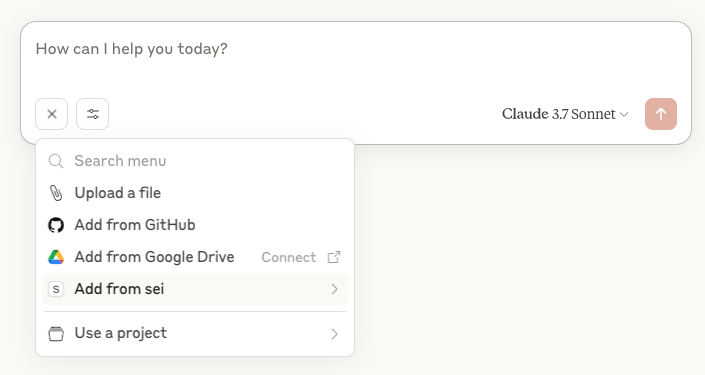
From there, click "Add from sei" to and for example, add a "my_wallet_address" prompt.
Claude should invoke now get_address_from_private_key tool and return the wallet address.
Sometimes, model may fail to understand tbe prompt or random question. Try to add a bit more context or retry with
extensive thinking option.
All tools available could be found by clicking "Search And Tools" button and then "sei".
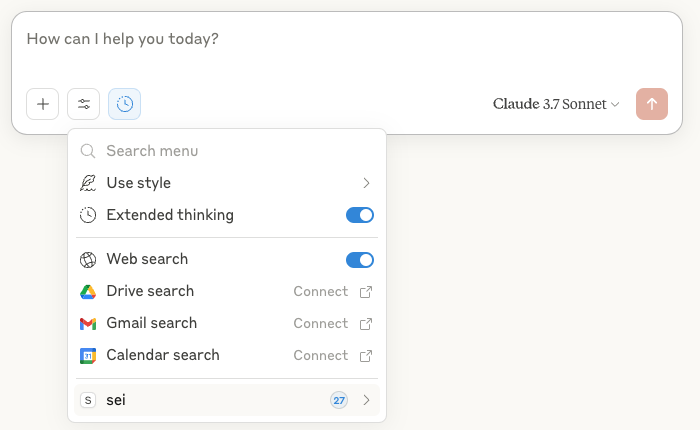
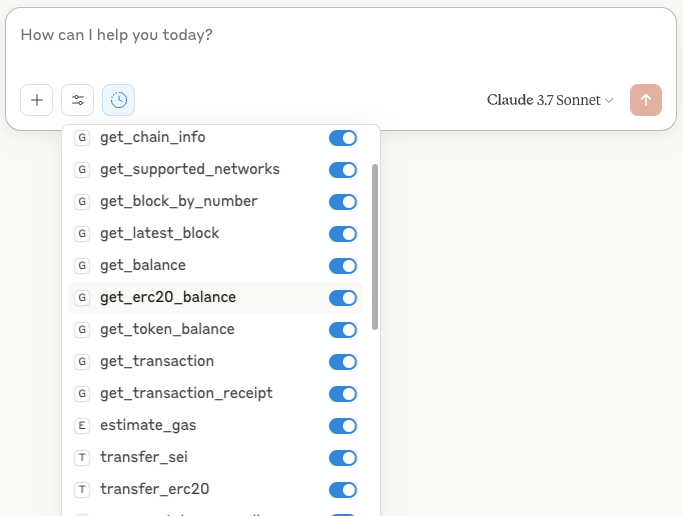
Using npx (No Installation Required)
You can run the Sei MCP Server directly without installation using npx:
Running the Server Locally
Start the server using stdio (for embedding in CLI tools):
Or start the HTTP server with SSE for web applications:
Connecting to the Server
Connect to this MCP server using any MCP-compatible client. For testing and debugging, you can use the MCP Inspector.
Connecting from Cursor
To connect to the MCP server from Cursor:
Open Cursor and go to Settings (gear icon in the bottom left)
Scroll down to "MCP" section
Click "Add new Global MCP server"
In mcp.json tab add the following configuration
Example: HTTP Mode with SSE
If you're developing a web application and want to connect to the HTTP server with Server-Sent Events (SSE), you can use this configuration:
This connects directly to the HTTP server's SSE endpoint, which is useful for:
Web applications that need to connect to the MCP server from the browser
Environments where running local commands isn't ideal
Sharing a single MCP server instance among multiple users or applications
To use this configuration:
Create a
.cursordirectory in your project root if it doesn't existSave the above JSON as
mcp.jsonin the.cursordirectoryRestart Cursor or open your project
Cursor will detect the configuration and offer to enable the server(s)
Example: Using the MCP Server in Cursor
After configuring the MCP server with mcp.json, you can easily use it in Cursor. Here's an example workflow:
Create a new JavaScript/TypeScript file in your project:
With the file open in Cursor, you can ask Cursor to:
"Check the current Sei balance of 0x1234 on mainnet"
"Show me the latest block on Sei"
"Check if 0x1234... is a contract address"
Cursor will use the MCP server to execute these operations and return the results directly in your conversation.
The MCP server handles all the blockchain communication while allowing Cursor to understand and execute blockchain-related tasks through natural language.
Connecting using Claude CLI
If you're using Claude CLI, you can connect to the MCP server with just two commands:
Example: Getting a Token Balance
📚 API Reference
Tools
The server provides the following MCP tools for agents.
These tools are used to interact with the blockchain and perform various operations.
🔹 Native SEI
Tool | Description | Parameters |
| Get the EVM address derived from the PRIVATE_KEY env variable | – |
| Get the native token (SEI) balance for an address |
|
| Transfer native SEI tokens to an address |
|
🔹 ERC20 Tokens
Tool | Description | Parameters |
| Get comprehensive information about an ERC20 token |
|
| Get the ERC20 token balance of an EVM address |
|
| Transfer ERC20 tokens to another address |
|
| Approve an address to spend your ERC20 tokens |
|
🔹 NFTs (ERC721)
Tool | Description | Parameters |
| Get detailed information about a specific NFT (ERC721) |
|
| Get the total number of NFTs an address owns from a collection |
|
| Check if an address owns a specific NFT (ERC721) |
|
| Transfer an NFT (ERC721 token) to another address |
|
🔹 Multi-Token (ERC1155)
Tool | Description | Parameters |
| Get the balance of a specific ERC1155 token ID for an address |
|
| Get the metadata URI for an ERC1155 token |
|
| Transfer ERC1155 tokens to another address |
|
🔹 Wrapping / Unwrapping
Tool | Description | Parameters |
| Wrap SEI into WSEI |
|
| Unwrap WSEI back to SEI |
|
These tools help you deploy and manage ERC20 tokens.
⚒️ Tool Name | 📖 Description | 🔑 Key Parameters |
🚀 deploy_erc20 | Deploys a new ERC20 token to the specified network. |
|
🔍 verify_erc20_contract_locally | Verifies a deployed ERC20 by checking its on-chain parameters. |
|
📝 verify_erc20_contract | Submits an ERC20 contract's source code for verification on SeiTrace. |
|
📡 check_verification_status | Checks the verification status of a contract on SeiTrace. |
|
💰 mint_erc20_tokens | Mints additional tokens from a deployed ERC20 contract. |
|
These tools help you deploy and manage ERC721 (NFT) tokens.
⚒️ Tool Name | 📖 Description | 🔑 Key Parameters |
🚀 deploy_erc721 | Deploys a new ERC721 (NFT) token contract. |
|
🔍 verify_erc721_contract_locally | Verifies a deployed ERC721 by checking its on-chain parameters. |
|
📝 verify_erc721_contract | Submits an ERC721 contract's source code for verification on a block explorer. |
|
🎁 mint_nft | Mints a single new NFT from the collection to a specified address. |
|
📦 mint_batch_nfts | Mints a batch of new NFTs to a specified address. |
|
These tools help you interact with DragonSwap for token swaps, routes, and trade checks.
🔄 Swapping
Tool | Description | Parameters |
| Get a swap quote for a single token pair |
|
| Get a swap quote for a multi-hop path |
|
| Find the best swap route (direct or multi-hop) for the best price |
|
| Execute a single-hop token swap |
|
| Execute a multi-hop swap using an encoded path |
|
💧 Liquidity Provision
Tool | Description | Parameters |
| Add liquidity to a V3 pool within a specific tick range |
|
| Remove liquidity from a position NFT |
|
| Collect accrued fees from a liquidity position |
|
| Get detailed information about a liquidity position NFT |
|
🏦 Pool Information
Tool | Description | Parameters |
| Get the current price of a token from a specific pool |
|
| Get the address of an existing pool for a token pair and fee |
|
| Create a new liquidity pool for a token pair and fee |
|
| Get comprehensive information about a specific pool |
|
| Get historical swap, mint, and burn events for a pool |
|
| Monitor a pool for real-time events like swaps, mints, and burns |
|
🛠 Utilities
Tool | Description | Parameters |
| Check the token allowance for a spender |
|
| Calculate the impermanent loss for a liquidity position |
|
| Batch multiple operations (e.g., swap and add liquidity) into one transaction |
|
These tools help you interact with Yei Finance for token lending and borrowing.
📊 Market & User Data
⚒️ Tool Name | 📖 Description | 🔑 Key Parameters |
📡 get_yei_reserves | Get data for all available reserve assets in the Yei Finance pool. |
|
👤 get_yei_user_account | Get a user's account data, including health factor and balances. |
|
⚡ Core Actions
⚒️ Tool Name | 📖 Description | 🔑 Key Parameters |
✅ approve_yei_token | Approve the Yei Finance pool to spend a specified amount of a token. |
|
💰 supply_yei_asset | Supply (deposit) an ERC20 token to the pool to earn interest. |
|
🪙 supply_yei_native_asset | Supply (deposit) the native asset (SEI) to the pool. |
|
💳 borrow_yei_asset | Borrow an asset against supplied collateral. |
|
🔄 repay_yei_asset | Repay a borrowed asset to the pool. |
|
📤 withdraw_yei_asset | Withdraw a supplied ERC20 asset from the pool. |
|
🏧 withdraw_native_asset | Withdraw the native asset (SEI) from the pool. |
|
🛡️ Position Management
⚒️ Tool Name | 📖 Description | 🔑 Key Parameters |
🏗️ set_collateral_status | Enable or disable a supplied asset to be used as collateral. |
|
⚙️ set_emode_category | Enter or exit a High-Efficiency Mode (E-Mode) category. |
|
🧠 Advanced Features
⚒️ Tool Name | 📖 Description | 🔑 Key Parameters |
⚡ execute_flash_loan | Executes a flash loan with multiple assets. |
|
🤝 delegate_credit_by_asset | Delegate borrowing power to another address for a specific asset. |
|
These tools help you interact with Symphony for token swaps and route discovery.
⚙️ Configuration
Tool Name | Description | Key Parameters |
| Retrieves the current configuration of the Symphony SDK instance. | – |
| Updates the configuration of the Symphony SDK instance. |
|
🔎 Token & Route Discovery
Tool Name | Description | Key Parameters |
| Retrieves the list of all available tokens for swapping. | – |
| Checks if a given token address is available for swaps. |
|
| Finds the best swap route for a given token pair without executing. |
|
| Calculates the total output amount for a given swap route. |
|
🔄 Swap Execution
Tool Name | Description | Key Parameters |
| Swaps one token for another using the optimal route. |
|
| Swaps tokens with advanced options for routing, execution, and slippage. |
|
📜 Transaction Management
Tool Name | Description | Key Parameters |
| Checks if the protocol has sufficient allowance to spend a token. |
|
| Approves the protocol to spend a specific token for swapping. |
|
| Generates the transaction calldata for a swap without executing it. |
|
These tools help you interact with deBridge for cross-chain asset transfers.
📝 Order Creation & Execution
Tool Name | Description | Key Parameters |
⚡ | Creates a cross-chain order. Returns an estimation or a signable transaction. |
|
🔗 | Creates and executes a deBridge cross-chain order in one step. |
|
🧪 | Gets a deBridge quote using chain names (for dev use only). |
|
📜 Order Tracking & History
Tool Name | Description | Key Parameters |
🕵️ | Retrieves a list of historical deBridge orders for a wallet. |
|
🔍 | Retrieves details of a deBridge order by its creation transaction hash. |
|
🧾 | Retrieves all deBridge order IDs created in a single transaction. |
|
⏳ | Retrieves the status and details of a specific deBridge order. |
|
🛠️ Order Management
Tool Name | Description | Key Parameters |
❌ | Cancels an unfulfilled deBridge order. |
|
These tools help you interact with Li.Fi for cross-chain asset transfers.
Tool Name | Description | Key Parameters |
🔎 get_lifi_quote | Gets a single cross-chain swap quote from Li.Fi. | fromChainId, toChainId, fromTokenAddress, toTokenAddress, fromAmount |
🛤️ get_lifi_route | Gets all available routes for a cross-chain swap. | fromChainId, toChainId, fromTokenAddress, toTokenAddress, fromAmount |
⚡ create_and_execute_lifi_order | Creates and executes a Li.Fi cross-chain swap in one step. | fromChainId, toChainId, fromTokenAddress, toTokenAddress, fromAmount |
🌐 get_lifi_chains | Fetches all EVM chains supported by the Li.Fi SDK. | — |
💠 get_lifi_token | Fetches details for a specific token on a given chain. | chainId, tokenAddress |
These tools help you interact with OpenSea for NFT discovery and information.
🔹 Discovery & Information
Tool | Description | Key Parameters |
| Get an OpenSea Account Profile. |
|
| Get a list of OpenSea collections for the Sei chain. | — |
| Get stats for a single collection. |
|
| Get a single NFT's metadata, traits, and ownership info. |
|
| Get NFTs owned by a given account address on the Sei chain. |
|
| Get multiple NFTs for a collection. |
|
| Get a smart contract for a given address on the Sei chain. |
|
🔹 Activity & Events
Tool | Description | Key Parameters |
| Get a list of events for an account. |
|
| Get a list of events for a collection. |
|
| Get a list of events for a single NFT. |
|
🔹 Trading & Order Management
Tool | Description | Key Parameters |
| Get the cheapest active listings on a single collection. |
|
| Get the best (lowest priced) listing for a single NFT. |
|
| Create and submit a listing for an asset on OpenSea. |
|
| Create and submit an offer for an asset on OpenSea. |
|
| Create and submit a collection offer. |
|
| Fulfill an order for an asset (listing or offer). |
|
| Buy an NFT by fetching its best listing and fulfilling the order. |
|
| Cancel an order on-chain to prevent it from being fulfilled. |
|
These tools help you interact with the blockchain and smart contracts.
Tool | Description | Parameters |
| Get information about a supported network |
|
| Get a list of all supported EVM networks | – |
| Get a block by its number |
|
| Get the latest block from the blockchain |
|
| Get detailed information about a transaction by its hash |
|
| Get a transaction receipt by its hash |
|
| Estimate the gas cost for a transaction |
|
| Check if an address is a smart contract or an EOA |
|
| Read data from a smart contract (view/pure function) |
|
| Write data to a smart contract (state-changing function) |
|
These tools let you fetch token prices, market data, and trending coins from CoinGecko.
Tool Name | Description | Key Parameters |
📈 get_token_price | Gets current price and market data for a token. | tokenId, vsCurrency |
📊 get_multiple_token_prices | Gets current prices for multiple tokens in a single call. | tokenIds, vsCurrency |
⏳ get_token_historical_data | Gets historical price data for a token. | tokenId, vsCurrency, days, interval |
🔍 search_tokens | Searches for tokens on CoinGecko by name or symbol. | query |
🚀 get_trending_tokens | Gets currently trending tokens from CoinGecko. | — |
🔗 get_token_by_contract | Gets token information by its on-chain contract address. | platformId, contractAddress |
These tools let you analyze token pairs, profiles, and activity across chains using DexScreener.
Tool Name | Description | Key Parameters |
🔍 dex_search_pairs | Search for token pairs by name, symbol, or address. | query |
🪙 dex_get_token_pairs | Get all pairs for a specific token address. | tokenAddresses |
🔗 dex_get_pairs_by_address | Get information for a specific pair contract address. | chainId, pairAddress |
📄 dex_get_token_profile | Get a token's profile, including description and links. | chainId, tokenAddress |
🆕 dex_get_latest_token_profiles | Get recently updated or active token profiles. | — |
🚀 dex_get_top_boosted_tokens | Get tokens that have been promoted by their communities. | — |
📈 dex_get_orders_by_chain | Get recent trading activity for a token on a specific chain. | chainId, tokenAddress |
🎯 dex_advanced_search | Perform multiple, limited searches for token pairs. | queries, limit |
🌐 dex_get_multi_chain_token_data | Get pair data for a token across multiple chains. | tokenAddresses, maxPairsPerToken |
These tools let you analyze token pairs, profiles, and activity across chains using SeiTrace.
📌 Address & Contract Tools
Tool | Description | Key Parameters |
| Get details for a wallet or contract address. |
|
| Fetch detailed smart contract information. |
|
📜 Transaction History Tools
Tool | Description | Key Parameters |
| Fetch transactions for an address. |
|
| Get all token transfers for an address. |
|
| ERC20 transfers for a specific contract. |
|
| NFT (ERC721) transfers for a collection. |
|
| ERC1155 token transfers for a contract. |
|
| Native token (SEI) transfers. |
|
🪙 Token Information Tools
Tool | Description | Key Parameters |
| ERC20 token details. |
|
| ERC721 collection details. |
|
| ERC1155 contract details. |
|
| Native token details. |
|
💰 Token Balances & Holders
Tool | Description | Key Parameters |
| Get ERC20 balances for a wallet. |
|
| Get NFT balances for a wallet. |
|
| Get ERC1155 balances for a wallet. |
|
| Get native balances for a wallet. |
|
| List holders of an ERC20 token. |
|
| List holders of an NFT collection. |
|
| List holders of an ERC1155 token. |
|
| List holders of a native token. |
|
🎨 NFT Tools
Tool | Description | Key Parameters |
| Get specific NFTs in a collection. |
|
| Get ERC1155 token instances. |
|
These tools let you interact with the Citrex Perpetuals Exchange.
📊 Market Data
Tool | Description | Key Parameters |
| Fetches ticker information for one or all markets. |
|
| Fetches product information by its ID or symbol. |
|
| Fetches all available products and their mark prices. | — |
| Fetches the order book for a specific market. |
|
| Fetches historical kline (candlestick) data for a product. |
|
| Fetches the recent trade history for a product. |
|
| Fetches the current server time from the exchange. | — |
🧾 Account Management
Tool | Description | Key Parameters |
| Fetches the health and margin information of the account. | — |
| Fetches a list of all asset balances for the user's account. | — |
| Deposits funds into the user's Citrex account. |
|
| Withdraws funds from the user's Citrex account. |
|
💹 Trading & Order Management
Tool | Description | Key Parameters |
| Lists the user's open orders for a specific market or all. |
|
| Calculates margin requirement for a potential trade. |
|
| Places a new order on the exchange. |
|
| Places multiple new orders in a single transaction. |
|
| Cancels an existing open order. |
|
| Cancels multiple existing open orders in a single transaction. |
|
| Atomically cancels an order and replaces it with a new one. |
|
| Cancels all open orders for a specific product. |
|
⚙️ SDK Configuration
Tool | Description | Key Parameters |
| Retrieves the configuration currently used by the SDK. | — |
| Updates and re-initializes the Citrex SDK instance. |
|
These tools let you interact with the Kame DEX Aggregator.
🔹 Swapping & Quoting
Tool | Description | Key Parameters |
| Retrieves a quote for a token swap from the Kame Aggregator. |
|
| Executes a token swap on the Kame Aggregator. |
|
| Generates the transaction calldata for a swap without executing it. |
|
🔹 Token & Price Discovery
Tool | Description | Key Parameters |
| Retrieves a list of tokens from the Kame Aggregator. |
|
| Retrieves token prices from the Kame Aggregator. |
|
These tools let you interact with the Hive Intelligence Query Tool.
Tool | Description | Key Parameters |
| Sends a natural language prompt to retrieve blockchain data like wallet holdings, transaction history, and token information. |
|
Resources
The server exposes blockchain data through the following MCP resource URIs.
⛓️ Blockchain Resources
Resource URI Pattern | Description |
| Chain information for a specific network |
| Sei mainnet chain information |
| Block data by number |
| Latest block data |
| Native token balance |
| Transaction details |
| Transaction receipt with logs |
🪙 Token Resources
Resource URI Pattern | Description |
| ERC20 token information |
| ERC20 token balance |
| NFT (ERC721) token information |
| NFT ownership verification |
| ERC1155 token URI |
| ERC1155 token balance |
🔒 Security Considerations
Private keys are used only for transaction signing and are never stored by the server
Consider implementing additional authentication mechanisms for production use
Use HTTPS for the HTTP server in production environments
Implement rate limiting to prevent abuse
For high-value services, consider adding confirmation steps
📁 Project Structure
🛠️ Development
To modify or extend the server:
Add new services in the appropriate file under
src/core/services/Add new tools in the appropriate file under
src/core/tools/Register new resources in
src/core/resources.tsAdd new network support in
src/core/chains.tsTo change server configuration, edit the hardcoded values in
src/server/http-server.ts
📄 License
This project is licensed under the terms of the MIT License.